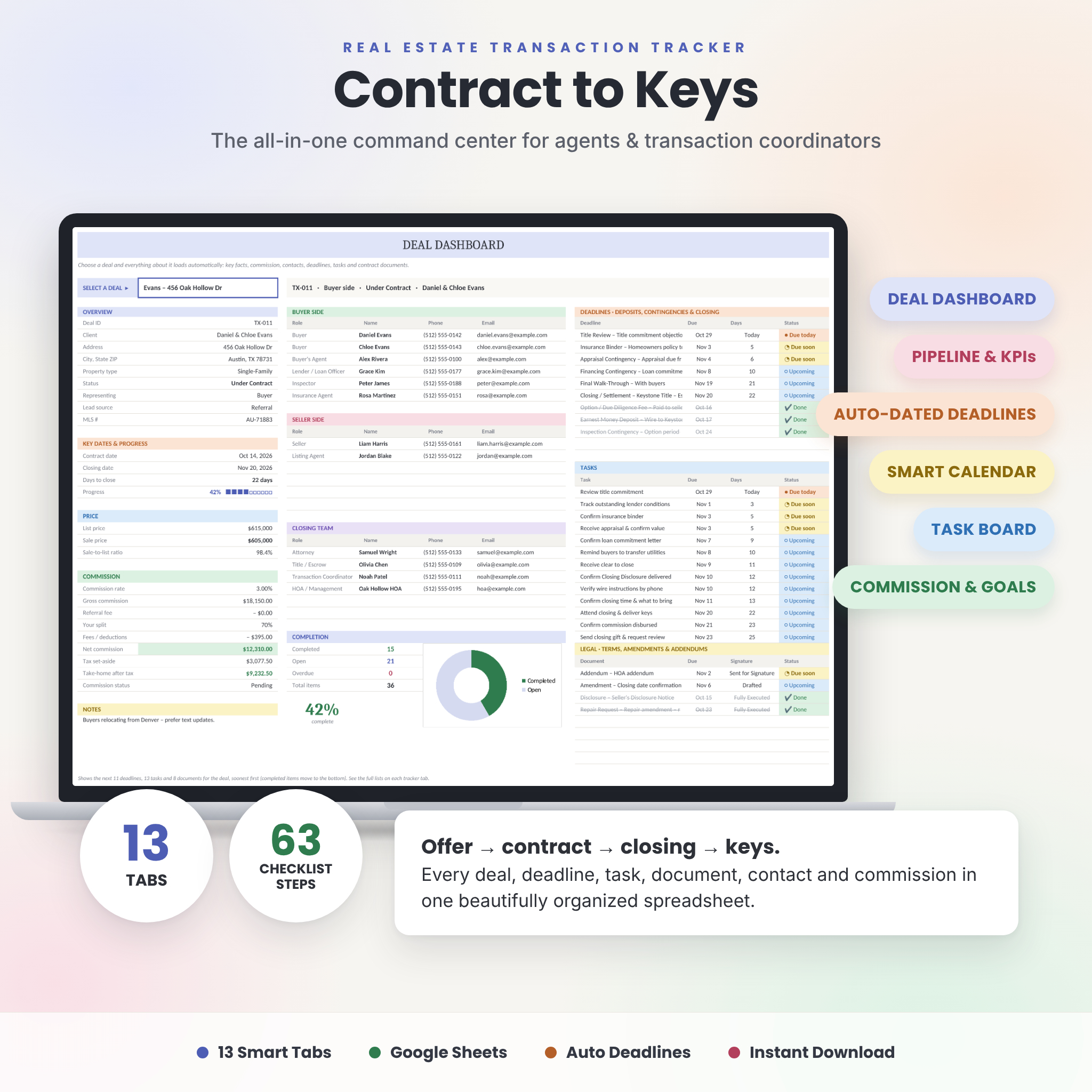
Contract to Keys is a real estate transaction tracker spreadsheet that runs your whole contract-to-close process from one file. Add a deal once and the workbook does the follow-up work. It dates your deposit, contingency and closing deadlines, works out your commission, flags anything overdue and fills a monthly calendar. It also builds live dashboards for each deal and for your whole business. It’s made for Google Sheets, so all you need is a free Google account.
A Real Estate Transaction Tracker Built for Agents and TCs
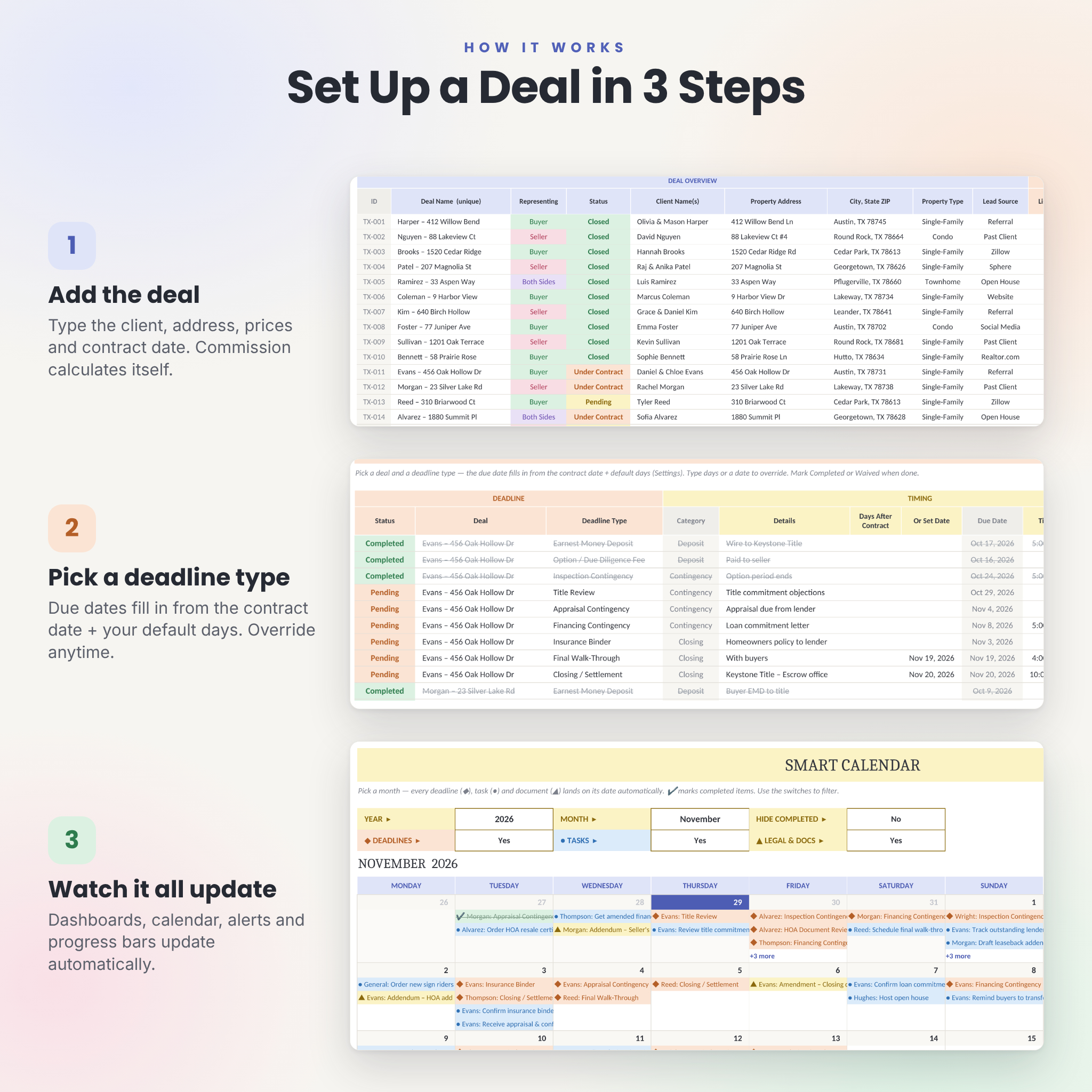
Most transaction templates give you a list of columns and leave the rest to you. Contract to Keys connects everything. Pick a deal and its deadline type, and the due date fills in from the contract date. Mark a step done and the progress bar, alerts, calendar and dashboards update together. White cells are for typing and tinted cells calculate on their own, so it stays simple even if you’re new to spreadsheets.
Who it’s for
- Real estate agents who want every deal, date and dollar in one place
- Transaction coordinators managing files for one or more agents
- Small teams that want a shared pipeline everyone can see
- New agents who want a clear, repeatable contract-to-close process
Main Benefits
- Fewer missed deadlines. Color alerts show overdue, due today, due soon and done on every tab.
- Less typing. Due dates come from the contract date plus your own default days.
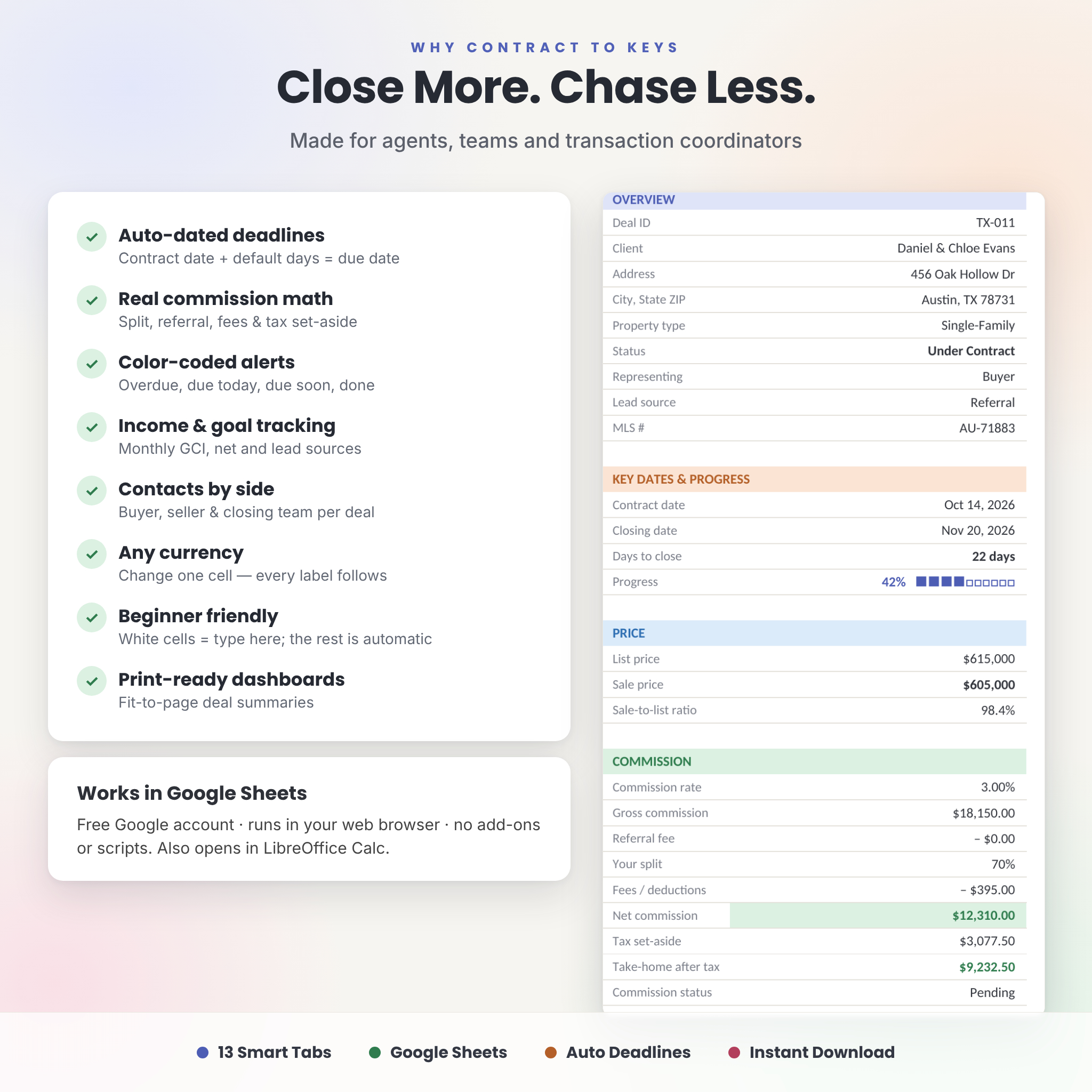
- Clear commission math. Gross commission, referral fee, your split, fees, net income and a tax set-aside are calculated for every deal.
- Your business at a glance. Live KPIs, income by month, goal progress and your top lead sources.
- A repeatable process. Paste a ready-made buyer or seller checklist into any deal in seconds.
Features: 13 Tabs That Work Together
Trackers (where you type)
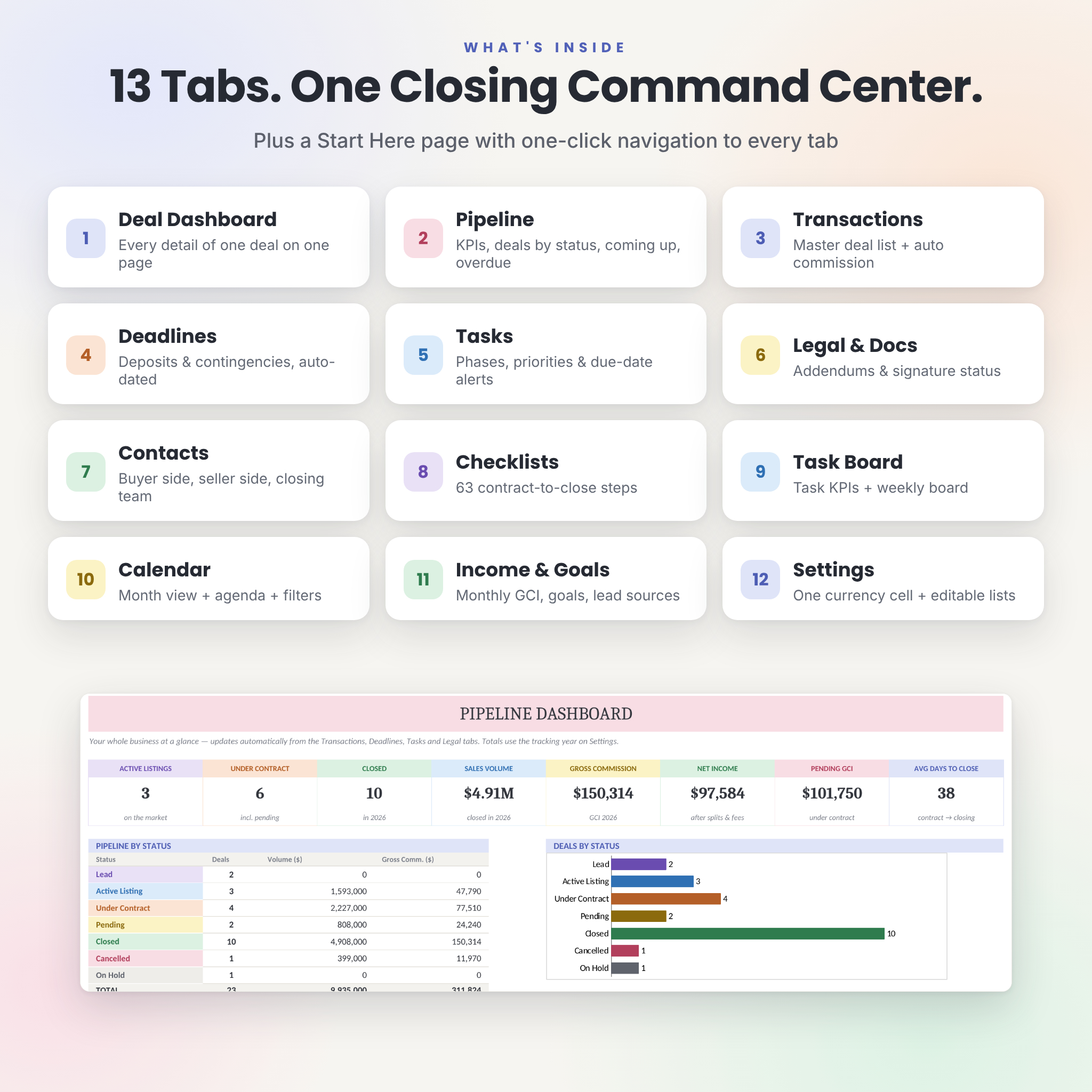
- Transactions: one row per deal with side, status, client, property, prices, dates, MLS # and notes. Days to close, progress %, gross and net commission and tax set-aside calculate automatically.
- Deadlines (deposits, contingencies & closing): earnest money, option fee, inspection, title, HOA, appraisal, financing, insurance, clear to close, walk-through and closing. Due dates fill in from the contract date, and you can override any of them.
- Tasks: up to 1,200 to-dos with phase, priority, assignee, due date and alerts. General business tasks work too.
- Legal & Docs: addendums, amendments, counteroffers, disclosures and extensions, with signature status and a link to each file.
- Contacts: buyers, sellers, agents, lender, title, inspector, appraiser, attorney, insurance and HOA for each deal.
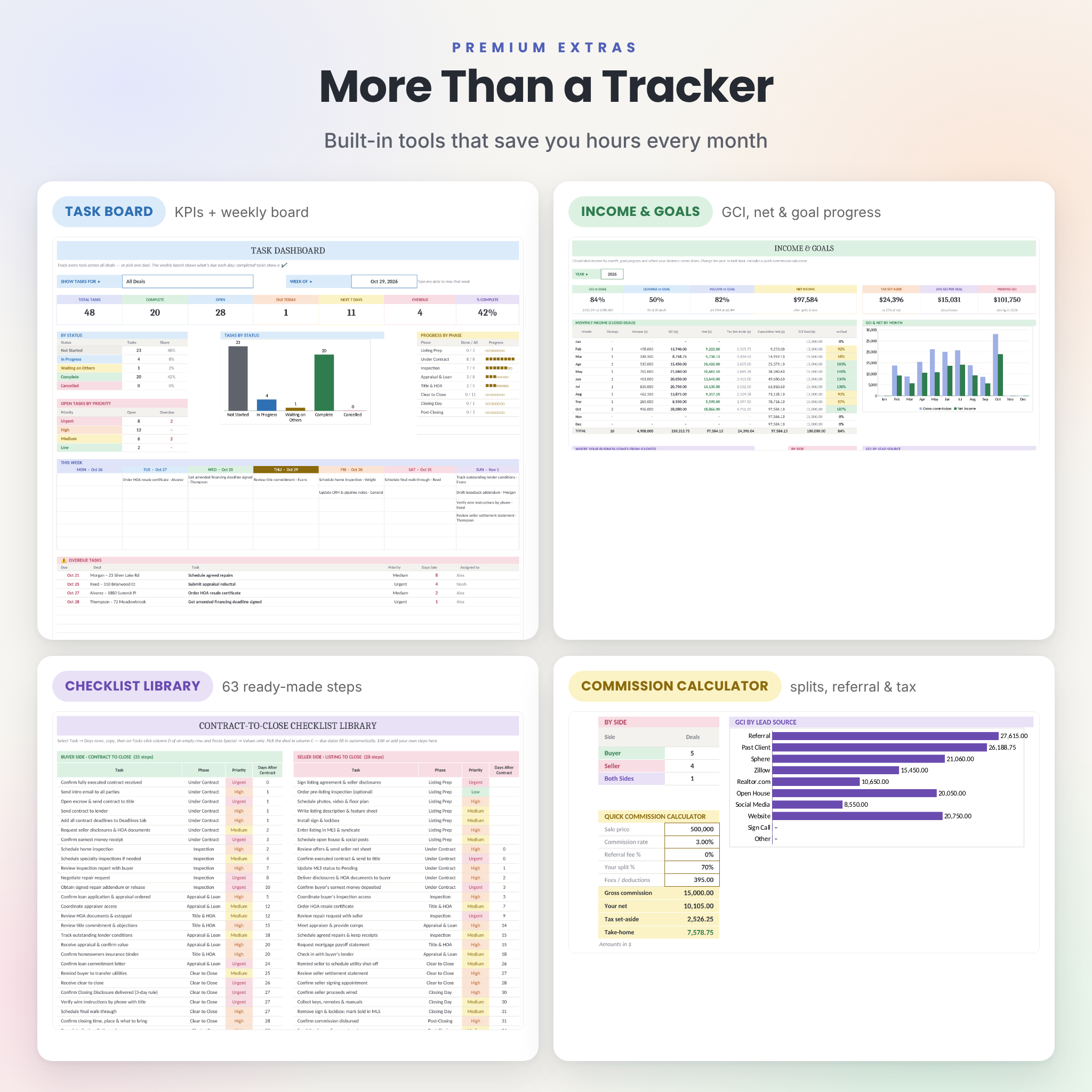
- Checklists: 35 buyer-side and 28 seller-side contract-to-close steps, all editable.
Dashboards (automatic)
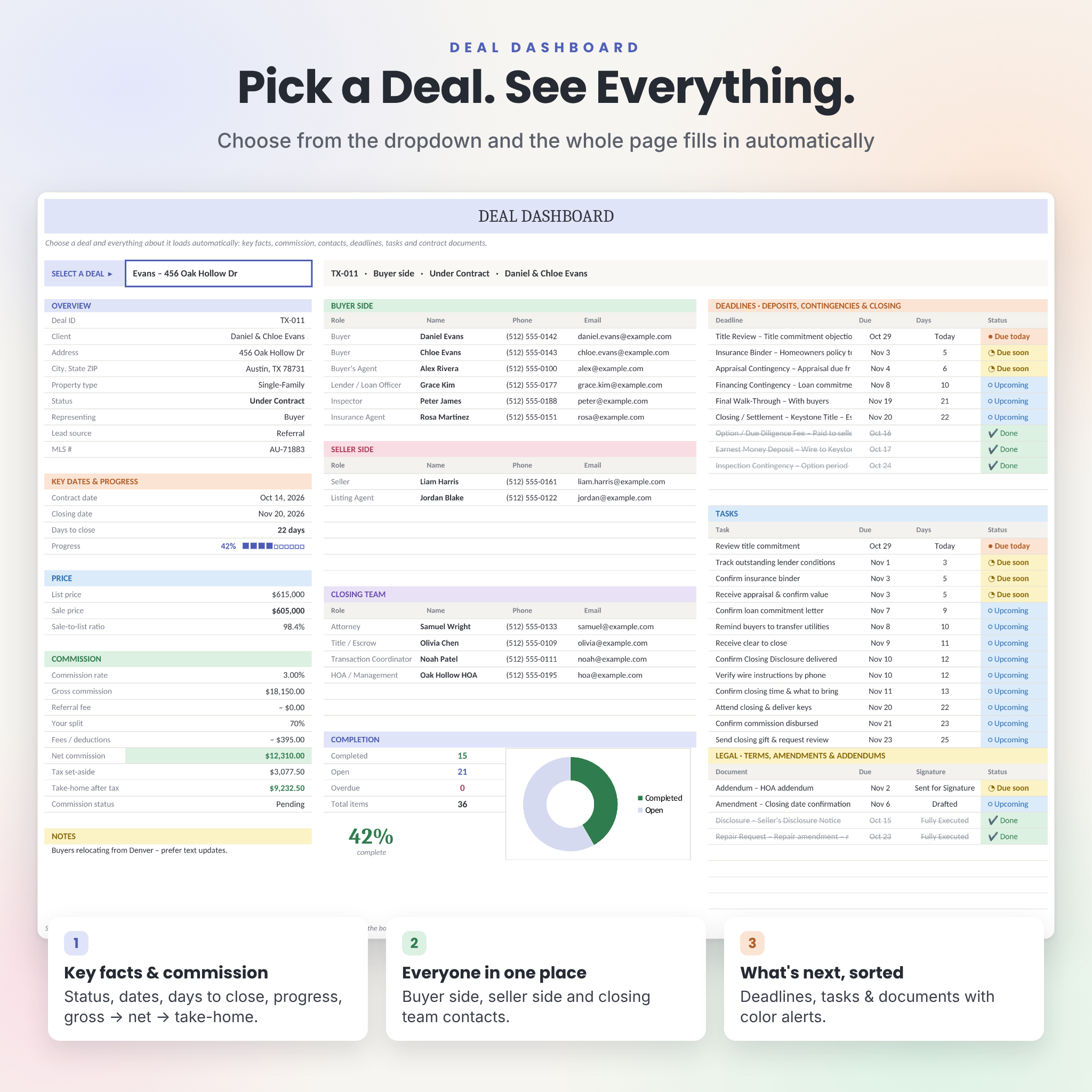
- Deal Dashboard: choose a deal to see its key facts, days to close, progress, a commission breakdown down to take-home pay, contacts by side, a completion chart, and its next deadlines, tasks and documents. It prints on one page.
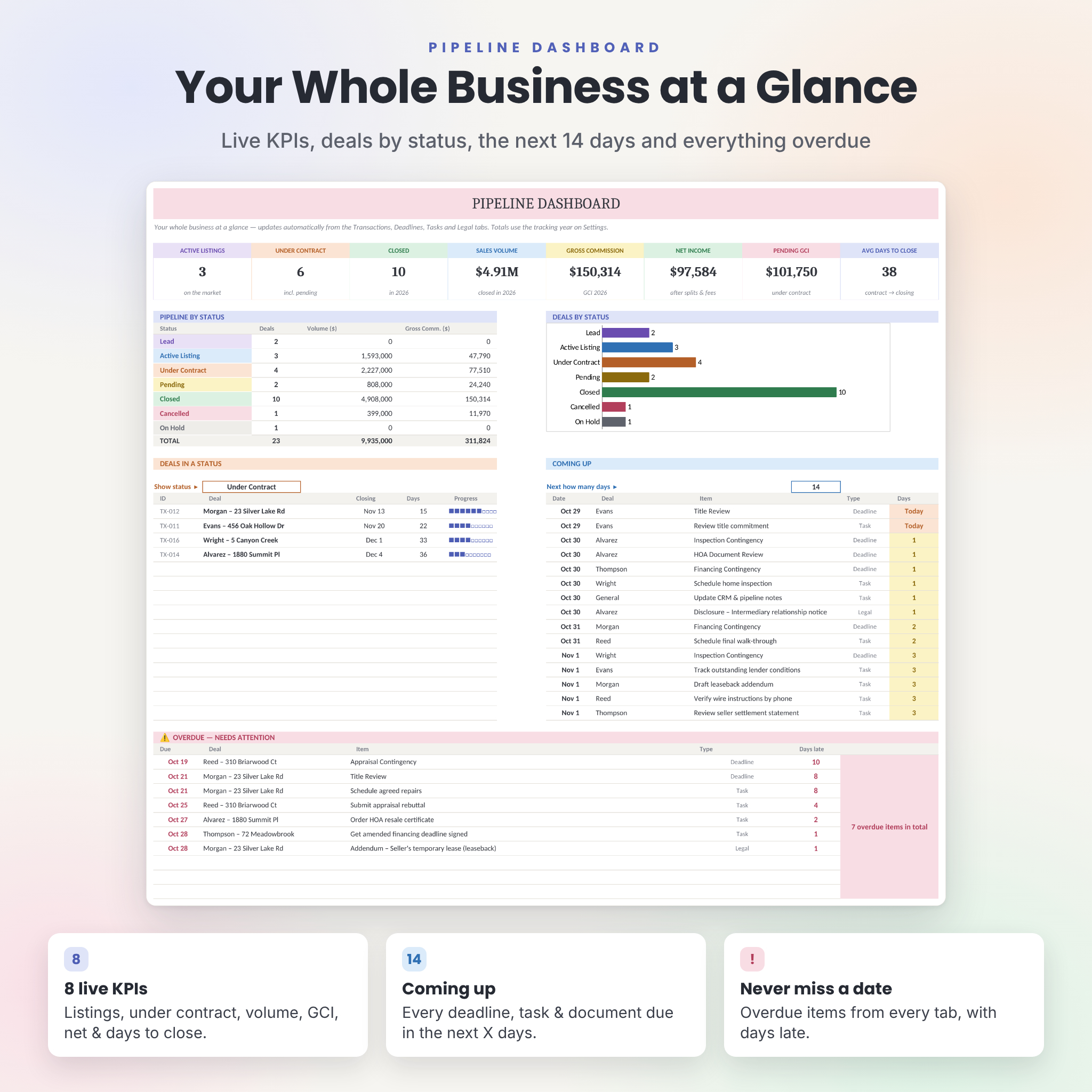
- Pipeline: 8 KPIs (active listings, under contract, closed, volume, GCI, net income, pending GCI and average days to close), deals by status, what’s coming up in the next X days, and everything overdue.
- Task Board: task KPIs, a status chart, open tasks by priority, progress by phase, a Monday-to-Sunday weekly board and an overdue list. View all deals or just one.
- Smart Calendar: pick a month to see every deadline, task and document on its date. Filter by type, hide completed items and read the month agenda.
- Income & Goals: monthly closings, volume, GCI, net and tax set-aside, progress toward your GCI, closings and volume goals, a GCI vs net chart, results by lead source, a buyer vs seller split and a quick commission calculator.
Setup and extras
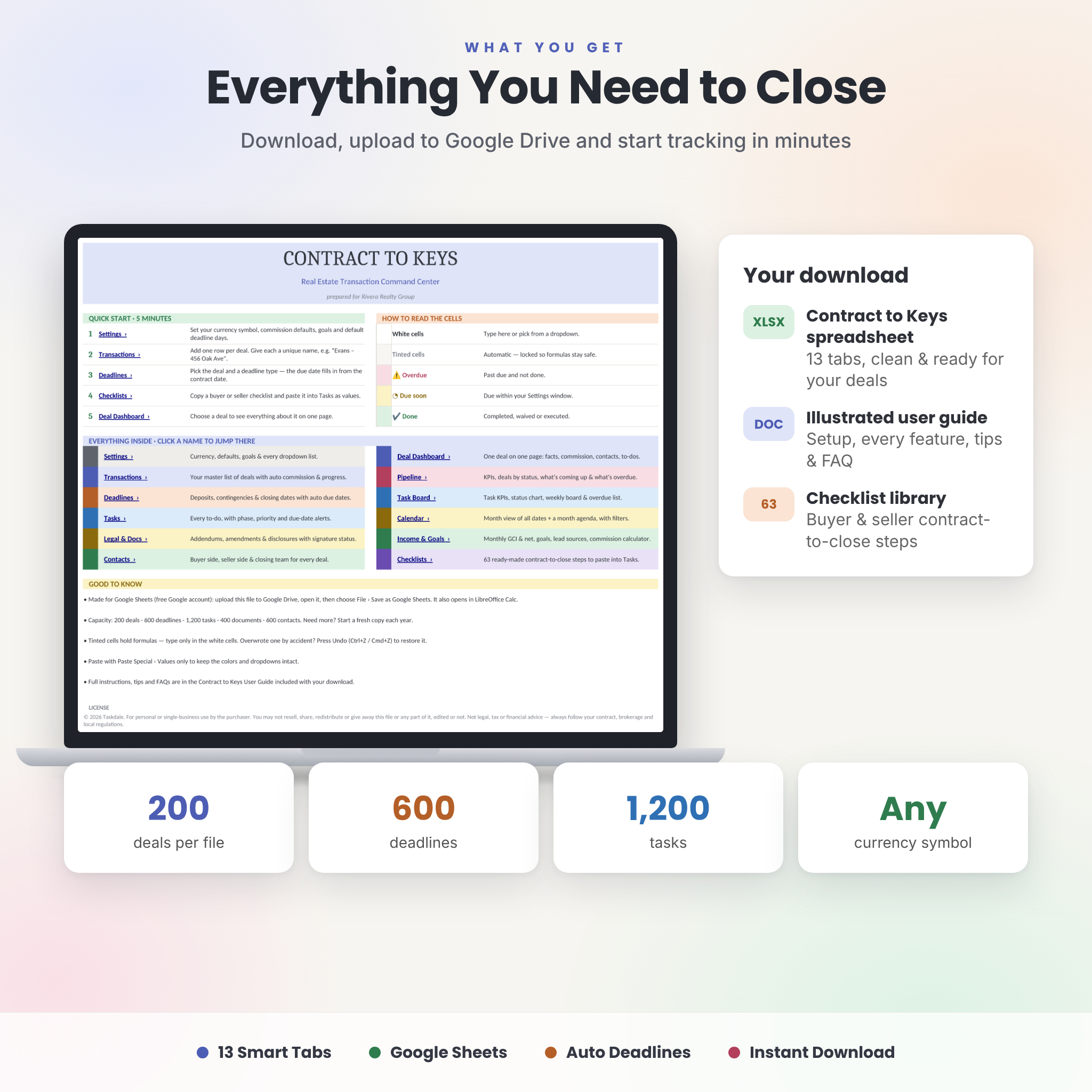
- Start Here page with a 5-minute quick start and one-click links to every tab
- Settings with one currency setting, commission defaults, annual goals and every dropdown list
- Duplicate deal names are blocked, and dropdown cells only accept options from your lists
- Room for 200 deals, 600 deadlines, 1,200 tasks, 400 documents and 600 contacts per file
What’s Included
- Contract to Keys spreadsheet (.xlsx, 13 tabs, clean and ready for your deals)
- Illustrated user guide (.docx) covering setup, every tab, customization, troubleshooting and FAQ
How It Works
- Download the files right after purchase.
- Upload the spreadsheet to Google Drive, open it, and choose File › Save as Google Sheets.
- Set up your currency, commission defaults and goals on the Settings tab.
- Add a deal, pick its deadlines and paste a checklist into Tasks.
- Open the dashboards. Everything is already up to date.
File Formats & Software Requirements
- Format: .xlsx spreadsheet and .docx user guide
- Made and tested for Google Sheets (free Google account, runs in your web browser)
- Also opens in LibreOffice Calc
- No add-ons, scripts or macros. Everything runs on standard formulas.
- Microsoft Excel is not an officially supported platform
Customization
Change the currency symbol in one cell and every money label and dashboard figure follows. $ is the default, and any symbol works (€, £, R, A$, C$). You can edit the dropdown lists, deadline types and default day counts, contact roles, goals and the checklist steps. Colors and fonts change like in any spreadsheet.
Real-Life Use Cases
- A buyer’s agent goes under contract and adds the deal. The inspection, appraisal and financing deadlines appear on the calendar right away.
- A transaction coordinator checks the Pipeline each morning for items due today, due soon or overdue across 15 open files.
- A listing agent gives the seller a weekly update using the Deal Dashboard print view.
- An agent reviews Income & Goals each month to track GCI against the annual goal and see which lead sources actually close.
- A team shares one Google Sheets copy so the agent, assistant and TC all see the same live status.
Digital Download
This is an instant digital download. No physical item will be shipped. You’ll get access to the files as soon as your payment is confirmed.
FAQ
Do I need to pay for any software?
No. Google Sheets is free with a Google account.
Does it work in Microsoft Excel?
It’s built and tested for Google Sheets and also opens in LibreOffice Calc. Excel isn’t an officially supported platform.
Can I use my own currency?
Yes. Change one cell on the Settings tab. $ is the default.
Can I share it with my team or transaction coordinator?
Yes. Share your Google Sheets copy with the people you work with and everyone sees live updates.
Does it handle both buyer and seller transactions?
Yes. Each deal is marked Buyer, Seller or Both Sides, and the checklist library includes both sides.
Are the deadline day counts set for my state?
They’re editable examples. Always use the dates in your own contract and follow your brokerage and local rules.
Is this a monthly subscription?
No. It’s a one-time purchase with no recurring fees.
License
For personal use in your own real estate business (one person or one team). Please don’t resell, share or redistribute the files. Contract to Keys is an organizational tool and doesn’t provide legal, tax or financial advice.
Reviews
There are no reviews yet.