
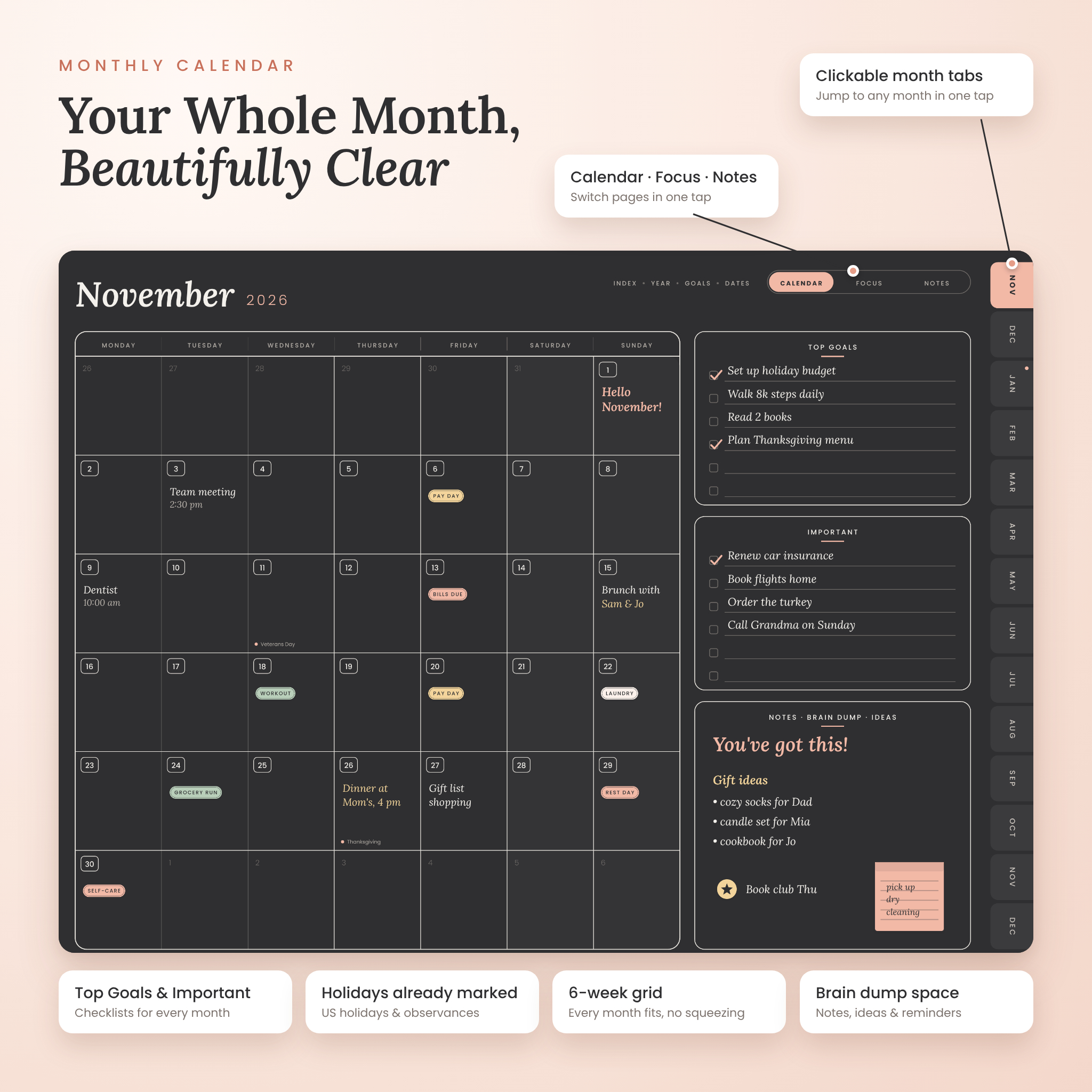

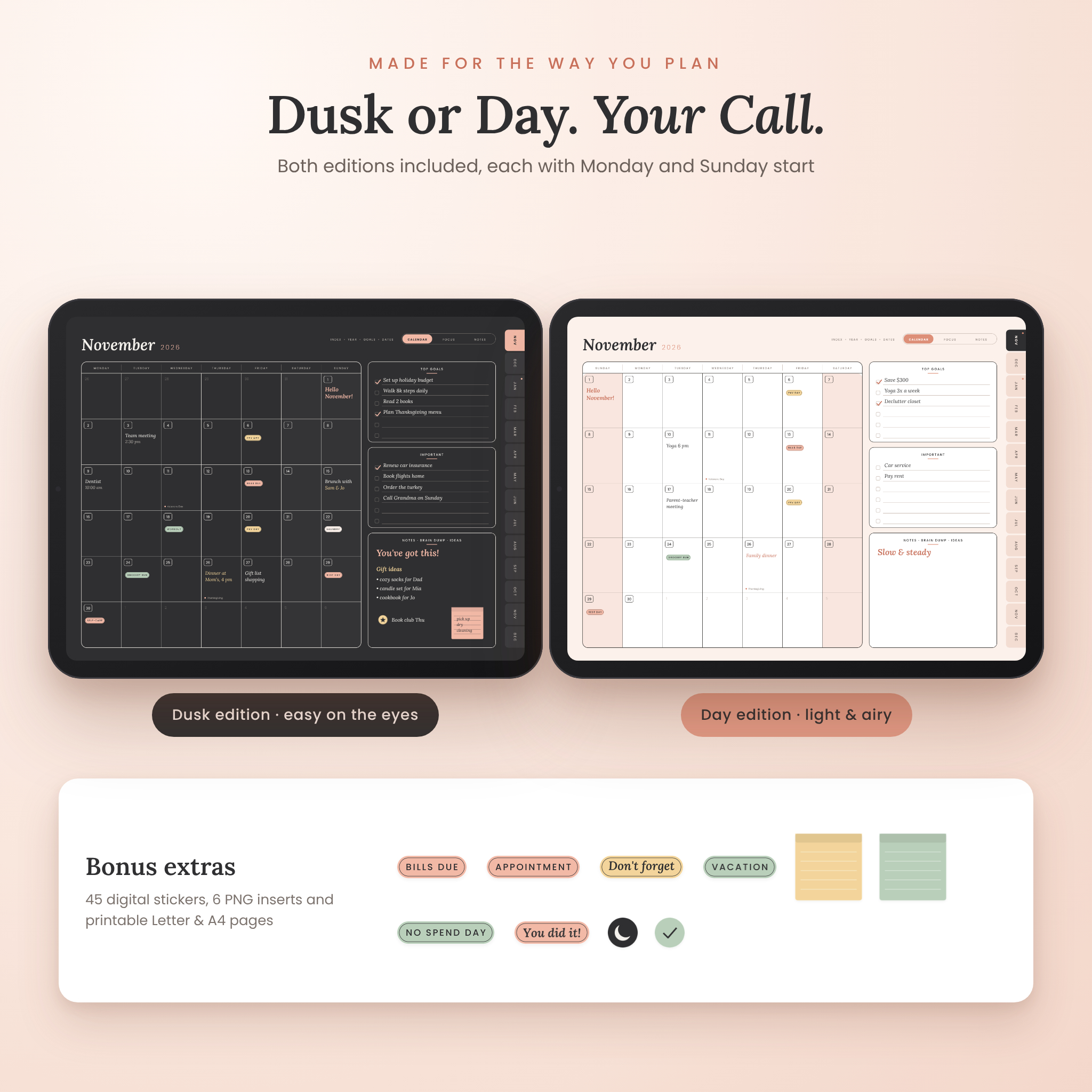
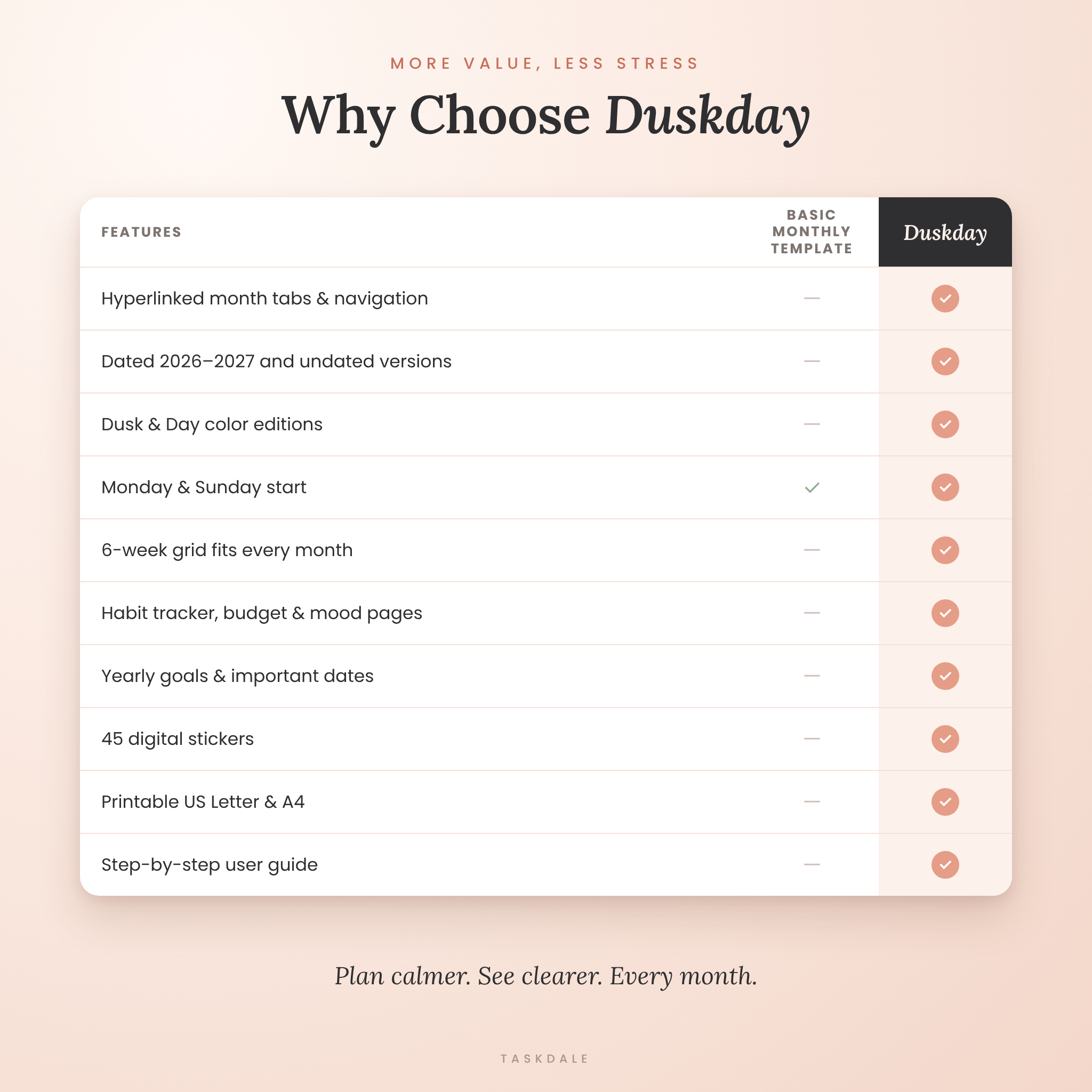
The Duskday Digital Monthly Planner is a hyperlinked monthly calendar for GoodNotes, Notability, Noteshelf, Xodo and other PDF note-taking apps. Plan your whole month at a glance, set your top goals, track habits and money, and jump to any month with one tap. It comes dated for November 2026 to December 2027 with US holidays marked, plus an undated version you can use in any year. Both come in two color editions (a calm charcoal Dusk edition and a light blush Day edition), each with Monday and Sunday start.
A Digital Monthly Planner That Keeps Life Clear
Most monthly templates give you one blank page and nothing else. Duskday gives every month three connected pages (Calendar, Focus and Notes) so your appointments, goals, habits and budget live in one tidy place. The layout is clean and uncluttered, with generous writing space and soft colors that look beautiful on an iPad or Android tablet.
Who It Is For
- Busy parents juggling school events, bills and family plans
- Students who want deadlines and study goals in one place
- Professionals and small business owners planning meetings, projects and pay days
- Anyone who loves dark mode planning or a minimalist monthly calendar
- Paper planner fans who want printable pages too
Features
Monthly Calendar
- Six-week calendar grid, so every month fits, even months that spread across six weeks
- Top Goals and Important checklists beside every month
- Notes · Brain Dump · Ideas box for everything else
- US federal holidays and popular observances marked in the dated planner
- Undated version with a small date box in every cell
Monthly Focus Page
- Habit tracker for 8 habits × 31 days
- Monthly Intentions and Wins & Highlights
- Budget Snapshot with Planned and Actual columns and a blank currency field, so it works with dollars or any other currency
- Mood of the Month tracker and two reflection prompts
Monthly Notes Page
- A full dot grid page for lists, meal plans, meeting notes and journaling
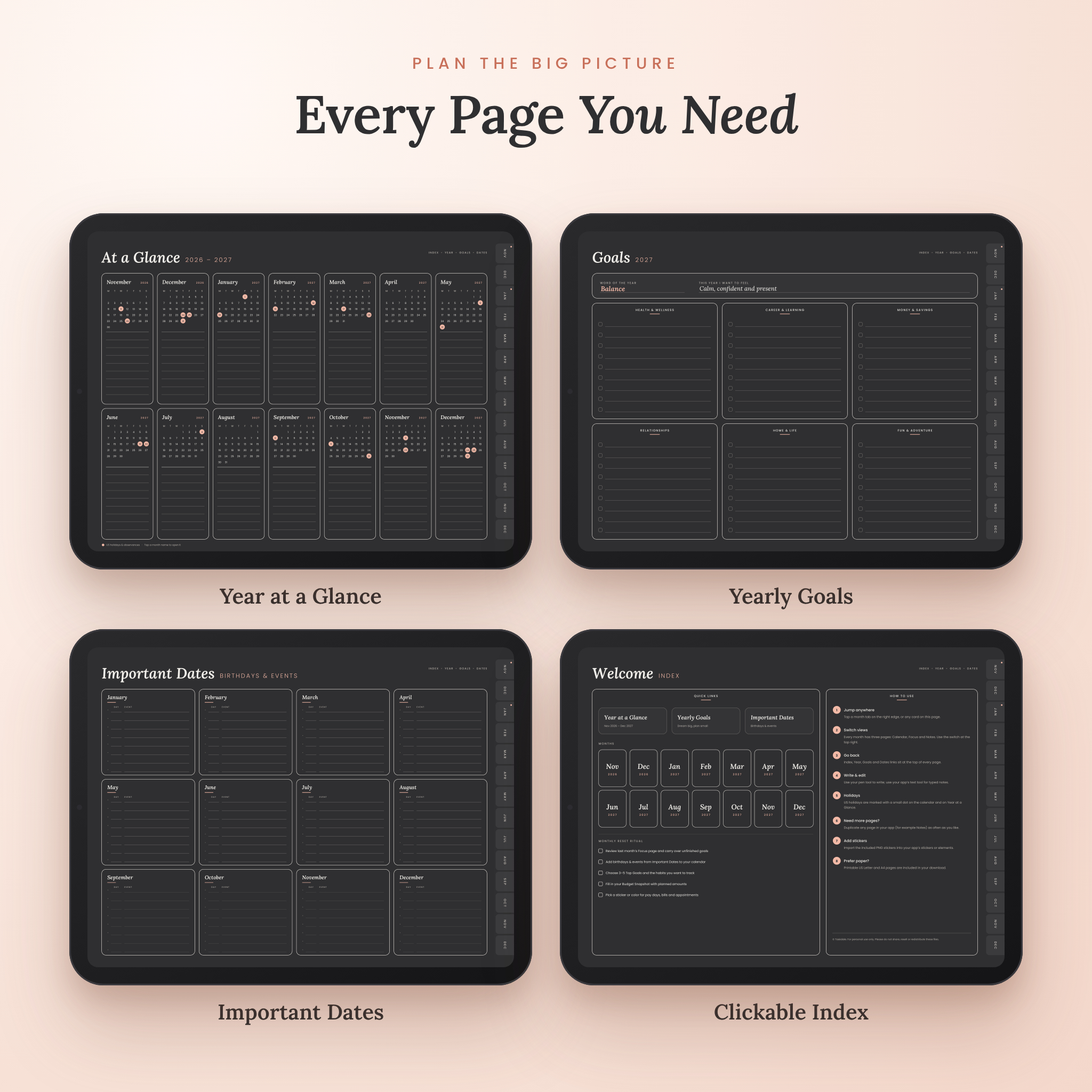
Yearly Planning Pages
- Year at a Glance with mini calendars (dated) or event lines (undated)
- Yearly Goals: word of the year plus six goal areas with checkboxes
- Important Dates for birthdays, anniversaries and events
- Clickable Index with a monthly reset ritual checklist and quick how-to tips
Hyperlinked Navigation
- Clickable month tabs on the right edge of every page
- Calendar / Focus / Notes switch at the top of each month
- Index, Year, Goals and Dates links on every page
- Bookmarks (outline) included for apps that show a page outline
What’s Included
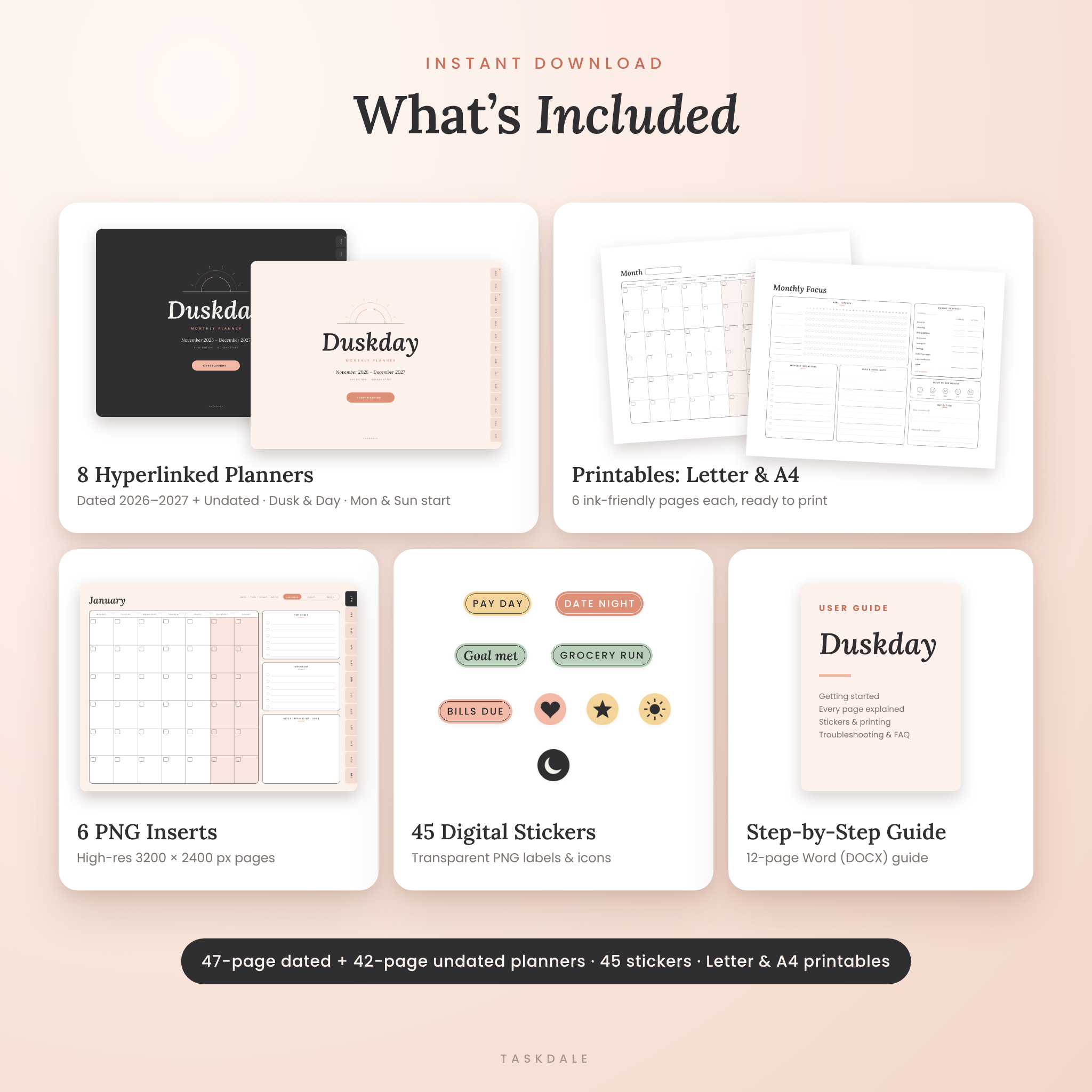
- 4 dated hyperlinked planners, Nov 2026 to Dec 2027 (Dusk and Day editions, Monday and Sunday start), 47 pages each
- 4 undated hyperlinked planners (Dusk and Day, Monday and Sunday start), 42 pages each, including a reusable blank monthly page
- 6 high-resolution PNG inserts (3200 × 2400 px): blank monthly pages and Focus pages
- 2 printable PDFs (US Letter and A4), 6 ink-friendly pages each
- 45 transparent PNG digital stickers: labels such as Pay Day, Bills Due and Grocery Run, script stickers, sticky notes, highlighter strips and icons
- A 12-page user guide (Word DOCX) with setup steps, tips, troubleshooting and FAQ
How It Works
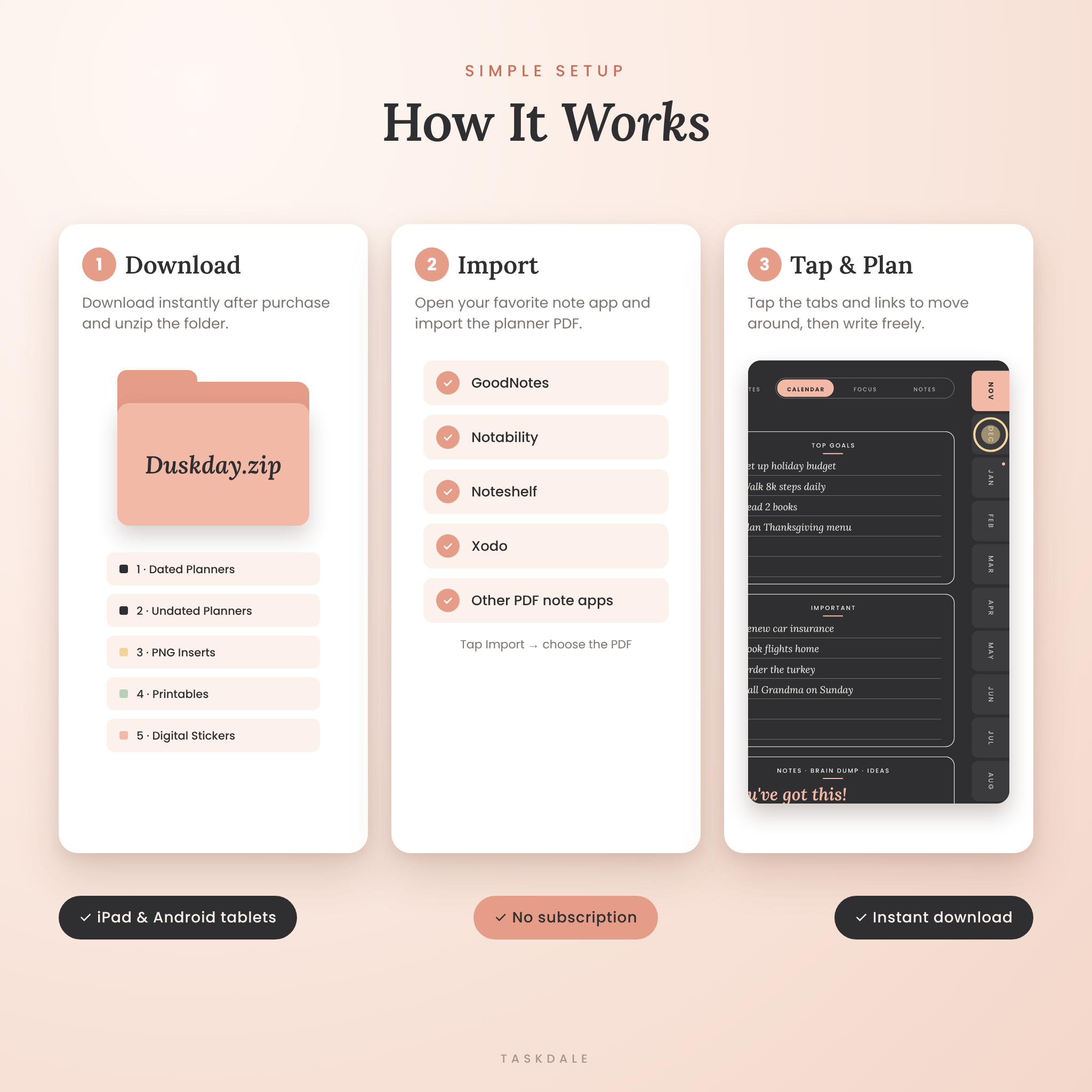
- Download the ZIP file right after purchase and unzip it.
- Open your note-taking app and import the planner PDF you like best.
- Tap the cover’s Start Planning button, then use the tabs and links to move around.
- Write with your stylus or type with your app’s text tool. Add stickers to color-code your month.
File Formats and Requirements
- Formats: PDF (hyperlinked planners and printables), PNG (inserts and stickers) and DOCX (user guide), delivered in one ZIP file
- Page size: 4:3 landscape, made for iPad and comfortable on Android tablets
- Software: a PDF annotation app such as GoodNotes, Notability, Noteshelf, Xodo or Samsung Notes. Printables open in any PDF reader. The guide opens in Word, Google Docs, Pages or LibreOffice
- Devices: iPad, Android tablets and computers. A stylus is recommended for handwriting
Customization
Choose the edition that fits your style, or use both. Duplicate any page (like Notes) as often as you need, color-code with the highlighter and label stickers, type or handwrite, and write in your own currency on the Budget Snapshot. The undated planner lets you start in any month of any year, and the PNG inserts let you add Duskday pages to a notebook you already use.
Real-Life Ways to Use Your Monthly Planner
- Family calendar: track school events, sports, birthdays and trash day in one place.
- Money month: mark pay days and due dates, then compare planned and actual spending on the Focus page.
- Habit reset: pick three habits, fill a circle each day and watch the streaks grow.
- Work and side hustle: plan meetings and deadlines and keep a brain dump of ideas.
- Holiday season: plan Thanksgiving and December gatherings, gift lists and budgets.
Digital Download
This is an instant digital download. No physical product will be shipped. Your files are available right after payment. Because this is a digital product, all sales are final, but if anything goes wrong with your files, just contact us and we’ll help.
Frequently Asked Questions
Does this digital planner work with GoodNotes and Notability?
Yes. It is a standard hyperlinked PDF, made to be imported into GoodNotes, Notability, Noteshelf, Xodo and similar PDF note apps.
Does it work on Android?
Yes. Use any Android app that opens and annotates PDFs, such as Xodo, Noteshelf, Samsung Notes or GoodNotes for Android.
Is the planner dated or undated?
Both are included: a dated November 2026 to December 2027 planner and an undated planner you can use in any year.
Can I print it?
Yes. Printable US Letter and A4 PDFs are included with an ink-friendly white background.
Why aren’t the tabs working?
Most apps follow links in reading mode or when you tap with your finger while stylus-only drawing is on. The user guide shows exactly how.
Can I use my own currency?
Yes. The Budget Snapshot has a blank currency field, so you can use $, £, € or any other currency.
Can I share the files?
The planner is for personal use by one person. Please don’t share, resell or redistribute the files.
© Taskdale. For personal use only.
Reviews
There are no reviews yet.