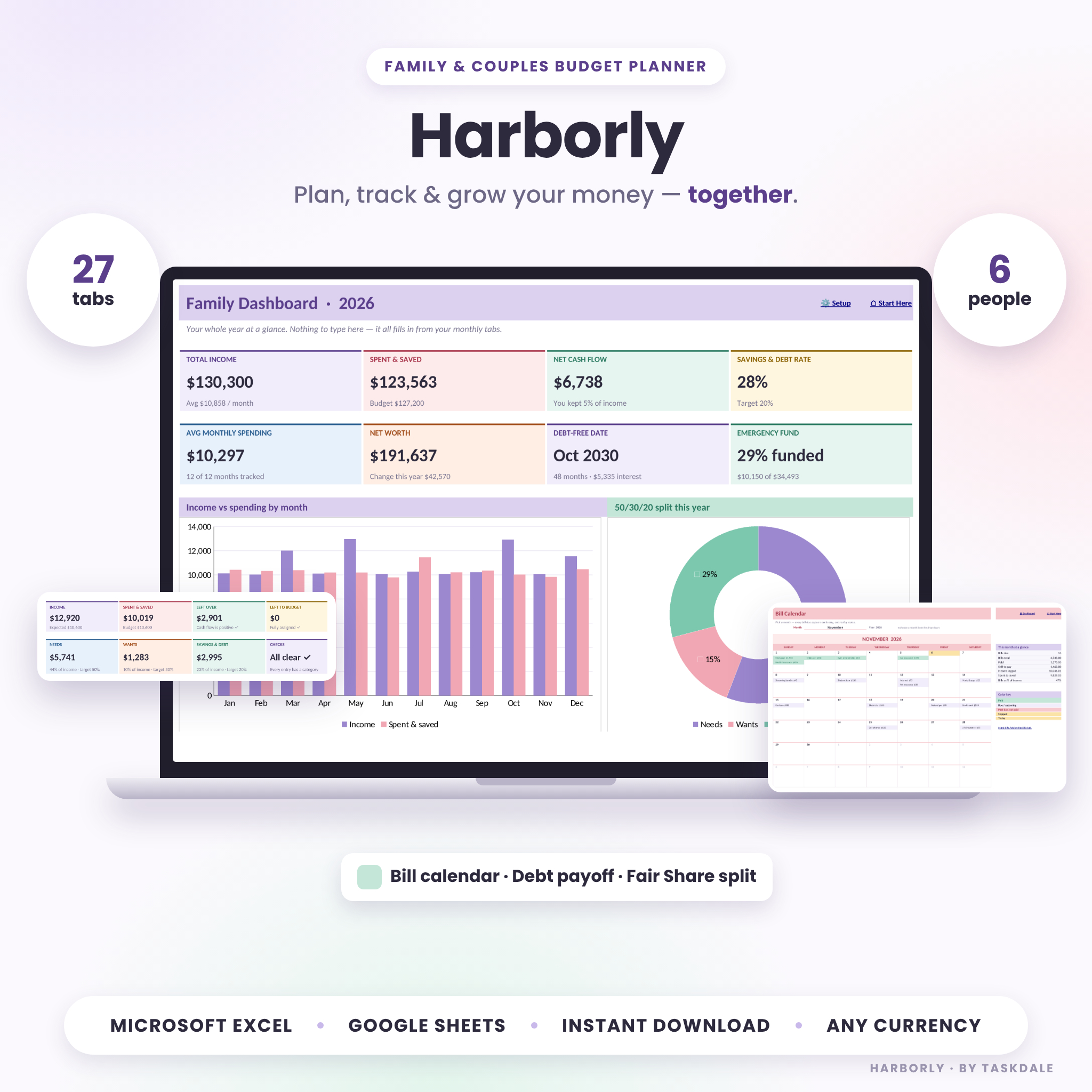
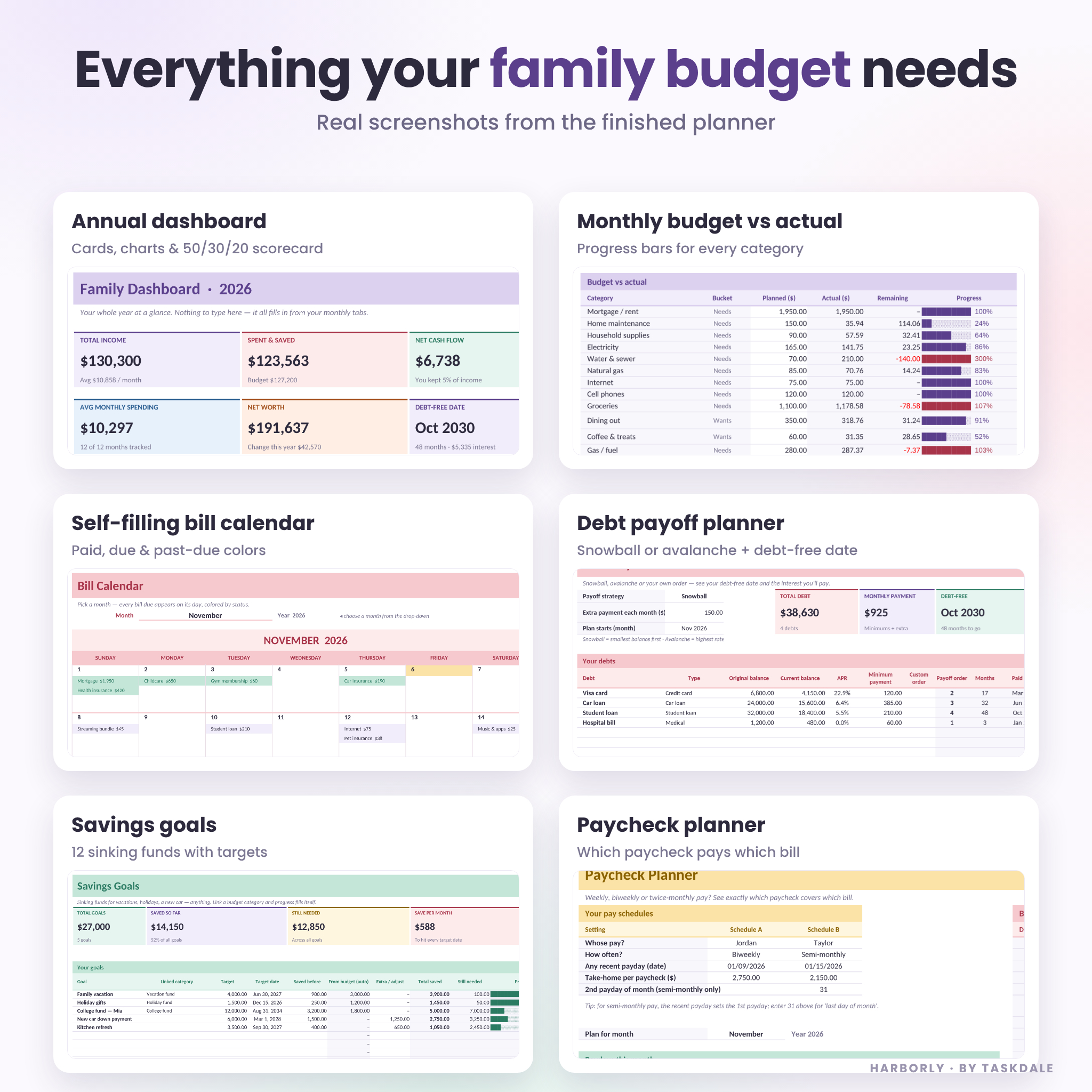
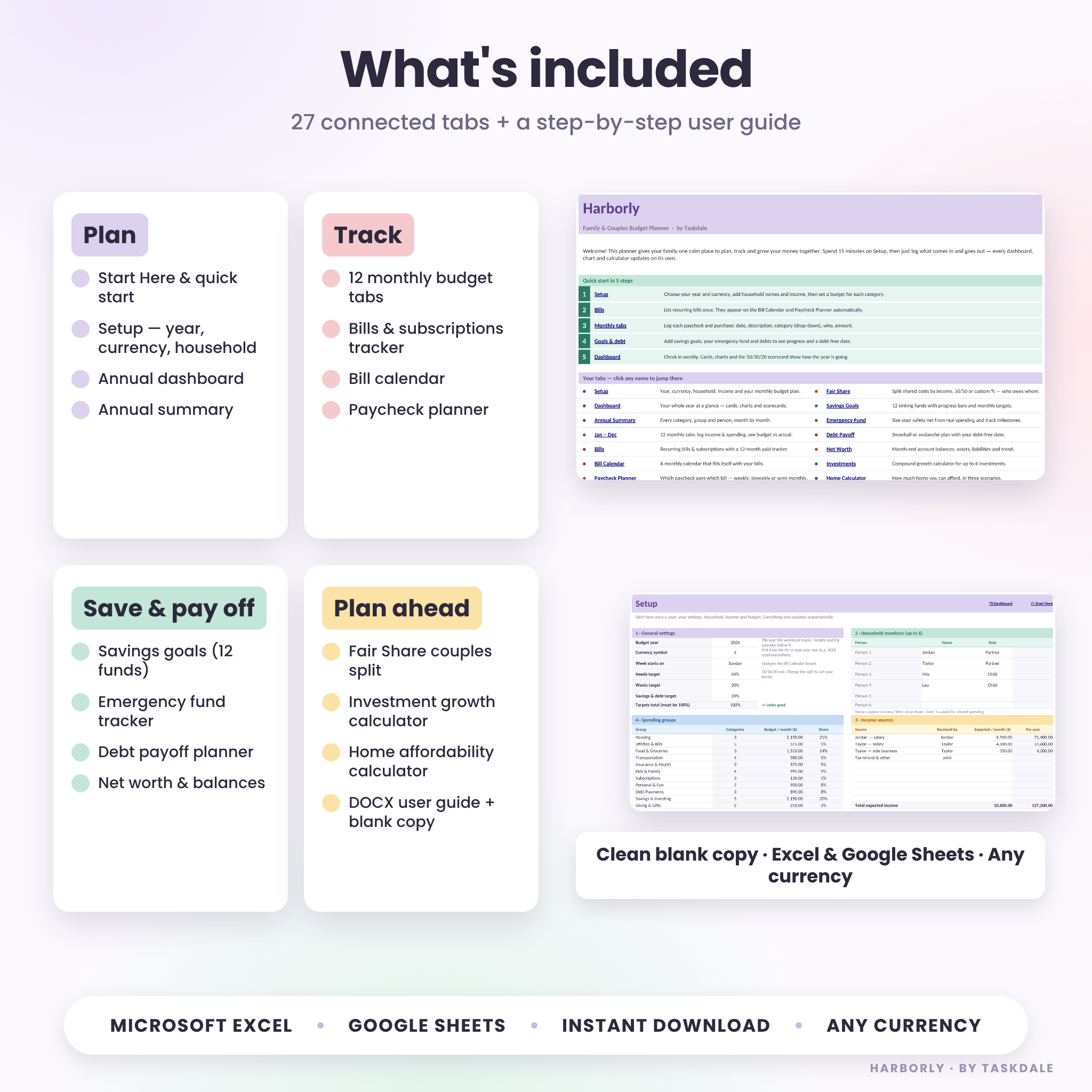


The Harborly family budget spreadsheet gives couples and families one calm place to plan, track and grow their money together. Set it up once in about 15 minutes, then simply log what comes in and goes out. Twenty-seven connected tabs turn those entries into an annual dashboard, monthly budget-vs-actual reports, a bill calendar that fills itself, a paycheck planner, a fair couples split, savings goals, a debt payoff plan and more. It works in Microsoft Excel and Google Sheets, in any currency.
What this family budget planner does
Most budget templates stop at a list of expenses. Harborly connects every part of your household money so you can see the whole picture without writing a single formula.
- Plans your month: give every category a budget and watch “Left to budget” reach zero, so every part of your income has a job.
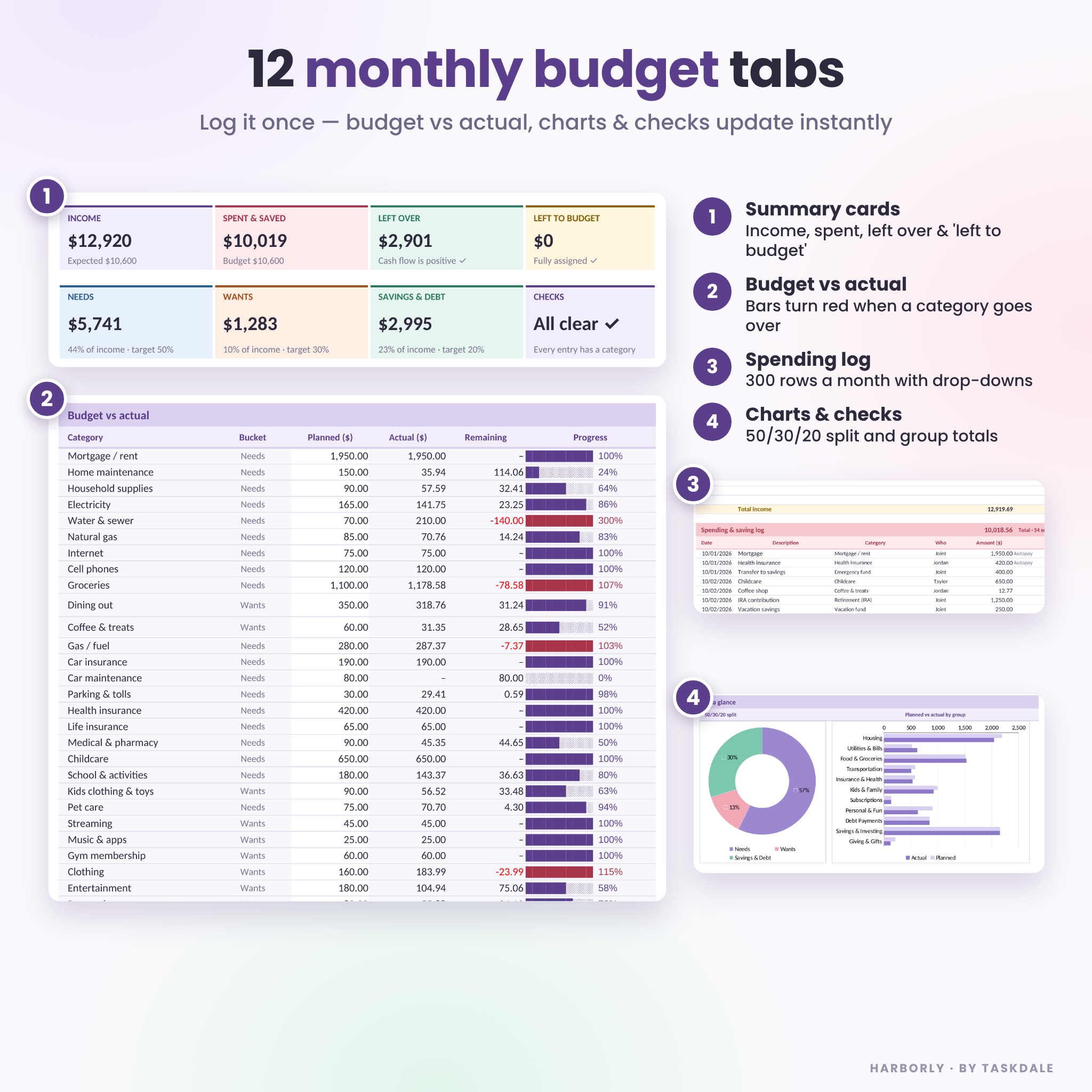
- Tracks real spending: pick a category and the person who paid from drop-downs. Progress bars turn red the moment a category goes over.
- Shows the year at a glance: the dashboard adds up all 12 months into cards, charts and a 50/30/20 scorecard.
- Keeps bills on time: list a bill once and it appears on the right day of the bill calendar and on the paycheck that should cover it.
- Grows your savings and clears debt: sinking funds, an emergency fund and a snowball or avalanche plan with your debt-free date.
Who it’s for
Harborly is built for couples who share bills, families who want to see spending by person, and anyone paid weekly, biweekly or twice a month who needs to know which paycheck pays which bill. It’s beginner-friendly: white cells are for typing, tinted cells calculate automatically and are protected so nothing breaks.
Features
Annual dashboard
- 8 summary cards: total income, spent and saved, net cash flow, savings and debt rate, average monthly spending, net worth, debt-free date and emergency fund progress
- Income vs spending by month, 50/30/20 split, spending by group and by person, net worth trend, and planned vs actual by group
- Month-by-month table, top 5 categories and a 50/30/20 scorecard
12 monthly budget tabs
- Income log (15 rows) and spending and saving log (300 rows) with category and “who” drop-downs
- Budget vs actual for up to 50 categories with progress bars, group totals and a 50/30/20 check
- Household breakdown by person, top 5 expenses and two charts
- Built-in checks flag uncategorized entries and dates in the wrong month
Bills, bill calendar and paycheck planner
- Up to 30 recurring bills: monthly, quarterly, twice a year or yearly, with autopay and who pays
- 12-month Paid / Pending / Skipped tracker with past-due highlighting
- A monthly bill calendar with Sunday or Monday start that fills itself and colors each bill by status
- Paycheck planner for two pay schedules (weekly, biweekly, semi-monthly or monthly) showing which paycheck covers each bill
Couples and family extras
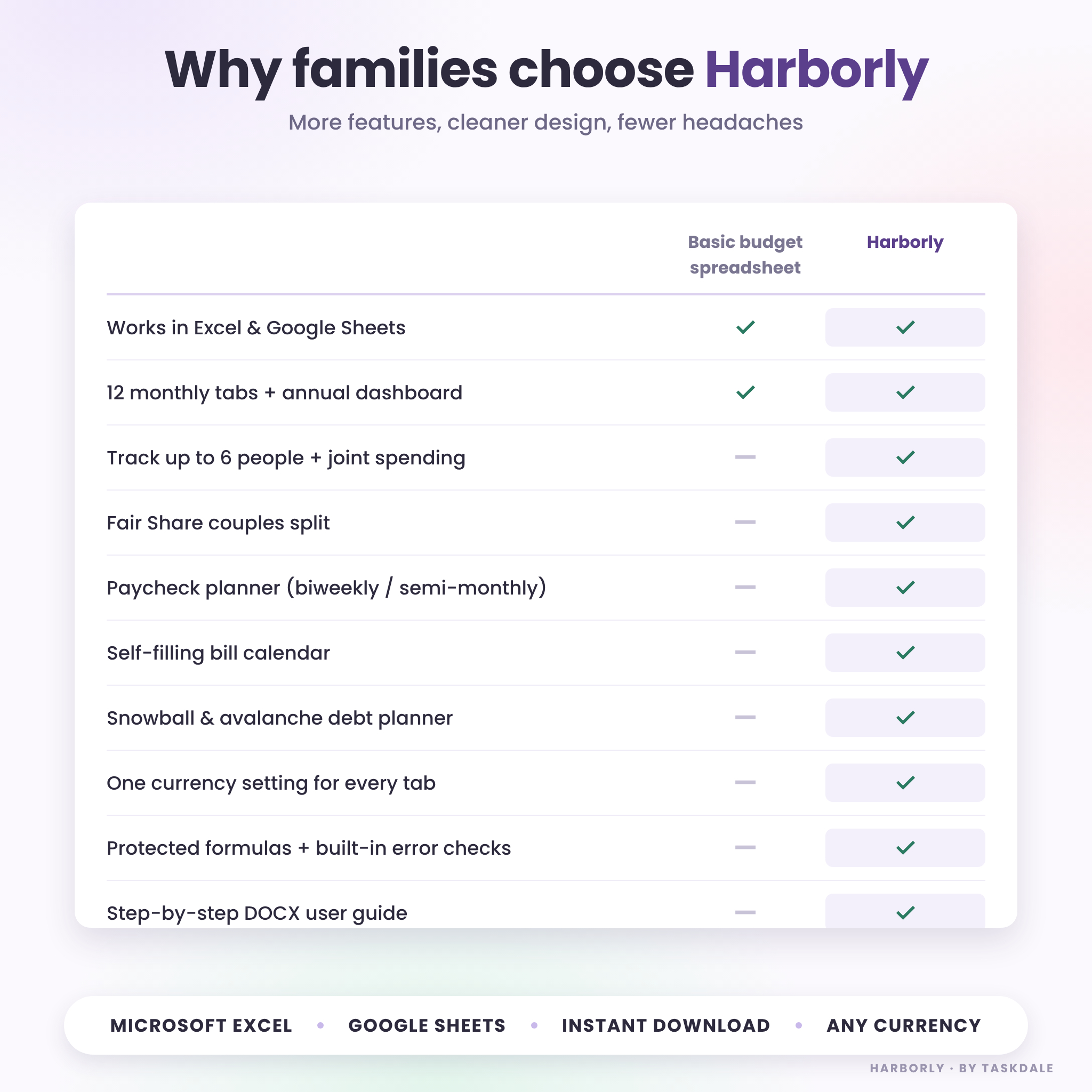
- Fair Share split: divide household costs by income, 50/50 or custom percentages and see exactly who owes whom
- Track up to 6 people plus joint spending
- Savings goals for up to 12 sinking funds with automatic progress and a monthly target
- Emergency fund sized from your real essential spending, with milestones
- Debt payoff planner for up to 10 debts: snowball, avalanche or custom order, with payoff dates and interest
- Net worth and account balance tracker, investment growth calculator and home affordability calculator
What’s included
- Harborly Family Budget Planner (.xlsx) — a clean, ready-to-use workbook with 27 tabs and starter budget categories
- Harborly User Guide (.docx) — step-by-step setup, how to use every tab, customization tips, troubleshooting and FAQ
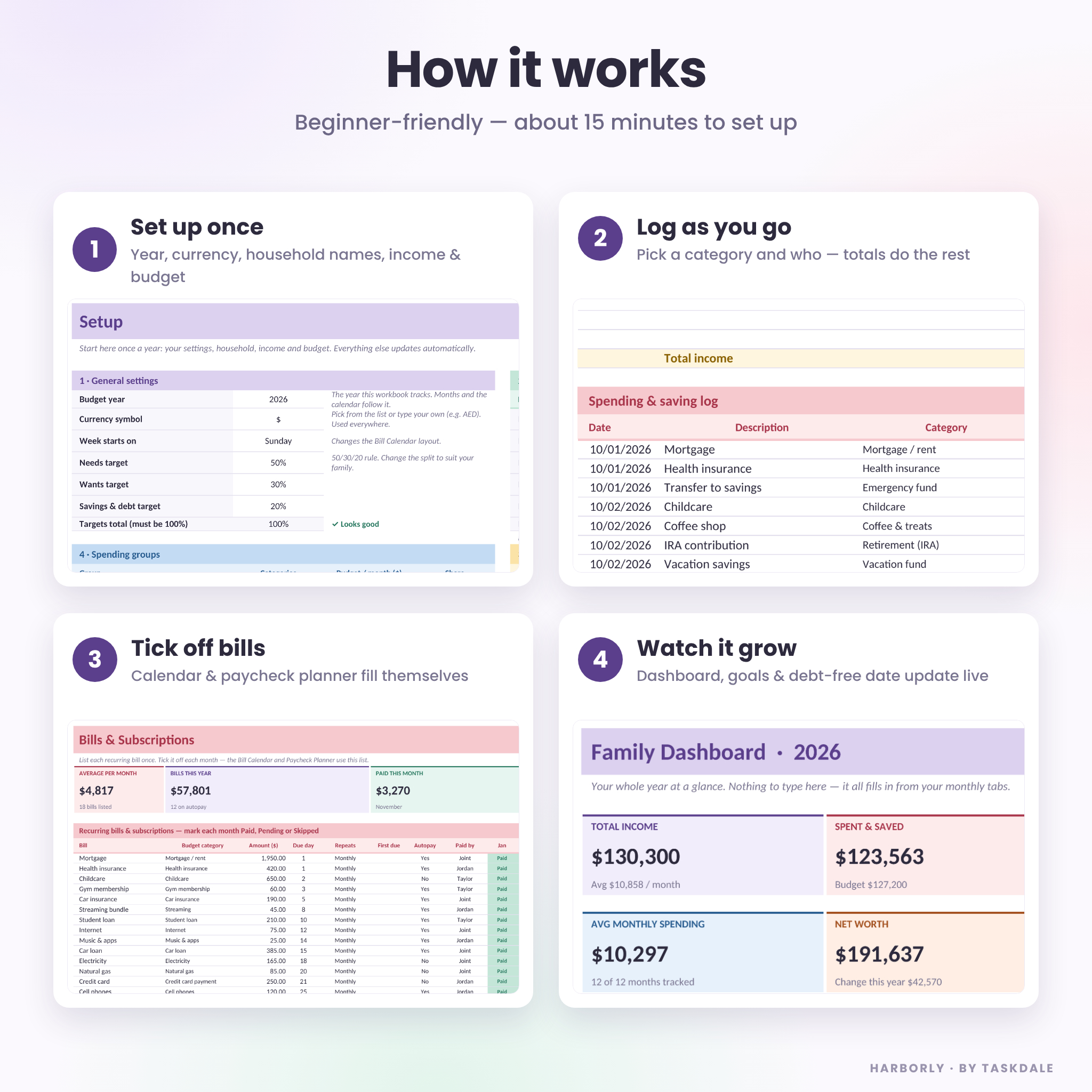
How it works
- Set up once: choose your year and currency, add household names, income sources and a budget for each category.
- Log as you go: add paychecks and purchases on the monthly tabs — ten minutes a week is plenty.
- Tick off bills: mark bills paid and let the calendar and paycheck planner keep you on track.
- Review together: open the dashboard each month to see progress, goals and your debt-free date.
File formats and software requirements
- Format: Microsoft Excel workbook (.xlsx) plus a Word user guide (.docx)
- Works in Microsoft Excel (Microsoft 365 or Excel 2019 and newer, Windows and Mac) and in Google Sheets with a free Google account
- For Google Sheets: upload the file to Google Drive, open it and choose File > Save as Google Sheets
- Best on a computer or tablet; the Excel and Google Sheets mobile apps work for quick entries
Customization
Pick your currency once on the Setup tab and every amount follows it — dollars by default, or euros, pounds, rand, rupees or any symbol you type. Rename categories and spending groups, change the 50/30/20 targets, choose a Sunday or Monday week start, and add your own family names. Sheets are protected without a password, so you can unlock them to change colors or layout.
Digital download
This is an instant digital download. No physical product will be shipped. Your files are available to download right after purchase.
Real-life ways to use it
- Newlyweds combining finances and agreeing a fair way to split rent, groceries and bills
- Parents tracking childcare, school and kids’ activities next to the grocery budget
- Biweekly earners planning which paycheck covers the mortgage or rent
- Families saving for a vacation, holidays or a new car while paying down credit cards
- Couples deciding how much home they can afford before talking to a lender
FAQ
Does this budget spreadsheet work in Google Sheets?
Yes. Upload the .xlsx to Google Drive and save it as a Google Sheet. Formulas, drop-downs, colors and charts carry over.
Can I use my own currency?
Yes. Choose a symbol from the list or type your own on the Setup tab; every tab updates.
How many people can I track?
Up to six household members, plus a “Joint” option for shared spending.
Is it good for biweekly pay?
Yes. The paycheck planner works out weekly, biweekly, semi-monthly or monthly paydays and shows which bills each paycheck covers.
Can I reuse it next year?
Yes. Save a copy, change the year on Setup and clear the monthly logs.
Does it connect to my bank?
No. You enter amounts yourself, so your financial data stays in your own file.
Is this financial advice?
No. Harborly is a budgeting tool for information only and does not replace advice from a licensed professional.
Licence: for personal use in your own household only. You may not resell, share, distribute or reproduce this planner or its guide, with or without changes. © Taskdale.
Reviews
There are no reviews yet.