




A calm spending tracker app that shows where your money goes
Hush Ledger is a spending tracker app that lives in one small file on your own computer. There is no subscription, no account and no bank login. You type in what you spend, press Enter, and it does the rest: totals, budgets, charts and a clear daily number that tells you what is safe to spend.
It is designed like a classic paper ledger, in warm cream, burgundy and gold, so checking your money feels quiet instead of stressful. Everything saves as you type, and it works without an internet connection.
What it does
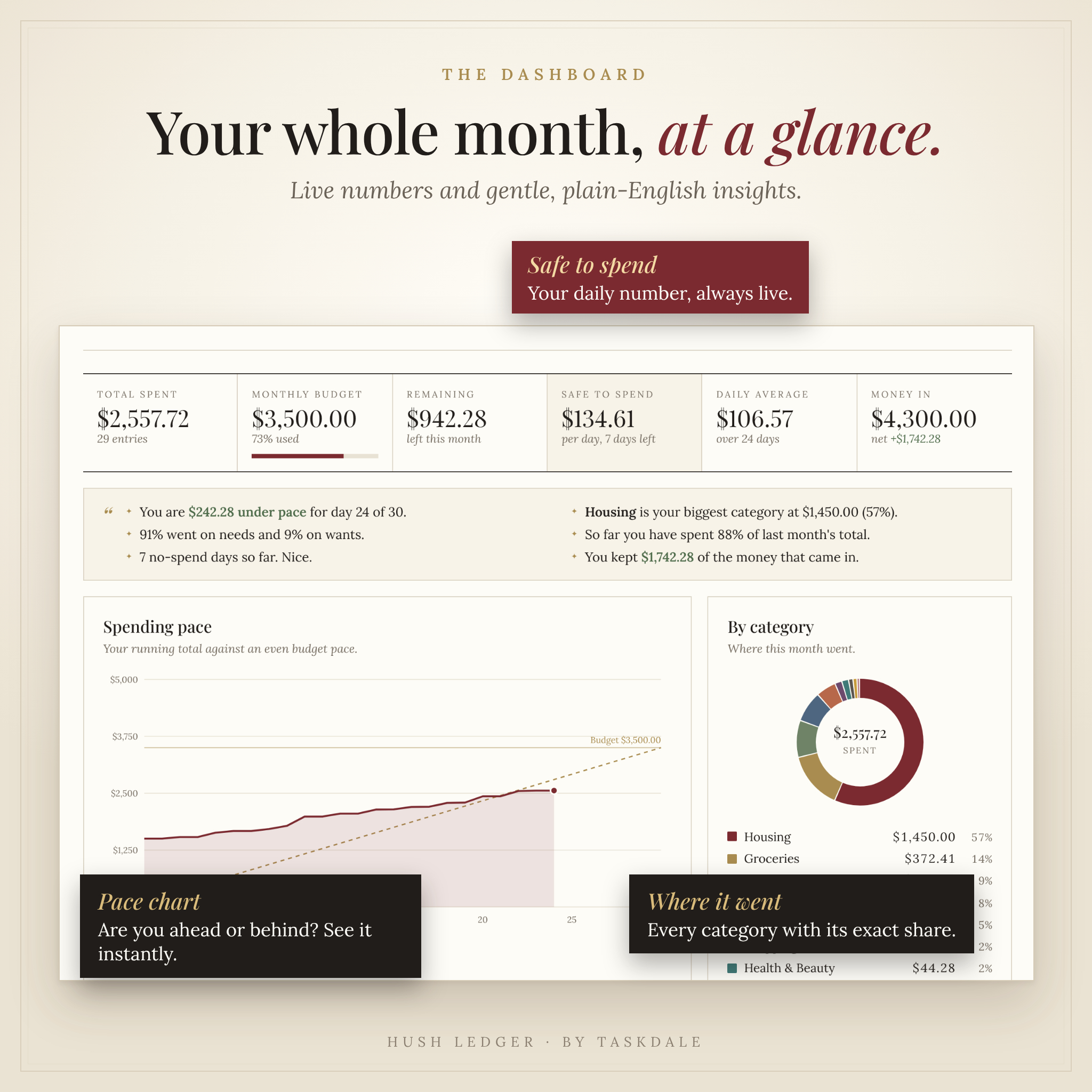
- Live dashboard: total spent, budget used, remaining, safe to spend per day, daily average and money in, always up to date.
- Plain-English insights: short sentences such as “You are $242 under pace for day 24 of 30” and “Groceries is your biggest category.”
- Spending pace chart: your running total against an even budget pace, so you can see early if the month is drifting.
- Category donut and day-by-day chart: see exactly where the month went and which days cost the most.
- No-spend calendar: darker days cost more, and a small star marks every day you spent nothing.
Who it is for
- Anyone who wants a simple monthly budget tracker without handing bank details to an app.
- Busy and ADHD minds who need low-friction entry, one-tap choices and zero guilt for missed days.
- Students, couples, freelancers and households who would rather pay once than add another monthly fee.
- People who have tried spreadsheets and found them too fiddly to keep up.
Main benefits
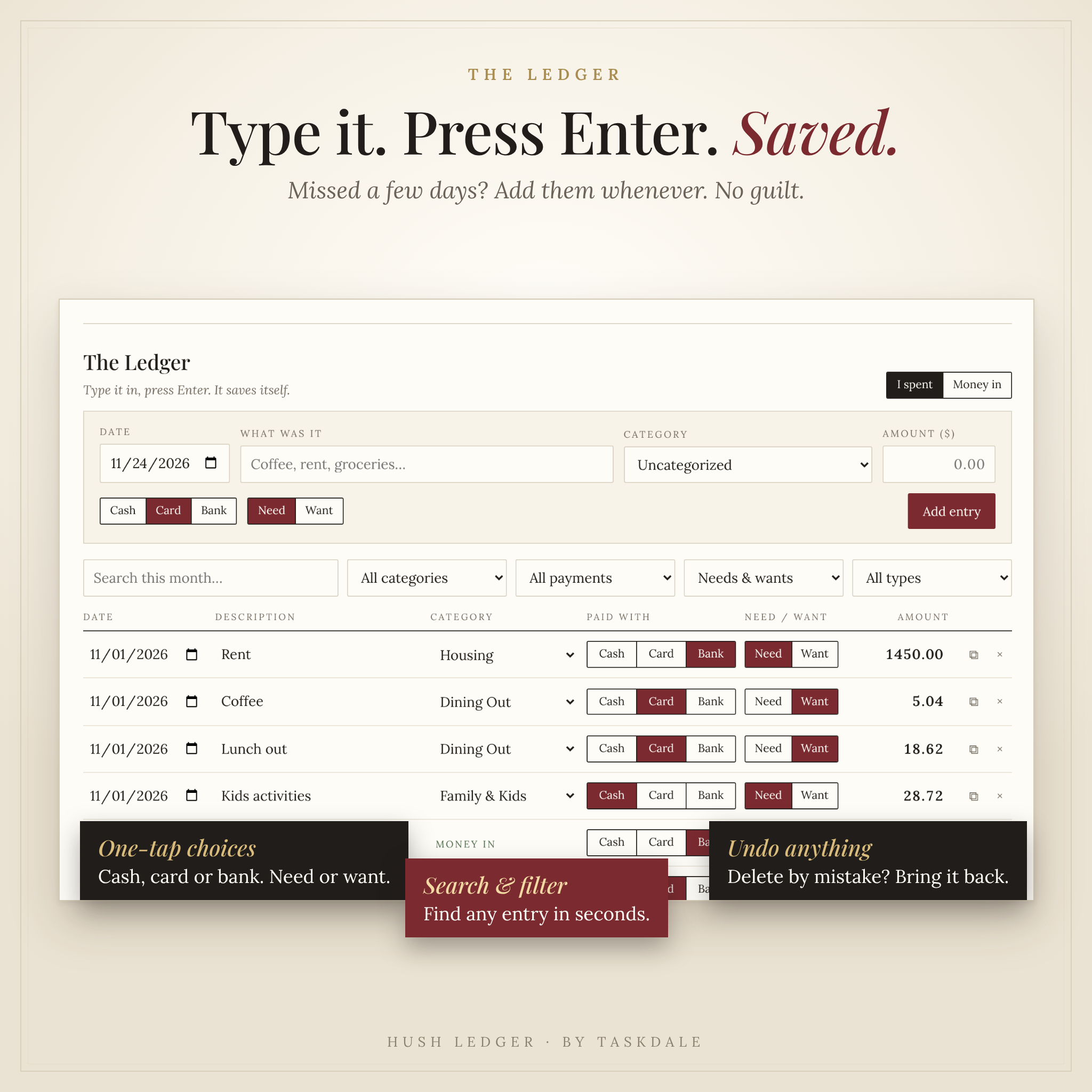
- Fast: type it, press Enter, saved. The cursor returns to the next line on its own.
- Clear: one “safe to spend” number tells you what you can spend today and still finish on budget.
- Private: your entries stay in your browser on your device. Nothing is uploaded or shared.
- Forgiving: undo a delete, add missed days whenever you like, edit anything in place.
- Yours for good: a one-time purchase with no ads and no renewals.
Features
The Ledger
- Date, description, category and amount on one line
- One tap for cash, card or bank, and for need or want
- Log money in (paychecks, refunds, side income) alongside spending
- Search and filter by category, payment type, needs or wants
- Duplicate repeat purchases and undo accidental deletes
Budget
- One monthly budget number, plus optional limits for each category
- Progress bars that turn from green to gold to orange as you approach a limit
- Budgets carry forward automatically, so you only set them once
Bills and subscriptions
- Save rent, phone, streaming and other recurring bills once
- Log each one with a single tap when it is paid
- See what is paid, what is still to come and the yearly cost of your commitments
Savings goals
- Progress rings for every goal
- Add a target date and see how much to save each month
- Kept separate from spending, so saving never counts against your budget
The year at a glance
- Twelve months of spending, money in and budget, side by side
- A category-by-month table, with one tap to open any month
- Year total, monthly average, highest and lowest months
Settings and data
- 43 currencies plus your own custom symbol, all from one setting
- Rename, recolor, add or remove categories (up to 24)
- Light and dark mode, and three date formats
- One-tap backup and restore
- CSV export for Excel, Google Sheets and Numbers, plus CSV import
- A clean printable monthly report that fits US Letter and A4
What is included
- Hush Ledger Spending Tracker (HTML app file)
- Illustrated User Guide (editable DOCX)
- Start Here quick start (PDF, US Letter and A4)
- CSV import template for bringing in past spending
- License terms (personal use)
Everything arrives in one ZIP file.
How it works
- Download and unzip the file.
- Double-click the app file. It opens in your web browser. Bookmark it.
- Choose your currency, set a monthly budget and add your first entry.
Want to look around first? Load the built-in sample data to see every chart filled in, then erase it with one button.
File formats and software requirements
- Formats: HTML (the app), DOCX, PDF, CSV and TXT, delivered as a ZIP.
- You need: a computer with a current web browser. No installation, no internet connection and no other software.
- Tested in: Google Chrome (Chromium engine) at laptop, tablet and phone screen sizes. The app uses standard browser features, so current versions of Edge, Firefox and Safari should work the same way, but they were not part of our testing.
- Phones and tablets: the layout adapts to small screens, but opening a downloaded HTML file depends on the device and was not tested on physical phones. We recommend a computer as your main device.
Customization
Make the spending tracker your own: add your name to the cover, rename every category, pick your own colors, relabel the payment types (for example Debit and Credit), choose your currency and date format, and switch between light and dark mode. Renaming a category never breaks past entries.
Digital download
This is a digital product. Nothing physical is shipped. Your download is available as soon as payment is confirmed. For personal use only. Please do not share, resell or redistribute the files.
Your ledger is stored by your browser on your own device, so use the same browser each time, avoid private windows, and download a backup regularly.
Real ways people use it
- The evening check-in: thirty seconds to add the day’s coffee, groceries and gas.
- Before a shopping trip: a glance at Safe to spend to know today’s limit.
- Bill day: tap “Log it” on rent, phone and streaming instead of retyping them.
- Month end: print the monthly report or export it to a spreadsheet.
- Saving for something: watch the ring fill for a trip, a laptop or an emergency fund.
- New year review: use the Year tab to see which categories crept up.
Frequently asked questions
Does this expense tracker work offline?
Yes. Everything it needs is inside the file, so it works with no internet connection.
Does it connect to my bank account?
No. You enter your own spending. That keeps your data private and keeps you aware of each purchase.
Is there a subscription or monthly fee?
No. You pay once and keep it.
Where is my data stored?
In your browser on your own device. Use the backup button to keep a copy or move to another computer.
Can I use my own currency?
Yes. Choose from 43 currencies or type a custom symbol. The setting changes how amounts are shown and does not convert them.
Is it good for ADHD budgeting?
It was designed for it: quick entry, one-tap choices, automatic saving, a single daily number and no penalties for catching up later.
Can I import my old spending?
Yes. Fill in the included CSV template, or export from a spreadsheet, and import it in Settings.
Is this financial advice?
No. Hush Ledger is a budgeting tool to help you see and plan your own spending.
Reviews
There are no reviews yet.