


A simple balance sheet template that actually checks your numbers
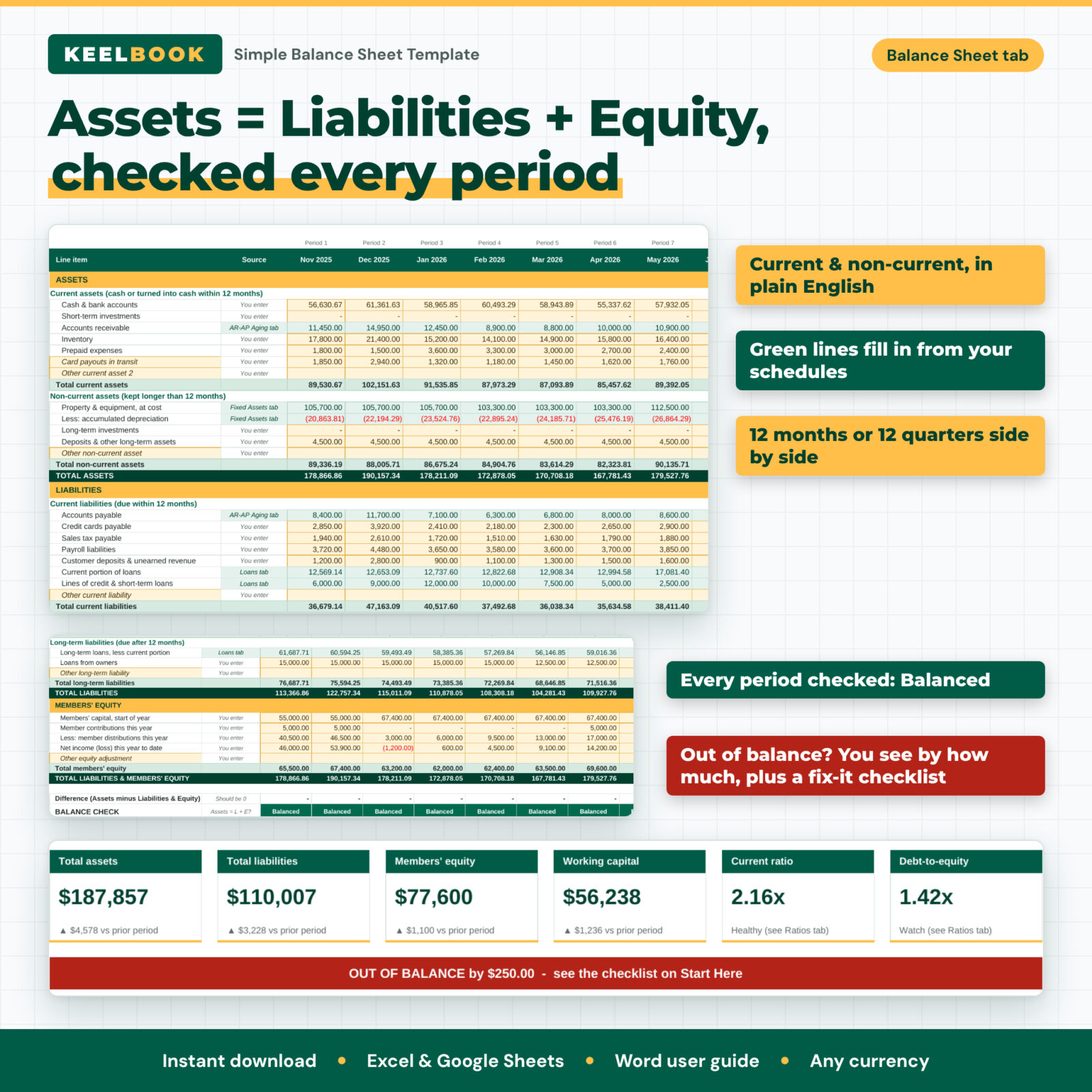
Keelbook is a simple balance sheet template for small business owners who want a clear picture of what the business owns, what it owes and what is left for the owners, without learning accounting software. Enter your period-end balances once and Keelbook builds a clean balance sheet, checks that Assets = Liabilities + Equity for every period, and explains the result in plain English.
Most free balance sheet templates give you one column and a total. Keelbook gives you 12 snapshots side by side (monthly or quarterly), schedules that do the hard math for you, ratios a lender would look at, a dashboard, and a formal one-page balance sheet you can print or save as PDF.
Who this balance sheet spreadsheet is for
- Sole proprietors and freelancers who need a balance sheet for a bank loan, SBA application, lease or grant
- Single-member and multi-member LLCs, partnerships and small corporations that want monthly or quarterly snapshots
- Owners who use bookkeeping software but want an easier summary with trends and ratios
- Bookkeepers who prepare simple owner reports for clients (within your own business)
- Students and new business owners learning how a balance sheet works
Main benefits
- No more guessing if it balances. Every period shows Balanced or Out by the exact amount, and a checklist lists the usual causes (missing year-to-date profit, draws entered as negatives, a loan entered twice).
- Less typing, fewer errors. Accumulated depreciation, loan balances split into current and long-term parts, receivables and payables all flow in from their own schedules.
- Understand your position. Working capital, current ratio, quick ratio, debt-to-equity, debt ratio and old receivables are calculated for every period with Healthy / Watch / Concern status and plain-English explanations.
- Ready to share. A one-page printable balance sheet with the prior period, change, balance check and key ratios.
Features
Balance sheet with 12 snapshots
- Current assets, non-current assets, current liabilities, long-term liabilities and equity in plain-English wording
- 12 month-ends or 12 quarter-ends side by side; dates are built from your first period end date
- Change from the first to the latest period (amount and percent) on every line
- Rename the Other lines to fit your business; the names flow to every tab
Supporting schedules
- Fixed assets: up to 30 assets with straight-line depreciation, salvage value, disposals, book value and status
- Loans: up to 8 amortizing loans with balances calculated for every period, extra-payment option and estimated payoff month, plus lines of credit and irregular loans
- Receivables and payables aging: not yet due, 1-30, 31-60, 61-90 and over 90 days past due
Dashboard, changes and ratios
- Six headline tiles with change vs the prior period and a Balanced / Out of balance banner
- Four charts: what you own vs what you owe, equity trend, asset mix, current and quick ratio trend
- Ratio scorecard and an automatic quick read written in sentences
- Changes tab with every line color-coded by good or less helpful direction
- Ratio comfort zones you can adjust to your industry
Made for your business type
- One dropdown switches equity labels for sole proprietor, single-member LLC, multi-member LLC, partnership or corporation
- Detailed or Quick equity method (Quick shows equity as assets minus liabilities if you have no books yet)
- One currency setting for every heading, tile and summary
What is included
- Keelbook-Simple-Balance-Sheet.xlsx: the clean workbook (11 tabs: Start Here, Dashboard, Settings, Balance Sheet, Fixed Assets, Loans, AR-AP Aging, Changes, Ratios, Print Balance Sheet, Glossary)
- Keelbook-Example-Filled-Balance-Sheet.xlsx: the same workbook filled with 12 months of example numbers so you can see a finished balance sheet
- Keelbook-User-Guide.docx: a 13-page Word guide with screenshots, troubleshooting and FAQ
How it works
- Choose your business type, currency, monthly or quarterly snapshots and first period end date on the Settings tab.
- Add your fixed assets and loans once (optional). Depreciation and loan splits are calculated for every period.
- Enter receivables and payables by age (optional), then type the remaining balances on the Balance Sheet tab.
- Make sure every period says Balanced, read the Dashboard and Ratios, and print the one-page balance sheet.
File formats and software requirements
One .xlsx workbook plus a filled example and a .docx user guide. Works in Microsoft Excel 2016 or later (Windows and Mac), Excel for Microsoft 365, and Google Sheets (free Google account). No macros, no add-ins, no scripts. Formula cells are locked without a password, so you can unprotect any sheet to customize it.
Customization
Rename the yellow Other lines, change currency, business type and ratio comfort zones, switch between monthly and quarterly, and restyle fonts and colors. Start a new year by saving a copy and carrying last year’s ending equity forward.
Digital download
This is an instant digital download. No physical item is shipped. You can download the files right after checkout from your Taskdale account. License: personal use only, or use within your own business. You may not resell, share or redistribute the files.
Use cases
- Preparing a balance sheet for a bank, SBA or equipment loan application
- Month-end or quarter-end review of cash, debt and owner equity
- Tracking how fast you are paying down loans and building equity over a year
- Giving a landlord, investor or partner a clean one-page snapshot
- Learning the balance sheet with a real worked example before you meet your accountant
Balance sheet template FAQ
Is this balance sheet template good for a small business with no accountant?
Yes. It is written in plain English, includes a glossary and a filled example, and the Quick equity method works even if you do not have bookkeeping records yet.
Does it work in Google Sheets?
Yes. Upload the .xlsx to Google Drive and open it with Google Sheets. It uses only standard functions and native charts.
Can I use it for an LLC or partnership?
Yes. Pick your business type and the equity section switches to member’s equity, members’ equity, partners’ capital or stockholders’ equity.
Why does my balance sheet not balance?
Usually year-to-date net profit is missing, draws were entered as negative numbers, or a loan was entered twice. The workbook shows the exact difference and a checklist of causes.
Does it calculate depreciation for my taxes?
No. It uses straight-line depreciation as a simple book estimate. Tax depreciation follows IRS rules, so ask your tax professional.
Can I use my own currency?
Yes. One currency setting updates the headings, dashboard tiles and summaries.
Educational tool for organizing your own numbers. Not accounting, tax or legal advice.
Reviews
There are no reviews yet.