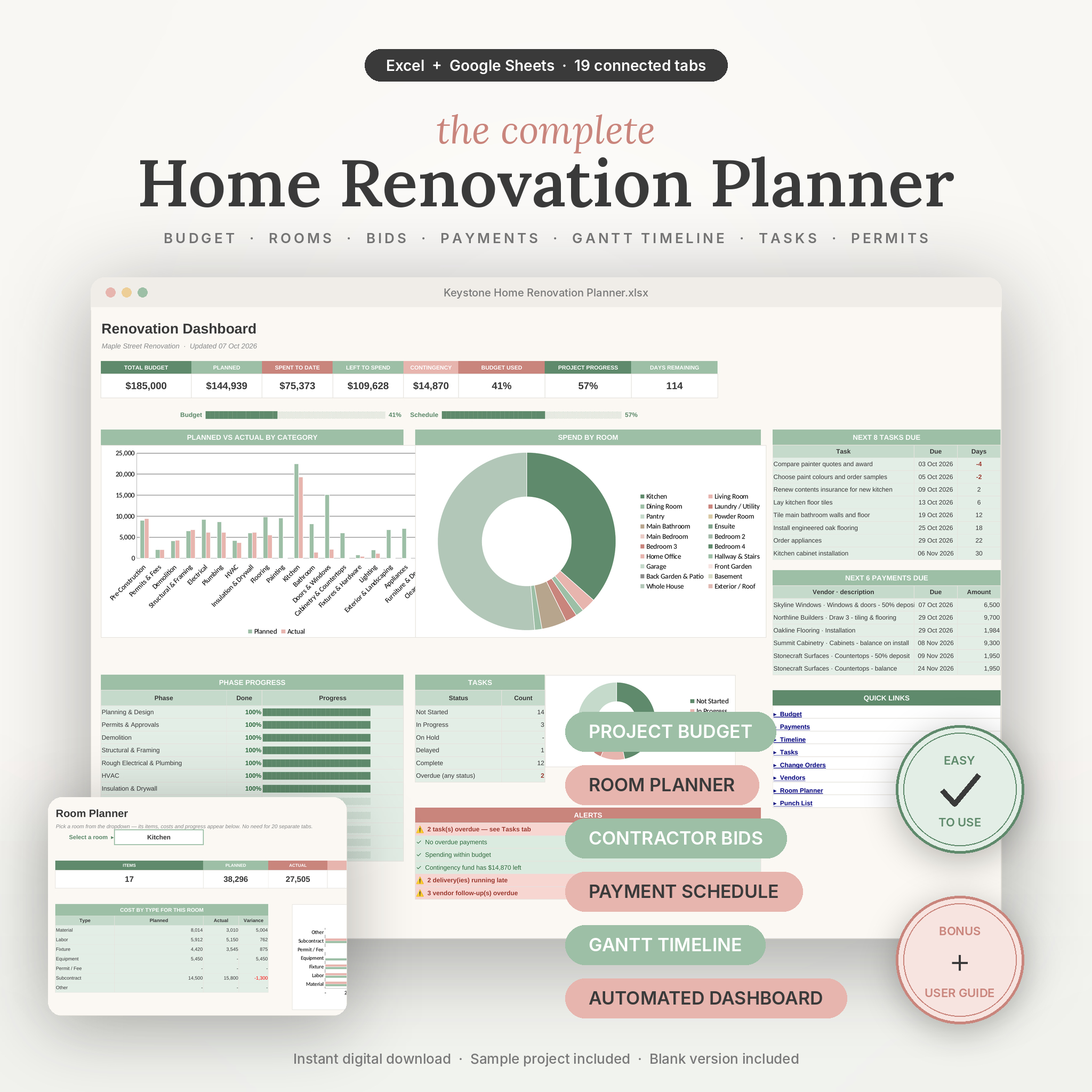


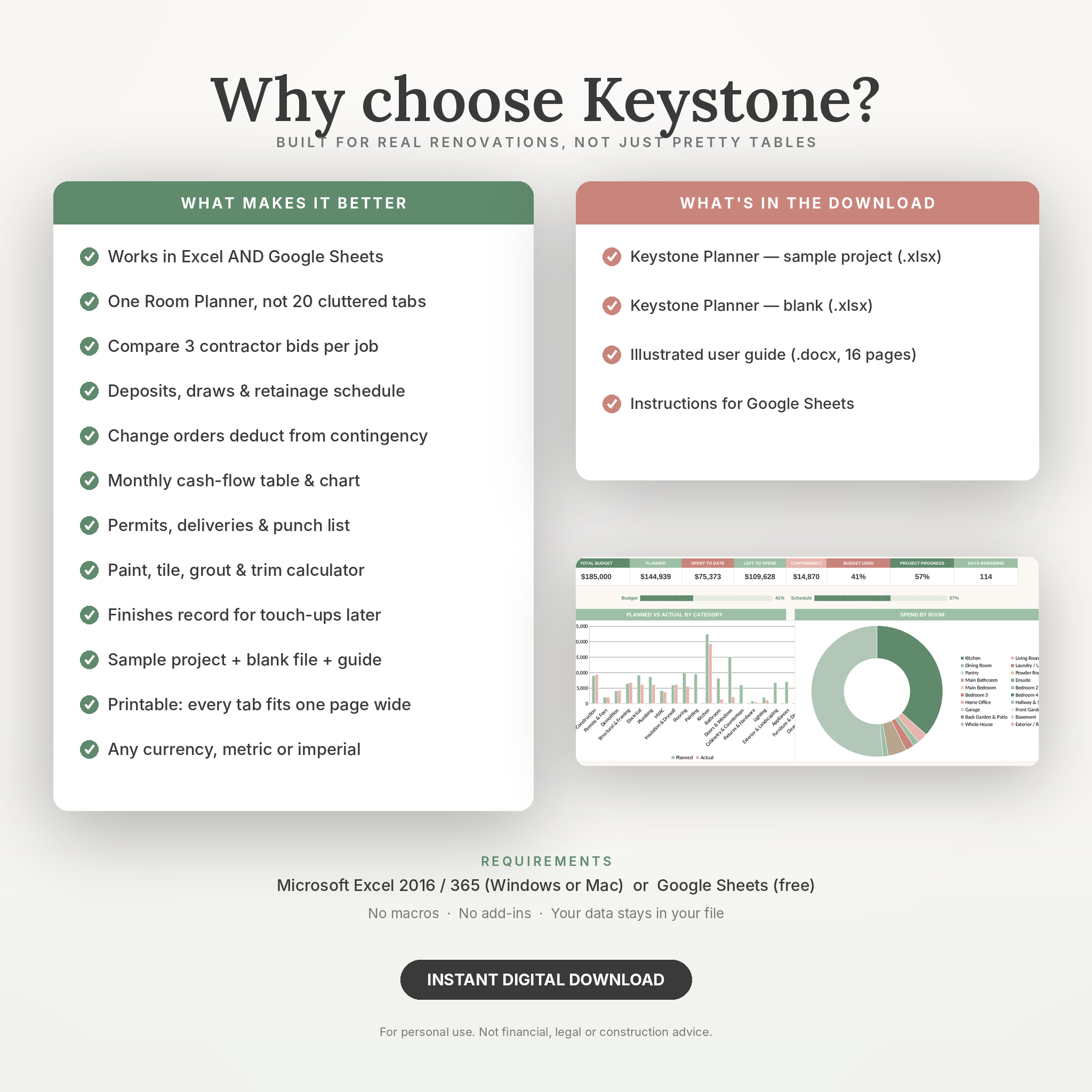
Renovating a house generates paperwork faster than it generates dust. Quotes in your inbox, a budget on the back of an envelope, a promise from the tiler about Tuesday that nobody wrote down. Keystone puts all of it in one workbook that actually does the maths for you.
Type a cost once on the Budget tab and it flows through to the room summary, the category chart, the dashboard tiles and the room planner. Change a date on the Timeline and the Gantt bars redraw themselves. Approve a change order and your contingency fund drops by exactly that amount. Nothing gets typed twice.
Who it’s for
Homeowners managing their own renovation, extension or new build. Couples who want one shared place for budget, decisions and dates. Investors refurbishing a property to flip or let. Small contractors and designers who want a clean tracker to share with clients. No spreadsheet skills needed. If you can type in a cell and pick from a dropdown, you can run the whole thing.
Why buyers pick Keystone over other renovation templates
- Works in Microsoft Excel AND Google Sheets. Most renovation planners are one or the other. This one is both.
- One Room Planner instead of 20 room tabs. Pick any room from a dropdown and see its items, cost by type and progress. No clutter, nothing to maintain.
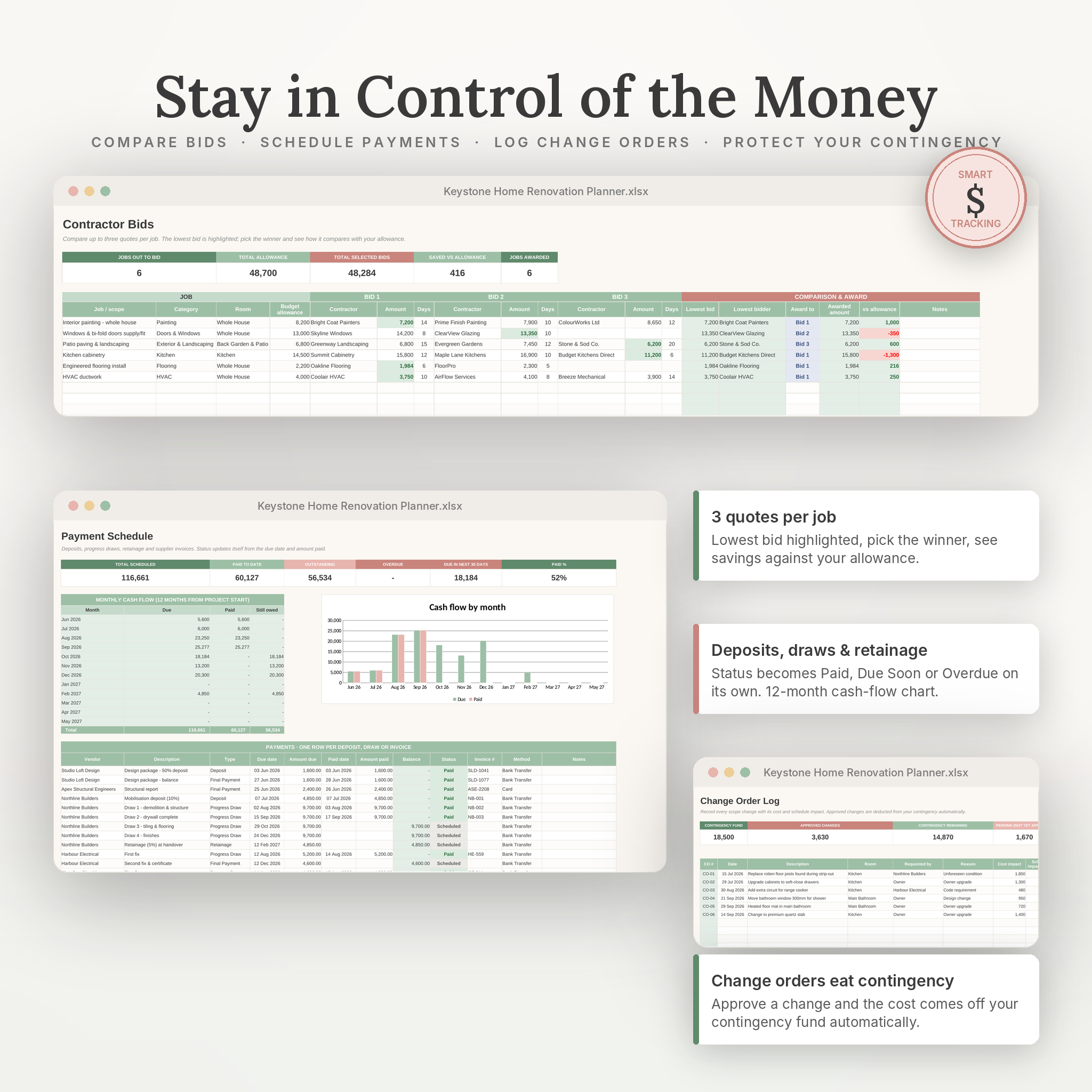
- Contractor bid comparison. Up to three quotes per job, lowest bid highlighted, award the work and track savings against your allowance.
- Real payment tracking. Deposits, progress draws, retainage and supplier invoices with status that updates itself (Paid, Due Soon, Overdue), plus a 12-month cash-flow table and chart.
- Change orders that hit your contingency. Log scope changes with cost and schedule impact. Approved ones come straight off the contingency fund on the dashboard.
- A dashboard that tells you when something is wrong. Overdue tasks, late payments, late deliveries and an exhausted contingency all turn red automatically.
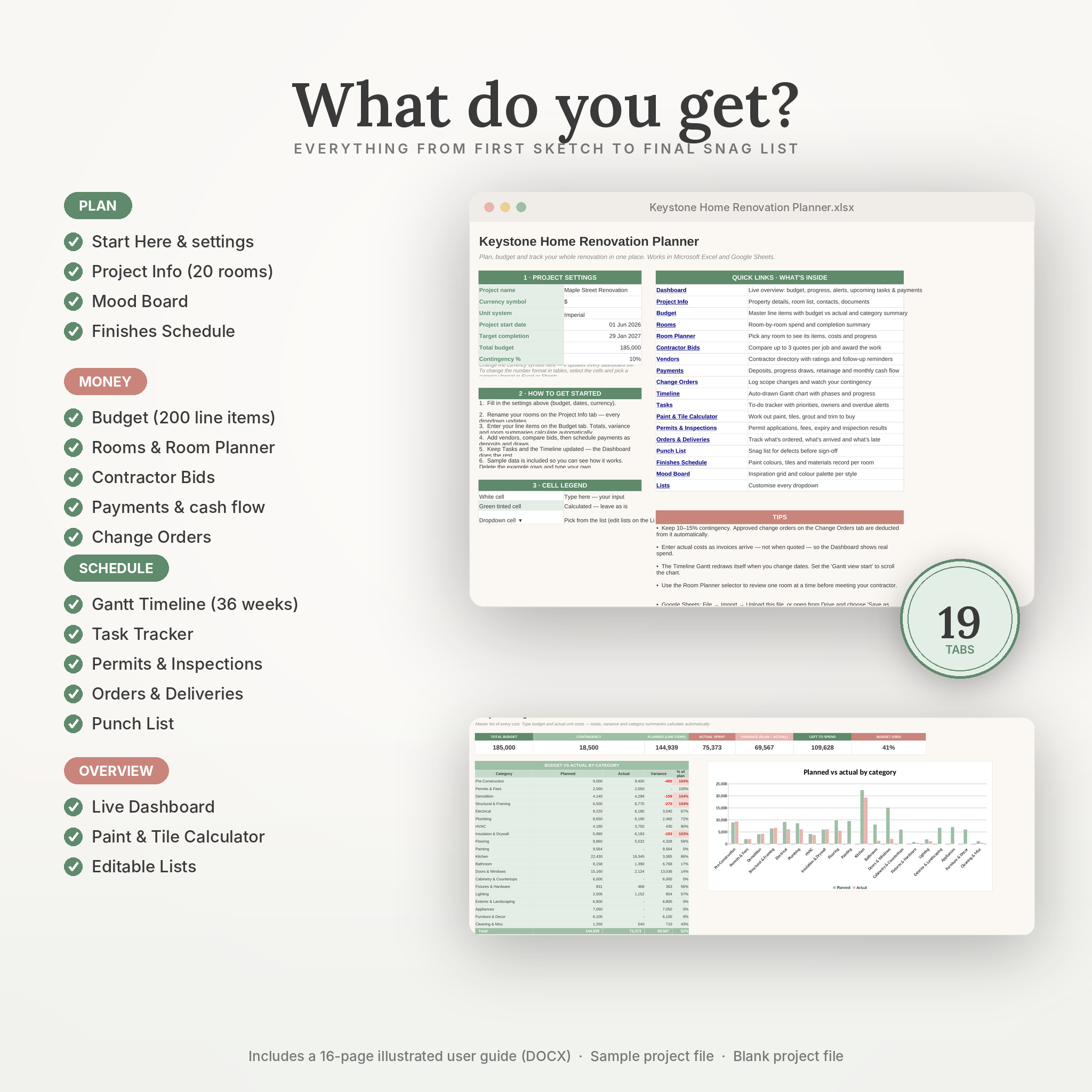
What’s inside (19 tabs)
- Start Here – project settings (currency, units, dates, budget, contingency %), quick links, legend and tips
- Dashboard – 8 live KPI tiles, budget vs schedule progress bars, planned-vs-actual chart, spend-by-room chart, phase progress, task status, alerts, next 8 tasks due and next 6 payments due
- Project Info – property details, up to 20 renamable rooms, key contacts, document links
- Budget – 200 line items with quantity × unit cost, budget vs actual, variance, vendor, status and a 20-category summary with chart
- Rooms – every room on one page: items, planned, actual, variance, share of spend and completion bar
- Room Planner – dropdown room selector with filtered items, cost by type and chart
- Contractor Bids – compare 3 quotes per job and award the work
- Vendors – 40-row directory with licence, insurance, rating, quote, status and follow-up countdown
- Payments – deposits, draws, retainage, invoices, automatic status and monthly cash flow
- Change Orders – cost and schedule impact, contingency remaining
- Timeline – 36-week Gantt chart drawn from your dates, with phases, % complete and a this-week marker
- Tasks – 80-row tracker with room, phase, owner, due date, days left, priority, status and overdue flags
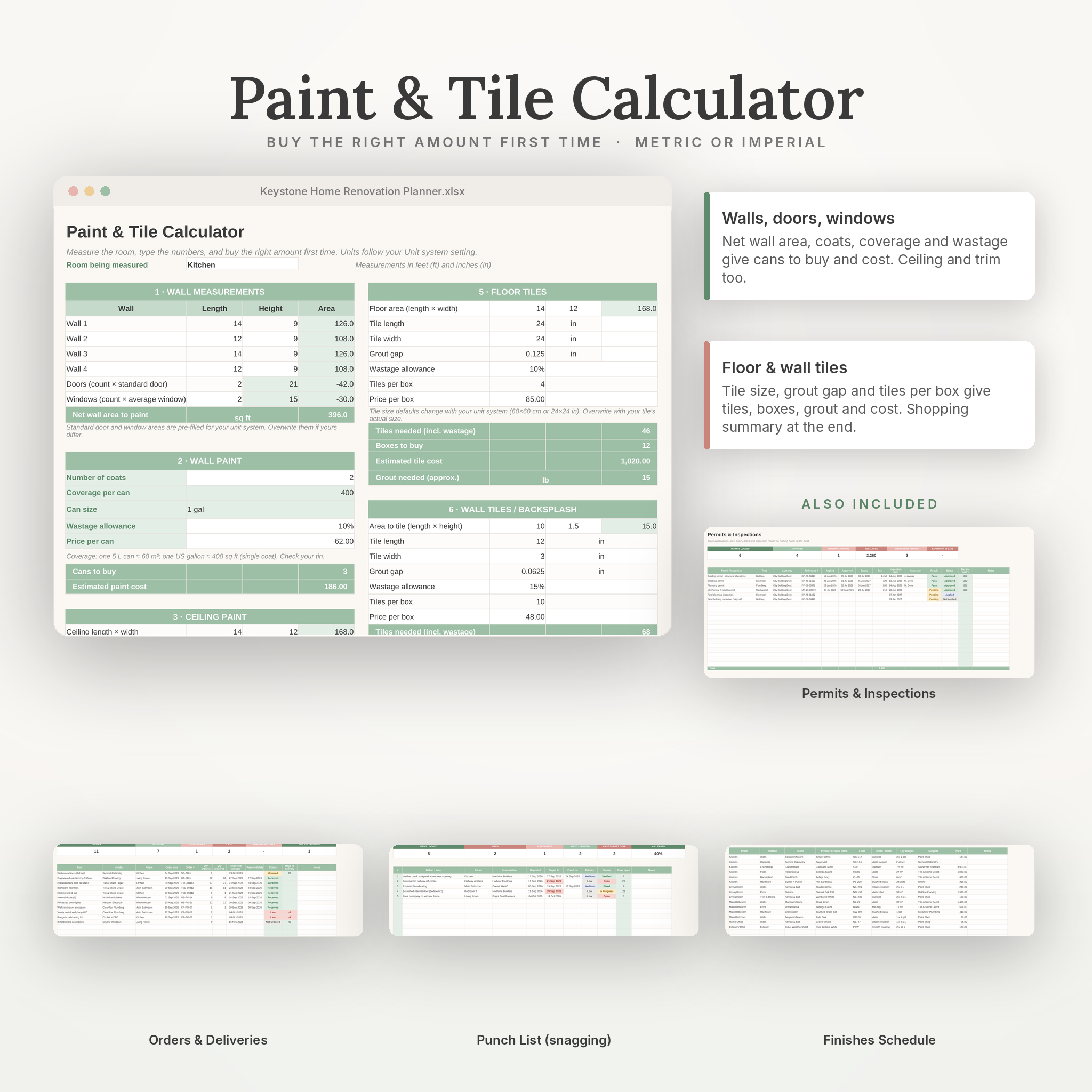
- Paint & Tile Calculator – wall and ceiling paint, trim length, floor and wall tiles, grout, boxes and cost (metric or imperial)
- Permits & Inspections – applications, fees, approvals, expiry countdown, inspection results
- Orders & Deliveries – what’s ordered, what’s arrived, what’s late
- Punch List – snagging with responsibility, target dates and days open
- Finishes Schedule – paint colours, tiles, worktops and hardware per room
- Mood Board – three inspiration boards with image cells, links, swatches and style notes
- Lists – every dropdown in one place to customise
How it works
- Fill in seven settings cells on Start Here.
- Rename your rooms on Project Info. Every dropdown updates.
- Enter your line items on the Budget tab. Totals and summaries calculate.
- Add vendors, compare bids, then schedule payments.
- Enter phases and tasks on the Timeline and check the Dashboard.
What you receive
- Keystone Home Renovation Planner (sample project) – .xlsx filled with a realistic whole-house renovation so you can see how everything behaves
- Keystone Home Renovation Planner (blank) – the same workbook, cleared and ready for your project
- User Guide – 16-page illustrated .docx covering every tab, customisation, troubleshooting and FAQ
File format & requirements
- .xlsx (Excel) and .docx (Word) files
- Microsoft Excel 2016 or later / Microsoft 365 (Windows or Mac), or Google Sheets (free Google account): upload to Drive and choose File → Save as Google Sheets
- LibreOffice Calc also works. Apple Numbers opens the file but drops some dropdowns and colour rules
- No macros, no add-ins. Everything stays in your file
Customisation
Change the currency symbol and unit system on Start Here. Rename rooms, edit any dropdown list, recolour headers, add rows, and print any tab (each is set to fit one page wide). The user guide walks through all of it.
Digital download
Instant digital download. No physical item will be shipped. Files are available straight after checkout. For personal use only; please don’t resell or redistribute. Keystone is a planning tool, not financial, legal or construction advice.
Reviews
There are no reviews yet.