

A truck dispatcher spreadsheet that runs your whole dispatch office
Lanecue is a truck dispatcher spreadsheet built for independent dispatchers and small dispatch services. It keeps your carrier clients, every load you book, your dispatch fees, weekly carrier settlement statements, commission invoices, broker contacts and lane rate history in one linked workbook for Microsoft Excel and Google Sheets. You type the load once; Lanecue works out the RPM, the settlement week, your fee and whether that week has been billed yet.
Unlike a load list with a fixed 10% column, Lanecue handles how dispatchers really charge, prints the paperwork carriers expect, and shows what you earned, what is owed and what is unbilled.
Who it is for
- Independent truck dispatchers working for owner-operators and small fleets
- New dispatchers who want a professional system from the first carrier
- Small dispatch services managing up to 80 carriers and 1,500 loads per workbook
- Owner-operators who book their own freight and want lane and broker records
Main benefits
- Never forget to bill a week. The Ready to Invoice list shows every carrier-week with loads but no invoice.
- Get paid faster. Due dates, balances and overdue status on every commission invoice, plus a fee balance per carrier.
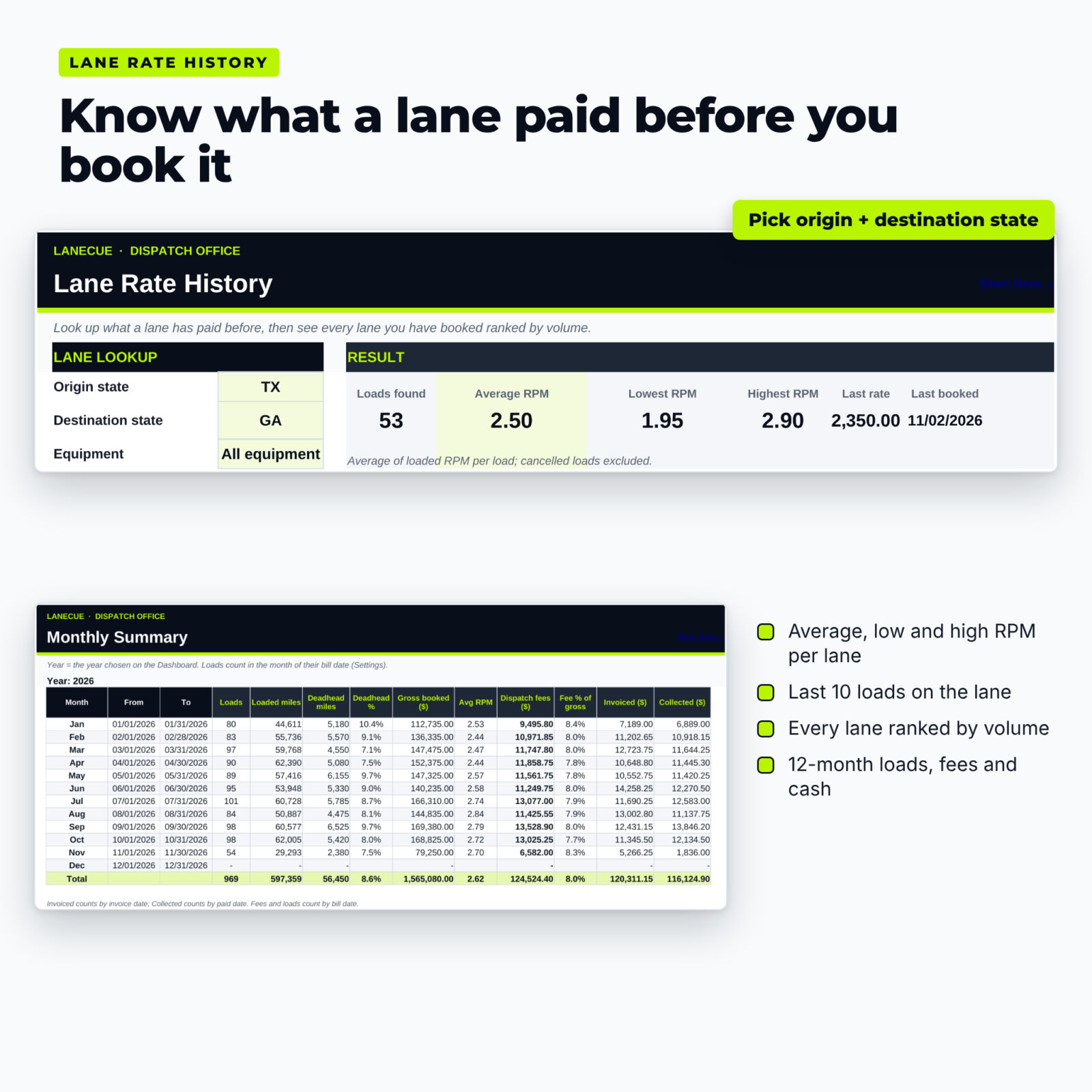
- Negotiate with data. Look up any lane to see the average, lowest and highest rate per mile you have booked, and the last 10 loads.
- Work with better brokers. Average days to pay per broker, compared with their stated terms.
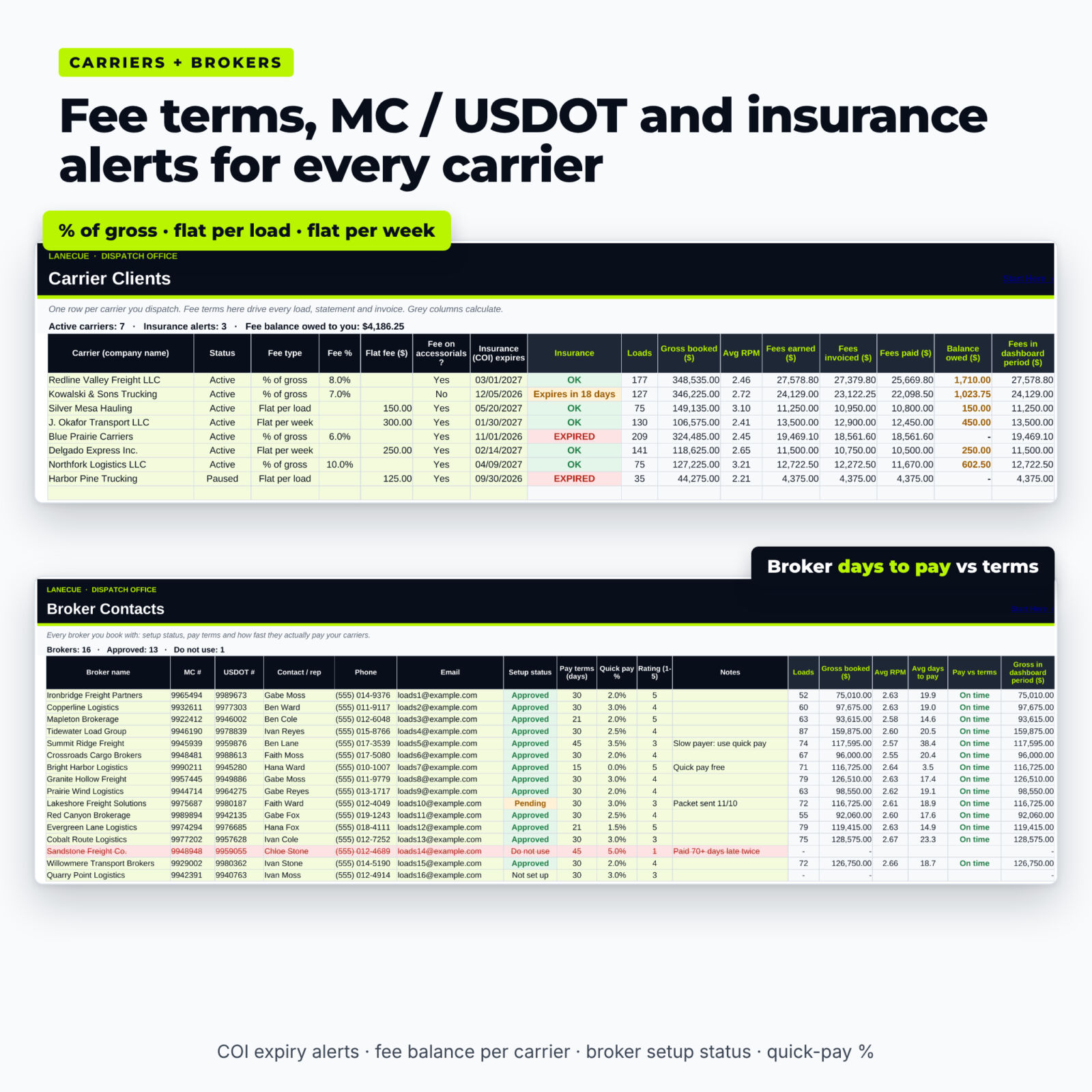
- Stay compliant with your own process. Store MC and USDOT numbers, agreement dates and insurance (COI) expiry, with alerts before a certificate lapses.
Features of the truck dispatcher tracker
Load board log (1,500 loads)
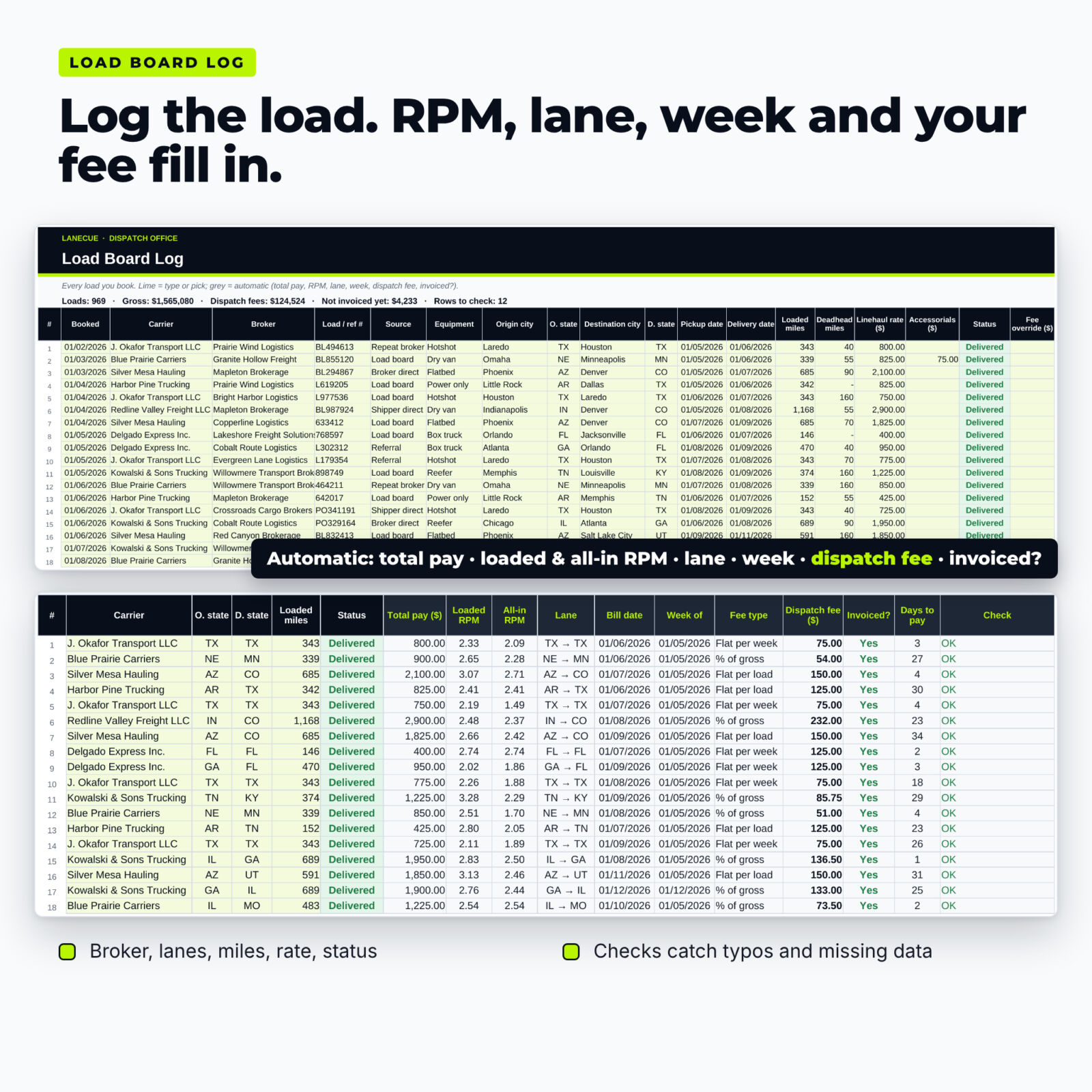
Booked date, carrier, broker, load number, source, equipment, origin and destination, pickup and delivery dates, loaded and deadhead miles, linehaul, accessorials, status, fee override and broker paid date. Automatic total pay, loaded RPM, all-in RPM, lane, bill date, settlement week, fee type, dispatch fee, invoiced? and a Check column that flags missing or suspicious data.
Carrier client list (80 carriers)
MC #, USDOT #, contact, equipment, trucks, home base, fee type, fee %, flat fee, fee on accessorials yes/no, agreement date, COI expiry, factoring company and notes. Each carrier shows loads, gross booked, average RPM, fees earned, invoiced, paid and balance owed.
Dispatch fee calculator built in
- % of gross on linehaul + accessorials, or linehaul only
- Flat per load, including TONU loads
- Flat per week, charged once per week with loads and split across that week’s loads to the cent
- Fee override for one-off deals; cancelled loads are excluded automatically
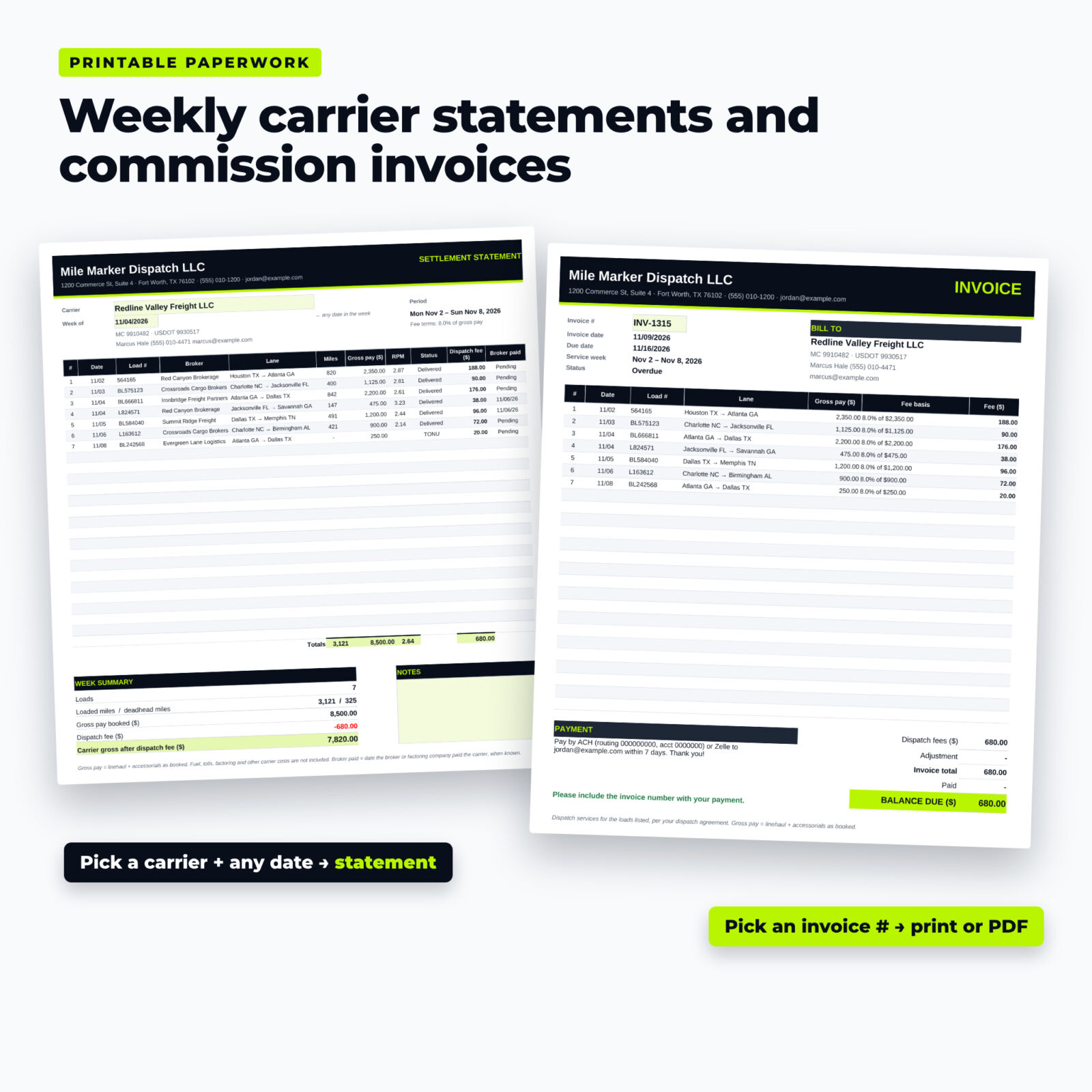
Weekly carrier settlement statement
Pick a carrier and any date in the week. The printable statement lists up to 25 loads with broker, lane, miles, gross pay, RPM, status, your fee and broker paid date, then totals and the carrier’s gross after your dispatch fee.
Commission invoices
An invoice register (500 rows) where the fee total fills itself from the loads, with adjustments, payments, due dates and Open, Part paid, Overdue or Paid status. A printable invoice page shows your business details, bill-to carrier, every load with its fee basis and the balance due.
Broker contact list (200 brokers)
Setup status, pay terms, quick-pay %, rating, loads, gross, average RPM and average days to pay.
Lane rate history
Lane lookup by origin and destination state and equipment, plus every lane you have booked ranked by loads.
Dashboard and monthly summary
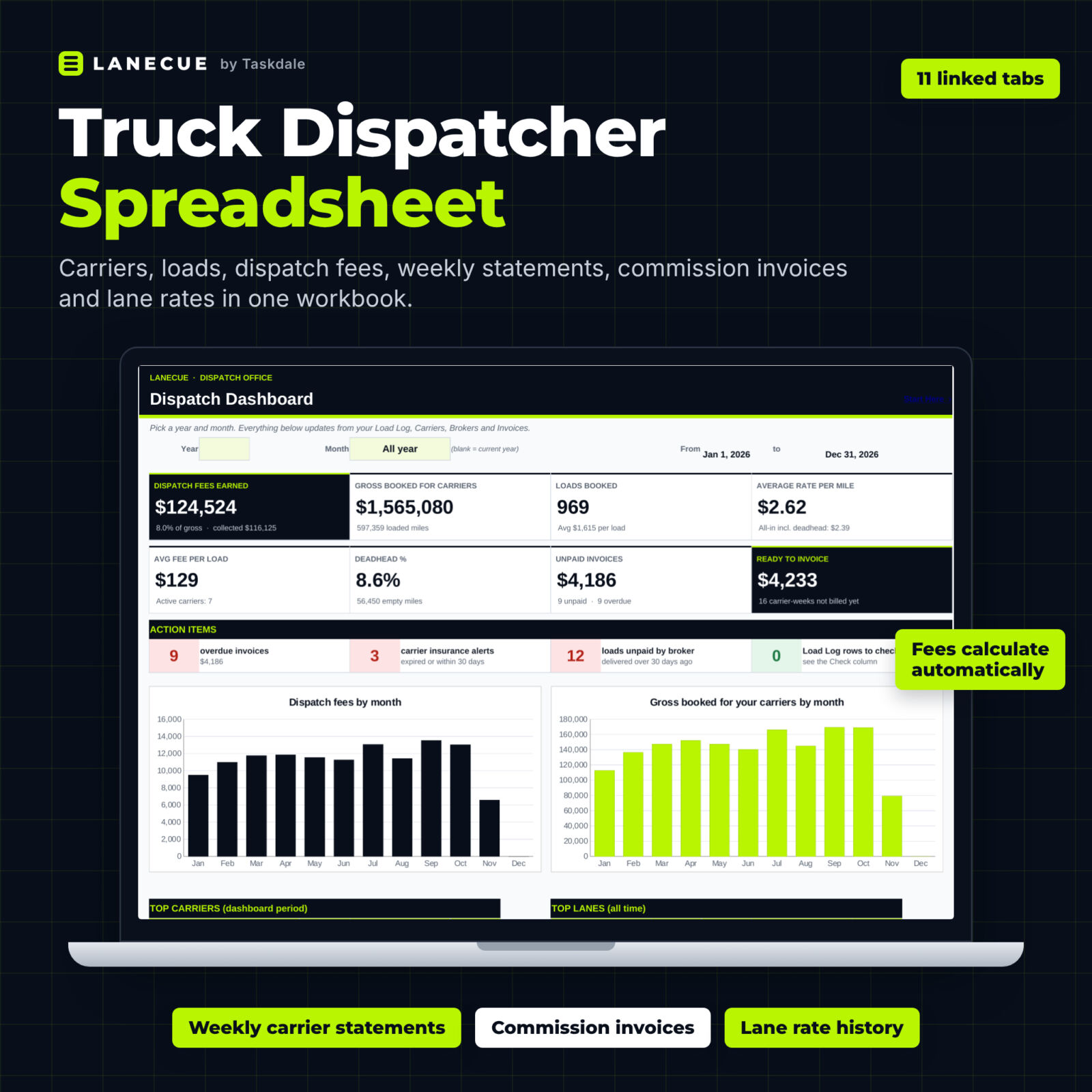
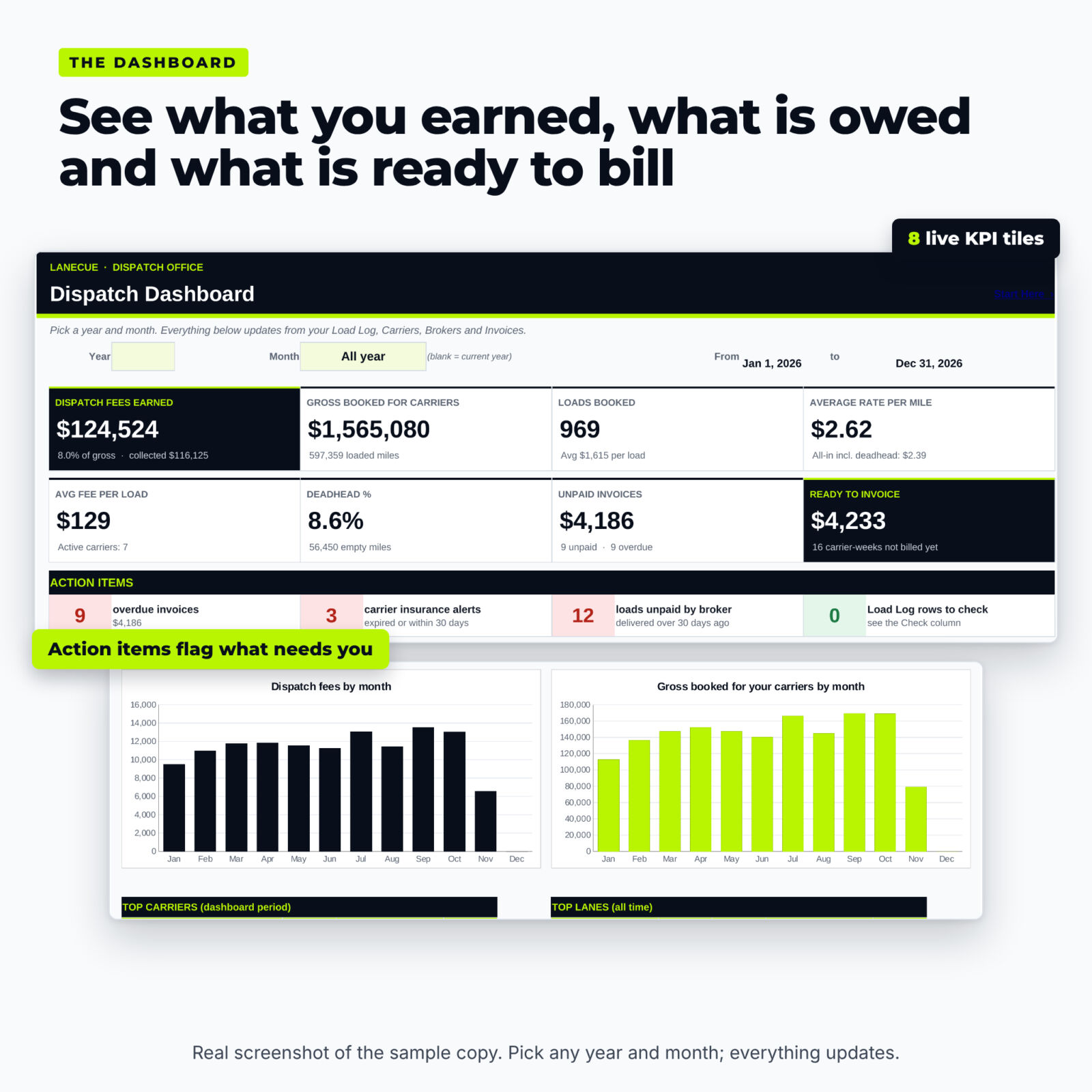
Eight KPI tiles (fees earned, gross booked, loads, RPM, average fee per load, deadhead %, unpaid invoices, ready to invoice), action items, three charts, top carriers, top lanes and top brokers for any year or month, and a 12-month summary of loads, miles, gross, fees, invoiced and collected.
What’s included
- Lanecue-Truck-Dispatcher-Tracker.xlsx: the blank 11-tab workbook (Start Here, Dashboard, Load Log, Carriers, Brokers, Weekly Statement, Invoices, Invoice, Lane History, Monthly Summary, Settings)
- Lanecue-User-Guide.docx: a designed Word guide with setup steps, fee rules, troubleshooting and FAQ
How it works
- Enter your business details, currency symbol, week start and invoice terms on Settings.
- Add your carriers with their fee terms, MC / USDOT numbers and COI dates, and your brokers.
- Log every load you book. Fees and RPM calculate as you type.
- Each week, add an invoice row for every carrier-week on the Ready to Invoice list, then print the invoice and the settlement statement.
- Record payments and watch the dashboard.
File format and software requirements
One .xlsx workbook for Microsoft Excel 2016 or later, Excel 365 (Windows and Mac) and Google Sheets (free Google account). No macros, add-ins or scripts. Every calculation was tested with a full year of sample data. Printable pages fit on one sheet of US Letter or A4.
Customization
Use any currency symbol, Monday or Sunday settlement weeks, billing by delivery or pickup date, your own invoice terms and number prefix, and your own lists of equipment types, load sources and payment methods. Formula cells are locked without a password.
Use cases
- A dispatcher with five owner-operators on 8% bills every Monday from the Ready to Invoice list and emails each carrier a PDF invoice and settlement statement.
- A hotshot dispatcher charging a flat weekly fee sees exactly how that fee spreads across the week’s loads and what each truck still owes.
- Before quoting a Texas-to-Georgia dry van load, a dispatcher checks Lane History for the average and highest RPM booked on that lane.
Digital download
This is a digital product. No physical item ships. You can download the files right after checkout from your order confirmation and your account.
FAQ
Does this truck dispatcher spreadsheet work in Google Sheets?
Yes. Upload the .xlsx to Google Drive and save it as a Google Sheet. There are no macros or scripts to enable.
Can each carrier have a different dispatch fee?
Yes. Every carrier has its own fee type (% of gross, flat per load or flat per week) and amount, and any single load can be overridden.
How do I make a carrier settlement statement?
Open Weekly Statement, pick the carrier and type any date in the week. Print it or save it as PDF.
Does it create dispatch invoices?
Yes. Add a row on the Invoices tab and the fee total fills in from that carrier’s loads for the week; the Invoice tab prints it with your payment instructions.
How many carriers and loads can I track?
80 carriers, 200 brokers, 1,500 loads and 500 invoices per workbook. Most dispatchers start a fresh copy each year.
Is it accounting or tax software?
No. Lanecue tracks dispatch revenue, billing, payments and lanes. Use your accounting software or a tax professional for bookkeeping and taxes.
Do I need MC numbers?
No. MC # and USDOT # are optional text fields. FMCSA has proposed moving to the USDOT number only, so leave MC # blank for carriers that do not have one.
Licence: personal use only (or use within your own business). You may not resell, share, or redistribute the files. © 2026 Taskdale. All rights reserved. Lanecue is a record-keeping tool, not legal, tax or financial advice.


Reviews
There are no reviews yet.