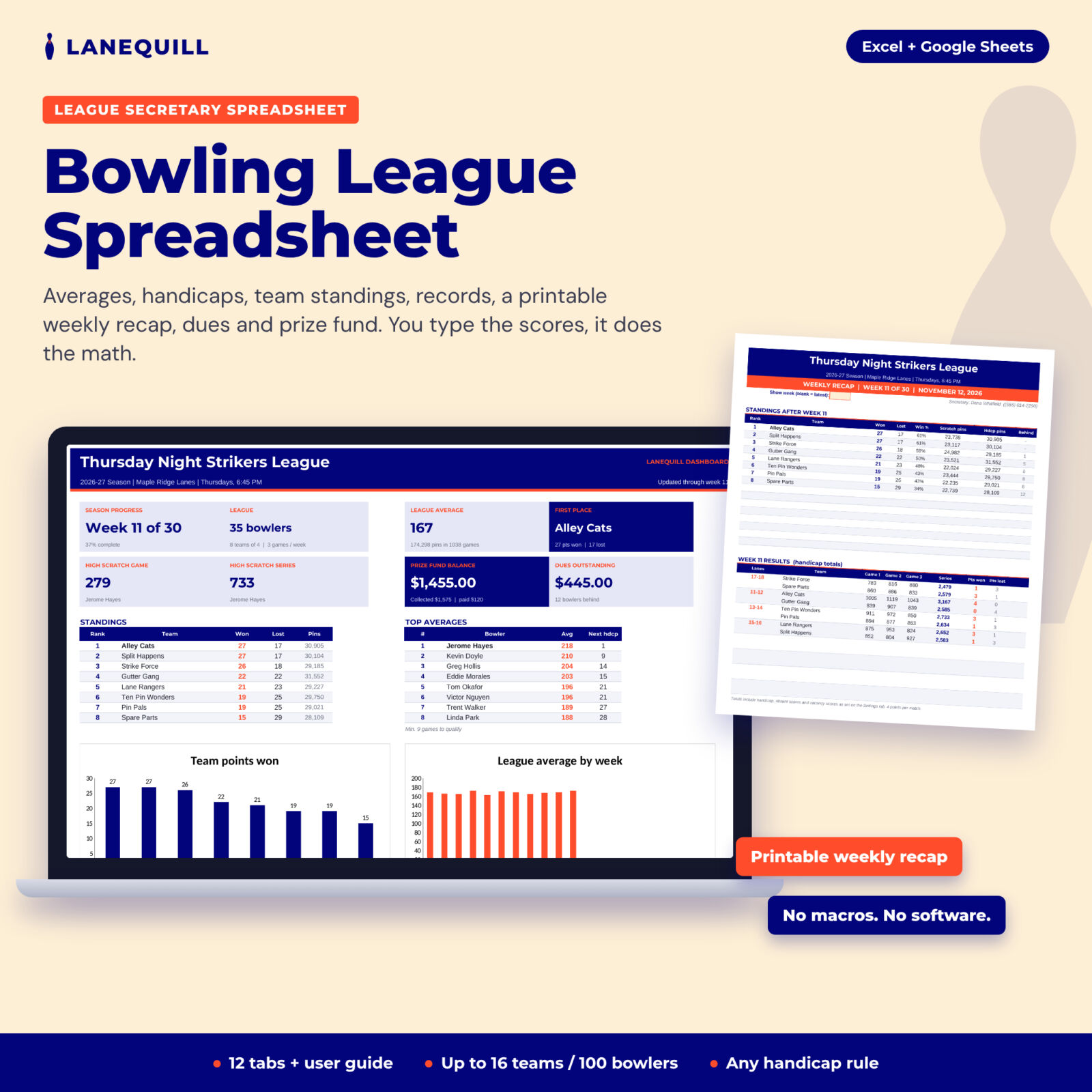


Lanequill is a bowling league spreadsheet built for the person who keeps the books: the league secretary. Set your league’s rules once, type each bowler’s games after league night, and the workbook calculates averages, handicaps, absent and vacancy scores, team points, standings, high games and series, dues balances and the prize fund. Then print a clean weekly recap for the lanes or share it as a PDF. It runs in Microsoft Excel and Google Sheets with no macros, so it opens on any computer.
What this bowling league spreadsheet does
Most league trackers stop at averages. Lanequill handles the whole weekly job of a league secretary, including the parts that usually break a homemade spreadsheet: absent bowlers, empty lineup spots, substitutes, byes and tie-breaks.
- Averages and handicaps: averages drop fractions, handicaps use your basis and percentage (for example 90% of 220), an optional maximum, drop-fractions or rounding, and entering averages until a bowler has enough league games.
- Absent and vacancy scores: choose average minus pins or a percent of average, with or without handicap. Empty spots get your vacancy score automatically.
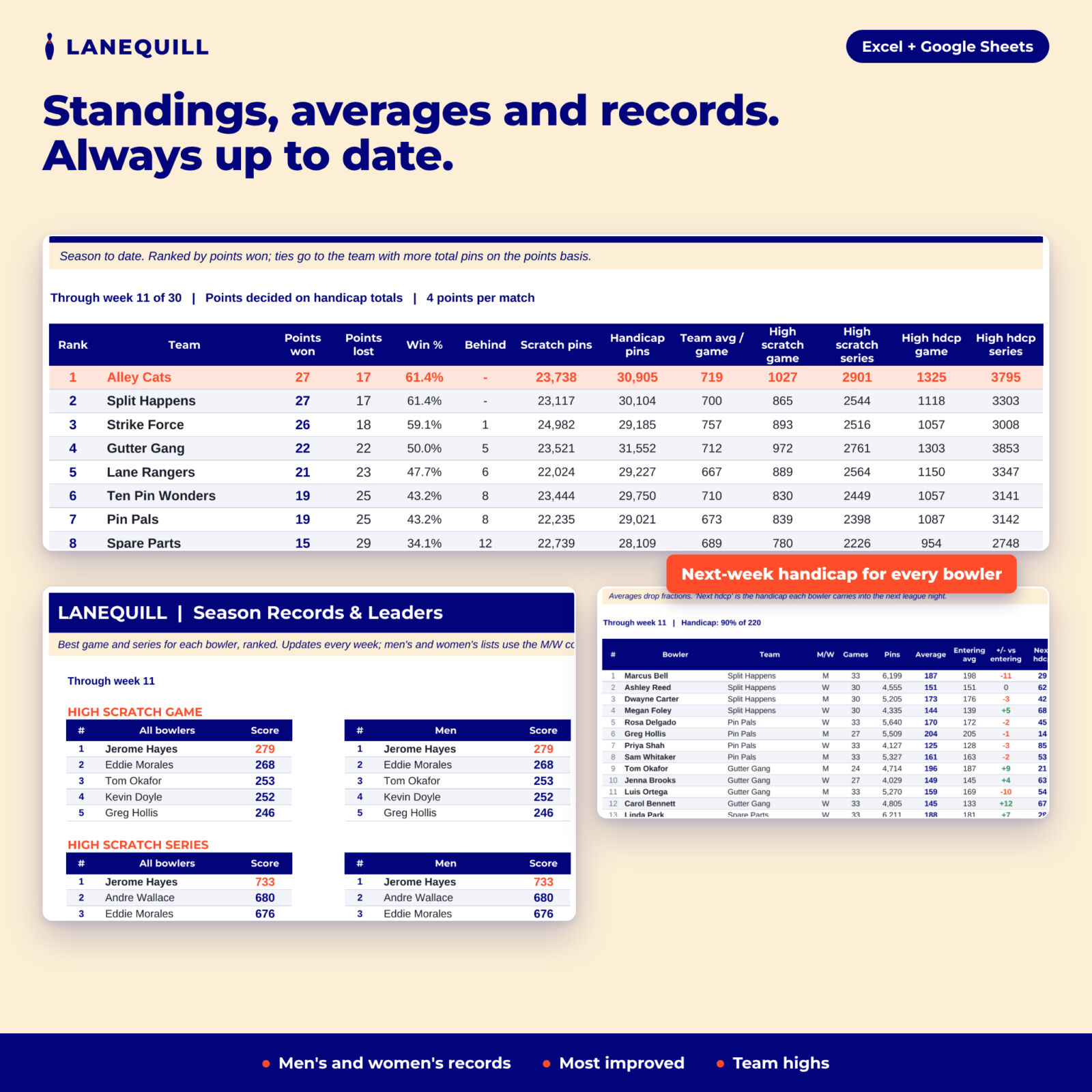
- Team points and standings: points for each game and for the series, decided on handicap or scratch totals, with ties split and a pin-total tiebreak.
- Schedule and lanes: an automatic round robin with rotating lane pairs and byes for odd team counts. Override any pairing or date.
- Records: top 5 high games and series, scratch and handicap, for all bowlers, men and women, plus top averages, most improved, most 200+ games and team records.
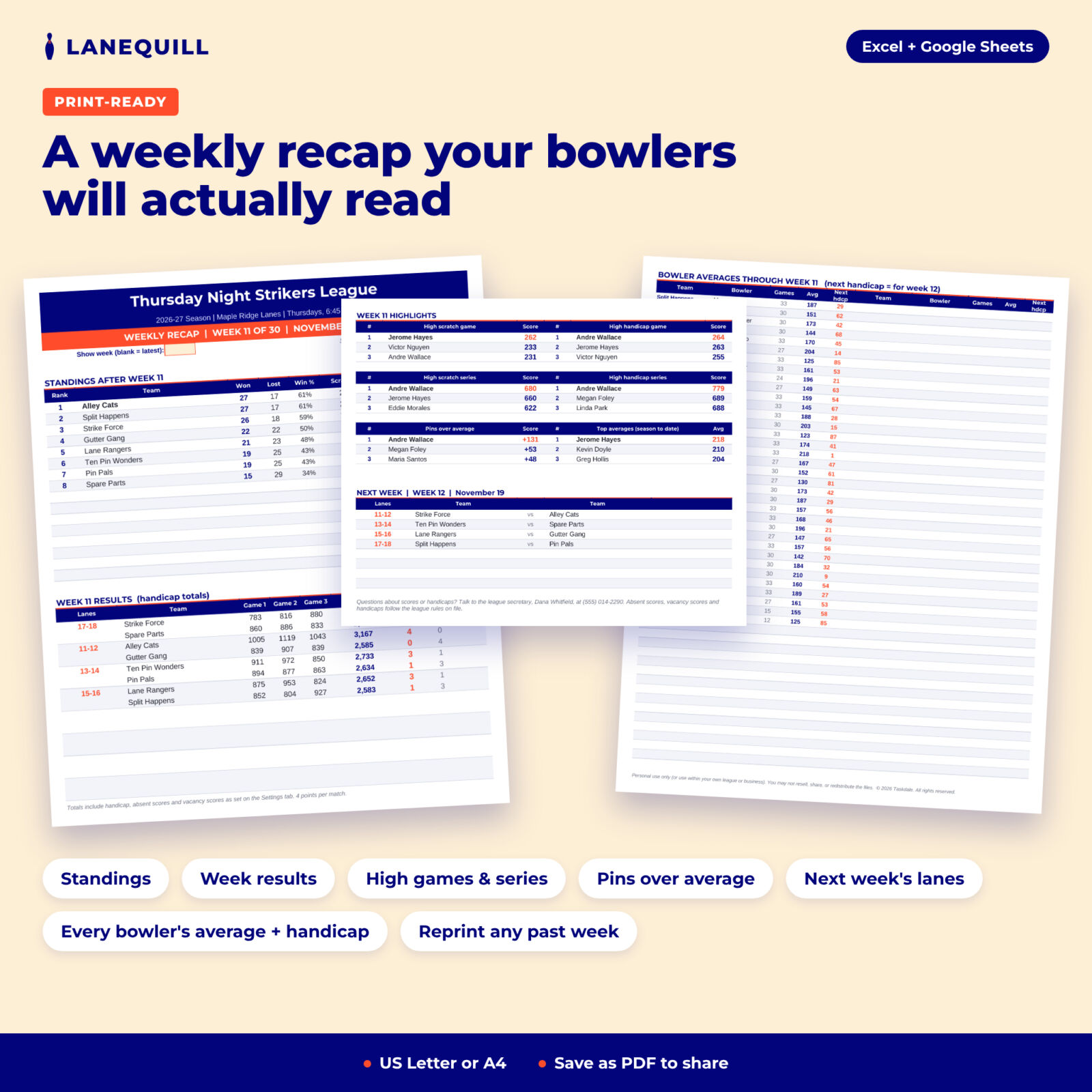
- Printable weekly recap: three pages with standings, each match’s game totals and points, the week’s highlights, next week’s lanes and every bowler’s average and next-week handicap. Reprint any past week by typing its number.
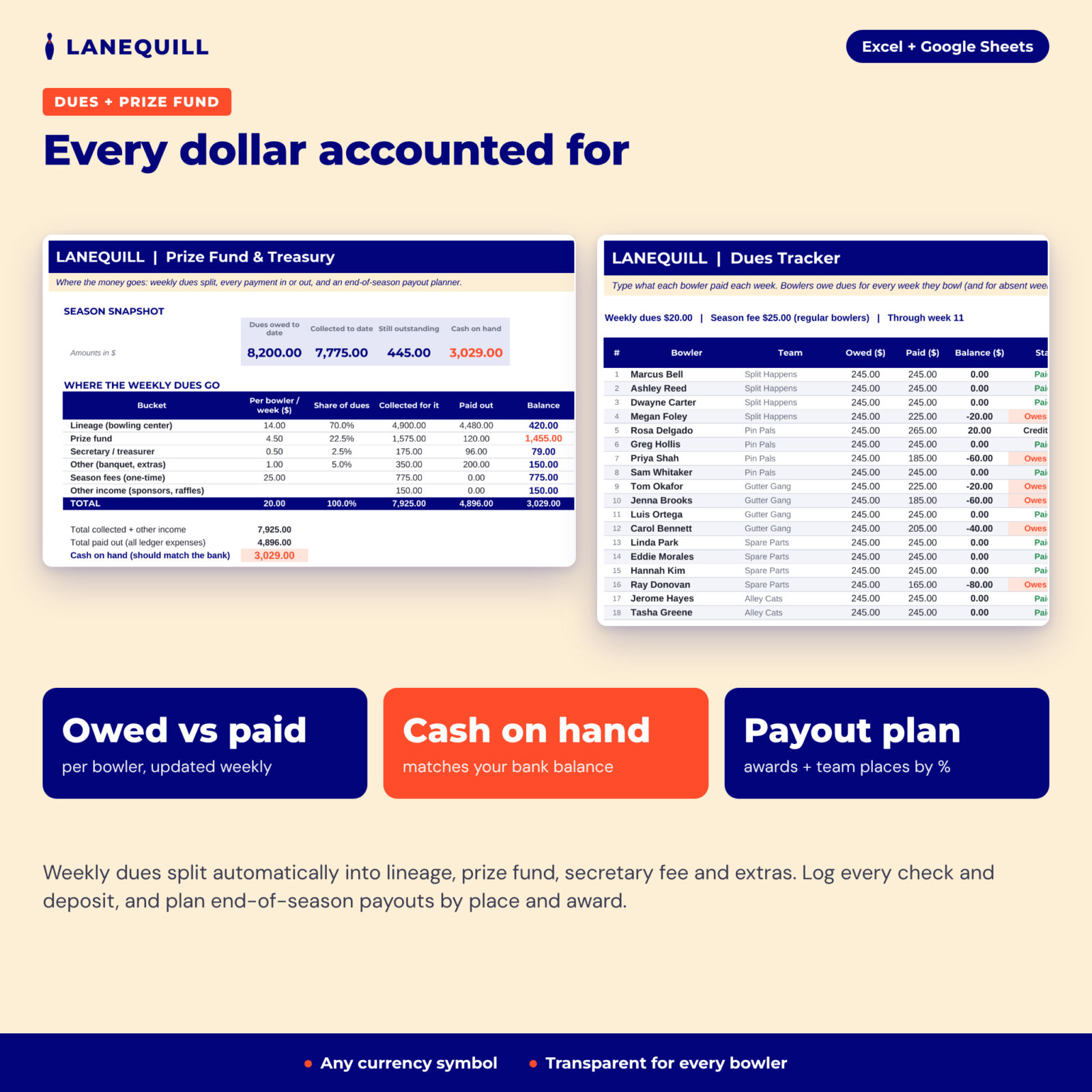
- Dues and prize fund: owed, paid and balance for every bowler; a split of weekly dues into lineage, prize fund, secretary fee and extras; a ledger for every check; cash on hand; and an end-of-season payout planner.
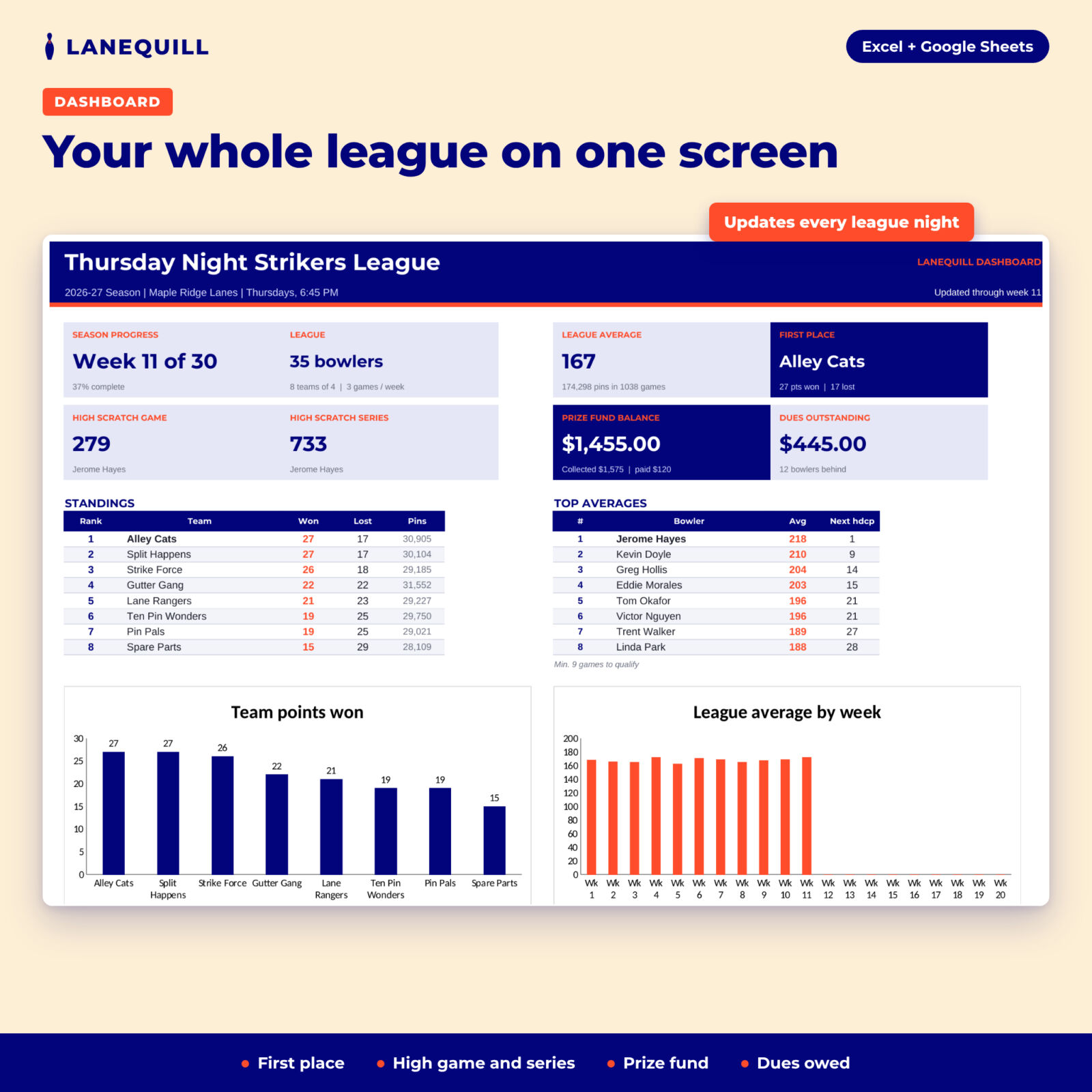
- Dashboard: season progress, league average, first place, high game and series, prize fund balance, dues outstanding and three charts.
Who it is for
League secretaries and treasurers of adult, senior, mixed, church, company and youth leagues with 2 to 16 teams. It also suits a new secretary taking over a league from paper score sheets, or a small league that does not want to buy and learn dedicated league software. Team captains can use it to keep their own figures.
Main benefits
- Save hours every week: typing a night’s games takes about 10 minutes; the math is done instantly.
- Fewer disputes: every handicap and absent score follows the rules on your Settings tab, the same way every week.
- Transparent money: bowlers can see what they owe and where the prize fund stands.
- Nothing to install: no macros or add-ins, so it is not blocked by security settings.
What is included
- Lanequill Bowling League Secretary Spreadsheet (.xlsx) with 12 tabs: Start Here, Dashboard, Settings, Roster, Schedule, Scores, Standings, Bowlers, Records, Recap, Dues and Prize Fund.
- Lanequill User Guide (.docx): 16 illustrated pages covering setup, every tab, how the math works, troubleshooting and FAQ.
How it works
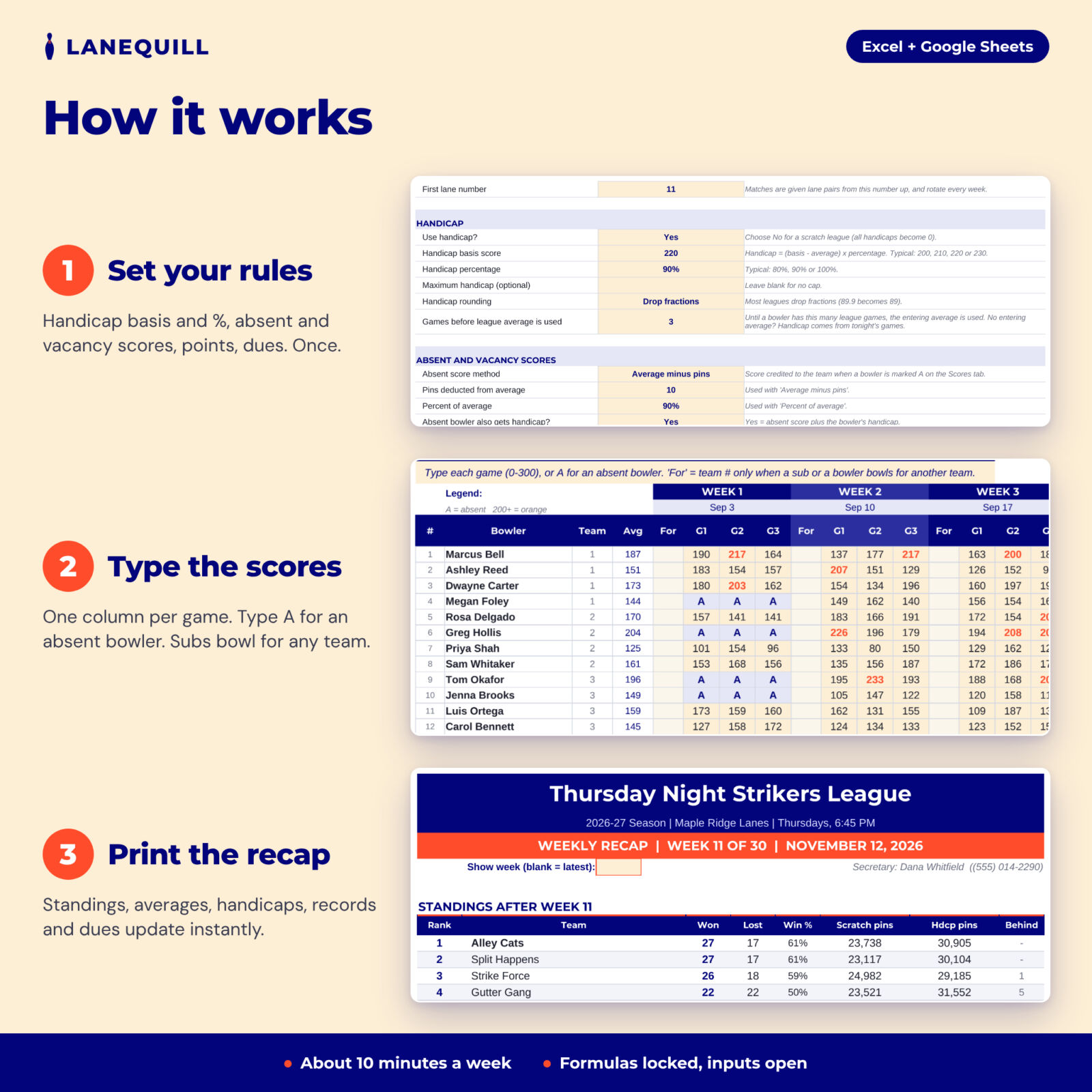
- Set your rules on the Settings tab: teams, bowlers per team, games, weeks, handicap, absent and vacancy scores, points and dues.
- Add teams and bowlers on the Roster, including subs, M/W and entering averages.
- Type the scores after league night. Type A for an absent bowler; use the “For” column when a sub bowls for a team.
- Print the recap and record dues. Standings, averages, handicaps, records and the dashboard update by themselves.
Capacity
Up to 16 teams, 5 bowlers per team, 100 bowlers including substitutes, 1 to 3 games per week and up to 36 weeks.
File formats and software requirements
- Format: Excel workbook (.xlsx) and Word guide (.docx).
- Works in Microsoft Excel 2016 or newer for Windows and Mac, Microsoft 365, Excel for the web and Google Sheets (import the file to your Drive).
- No macros, add-ins or internet connection needed. Formulas use only functions that behave the same in Excel and Google Sheets.
- The recap is set up for US Letter and fits A4 with “fit to width”.
Customization
Every rule lives on the Settings tab, so you can match your league without touching a formula: handicap basis and percentage, cap, rounding, absent method, vacancy score, points per game and series, bye points, weekly dues split, one-time season fee and the currency symbol. Rename teams any time. Formula cells are locked without a password to prevent accidents; unprotect a sheet if you want to change colors or layouts.
Digital download
This is a digital product. After checkout you can download the spreadsheet and the user guide right away. No physical item will be shipped. Reuse the file every season by starting from a fresh copy.
Use cases
- A Thursday night mixed league of 8 teams of 4, bowling 3 games at 90% of 220, posting a recap each week.
- A senior daytime league with 2 games a week, a scratch prize and a bye for an odd number of teams.
- A church or company league that needs transparent dues and an end-of-season banquet and awards budget.
- A youth or summer league with a short season and lots of substitutes.
Bowling league spreadsheet FAQ
Does it work in Google Sheets?
Yes. Upload the .xlsx to Google Drive and open it with Google Sheets. There are no macros.
Can I use my league’s handicap formula?
Yes. Any basis from 100 to 300, any percentage, an optional maximum, and drop-fractions or rounding. Set Use handicap to No for a scratch league.
How are absent bowlers handled?
Type A instead of a score. The team gets the absent score from your rules (for example average minus 10, with handicap); the bowler’s average is not affected.
Can substitutes bowl for any team?
Yes. Add subs to the roster with team SUB and type the team number in the sub’s “For” column on the night they bowl. Their games count for that team and for their own average.
How many teams and bowlers does it hold?
Up to 16 teams, 5 bowlers per team, 100 bowlers including subs, 3 games a week and 36 weeks.
Can I reprint an older recap?
Yes. Type the week number in the box at the top of the Recap tab and print.
Is it an official sanctioning body form?
No. Lanequill follows the rules you enter and is not affiliated with any bowling association. Your league’s written rules always decide.
Reviews
There are no reviews yet.