


A private period tracker spreadsheet with predictions, phases and patterns
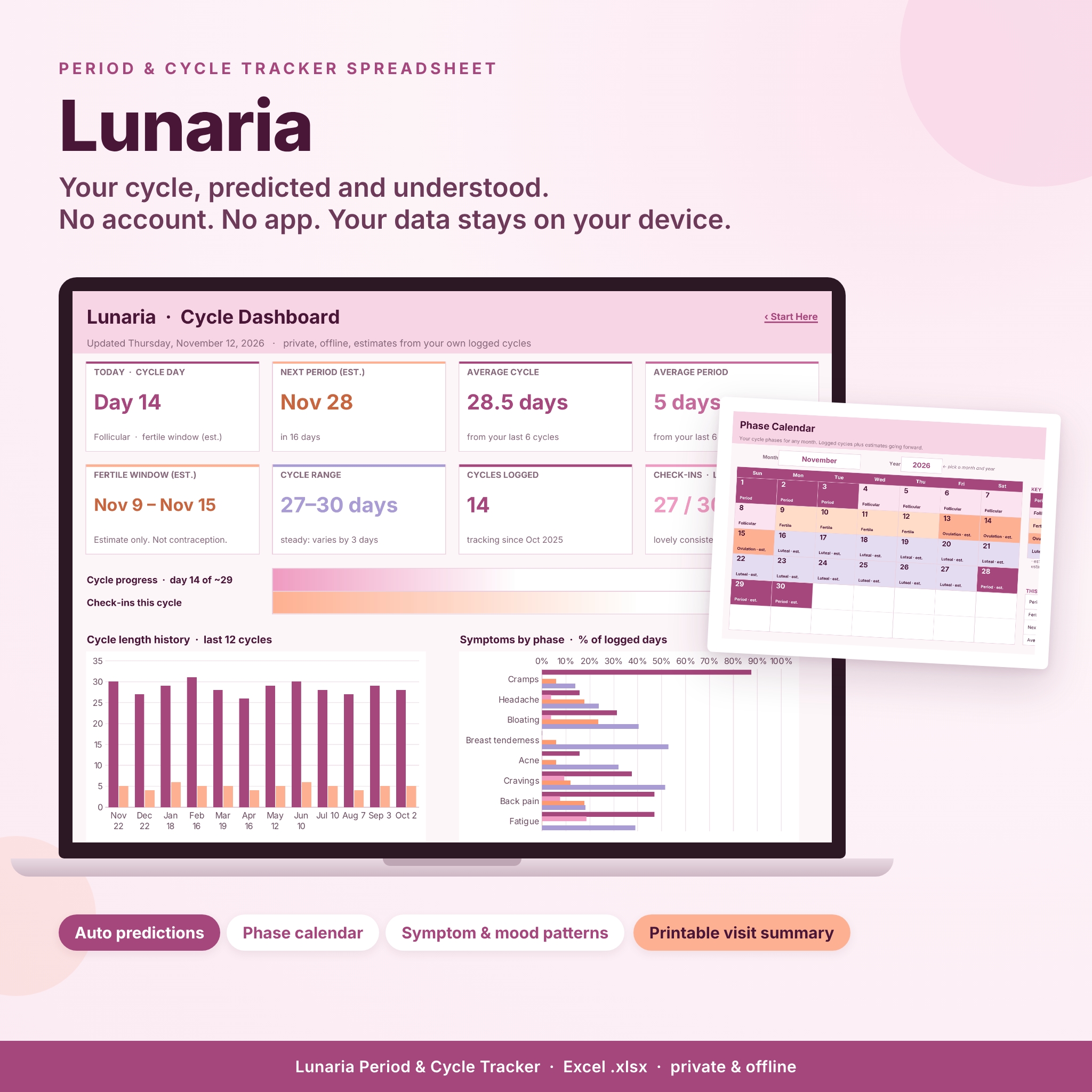
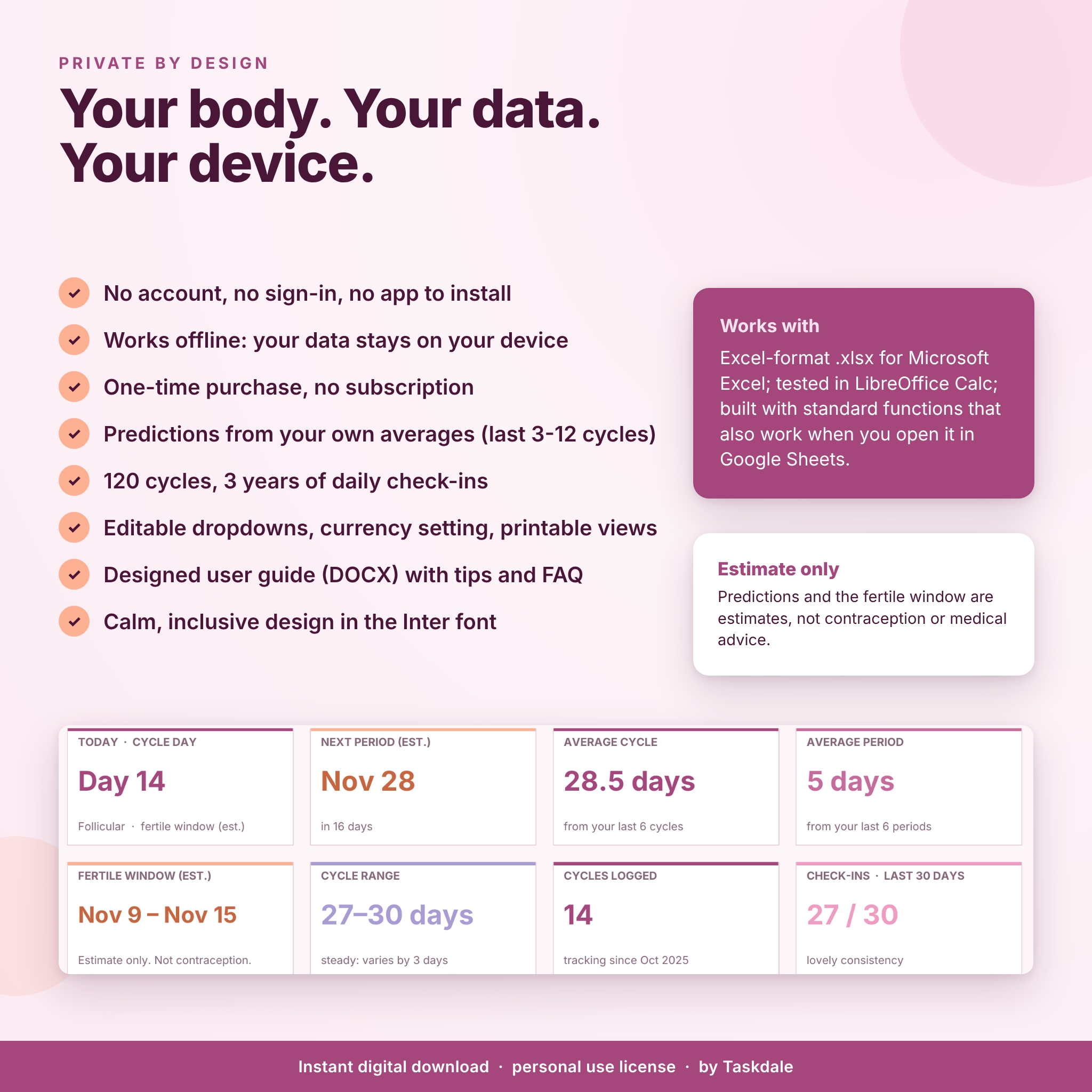
Lunaria is a period tracker spreadsheet for anyone who wants to understand their cycle without handing personal health details to an app or an account. You type the dates your periods start and end, check in on the days you choose, and Lunaria does the math: average cycle and period length, next-period predictions, estimated cycle phases, an estimated fertile window and pattern charts by phase. Everything lives in one Excel-format file that stays on your device.
What Lunaria does for you
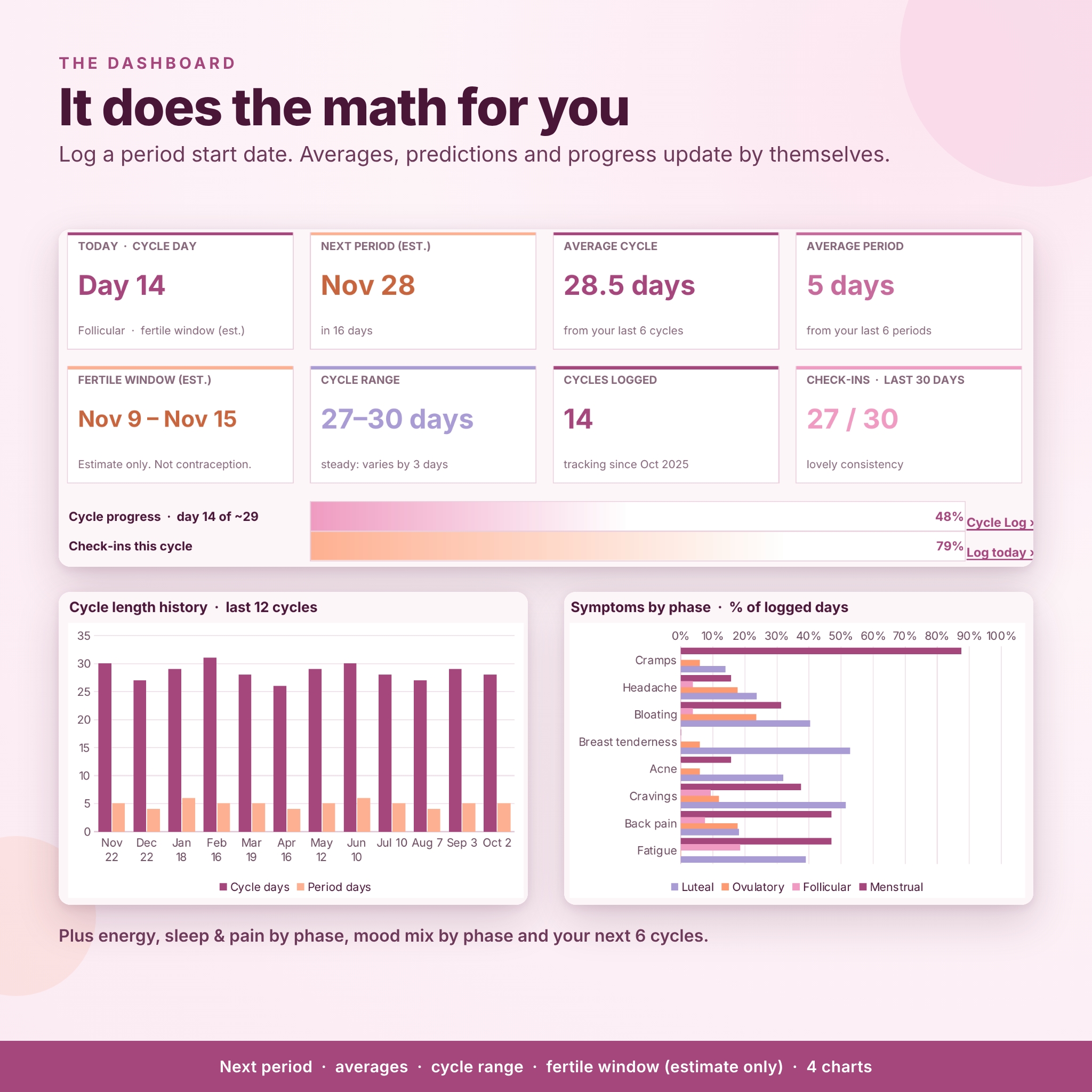
- Calculates your averages automatically. Cycle length (start to next start) and period length are worked out for every cycle, and your averages use your most recent cycles (6 by default, adjustable from 3 to 12).
- Predicts your next 6 periods, with a countdown, a likely start range based on your shortest and longest recent cycles, and a gentle note if your period is later than average.
- Estimates your cycle phases: menstrual, follicular, ovulatory and luteal, plus an estimated fertile window. Every estimate is clearly labeled.
- Turns daily check-ins into insights: see how energy, sleep, pain, symptoms and mood change by phase.
- Prepares you for appointments with a Doctor Notes log and a printable one-page Visit Summary.
Who this cycle tracker is for
- Anyone who has periods and prefers a private record with no sign-in, cloud sync or ads.
- People who want to notice how their body and mood shift through the month.
- Anyone tracking symptoms to discuss with a doctor, nurse or other health professional.
- Spreadsheet fans who want a calm, inclusive design they can rename and adjust.
Features
Dashboard
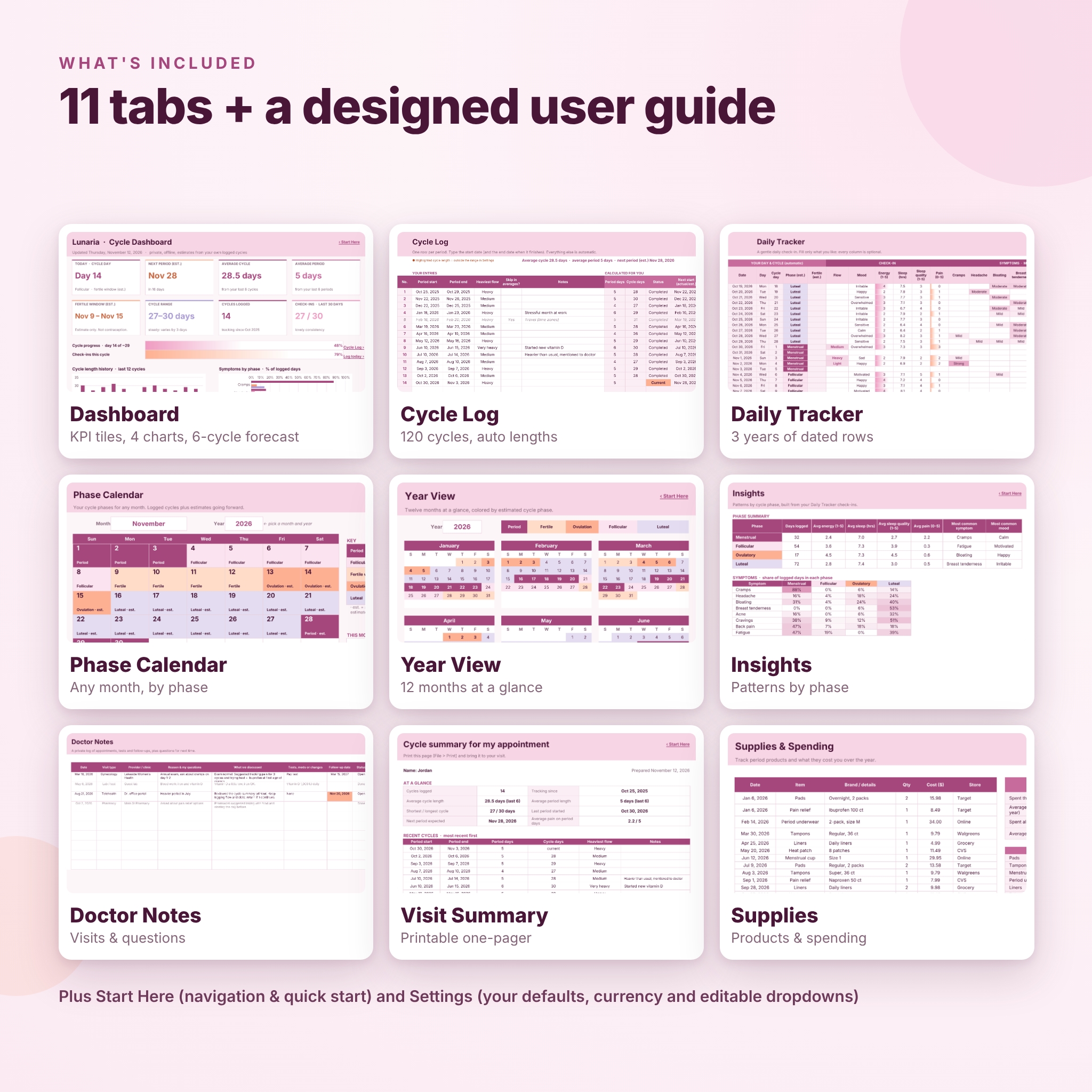
Eight KPI tiles show today’s cycle day and phase, your next period with a countdown, average cycle and period length, the estimated fertile window, your cycle range, cycles logged and check-ins in the last 30 days. Progress bars show how far you are through the current cycle and how many days you have checked in. Four charts show cycle length history, symptoms by phase, energy, sleep quality and pain by phase, and your mood mix by phase. A table lists your next 6 estimated cycles.
Cycle Log
Log up to 120 cycles. Enter start and end dates, heaviest flow and notes. Lunaria calculates period days, cycle days, status, next start, estimated ovulation and fertile window, and how each cycle compares with your average. Mark an unusual cycle with “Skip in averages” to keep it in your history without skewing predictions. Cycles outside the range you set are softly highlighted and duplicate dates are flagged.
Daily Tracker
Three years of dated rows (1,096 days) with automatic cycle day, estimated phase and fertile marker. Log flow, mood, energy (1 to 5), sleep hours and quality, pain (0 to 5) and eight renameable symptoms rated mild, moderate or strong. Optional columns cover basal body temperature, cervical fluid, meds or remedies and notes. Today’s row is highlighted.
Phase Calendar and Year View
Pick any month and year to see each day colored by phase, with future days marked as estimates and today labeled. Year View shows all twelve months at a glance.
Insights
Averages, top symptoms and top moods for each phase, plus heat-map tables showing how often each symptom and mood appears in each phase, and your last 12 cycles.
Doctor Notes, Visit Summary and Supplies
Log appointments, tests and follow-ups (open follow-ups due within 14 days are highlighted) and keep a list of questions for your next visit. The Visit Summary prints on one page. The Supplies tab tracks period products and spending in your own currency.
What is included
- Lunaria-Period-Cycle-Tracker.xlsx with 11 tabs: Start Here, Dashboard, Cycle Log, Daily Tracker, Phase Calendar, Year View, Insights, Doctor Notes, Visit Summary, Supplies and Settings.
- Lunaria-User-Guide.docx: a designed guide covering setup, every feature, how predictions work, customizing, tips, troubleshooting and FAQ.
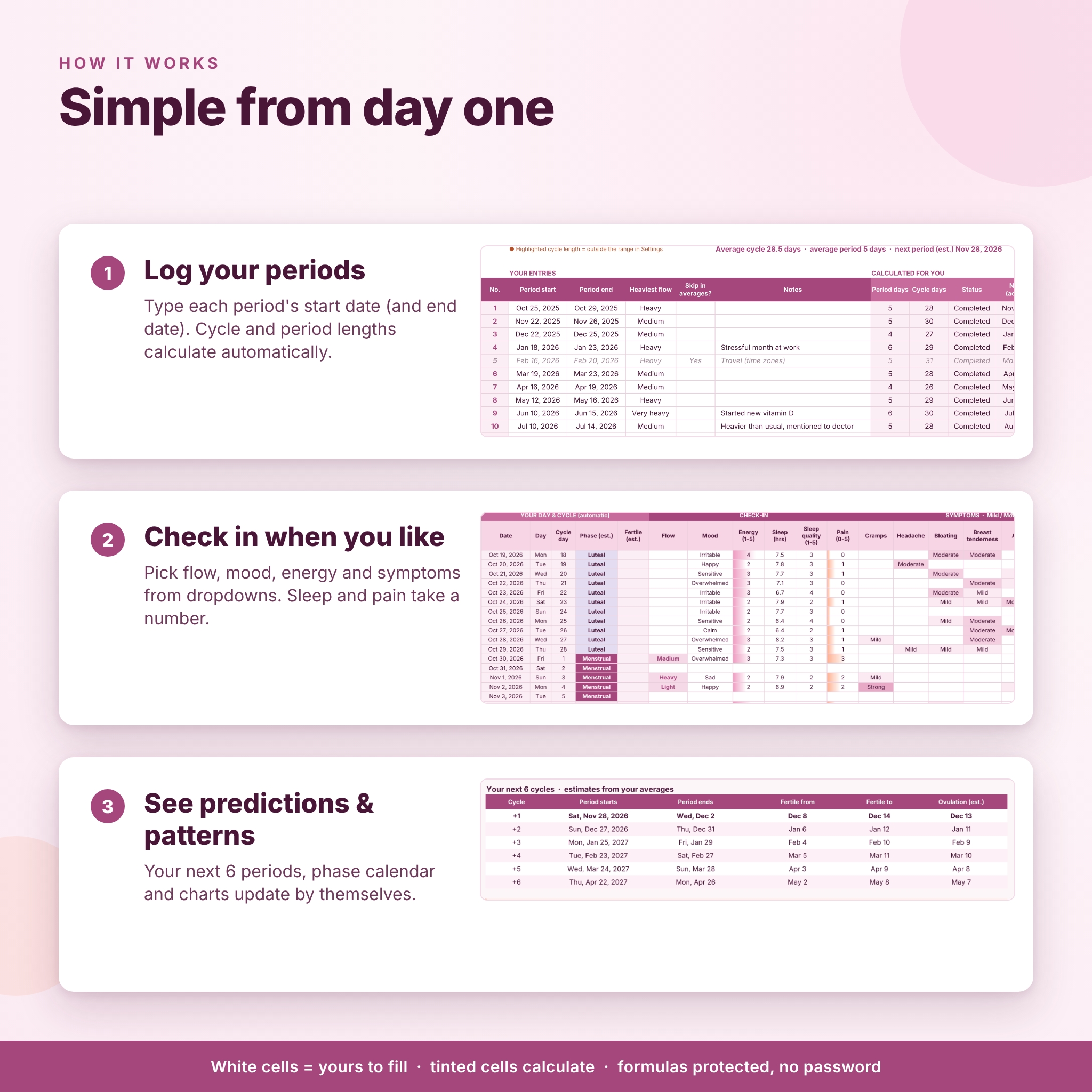
How it works
- In Settings, type the date you want your Daily Tracker to start and check the defaults.
- Add the start dates of your last few periods in Cycle Log, plus end dates if you know them.
- Check in on the Daily Tracker whenever you like. Every column is optional.
- Your Dashboard, calendars and Insights update by themselves.
White cells are for you; tinted cells calculate and are locked so formulas are safe. Sheets are protected without a password.
File format and software requirements
Excel-format .xlsx for Microsoft Excel; tested in LibreOffice Calc; built with standard functions that also work when you open it in Google Sheets. You need a spreadsheet app on a computer. The workbook uses the free Inter font and falls back to your default font if Inter is not installed. Print areas are set for every tab.
Customization
Rename flow levels, moods, symptoms, visit types and supply items in Settings and the headers, Insights and charts follow. Set your currency symbol, default cycle and period length, luteal phase length, number of cycles in averages, week start (Sunday or Monday), temperature unit and highlight range.
Real-life ways to use it
- Know when to pack supplies before a trip or a big event.
- Spot that your energy dips in the days before your period and plan lighter days.
- Bring a printed summary of dates, cycle lengths and symptom patterns to an appointment.
- Keep a private record after deleting a tracking app.
Digital download
This is an instant digital download. No physical item is shipped. Open the .xlsx in your spreadsheet app and save your own copy.
FAQ
Does it need an account or internet connection?
No. It is a file on your device with no sign-in or cloud connection.
Can I use it in Google Sheets?
Yes, it is built with standard functions that also work when you open it in Google Sheets. It is tested in LibreOffice Calc and made for Microsoft Excel.
Is the fertile window reliable for avoiding pregnancy?
No. It is an estimate from your own averages, not contraception and not medical advice.
What if my cycles are irregular?
You still get a clear history, your shortest and longest cycles and patterns by phase. Predictions are less precise when cycles vary, so the dashboard also shows a likely range.
How much data does it hold?
120 cycles, 1,096 daily check-ins, 200 doctor notes and 300 supply purchases.
Can I change the colors or layout?
Yes. Unprotect a sheet (no password) to change the design, then protect it again.
License
For personal use only. Please do not resell, share or redistribute the files. Estimates only; Lunaria is not a medical device and does not give medical advice.
Reviews
There are no reviews yet.