


A Classroom Christmas Party Planner That Does the Organizing for You
Merrygrade is a classroom Christmas party planner made for room parents, class volunteers and teachers. It walks you from the first chat with the teacher to the last thank-you note, so you never have to build a sign-up sheet from scratch or chase details across ten group chats. Every page is fillable on screen, and every page prints cleanly in color or black and white.
The kit has two parts. The planner is a 41-page fillable PDF in US Letter and A4. The parent letters are 8 editable Word documents for every stage of the party, each with a short version you can paste into a text, an email or your class app.
Who It’s For
- Room parents, room moms and room dads planning a Christmas, holiday or winter party for preschool through elementary grades
- Teachers who plan their own class party or want to hand a volunteer a ready system
- PTA and PTO volunteers who want every class organized the same way
- Homeschool co-op, Sunday school and scout leaders running a group celebration
What’s Inside the Planner
Plan
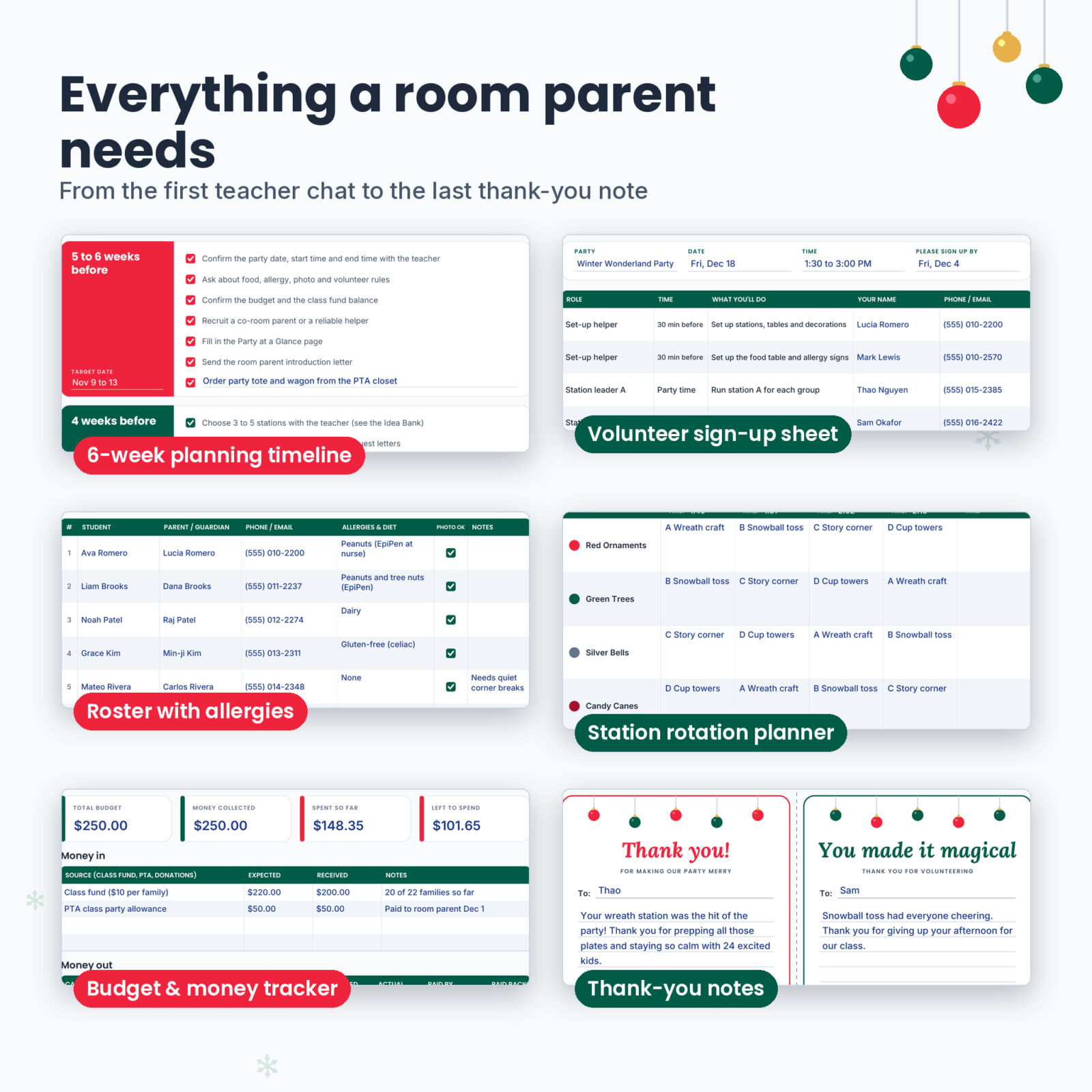
- Party at a Glance: date, times, room, headcounts, theme, budget and tick boxes for school rules such as store-bought only, nut-free and photo policy
- Teacher Check-In: 12 questions to ask early, with space for every answer
- Planning Timeline: eight phases from 6 weeks out to after the party, each with your own target date
- December 2026 calendar with correct dates, plus an undated month you can reuse every year
- Party Budget and Class Fund Collection Tracker with planned and actual amounts and a paid-back column
People
- Class roster for 32 students with allergy, diet and Photo OK columns
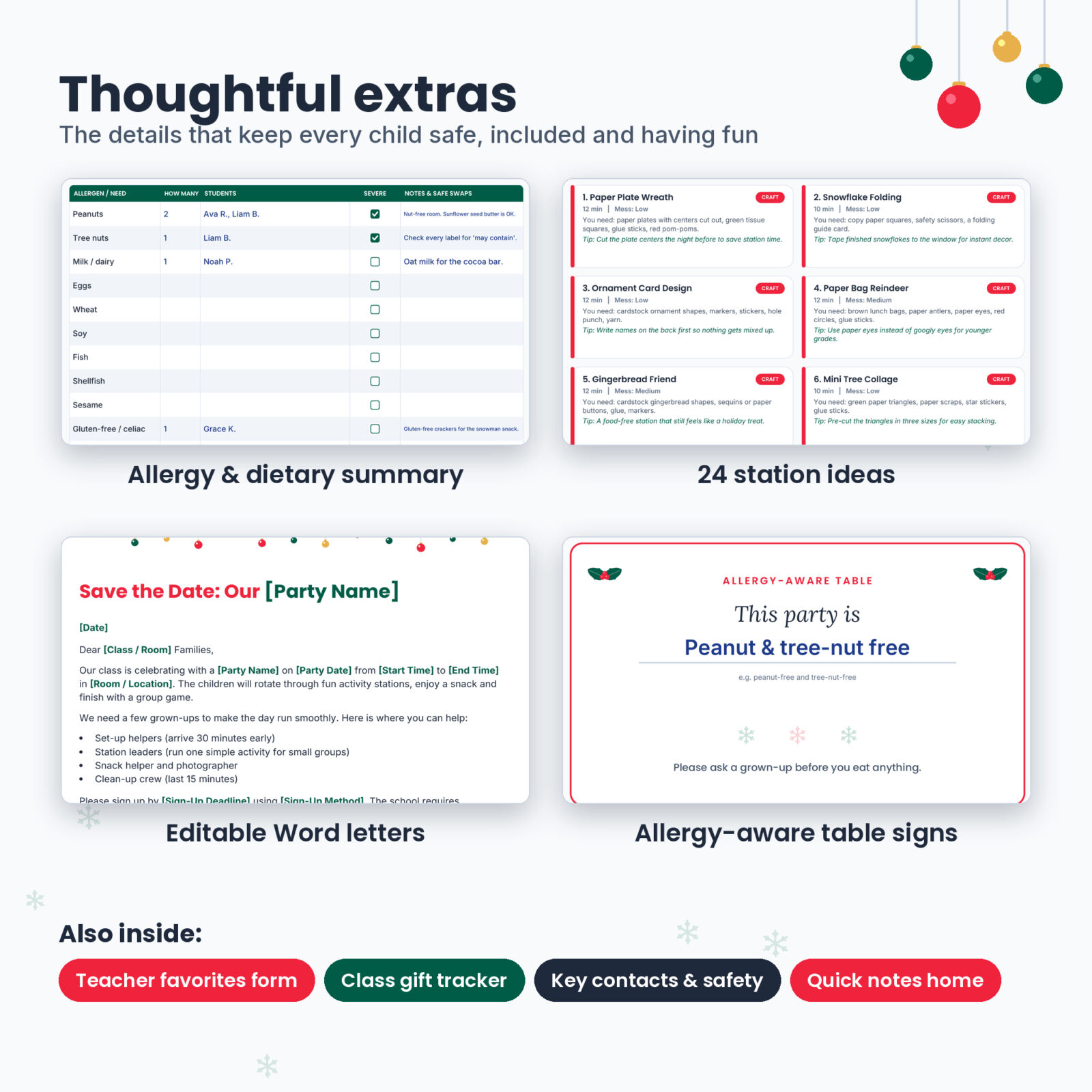
- Allergy & Dietary At-a-Glance: the nine major allergens plus gluten-free, vegetarian and cultural needs, severity and safe swaps
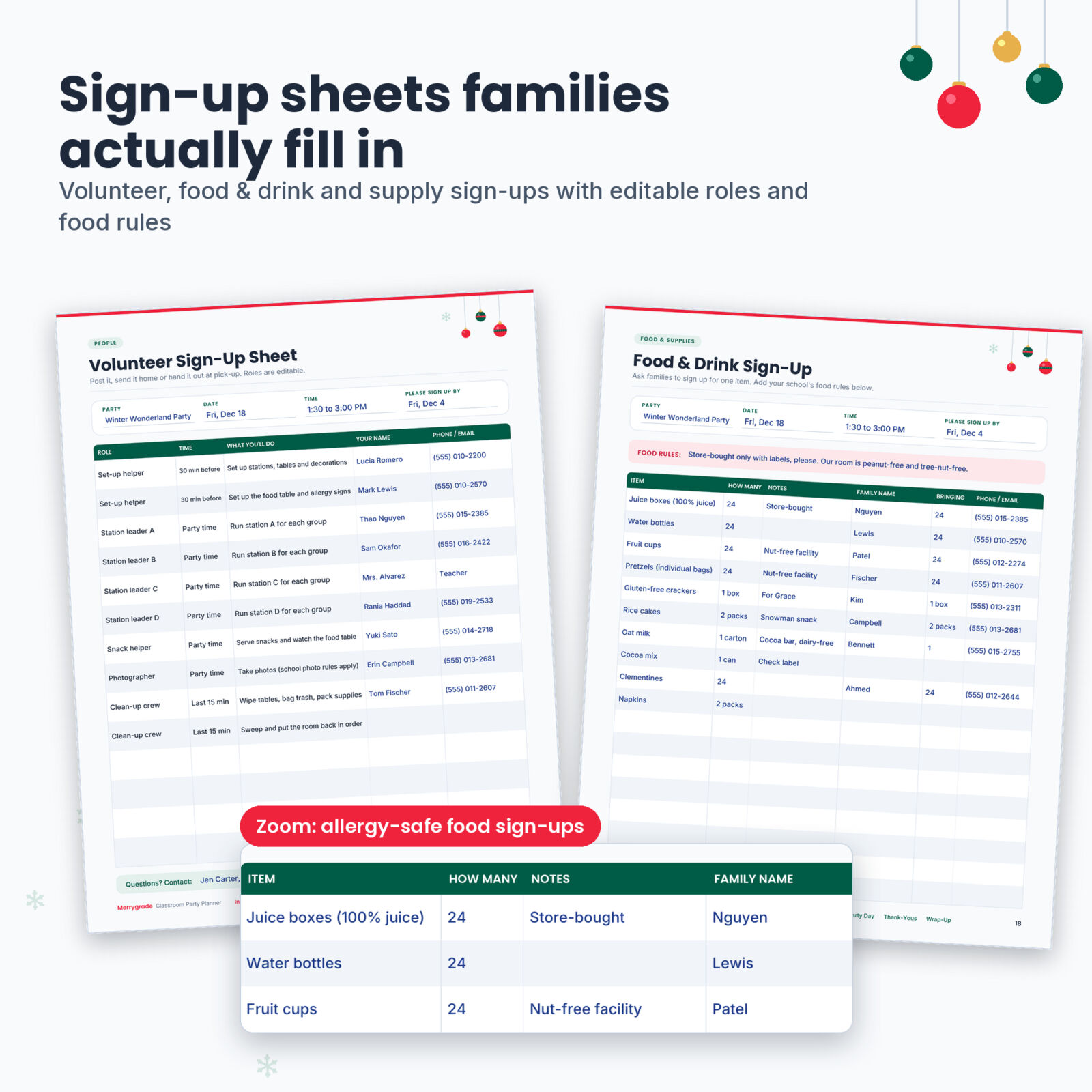
- Volunteer Sign-Up Sheet with editable roles and times, plus a private volunteer roster to track clearance, confirmation and thank-yous
- Key Contacts & Safety page for party day
Food & Supplies
- Food & Drink Sign-Up and Craft & Supply Donation Sign-Up, each with an editable food rules line
- Master Supply Checklist with 48 common items, Have and Buy boxes and a Who column
- Shopping List grouped by store and printable Food Table Signs
Party Day
- Run of Show with a sample 90-minute flow
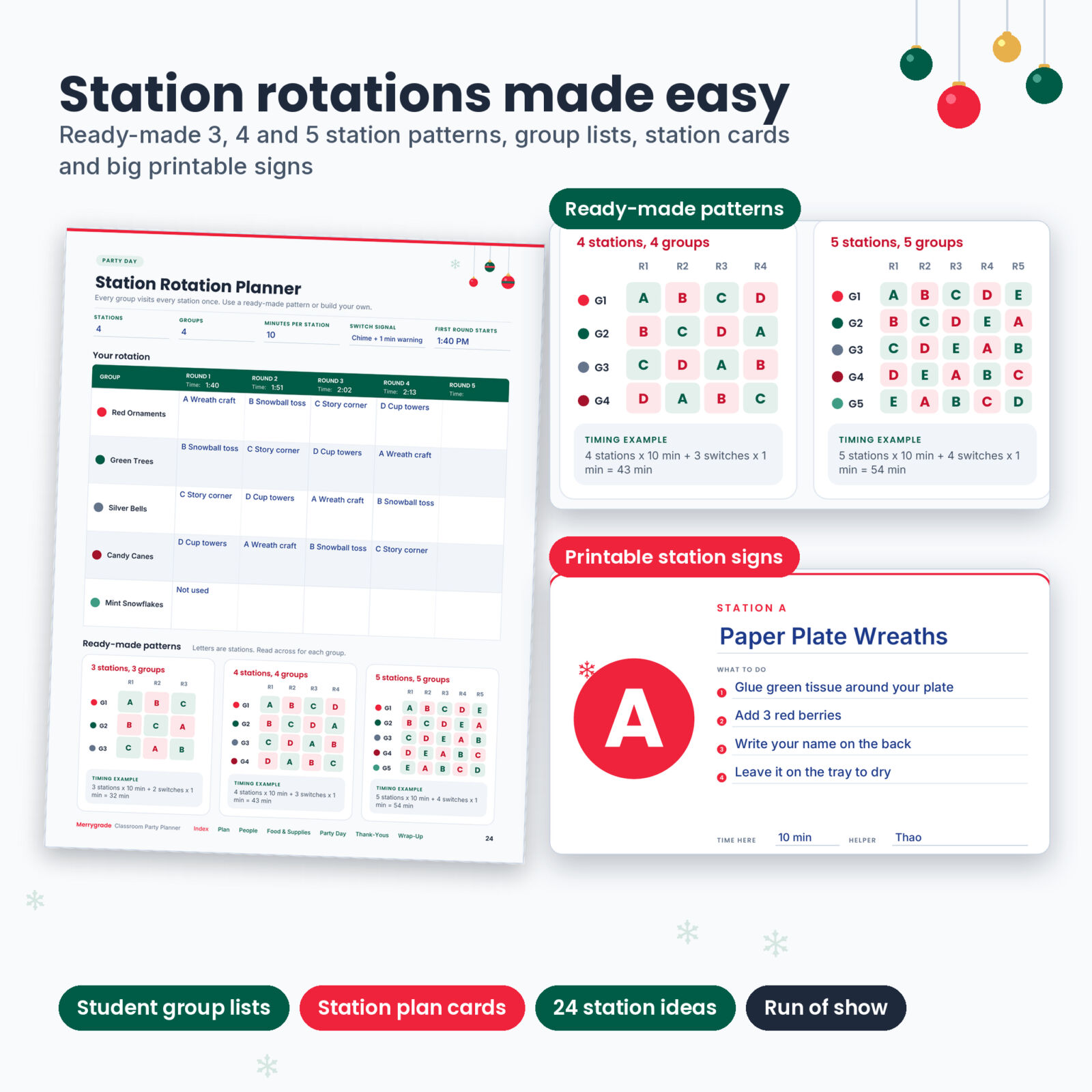
- Station Rotation Planner with ready-made 3, 4 and 5 station patterns and timing examples
- Student Groups, six Station Plan Cards and six half-page Station Signs
- Station Idea Bank: 24 low-cost crafts, games, STEM, calm and snack stations with supply lists and tips
- Day-Of Checklist & Party Tote
Communicate, Thank and Wrap Up
- Parent Communication Log, two half-page Quick Notes Home and a Teacher Favorites Form
- Class Gift Collection tracker
- 8 quarter-page thank-you notes for volunteers, donors and the teacher
- Party Recap and Notes pages to pass on to next year’s room parent
8 Editable Parent Letters
Each letter fits on one page with green placeholders such as [Teacher Name] and [Party Date] that you click and replace. The set covers a room parent introduction, Save the Date with a volunteer reply slip, a food and supply request with a donation reply slip, an allergy-aware party notice, an optional class gift letter with a reply slip, a one-week reminder, party-day details for volunteers and a final thank-you to families. The last page holds short versions of all eight for texting or class apps.
Why Room Parents Like It
- Allergy-aware from start to finish. Food rules sit at the top of every food sign-up, the roster flags allergies, and the snack station ideas remind you to check labels.
- Stations without the chaos. Ready-made rotation patterns make sure every group visits every station once.
- Inclusive wording. Type Christmas Party, Holiday Party or Winter Party into the party name and the pages and letters work either way.
- Easy to find things. A clickable index and footer links jump to any section.
- Reusable. Target dates and an undated month mean the planner works for next year’s party too.
How It Works
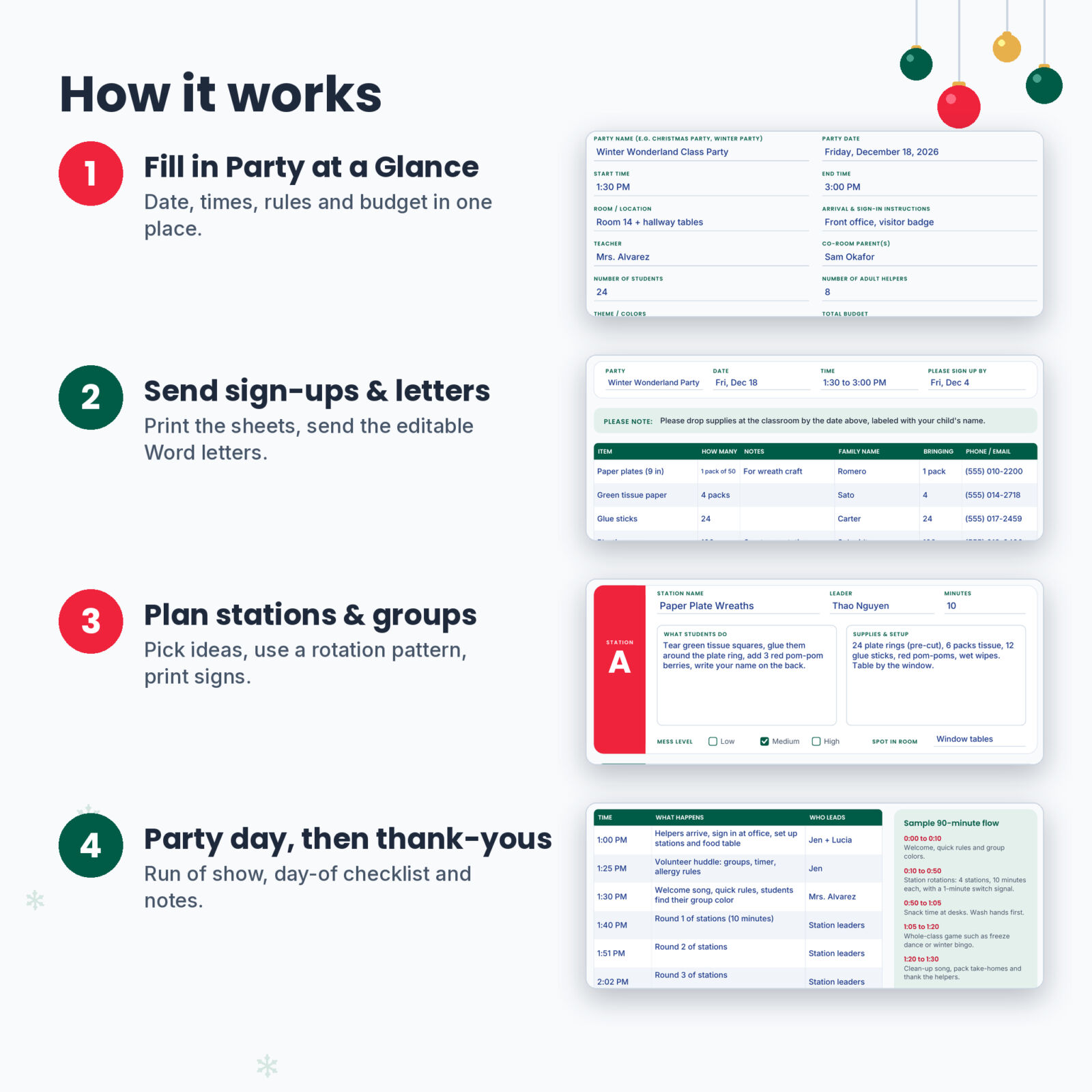
- Download the files and open the planner in Adobe Acrobat Reader (free) or another PDF app that supports fillable forms.
- Fill in Party at a Glance and the Teacher Check-In.
- Send the sign-up sheets and Word letters to families.
- Pick your stations, fill in the rotation planner and print the signs.
- Run the party with the Run of Show and Day-Of Checklist, then send thank-you notes.
File Formats and Requirements
- Fillable PDF planner, 41 pages, in US Letter (8.5 x 11 in) and A4
- Editable Word parent letters (.docx), in US Letter and A4
- User guide (.docx) with screenshots, tips and troubleshooting
- To type in the PDF you need a PDF app with form support, such as Adobe Acrobat Reader. The letters open in Microsoft Word and other apps that edit .docx files.
- Money fields have no currency symbol, so you can use any currency.
This is an instant digital download. No physical item will be shipped. You can print as many copies as you need for your own class.
Frequently Asked Questions
Is this only for Christmas parties?
No. Type any party name into the planner and letters. It works for holiday and winter parties, and most pages suit Halloween, Valentine’s Day or end-of-year parties too.
Can I fill it in on my phone or tablet?
Yes, in a PDF app that supports fillable forms, such as Adobe Acrobat Reader. You can also print the pages and write by hand.
Can I share the sign-up sheets with class families?
Yes. Print them or send a filled sign-up sheet to your class families. Please don’t share or upload the full planner files.
Does the budget add up totals automatically?
No. The money fields are simple text fields so they work in every PDF app. Add your totals with a calculator and type them in.
How many students does the roster hold?
32 students across two pages, plus six student groups of up to seven.
Do I need Microsoft Word for the letters?
Word works best, but Google Docs, Apple Pages and LibreOffice can also open and edit .docx files.
What is the license?
Personal use and use with your own class or school volunteer role. You may not resell or share the digital files.

Reviews
There are no reviews yet.