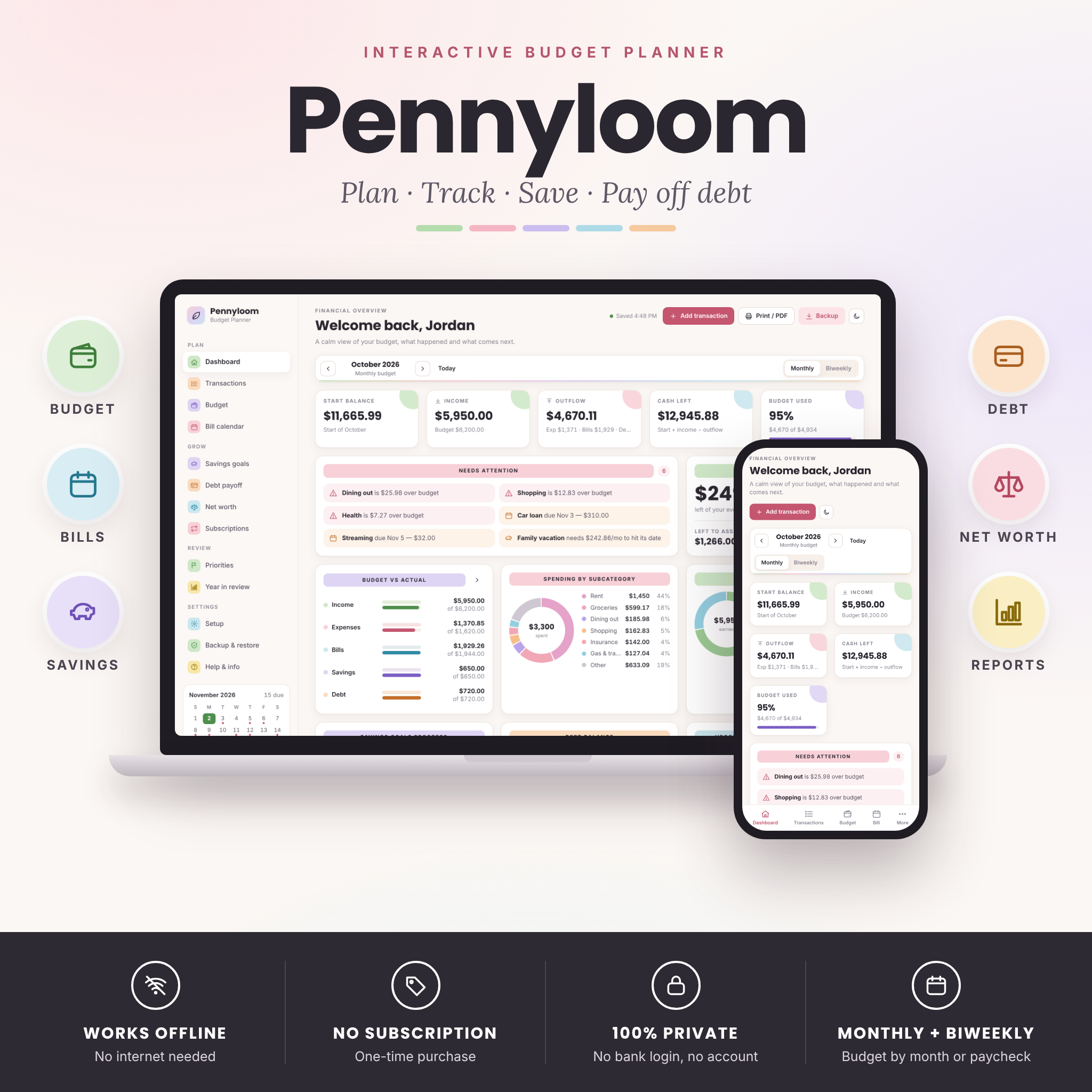


Monthly Budget Planner App That Works Offline
Pennyloom is an interactive monthly budget planner that opens in your web browser and feels like a calm money app, not a spreadsheet. Plan your month or each paycheck, log what you earn and spend, and the dashboard updates by itself with budget vs actual, cash left, safe-to-spend per day, upcoming bills, savings goals and your debt-free date.
There is no account, no subscription and no bank login. Your entries are saved automatically on your own device and never leave it. Open the file, explore six months of example data, then clean it and start your own budget in minutes.
Who This Budget Planner Is For
- Anyone who wants a clear monthly budget without fighting spreadsheet formulas
- People paid every two weeks who want to budget paycheck by paycheck
- Zero-based budgeters who want every dollar to have a job
- Couples and families paying down credit cards and loans
- Savers building an emergency fund, a vacation fund or a sinking fund
- Anyone who would rather not link a bank account to an app
Main Benefits
- See your whole month at a glance — start balance, income, outflow, cash left and budget used, always up to date.
- Know what you can spend today — the safe-to-spend card divides what is left of your everyday budget by the days remaining.
- Catch problems early — the Needs Attention panel flags overspending, overdue bills, bills due in the next three days and goals falling behind.
- Never miss a due date — recurring bills, paydays and debt payments appear on a color-coded calendar with paid, due-soon and overdue status.
- Get out of debt faster — compare the debt snowball and avalanche methods, add an extra payment and see exactly how much interest and time you save.
- Stay private — no cloud, no login, no tracking. You own your data.
Features
Plan
- Dashboard with 5 key numbers, alerts, safe to spend, left to assign, budget vs actual, spending by subcategory, income sources, savings rings, debt balance, upcoming payments, a 6-period cash flow trend and budget performance.
- Monthly and biweekly budgeting — switch between calendar months and 14-day pay cycles anchored to your payday. Biweekly mode shows your cycle budget, bills due this cycle and flags months with a third paycheck.
- Zero-based budget page with one card per category, live totals, over-budget highlighting, a cash flow table, copy previous period, 3-month average quick-fill, match actuals and convert a monthly plan to a paycheck plan.
- Transactions — add in seconds (press N), save & add another, search, filter, sort, edit and delete with undo.
- Bill calendar — weekly, every 2 weeks, twice a month, monthly, quarterly and yearly schedules; one-click Mark Paid; automatic matching of logged payments; optional auto-logging for autopay bills and direct deposits.
Grow
- Savings goals with progress rings, needed-per-month, recent pace, on-track status and a 12-month contributions chart.
- Debt payoff planner — snowball, avalanche or custom order, extra monthly payment, debt-free date, total interest, interest saved vs minimum payments and a payoff timeline chart.
- Net worth tracker — assets and liabilities (debts included automatically) with a monthly snapshot trend line.
- Subscription tracker — monthly and yearly cost, renewals in the next 30 days, a “worth it?” rating and how much you could save by canceling.
Review
- Spending priorities — rate every expense from Essential to Avoidable and see where to cut back first.
- Year in review — 12-month report, savings rate, where the money went and a 50/30/20 rule check.
- Printable budget report — summary, cash flow, budget by subcategory, bills and transactions on US Letter or A4, or save as PDF.
What Is Included
- Pennyloom-Budget-Planner.html — the interactive offline planner (13 sections)
- Pennyloom User Guide — 23 illustrated pages in Word (.docx) and PDF
- License and quick-start text file
- Six months of example data built in, ready to explore and clear
How It Works
- Download the ZIP file and save the planner in a folder you will keep.
- Double-click the HTML file — it opens in your web browser.
- Choose “Start my own budget” (currency, date format, monthly or paycheck budgeting) or “Explore with example data”.
- Add recurring bills, plan your budget, then log transactions as you go or import a bank CSV.
- Download a backup file every couple of weeks to keep your data safe.
File Formats and Requirements
- Format: one interactive HTML file + user guide in DOCX and PDF, delivered in a ZIP file.
- Works on: computers and laptops in a modern web browser, with a phone-friendly layout for mobile browsers. Nothing to install.
- Internet: not needed after download — everything runs offline, including printing and backups.
- Not included: this is not an Excel, Google Sheets, Notion or GoodNotes file, and it does not connect to your bank.
Customization
Choose from 40 currencies or type any symbol of your own, and every amount in the planner follows that one setting. Pick your number format, date format (MM/DD/YYYY, DD/MM/YYYY or YYYY-MM-DD) and week start. Add, rename, hide or delete subcategories for income, expenses and bills, rename and recolor the five priority levels, and switch between light and dark mode.
Bank CSV Import and Backups
Tired of typing? Download a CSV statement from your online banking and import it in a few clicks: match your columns, preview the rows and import. Descriptions that contain a subcategory name are filed automatically and duplicates are skipped. Export to CSV any time. Because your data lives in your browser, Pennyloom reminds you to download a backup file, which you can restore on another computer or phone.
Real-Life Use Cases
- Paid every other Friday? Budget each paycheck and see which bills fall before the next payday.
- Planning a family vacation? Set a goal and date and Pennyloom tells you how much to save each month.
- Juggling three credit cards? Compare snowball vs avalanche and pick the faster, cheaper path.
- Subscriptions creeping up? See their true yearly cost and mark the ones to cancel.
- Year-end money review? Print a report and check your savings rate and 50/30/20 split.
Digital Download
Instant digital download — nothing is shipped. After purchase, download the ZIP file from your order confirmation or account page and unzip it.
Budget Planner FAQ
Do I need Excel or Google Sheets?
No. Pennyloom is a single HTML file that runs in your web browser.
Does it work without internet?
Yes. After you download it, every feature works offline.
Is my financial data private?
Yes. There is no account, no server and no bank login. Your data stays on your device.
Can I use it on my phone?
Yes. It switches to a phone layout with a bottom menu. Each device keeps its own copy, so use Backup & Restore to move your data.
Can I budget by paycheck?
Yes. Switch to biweekly in Setup and enter a recent payday.
Can I use my own currency?
Yes. Pick from 40 currencies or type your own symbol. Dollars are the default.
Terms of Use
For personal and household budgeting only. Please do not resell, share or redistribute the files or present them as your own. Pennyloom is a budgeting tool and does not provide financial advice. © Taskdale.
Reviews
There are no reviews yet.