
Debt Payoff Spreadsheet: Snowball vs Avalanche on One Budget
When a credit card’s 0% offer ends in September and a loan payment is due every month, it is hard to tell which balance deserves your next spare dollar. Payfork is a debt payoff spreadsheet for Excel and Google Sheets that lets you enter your debts and monthly budget once, then compares two plans on equal terms: paying the smallest balance first (debt snowball) or the highest interest rate first (debt avalanche). You see where every payment goes, what happens when a promotional rate expires, and when each balance is estimated to reach zero.
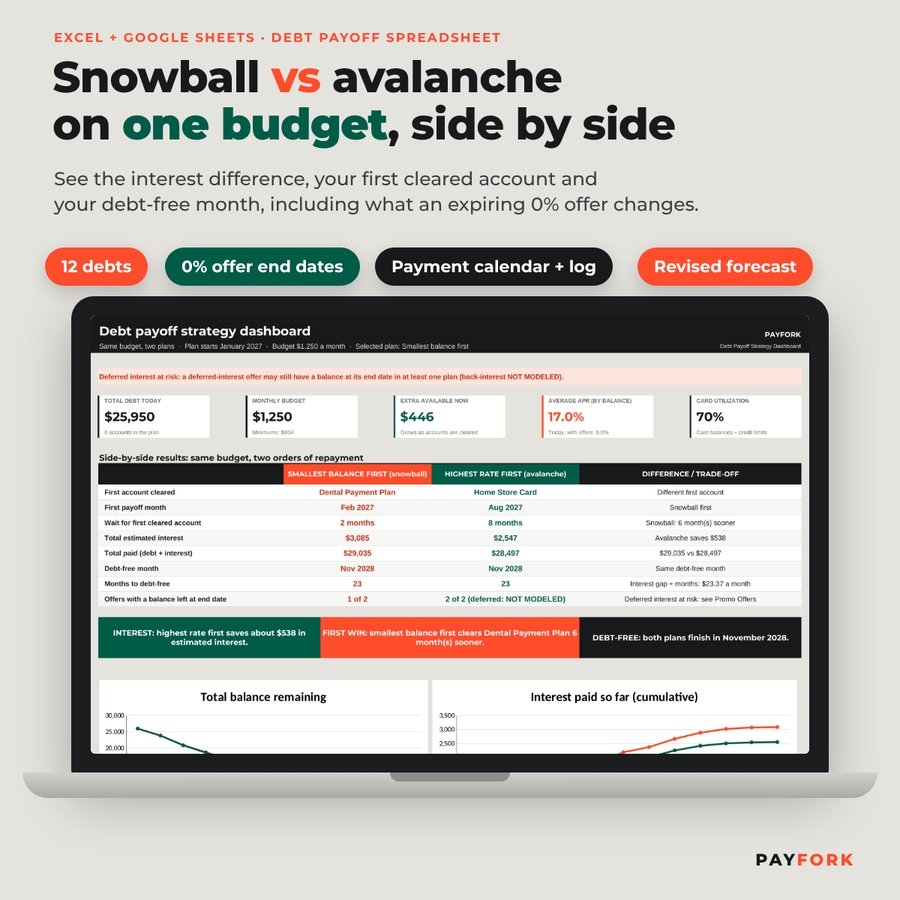
Payfork puts both plans side by side with a difference column, models the month an offer ends day by day, flags deferred interest honestly, and then helps you follow the plan with a calendar, a payment log, a countdown and a monthly revised forecast.
What You Can Do With It
1. Build a reliable starting point from your statements
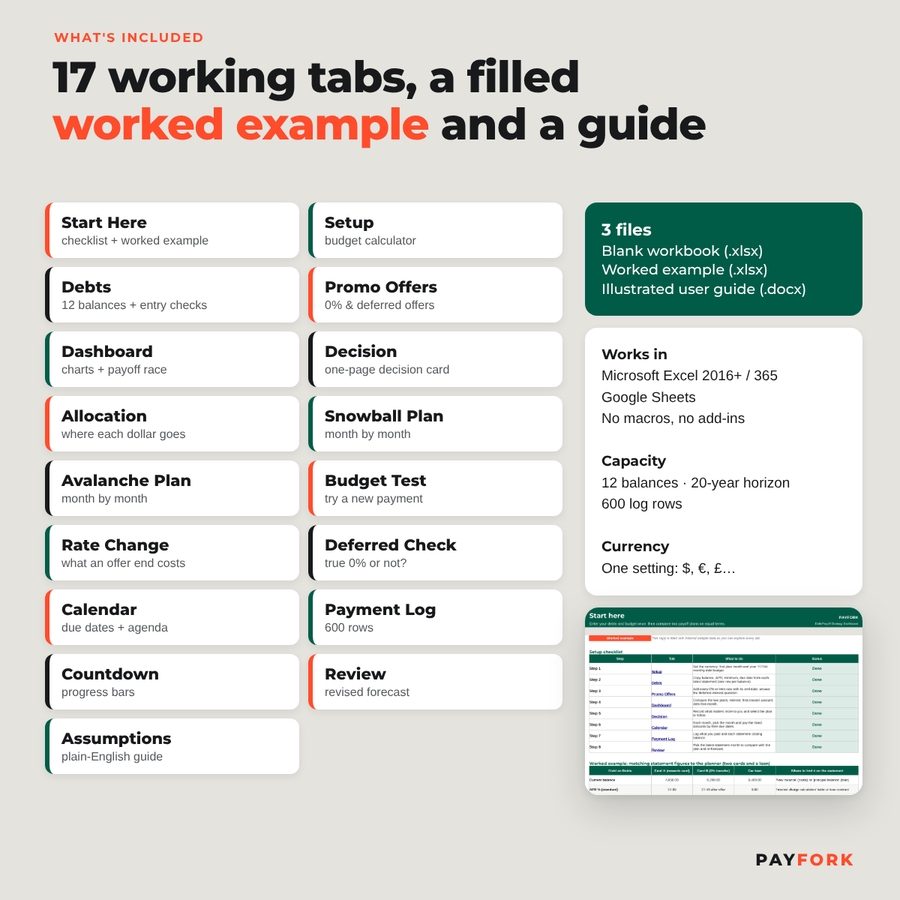
- Start Here sheet with a worked example using two cards and a loan, plus an eight-step setup checklist.
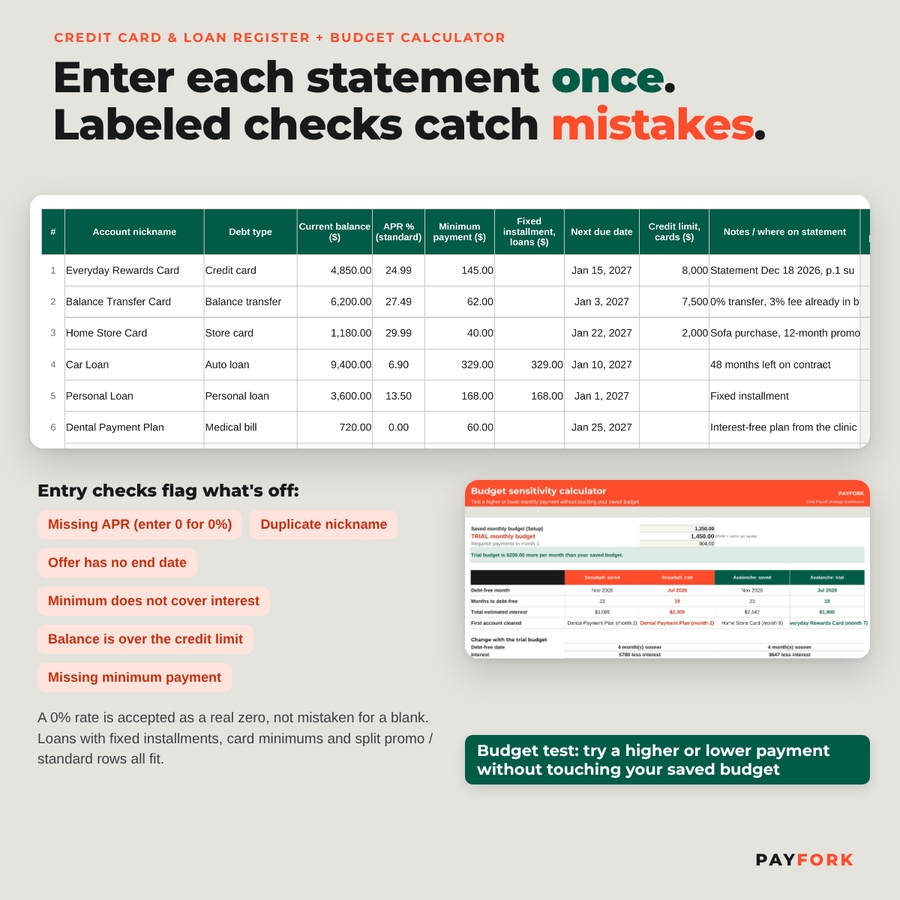
- Credit card and loan register for up to 12 balances: nickname, debt type, balance, APR, minimum payment, fixed installment for loans, next due date and optional credit limit.
- Monthly payment budget calculator: enter the total you can pay toward debt, minimums included, and see the extra available or the shortfall to address.
- Statement entry checks in plain words: missing APR, duplicate nicknames, offers without an end date, minimums that do not cover interest, balances over the limit. A 0% rate is accepted as a real zero, not mistaken for a blank.
- Assumptions and reading guide explaining why a monthly estimate can differ from the daily interest on a statement, and what is left out.
2. Compare smallest-balance-first and highest-rate-first plans
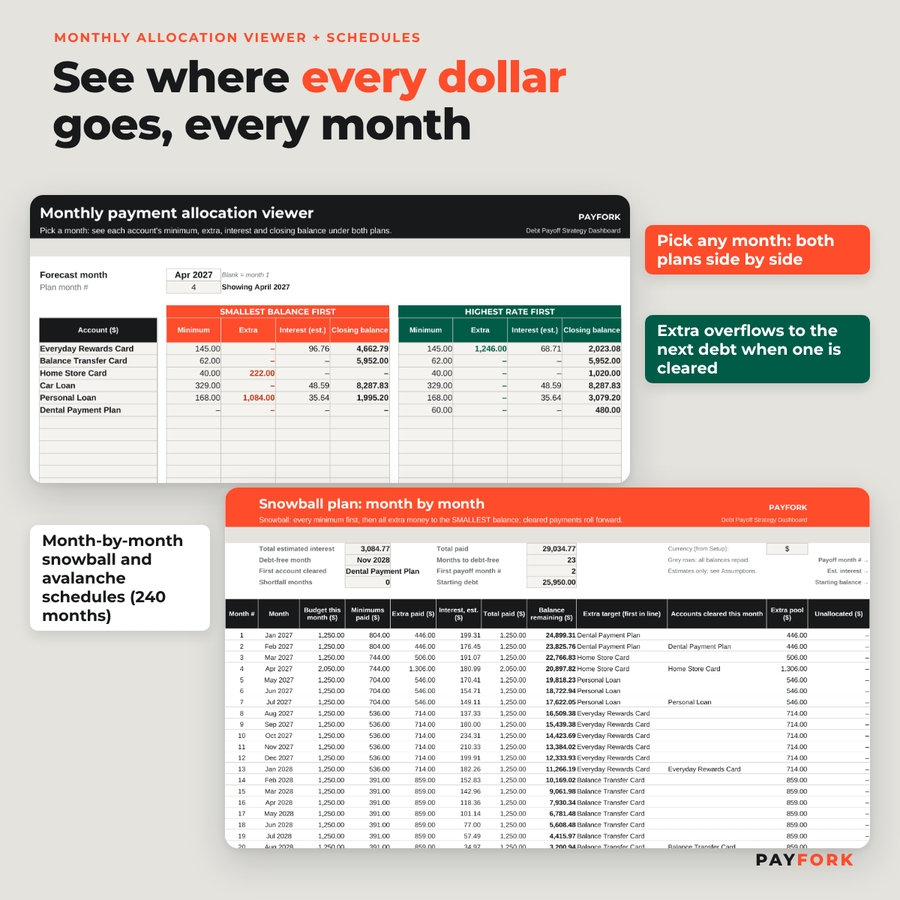
- Snowball schedule: every minimum first, extra to the smallest balance, cleared payments roll into the next debt.
- Avalanche schedule: the same budget, extra to the highest current APR, with the order re-checked whenever a promotional rate changes.
- Side-by-side dashboard: first account cleared, first payoff month, total estimated interest, total paid and debt-free month for each plan, with a difference column, three plain-English verdicts, two charts and payoff race grids.
- Monthly allocation viewer: pick a month to see each account’s minimum, extra, interest and closing balance under both plans, including where money flows when the target debt needs less than the full extra.
- Budget sensitivity calculator: test a higher or lower monthly payment without replacing your saved budget; a shortfall notice replaces the estimate if the trial cannot cover the minimums.
3. See what an expiring offer changes
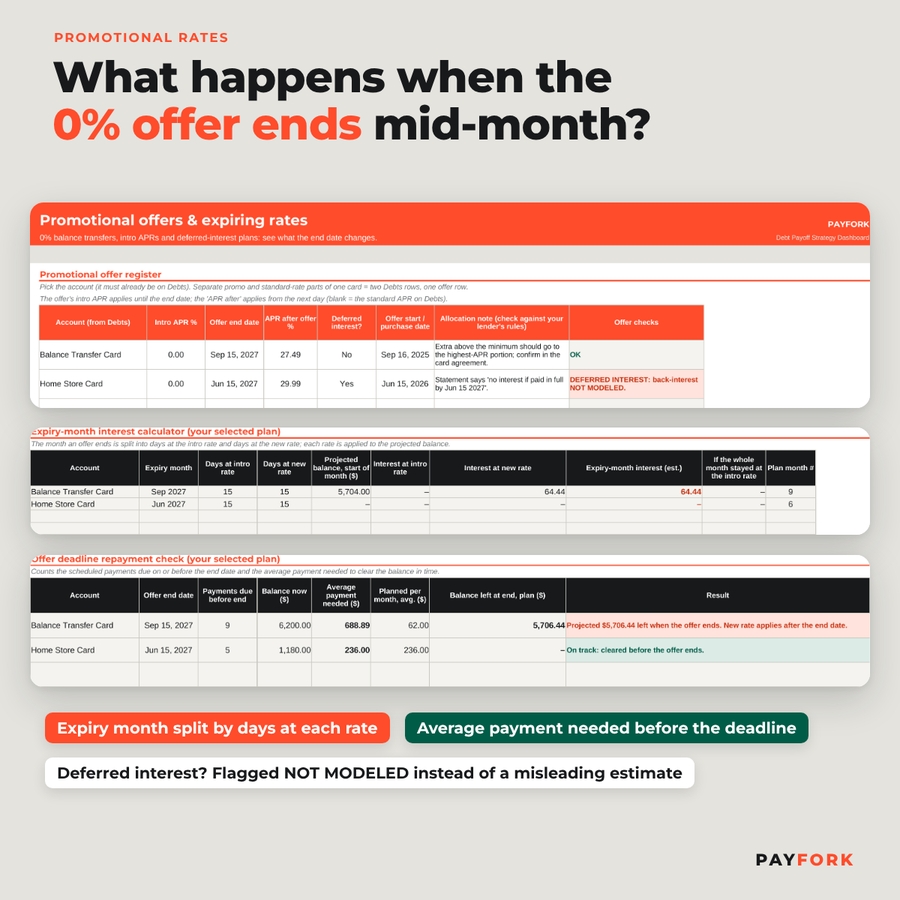
- Promotional offer register for intro APR, end date and follow-on APR, with allocation notes for cards that carry promo and standard-rate balances.
- Expiry-month interest calculator that splits the month into days before and after the rate change.
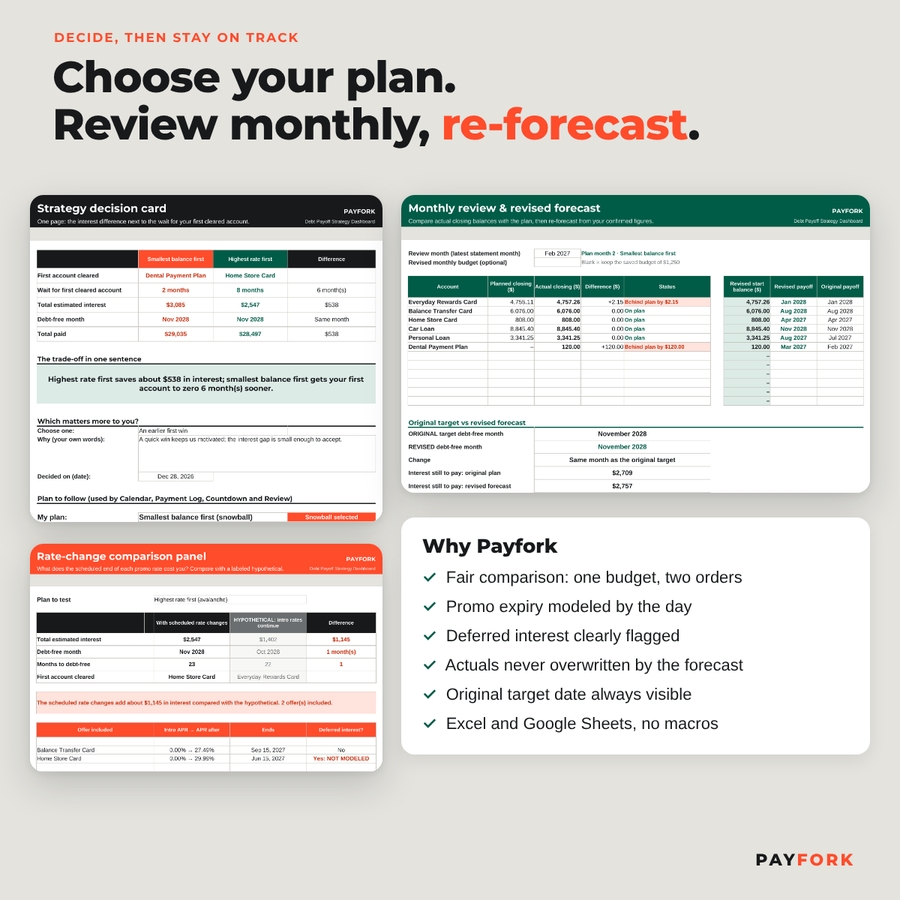
- Rate-change comparison panel: the scheduled rate change vs a clearly labeled hypothetical in which the intro rate continues.
- Offer deadline repayment check: payments due before the end date, the average payment needed to clear the balance, and the balance your plan is projected to leave.
- Deferred-interest checklist: statement prompts to tell a true 0% offer from a “no interest if paid in full” plan. Deferred offers are flagged not modeled instead of showing a misleading estimate.
4. Choose your plan and track each balance
- Strategy decision card: one printable page pairing the interest difference with the wait for your first cleared account, and the selector for the plan you will follow.
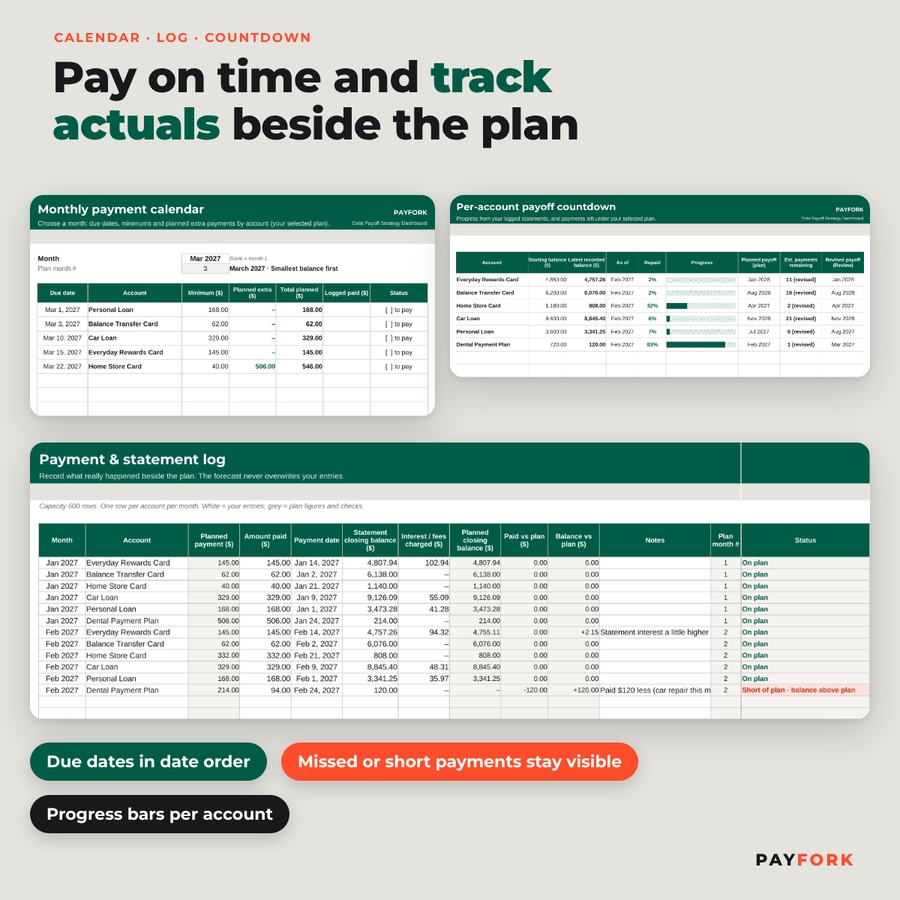
- Monthly payment calendar with due dates, minimums and planned extra payments, plus a printable agenda in date order.
- Payment and statement log (600 rows) so a missed payment or unexpected interest charge stays visible instead of being overwritten by the forecast.
- Per-account payoff countdown with progress bars and payments remaining.
- Monthly review and revised forecast that restarts from your confirmed balances while the original target date stays visible.
Extras beyond a basic debt tracker
- One-time extra payments (tax refund, bonus) added to both plans in the month you choose
- One currency setting: $ by default, or €, £ and others
- Filled worked-example workbook to explore before you start
Who It Is For
Anyone paying down two or more credit cards, store cards, balance transfers, personal, auto, student or medical balances who wants a clear, fair comparison of payoff methods. It is especially useful if a 0% balance transfer or a deferred-interest store card promotion ends soon, or if you are deciding between the motivation of quick wins and the savings of paying the highest APR first.
How It Works
- Set your currency, first plan month and total monthly debt budget.
- Copy each balance, APR, minimum and due date from your statements.
- Add any promotional offers with their end dates.
- Read the dashboard and record your decision.
- Each month, pay from the calendar, log your statements and review the revised forecast.
Interest is estimated as opening balance × APR ÷ 365 × days in the month. Every formula was checked month by month against an independent calculation.
What Is Included
- Payfork Debt Payoff Strategy Dashboard, blank workbook (.xlsx), 17 tabs
- Worked example workbook (.xlsx) filled with fictional debts
- Illustrated user guide (.docx), 15 pages
File Format and Software Requirements
Microsoft Excel 2016 or later (Windows or Mac), Microsoft 365, or Google Sheets (free Google account). No macros, add-ins or external connections. Best used on a computer or tablet. Capacity: 12 balances, 240 months (20 years), 600 log rows.
Customization
Change the currency symbol once and every money header updates. Use your own account nicknames, switch the plan you follow at any time without losing the comparison, and format colors freely. Formula cells are locked without a password so they are not overwritten by accident.
Instant Digital Download
This is a digital product: no physical item will be shipped. Download the files right after purchase. Personal use only. For planning and education; not financial, tax, legal or credit advice.
FAQ
Is the debt snowball or avalanche method better?
Avalanche usually costs less interest; snowball usually clears an account sooner. Payfork shows both results for your own debts so you can decide.
Does it work in Google Sheets?
Yes. Upload the .xlsx to Google Drive and save it as a Google Sheet. It also works in Excel 2016 or later and Microsoft 365.
How many debts can I track?
Up to 12 balances, over a horizon of up to 20 years.
Can it handle a 0% balance transfer that ends mid-month?
Yes. Days before the end date use the intro rate and the remaining days use the new rate.
Does it calculate deferred interest charges?
No. Deferred-interest offers are clearly flagged as not modeled, and the deadline check shows whether your plan clears them in time.
Can I track actual payments?
Yes. The payment log, countdown and monthly review compare your real statements with the plan and re-forecast from them.
Does it include student loans and car loans?
Yes. Any balance with a rate and a monthly payment works; loans use the fixed installment column.


Reviews
There are no reviews yet.