

A meal planning spreadsheet that prices the shop you’ll actually pay for
Plenticart is a meal planning spreadsheet and grocery budget dashboard for Microsoft Excel and Google Sheets. Most meal planners total up what each recipe uses. That figure is useful, but it isn’t what you pay. If a recipe needs a dollar’s worth of rice and the cupboard is empty, you still buy the four-dollar bag. Plenticart keeps the two figures apart. It shows what your planned meals use, what you already have, and which whole packs you need to buy. When the estimate comes in over budget, you can test a different meal, or one that uses the rest of a pack, before you change your week.
Who it’s for
- Families and couples who plan a week of meals and want the grocery bill to fit a weekly budget.
- Batch cooks who cook once and eat twice, and need leftover meals that add nothing to the shopping list.
- People cutting food waste who keep finding half-used packs at the back of the fridge.
- Budgeters who want to compare the estimate with the receipt and learn from the difference.
What the meal planner and grocery budget workbook does
Recipe library and portion controls
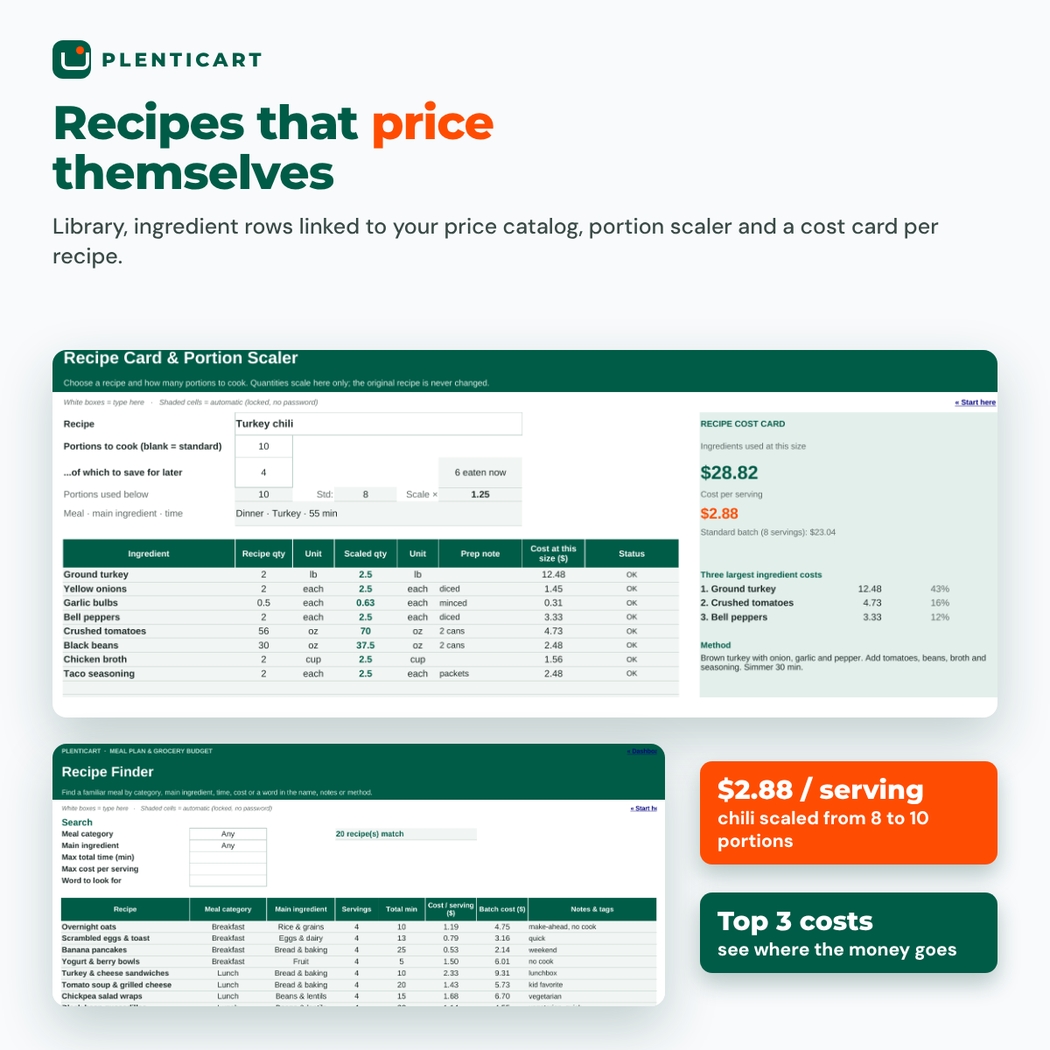
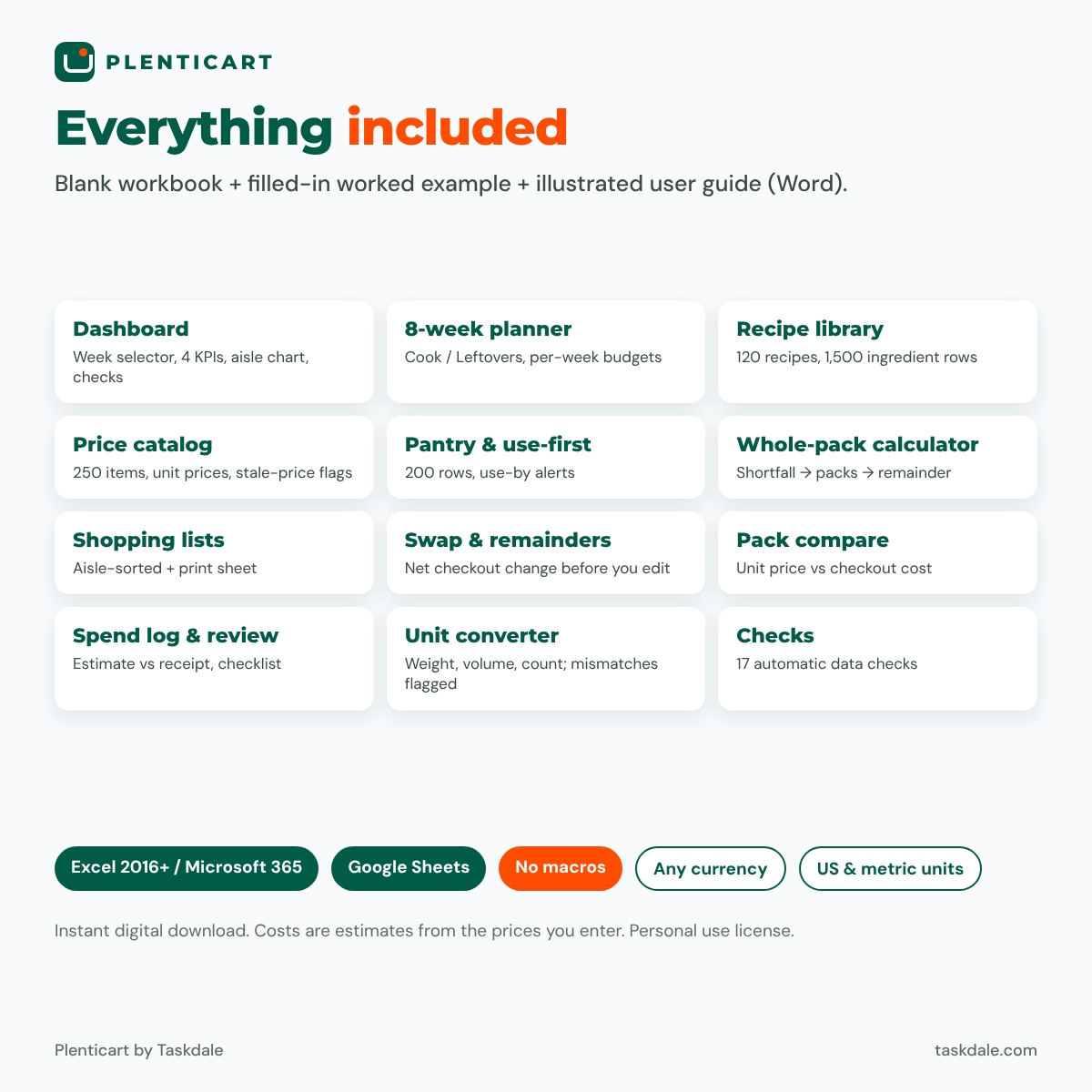
- Recipe library (120 recipes): standard servings, prep and cook time, method, meal category and main ingredient, with filters and a Recipe Finder (category, main ingredient, maximum time, maximum cost per serving or any word).
- Ingredient rows linked to a price catalog: rice used in three meals appears once on your list, under one name.
- Unit converter: grams to pounds, cups to fluid ounces and so on. Weight converts only to weight, volume to volume and count to count. Cups versus grams is flagged, never guessed.
- Recipe card and portion scaler: scale a recipe to any number of portions without changing the original. The cost card shows the cost at that size, the cost per serving and the three largest ingredient costs.
Weekly meal planner and pantry
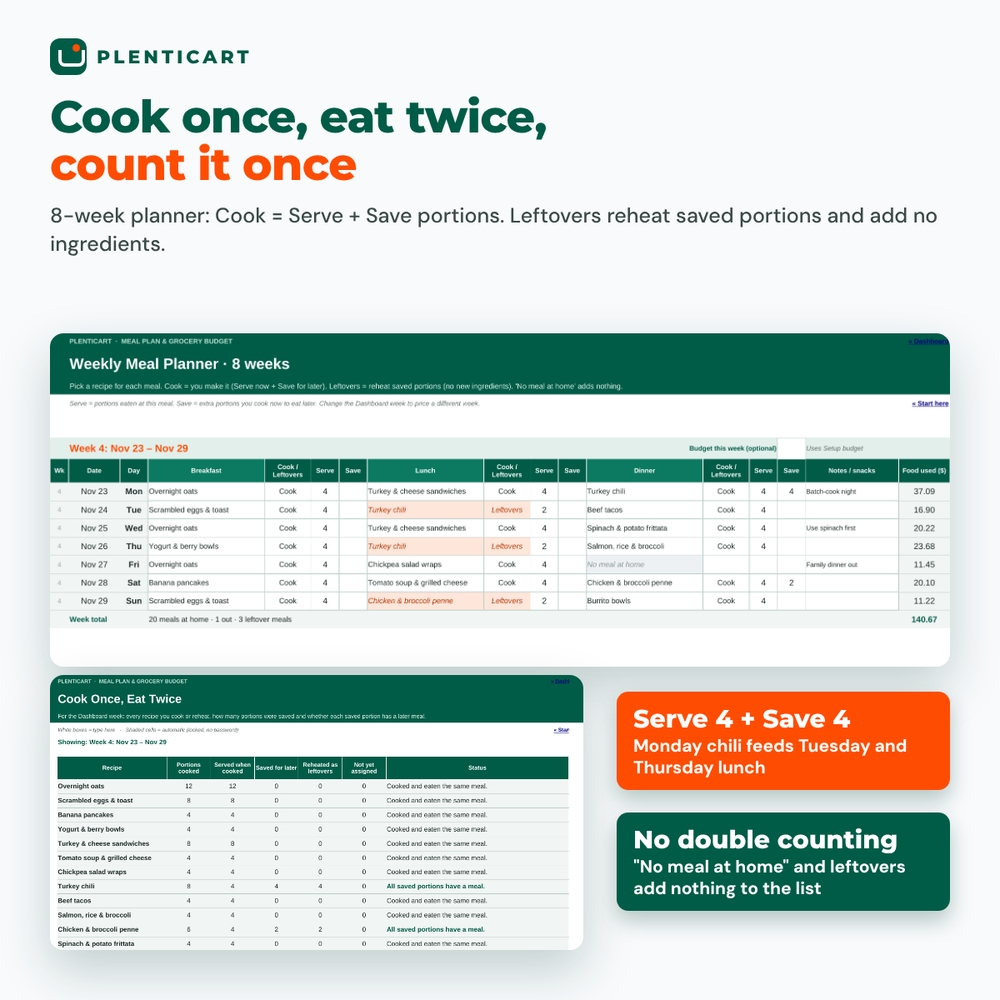
- 8-week planner: breakfast, lunch and dinner with recipe dropdowns, Serve and Save portions, a “No meal at home” option and an optional budget for each week.
- Cook once, eat twice: a Leftovers meal reheats saved portions and never counts the ingredients again. A tracker shows any saved portions that don’t have a meal yet.
- Pantry, fridge and freezer: part-packs, storage location and optional use-by dates, deducted once from the week’s combined needs.
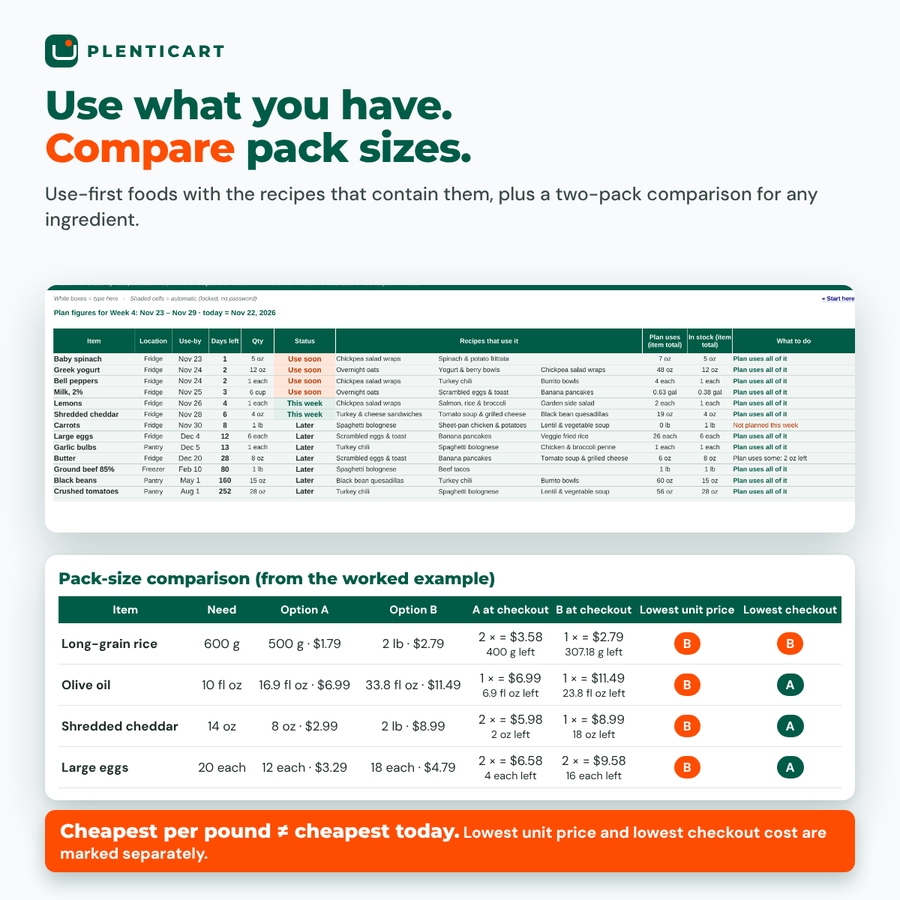
- Use-first view: foods closest to their use-by date, the recipes that contain them and how much the plan will use.
- Week templates: a worked example week plus blank grids to save your regular week.
Whole-pack calculator and grocery list
- Price catalog (250 items): pack size, shelf price, store, aisle, price-check date and a unit price (per lb, qt or each, or switch to kg and L).
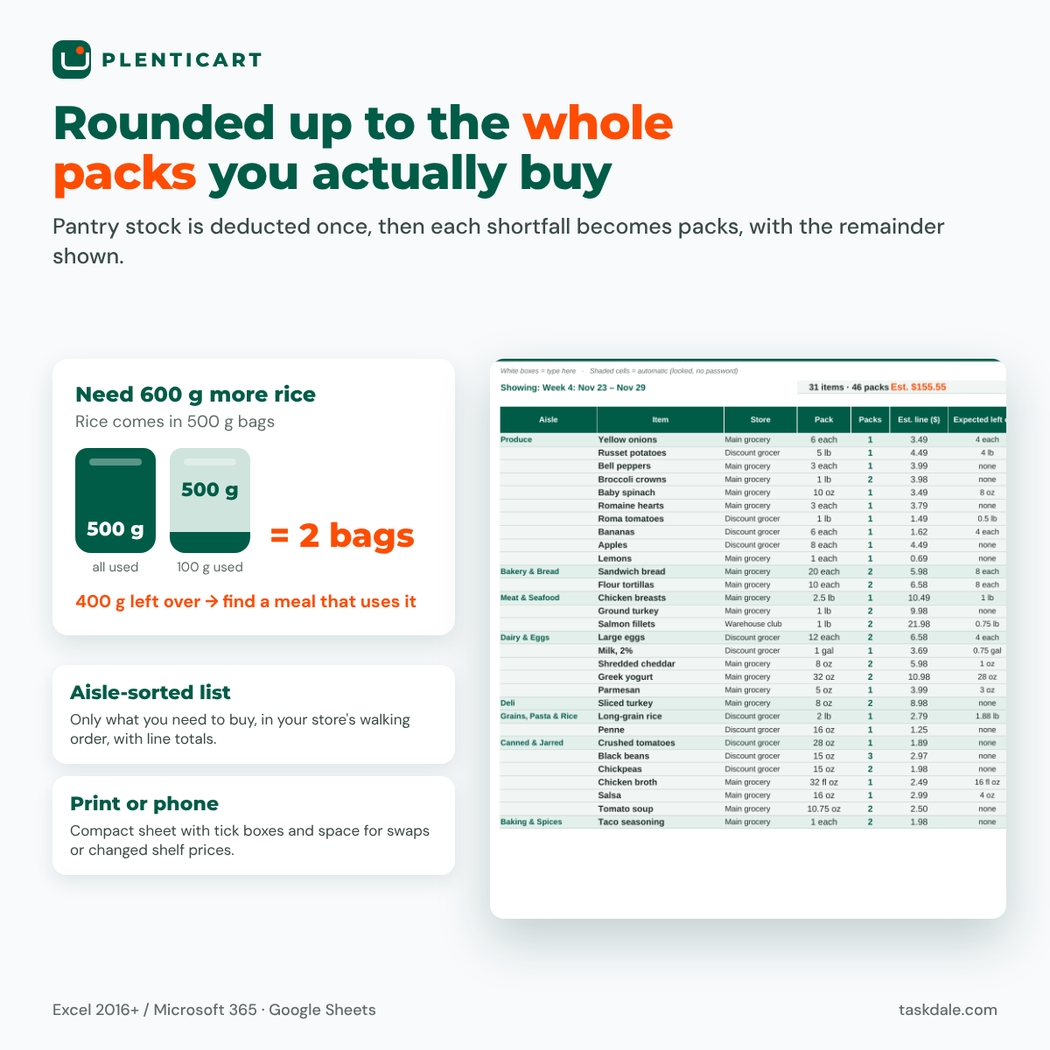
- Whole-pack calculator: each shortfall is rounded up to whole packs, with the expected remainder. Need 600 g more rice and buy 500 g bags? It lists 2 bags and 400 g left over.
- Pack-size comparison: two pack options side by side. The lowest unit price and the lowest checkout cost are marked separately, because the bigger bag isn’t always cheaper this week.
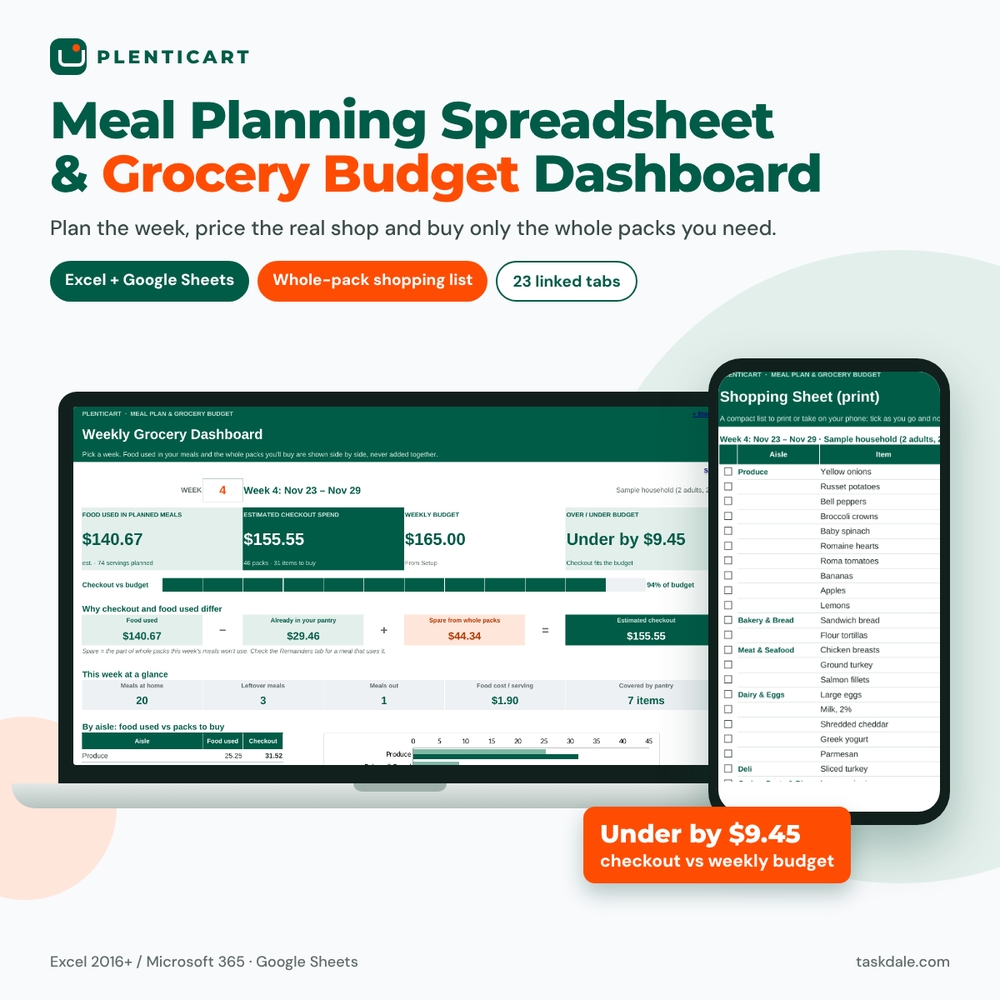
- Aisle-sorted shopping list: only what you need to buy, in your store’s walking order, with line totals and a Tick column, plus a compact print sheet with tick boxes and space for substitutions.
Grocery budget dashboard
- Week selector and four labeled figures: food used in planned meals, estimated checkout spend, weekly budget and over/under budget. A blank budget shows “Not entered”, not zero.
- The bridge: food used − already in your pantry + spare from whole packs = estimated checkout.
- Charts: food used vs packs to buy by aisle, and estimate vs receipt by week.
- Remainder-to-recipe finder: recipes that use a pack remainder and whether cooking one adds packs to the bill.
- One-meal swap preview: compare two versions of the shopping list. It shows which packs disappear, which are added and the net change at checkout.
- Spend log, budget review checklist and 17 automatic data checks.
What’s included
- Plenticart-01-Meal-Plan-Grocery-Budget.xlsx: the blank workbook (23 tabs).
- Plenticart-02-Worked-Example-Filled-In.xlsx: the same workbook filled in for a fictional family of four, with 46 grocery items, 20 recipes, a pantry, 4 planned weeks and 3 logged receipts.
- Plenticart-00-User-Guide.docx: an illustrated step-by-step guide with troubleshooting and FAQs.
How it works
- In Setup, enter your currency symbol, weekly budget, the first day of Week 1 and your store’s aisle order.
- Add the items you buy to the Catalog with pack size and shelf price.
- Add recipes and their ingredient rows.
- Record what’s in your pantry, fridge and freezer.
- Plan the week in the Planner: Cook (Serve + Save), Leftovers or No meal at home.
- Pick the week on the Dashboard, check the budget, try a swap if needed, then print the aisle-sorted list.
File formats and software requirements
Excel workbook (.xlsx) for Microsoft Excel 2016 or later (Windows or Mac, including Microsoft 365) and Google Sheets (upload the file to Google Drive). No macros, scripts or add-ons. Tested at full capacity (250 catalog items, 120 recipes, 1,500 ingredient rows, 200 pantry rows, 8 weeks) with zero formula errors. Formula cells are locked without a password, so you can unprotect and customize the workbook.
Customization
One currency setting changes every money figure and header ($ by default; €, £ or any symbol work). You can rename and reorder aisles and stores, add up to 15 units of your own (such as “can” or “clove”), show unit prices per lb or kg, and set a separate budget for any week.
Real-life uses
- Making a $165 week cost $165 at the register.
- Batch-cooking Sunday chili for dinner and two lunches without buying it twice.
- Using up a part-bag of rice without adding to the bill.
Digital download
Instant digital download; nothing is shipped. Costs are estimates from the prices you enter. Planning tool only, not financial, nutrition or medical advice. License: personal use only. You may not resell, share, or redistribute the files.
FAQ
Does this meal planning spreadsheet work in Google Sheets?
Yes. Upload the .xlsx to Google Drive and open it with Google Sheets. It uses only functions that work in both Excel and Google Sheets.
Why is the checkout estimate higher than the food used?
Because you buy whole packs. The dashboard shows the exact split: food used, minus what’s already in your pantry, plus the spare part of new packs.
Does it count leftovers twice?
No. Only the cooking meal’s Serve + Save portions add ingredients. Leftovers meals reheat saved portions.
Can I use metric units?
Yes. Grams, kilograms, milliliters and liters convert alongside ounces, pounds, cups and quarts, and unit prices can show per kg and L.
Does it calculate calories or nutrition?
No. It focuses on meals, quantities and money.
Do I need to enter every recipe myself?
The worked example includes 20 everyday recipes and 46 priced grocery items that you can copy into your own workbook and adjust.
Is there a free version?
Yes. Plenticart Lite (a 7-day planner and grocery list for 10 recipes) is free in our meal planning article.
Reviews
There are no reviews yet.