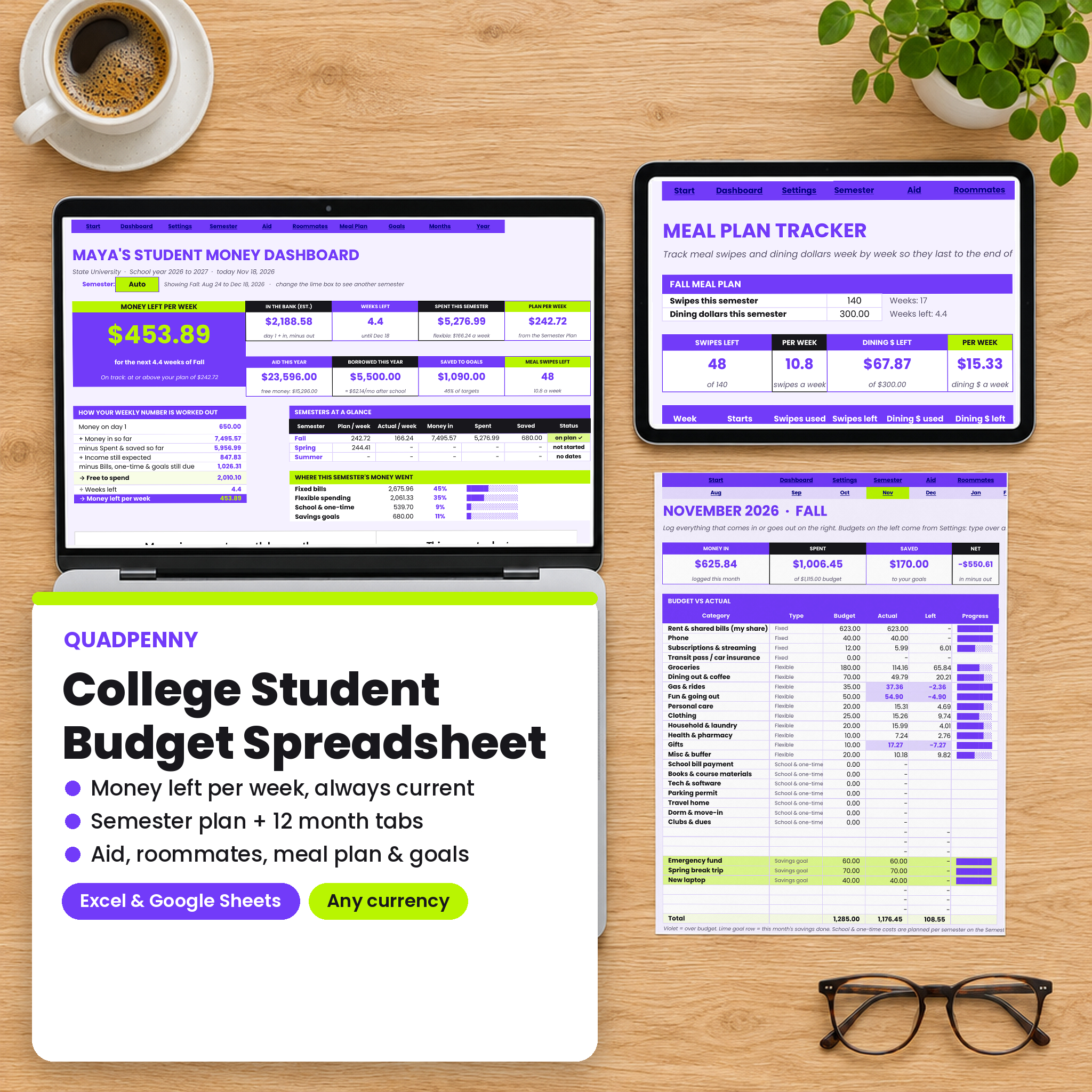




Student money is lumpy. A financial aid refund lands in late August, a campus job pays every two weeks, a parent sends something when they can, and rent, books and food have to last until the last week of finals. A normal monthly budget does not fit that. Quadpenny is a college student budget spreadsheet built around the way students actually get paid, and it answers the one question you ask before every purchase: how much can I spend this week?
What this college student budget spreadsheet does
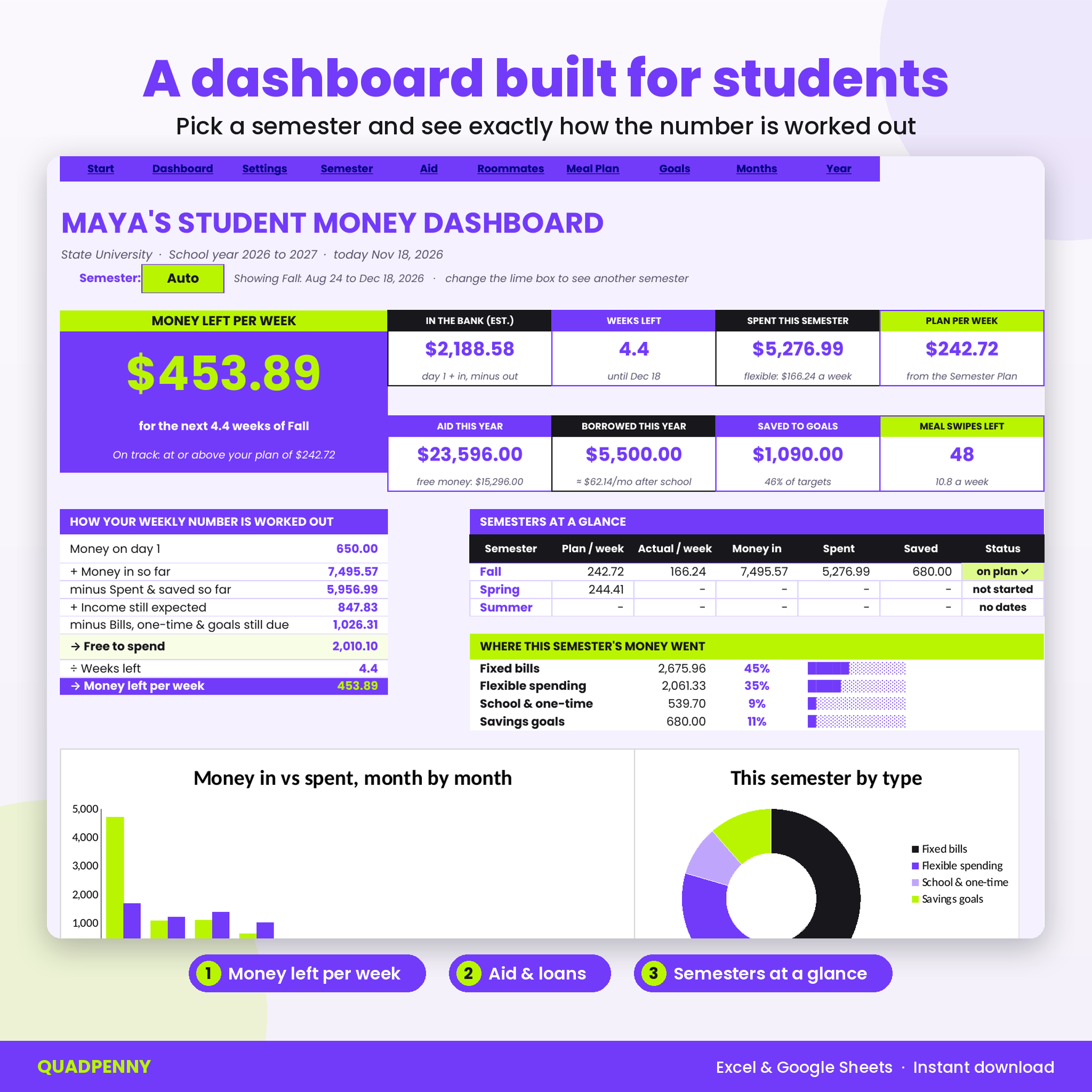
You plan each semester once. Quadpenny adds up your grants, scholarships, loans and work-study, subtracts your school bill, adds your day-one money, job pay and family help, and takes out rent, phone, books, travel and savings goals. What is left becomes your money per week. Then you log what you spend in the month tabs and the dashboard keeps a live number: money left per week for the rest of the semester.
Spend a little more on Friday and the number for the remaining weeks goes down. Pick up an extra shift and it goes up. No guessing, no math on your phone calculator at the register.
Who it is for
- College and university students living on aid, loans, a part-time job, family help or all four
- Students sharing an apartment who split rent, utilities and groceries
- Students on a meal plan who want swipes and dining dollars to last
- Parents setting up a first budget with a son or daughter heading to campus
- Complete beginners: you only type in the white cells
Features
Dashboard with money left per week
The big number at the top is your safe weekly spending money for the semester you pick. Under it, a short table shows exactly how it was worked out, step by step, so you can trust it. Cards show your estimated bank balance, weeks left, spending this semester, aid for the year, money borrowed, savings and meal swipes left. Two charts show money in vs spent by month and where this semester’s money went. Roommate balances and goal progress sit at the bottom.
Semester plan
- Fall, Spring and an optional Summer term, side by side
- Aid toward your bill vs tuition and fees, housing, meal plan and other charges
- Refund to you or the balance you owe, worked out automatically
- Part-time job estimate from pay per hour and hours per week
- One-time costs such as books, parking, travel home and move-in
- Plan vs actual spending per week, with a bank balance estimate
- Student loan box: what you borrowed this year and roughly what it adds to your monthly payment after school
12 month tabs, August to July
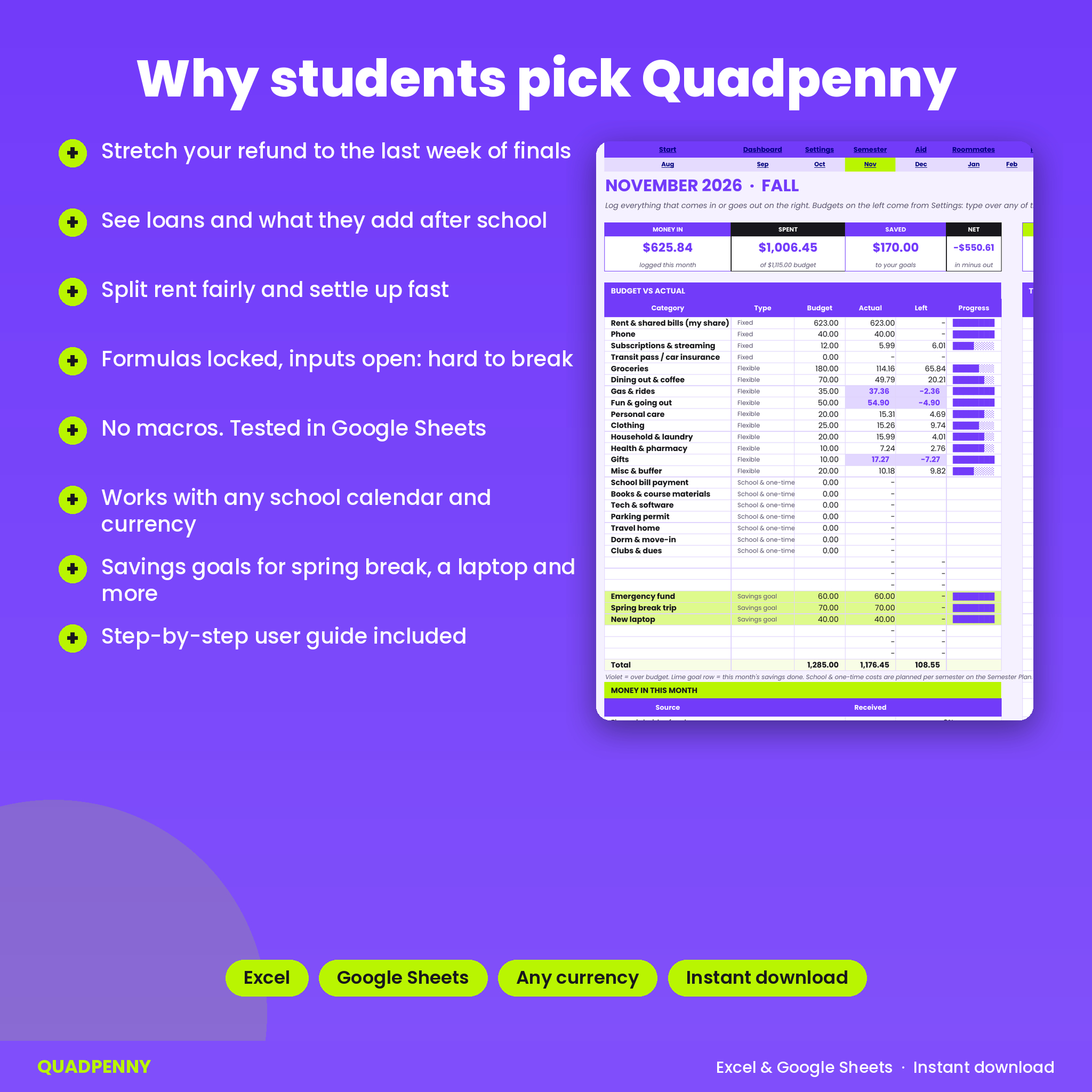
Each month has budget vs actual for up to 24 categories, a money-in table by source, a week-by-week view of flexible spending against your weekly allowance, and a 150-row transaction log. Amounts are always positive: the category decides whether a row is money in, spending or a savings deposit.
Financial aid and scholarship tracker
Thirty rows for grants, scholarships, federal and private loans, work-study and other aid, each with semester, amount, expected date, received, renewable and loan rate. Anything past its date and not received is highlighted so you know to check your student portal.
Rent and roommate split
Split up to 12 shared bills equally or by custom percent between up to 5 people. Your share feeds straight into your rent budget. A shared purchases log works out who owes who, and settled rows drop out of the balance.
Meal plan tracker
Track swipes and dining dollars week by week for Fall and Spring. See how many you can use per week from now on, and which weeks went over an even share.
Savings goals and a year view
Six goals with a target, date and plan per month, from a spring break trip to a new laptop. Deposits logged in the month tabs count automatically. The 12 Months tab shows the whole school year with a heat map of where your money goes.
What is included
- Quadpenny College Student Budget Spreadsheet (.xlsx) with 21 tabs: Start Here, Dashboard, Settings, Semester Plan, Aid & Income, Roommates, Meal Plan, Goals, 12 month tabs and 12 Months
- User guide (Word .docx) with setup steps, every feature explained, troubleshooting and FAQ
How it works
- Settings: currency, school year, semester dates, roommates and your categories with a monthly budget.
- Aid & Income: add each award from your financial aid letter.
- Semester Plan: type your school bill, day-one money, job hours and one-time costs. Read your money per week.
- Month tabs: log deposits and purchases as you go.
- Dashboard: check money left per week before you spend.
File format and software
One .xlsx file that opens in Microsoft Excel (2016 or newer, Microsoft 365, Windows or Mac) and in Google Sheets. Every tab was tested in Google Sheets with sample data. There are no macros or scripts. The violet buttons that jump between tabs are made for Excel; in Google Sheets you use the tab bar at the bottom. A free Google account is all you need to use it in Sheets.
Customizing
Pick any currency symbol and every money card follows it. Rename the 24 spending categories and 8 money-in sources, change their type, set your own semester dates and decide which semester each month belongs to, so quarter schools and January starts work too. Formula cells are locked without a password so you cannot break them by accident; input cells stay open.
Digital download
This is a digital product. Nothing is shipped. Download the spreadsheet and guide straight after checkout from your order page and your account. For personal use only: please do not share or resell the file.
Real situations it handles
- A $3,600 refund arrives in August and has to cover rent and food until December
- Three roommates split rent, internet and a streaming plan that only two of them use
- Week 9 of the semester and the meal plan has 40 swipes left
- Deciding whether you can afford a concert ticket this weekend
- Working out how much a summer job needs to cover before fall
FAQ
Does this student budget template work in Google Sheets?
Yes. Upload the file to Google Drive and open it with Google Sheets. All tabs were tested there.
My school uses quarters. Will it work?
Yes. Set three terms with your own dates and choose which term each month belongs to.
Does it connect to my bank?
No. You type transactions yourself, which keeps your bank login private and makes you notice where money goes.
What if I live in a dorm with no roommates?
Leave the roommate names blank and type your housing cost on the Semester Plan or as a monthly bill.
Can I use it on my phone?
You can log purchases in the Google Sheets or Excel app. Setup is easiest on a laptop.
Can I use it again next year?
Yes. Save a copy, change the school year on Settings and clear the logs.
Is it good for a parent to give a student?
It works well as a back to school gift. Set it up together the week before move-in.

Reviews
There are no reviews yet.