

Personal Trainer Client Tracker Spreadsheet for Session Packs, Progress and Income
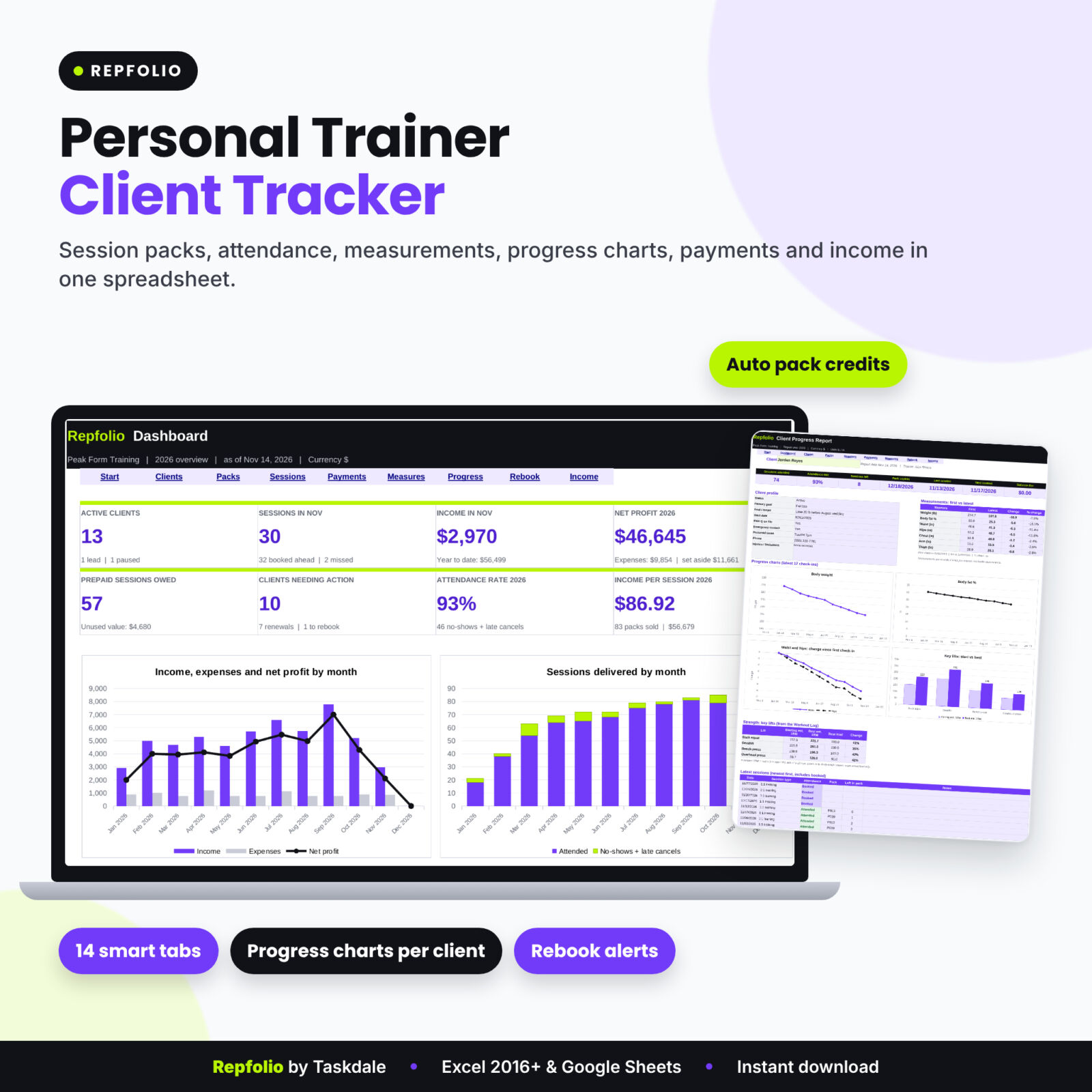
Repfolio is a personal trainer client tracker built as a single spreadsheet for Excel and Google Sheets. It keeps every client, every session pack, every session, every payment and every check-in in one place, and it does the counting that usually eats your evenings. Log a session and the credit comes off the client’s oldest pack. Record a payment and the pack balance updates. Add a check-in and the client’s progress report redraws its charts.
It is made for trainers who sell packs and block bookings and want clear numbers without paying for monthly coaching software.
Who it is for
- Independent and mobile personal trainers who sell 5, 10 or 20 session packs
- Studio owners and small-group coaches with up to 200 clients
- Online coaches who sell monthly check-in packages
- New trainers who want a professional system from day one
What the personal trainer spreadsheet does
Session packs that count themselves
Add one row per pack sold: client, package and purchase date. Sessions, price and expiry fill in from your Settings, with overrides for one-off deals. Every session that uses a credit is matched to the client’s oldest pack, and the Session Log shows the Pack ID used and the credits left after that session. Pack status updates on its own: Active, Low balance, Expiring soon, Expired or Used up. If a client trains past their credits, those sessions show No credit and the client gets an Unpaid sessions alert.
Session log with your no-show policy
Book future sessions as Booked, then mark them Attended, No-show, Late cancel or Canceled. You decide on Settings whether no-shows and late cancels use a credit. Session types such as Free consultation can be set to never use a credit, and a per-row override covers anything unusual.
Client database
Each client has status, start date, primary goal, goal details, PAR-Q on file (Yes/No), emergency contact on file (Yes/No), injuries and limitations notes, lead source and preferred times. Live columns show sessions left, current pack expiry, last session, days since, next booked session, attendance, payments and balance due, plus one clear alert.
Measurements and client progress report
Record weight, body fat %, waist, hips, chest, arm and thigh at each check-in, in kg or lb and cm or in. Pick a client on Client Progress for a one-page report: seven KPI tiles, profile, first vs latest measurements with change and % change, four charts (body weight, body fat %, waist and hips change, key lifts start vs best) and the latest sessions. Print it or save it as a PDF to share with the client.
Workout log and program card
Log sets, reps, load and RPE. Volume and an estimated 1-rep max (Epley formula, 1-12 reps) are calculated for you, and four key lifts of your choice appear on the progress report. A printable Program Card holds a 4-day plan with the client’s goal and limitation notes pulled in automatically.
Rebook & Renew action list
Every client who needs attention, sorted by urgency: unpaid sessions, balances due, 0 sessions left, expired packs with unused sessions, low balance, packs expiring soon, clients with nothing booked, leads to follow up and missing PAR-Q or emergency contact. Fix the cause and the client drops off the list.
Payments, income and dashboard
Payments link to packs, so part payments and balances are tracked per pack and per client. The Income tab shows income received, packs sold, sessions delivered, no-shows, new clients, expenses, net profit, a set-aside percentage and income per session for every month, plus income by payment method, expenses by category and your top 10 clients. The Dashboard brings it together with 8 KPI tiles, 4 charts, the next actions and the value of prepaid sessions you still owe.
What is included
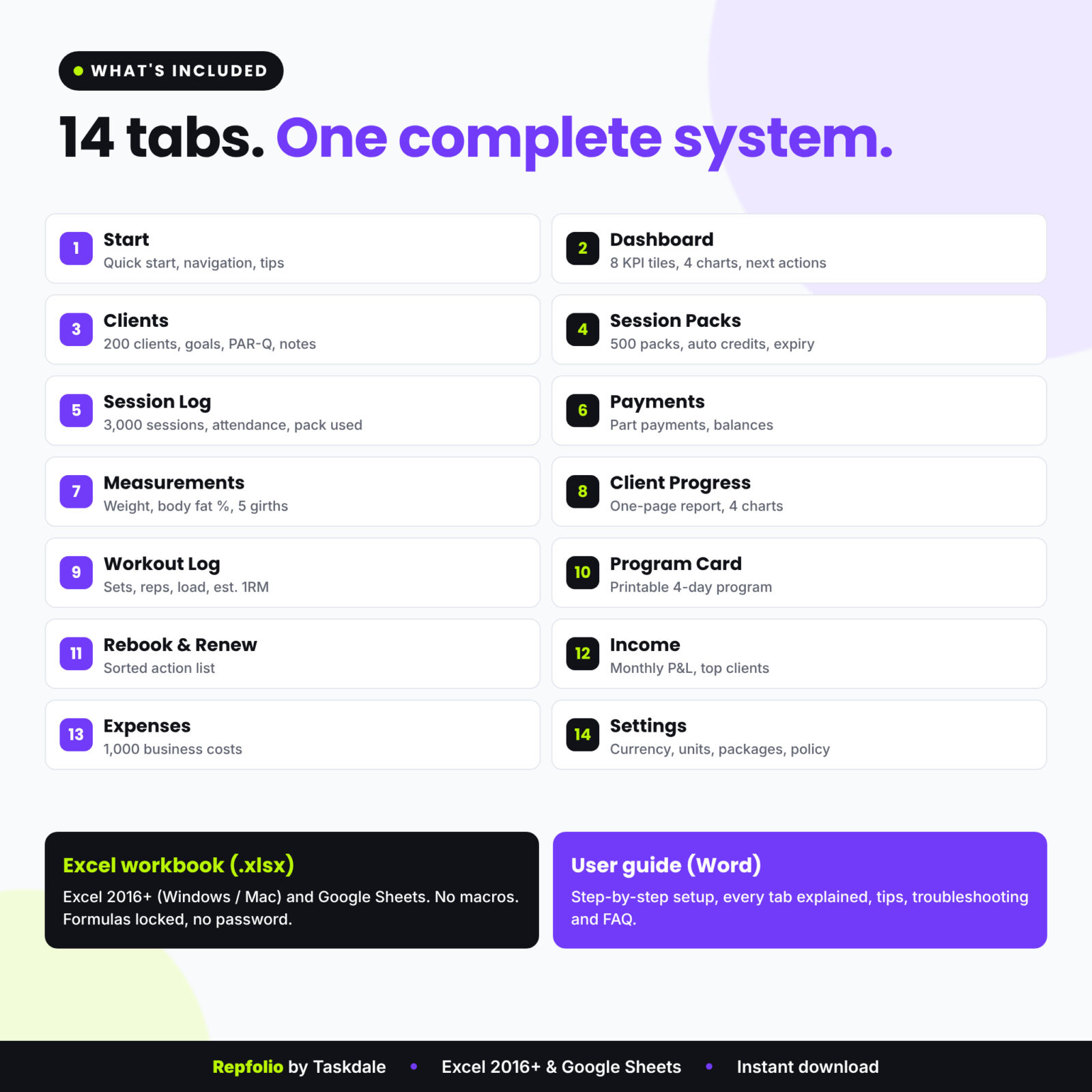
- Repfolio Personal Trainer Client Tracker (.xlsx) with 14 tabs: Start, Dashboard, Clients, Session Packs, Session Log, Payments, Measurements, Client Progress, Workout Log, Program Card, Rebook & Renew, Income, Expenses and Settings
- Repfolio User Guide (.docx): setup, every tab explained, tips, troubleshooting and FAQ
How it works
- Settings: business name, currency symbol, units, your packages and prices, and your no-show policy.
- Clients: add each client once.
- Session Packs and Payments: record what each client buys and pays.
- Session Log and Measurements: log sessions and check-ins as you go.
- Rebook & Renew and Dashboard: see who to contact and how the business is doing.
File format and software
- Microsoft Excel 2016 or newer (Windows and Mac) and Google Sheets (free Google account)
- No macros, no add-ons, no subscription
- Formula cells are locked without a password; input cells are color-coded
- Room for 200 clients, 500 packs, 3,000 sessions, 1,500 payments, 2,000 check-ins, 3,000 workout lines and 1,000 expenses
Customization
Set any currency symbol once and every money label follows it. Choose kg or lb and cm or in. Edit your packages, session types, goals, lead sources, payment methods, expense categories, locations and the 80-row exercise library. Renamed list items are flagged in the Check column of rows that still use the old name, so nothing breaks quietly.
Real situations it handles
- A client buys a new 10-pack before the old one runs out: credits keep coming off the older pack first.
- A client pays half now and half next month: the pack shows the balance until the second payment is logged.
- A client no-shows: the credit is used or not, based on your policy.
- A client has not trained for two weeks and has nothing booked: they appear on the Rebook list.
- A progress review: open Client Progress, pick the client, print the page.
Instant digital download
This is a digital product. You receive the Excel workbook and the Word user guide immediately after purchase. No physical item is shipped.
FAQ
Does it work in Google Sheets?
Yes. Upload the .xlsx to Google Drive and open it with Google Sheets. Formulas, dropdowns and charts carry over.
Do I need the latest version of Excel?
No. It works in Excel 2016 or newer on Windows and Mac. It uses standard formulas only.
How are session credits counted?
Each session that uses a credit takes the next credit from the client’s oldest pack, in date order. You set whether no-shows and late cancels count.
Can I use my own currency and kg or lb?
Yes. Type your currency symbol once on Settings and choose kg/lb and cm/in.
Does it store client health information?
It records only what you enter: Yes/No for PAR-Q and emergency contact on file, and your own short notes. It does not screen clients and is not medical advice.
Can I print client progress reports?
Yes. The Client Progress tab is set up as one US Letter page you can print or save as PDF.
Is there a free version?
Yes, a free Repfolio Lite session pack tracker is available on the Taskdale blog. The full version adds everything listed above.
Personal use only (or use within your own business for business templates). You may not resell, share, or redistribute the files. © 2026 Taskdale. All rights reserved.
Reviews
There are no reviews yet.