
A house cleaning quote calculator that prices from margin
Most cleaning price lists stop at “so much per bedroom.” Route & Rate Cleaning Quote Workbook builds each quote from what the job will actually cost you: labor from room counts and add-ons, plus supplies, travel and overhead. It then prices the job against a target margin (price = cost ÷ (1 − margin)), so the margin you set is the share of the price you keep. After the clean, you log the real hours and see whether the estimate held.
It is built for house cleaners, solo residential cleaning businesses and small teams in the US who quote recurring, deep and move-out cleans and want every quote to follow the same rules.
What it does, with a real example
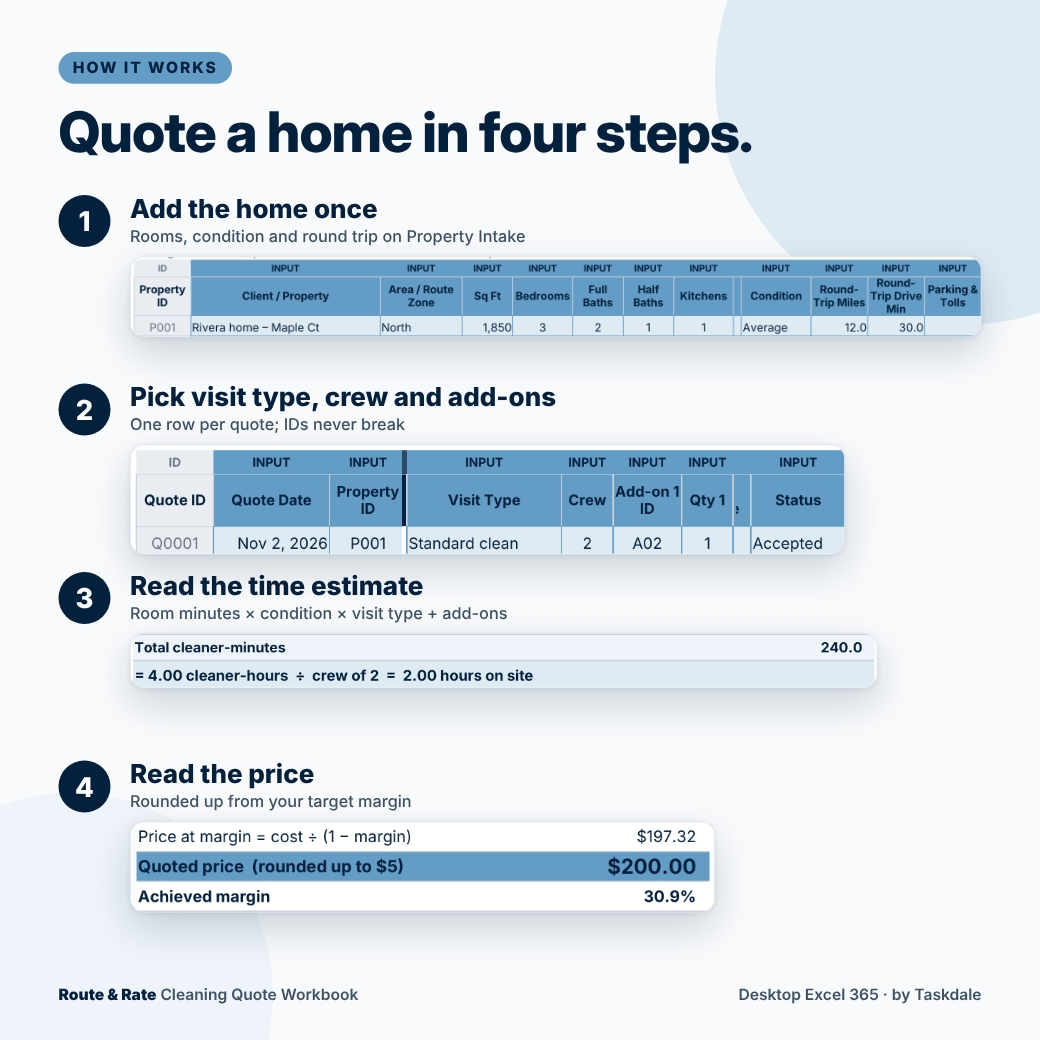
A three-bedroom home with two full baths, a half bath, a kitchen, living and dining areas, a laundry room and one stair flight needs 225 room minutes at your starter room times. One inside-fridge add-on adds 15 minutes. That is 4.00 cleaner-hours, or 2.00 hours on site for a crew of two.
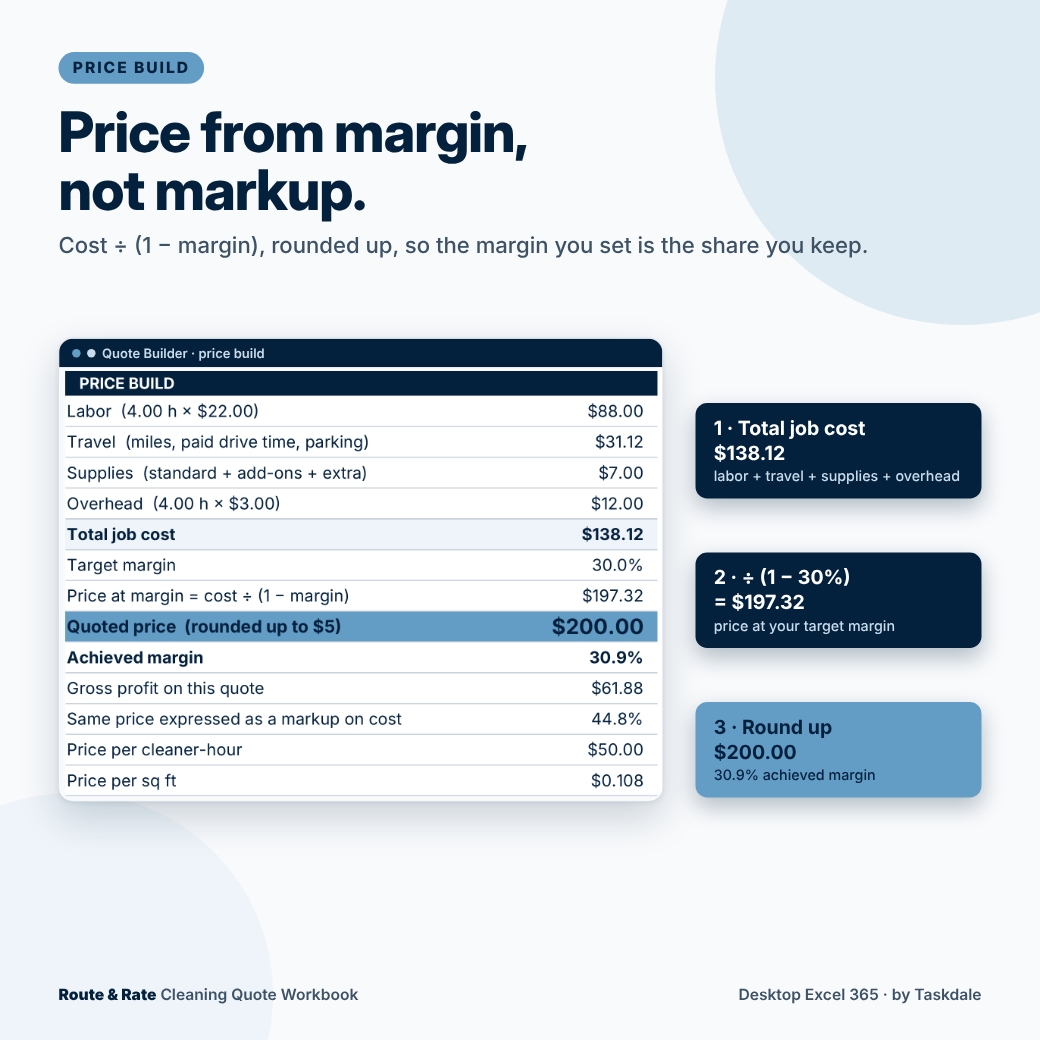
- Labor: 4.00 h × $22.00 = $88.00
- Travel: 12 miles × $0.76 plus 30 minutes of paid drive time for two cleaners = $31.12
- Supplies: $6.00 per visit + $1.00 for the add-on = $7.00
- Overhead: 4.00 h × $3.00 = $12.00
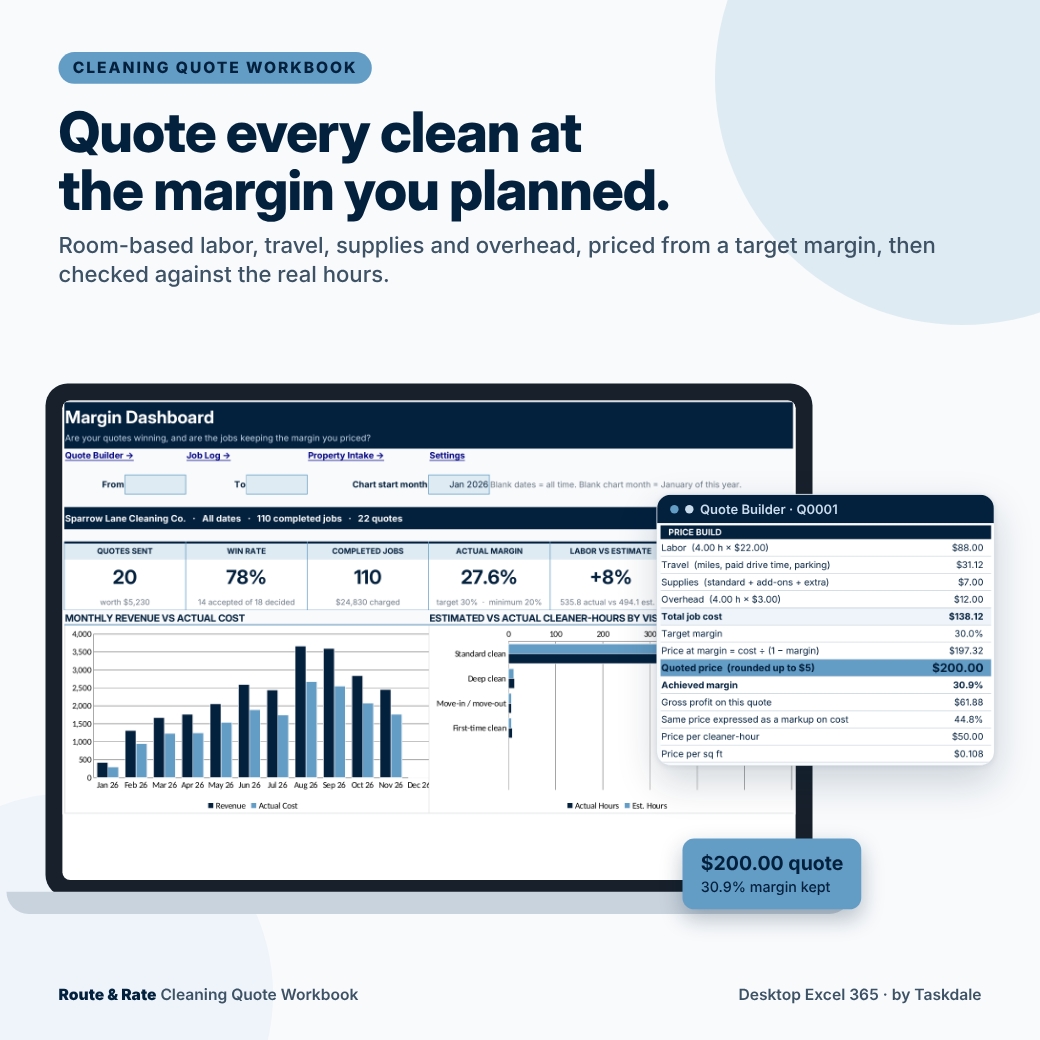
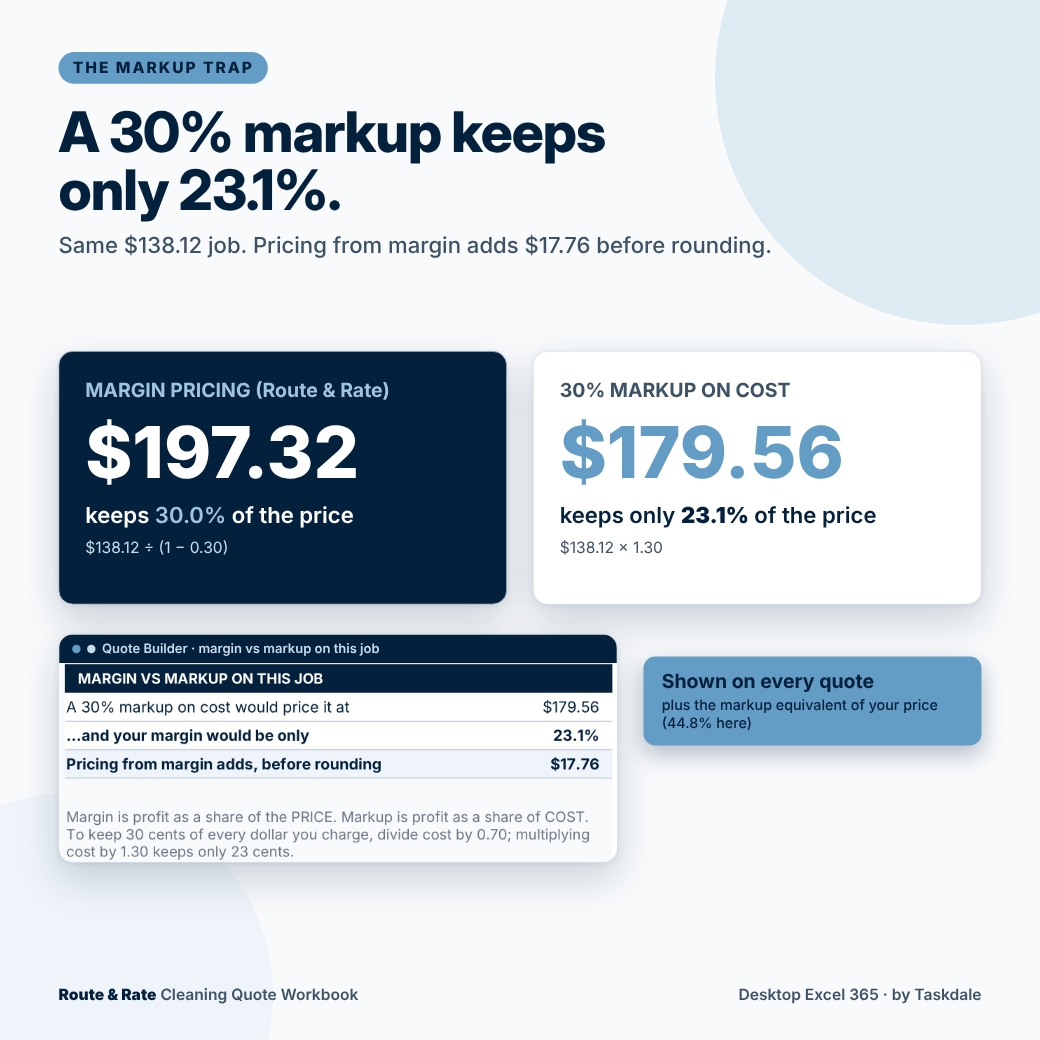
Total job cost is $138.12. At a 30% target margin the price is $138.12 ÷ 0.70 = $197.32, rounded up to your $5 step: $200.00, a 30.9% margin. A 30% markup on the same cost would have priced it at $179.56 and kept only 23.1%. The Quote Builder shows that comparison on every quote.
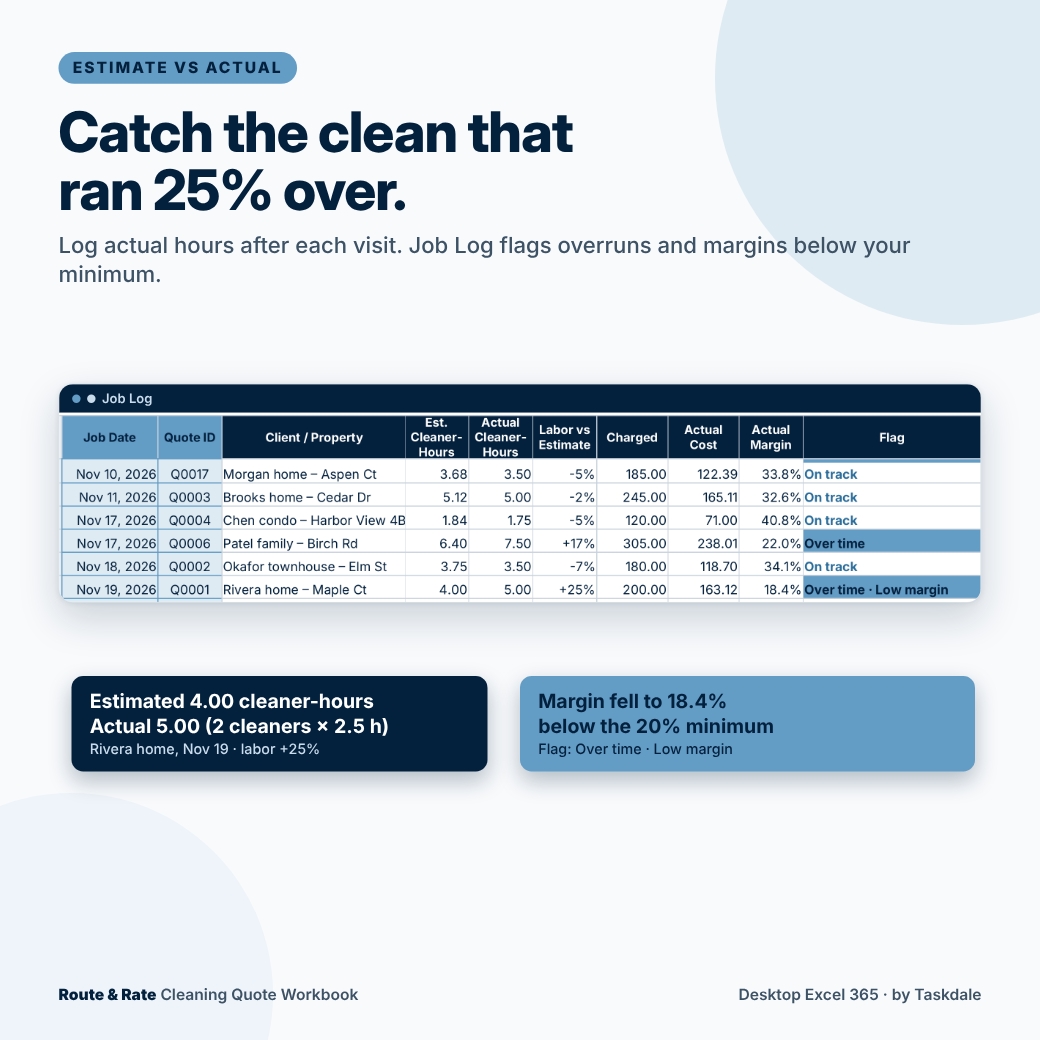
When that client’s second clean takes two cleaners 2.5 hours, the Job Log records 5.00 cleaner-hours against 4.00 estimated (+25%) and an actual margin of 18.4%. Because that is over your 15% time alert and under your 20% minimum margin, the row is flagged “Over time · Low margin.”
What’s included
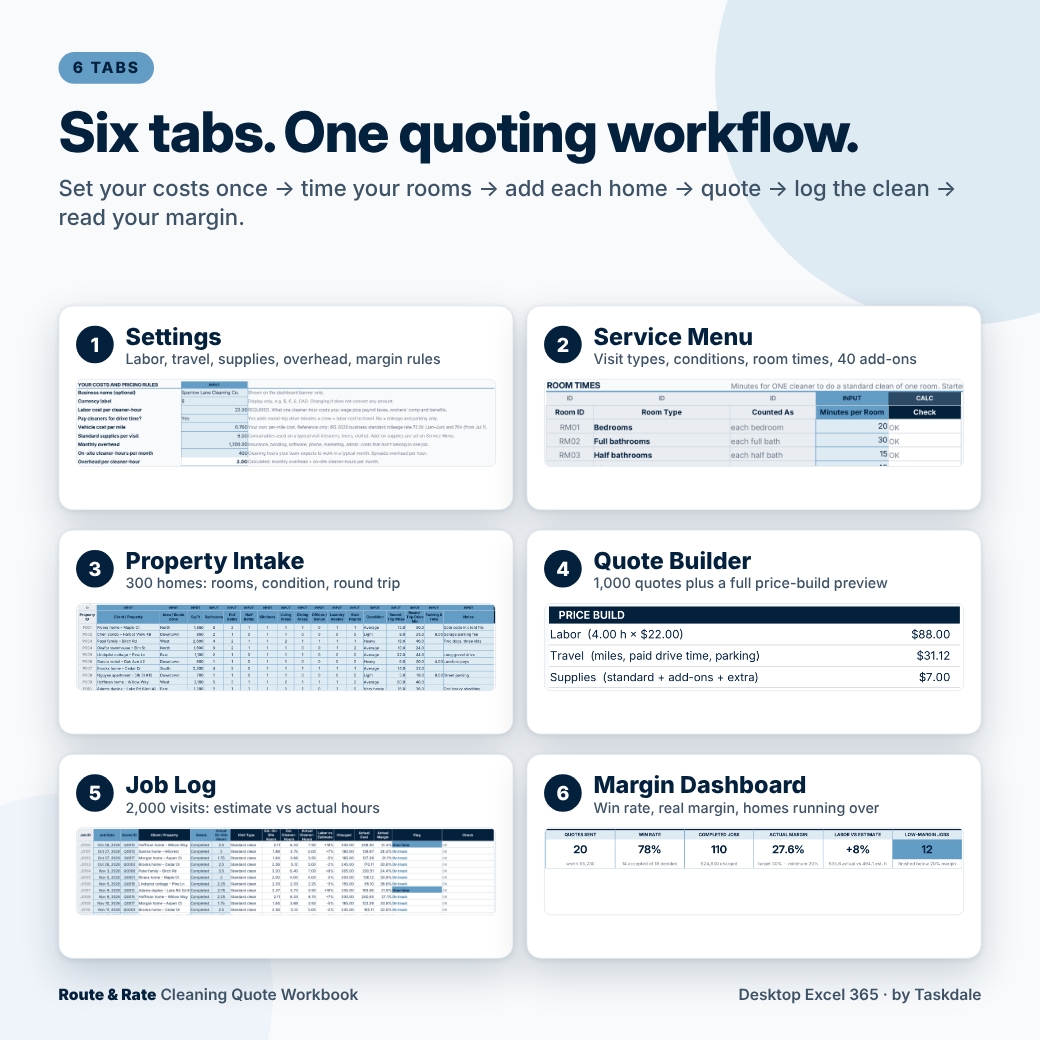
An editable, macro-free Excel workbook with six tabs:
- Settings: labor cost per cleaner-hour, paid drive time (Yes/No), vehicle cost per mile, supplies per visit, monthly overhead spread per cleaner-hour, target and minimum margin, price rounding, minimum job charge, time variance alert and one currency label.
- Service Menu: six visit types and four condition levels with time multipliers, minutes for nine room types, and 40 add-ons with minutes and supplies per unit.
- Property Intake: up to 300 homes with room counts, condition, round-trip miles, drive minutes and parking. Completed jobs, labor vs estimate and actual margin fill in per home.
- Quote Builder: 1,000 quote rows with crew size, up to four add-ons, extra supplies, an optional margin override and Draft/Sent/Accepted/Declined status, plus a preview panel with the full time and price build.
- Job Log: 2,000 visit rows. Enter actual crew, actual hours and the amount charged; see duration and labor vs estimate, actual cost, actual margin and a flag.
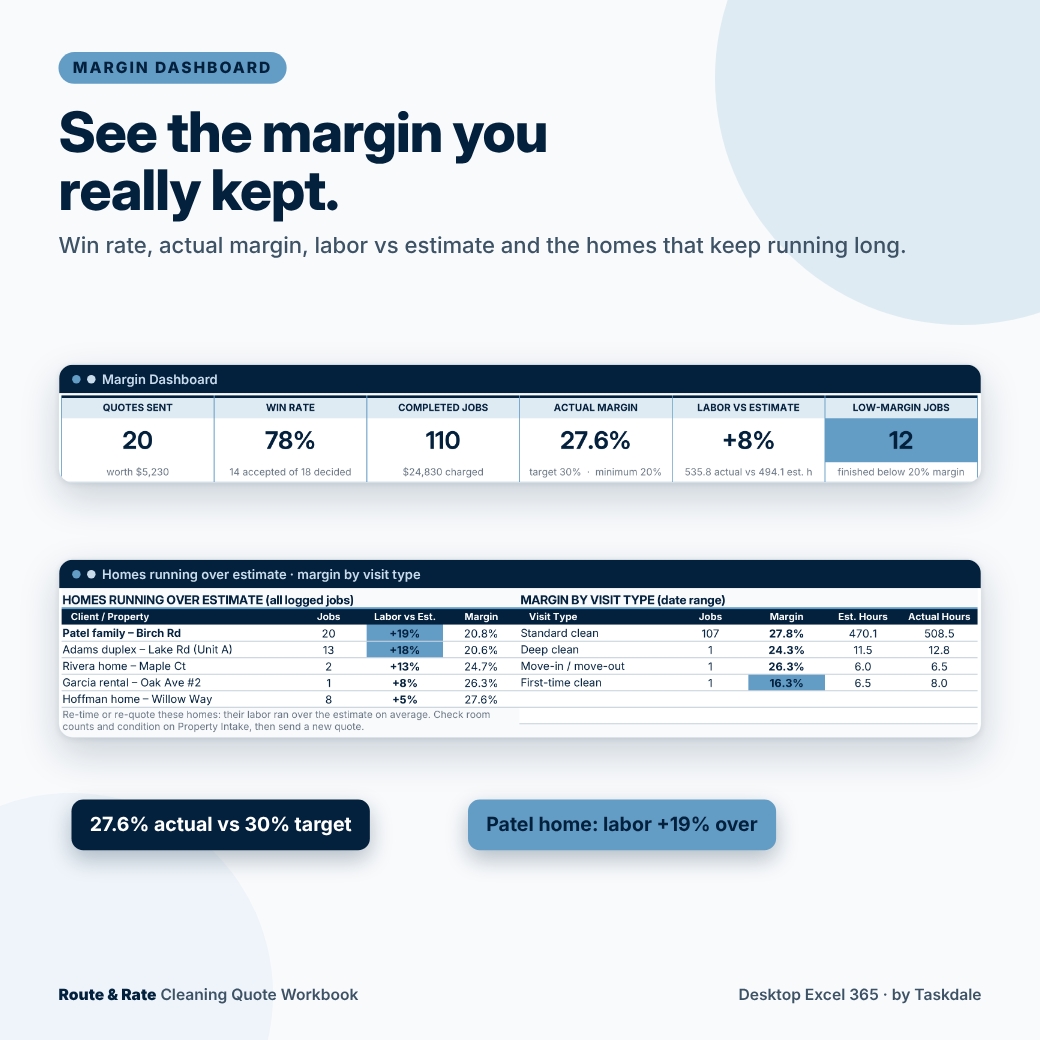
- Margin Dashboard: quotes sent, win rate, completed jobs, actual margin, labor vs estimate and low-margin jobs, a monthly revenue vs cost chart, estimated vs actual hours by visit type, the homes running over estimate and a 12-month table.
You also get a seven-page DOCX user guide with screenshots. The workbook you download is clean and ready for your own clients; the filled workbook in the images is a demonstration with fictional homes.
How to use it
1. Set your costs once. Enter what a cleaner-hour costs you, how you handle drive time, your vehicle and supply costs, and your overhead. Starter room times and add-ons are included, so time your next few cleans and replace them with your own.
2. Add each home once. Count the rooms, pick a condition and enter the round trip. Every future quote for that home reuses it.
3. Quote, clean, log. Pick the home, visit type and crew, add any add-ons and set the status. After the visit, enter the actual hours. Recurring clients reuse the same quote for every visit, and the dashboard shows which homes keep running over so you can re-time or re-quote them.
Every table has a Check column that reads OK when a row is valid, or says exactly what to fix: an unknown property, an inactive add-on, a crew of 1.5, a margin over 90% or missing hours. Invalid rows are left out of totals instead of skewing them.
Format, customization and download details
For desktop Microsoft Excel 365. The workbook is a macro-free .xlsx file with Excel tables, drop-downs, data validation and charts; the guide is a .docx file. Google Sheets, Excel for the web and mobile apps are not supported. This is a digital download; no physical item will ship.
Rename clients, add-ons and visit types, change room times and multipliers, and set any currency label ($ by default; changing it does not convert amounts). Formula cells are protected without a password so they are not overwritten by accident, while every input cell stays editable. Licensed for personal use or use within your own cleaning business; you may not share, resell or redistribute the files.
Good to know
- Quotes and job results recalculate from your current Settings. Save a dated copy before you change your labor cost, and record the amount actually charged on each job.
- It prices and reviews jobs; it does not schedule routes, send quotes to clients, invoice, or calculate tax.
- Starter times and multipliers are placeholders, not industry standards. Time your own cleans.
Frequently asked questions
Can I price by square foot instead of rooms?
Quotes are built from room counts. Enter square footage on each home and the preview shows the resulting price per square foot as a cross-check.
What is the difference between margin and markup?
Margin is profit as a share of the price; markup is profit as a share of cost. A 30% margin needs a 42.9% markup. This workbook prices from margin.
Does it work for a solo cleaner?
Yes. Leave crew size at 1 and use the labor cost you want to earn per hour, including your self-employment costs.
Can I quote deep cleans and move-outs?
Yes. Visit types multiply room minutes (Deep 1.60 and Move-in / move-out 2.00 to start), and you can edit the multipliers or add two of your own.
Can recurring clients have many visits on one quote?
Yes. Each visit is its own Job Log row that reuses the same Quote ID.
Will the price ever round down?
No. Prices round up to your step and never go below your minimum job charge, so rounding never lowers your margin.
Can I use Google Sheets?
No. This product is built and supported for desktop Microsoft Excel 365.

Reviews
There are no reviews yet.