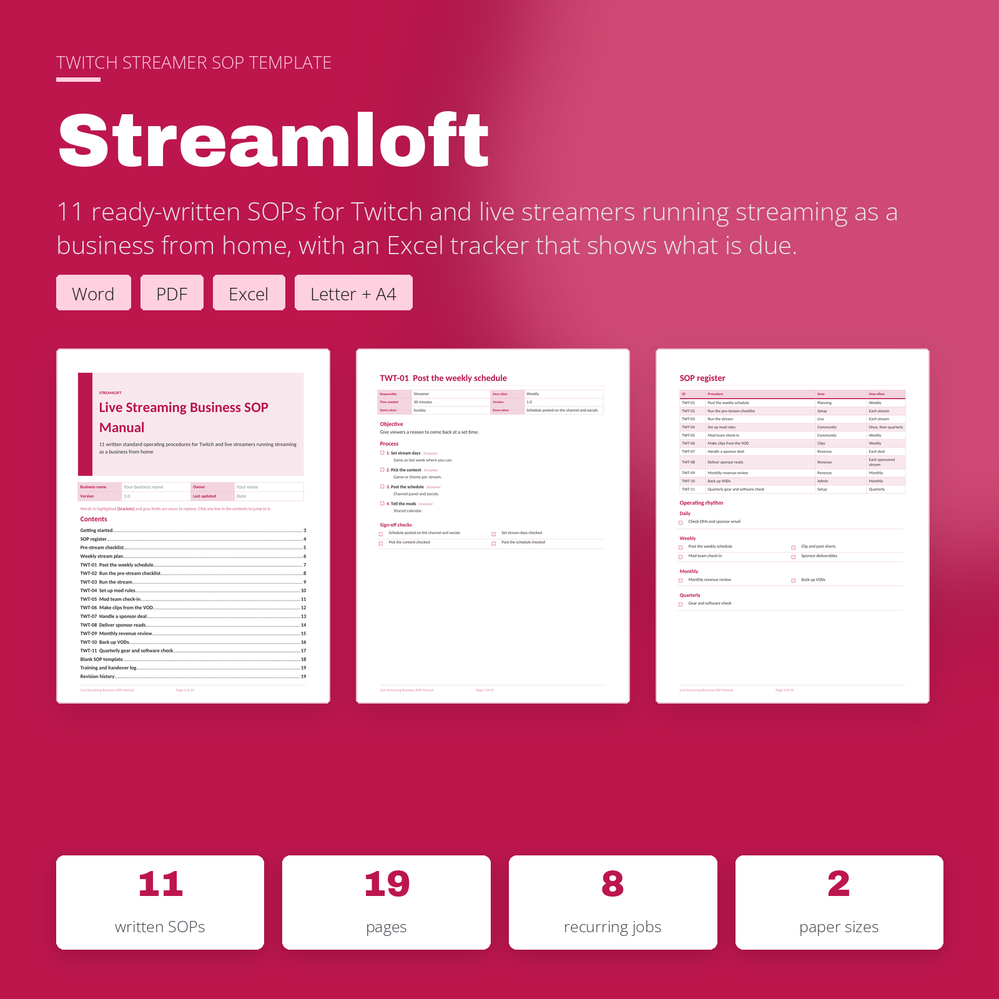


A Twitch streamer SOP template written for Twitch and live streamers running streaming as a business from home
Viewers see three hours of live content. Behind it sits a schedule, a scene setup, a mod team, clips for other platforms and the sponsor reads that pay the bills. This Twitch streamer SOP template gives you 11 procedures written out step by step, so you edit instead of starting from a blank page.
Streams grow on consistency: the same days, the same start time, the same quality. They stall when the schedule slips, audio breaks mid-stream or nobody turns the best moments into clips. These SOPs set a weekly schedule, a pre-stream tech checklist, mod rules, a clip routine, sponsor deliverables and monthly revenue tracking across subs, bits, ads and sponsors.
Built for
- Affiliate and partner streamers growing a channel
- Part-time streamers who want a fixed schedule
- Streamers bringing on mods and a clip editor
Files included
- Editable Word manual in US Letter and A4
- Print-ready PDF
- Blank SOP template (Word)
- Excel SOP tracker with dashboard
- User guide (Word)
Procedures inside
11 written SOPs, grouped by area:
- Planning: Post the weekly schedule
- Setup: Run the pre-stream checklist, quarterly gear and software check
- Live: Run the stream
- Community: Set up mod rules, mod team check-in
- Clips: Make clips from the VOD
- Revenue: Handle a sponsor deal, deliver sponsor reads, monthly revenue review
- Admin: Back up VODs
Each one lists who does it, how often, the time it takes, what starts it and what done looks like, followed by numbered steps with tick boxes, common mistakes and a final check.
Also included
A business snapshot, the SOP index, a daily, weekly and monthly rhythm, pre-stream checklist, weekly stream plan, a blank SOP template, a training log and a revision history.
The Excel SOP tracker
- All 11 SOPs listed with automatic review dates and status
- 8 recurring jobs with next due dates and overdue flags
- A dashboard with a health score, status counts and charts
- Settings for your areas, people, review cycle and currency
Your first hour
- Open the manual in your paper size.
- Read the SOPs you use most and change the [bracketed] details.
- Use the tick boxes the first few times through.
Compatibility
- Word .docx for Microsoft Word 2016 or newer, Microsoft 365 or LibreOffice
- PDF for printing or reading on a tablet
- Excel .xlsx for Excel 2016 or newer or LibreOffice Calc
- Fonts: Calibri and Calibri, already on Windows and Mac
Who uses it and how
- A streamer runs the pre-stream checklist and goes 3 months without a muted mic stream.
- A clip editor posts 5 short clips a week from VODs using the clip SOP.
- A streamer logs 4 sponsor deals in the tracker and delivers every read on the agreed stream.
Digital download
Instant download with unlimited re-downloads from your Taskdale account. Nothing is shipped. For use in your own business. Please do not resell or share the files.
Frequently asked questions
Does it work on platforms other than Twitch?
Yes. The steps fit any live platform with streams, clips and VODs.
Does it include overlay files?
No. It is a process manual for running the channel as a business.
Can I edit it?
Yes, every page is editable in Microsoft Word, and the tracker in Excel.
Does it work in Google Docs?
You can upload the files to Google Drive and open them there. Word gives the best results because the tick boxes and click-to-type fields are Word features.
Which paper sizes?
US Letter and A4 are both included.


Reviews
There are no reviews yet.