




Solar Site Survey App for Installers: Roof Fit, Shading and the 120% Panel Check
Sunyard is a solar site survey app that runs offline in your browser and does the field math while you are still standing in the driveway. Enter a roof plane and it shows how many panels fit. Add a tree and it scores the shade. Enter the main panel and it runs the 120% busbar pre-check, then hands your designer a clean report. One file, no account, no monthly fee.
Why a Solar Site Survey Checklist Is Not Enough
Most solar site assessment forms are lists of blanks. Nobody works out what fits until the designer opens the file back at the office. Then the call comes: the bus rating is missing and plane B is too small once the setbacks come off. Sunyard calculates the numbers a designer needs on the spot and tells you what is still missing before you drive away.
Who This Offline Solar Installer App Is For
Site surveyors, sales reps and owners at residential solar companies with one to fifteen people. It suits you if your survey lives on paper or in a generic checklist app, your photos get lost in the camera roll, and you want no per-user fee.
Main Benefits
- Fewer return trips. A readiness score for each of ten sections, plus required photos, shows gaps before you leave.
- Designers get everything the first time. Measured values, customer-reported values and estimates are tagged, so nobody guesses which numbers to trust.
- Faster proposals. Panel count, kW and rough yearly kWh per plane are ready when the survey ends.
- Your data stays on your device. No account, no cloud, JSON backups on demand.
Features of the Solar Roof Survey App
Roof planes and the solar panel fit calculator for roofs
Add each face of the roof with its azimuth (180 is south), pitch as rise in 12 or degrees, eave length and slope length. The app removes your fire setbacks, draws the usable rectangle with the panel grid to scale, and compares portrait with landscape. Obstructions such as vents remove panels. You get usable area, panels that fit, kW, an orientation factor and a rough yearly kWh. A plane 42 by 17 feet facing south at 6/12 fits 24 panels, or 9.84 kW. Totals compare the roof with the kW your customer needs.
Shading obstruction angles
Log trees, buildings, chimneys and power lines by direction, height and distance. Sunyard works out the elevation angle above the array and rates the risk High, Medium or Low, with north-side obstructions scored Low. Record solar access per plane and the action: trim, remove or avoid the area.
Electrical panel and the 120% rule solar calculator
Record the service, bus rating, main breaker, open slots and interconnection method, then enter the inverter in kW or amps. The 120% busbar pre-check shows the inverter amps, the 125% breaker size, the next standard breaker, the allowance and a pass or fail. A 200 A bus with a 200 A main passes a 7.68 kW inverter and fails an 11.4 kW one by 20 A, with a suggestion to derate the main to 175 A. It is a pre-check based on NEC 705.12, not code approval, and your AHJ decides.
Structure, equipment and photos
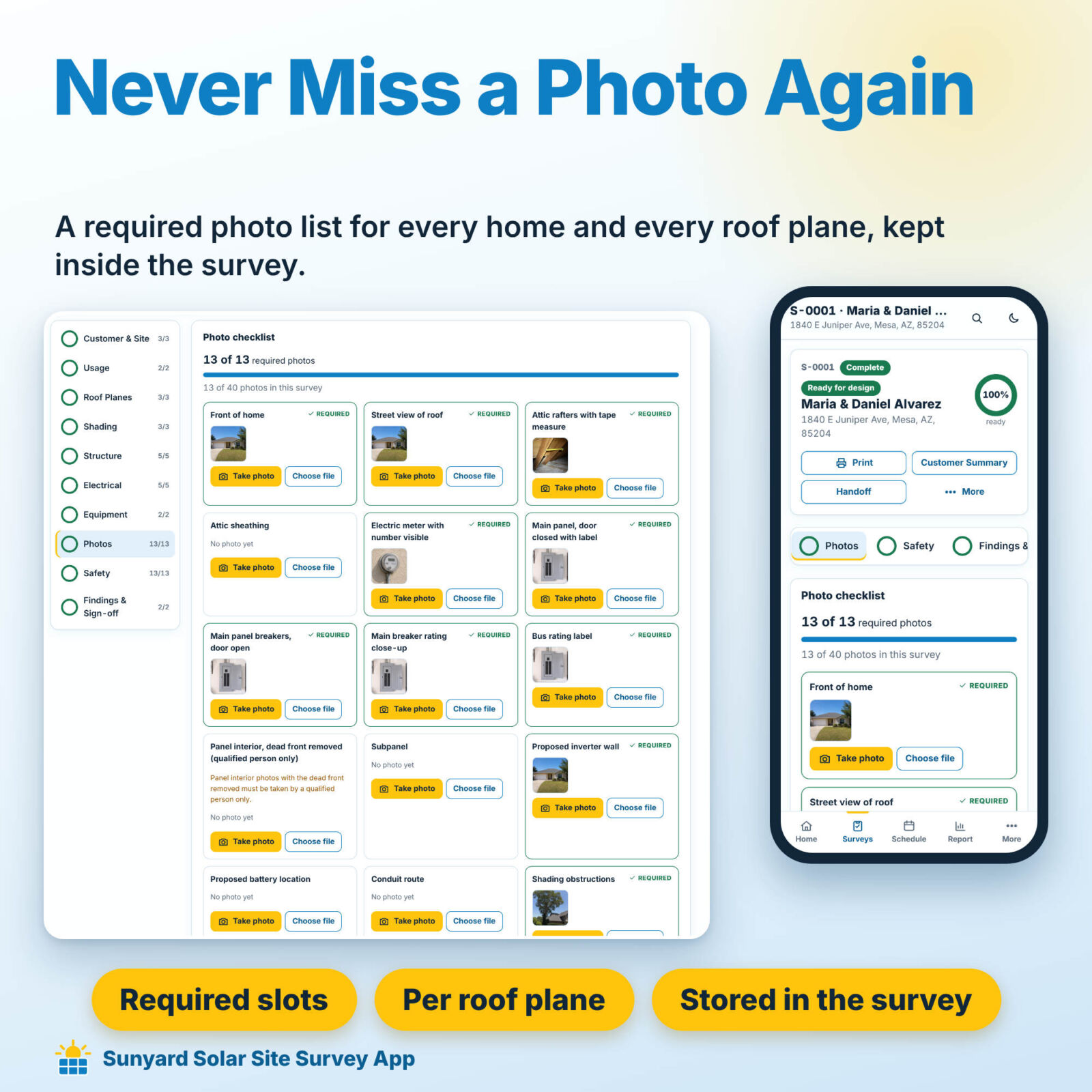
Capture rafter size, spacing, roof layers and condition, plus inverter and battery locations and conduit run lengths. The photo checklist has required slots for the meter, panel label, breaker rating, bus label, attic rafters and every roof plane, with a counter such as 13 of 13 required photos.
Findings, readiness and sign-off
Add findings with a severity of Blocker, Needs work or Note. One tap adds suggested findings, such as a missing bus rating, a roof over 15 years old or a failed 120% check. Collect signatures on screen, then mark the survey complete.
Schedule, reports and prints
Plan the week with overlap warnings, print a Day Sheet, and see a dashboard with surveys per month, outcomes and common issues. The solar survey report template prints a full Survey Report, a one-page Customer Summary, a Design Handoff and a Blank Field Form on US Letter or A4.
What Is Included
- The Sunyard Solar Site Survey App (one HTML file, empty and ready, with an optional Load sample data button)
- An illustrated User Guide in DOCX with worked examples, troubleshooting and a FAQ
- A one-page Start Here PDF
- CSV exports, JSON backup, one currency setting, light and dark themes
How It Works
- Open the HTML file in your browser and set your business, panel size and setbacks.
- Press New survey and enter the customer, address and visit date.
- Work through the ten sections. Roof planes, shading and the electrical card calculate as you type.
- Take the required photos and add suggested findings.
- Sign off, mark the survey complete and print or save the report for your designer.
File Formats and Software Requirements
The app is a single HTML file with its code inside, so there is nothing to install. It works offline. Tested in Chrome and Edge; should work in Safari and Firefox. Open the file in a browser, not the iPhone Files preview. The layout adapts to phone, tablet and desktop widths.
Customization
Add your logo, choose the currency symbol, switch between light and dark, and pick US Letter or A4. Edit your surveyors, materials, finding categories, safety items and photo slots.
Digital Download Information
This is a digital product. You receive a ZIP file after purchase, with no physical item shipped. Unzip it, open the HTML file in a browser and bookmark it. Your data lives in your browser: in our test about 700 typical surveys fit in its 5 MB of survey storage, with photos stored separately, so export a backup every week.
Use Cases
- A rep surveys two homes before lunch on a phone and sends each Design Handoff before the afternoon.
- A surveyor checks a 100 A panel before promising a large system.
- A crew prints the Blank Field Form for a rural site with no phone signal.
Solar Site Survey App FAQ
Does this solar site survey app work offline?
Yes. Once the file is open, nothing needs a connection, so it works in an attic.
Is there a monthly fee?
No. You pay once and keep the file.
Does it work on iPhone and Android?
The layout adapts to phone screens. Open the file in the phone’s browser, not the Files preview, and try the free Lite version on your phone first.
Does it replace design software?
No. It collects verified field data and gives rough estimates for your designer.
Is the 120% check code approval?
No. It is a pre-check based on NEC 705.12. Your AHJ decides, and your electrician confirms.
Can I print survey reports?
Yes. Print or save the Survey Report, Customer Summary, Design Handoff and Blank Field Form as PDF.
Can my team share surveys?
Through backup and import, using Merge on the other device.
License
Licensed to one business. Do not resell, share or upload this file. Sunyard is not engineering or electrical advice. Production figures are estimates only, not financial or tax advice; incentives change.



Reviews
There are no reviews yet.