

Junk Removal Pricing Calculator for Excel: Price by the Eighth of a Truck
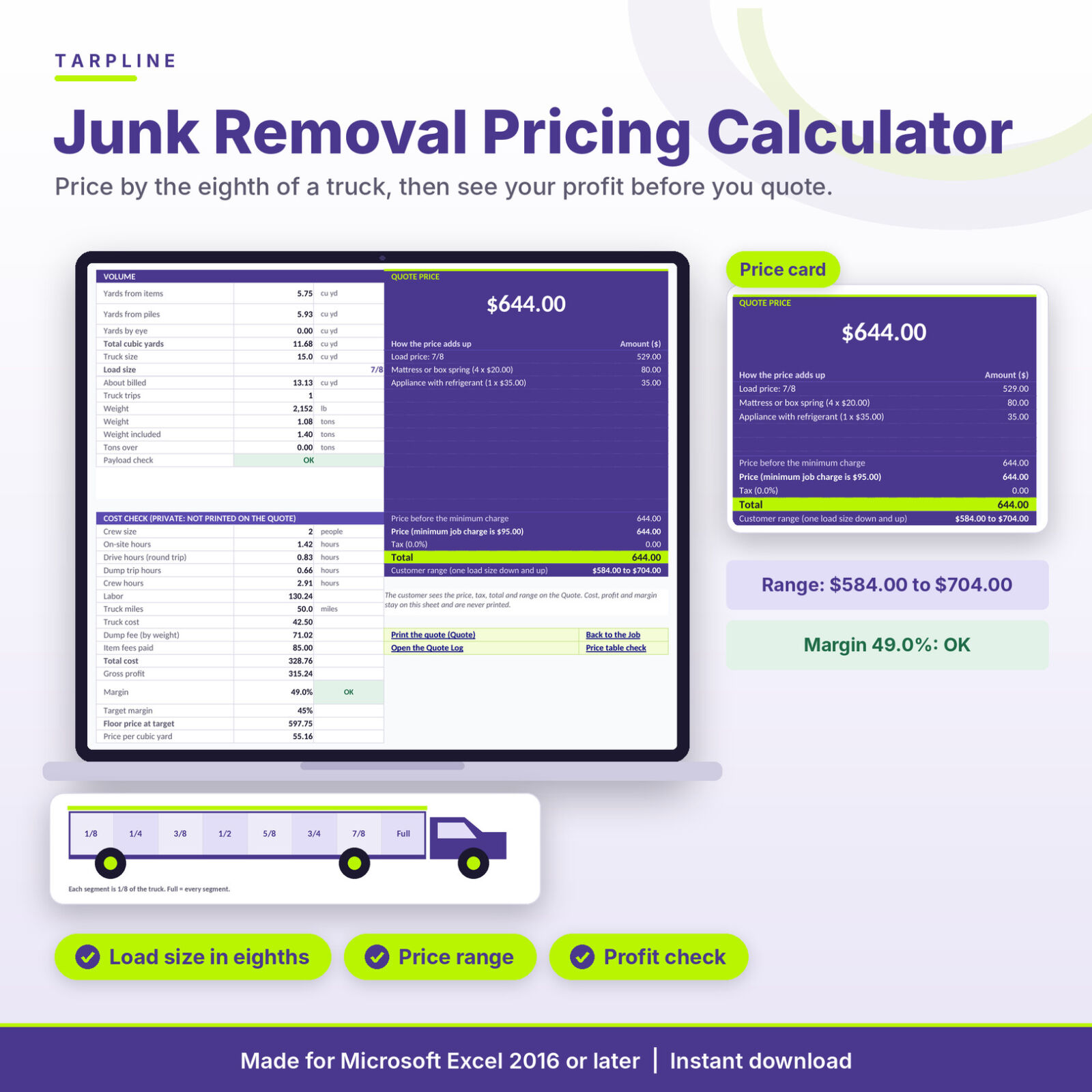
This junk removal pricing calculator prices a job the way haulers actually sell it: by the eighth of a truck. Pick items from a library, measure a pile in feet or add an eye estimate, and the workbook shows the load size, the price, a fair range for the customer and what the job really costs you. Built for owners of one to three trucks, it turns “that looks like a half load” into a price you can defend and a margin you can check before you leave the yard.
What this junk removal price sheet does
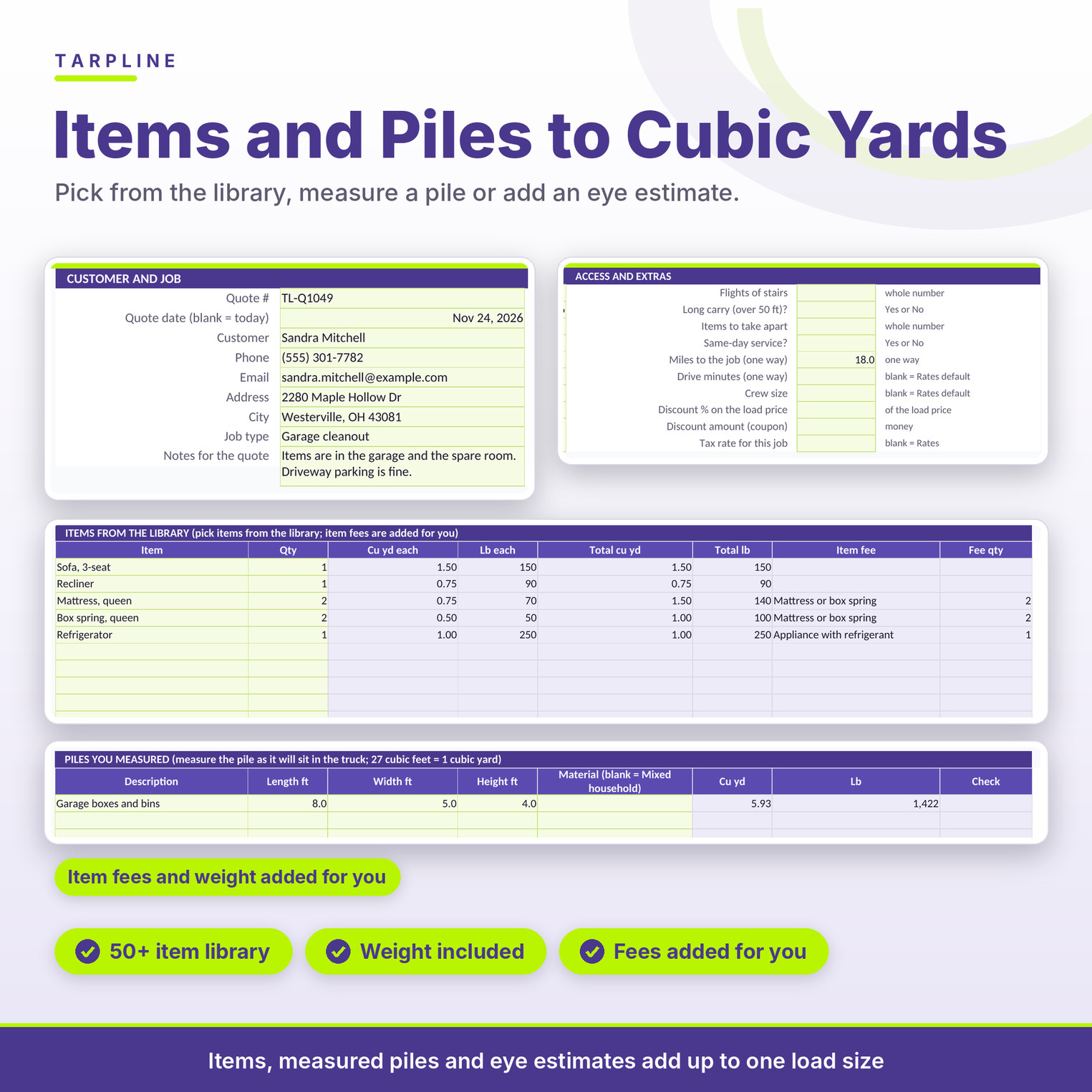
- Works out volume three ways. Items from a library of more than 50 (cubic yards and pounds each), piles measured in feet, and an eye estimate all add up to one load size.
- Prices from your own table. Nine load sizes, from a minimum load to a full truck, with full loads for big jobs. A 38 cubic yard estate cleanout on a 15 yard truck becomes 2 full loads plus 5/8.
- Charges for weight. Each load includes a set number of tons. Concrete, brick, dirt and shingles pay a per-ton charge above it, and a payload warning flags a trip that carries too much.
- Adds the extras for you. Stairs, long carry, take-apart, same-day, distance, item disposal fees, discounts, a minimum charge, rounding and tax.
- Prints a customer quote. One page with a price range, one load size down and up, so there are no surprises on site.
- Checks your profit. A private cost check counts crew labor, drive and dump trip time, truck miles and dump fee by weight, then shows margin and a floor price.
Who it is for
The junk removal pricing calculator suits owner-operators and small hauling companies that quote by phone, from customer photos and on site, and it works as a junk removal quote template too. If you have ever quoted concrete like furniture, or priced a single mattress without the facility fee, this workbook is for you.
Main benefits
- Fast, consistent quotes from photos or on site, as a junk removal estimate calculator should give.
- Heavy materials charged by weight, so a patio slab no longer costs you money.
- Item fees never forgotten: a queen mattress adds the mattress fee by itself.
- A range the customer sees before you arrive, which keeps the final price calm.
- A check of your whole price table, so you know which load sizes lose money.
Truck load pricing calculator features and cubic yard junk calculator tools
- Standard truck size and nine editable load-size prices.
- Item library with cubic yards, weight and disposal fee for each item, plus empty rows for your own.
- Eighths rounding with a float guard, so 7.5 cubic yards on a 15 yard truck is exactly 1/2.
- Printable customer price sheet with a truck diagram and “fits about” lines.
- Load Price Check with a chart of your price against your floor price.
- Quote Log for up to 300 quotes with win rate and price per cubic yard.
- One currency setting that drives every money value.
What is included
- The Excel workbook with eleven sheets: Start Here, Job, Price, Quote, Load Price Check, Price Sheet, Quote Log, Item Library, Rates, Settings and Calc.
- A DOCX user guide with screenshots, worked examples, troubleshooting and a FAQ.
How it works
- Set your currency and business details on Settings.
- Enter your truck size and load-size prices on Rates, then your weight rules, surcharges, item fees and costs.
- Open Load Price Check and fix any load size marked Below target.
- For each job, fill in the Job sheet: items, piles or an eye estimate, then access and extras.
- Read the Price sheet for the price build-up and the private cost check.
- Print the Quote, paste the job into the Quote Log and print your Price Sheet for the truck or your website.
Real jobs it handles
- A garage cleanout from customer photos. A sofa, a recliner, two queen mattresses, two box springs, a refrigerator and an 8 x 5 x 4 ft pile of boxes come to 11.68 cubic yards: a 7/8 load, with mattress and appliance fees added automatically.
- A broken concrete patio. Three cubic yards weighs 3.6 tons, so the weight charge and the cost check show why this job needs a higher price than its load size suggests.
- Two tires and a coupon. A minimum load, the tire fee and a discount land on the minimum job charge, and the sheet says so.
- A 38 cubic yard estate cleanout. Stairs, take-apart, a discount, rounding to the next 5 and tax across three truck trips.
File format and software
You get an .xlsx workbook, made for Microsoft Excel 2016 or later (Windows and Mac), including Excel for Microsoft 365. It uses standard functions and no macros. Formulas are locked with no password, and only the green input cells are open. Google Sheets and Numbers are not supported.
Customization
Everything in light green can be changed: prices, truck size, surcharges, item fees, materials, costs, the item library and your quote wording. Your business name, phone and service area print on the quote and the price sheet. Every input has limits and a plain-words message. Default figures are samples for testing, not market rates: replace them with your own prices and your dump sites’ posted rates.
Digital download information
This is a digital product. After purchase you download the Excel workbook and the DOCX user guide. Nothing is shipped. License: one business. Use it for your own company, and do not resell, share or give away the files.
Frequently asked questions
Does the junk removal pricing calculator work on a Mac?
It is made for Microsoft Excel 2016 or later on Windows and Mac. It uses standard functions and no macros.
Does it work in Google Sheets?
Google Sheets has not been tested, so it is not supported. The workbook is made for Excel.
How does it work out the load size?
It adds the cubic yards from items, piles and the eye estimate, divides by your truck size, multiplies by 8 and rounds up to the next eighth.
Can I use my own prices?
Yes. Your nine load-size prices, surcharges, item fees and costs are all inputs on the Rates sheet.
Does it handle heavy loads like concrete?
Yes. Weight is tracked for every item and pile. Loads over the included weight pay a per-ton charge, and the cost check shows the dump fee by weight.
Can I print a quote?
Yes. The Quote prints on one US Letter page (A4 fits too) with a price range and no costs. A separate Price Sheet prints your price list.
Can I change the currency?
Yes. Type any symbol of up to four characters on Settings and every money value follows it.
Is it a subscription?
No. You buy the file once.
Pricing aid only, not financial, legal or tax advice. Never load past your truck’s rated payload, and cover and secure every load as your state requires.

Reviews
There are no reviews yet.