Best Profit Calculator: Five Spreadsheets Compared
A profit calculator is a spreadsheet that turns your costs, fees and selling price into the figure you keep. The best profit calculator is the one that matches your question: break-even point, price per product, bakery recipe cost, or whole-business profit. Every option below works in Excel and Google Sheets.
Profit sums can feel more complicated than they are. Most people get stuck because they pick a tool built for a different question, not because the arithmetic is hard. We'll go through what to look for, how the five calculators differ, and a simple rule for choosing.
Key facts at a glance
- A break-even calculator tells you how many units or billable hours you must sell to cover costs; a pricing calculator tells you what to charge.
- Marketplace and payment fees are the most commonly missed cost, so a calculator that builds them in gives a more honest profit figure.
- Hue & Margin handles up to 5 products linked to 150 materials, which suits sellers with a large catalogue.
- Sweet Margin is the only calculator here built around recipes and batches, and it is aimed at bakers.
- Evenmark compares 3 scenarios side by side, so you can test a price change before you make it.
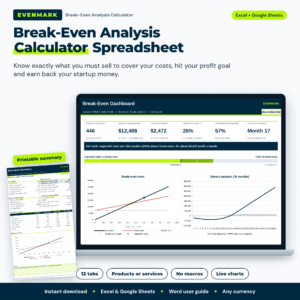 Break-Even Analysis Spreadsheet & Calculator | Evenmark Break-Even Point Template for Products & Services (Excel + Google Sheets)
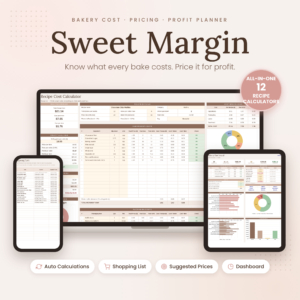 Bakery Pricing Calculator Spreadsheet | Sweet Margin Recipe Cost, Inventory & Order Planner for Excel & Google Sheets
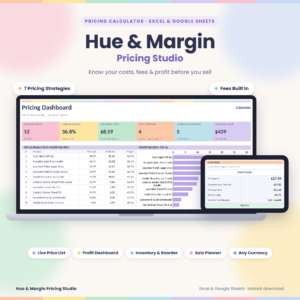 Pricing Calculator Spreadsheet for Excel & Google Sheets | Hue & Margin Product Pricing, Profit Margin & Fee Calculator with Live Price List, Inventory & Dashboard

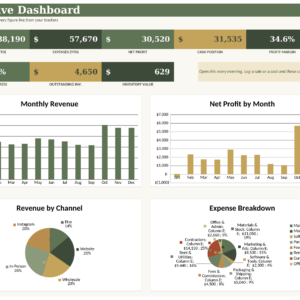
Table of Contents
Toggle
- What should you look for in a profit calculator?
- How do the profit calculators on this page compare?
- Which profit calculator suits which seller?
- How do you use a profit calculator properly?
- What mistakes make a profit calculator give the wrong answer?
- What affects the price of a profit calculator?
- Which profit calculator should you choose?
- Common questions
What should you look for in a profit calculator?
A good profit calculator answers one clear question, includes every cost that reduces your income, and works in software you already use. Five factors separate a calculator you will keep using from one that sits unopened. We'll take them in turn.
Which question does it answer?
Profit calculators fall into three groups: break-even tools, pricing tools and whole-business trackers. A break-even tool, such as the Evenmark template, tells you the sales volume you need. A pricing tool, such as Hue & Margin, tells you what to charge for each item. A tracker, such as the Small Business Command Centre, records what has already happened.
If you pick the wrong group, you end up forcing the sheet to do a job it wasn't designed for. Decide first whether you are planning, pricing or reviewing.
How does it handle fees and taxes?
Fee handling is the difference between profit on paper and profit in your bank account. Marketplace commission and payment processing fees come off every sale, and a calculator that ignores them will flatter you.
Hue & Margin builds marketplace and payment fees into its calculations and allows up to 2 taxes. Sweet Margin suggests a price that hits your target margin after fees. The Launchloom Idea Vault checks profit after fees for each digital product idea.
Does it reprice itself when costs change?
A live price list is a list that updates when an input changes, so you don't have to rework each product by hand. Hue & Margin links a price list of 5 products to 150 materials, so one change to a material cost reprices everything that uses it.
That matters most if your supplier costs move often. If your costs rarely change, a simpler one-off calculation may be all you need.
Does it work in the software you already use?
Check that the file opens in your software before anything else. All five products here work in Excel and Google Sheets. Sweet Margin has also been tested in LibreOffice, which helps if you use a free office suite.
Google Sheets suits you if you want to open the file on a tablet or share it with a bookkeeper. Excel suits you if you prefer working offline on a desktop.
Is there a worked example and a guide?
A worked example shows you what a finished sheet looks like, which saves guessing which cell goes where. Sweet Margin includes a fully worked sample bakery and an illustrated user guide. Hue & Margin comes with a 21-page user guide, and Evenmark comes with a Word user guide.
If you don't enjoy spreadsheets, a guide counts for more than any extra feature.
How do the profit calculators on this page compare?
The five products differ mainly in scope: Evenmark looks forward at break-even, Hue & Margin and Sweet Margin set prices, Launchloom scores ideas, and the Command Centre tracks the whole business. The table sets out what each one does best.
| Product | Main job | Built for | Notable detail |
|---|---|---|---|
| Break-Even Analysis Spreadsheet & Calculator | Evenmark Break-Even Point Template for Products & Services (Excel + Google Sheets) | Break-even units, revenue and payback | Products or services, any currency | 3 scenarios, margin of safety, printable summary |
| Bakery Pricing Calculator Spreadsheet | Sweet Margin Recipe Cost, Inventory & Order Planner for Excel & Google Sheets | Recipe costing and pricing | Bakers and home bakers | Unit conversion, self-building shopping list |
| Pricing Calculator Spreadsheet for Excel & Google Sheets | Hue & Margin Product Pricing, Profit Margin & Fee Calculator with Live Price List, Inventory & Dashboard | Pricing and fee-aware margins | Sellers with many products | 7 pricing strategies, 5 products, 150 materials |
| Launchloom 5 Digital Product Ideas to Sell – Idea Atlas PDF + Excel & Google Sheets Idea Tracker, Profit Calculator & 30-Day Launch Plan | Choosing and testing digital product ideas | People starting a digital product | 640 ideas, 16 niches, 102-page PDF |
| Small Business Command Centre Spreadsheet Bundle for Excel & Google Sheets | Tracking sales, costs and profit | Owners who want one overview | Dashboards for cash flow, tax, invoices, inventory |
Which profit calculator suits which seller?
Each calculator suits a different stage and type of business, so the right one depends on whether you are planning, pricing or already trading. Here is how we'd match them.
Evenmark suits anyone deciding whether an idea can pay its way. It works for products and for services, so a consultant counting billable hours can use it as readily as a shop owner counting units. It also shows how long your startup money takes to come back.
Sweet Margin suits bakers who buy flour by the pound but measure in cups. It costs ingredients, packaging, labour and overhead per batch, order and item, then tracks inventory and suppliers.
Hue & Margin suits makers and resellers with a wide range, especially if they sell through marketplaces that take a fee. Its 7 pricing strategies let you compare approaches before you commit.
Launchloom suits someone who hasn't chosen what to sell. It is mainly an ideas atlas, with a profit calculator as one part of a wider planning kit.
Small Business Command Centre suits owners who already trade and want one place to log sales and costs and watch profit, cash flow and tax.
How do you use a profit calculator properly?
You use a profit calculator by entering every cost first, setting a target, and only then reading the answer. The order matters, because leaving costs for later is how profit gets overstated.
- Make a copy of the file and keep the original untouched.
- Enter your fixed costs, such as software, rent or insurance, for a typical month.
- Enter the cost of each product or service, including materials, packaging and your own time.
- Add marketplace fees, payment fees and any tax the sheet asks for.
- Set your profit goal or target margin.
- Read the result, then change one input at a time to see how it moves.
Save a dated copy each quarter. Comparing old and new versions shows you where costs have crept up.
What mistakes make a profit calculator give the wrong answer?
The most common mistake is leaving out costs that feel small, because small costs add up across many sales. A calculator can only be as honest as the numbers you give it.
- Forgetting your own time. If you don't cost your labour, a profitable-looking product may pay you very little per hour.
- Ignoring fees. Commission and payment charges come off every order, so leaving them out inflates your margin.
- Mixing up margin and markup. Margin is profit as a share of the selling price; markup is profit as a share of the cost. A 50% markup is a smaller margin than 50%.
- Using guessed volumes. A break-even figure built on hopeful sales tells you little. Use a cautious number, and use the 3 scenarios in Evenmark to see the worst case.
- Never updating costs. Supplier prices move, and an old figure quietly erodes your profit.
What affects the price of a profit calculator?
The price of a profit calculator depends mainly on how much it does, how specialised it is and how much support material comes with it. The live product cards show current prices, so we'll compare in words here.
A single-purpose tool, such as a break-even template, generally costs less than a bundle that tracks sales, invoices, tax and inventory. Specialist sheets built for one trade, such as Sweet Margin for bakers, include features a general sheet lacks, like unit conversion and a self-building shopping list. Bigger capacity, such as Hue & Margin's 100-product list, and extras like printable planning tools and a PDF atlas in Launchloom, also push the price up.
None of these are subscription fees on this page as far as the listings say, so check each card before buying.
Which profit calculator should you choose?
Choose by the question you need answered today. If you want to know whether something can pay its way, take Evenmark. If you want to know what to charge, take Hue & Margin, or Sweet Margin if you bake.
If you haven't chosen a product, take Launchloom. If you already trade and want one overview, take the Small Business Command Centre. Browse all 5 options below, and begin with the one that answers your most pressing question. You can add a second later.
Common questions
Is a profit calculator the same as a break-even calculator?
No. A break-even calculator finds the sales level where you stop losing money. A profit calculator is broader and covers margin, price and the amount you keep. Evenmark covers break-even and profit goals, while the other tools here focus on pricing or tracking.
Can I use these calculators for services as well as products?
Yes, in some cases. Evenmark states it works for products and services and counts billable hours as well as units. Sweet Margin and Hue & Margin are built around physical goods, so a service business will find Evenmark or the Command Centre a closer fit.
Do I need Excel, or will Google Sheets do?
Google Sheets will do. All five products work in both Excel and Google Sheets, so a free Google account is enough. Sweet Margin is also tested in LibreOffice, which suits anyone who prefers a free desktop suite.
What is a good profit margin?
It varies by trade, so no single figure fits everyone. Margin is profit divided by selling price, shown as a percentage. Set your own target by working backwards from the income you want, then let the calculator show the price needed to reach it.
How often should I update my profit calculator?
Update it whenever a main cost changes, and review it at least once a quarter. Hue & Margin reprices your list automatically when you change a material cost, which removes most of the manual work for sellers with many products.