Best Quarterly Estimated Tax Planner for Self-Employed
The best quarterly estimated tax planner for most self-employed people is one that sits on top of your expense and mileage records, so each payment comes from real profit rather than a guess. The three options here all do that. Gildleaf is an offline app for Chrome or Edge, and Claimbright and WriteOff Ready are spreadsheets for Excel and Google Sheets.
Key facts at a glance
- A quarterly estimated tax planner turns your income and deductible expenses into a set-aside figure for each of the four yearly payments.
- Self-employment tax is 15.3% of net earnings, and it comes on top of income tax, which is why a rough guess so often falls short.
- All three planners here also track expenses, mileage and Schedule C lines, so the estimate is built from the same records you hand to a preparer.
- Gildleaf works offline with no bank login and no subscription, while Claimbright and WriteOff Ready run in Excel and Google Sheets.
- 3 options are listed below, and prices are shown on the product cards.
Working out what you owe in instalments can feel like a job for an accountant, and the fear of getting it wrong leads many people to avoid it. It's more manageable than it looks. We'll go through what to look for, how the three planners differ and how to use one, so you can choose with confidence.
 Tax Deduction Tracker App | Gildleaf Side Hustle Write-Off Tracker & Mileage Log with Schedule C Summary, Quarterly Tax Planner, Receipt Tracker & 1099 Match-Up | Works Offline
Table of Contents
Toggle
- What should you look for in a quarterly estimated tax planner?
- How do the three planners compare?
- Which quarterly tax planner suits which person?
- How do you use a quarterly estimated tax planner?
- What mistakes should you avoid?
- What affects the price of a quarterly tax planner?
- How do you decide which planner to buy?
- Common questions
What should you look for in a quarterly estimated tax planner?
A good quarterly estimated tax planner links your estimate to your actual records, shows its working, and keeps your data somewhere you're comfortable with. A standalone calculator asks you to type in a profit figure you may not have. A planner built into a deduction tracker takes the figure from what you've already logged. That's the main reason to prefer the type on this page.
A profit figure that updates as you log
Net profit is income minus deductible expenses, and your estimated tax grows or shrinks with it. If the planner reads from the same log where you record expenses, a quarter with a big equipment purchase automatically lowers your set-aside figure. Claimbright shows an estimated tax saved figure on its dashboard, and WriteOff Ready shows deductions, net profit and estimated tax saved. Both let you see the effect of each entry.
Automatic Schedule C line mapping
Schedule C is the form sole proprietors use to report business income and expenses. A planner that assigns each cost to its line saves you sorting everything at year end. In WriteOff Ready you pick an expense type and the category, tax form and Schedule C line fill in. Gildleaf and Claimbright also file each cost on its Schedule C line, and both apply business-use percentage and the 50% meals limit.
Mileage that respects the date of the trip
The IRS changed its mileage rate part-way through 2026, so a single flat rate across the year gives the wrong deduction. Gildleaf applies the 2026 mid-year rate change by trip date. Claimbright holds IRS mileage rates by date, including 2026. Check this feature if you drive for work, because mileage is often one of the largest deductions a sole trader claims.
Where your data lives
Gildleaf is a single offline HTML file for Chrome or Edge. It needs no bank login and no subscription, and your records stay on your own device. The two spreadsheets run in Excel or Google Sheets, so your data sits in a file you control and can back up like any other document. WriteOff Ready states there are no macros, which matters if your workplace blocks them.
A report your preparer can use
A planner earns its place at filing time. Gildleaf prints one clean preparer summary. Claimbright and WriteOff Ready each include an accountant report, and Claimbright's is print-ready. WriteOff Ready adds a missing receipts list, which helps if you tend to find gaps in February rather than in March.
Room for how your year actually runs
Not everyone's tax year matches the calendar. Claimbright supports any fiscal year, any currency and a 10-year view. WriteOff Ready covers 20 tax years, any currency and fiscal year support, so it suits someone who wants to go back and fill in earlier years. Gildleaf adds a 1099 match-up tool, useful if clients send you 1099 forms and you want to check them against your own income log.
How do the three planners compare?
The three planners differ mainly in format and extras. Gildleaf is an offline browser app, and the other two are spreadsheets with dashboards. All of them include a quarterly planner, a Schedule C summary and mileage tracking.
| Product | Format | Quarterly planner | Mileage | Standout extras |
|---|---|---|---|---|
| Tax Deduction Tracker App | Gildleaf Side Hustle Write-Off Tracker & Mileage Log with Schedule C Summary, Quarterly Tax Planner, Receipt Tracker & 1099 Match-Up | Works Offline | Offline HTML file for Chrome or Edge | Yes | 2026 mid-year rate change applied by trip date | Receipt tracker, 1099 match-up, home office tools, no bank login |
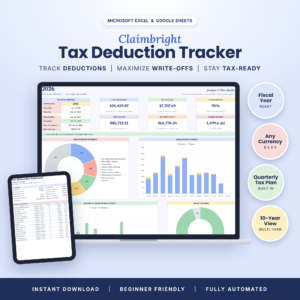 Self-Employed Tax Deduction Tracker for Excel & Google Sheets | Claimbright Write-Off Spreadsheet with Mileage Log, Quarterly Tax Planner, Home Office Calculator & Schedule C Summary | Excel and Google Sheets | Yes | IRS rates by date, including 2026 | Filing countdown, 4 charts, 17-page user guide, sample file |
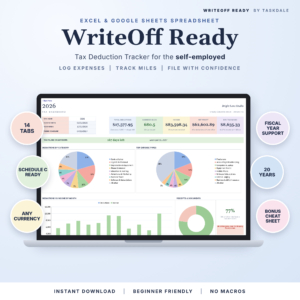 Tax Deduction Tracker Spreadsheet for Excel & Google Sheets | WriteOff Ready Self-Employed Expense, Mileage & Schedule C Tracker | Excel and Google Sheets, no macros | Yes | Mileage tracked | 14 tabs, 20 tax years, missing receipts list, cheat sheet |
Which quarterly tax planner suits which person?
Each planner suits a different working style. Pick by how you like to keep records, since the tax features overlap.
Gildleaf suits the privacy-minded side hustler. If you don't want to connect a bank account or pay a subscription, and you're happy using Chrome or Edge, its single offline file is the simplest route. The 1099 match-up helps if you get forms from several clients.
Claimbright suits the person who likes a dashboard. The filing countdown and four charts keep the next payment visible, and the 17-page guide plus a sample file make a good starting point if spreadsheets make you nervous. It's also the better fit for a non-calendar fiscal year.
WriteOff Ready suits the thorough record keeper. With 14 tabs, 20 tax years and a missing receipts list, it's built for someone catching up on past years or who wants every receipt accounted for. The bonus cheat sheet helps you learn the layout quickly.
How do you use a quarterly estimated tax planner?
Using a quarterly estimated tax planner means logging every income and expense item as it happens, then reading the set-aside figure before each payment date. Here's a routine that takes about 15 minutes a week.
- Enter your tax year or fiscal year and your filing status in the setup tab or screen.
- Log each payment you receive, with the client and date.
- Log each business cost as you pay it, choosing the expense type so it lands on the right Schedule C line.
- Add mileage by trip, with the date, so the correct rate applies.
- Set the business-use percentage for anything shared, such as a phone or part of your home.
- Check the quarterly tax planner about two weeks before each payment is due, and move that amount into a separate savings account.
- Make the payment, then record it so the planner shows what's left for the year.
Back up your file after each session. For the spreadsheets, that's a copy in cloud storage or on a drive. For Gildleaf, keep a copy of the HTML file, since your records live on your device.
What mistakes should you avoid?
The most common mistake with a quarterly estimated tax planner is treating the estimate as a final figure instead of checking it each quarter. Income moves, and the figure needs to move with it.
- Leaving receipts until year end. Missing records mean missing deductions. Log items weekly, or use the receipt tracker or missing receipts list.
- Claiming 100% on shared costs. A phone used half for work is a 50% deduction. Set the business-use percentage and keep it consistent.
- Forgetting self-employment tax. Income tax is only part of the bill. Set aside enough for both, and don't treat your take-home figure as all yours.
- Using one mileage rate all year. In a year when the rate changes, use a planner that applies rates by date.
- Skipping a payment after a slow quarter. Paying nothing then catching up later can still trigger an underpayment penalty. Pay a lower amount instead.
- Relying on a planner instead of advice. These tools organise your numbers. They don't replace a qualified tax preparer's judgement on your situation.
What affects the price of a quarterly tax planner?
The price of a quarterly tax planner depends mainly on whether you pay once or keep paying, and on how much is built in. A one-off file generally costs more up front than a monthly subscription app but costs less over several years.
Gildleaf has no subscription, which keeps the long-term cost predictable. The two spreadsheets are file-based products, and the one with more tabs, more tax years and a longer guide generally costs more than a simpler one. Other things that move the price include whether the product has a home office calculator, charts and dashboards, and a printable accountant report. Check the live product cards for current prices.
Also weigh the cost of getting it wrong. A planner that saves you an underpayment penalty, or a missed deduction, can recover its price quickly.
How do you decide which planner to buy?
Choose by the way you work, because the tax features are similar. If you want no bank login and an offline file, pick Gildleaf. If you want a dashboard, charts and a guide to learn from, pick Claimbright. If you want depth, many tax years and a missing receipts list, pick WriteOff Ready.
Whichever you choose, start logging this week and check the planner before the next payment date.
Common questions
When are quarterly estimated tax payments due?
There are four payments a year, usually due around 15 April, 15 June, 15 September and 15 January. When a date falls on a weekend or holiday, it moves to the next working day. The periods are uneven, so check the IRS calendar for the exact dates in your tax year.
How much should I pay to avoid an underpayment penalty?
As a general rule, paying at least 90% of this year's tax, or 100% of last year's tax, avoids the penalty. The prior-year figure rises to 110% for higher earners. Confirm the rule for your income with the IRS or a preparer.
Do I still need an accountant if I use a planner?
Often yes, but you'll need less of their time. A planner gives your preparer organised records and a summary, which can shorten the work. Complex situations, such as multiple income types or a business structure change, still benefit from professional advice.
What if my income changes a lot from quarter to quarter?
Update the planner after each quarter's income and expenses and let it recalculate. Where income is uneven, you can pay less in a slow quarter and more in a strong one. Keep the running total in view so the year adds up.
Can I use a planner for earlier tax years?
It depends on the product. WriteOff Ready covers 20 tax years, and Claimbright has a 10-year view, so both can hold earlier records. Gildleaf applies the 2026 mileage rate change by trip date. Use whichever matches the years you need to review.