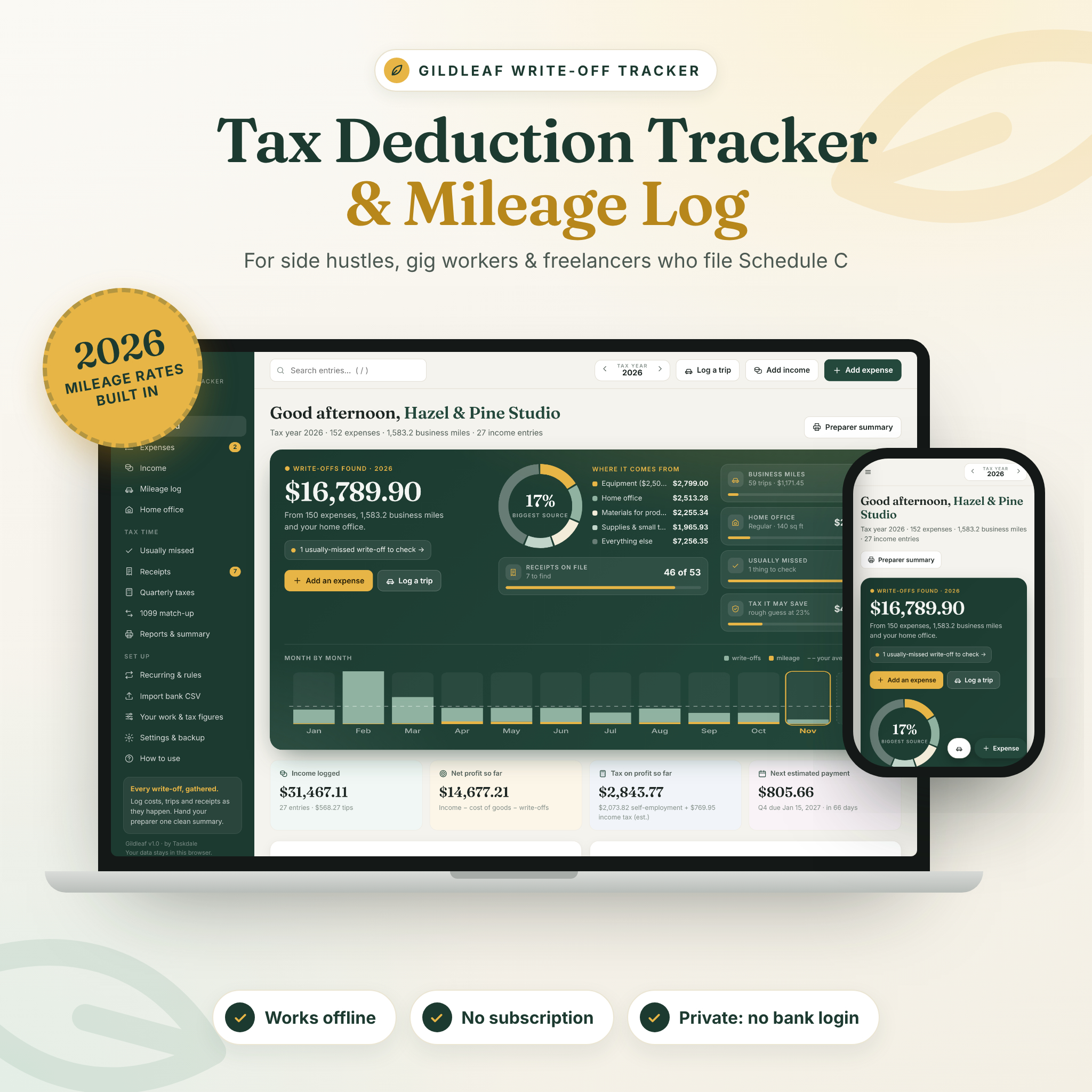


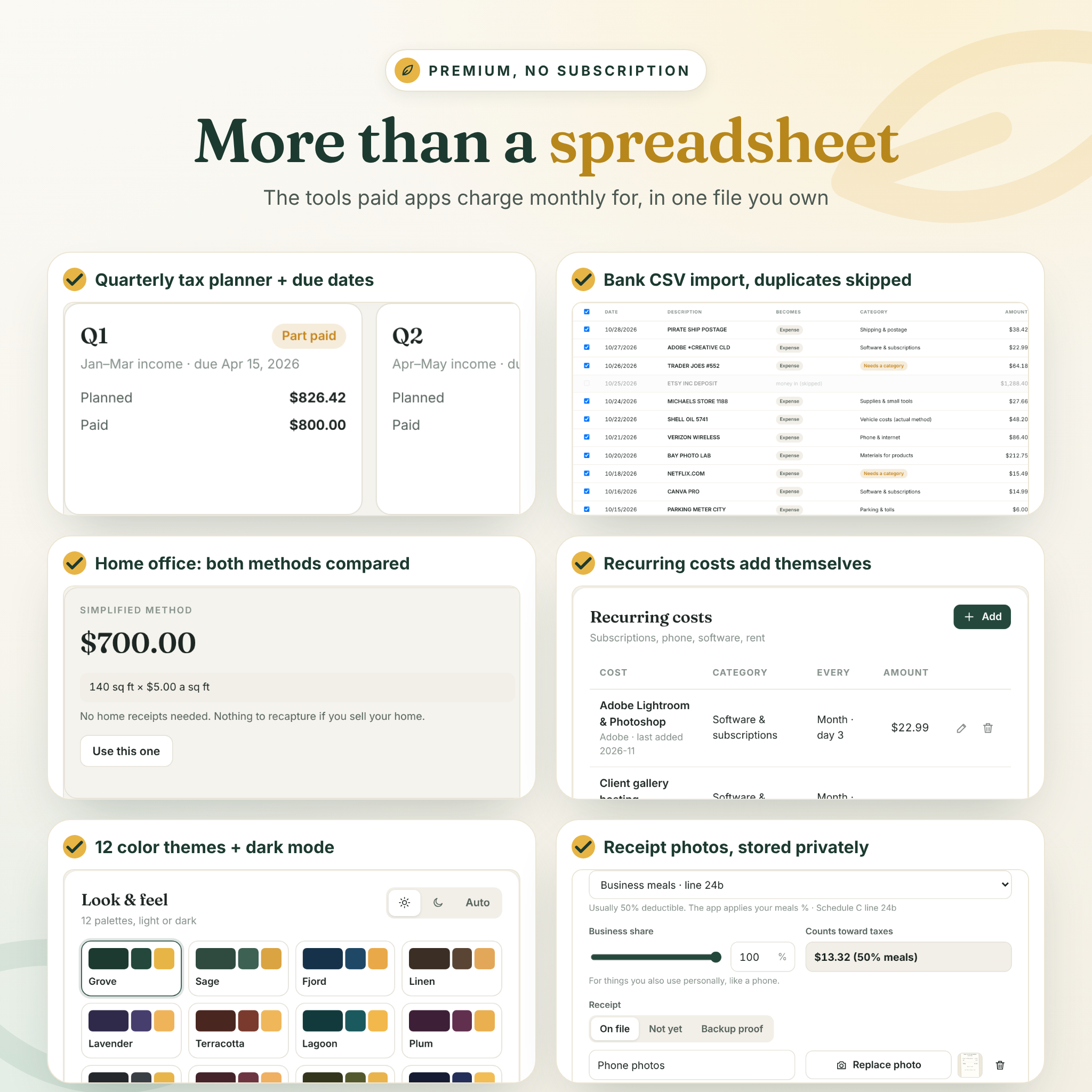

Gildleaf is a tax deduction tracker app for side hustlers, gig workers and freelancers. It files every cost on its Schedule C line, logs your business miles at the right IRS rate for each date, compares both home office methods, plans your quarterly taxes and hands your tax preparer one clean summary. It is one file you open in your browser. No account, no bank login, no subscription.
What this tax deduction tracker does
Add an expense, log a trip or record a payout, and Gildleaf does the rest. It applies the business share for things you also use personally, takes the 50% meals limit off automatically, leaves out gas and repairs when you use the standard mileage rate, and keeps a running total of your write-offs, income, net profit and estimated tax. A tax-ready score and a short to-do list tell you exactly what still needs attention.
Who it is for
Gildleaf is made for anyone in the US who files Schedule C: rideshare and delivery drivers, Etsy sellers and resellers, content creators, freelancers and consultants, photographers, real estate agents, contractors, beauty and fitness pros, tutors, cleaners, pet sitters, artists and makers. It is a calm, private alternative to a shoebox of receipts, a spreadsheet full of formulas, or a monthly app subscription.
Main benefits
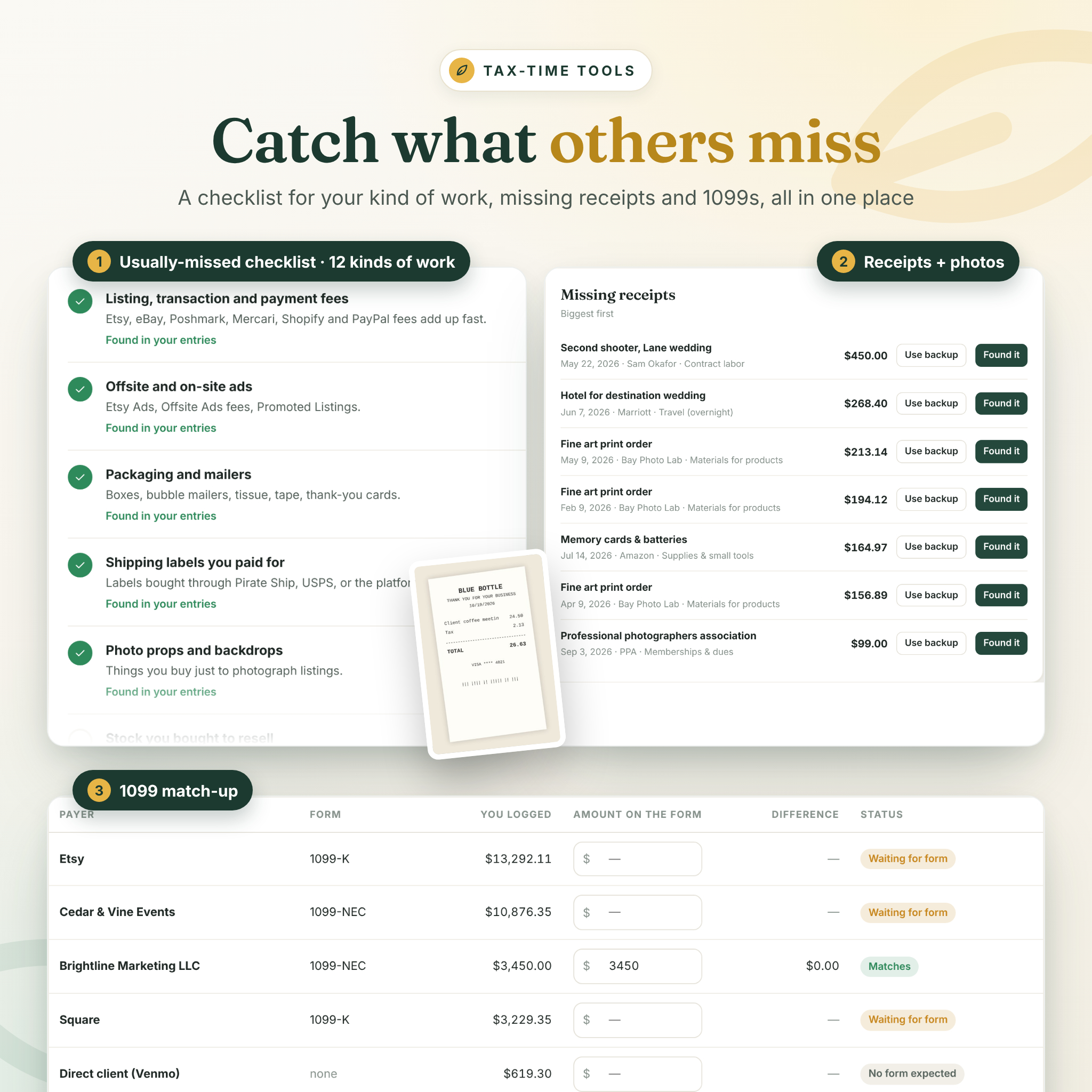
- Find more write-offs: a usually-missed checklist for 12 kinds of work ticks itself off as you log matching expenses.
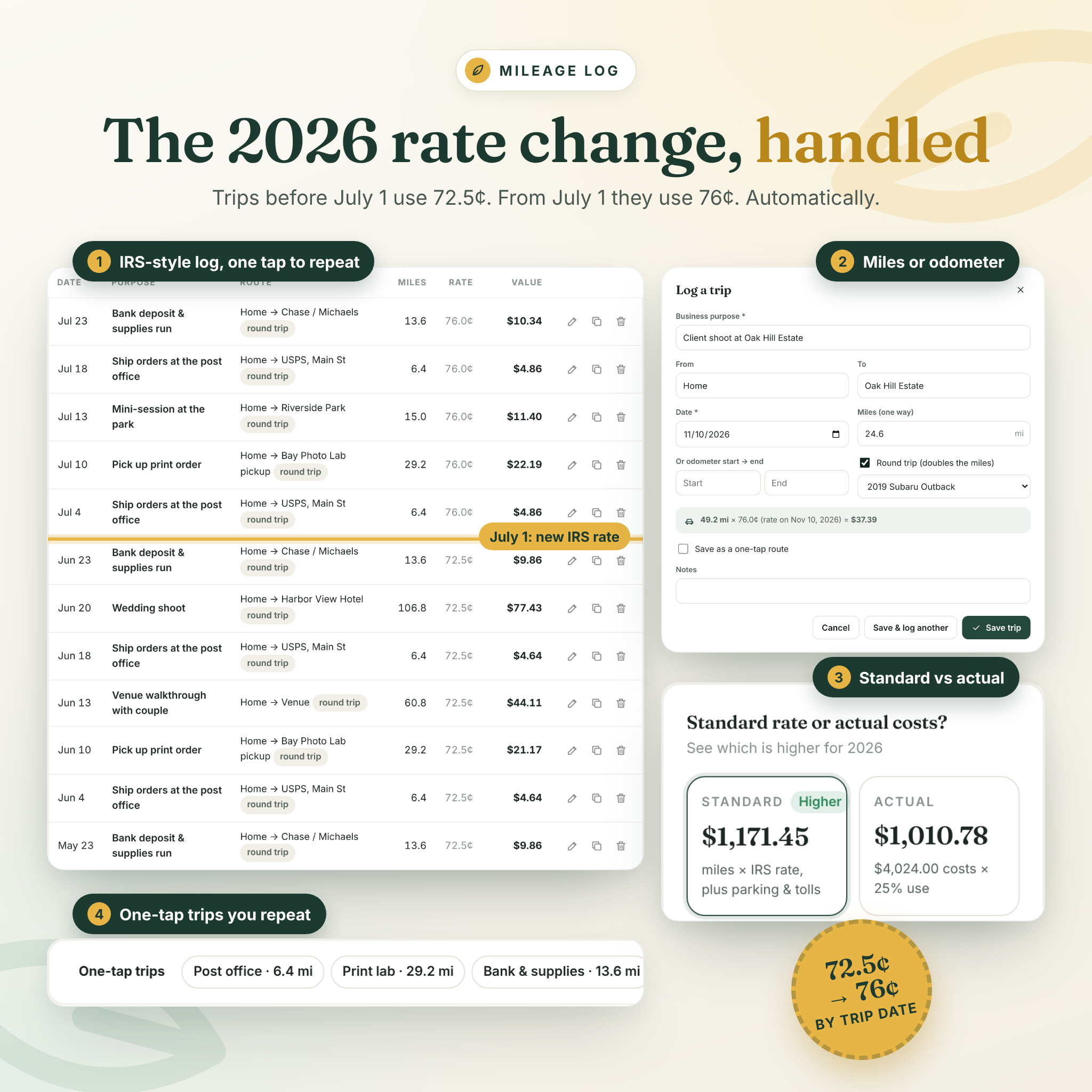
- Mileage done right: 2026 has two IRS rates, 72.5¢ until June 30 and 76¢ from July 1. Each trip gets the rate for its date automatically.
- No surprises in April: the quarterly tax planner shows what to set aside, when each payment is due and what you have already paid.
- Preparer-ready: print or save a summary organized by Schedule C line, with CSV files for spreadsheets.
- Private by design: your entries stay in your browser on your computer. Nothing is uploaded.
Features
Dashboard
Write-offs found, where they come from, month-by-month chart, business miles, home office, tax it may save, income, net profit, tax on profit so far, next estimated payment, tax-ready score, an up-next list and a profit picture.
Expenses and income
- 30 built-in categories mapped to Schedule C lines, cost of goods sold and Schedule 1 items, plus your own categories
- Business-use percentage, meals limit and receipt status on every expense
- Attach receipt photos or PDFs, or note where each receipt lives
- Search, filter, sort, bulk edit, duplicate and undo delete
- Income by payer with the 1099 form you expect and a tips total
Mileage log
- IRS-style log: date, business purpose, from, to, miles or odometer readings, round trips
- Dated mileage rates, including mid-year changes
- One-tap saved routes for trips you repeat
- Vehicles with odometer readings, business-use percentage and a standard-versus-actual comparison
Tax-time tools
- Home office calculator: simplified and regular methods side by side
- Missing receipts list with “what can back it up instead” guidance
- Quarterly tax planner with projected, year-to-date and safe-harbor options
- 1099 match-up that compares each form with what you logged
- 8 printable reports in US Letter or A4 and 5 CSV exports
Automation and customizing
- Recurring costs that add themselves each month
- Bank CSV import with column mapping, duplicate check and category rules
- Editable tax figures for every year, with links to verify them
- One currency setting for every amount (US dollars by default)
- 12 color themes in light and dark mode
- Download backup, restore, and automatic daily backups to a folder in Chrome and Edge
What is included
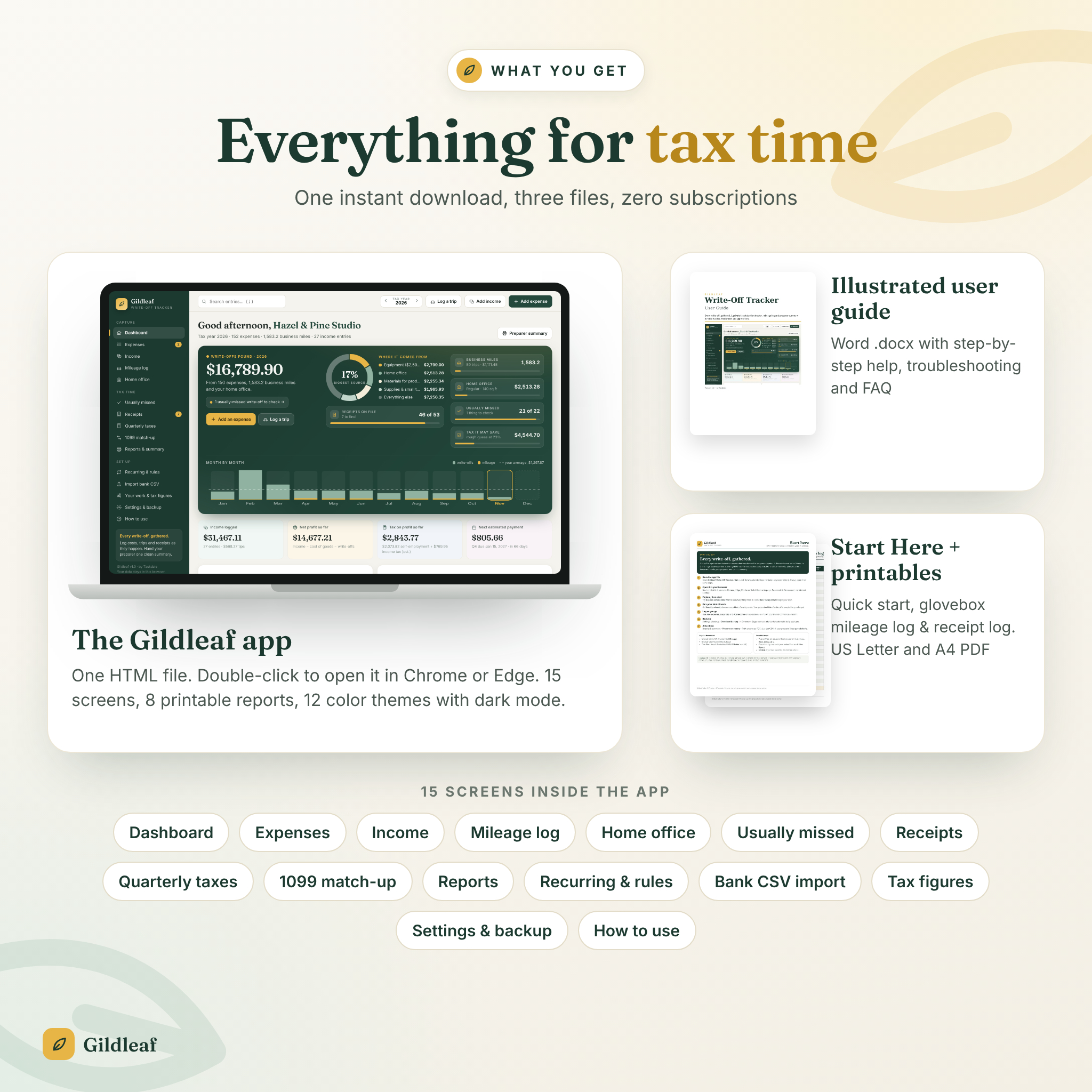
- Gildleaf-Write-Off-Tracker.html: the app, 15 screens
- Gildleaf User Guide (Word .docx): an illustrated, step-by-step guide with troubleshooting and FAQ
- Start Here & Printables (PDF, US Letter and A4): quick start, a glovebox mileage log and a receipt and expense log
- All files together in one ZIP, plus each file on its own
How it works
- Download the ZIP and save the HTML file somewhere you will find it, such as Documents.
- Double-click it to open it in Google Chrome or Microsoft Edge.
- Pick your kind of work, or explore the built-in sample business first.
- Log costs, trips and income as they happen, or import your bank’s CSV each month.
- At tax time, print the preparer summary or save it as a PDF.
File format and requirements
An offline HTML web app. You need a Windows or Mac computer with Google Chrome or Microsoft Edge (both free). No internet connection, account, Excel or other software is needed. The user guide opens in Word, Google Docs, Pages or LibreOffice. The printables are PDF.
Customizing
Add your business name, choose your currency and date format, rename or add categories, update the tax figures each year, and pick a color theme in light or dark mode. Every change is kept in your browser.
Digital download
This is a digital product; nothing is shipped. Your files are available to download right after payment. Because it is digital, it cannot be returned. Please contact us if you have any trouble with your files.
Use cases
- A delivery driver logs each shift’s miles and sees that the July rate change was applied.
- An Etsy seller imports a month of card transactions and has shipping labels and fees filed in seconds.
- A freelance designer checks the quarterly planner before the September 15 payment.
- A photographer compares both home office methods and picks the higher one.
- Anyone hands their preparer one summary instead of a box of receipts.
FAQ
Is this a spreadsheet?
No. It is an offline web app in one HTML file, so there are no formulas to break. You can still export CSV files for spreadsheets.
Does it connect to my bank?
No. You enter costs or import a CSV you download from your bank. Your data never leaves your computer.
Which tax years does it cover?
Any year. Figures for 2024, 2025 and 2026 are built in, including both 2026 mileage rates, and every figure is editable.
Does it include a mileage log for the IRS?
Yes. It records date, business purpose, route and miles or odometer readings, and prints an IRS-style log.
Can I use it on my phone?
Gildleaf is made for a computer. Use Chrome or Edge on Windows or Mac.
Does it calculate my taxes or file them?
No. It organizes your records and gives rough estimates for planning. It is not tax advice; check with a tax professional.
What if I clear my browser data?
Entries are stored in your browser, so back up regularly. Gildleaf reminds you, and Chrome and Edge can back up to a folder automatically.
Licence
For your own business and side income, on your own devices. You may not resell, share or redistribute the files, or include them in any product or service. © Taskdale.
Reviews
There are no reviews yet.