The best student loan payoff tool depends on how many loans you carry and how much planning you want. For a clear view of up to five loans, the free Tasselfree Lite tracker is enough. Paidwell suits a mix of debts that needs a strategy. Payoff Compass suits one fixed-rate loan you want to overpay.
Choosing a payoff tool can feel like one more task on top of the repayments themselves. It needn't be. We'll go through what matters, how these three options differ, and how to pick one in a few minutes.
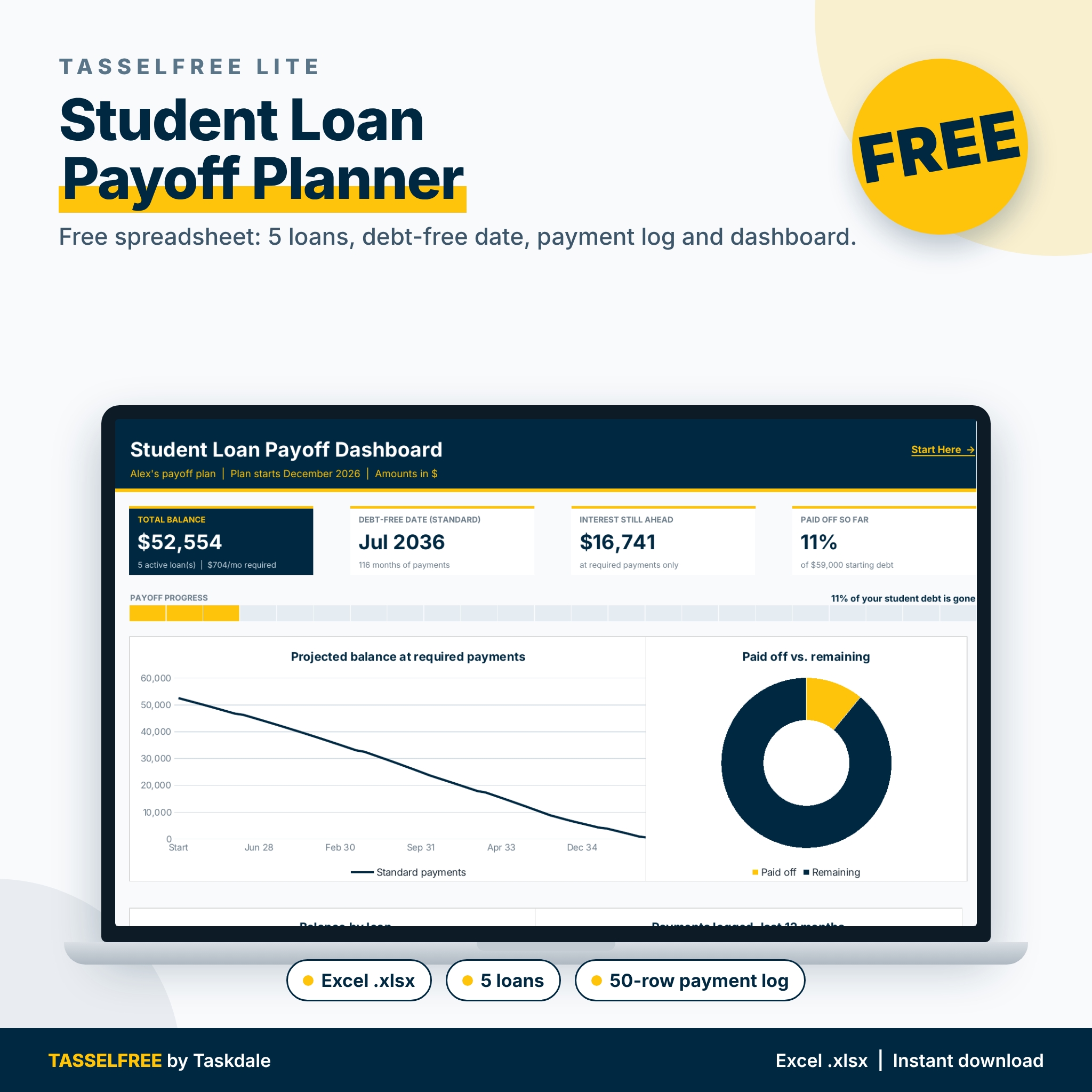 Free Student Loan Payoff Spreadsheet | Tasselfree Lite Student Loan Tracker with Dashboard & Payment LogView product
Student loan payoff at a glance
- Tasselfree Lite is a free Excel (.xlsx) tracker for up to 5 federal or private loans, with a 4-chart dashboard and room for 50 logged payments.
- Paidwell is a debt payoff planner that compares snowball, avalanche and five more methods, and works offline in your browser with no account or subscription.
- Payoff Compass is an amortisation spreadsheet for Excel and Google Sheets that shows interest saved and time saved when you add extra payments.
- Tasselfree Lite needs a free Taskdale account, with 3 free downloads per day.
- Browse all 3 options below to compare them side by side.
Table of Contents
- What should you look for in a student loan payoff tool?
- How do the three student loan payoff options compare?
- Who does each student loan payoff tool suit?
- How do you use a student loan payoff tool?
- What mistakes should you avoid when paying off student loans early?
- What affects the cost of a student loan payoff tool?
- Which student loan payoff tool should you pick?
- Common questions
What should you look for in a student loan payoff tool?
A good student loan payoff tool shows your debt-free date, the interest still ahead, and what changes when you pay more. Everything else is a bonus. Five factors separate these products.
How many loans does it handle?
Count your loans first. Tasselfree Lite takes up to 5 federal or private loans, which covers most graduates whose borrowing came in a few yearly slices. Paidwell is built for several debts at once, including cards and car finance alongside student loans. Payoff Compass works on one fixed-rate loan at a time, so you would use a copy per loan.
Does it support the payoff method you want?
A payoff method is the order in which you direct spare money at your debts. Snowball clears the smallest balance first. Avalanche clears the highest interest rate first. Paidwell compares those two and five more. Tasselfree Lite and Payoff Compass don't rank methods, so they suit people who already know which loan comes first.
Can you test extra payments?
An extra-payment test shows how much interest and time you save by paying more. Payoff Compass does this best: add an extra amount and it updates your debt-free date, interest saved and time saved straight away. It also has a What-If Planner and nine payment frequencies, including accelerated bi-weekly. Paidwell lets you test lump sums and balance transfers.
How much tracking and charting do you want?
Some people want a single number. Others want a record. Tasselfree Lite gives you a dashboard with total balance, standard debt-free date, interest still ahead and percent paid off, plus a log for up to 50 payments. Payoff Compass adds a payment-by-payment schedule, a yearly summary and 3 charts. Paidwell adds budgeting, savings, a credit score tracker and milestones.
Where does it run, and who sees your data?
Tasselfree Lite is an Excel-format file, so you need Excel or a compatible programme. Payoff Compass opens in Excel and Google Sheets. Paidwell runs offline in your browser with no account, which suits anyone who would rather not sign up for another service. Tasselfree Lite does need a free Taskdale account to download.
How do the three student loan payoff options compare?
The three differ mainly in scope: one is a simple tracker, one is a multi-debt planner, and one is a single-loan calculator. This table sets out what each does, using only what each listing states.
| Product | Format | Best for | Standout features |
|---|---|---|---|
| Free Student Loan Payoff Spreadsheet | Tasselfree Lite Student Loan Tracker with Dashboard & Payment Log | Excel .xlsx | Seeing up to 5 loans clearly | Dashboard with 4 charts, 50-payment log, free |
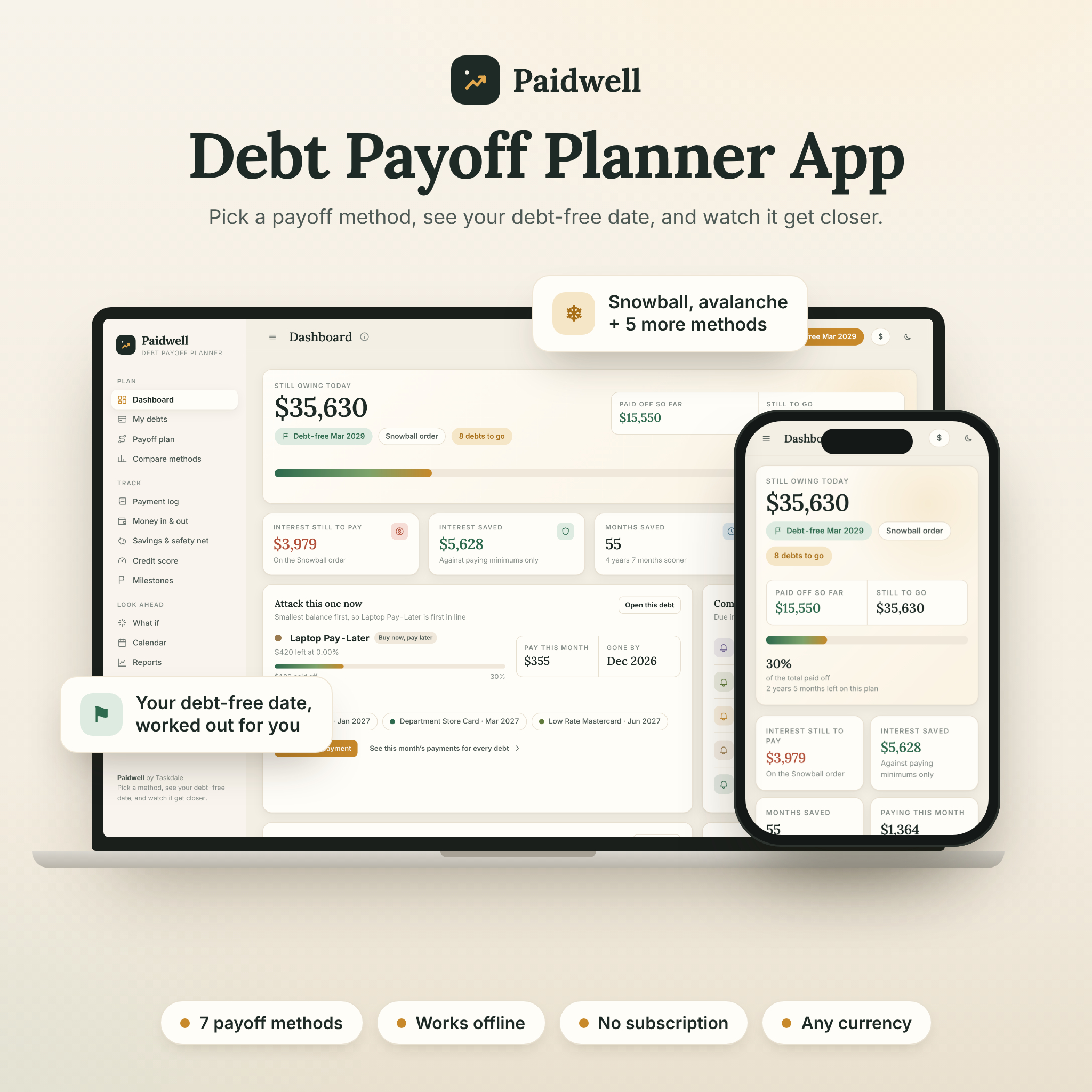 Debt Payoff Planner App | Paidwell Snowball & Avalanche Debt Tracker with Payoff Calculator, Budget, Credit Score Tracker & Printables | Works Offline | Browser, works offline | Several debts and choosing a method | 7 payoff methods, balance transfer and lump sum tests, 15-page guide, printables |
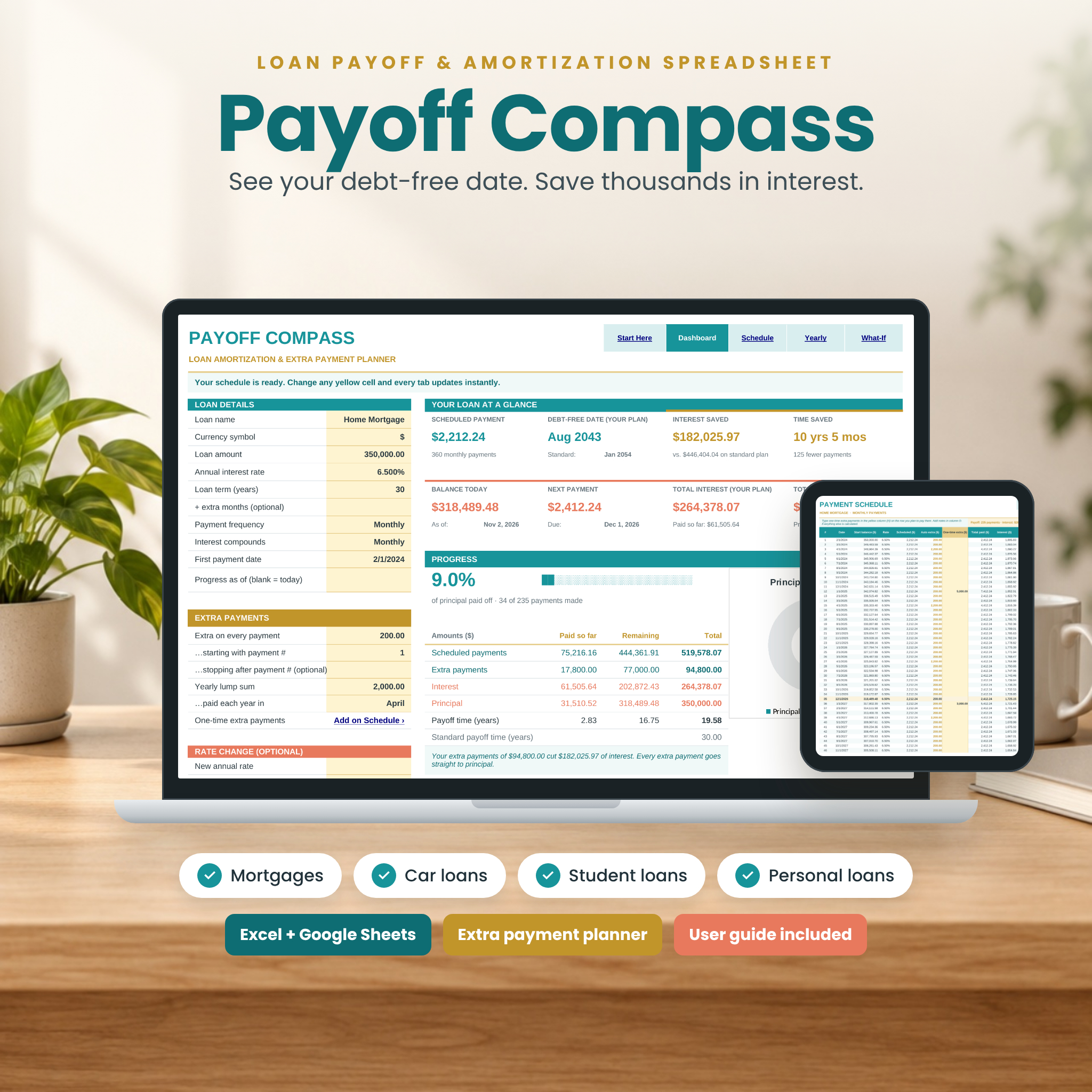 Payoff Compass Loan Amortization Spreadsheet | Mortgage Payoff Calculator with Extra Payments, Bi-Weekly & Debt-Free Date | Excel & Google Sheets | Excel and Google Sheets | One fixed-rate loan and extra payments | Interest and time saved, What-If Planner, 9 payment frequencies, 17-page guide |
Tasselfree Lite is the cheapest route in, and it costs nothing. Paidwell and Payoff Compass go further, each in a different direction.
Who does each student loan payoff tool suit?
Each tool suits a different borrower, and the fit is mostly about how many debts you have and how hands-on you want to be.
Tasselfree Lite suits the borrower who wants clarity. If you have a handful of federal or private loans and just want to see the total, the date you will be free and how much is paid off, this is the lightest option. It also suits a parent helping a graduate keep tabs on balances.
Paidwell suits the borrower juggling more than loans. If you also have a credit card or car finance and you're unsure which to attack first, comparing methods in one place saves guesswork. The printable pack helps if you prefer paper on the fridge.
Payoff Compass suits the borrower with one main loan and spare cash. If you've a single fixed-rate loan and want to see what an extra monthly payment or a bi-weekly schedule does, the schedule and What-If Planner answer that directly. Its Canadian-ready compounding also helps if your loan compounds the Canadian way. The listing's mortgage wording shows it handles any fixed-rate loan, so it works here too.
How do you use a student loan payoff tool?
You use a payoff tool by entering accurate loan details, choosing a plan and checking your progress each month. These steps work for all three products.
- Gather your statements. Note each loan's current balance, interest rate and minimum monthly payment from your servicer or lender.
- Enter the loans exactly. Small errors in rate or balance carry through to the debt-free date, so copy figures from the statement rather than memory.
- Note your baseline date. Record the debt-free date with minimum payments only. This is your comparison point.
- Add an extra amount. Try a sum you could realistically keep up, and see how the date and interest ahead move.
- Pick an order for multiple loans. If you use Paidwell, compare snowball and avalanche and choose the one you'll actually stick with.
- Log each payment. Record it when it leaves your account, then compare with your servicer's statement every few months.
What mistakes should you avoid when paying off student loans early?
The biggest mistake is paying extra without checking where your lender applies it. Some lenders can put an overpayment toward future instalments rather than the balance, so confirm in writing that extra money reduces the principal.
Other pitfalls are worth knowing:
- Treating every loan the same. Federal and private loans can carry different terms and protections. Cheque what you'd give up before paying one off early.
- Using out-of-date figures. A tool is only as good as the balance you type in. Refresh it after any change in rate.
- Chasing the clever method. Avalanche usually costs less in interest, but snowball can keep you motivated. The better method is the one you follow.
- Emptying your cushion. Paying down debt with no emergency savings can push you back toward borrowing.
- Assuming a spreadsheet replaces your servicer. Your servicer's statement is the official record. Use the tool to plan and cross-cheque.
What affects the cost of a student loan payoff tool?
Cost is driven by scope and format, not by how well a tool helps you. A single-purpose tracker costs less than a multi-feature planner, and a free option exists here.
Tasselfree Lite is free, with a limit of 3 downloads per day and a Taskdale account. Paidwell costs more up front because it bundles a payoff calculator, budget, credit score tracker, user guide and printable pack, and it has no subscription. Payoff Compass sits as a specialist calculator with a longer guide and both clean and filled sample copies. Cheque the live product cards for current figures before you decide.
Remember the real cost of any tool is the time it takes to keep accurate. A cheap tool you update monthly beats an expensive one you abandon.
Which student loan payoff tool should you pick?
Pick by your situation. If you have up to 5 loans and want a clear picture, start with Tasselfree Lite, since it costs nothing to try. If you carry several kinds of debt and want to compare methods, choose Paidwell. If you have one fixed-rate loan and want to see what overpaying achieves, choose Payoff Compass.
Not sure? Download the free tracker first, note your debt-free date, and move to a fuller tool only when you find yourself wanting to test extra payments or rank your debts.
Common questions
Is a free student loan payoff spreadsheet accurate enough to rely on?
A free spreadsheet is as accurate as the figures you enter. Copy balances and rates from your servicer's latest statement, and compare the result with their projection every few months. Treat the spreadsheet as a planning aid, with your servicer's statement as the official record.
Is snowball or avalanche better for student loans?
Avalanche, which targets the highest interest rate first, usually minimises total interest. Snowball, which clears the smallest balance first, gives quicker wins that help some people stay on track. If your rates are similar, the difference is small, so choose the approach you will keep following.
Do I need Excel to use these tools?
Tasselfree Lite is an Excel-format .xlsx file, so you need Excel or a programme that opens that format. Payoff Compass works in Excel and Google Sheets. Paidwell runs in your browser and works offline, so it needs neither.
Can I use one tool for both federal and private loans?
Yes. Tasselfree Lite is designed for up to 5 federal or private loans, and Paidwell tracks any debt you enter. Keep each loan separate with its own balance and rate, because terms and repayment options can differ between federal and private lenders.
Will extra payments always shorten my loan?
Extra payments shorten a loan only when your lender applies them to the balance. Ask your servicer how overpayments are handled before you start. Payoff Compass shows the date and interest effect of extra payments, so you can compare its figures with your lender's.