Best Tax Document Checklist: 3 Spreadsheets Compared
If you file your own return, the Slatefile Tax Organiser is the best tax document checklist on this page. Its 200-row checklist updates its own status and flags overdue W-2s and 1099s. If you prepare returns for clients, ReturnRoom and PrepBloom Tax Pro Studio build a document checklist into a full practise workbook.
A pile of tax paperwork can feel bigger than it is, and most of the stress comes from not knowing what is still missing. A good checklist removes that doubt. We'll explain what to look for, how these three spreadsheets differ, and how to pick the right one.
Key facts at a glance
- The Slatefile Tax Organiser is the only one of the three built for individuals and households, with a 200-row document checklist.
- ReturnRoom and PrepBloom Tax Pro Studio are built for tax preparers and track clients, invoices and deadlines alongside documents.
- All three work in Excel and Google Sheets, with a step-by-step or illustrated guide included.
- None of the three is a subscription, and each can be reused when the next tax season starts.
- PrepBloom's checklist has 3 items, while Slatefile's has 200 rows, so they suit different jobs.
 Tax Prep Checklist Spreadsheet | Slatefile Tax Organizer for Excel & Google Sheets with Dashboard, Document Tracker, Mileage Log & Estimated Tax Planner
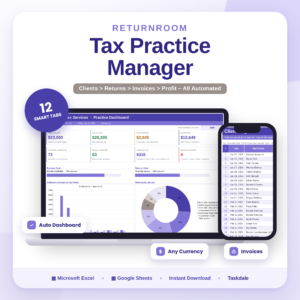
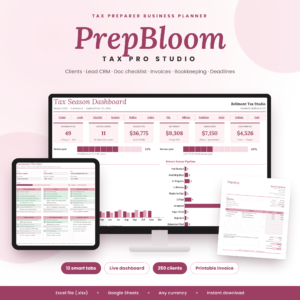
Table of contents
- What should you look for in a tax document checklist?
- How do the three tax document checklists compare?
- Who does each tax document checklist suit?
- How do you use a tax document checklist spreadsheet?
- What mistakes should you avoid with a tax document checklist?
- What affects the price of a tax document checklist?
- Which tax document checklist should you choose?
- Common questions
What should you look for in a tax document checklist?
A tax document checklist is a list of every form, receipt and record your return depends on, with a way to mark each one as received. The best ones tell you what is still outstanding without you having to count. Five factors separate a useful checklist from a printed list that sits in a drawer.
Self-updating status
A checklist that changes its own status saves you from re-reading the whole list. The Slatefile Tax Organiser does this across 200 rows and adds overdue alerts, so a missing W-2 or 1099 shows up rather than hiding. ReturnRoom and PrepBloom include checklists too, but those sit inside a client workflow.
Coverage of your actual documents
A longer list is not automatically better. A 200-row list suits someone with several income sources, deductions and mileage. A 56-item list, like PrepBloom's, is easier to hand to a client who just needs to know what to bring. Match the length to the complexity of the returns you handle.
Logs that sit beside the checklist
A checklist tells you a document exists. Logs tell you what it says. Slatefile adds income and deduction logs, plus a mileage log that applies IRS rates automatically. That means the figures you gather are already in one place when your preparer asks for them.
Compatibility with Excel and Google Sheets
All three are made for both Excel and Google Sheets. PrepBloom is an Excel (.xlsx) file that also works in Google Sheets. If you share the file with a preparer or a partner, Google Sheets makes that simple, while Excel suits anyone who prefers to keep files offline.
Reuse and handover
Tax organisation repeats every year, so the file should too. Slatefile is reusable annually and works in any currency. It also produces a printable summary for your tax preparer, which is the page that turns your gathering into something a professional can act on.
How do the three tax document checklists compare?
Slatefile covers personal tax organisation, while ReturnRoom and PrepBloom cover running a tax practise. The table below sets out what each one actually includes, using only the details supplied for each product.
| Product | Built for | Document checklist | Other main features | Works in |
|---|---|---|---|---|
| Tax Prep Checklist Spreadsheet | Slatefile Tax Organiser for Excel & Google Sheets with Dashboard, Document Tracker, Mileage Log & Estimated Tax Planner | Individuals preparing their own paperwork | 200 rows, updates its own status | Dashboard, income and deduction logs, mileage log with automatic IRS rates, estimated tax planner with safe-harbour calculator, overdue alerts, printable preparer summary | Excel and Google Sheets |
| Tax Preparer Client Tracker Spreadsheet | ReturnRoom Tax Practise Manager with Dashboard, Invoice Generator, Document Checklist, IRS Deadlines & Profit Tracker | Tax preparers managing clients | Included, number of items not stated | 12 connected tabs, auto dashboard, invoice generator, 2027 IRS deadline countdowns, monthly profit report | Excel and Google Sheets |
| Tax Preparer Business Planner Spreadsheet | PrepBloom Tax Pro Studio Client Tracker, Tax Prep CRM, Document Checklist, Invoice & Bookkeeping Template | Tax preparers running a wider business | 3 items | 12 connected tabs, 250-client tracker, lead CRM, invoice builder and tracker, bookkeeping ledger with monthly P&L, mileage log, deadline calendar, social media planner | Excel (.xlsx), also Google Sheets |
Who does each tax document checklist suit?
Each spreadsheet suits a different person, and the split is clear once you know whether you are filing or preparing.
Slatefile Tax Organiser suits anyone gathering their own paperwork: employees with a W-2 and a few deductions, freelancers with several 1099s, or people who drive for work and need a mileage record. Its estimated tax planner with a safe-harbour calculator is useful if you pay tax in instalments during the year. It is the only one here that is aimed at a household rather than a business.
ReturnRoom suits a preparer who wants one tidy system. You log a return once, and it fills in your fee, then works out balances and payment status. The 2027 IRS deadline countdowns and monthly profit report make it a good fit for a solo practise that wants invoices, deadlines and documents connected.
PrepBloom Tax Pro Studio suits a preparer who also wants marketing and bookkeeping in the same workbook. It handles up to 250 clients with colour-coded return statuses, and adds a lead CRM with follow-up alerts and a social media planner. That breadth is a benefit if you will use it, and clutter if you will not.
How do you use a tax document checklist spreadsheet?
You use a tax document checklist spreadsheet by listing expected documents at the start of the year, ticking them off as they arrive, and sharing a summary with your preparer. A simple routine keeps this manageable.
- Download the file and save a copy, so the original stays clean for next year.
- Open the sample file or guide first, so you can see how a finished version looks.
- Set your currency, then enter the documents you expect, such as W-2s, 1099s and receipts.
- Update the status of each item as it arrives. In Slatefile, the checklist recalculates for you.
- Log income, deductions and mileage as you go rather than all at once in spring.
- Check the dashboard for overdue items, then print the summary for your preparer.
What mistakes should you avoid with a tax document checklist?
The most common mistake is using a checklist to hold documents rather than track them. A list that is not updated gives false comfort, which is worse than no list at all.
- Starting too late. Begin when the first document arrives, not when you sit down to file.
- Choosing a business tool for a personal job. ReturnRoom and PrepBloom are practise managers. If you only need to organise your own return, they carry features you will never open.
- Choosing a personal tool for a practise. Slatefile is not a client tracker, so a preparer needs one of the other two.
- Ignoring the guide. Each product includes a guide, and reading it first prevents broken formulas.
- Overwriting the master file. Keep a clean copy, because reusing it every year only works if the template is intact.
What affects the price of a tax document checklist?
The price of a tax document checklist spreadsheet mostly reflects how much of your workflow it replaces. A single-purpose organiser costs less than a 12-tab practise manager, because the second does the work of several tools.
Features that raise value, and usually cost, include automatic calculations, dashboards, invoice builders and bookkeeping ledgers. The cheaper option is usually the narrower one, which is fine if you only need the checklist. Check the live product cards for current prices. Since none of these is a subscription, you are paying once rather than monthly, which makes reuse each year worthwhile.
Which tax document checklist should you choose?
Choose by role. If you are filing your own return, pick the Slatefile Tax Organiser. If you prepare returns and want invoicing and deadlines in one place, pick ReturnRoom. If you also want a CRM, bookkeeping and a social media planner, pick PrepBloom Tax Pro Studio.
If you are unsure, ask yourself one question: do I track my own documents or other people's? Your answer decides the shortlist. Browse all 3 options below and compare the product cards before buying.
Common questions
Can I use a tax document checklist spreadsheet in Google Sheets?
Yes. All three products work in both Excel and Google Sheets. PrepBloom is an Excel (.xlsx) file that also works in Google Sheets. Google Sheets is convenient if you want to share the file with a preparer or family member.
Does the Slatefile Tax Organiser work outside the United States?
The spreadsheet works in any currency, so you can enter amounts in your own. However, its mileage log applies IRS rates and its planner refers to safe-harbour rules, so those parts are designed around US tax. Check they fit your situation first.
Can I reuse the same file every year?
Yes. Slatefile is reusable each year, and ReturnRoom and PrepBloom are built as ongoing practise workbooks. Keep an untouched copy of the original so you can start each tax season from a clean template.
Is there a subscription?
ReturnRoom is described as having no subscription. Slatefile and PrepBloom are supplied as files you download and keep. Check the live product card for the licence details of each before you buy.
Do I need Excel skills to use these?
No. Fees, totals, charts and alerts calculate for you in these workbooks. Each product includes a guide: Slatefile and ReturnRoom have a step-by-step guide, and PrepBloom has an illustrated user guide. Slatefile also includes a sample file.