A good timetable creator template saves you from drawing the same grid every Sunday. You enter the fixed things once: classes, shifts, commutes, the 7:45 school run. The template lays them out in blocks, and you fill the gaps with study, deep work or rest. When something moves, you change one cell and the week redraws.
This guide is for students building a class timetable, workers planning time blocks, and anyone trying to fit both into one week. You will learn the steps to build a timetable that holds up, see worked examples for a college student and an office worker, and compare four templates on Taskdale that do the drawing for you.
Quick picks: timetable templates on Taskdale
| Product | Best for | Price | Link |
|---|---|---|---|
| Campus Compass Student Planner Spreadsheet | A class timetable that draws itself and flags clashes | Original price was: $11.99.$5.99Current price is: $5.99. | View |
| Semester Pilot Student Academic Planner App | Class times plus office hours and study blocks | $20.39 | View |
| Focus Desk Work Planner Kit | Half-hour time blocks for the workday | Original price was: $4.99.$2.49Current price is: $2.49. | View |
| Work From Home Planner Printable and Fillable PDF | Hourly days that mix work and home | $1.49 | View |
What a timetable template should actually do
A blank grid with days across the top and hours down the side is a start. It is not a timetable creator. The difference is what the template does after you type.
Here is what to look for:
- Fixed blocks entered once. A Tuesday and Thursday class at 10:30 should not need typing twice a week for 15 weeks.
- Half-hour slots. Hourly grids round everything off. Real life starts at 8:30 and ends at 3:15.
- Clash warnings. If two blocks overlap, you want to know before the first day of term, not when you are running between buildings.
- Color by subject or project. Your eye should find “all the chemistry” in one glance.
- A print view. A timetable taped inside a locker or above a desk gets used more than one buried in an app.
Spreadsheets and planner apps can do all five. Printable PDFs do the last two well and rely on you for the rest. Both have a place. Plenty of people build the week once in a spreadsheet, print it, then pencil in the extras by hand. That gives you the automatic layout of a spreadsheet and the always-visible page of paper, without picking one camp.
Build a school timetable in five steps
Take a college sophomore with four classes. Biology meets Monday, Wednesday and Friday at 9:00. Statistics is Tuesday and Thursday at 11:00. English is Monday and Wednesday at 1:30. A lab runs Thursday from 2:00 to 5:00. Here is how to turn that into a week that works.
- Enter every fixed class. Course name, days, start and end time, room. Do it straight from the registration page so nothing is misremembered.
- Add travel time. If the lab is a 15-minute walk across campus, block it. Tiny gaps cause most late arrivals.
- Add work shifts and other fixed commitments. A Saturday job, a Tuesday evening club, a weekly call home.
- Place study blocks next to classes. One hour of review right after biology on Monday beats one hour on Sunday night. The material is still fresh.
- Leave white space. At least one free evening and one half-day on the weekend. A timetable with no gaps breaks the first time something runs over.
That sophomore ends up with about 14 hours of class, 3 hours of lab, 12 hours of planned study and 8 hours of work in a week. Seen in color on one page, it looks busy but doable. That is the point. You can see it before you live it.
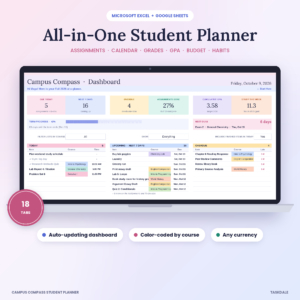
Campus Compass Student Planner Spreadsheet
Price: Original price was: $11.99.$5.99Current price is: $5.99. | Best for: college students with set class times
An 18-tab spreadsheet for Excel or Google Sheets where you tick the days a class meets and type the times, and a color-coded weekly timetable draws itself and warns you if two classes overlap. The same workbook tracks assignments with countdowns, grades, GPA, attendance, a study log and a budget. Start on the Courses tab: add each class with its days and times, then open the Schedule tab.
If you want to go further with deadlines and grades once your timetable is set, read how to use a student planner spreadsheet for assignments and GPA.
Let the timetable place your study time
Classes are easy to timetable because someone else picked the times. Study is harder. You have to choose, and most students choose “later”, which turns into midnight.
A smarter timetable treats study like a class. It sits in a named block at a set time. Monday 10:00 to 11:00, Biology review, library second floor. You would not skip a class just because nobody took attendance. Treat this block the same way. Two or three named study blocks per class each week is a sensible starting point for most college courses.
Some planners go one step further and place study sessions before exams for you, then drop them onto the calendar next to your classes. That saves the guesswork during the weeks when the timetable matters most.

Semester Pilot Student Academic Planner App
Price: $20.39 | Best for: students who want study blocks placed for them
A single HTML file that runs in your browser with no account. Your class times become a weekly timetable, with office hours and timed deadlines shown alongside, and an exam prep tool spreads short study sessions before each exam and adds them to your calendar. You can export the calendar as an .ics file for Google, Apple or Outlook. Enter your semester dates and course times first.
Build a work timetable with time blocks
At work the problem flips. Nobody hands you a set timetable, and the day fills with whatever arrives first. Email, a call, a quick favor for a coworker. By 4pm the main task has not moved.
Time blocking fixes that by giving each type of work a home on the clock. A typical eight-hour office day might look like this:
| Time | Block |
|---|---|
| 8:30 to 9:00 | Inbox and plan the day |
| 9:00 to 11:00 | Deep work: the hardest task, notifications off |
| 11:00 to 12:00 | Meetings and calls |
| 12:00 to 12:45 | Lunch, away from the desk |
| 12:45 to 2:30 | Second focus block or project work |
| 2:30 to 3:00 | Quick tasks and replies |
| 3:00 to 4:30 | Meetings, admin, follow-ups |
| 4:30 to 5:00 | Wrap up and write tomorrow’s top three |
It is not a cage. When a meeting lands at 9:30, you move the deep work block, not delete it. The template just keeps that block on the page so it gets rescheduled instead of forgotten.
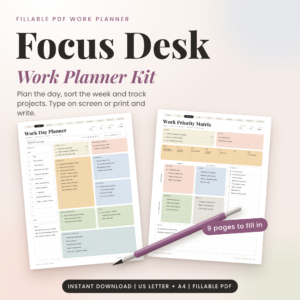
Focus Desk Work Planner Kit
Price: Original price was: $4.99.$2.49Current price is: $2.49. | Best for: office workers and team leads
A fillable PDF kit in US Letter and A4 with nine planner pages, including a Time Blocker with half-hour slots from 6 AM to 9 PM, a deep work block, quick tasks and breaks, a Work Day Planner, a priority matrix, a weekly planner and meeting notes. Filled example pages and a Word guide are included. Save a blank copy, then type tomorrow’s blocks into the Time Blocker before you log off today.
To see more work-focused options side by side, the guide to the best planners for work, school and home compares picks for each part of the week.
One timetable for school, work and home
Plenty of people live in two worlds at once. A grad student working 20 hours a week. A parent taking an evening course. A part-time worker with two kids and a 3:15 pickup. For them, separate timetables just create clashes nobody sees until it is too late.
The answer is one master timetable with color doing the sorting. Say blue for work, green for classes, orange for family. Put the hard edges in first: shifts, classes, pickups. Then add study and focus blocks into the gaps. One look on Sunday tells you whether Wednesday is possible or a fantasy.
A mom working from home with a Thursday evening class might block 9:00 to 12:00 for work, 12:30 to 2:30 for more work, 3:15 for the pickup, 4:00 to 5:00 for homework help, and 6:30 to 9:00 for class. Seeing that on paper is the moment she decides to order takeout on Thursdays. Small decision. Big relief.
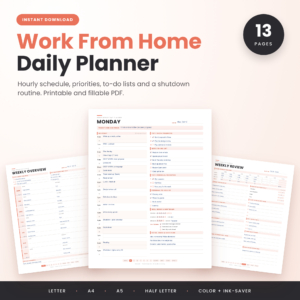
Work From Home Planner Printable and Fillable PDF
Price: $1.49 | Best for: people mixing work and home hours
Thirteen undated pages in four paper sizes, in color or ink-saver, as printable or fillable PDFs. Each daily page has a half-hour schedule from 6 am to 9:30 pm, one big focus, separate work and personal top 3 lists, and a shutdown checklist, with a weekly overview and a weekly review that logs hours worked. Print a week of daily pages and fill in the fixed blocks first.
Families who teach at home face the same puzzle with even more moving parts. These homeschool schedule examples show daily routines by age that slot neatly into a family timetable.
When your hours change every week
Fixed timetables assume fixed hours. Nurses, retail staff, warehouse workers and anyone on a rotating roster do not get that luxury. Monday might be an early shift one week and a late one the next. A pretty weekly grid printed in September is useless by October.
The trick is to split the timetable into two layers. The first layer holds what never moves: classes, the gym on Saturday morning, a standing call with your mom on Sundays. The second layer is the shift pattern, which you copy in each week as soon as the roster comes out. Then you place study, errands and rest around both.
Say a part-time pharmacy tech gets a roster every Thursday for the following week. Thursday night becomes timetable night. Ten minutes: copy the shifts in, check for any clash with classes, and move study blocks to the free mornings. If a shift lands on top of a class, that is the moment to ask for a swap, not the night before.
An undated daily page with blank time slots works well here, because you write the hours yourself instead of fighting a grid that starts at 6am when your day starts at 2pm.
A ten-minute Sunday check
A timetable drifts if nobody looks at it. One short check a week keeps it honest.
- Look back. Which blocks did you actually keep last week? Which did you skip twice?
- Move or shrink the blocks you keep skipping. A 90-minute block you never start might work as two 40-minute ones.
- Add anything new: a test date, a deadline, a dentist appointment, a late meeting.
- Check the hardest day of the week. If it has more than ten hours of blocks, move something.
Ten minutes, and the week ahead looks like a week you can live, not one you will fight. That calm on a Sunday evening is the whole reason to have a timetable.
Three rules for a timetable you will actually read
Keep colors to five or fewer
Twelve colors look like confetti. Five groups are easy to scan: classes, work, study, family, rest.
Label blocks with a verb
“Stats” is a subject. “Stats problem set 4” is a job. Blocks with verbs get done more often.
Put it where you look
Phone lock screen, the inside of a planner cover, or a printed sheet above the desk. A timetable you have to search for is a timetable you skip.
Common timetable mistakes
- Back-to-back everything. No buffer between a class ending at 10:50 and another starting at 11:00 across campus means you are always late.
- Study blocks at your worst hour. If you fade after 9pm, a 10pm study block will fail. Put hard work where your energy is.
- Forgetting meals and sleep. They are fixed blocks too. Leave them off and the timetable lies to you.
- Never updating it. Review the timetable after week two of term or the first month at a new job. Reality will have changed something.
Frequently asked questions
How do I make a timetable for school and work?
Enter fixed classes and shifts first, add travel time, then place study and focus blocks in the gaps. Leave at least one free evening each week.
What is the best format for a timetable template?
A spreadsheet if you want clash warnings and auto colors. A fillable PDF if you want something to print and write on. Many people use a spreadsheet to build it and print the result.
Can Google Sheets make a class timetable?
Yes. A student planner built for Excel and Google Sheets can draw a weekly class timetable from your course days and times.
How long should time blocks be?
For focused work, 60 to 120 minutes. For admin and replies, 30 minutes. Shorter blocks are fine for school review sessions.
Should I use a different timetable each week?
Keep one master week for fixed items and copy it forward. Then adjust only the blocks that change, such as exams or deadlines.
Your next step
Grab your class list or work calendar and write down every fixed block for next week, with start and end times. Then build the grid and add two study or focus blocks in the gaps. If you are a student, open the Campus Compass Student Planner Spreadsheet and let your class timetable draw itself tonight.