Best Undated Habit Tracker: Four Options Compared
Undated habit trackers are easier to choose than they first look, and you can start on any day without wasting pages. The best undated habit tracker is the one that fits how you like to record habits: dots on a page, colouring a circle, or ticking cells in a spreadsheet. Dotlane suits most people, Moonarc suits visual thinkers, Steady Streak suits long habit lists, and Habit Studio suits anyone who prefers a screen.
Key facts at a glance
- An undated habit tracker has no printed dates, so you can begin on any day and miss a week without leaving blank, guilt-inducing pages behind.
- Steady Streak tracks up to 20 habits per month, and Habit Studio tracks up to 30 daily habits and 15 weekly habits.
- Dotlane and Steady Streak both offer click-to-tick fillable PDFs, so you can mark habits on screen or print the pages.
- Moonarc is the only option here with a circular, colour-in layout, and it includes both dated 2027 months and undated pages.
- Habit Studio is the only spreadsheet, with streak counting that carries over from month to month.
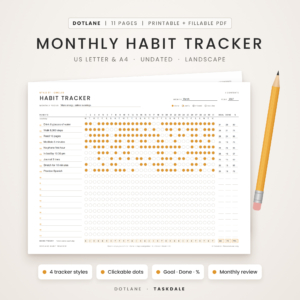 Monthly Habit Tracker Printable & Fillable PDF | Dotlane Undated Habit Tracker with 4 Styles, 30-Day Challenge, Monthly Review & Year at a Glance | US Letter & A4
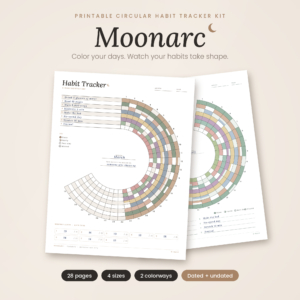
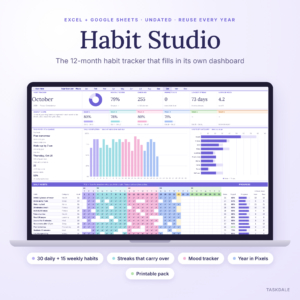
Table of Contents
Toggle
- What is an undated habit tracker?
- What should you look for in an undated habit tracker?
- How do the four options compare?
- Which undated habit tracker suits which person?
- How do you use an undated habit tracker?
- What mistakes should you avoid?
- What affects the price of an undated habit tracker?
- Common questions
- Which undated habit tracker should you pick?
What is an undated habit tracker?
An undated habit tracker is a set of tracking pages with no fixed calendar dates, so you write or select the month and days yourself. That sounds like extra work, but it removes the usual problem with dated planners: start in March and you have already wasted two months of pages.
Every product here is a digital download, so there is nothing to post and nothing to run out of. You can print a fresh page whenever you need one, or fill the file in on screen. With 4 options on this page, the real question is not which is "best" in general, but which layout you will still be using in week six.
What should you look for in an undated habit tracker?
Look at five things: how many habits it holds, how you mark them, how it shows progress, which paper sizes or software it supports, and whether it has extras you will actually use. Each factor below is described using the products on this page.
Number of habits it can hold
A tracker that holds too few habits forces you to leave things out, and one that holds too many tempts you to overload yourself. Steady Streak holds up to 20 habits, and Habit Studio holds up to 30 daily and 15 weekly habits. Moonarc's circular designs come in 5, 8 and 10-habit versions, which suits people who prefer a short, focused list. Dotlane offers four tracker styles, so you can pick a layout to match your list.
How you mark a habit as done
You can mark habits by hand, by clicking, or by colouring. Dotlane and Steady Streak both offer fillable PDFs where you click a dot or tick a box on screen. Moonarc is designed to be coloured in by hand, which many people find more satisfying. Habit Studio works by ticking cells in Excel or Google Sheets.
If you spend most of the day at a computer, a clickable file is easier to keep up. If you want a break from screens, choose a printed page.
How progress is shown
Progress display is what turns a tracker from a chore into encouragement. Dotlane has Goal, Done and % columns, a daily total row and a year-at-a-glance heat map. Steady Streak asks you to set a goal per habit and count your days and percentage at month end. Moonarc has a no-maths completion percentage chart and a Year in Colour page. Habit Studio calculates scores and charts automatically.
Choose manual counting if you enjoy the ritual, and automatic scoring if sums put you off.
Paper sizes and file types
Check that the file matches your printer and your planner. Dotlane and Steady Streak come in US Letter and A4, both in landscape. Moonarc adds A5 and Happy Planner Classic sizes, which matters if you keep a ring-bound planner. Habit Studio is an Excel and Google Sheets file with a 4-page printable pack in US Letter and A4.
Dotlane offers Amber and ink-saving Mono versions, and Steady Streak includes an Ink Saver option, which helps if you print often.
Extras that earn their place
Extras are only worth having if they support the habit itself. Both Dotlane and Steady Streak include a 30-day challenge and a monthly review, and Dotlane includes two challenges plus a step-by-step user guide. Moonarc adds a Habit Wheel, a Mood and Sleep Ring and 60 habit ideas, which helps if you are unsure where to begin. Habit Studio includes a mood tracker and a habit leaderboard.
How do the four options compare?
The four trackers differ mainly in format and habit capacity. The table below sets out what each one offers, using only the details supplied for each product.
| Product | Format | Habit capacity | Marking method | Standout features |
|---|---|---|---|---|
| Monthly Habit Tracker Printable & Fillable PDF | Dotlane Undated Habit Tracker | Printable and fillable PDF, landscape, US Letter and A4 | Four tracker styles | Click a dot or print |
| Moonarc Circular Habit Tracker Printable | Printable, US Letter, A4, A5, Happy Planner Classic | 5, 8 and 10-habit arcs | Colour in a crescent | Habit Wheel, Mood and Sleep Ring, 60 habit ideas |
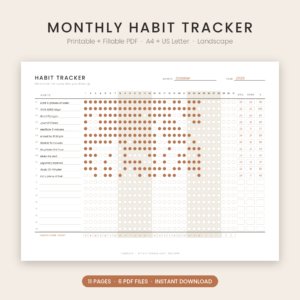 Steady Streak Monthly Habit Tracker Printable & Fillable PDF | Printable, Ink Saver and fillable PDF, A4 and US Letter | Up to 20 habits | Click to tick or print | Weekly tracker, 30-day challenge, 11 undated landscape pages |
| Habit Tracker Spreadsheet 2026 for Excel & Google Sheets | Habit Studio | Spreadsheet plus 4-page printable pack | Up to 30 daily and 15 weekly habits | Tick cells |
Which undated habit tracker suits which person?
Each tracker suits a different kind of habit-builder, and the right match depends on how many habits you track and whether you prefer paper or screen.
Dotlane suits people who want the most complete printable set in one download. With four styles, two challenges and a review scorecard, it covers a first month and a full year. It is a good first choice if you are not yet sure which layout you will like.
Moonarc suits people who respond to colour and shape rather than rows of boxes. Colouring a crescent each day shows your month at a glance. It also fits people who use a Happy Planner or A5 binder, since those sizes are included.
Steady Streak suits people who track a long list, up to 20 habits, and like to count their own totals. It is straightforward and does not try to be more than a monthly tracker.
Habit Studio suits people who live in spreadsheets or prefer not to print. Streaks carry from month to month, which gives long-term habits real continuity. The mood tracker and Year in Pixels are useful if you want to see how habits and mood relate.
How do you use an undated habit tracker?
Using an undated habit tracker takes about ten minutes to set up and under a minute a day. Follow these steps for any of the products here.
- Pick no more than three to five habits to begin with, even if your tracker holds many more.
- Write the month and the dates on your first page, or enter them in the spreadsheet.
- Set a goal for each habit, such as 20 days out of 30 or three times a week.
- Put the tracker where you will see it daily, or save the file to your desktop.
- Mark each habit at the same time every day, ideally straight after doing it.
- At month end, count your days, work out the percentage and decide what to keep, drop or adjust.
If you print, a ring binder or clipboard keeps the pages together. Print one month at a time so you can adjust the layout as your habits change.
What mistakes should you avoid?
The most common mistake is tracking too many habits too soon. A tracker that holds 20 or 30 does not mean you should fill it. Start small, then add one habit at a time once the first few feel automatic.
Other mistakes worth avoiding:
- Setting goals of 100%. Missing a day then feels like failure. A goal of 80% leaves room for real life.
- Choosing the wrong format. If you dislike printing, a printable pack will sit unused. If you dislike screens, a spreadsheet will too.
- Never reviewing. The monthly review pages exist so you can see what worked. Skip them and the tracker becomes a record, not a guide.
- Starting over after a gap. This is the main advantage of undated pages. Pick up where you left off.
What affects the price of an undated habit tracker?
The price of an undated habit tracker depends mainly on how many pages and layouts are included, how many file formats you get, and whether there are extras such as user guides or colourways. A single monthly tracker costs less than a bundle with challenges, a year overview and a review scorecard.
Page size options add value too. Moonarc includes four sizes and two colourways, while Dotlane includes two paper sizes and two colour versions. A spreadsheet like Habit Studio with automated scoring and streak counting is built on formulas, which is a different kind of work from designing printable pages. Current prices are shown on the product cards, so compare those alongside what each download includes.
Common questions
Can I start a tracker in the middle of the month?
Yes. Undated trackers have no printed dates, so you simply write in today's date and continue. Your first month may be shorter than 30 days, and that is fine. Many people find a mid-month start less pressured than waiting for the first of the month.
Do I need to print a new page every month?
For printable trackers, yes, one page or set per month. Fillable PDFs can be reused by saving a new copy each month. A spreadsheet like Habit Studio holds 12 monthly dashboards in one file, so you do not need to print anything unless you want to.
How many habits should I track at once?
Three to five is a sensible starting point. Moonarc's 5-habit arc matches this well. Once those habits feel routine, add another. Trackers that hold 20 or more are useful later, but beginning with a short list makes success more likely.
Can I use the pages in a Happy Planner or ring binder?
Moonarc is the product that lists Happy Planner Classic as a size, alongside US Letter, A4 and A5. The other trackers come in US Letter or A4, which fit standard ring binders. Check your planner's page size before printing.
What is the difference between a streak and a percentage?
A streak counts consecutive days a habit was done, while a percentage shows how many days out of the month you completed it. Habit Studio tracks both streaks and goals. The printable trackers focus on counting days and percentage, which is gentler if you do not want one missed day to reset everything.
Which undated habit tracker should you pick?
Choose by how you prefer to record habits. Pick Dotlane for a complete printable set, Moonarc if you enjoy colouring and use smaller planner sizes, Steady Streak for a long habit list, and Habit Studio if you work on screen and want streaks counted for you.
If you are still unsure, choose the format you are most likely to open every day, then start with three habits.