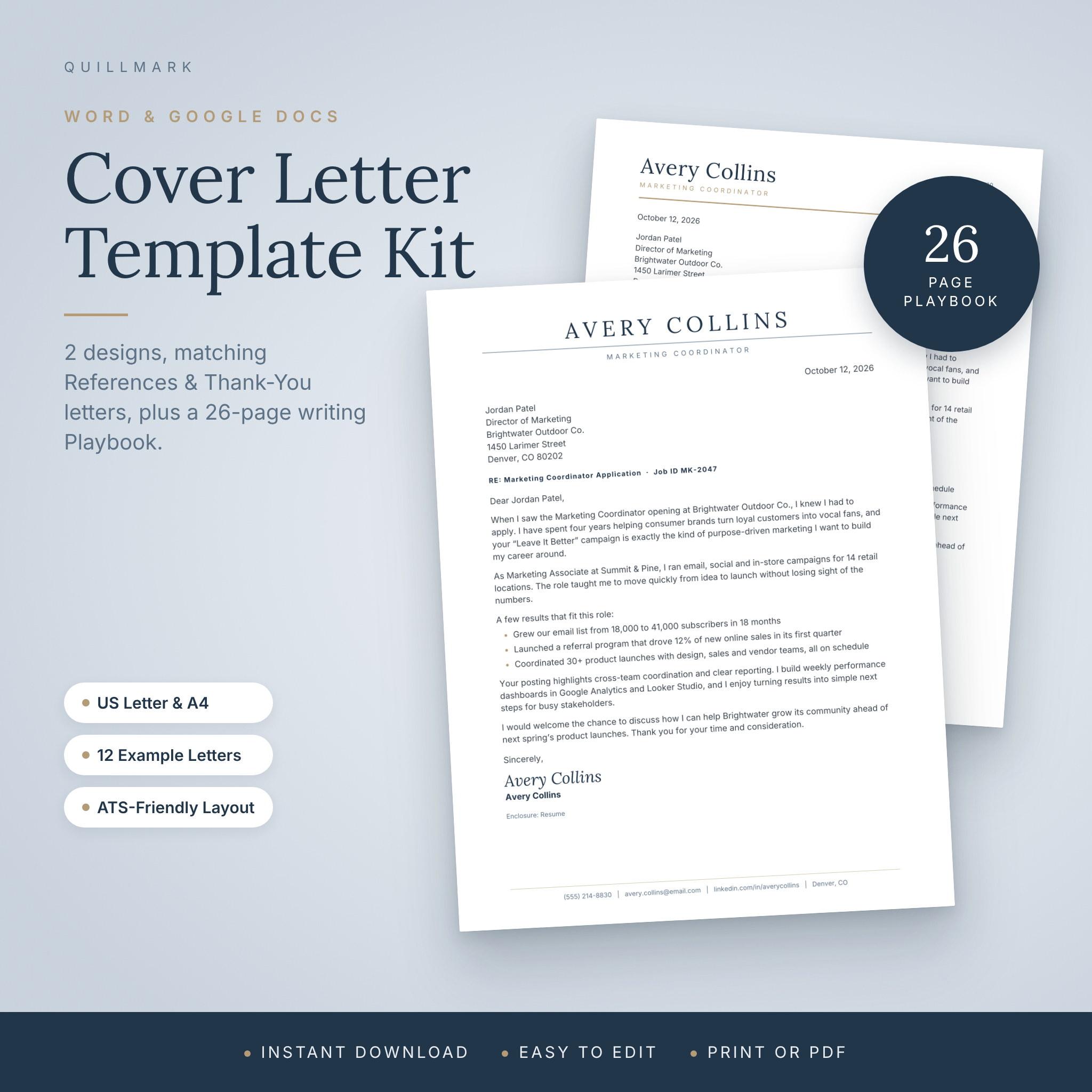



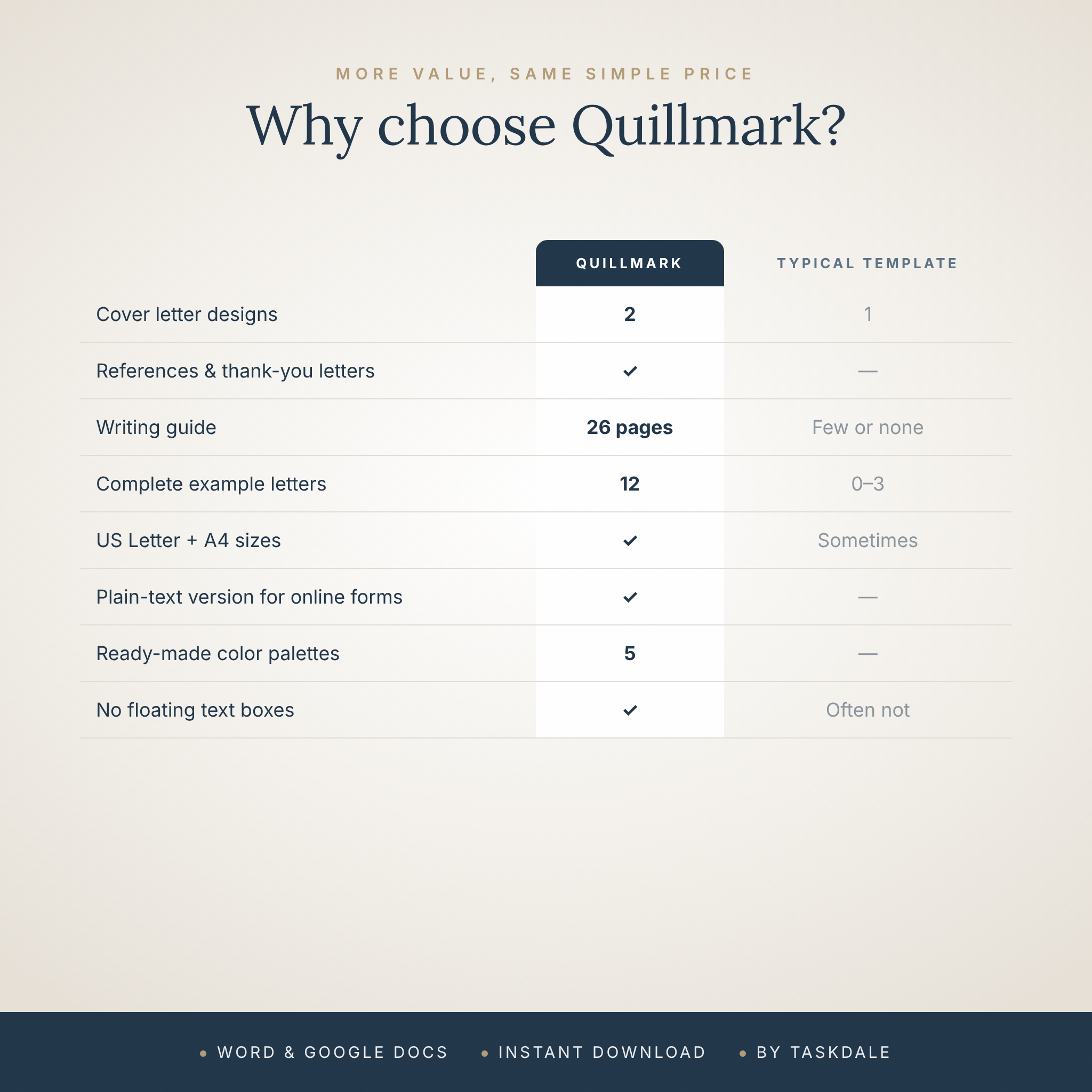
The Quillmark Cover Letter Kit is a professional cover letter template for Microsoft Word and Google Docs, built to help you make a strong first impression without fighting with formatting. You get two elegant designs, a matching references page and an interview thank-you letter, all in US Letter and A4. Then the 26-page Cover Letter Playbook shows you exactly what to write, with a fill-in-the-blank letter, ready-to-use phrases and 12 complete example letters.
Open a template, type over the bracketed placeholders, save it as a PDF and send it. Most people have a polished, tailored letter ready in under 30 minutes.
Why this cover letter template is different
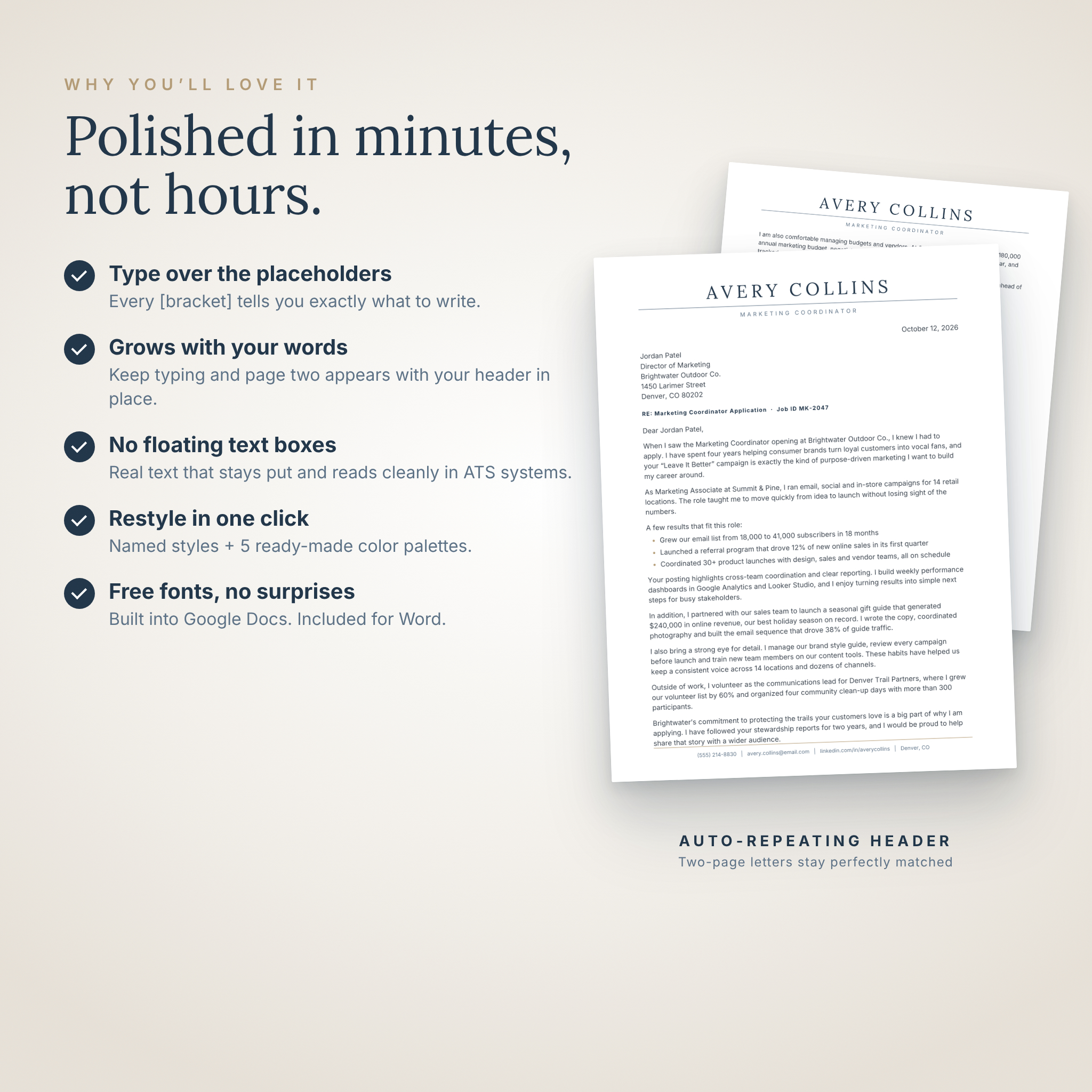
Many cover letter templates look great in the preview and fall apart the moment you start typing. Quillmark is built from real text and simple, named styles, with no floating text boxes. When you add a sentence, everything below it moves down neatly. If your letter runs long, a second page appears automatically with your name, title and contact details already in place.
Every placeholder also teaches. Instead of lorem ipsum, each paragraph explains what to write and gives you a short example, so you are never staring at a blank page.
What’s included
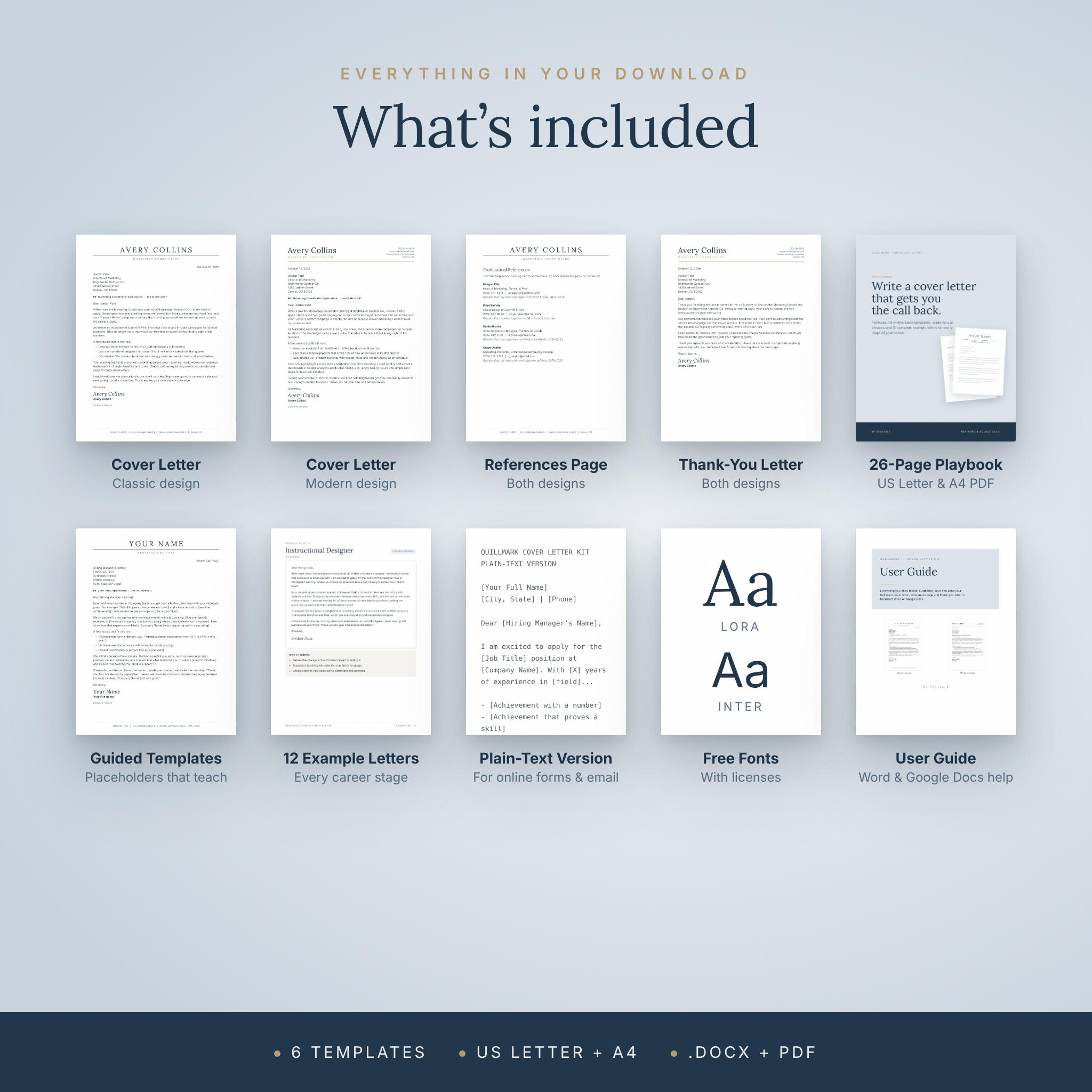
- Cover Letter in two designs: Classic (centered name in spaced capitals with a contact line footer) and Modern (left-aligned name with stacked contact details)
- References Page in both designs, with space for four references and a relationship line for each
- Interview Thank-You Letter in both designs
- US Letter and A4 versions of every template (12 .docx files in total)
- 26-page Cover Letter Playbook (PDF, US Letter and A4) with clickable contents
- Plain-text cover letter for online application forms and email bodies, plus subject lines that get opened
- Two free fonts (Lora and Inter) with their licenses and install instructions
- 15-page user guide (.docx) with step-by-step help for Word and Google Docs
Inside the Cover Letter Playbook
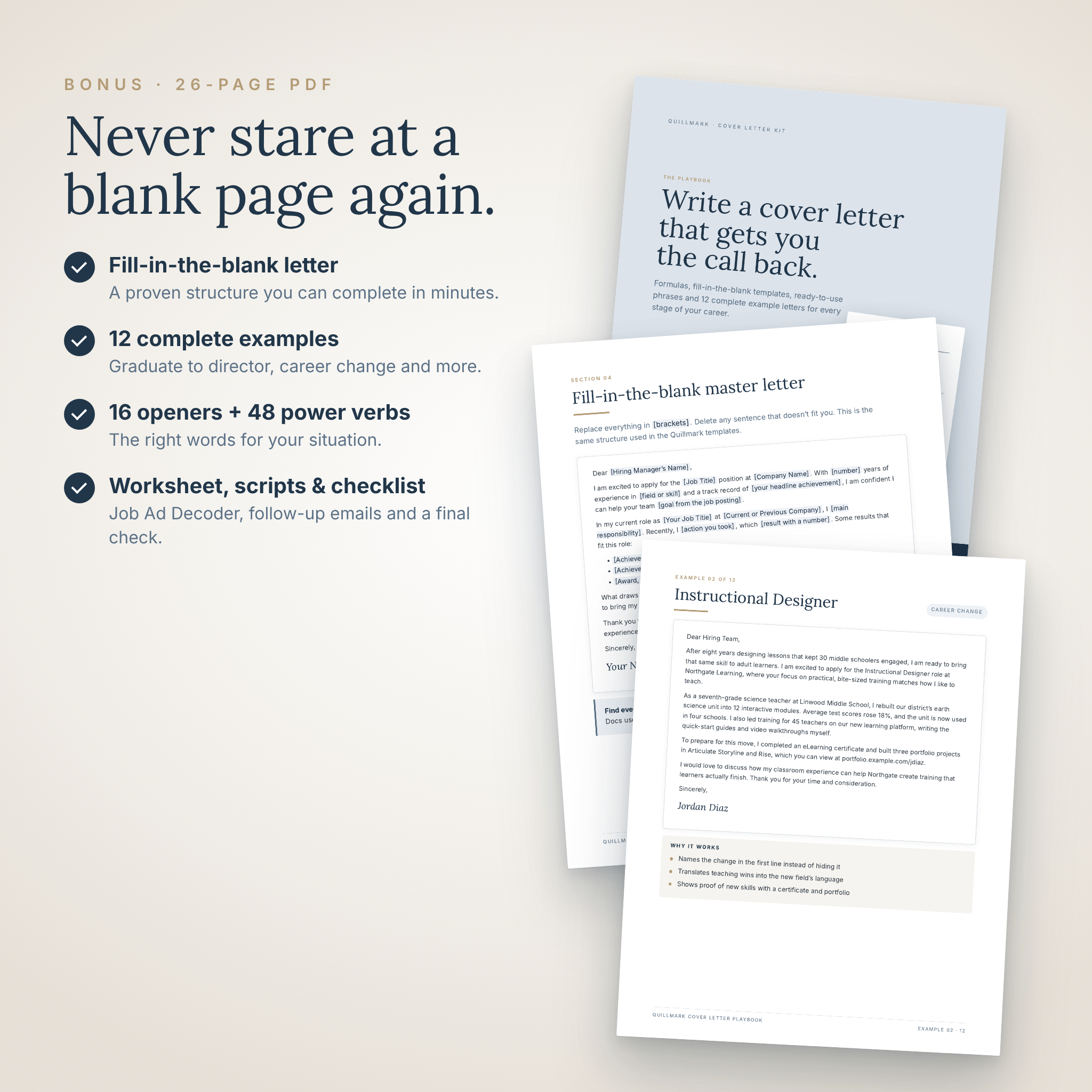
The bonus Playbook turns a cover letter template into a complete writing system:
- The 5-step method for writing a tailored letter quickly
- Anatomy of a winning cover letter, with each part explained
- Job Ad Decoder worksheet (printable) to match your experience to the posting
- Fill-in-the-blank master letter you can complete in minutes
- 16 opening lines for every situation, from referrals to career changes
- The proof paragraph formula with weak-to-strong rewrites and 48 power verbs
- 10 closing lines and a guide to choosing a sign-off
- 12 complete example letters: marketing assistant, career change to instructional design, administrative assistant, customer service, sales, software engineer, registered nurse, teacher, project manager, returning to work, finance internship and director of operations
- 6 email scripts for applying, following up, thanking an interviewer, asking for a referral and accepting an offer
- Sending tips and a 15-point checklist so nothing slips through
Features you’ll actually use
Guided placeholders
Search for “[” to jump to every placeholder in turn. When the search finds nothing, your letter is complete.
Auto-repeating header
Your name and contact details sit in the page header (and the footer in the Classic design), so they appear on every page automatically.
ATS-friendly layout
Real, selectable text in a clean single-column layout that applicant tracking systems can read. For portals with a text box, use the included plain-text version.
Restyle in seconds
Named styles such as Title, Subtitle and Contact Info let you change a color or font once and update the whole letter. The user guide includes five ready-made color palettes: Slate, Sage, Mocha, Charcoal and Plum.
Optional extras built in
Keep or delete the RE: subject line and the achievement bullets to suit the role. Sign with the styled name, your scanned signature or a typed name.
How it works
- Download and unzip the kit.
- Open the US Letter or A4 template in Microsoft Word, or upload it to Google Drive and open it with Google Docs.
- Type over the placeholders, using the Playbook for ideas.
- Save as a PDF and send it with the included email script.
Who it’s for
This kit is for anyone applying for a job who wants a professional, consistent application without hiring a writer: recent graduates and interns, experienced professionals, career changers, parents and caregivers returning to work, and managers stepping into leadership roles. It suits corporate, healthcare, education, tech, sales, administrative and creative applications.
Real ways to use it
- Applying online and uploading a PDF cover letter with your resume
- Emailing a recruiter with your letter attached and a short, professional message
- Pasting a clean plain-text letter into an application form
- Sending a thank-you letter within 24 hours of an interview
- Bringing a printed references page to a final interview
- Writing a career change letter that explains your move with confidence
File formats and requirements
- Templates: .docx (Microsoft Word), which also open in Google Docs
- Playbook: PDF, in US Letter (8.5 x 11 in) and A4
- Plain-text version: .txt
- Fonts: .ttf and .otf files, free under the SIL Open Font License
- Works with: Microsoft Word for Windows and Mac (desktop) and Google Docs (free, in any browser, including on Chromebooks and tablets)
- Word users: install the two free fonts (about a minute). Google Docs users: nothing to install.
- Tested in Word for the web, Google Docs and LibreOffice Writer. Google Docs doesn’t support letter spacing, so names display at normal spacing there. Word for the web can’t use installed fonts, so it may show a substitute font while editing.
Instant digital download
This is a digital product. No physical item will be shipped. Your ZIP file and user guide are ready to download right after purchase. The kit includes a personal-use license: use it for your own applications as often as you like, but please do not share or resell the files.
Frequently asked questions
Can I edit this cover letter template in Google Docs?
Yes. Upload the .docx file to Google Drive and open it with Google Docs. The user guide walks you through it step by step.
Do I need Microsoft Word?
No. Google Docs is free and works with every template. If you use Word, install the two included free fonts for the exact look.
Is the cover letter ATS-friendly?
Yes. It uses real text in a single-column layout with no images or floating text boxes, and a plain-text version is included for online forms.
Can I add a second page?
Just keep typing. A new page appears automatically with your header and contact details in place.
Does it come in A4 size?
Yes. Every template is included in both US Letter and A4.
Does it include examples of what to write?
Yes. The 26-page Playbook includes a fill-in-the-blank letter, 16 opening lines and 12 complete example letters for different roles and career stages.
Can I change the colors?
Yes. Edit the named styles, or use one of the five color palettes in the user guide.
Is this a physical product?
No. It is an instant digital download.
Reviews
There are no reviews yet.