
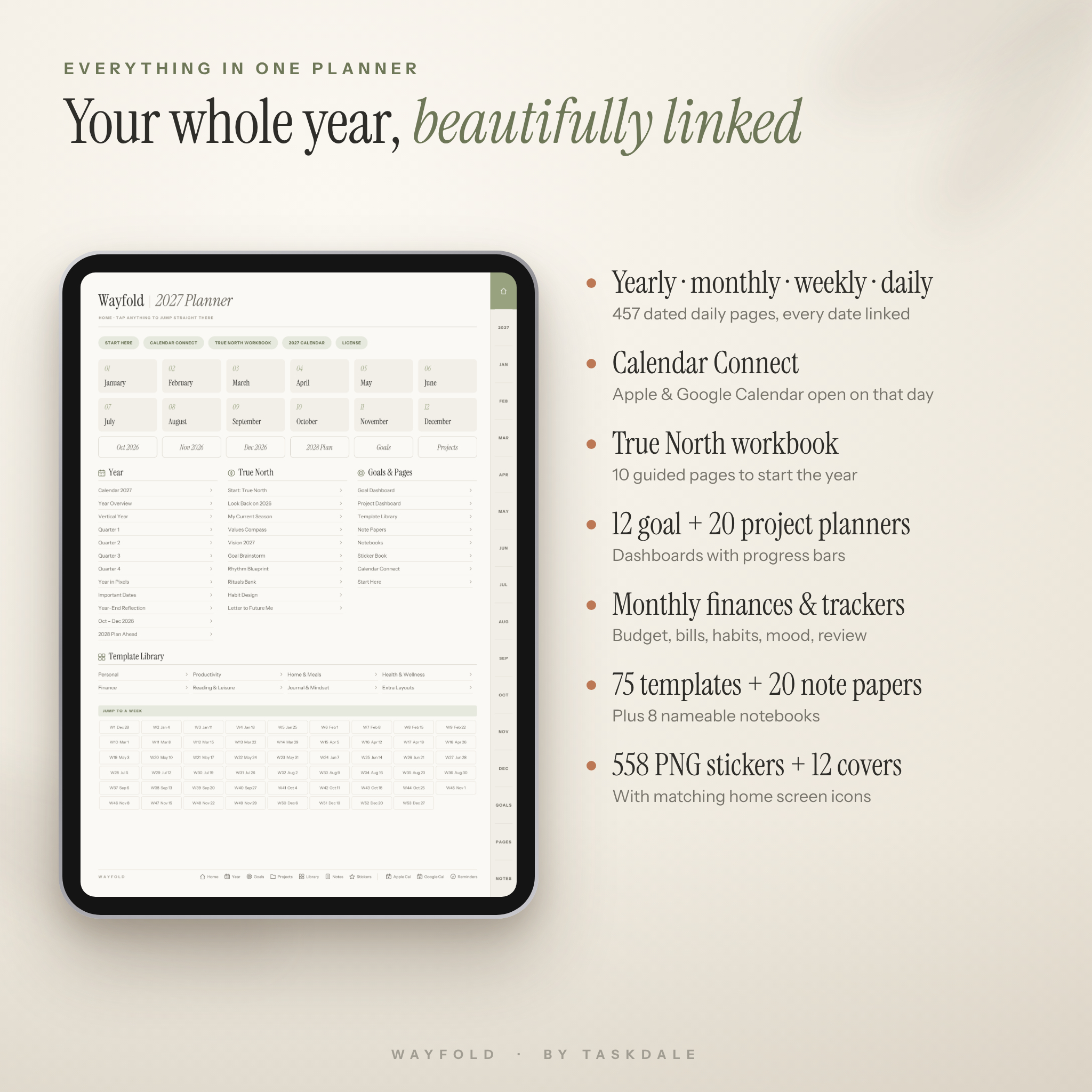
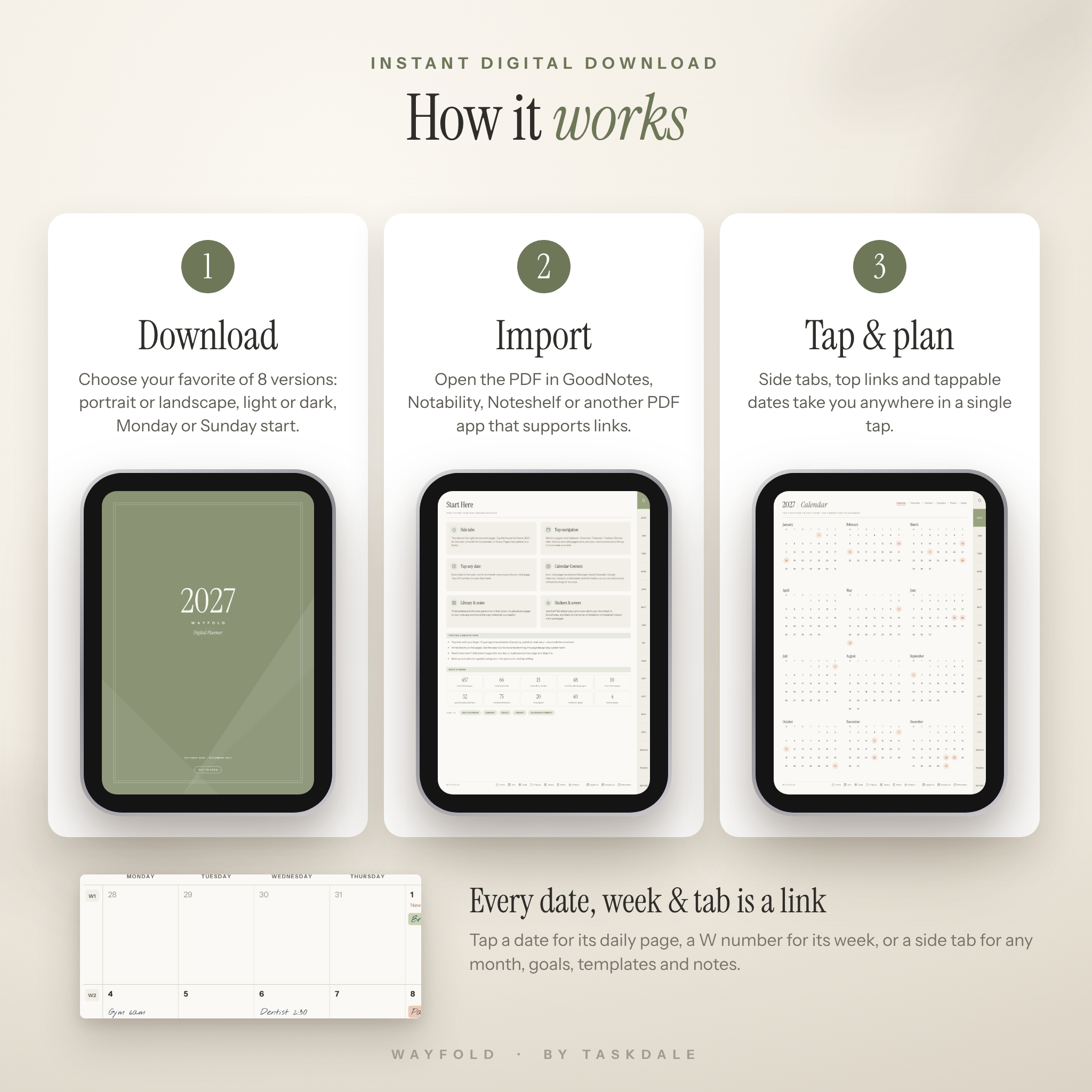

The Wayfold 2027 Digital Planner is a fully hyperlinked digital planner for iPad and Android tablets that brings your calendar, goals, budget, habits and notes into one calm, beautifully designed notebook. It has 800 linked pages, a guided start-of-year workbook and Calendar Connect: buttons on every daily page that open Apple Calendar or Google Calendar on that exact date, so handwritten planning and digital reminders finally work together.
Start planning today with the included October to December 2026 mini planner, then move straight into a full year of dated monthly, weekly and daily pages for 2027.
Why choose this 2027 digital planner?
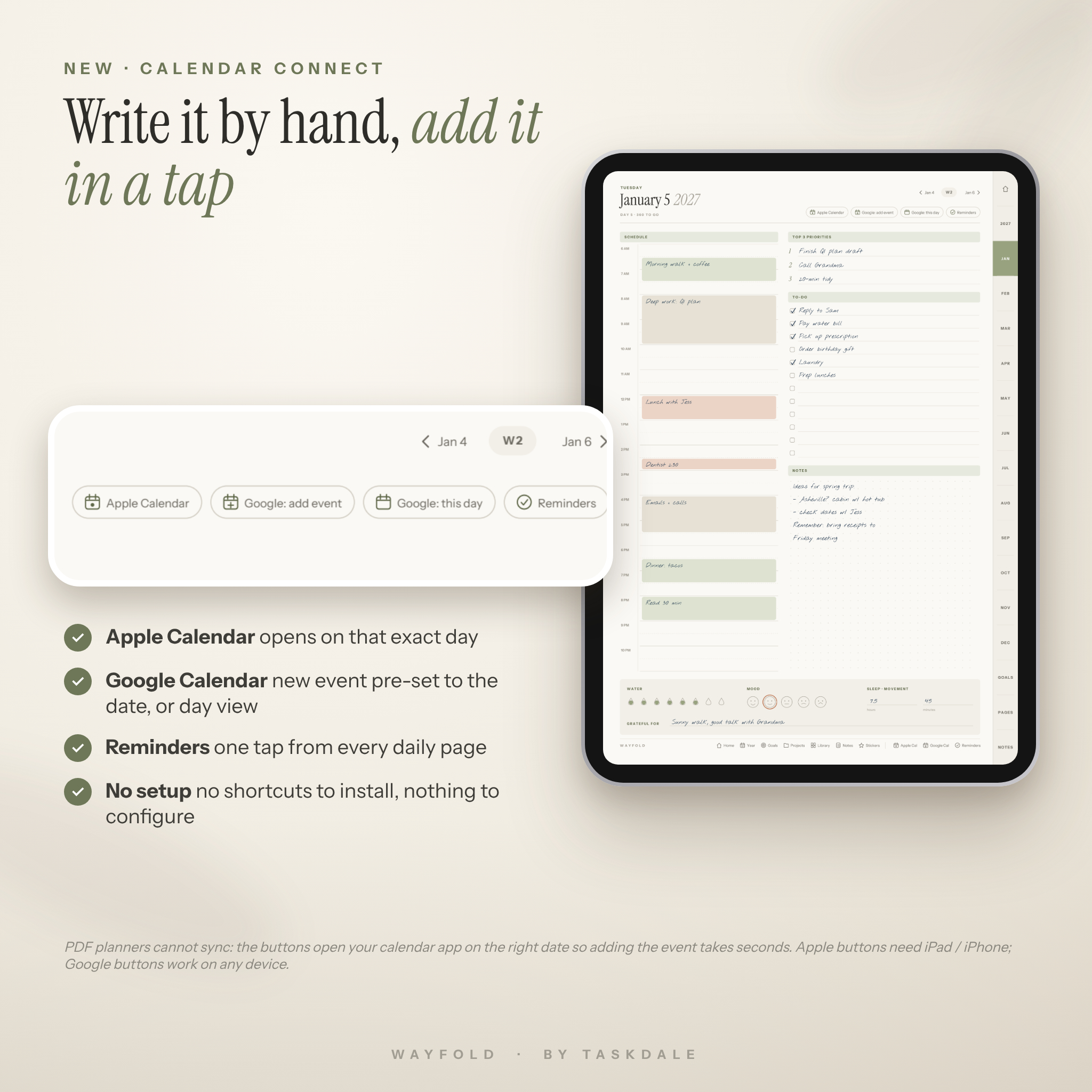
- Date-aware calendar buttons: tap “Google: add event” on any day and a new Google Calendar event opens already set to that date. Apple Calendar and Reminders are one tap away too. No shortcuts to install and nothing to set up.
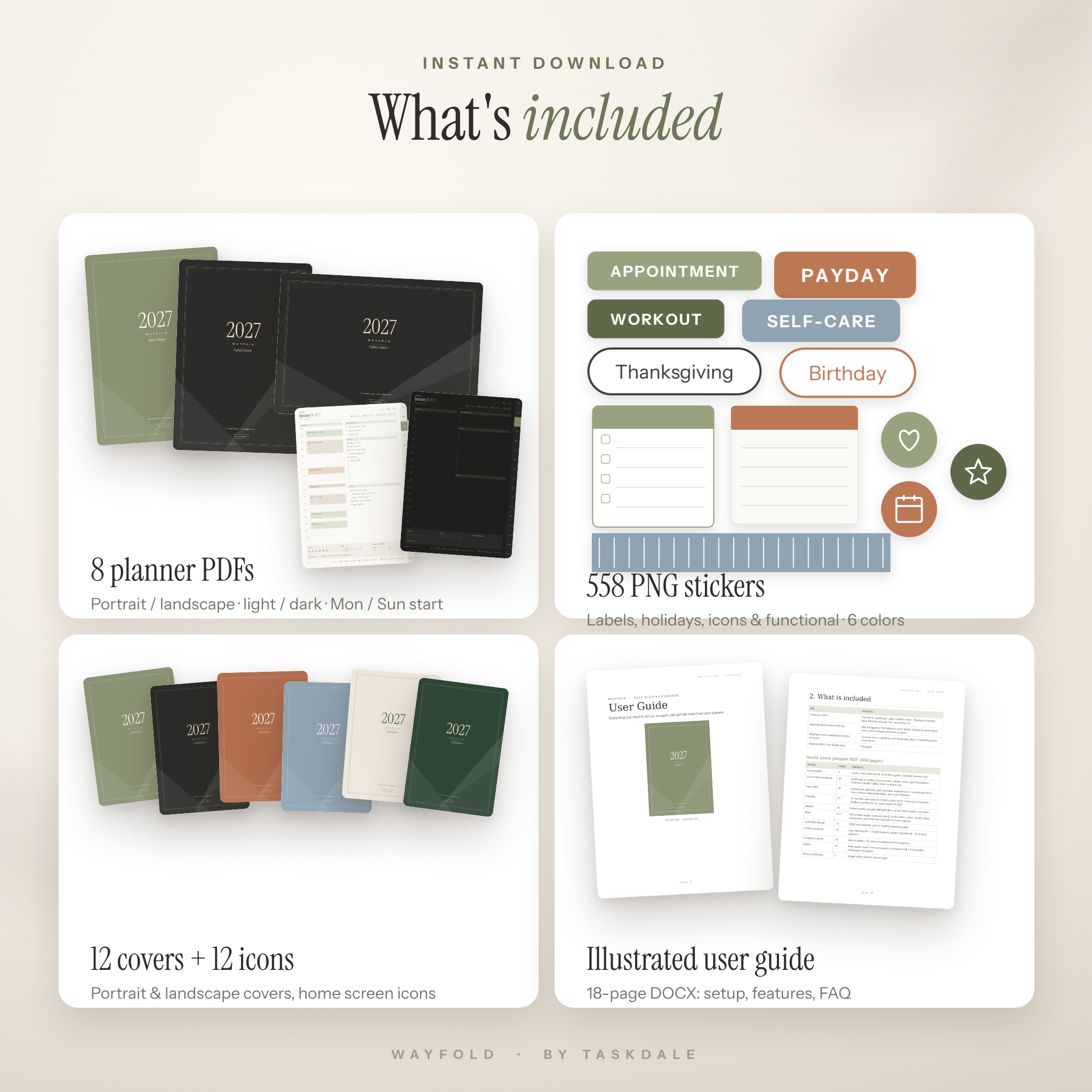
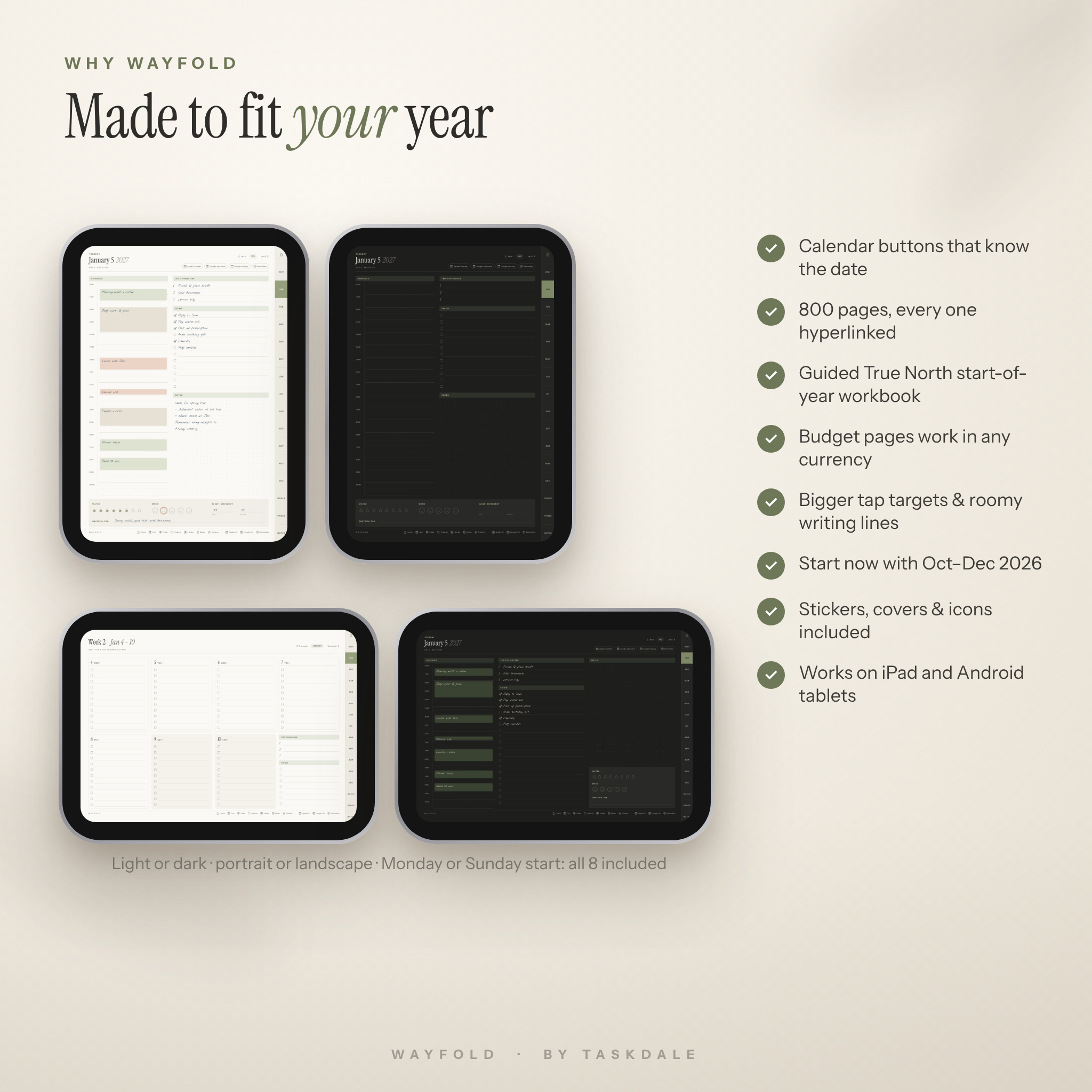
- Everything in one download: all 8 versions are included (portrait or landscape, light or dark mode, Monday or Sunday start), plus stickers, covers and a user guide.
- Designed for real handwriting: roomy writing lines, large tap-friendly tabs and a warm sage, sand and terracotta palette that is easy on the eyes.
- Plans the whole you: goals, projects, money, health, home and reflection, not just appointments.
What’s inside the planner
True North start-of-year workbook (10 pages)
Look back on 2026, check your capacity, choose your values, picture your year, brainstorm goals, design your daily rhythm, collect rituals, build habits and write a letter to future you.
Yearly pages
- 2027 calendar with every date linked to its daily page and US holidays highlighted
- Year overview, vertical year view, four quarter planners and Year in Pixels mood tracker
- Important dates, year-end reflection and a 2028 Plan Ahead section with monthly pages
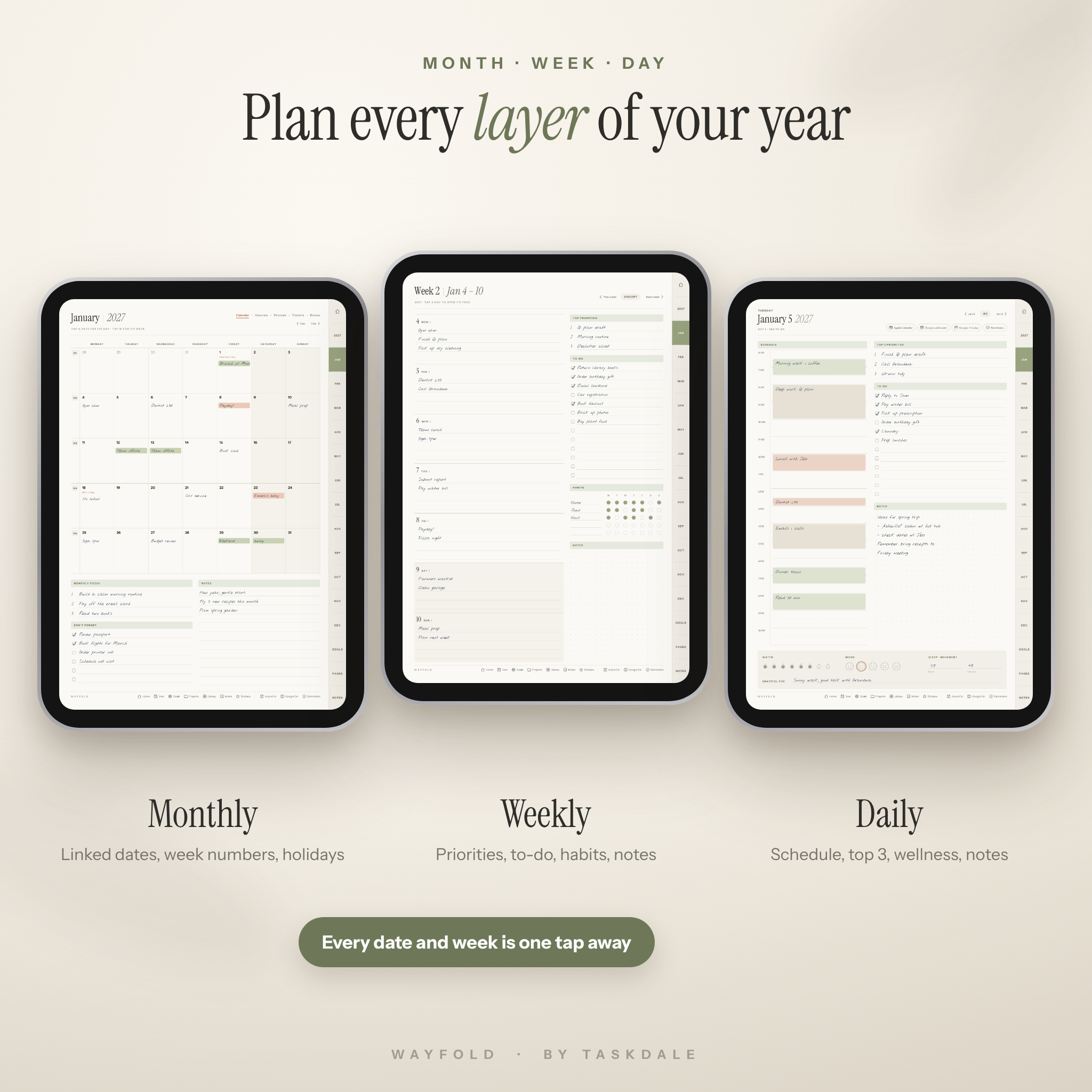
Monthly pages (five per month)
- Calendar: big writing boxes, linked dates, tappable week numbers, monthly focus and notes
- Overview: word of the month, top goals, tasks and life-balance actions
- Finances: income, bills with paid boxes, spending categories, purchase log, summary and savings progress bar
- Trackers: 12 habits, 6 wellness trackers and a mood and energy chart
- Review: wins, lessons, life-area check-in, gratitude and next month’s focus
Weekly and daily pages
66 dated weekly spreads with priorities, to-do list, habit tracker and notes. 457 dated daily pages with a 6 AM to 10 PM schedule, top 3 priorities, to-do list, dot-grid notes, water, mood, sleep, movement and gratitude, plus Calendar Connect buttons.
Goals, projects and templates
- Goal dashboard + 12 goal planners with milestones and progress trackers
- Project dashboard + 20 project planners with tasks, resources and budget
- 75 undated templates: meal planner, grocery list, budget, bill tracker, savings challenge, debt payoff, reading log, workout log, cleaning schedule, travel planner, habit tracker, gratitude journal and many more
- 20 note paper styles (lined, dot, grid, Cornell, Kanban, meeting, music staff and more) and 8 nameable notebooks
What is included in your download
- 8 hyperlinked planner PDFs: Portrait / Landscape · Light / Dark · Monday / Sunday start (800 pages each)
- Sticker pack: 558 transparent PNG stickers (word labels, holiday and event labels, icons, sticky notes, checklists, washi tape and more in 6 colors)
- 12 cover colors in portrait and landscape, plus 12 matching home screen icons
- Illustrated 18-page user guide (DOCX) with setup steps, tips, troubleshooting and FAQ
How it works
- Purchase and download your files instantly from your Taskdale account.
- Choose your favorite version and open the PDF in your note-taking app.
- Tap the cover, then use the side tabs, top links and tappable dates to move anywhere in a single tap.
File formats and software requirements
- Format: PDF (hyperlinked), PNG stickers, cover images and icons, DOCX user guide
- Designed for PDF annotation apps that support hyperlinks, such as GoodNotes, Notability, Noteshelf and Xodo
- Works on iPad and Android tablets; a stylus is recommended for handwriting
- Apple Calendar and Reminders buttons need an iPad or iPhone. Google Calendar buttons work on any device with a web browser
- Page size is optimized for tablet screens (iPad ratio) and is light enough to open quickly (about 6 MB per file)
Customization
Pick light or dark mode, portrait or landscape and your week start. Swap between 12 cover colors, add a matching home screen icon, decorate with stickers, and duplicate any template page to place it exactly where you need it. Money fields are neutral, so you can write in dollars or any currency.
Use cases
- A busy parent juggling school pickups, meal planning and the family budget in one place
- A professional who plans meetings by hand, then taps once to add them to Google Calendar
- A student tracking assignments, class notes and study habits
- A small business owner running projects, goals and monthly finances side by side
- Anyone who wants to start 2027 with reflection and clear goals instead of a blank calendar
Digital download information
This is a digital product. No physical item will be shipped. Your files are available to download immediately after payment from your Taskdale account. Colors may vary slightly between screens.
FAQ
Does this digital planner work with GoodNotes?
Yes. It is designed for GoodNotes and other PDF annotation apps that support hyperlinks, such as Notability, Noteshelf and Xodo.
Does it sync with Apple Calendar or Google Calendar?
No PDF planner can sync. Calendar Connect buttons open your calendar app on the right date so adding the event takes seconds.
Can I use it on an Android tablet?
Yes. All pages and links work in Android PDF apps that support hyperlinks. The Google Calendar buttons work too; the Apple Calendar and Reminders buttons need an Apple device.
Is it dated?
Yes, January to December 2027, plus October to December 2026 and a 2028 plan-ahead section. The 75 templates and note papers are undated.
Which version should I choose?
You get all eight. Most people start with Portrait Light; try Dark mode for evening planning or Landscape if you use a keyboard case.
Can I print the pages?
Yes, for personal use. Print any page from your note app.
Do I need a stylus?
A stylus is recommended for handwriting, but you can also type with your app’s text tool.
License: personal use only. Please do not share, resell or redistribute. © 2026 Taskdale.
Reviews
There are no reviews yet.