


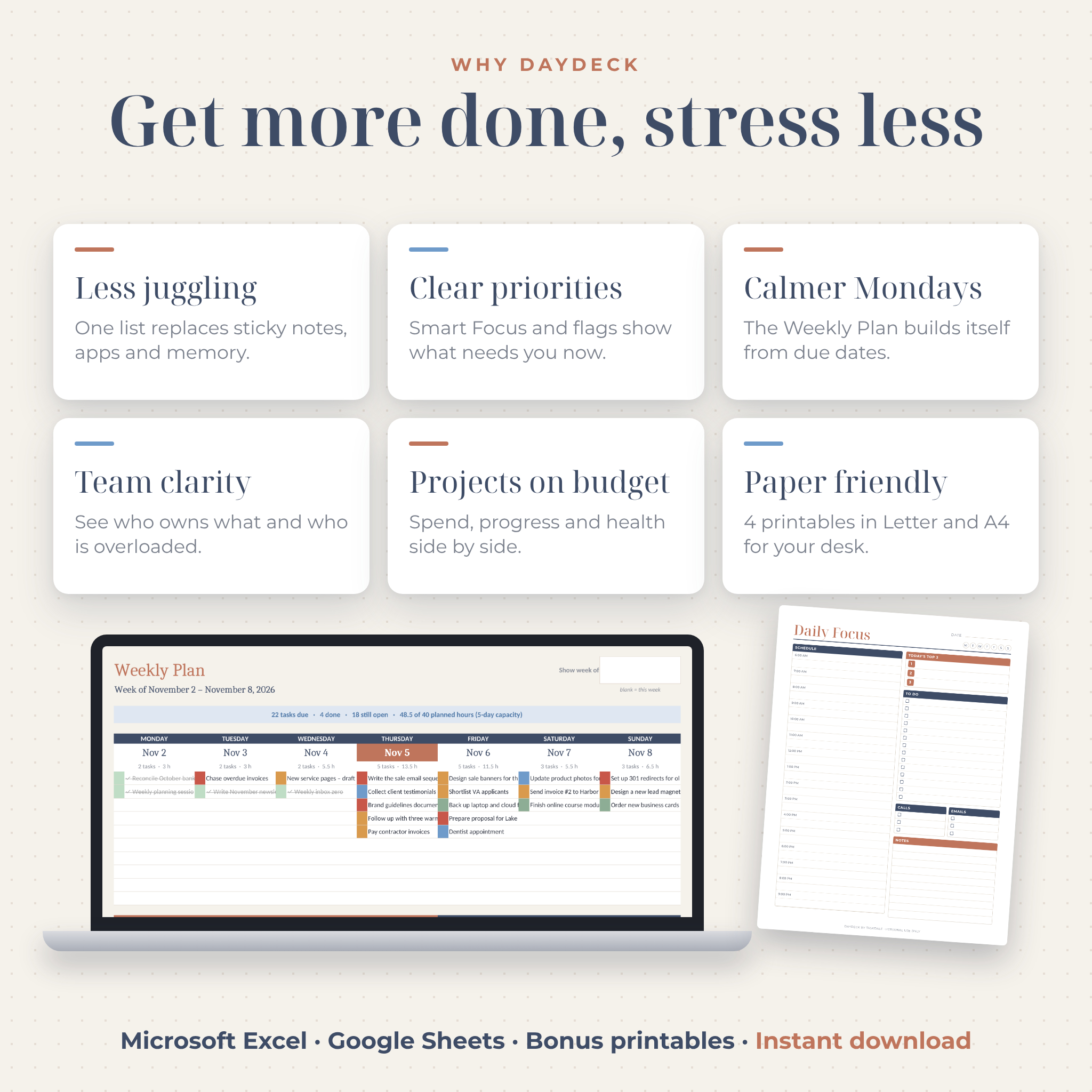
DayDeck is a task tracker spreadsheet for Excel and Google Sheets that does the shuffling for you. You type a task once. Your Daily Planner, Weekly Plan, month Calendar and Dashboard all pick it up right away. No copying the same to-do onto four pages. No Sunday night rewrite.
It was made for busy people who run a lot of moving parts: solo founders, freelancers, shop owners, virtual assistants and small teams. If your list lives on sticky notes, in a few apps and partly in your head, this puts it in one calm place.
What this task tracker spreadsheet does
Everything starts on the Task List. Each task gets a project, tag, priority, status, owner, dates and hours, all picked from drop-downs. From there, the workbook sorts out the rest. Late tasks turn red. Tasks due today float to the top of your planner. Finished work turns grey, gets a line through it and still counts toward your weekly chart.
The 8 tabs
- Start Here: a 4-step quick start and buttons that jump to every tab.
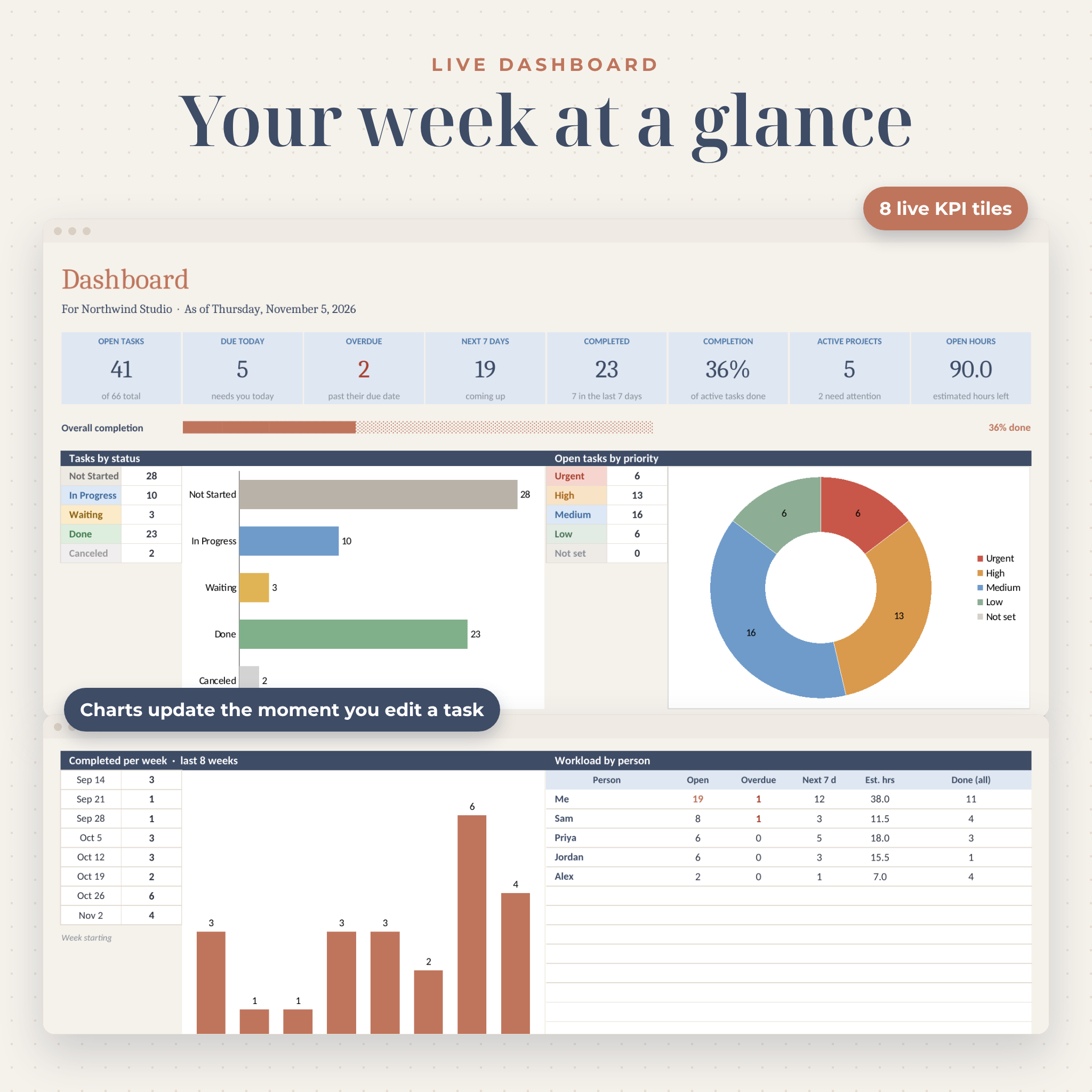
- Dashboard: 8 live tiles (open, due today, overdue, next 7 days, completed, completion rate, active projects, hours left), charts by status, priority, week and tag, workload by person, an overdue list, a coming-up list and a project snapshot.
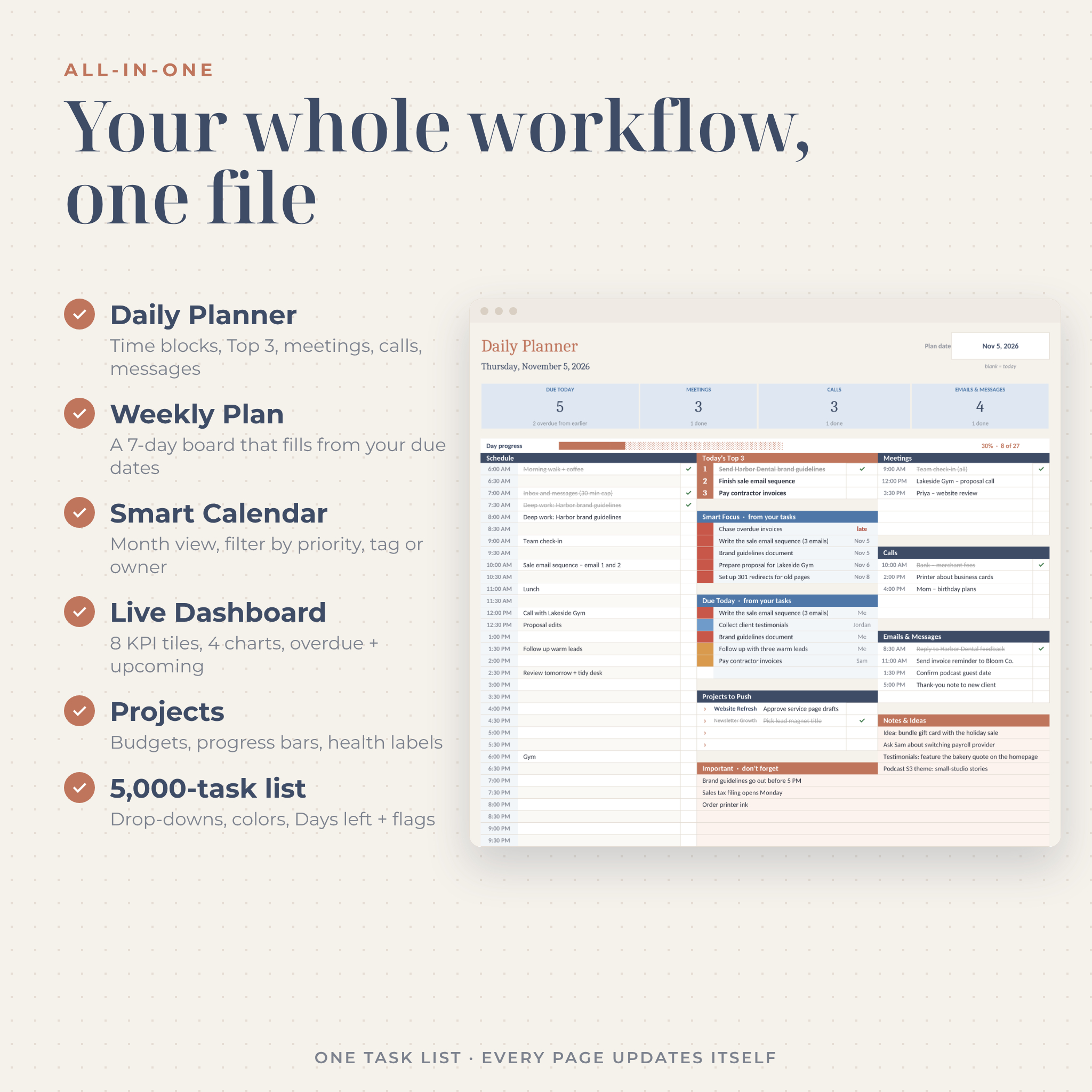
- Daily Planner: a time-blocked schedule, Today’s Top 3, meetings, calls, emails and messages, projects to push, notes and a “don’t forget” box. Smart Focus and Due Today fill in from your task list, and a progress bar fills as you tick things off.
- Weekly Plan: a seven-day board built from your due dates with priority colors, planned hours against your capacity, weekly goals and a space for wins.
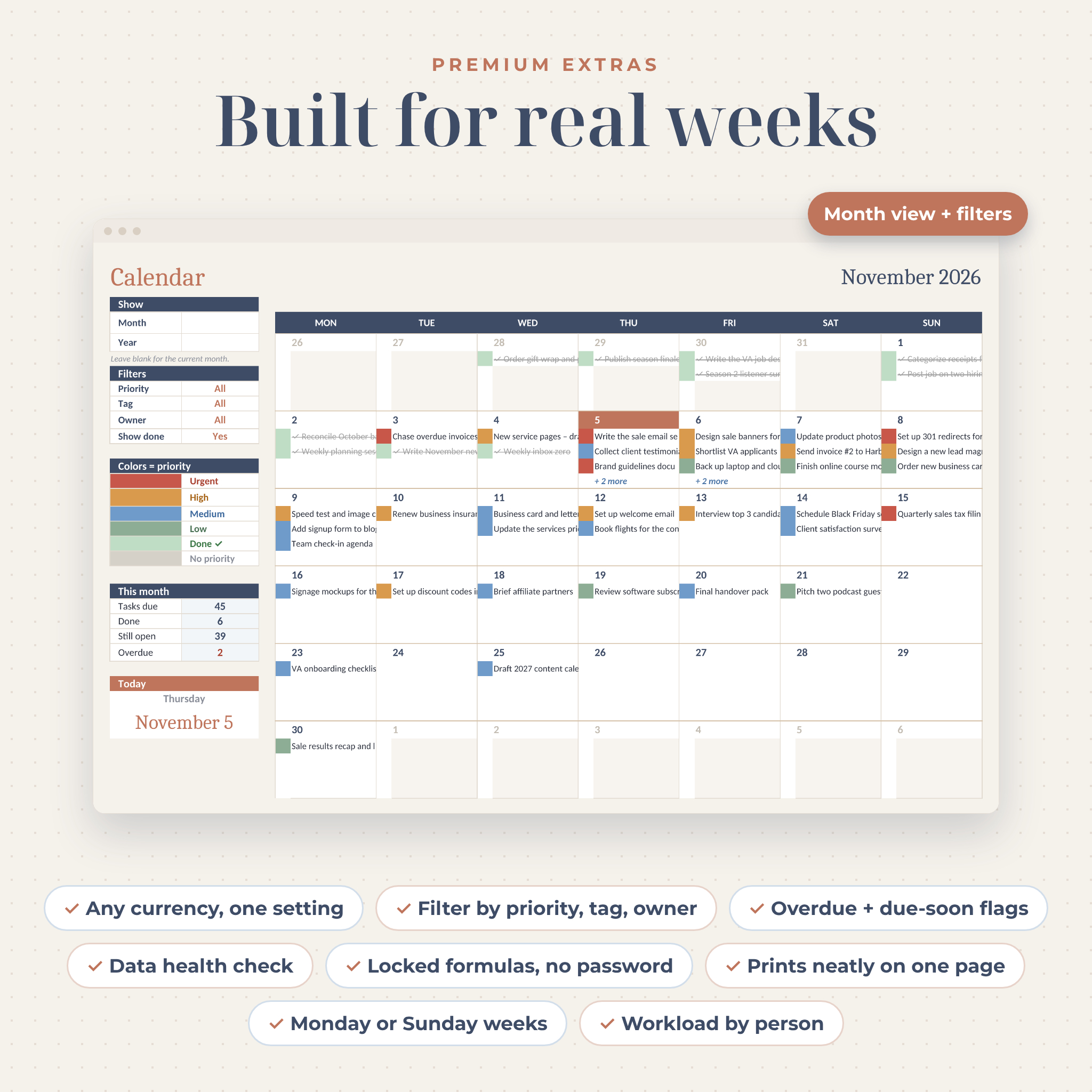
- Calendar: a month view with filters for priority, tag and owner, a show or hide finished tasks switch, a color legend and a monthly summary.
- Task List: 5,000 rows with drop-downs, a colored tag strip, Days Left countdown and status flags (Overdue, Due today, Due soon, On track).
- Projects: up to 30 projects or clients with budget, spend, money left, task counts, a progress bar and a health label (On track, At risk, Late, Over budget, Complete).
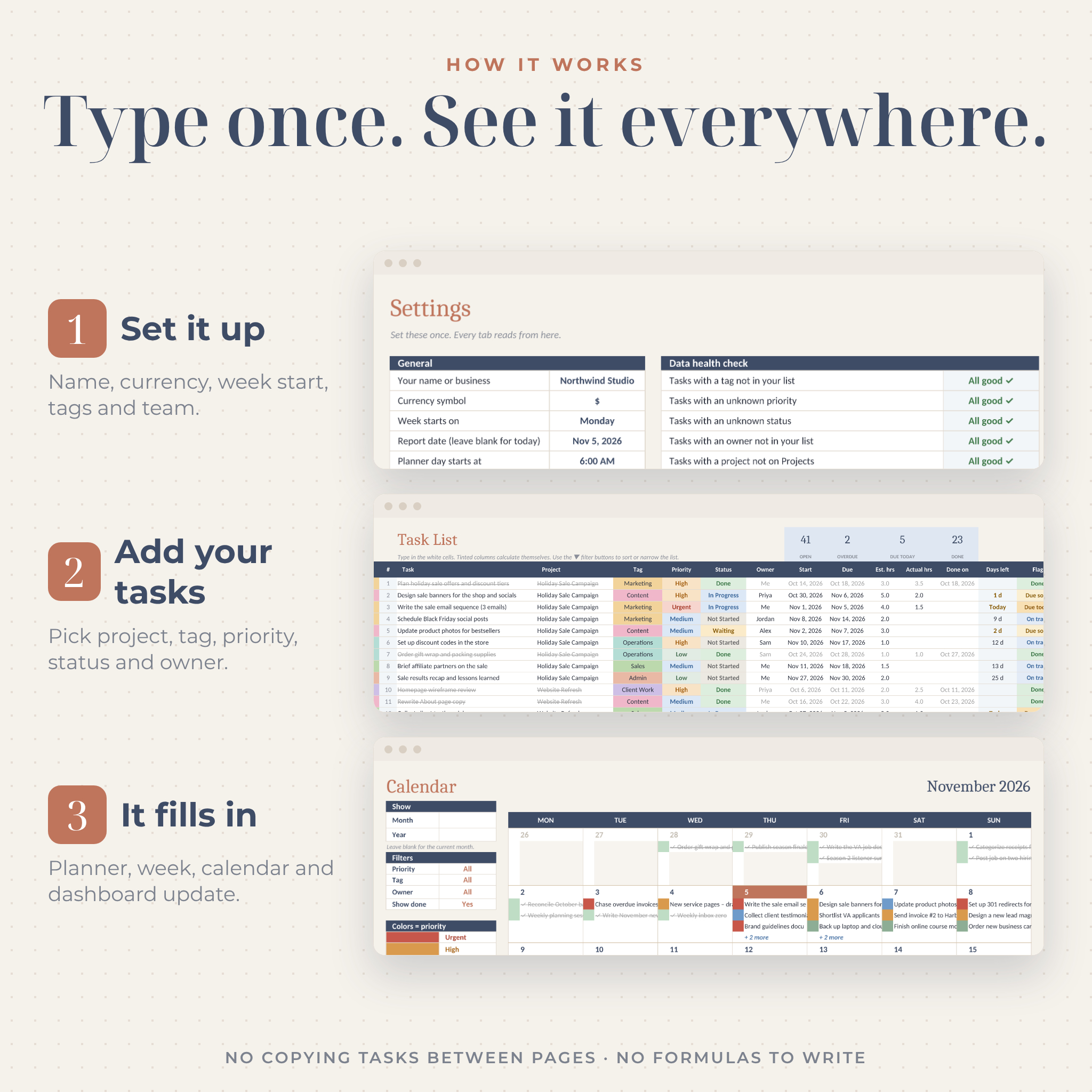
- Settings: your name, currency symbol, Monday or Sunday weeks, planner start time and step, a “due soon” window, daily work hours, plus your own tags, priorities, statuses and team list.
Why people choose DayDeck
- One list, every view. The planner, week, month and dashboard all read from the same tasks, so nothing drifts out of date.
- It tells you where to start. Smart Focus picks your most urgent open tasks for the next seven days, highest priority first.
- Built for teams too. Give tasks an owner and see who is stretched thin before your next check-in.
- Hard to break. Formula cells are locked with no password. White cells are for typing. A data health check catches renamed tags or statuses so totals never go quietly wrong.
- Two copies included. A clean copy for your real work and a filled example so you can see every feature working before you start.
What’s included
- DayDeck Task Tracker (.xlsx), your clean copy
- DayDeck Task Tracker EXAMPLE (.xlsx), filled with a sample small business
- 4 bonus printables in US Letter and A4 (PDF): Daily Focus, Weekly Task Map, Monthly and Yearly Map, Mind Map
- Illustrated user guide (.docx) with setup steps for Excel and Google Sheets, tab-by-tab help, troubleshooting and FAQ
How it works
- Set it up in a few minutes. Open Settings, add your name, currency, week start, tags and team.
- Add your tasks. Type a task and pick its project, tag, priority, status, owner and due date.
- Plan from the views. Use the Daily Planner each morning, the Weekly Plan on Monday and the Dashboard for a quick Friday review.
File formats and software
- Spreadsheet: .xlsx, opens in Microsoft Excel (Windows and Mac) and Excel for the web
- Google Sheets: upload the file to Google Drive and open it, no add-ons or scripts needed
- Printables: PDF, sized for US Letter and A4
- Guide: .docx, opens in Microsoft Word and other word processors
The workbook uses standard formulas only. No macros, no add-ons and nothing to enable.
Make it yours
Rename tags, priorities, statuses and people in Settings and every drop-down updates at once. Pick any currency symbol ($ by default) and every money heading follows that one cell. Choose Monday or Sunday weeks, set when your day starts and switch the planner between 15, 30 or 60 minute slots. Sheets are protected without a password, so you can unlock one any time you want to change the design.
Real ways to use it
- Solo business owner: keep client work, admin, marketing and personal errands in one daily plan.
- Freelancer or consultant: track each client as a project with budget, spend and progress.
- Virtual assistant: manage tasks for several clients and filter the calendar by owner.
- Small team lead: check workload by person and clear the overdue list before a weekly meeting.
- Busy professional: time-block your day, keep a Top 3 and print the Daily Focus page for your desk.
Digital download
This is an instant digital download. No physical item will be shipped. Your files are ready on the order confirmation page and in your account right after payment.
FAQ
Does this task tracker work in Google Sheets?
Yes. Upload the .xlsx to Google Drive and open it. The drop-downs, colors, filters, calendar and charts all work.
Which version of Excel do I need?
Excel 2016 or newer on Windows or Mac, or the free Excel for the web. No Microsoft 365 subscription is needed.
How many tasks can I track?
Up to 5,000 tasks, 30 projects, 15 tags and 15 team members.
Can I use my own currency?
Yes. Choose or type a symbol in Settings and every money value heading updates.
Can my team use it together?
Yes. Share it through Google Drive or OneDrive so everyone works from the same list.
Can I print it?
Yes. Each tab is set to print neatly, and the four printable pages come in US Letter and A4.
Is it beginner friendly?
Yes. You only type in white cells and pick from drop-downs. The filled example and the user guide show you every step.
License
For personal use or use inside your own business. Please do not resell, share or distribute the files. Not affiliated with Microsoft or Google.

Reviews
There are no reviews yet.