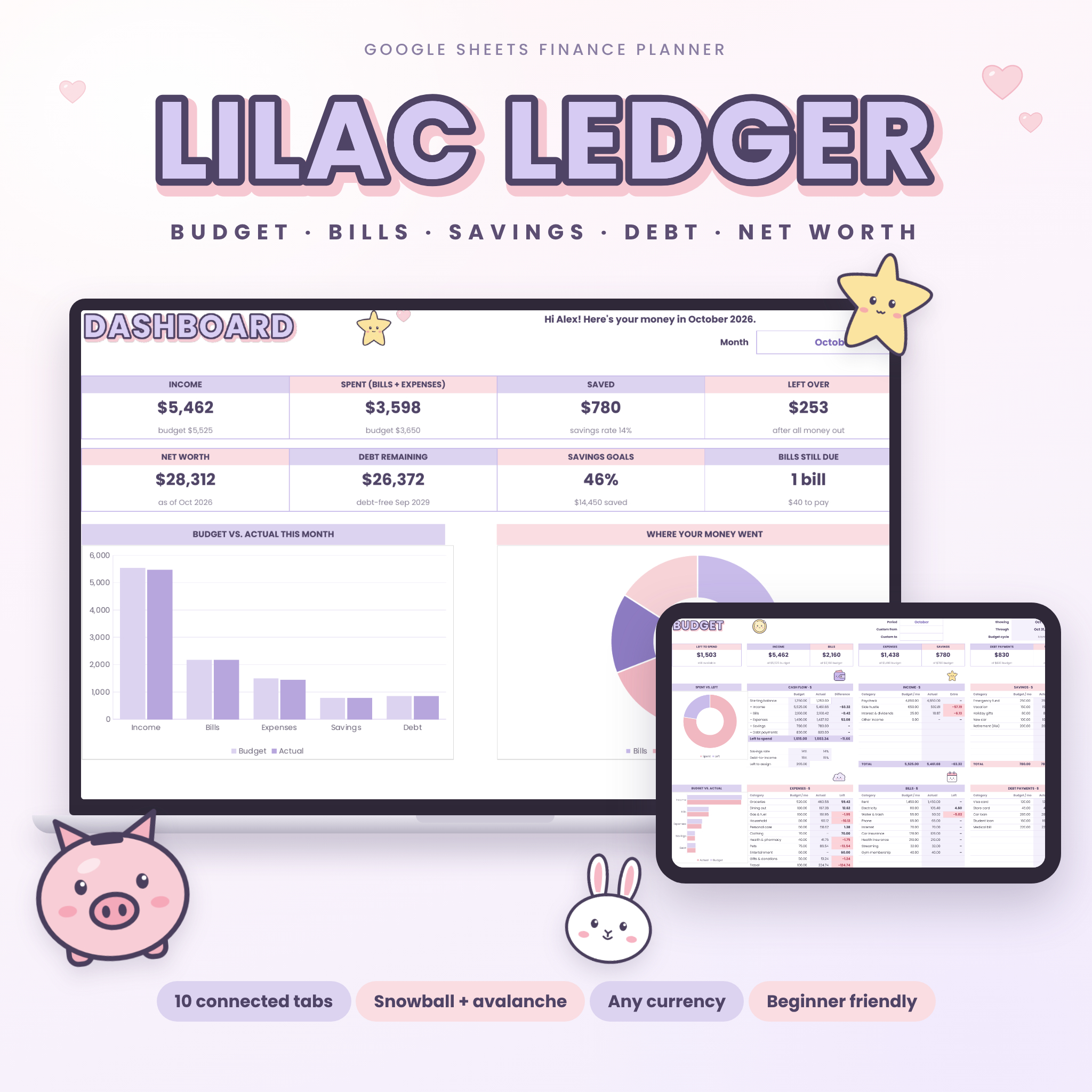


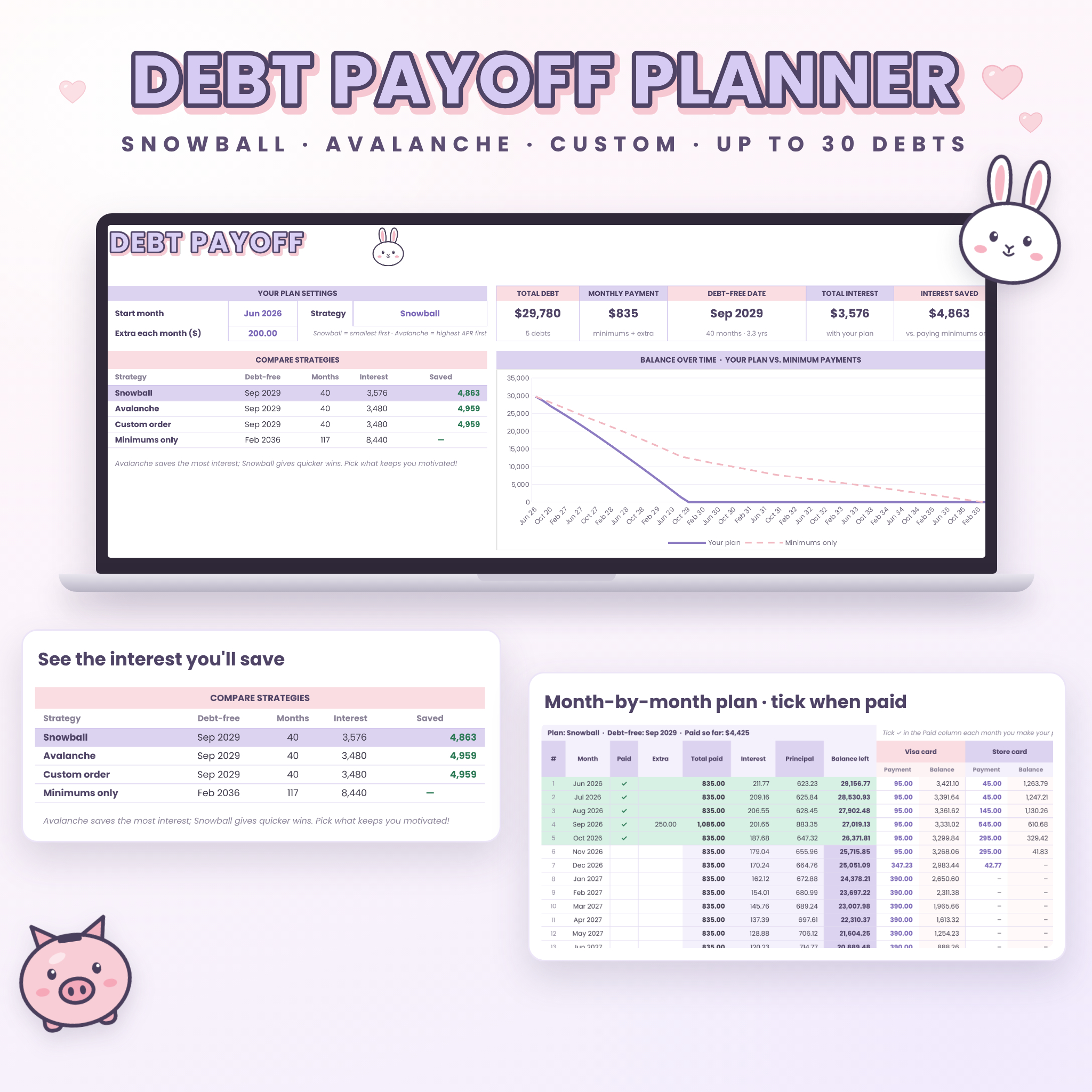

Lilac Ledger is an all-in-one budget planner spreadsheet for Google Sheets that brings your budget, bills, savings goals, debt payoff and net worth together in one cute, connected workbook. Log a transaction once and your budget, year overview and dashboard update on their own. Pick snowball or avalanche and see your debt-free date, how much interest you’ll pay and how much you’ll save, all in seconds.
It’s designed for real life: monthly, weekly, every-two-weeks or twice-a-month budgets, any currency, and simple white boxes that show you exactly where to type. Original kawaii mascots keep it cheerful while the formulas do the math.
What the Lilac Ledger budget planner spreadsheet does
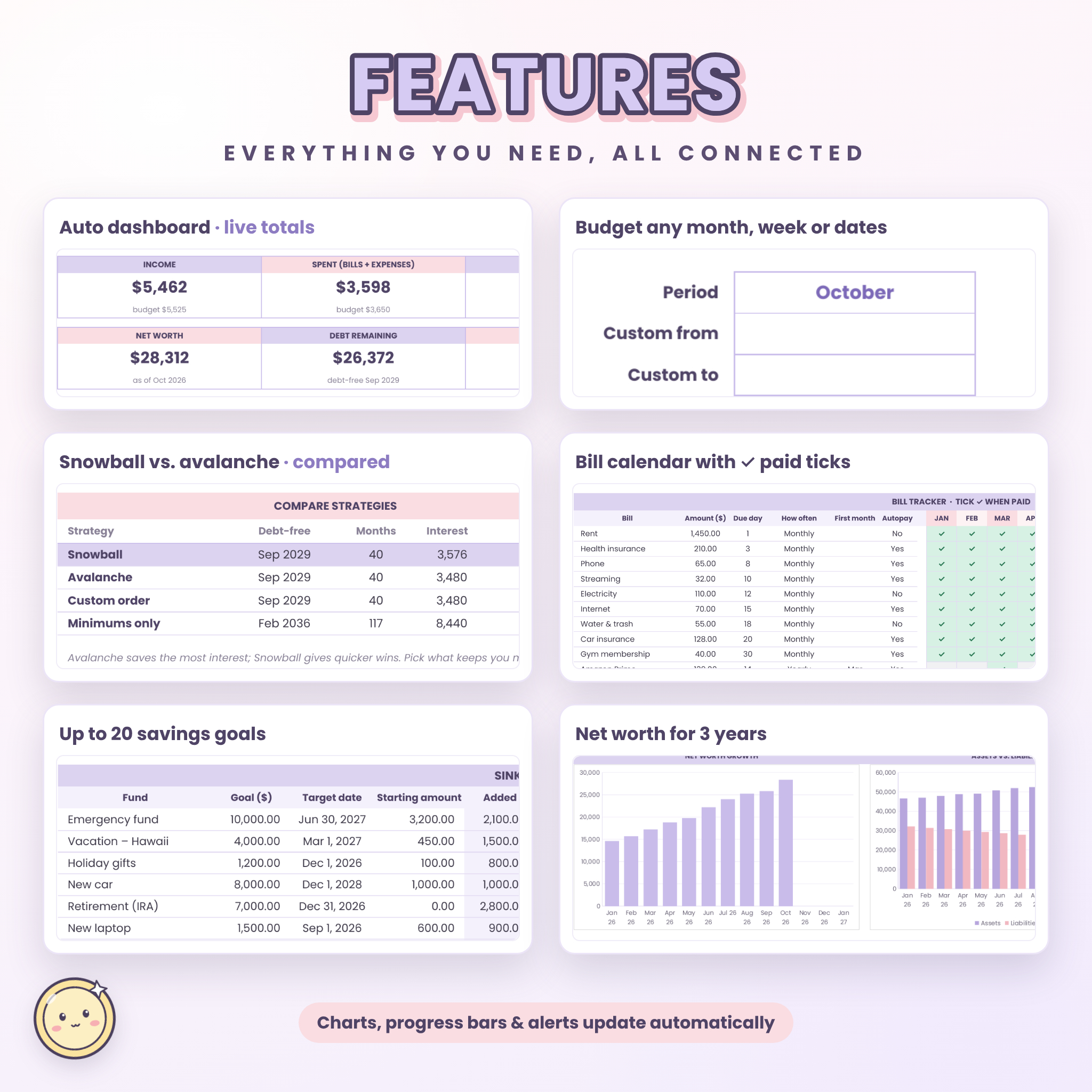
- Plans your budget across Income, Bills, Expenses, Savings and Debt payments (up to 82 categories) for any month, the full year or custom dates.
- Tracks your spending automatically from a simple transaction log, with budget vs. actual and pink alerts when you go over.
- Keeps bills on time with a 12-month bill tracker, due days, autopay and overdue warnings.
- Grows your savings with up to 20 sinking funds that show how much to save each month.
- Builds a debt payoff plan for up to 30 debts and compares snowball, avalanche, your own order and minimum payments side by side.
- Tracks your net worth month by month for three years, with a goal and charts.
Who it’s for
Lilac Ledger is for beginners who want an easy, friendly way to start budgeting, and for anyone paying down credit cards, car loans or student loans who wants a clear plan. It’s great for families, students, freelancers and anyone paid weekly or biweekly. No spreadsheet experience is needed.
Features
Smart dashboard
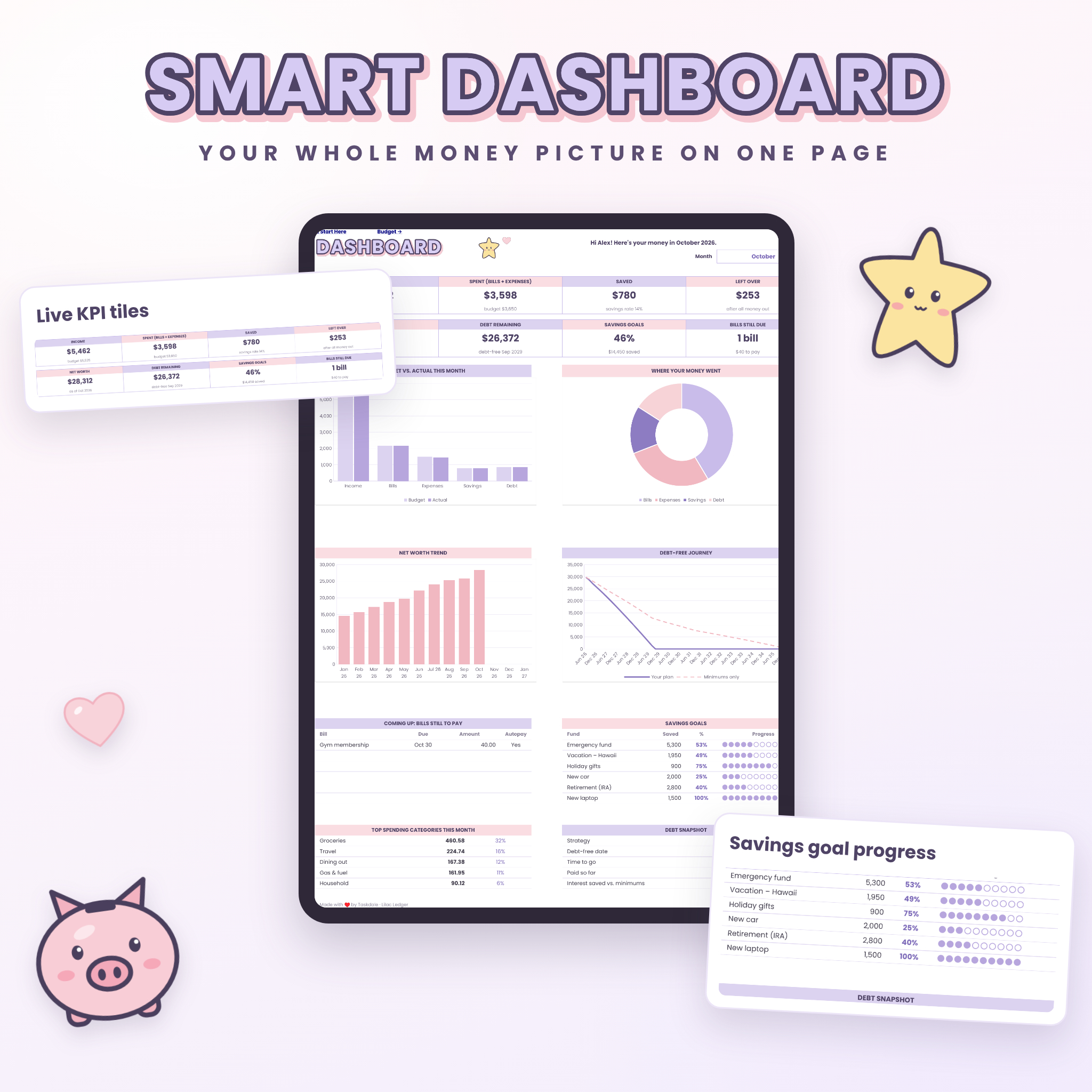
Choose a month and see income, spending, money saved, what’s left over, net worth, debt remaining, savings progress and bills still due. Four charts show budget vs. actual, where your money went, your net worth trend and your debt-free journey. You’ll also see unpaid bills, savings goal progress, your top five spending categories and a debt snapshot.
Flexible budget
- Monthly, twice-a-month, every-2-weeks or weekly budget cycles
- View any month, the full year or a custom date range
- Cash flow summary with savings rate, debt-to-income and “left to assign” for zero-based budgeting
- Budget check-up that flags uncategorized transactions, duplicate names and over-budget categories
Transactions and year overview
Log up to 1,500 transactions with category drop-downs and payment methods. The Year Overview shows every category month by month with totals, averages, your monthly budget and two charts.
Bill tracker
Track 30 monthly, quarterly, twice-yearly or yearly bills. Tick ✓ when paid, see what’s due, paid and overdue, and check which bill is next.
Savings and sinking funds tracker
Set goals with target dates and starting amounts, log deposits and withdrawals, and watch progress bars fill. The planner tells you how much to save each month to reach every goal on time.
Debt snowball and avalanche calculator
- Up to 30 debts with balance, APR and minimum payment
- Snowball, avalanche or custom order, with freed-up payments rolled into the next debt
- Side-by-side comparison of debt-free date, months and total interest, plus interest saved vs. minimums
- Month-by-month payment plan for up to 30 years, with one-off extra payments and a paid ✓ for each month
- Warnings when a minimum payment doesn’t cover the interest
Net worth tracker
Update assets and liabilities once a month for 37 months. See net worth today, change since you started, a growth chart, assets vs. liabilities, your asset mix and progress toward your goal.
What’s included
- Lilac Ledger Finance Planner (.xlsx) with 10 connected tabs: Start Here, Dashboard, Budget, Transactions, Year Overview, Bills, Savings, Debt Payoff, Payment Plan and Net Worth
- Illustrated user guide (DOCX) with setup steps, how-tos, tips, troubleshooting and FAQs
How it works
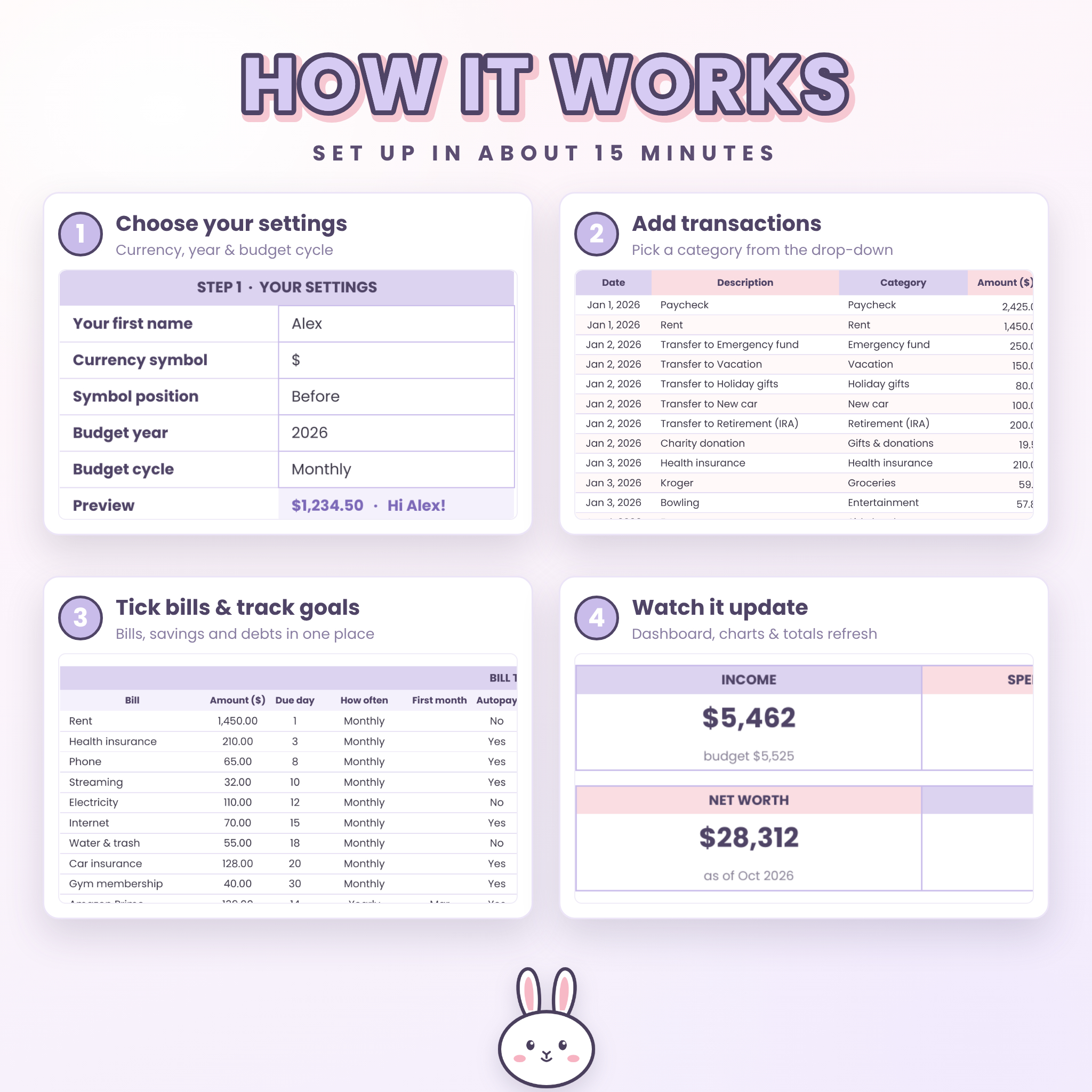
- Download the file and upload it to Google Sheets (sheets.google.com, then the folder icon, then Upload). It opens as a Google Sheet.
- On Start Here, choose your currency symbol, budget year and budget cycle.
- Enter your budget amounts, then add transactions as you spend and earn.
- Add your bills, savings goals, debts and account balances.
- Check the Dashboard any time to see where you stand.
File format and requirements
- Made for and tested in Google Sheets (free with a Google account)
- Delivered as an .xlsx file that you upload to Google Sheets
- Use it in Google Sheets in your web browser on a computer
- User guide is a Word-compatible DOCX file
Customization
Rename any budget category and the drop-downs update automatically. Set any currency symbol before or after amounts, edit payment methods, rename net worth accounts and switch budget cycles whenever you like. Input cells are white boxes and formulas sit in tinted cells, so it’s easy to see what to change.
Digital download
This is a digital product. No physical item will be shipped. Your files are available to download right after purchase.
Real-life ways to use it
- Building your first budget after a new job or a move
- Planning paycheck to paycheck when you’re paid every two weeks
- Paying off credit cards with the debt snowball and watching balances drop
- Saving for a vacation, holidays, a new car and an emergency fund at the same time
- Keeping the household bills organized so nothing is paid late
- Tracking your net worth as you invest and pay down debt
Budget planner spreadsheet FAQ
Do I need spreadsheet experience?
No. You type only in the white boxes and choose from drop-downs. The step-by-step guide walks you through setup in about 15 minutes.
What software do I need?
Just a free Google account. Upload the file to Google Sheets in your web browser and it’s ready to use. Nothing to install.
Can I use my own currency?
Yes. Choose or type any currency symbol and pick whether it goes before or after the amount. Every total follows that one setting.
Does it work if I’m paid weekly or every two weeks?
Yes. Set the budget cycle to weekly, every 2 weeks, twice a month or monthly, and the monthly and yearly views convert your budget for you.
What’s the difference between debt snowball and avalanche?
Snowball pays the smallest balance first for quick wins. Avalanche pays the highest interest rate first to save the most money. Lilac Ledger shows both side by side so you can choose.
How many debts, goals and transactions can I track?
Up to 30 debts, 20 savings goals, 30 bills, 82 budget categories and 1,500 transactions in one file.
Can I reuse it next year?
Yes. Make a copy, clear the white input cells and change the year on Start Here.
License
For personal, non-commercial use only. Please don’t resell, share or redistribute the files or artwork. © Taskdale.
Reviews
There are no reviews yet.