
An Airbnb Income and Expense Tracker That Shows What Each Unit Really Earns
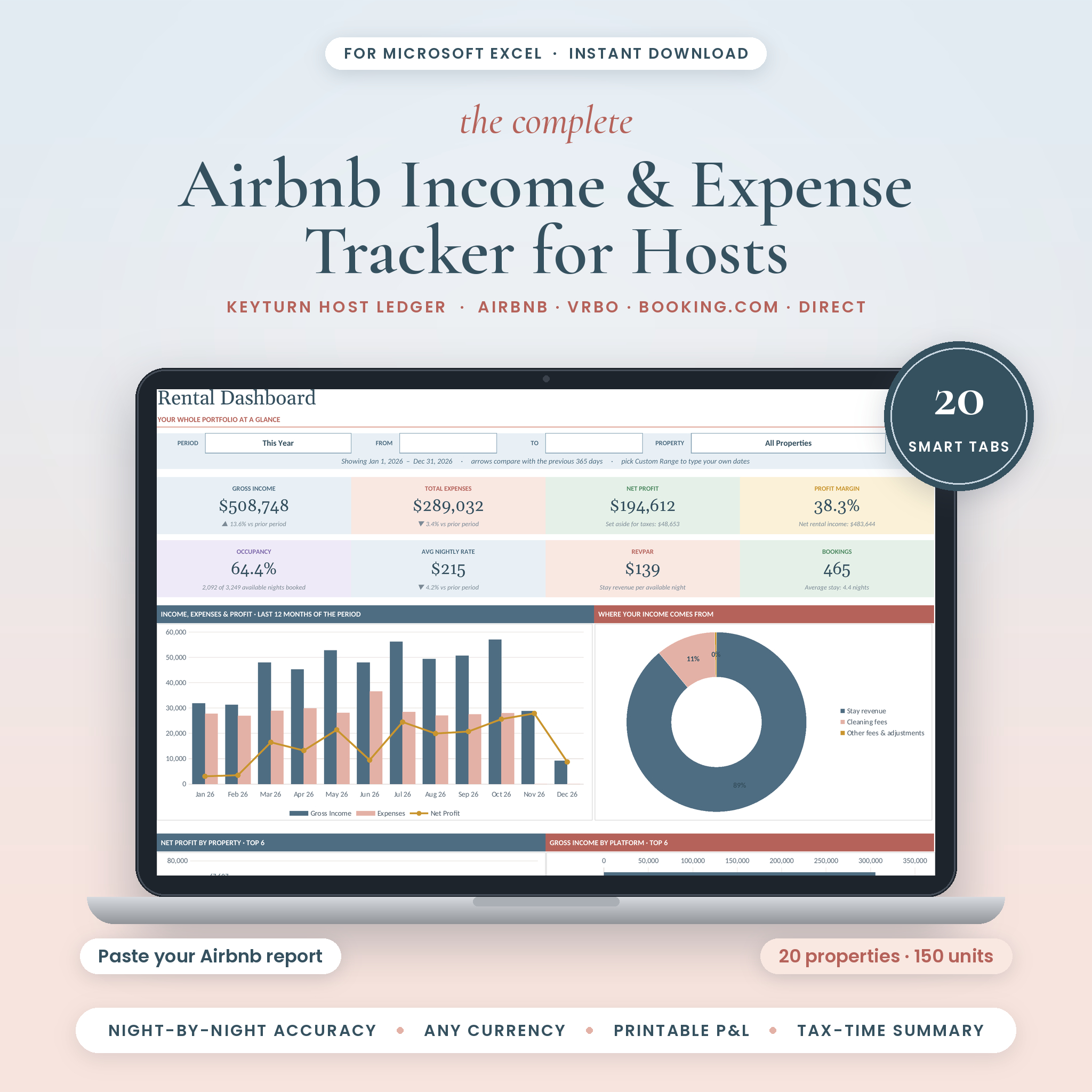
Airbnb shows you payouts. Your bank shows deposits. Neither tells you whether Loft 2A made money last quarter. The Keyturn Host Ledger is an Airbnb income and expense tracker for Microsoft Excel that pulls it all together. Paste your Airbnb transaction history, log stays from other platforms, add your bills, and 20 connected tabs do the math.
It’s built for short-term rental hosts with one cabin or a building full of suites. Up to 20 properties and 150 units fit in one file.
Who It’s For
- Airbnb and Vrbo hosts who want clean monthly numbers without bookkeeping software
- Owners renting rooms, suites or lofts inside one property
- Co-hosts and small vacation rental managers handling several listings
- Anyone who dreads pulling totals together for their tax preparer each spring
Main Benefits
Stop retyping bookings
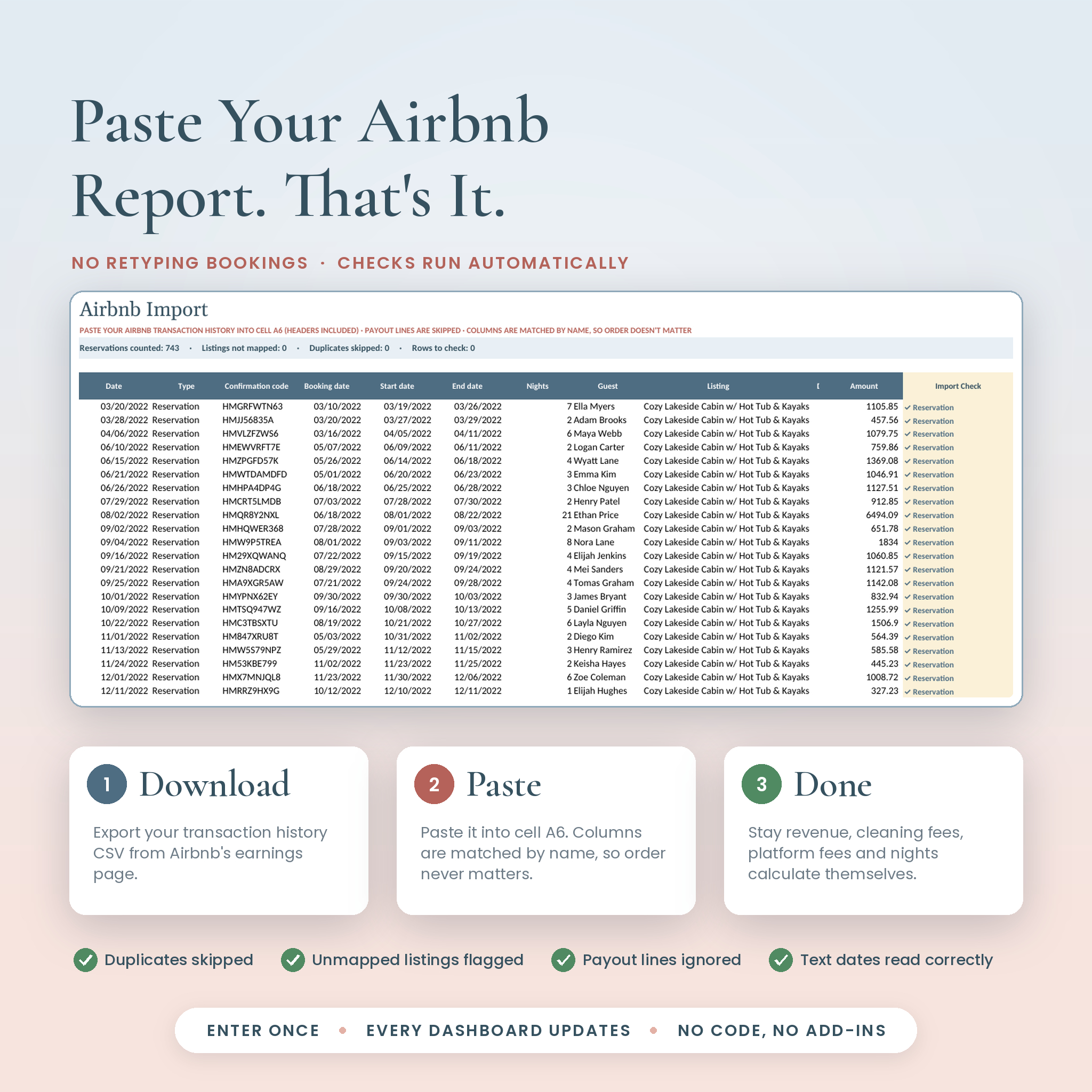
Export your Airbnb transaction history as a CSV and paste it into one tab. Columns are matched by their header names, so the import keeps working even if Airbnb shuffles its export. Payout lines are skipped, duplicate confirmation codes are counted once, and listings that aren’t linked to a unit are flagged in pink.
See true profit per unit
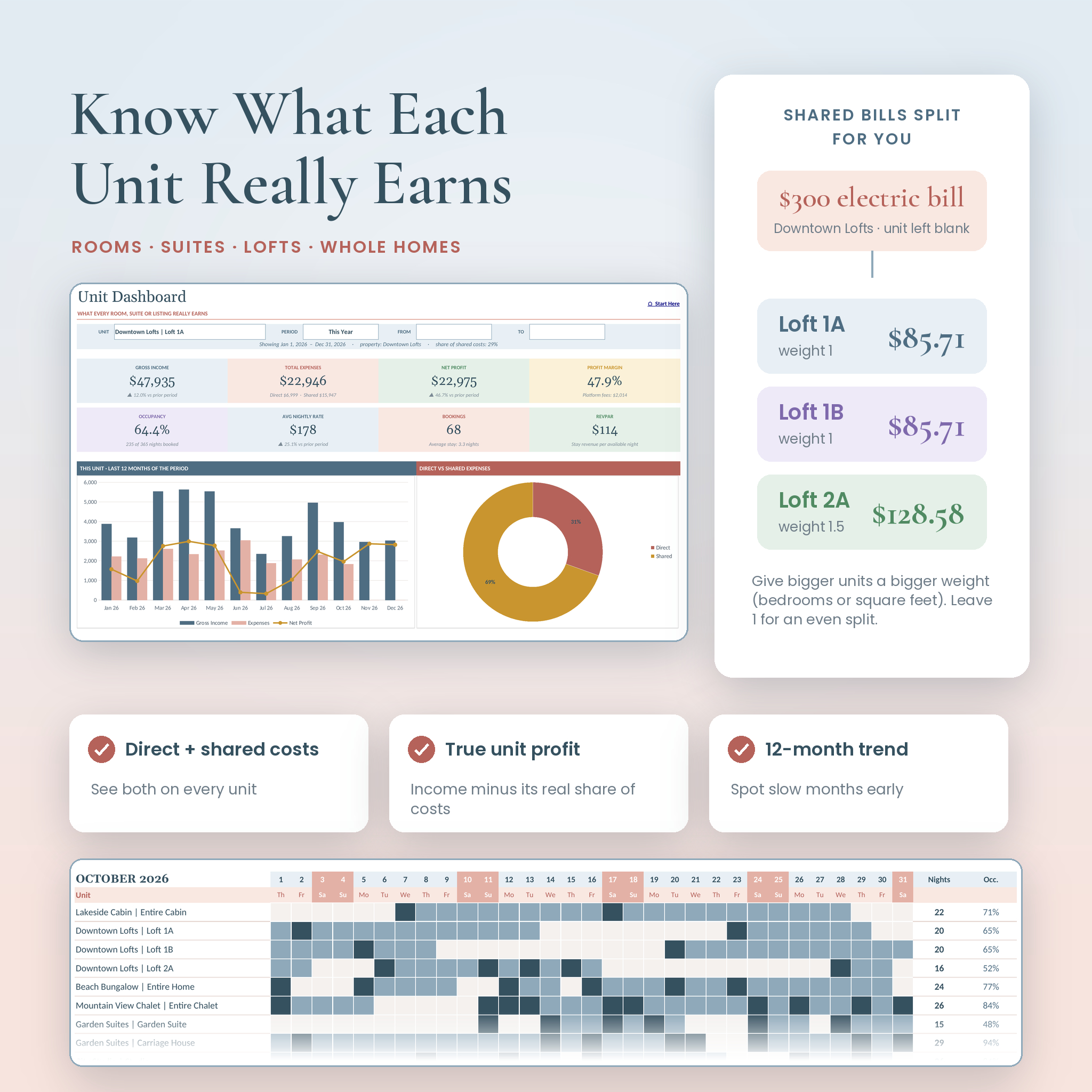
Leave the unit blank on a shared bill, like a $300 electric bill for a three-loft building, and it splits across the units by a weight you choose. With weights of 1, 1 and 1.5 that’s $85.71, $85.71 and $128.58. Every unit gets its fair share of costs, so its profit is real.
Numbers that land in the right month
A stay from January 29 to February 3 counts 3 nights in January and 2 in February. Revenue follows the nights, so month-end totals and occupancy stay accurate.
Honest occupancy
Each unit has an Active From date, so a unit you added in June isn’t counted as empty for the first five months. Owner stays logged as Owner Block are removed from available nights.
Features
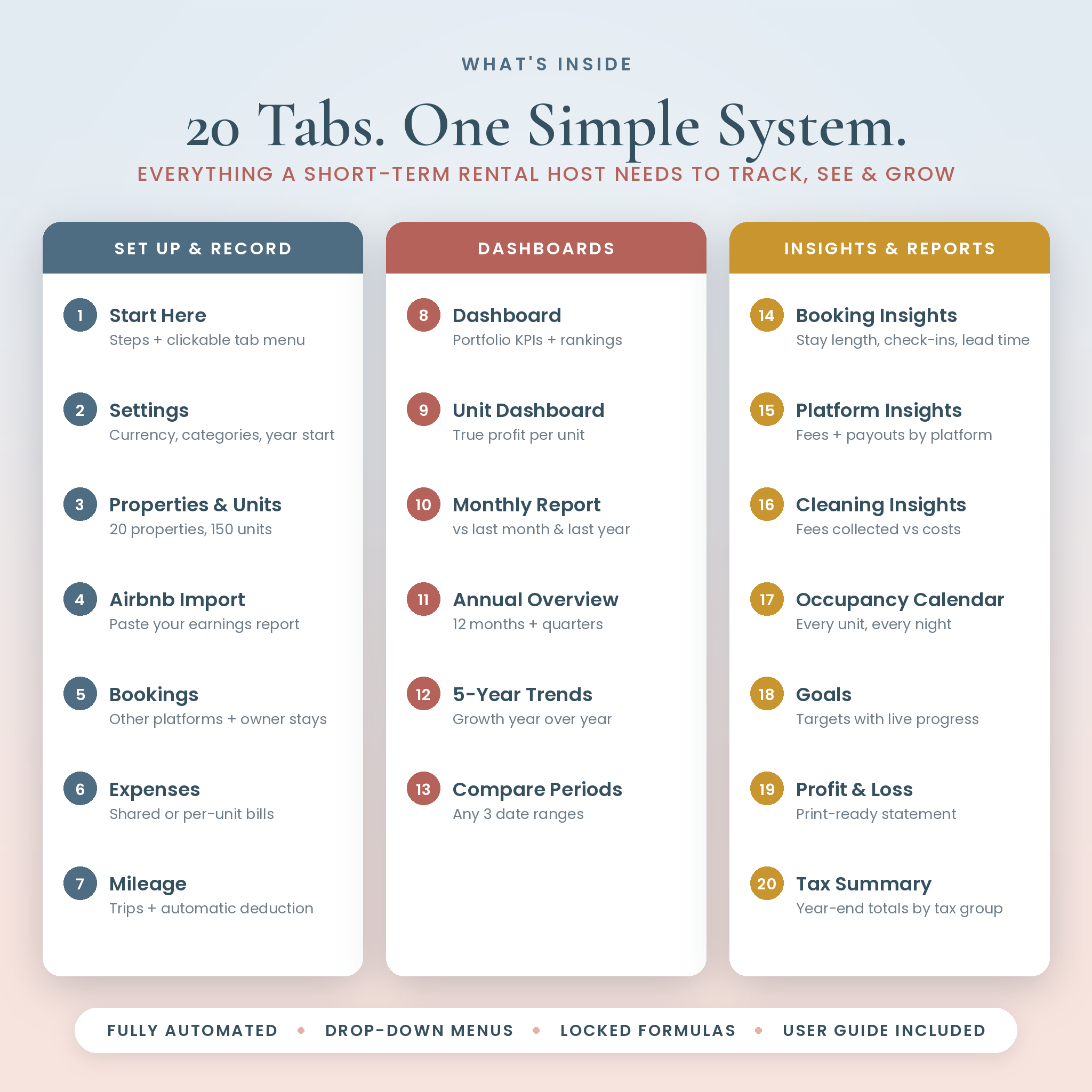
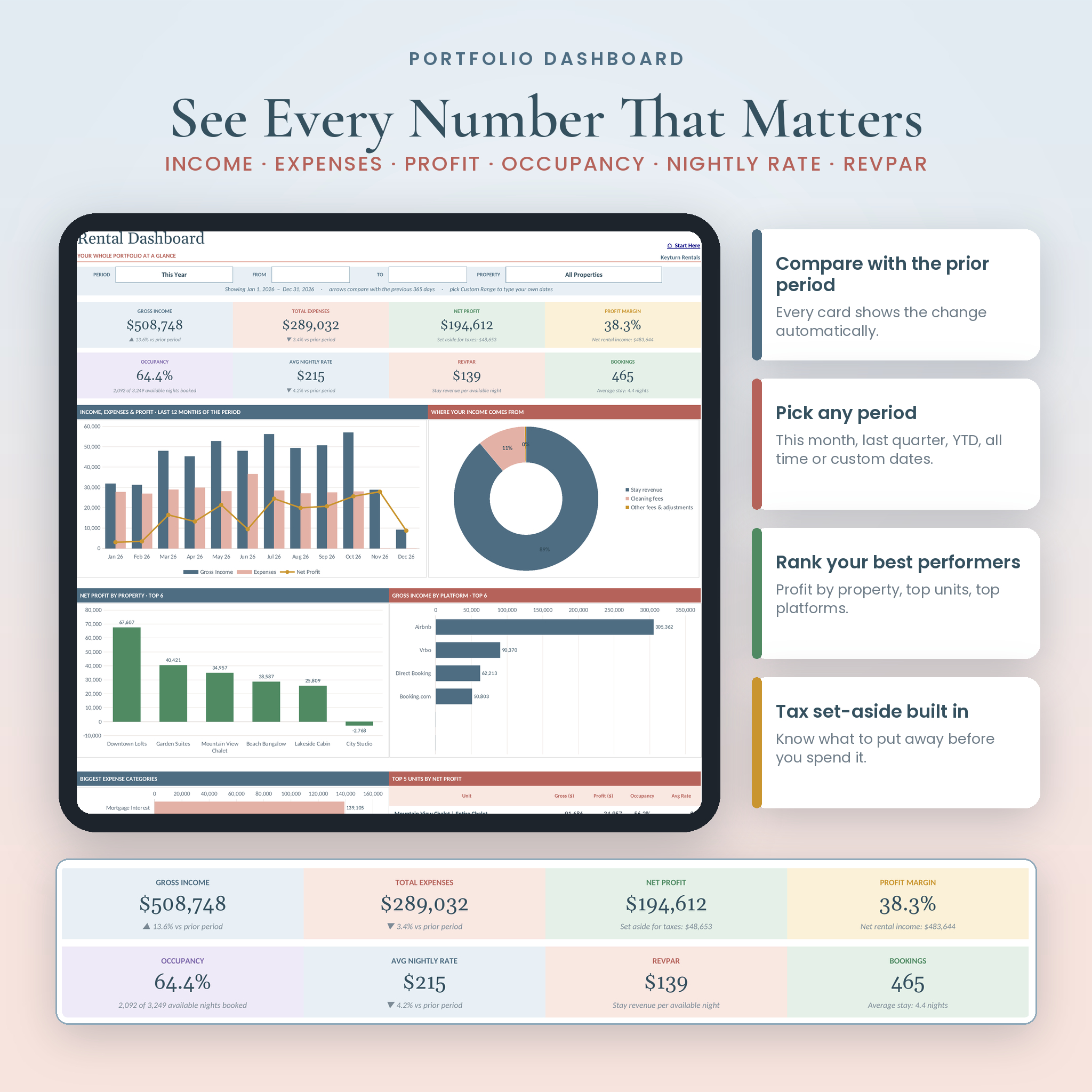
- Dashboard with 8 KPI cards: gross income, expenses, net profit, margin, occupancy, average nightly rate (ADR), RevPAR and bookings, each compared with the previous period
- 10 period presets including This Month, Last Quarter, Year to Date, Last 12 Months, All Time and a custom date range
- Unit Dashboard with direct vs shared costs, a 12-month trend and income by platform
- Monthly Report comparing a month with last month and the same month last year
- Annual Overview with 12 months side by side, quarterly totals and highlights like your best month
- 5-Year Trends with year-over-year growth
- Compare Periods for any three date ranges, like Summer 2025 vs Summer 2026
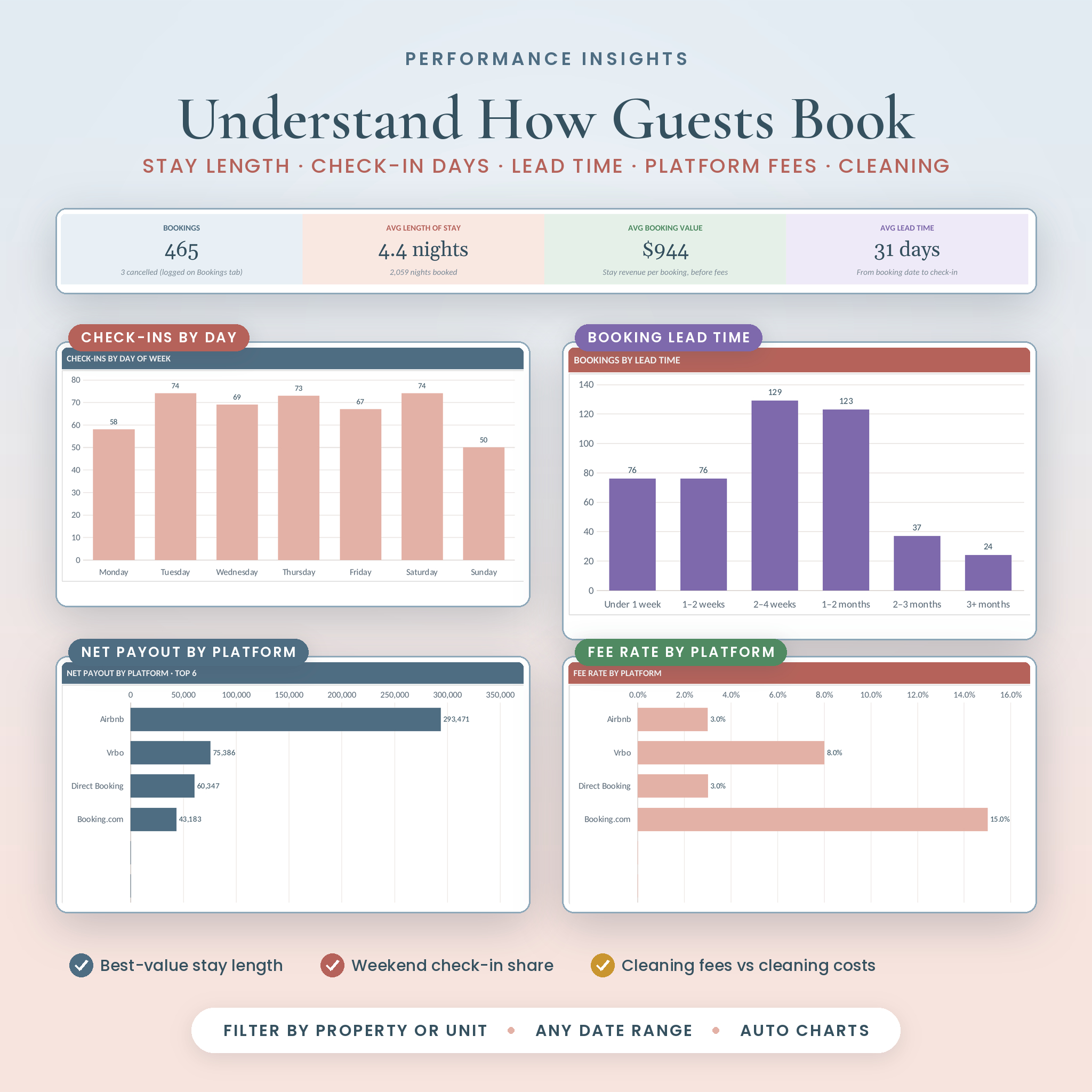
- Booking Insights: stay length, check-in day, lead time and a highlights panel
- Platform Insights: gross earnings, fees, fee rate, net payout and booking share for each platform
- Cleaning Insights: cleaning fees collected vs cleaning costs, per property and per turnover
- Occupancy Calendar: a night-by-night grid showing check-ins, booked nights, owner blocks and gaps
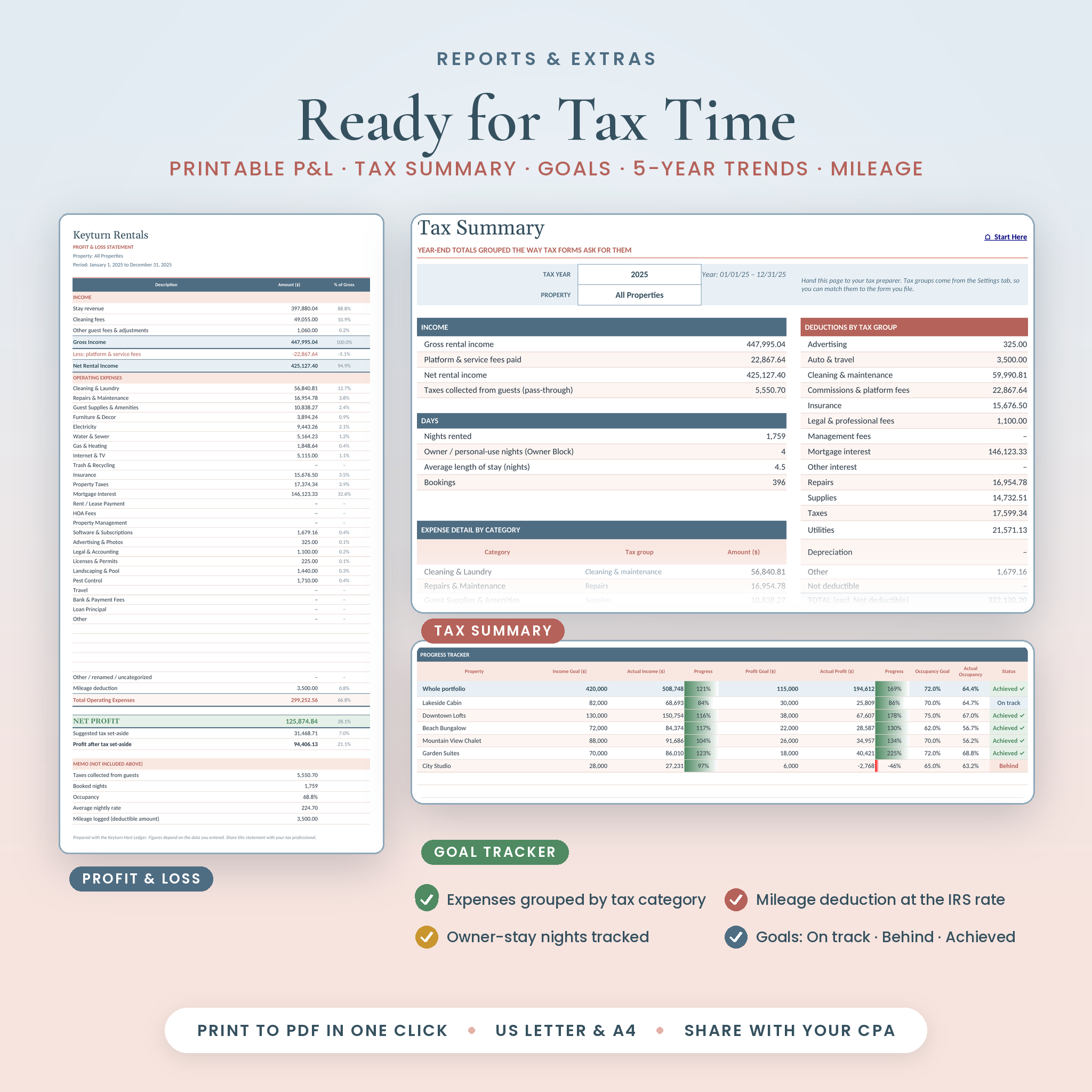
- Goals for income, profit and occupancy with live status (Achieved, On track, Behind)
- Profit & Loss statement that prints on one page
- Tax Summary grouping expenses by tax category, plus platform fees, mileage and owner-use nights
- Mileage log using the IRS business rate for each trip’s year (2024 to 2026 rates included)
- Tax set-aside estimate, taxes collected tracking and a missing receipt counter
What’s Included
- Keyturn Host Ledger workbook (.xlsx) with 20 tabs, ready for your data
- Step-by-step user guide (.docx) with setup, tab-by-tab instructions, troubleshooting and FAQ
How It Works
- Settings: choose your currency symbol, the month your year starts and your tax set-aside.
- Properties & Units: list each property and every unit, with its Airbnb listing title.
- Bookings: paste your Airbnb report and log stays from Vrbo, Booking.com, direct and other platforms.
- Expenses and Mileage: add bills and business trips as they happen.
- Dashboards: open any report and pick a period. Everything is already calculated.
File Formats and Software Requirements
- Microsoft Excel .xlsx workbook plus a Word .docx guide
- Works in Microsoft Excel 2016 or newer and Microsoft 365, on Windows and Mac
- Also opens in LibreOffice Calc
- No macros, no add-ins and no internet connection needed
Customization
Change the currency symbol once and every money label updates. Set your year to start in any month. Rename up to 30 expense categories and assign each one a tax group, edit up to 15 booking platforms and your payment methods. Formulas are locked so nothing breaks by accident, but sheets are protected without a password, so you can unlock them whenever you like.
Real Ways Hosts Use It
- A couple with a lake cabin checks whether raising the cleaning fee covered their new cleaner’s rate.
- An owner with three lofts in one building sees that the two-bedroom loft earns the most per night but carries the highest share of utilities.
- A host on Airbnb and Vrbo compares fee rates and net payouts to decide where to push direct bookings.
- A co-host prints a one-page P&L for each owner at the end of every month.
- A new host sets a first-year profit goal and watches it move from Behind to On track by summer.
- Everyone hands the Tax Summary to their tax preparer in January instead of a shoebox of receipts.
Digital Download
This is a digital product. You’ll get a download link right after checkout. Nothing is shipped. Save a blank copy of the workbook before you start, so you always have a fresh one.
Frequently Asked Questions
Does this Airbnb spreadsheet work on a Mac?
Yes. It works in Excel 2016 or newer for Mac and Windows, and in Microsoft 365.
Can I track Vrbo and Booking.com bookings too?
Yes. Log them on the Bookings tab and pick the platform from the drop-down. They flow into every dashboard alongside Airbnb.
How many properties can I track?
Up to 20 properties and 150 units, with room for 2,000 Airbnb report lines, 1,500 other bookings, 2,500 expenses and 800 trips.
What if I don’t want to use the Airbnb import?
You don’t have to. You can log every stay on the Bookings tab instead.
Can I use it outside the US?
Yes. Set your own currency symbol and the month your year starts. Tax groups are labels you can rename.
Is it a monthly subscription?
No. You pay once and keep the file. Your data stays on your computer.
Is this tax or accounting advice?
No. It organizes your rental numbers so your tax preparer has what they need.
License
Personal use license for your own rental business. Please don’t share, resell or redistribute the files. © Taskdale.
Reviews
There are no reviews yet.