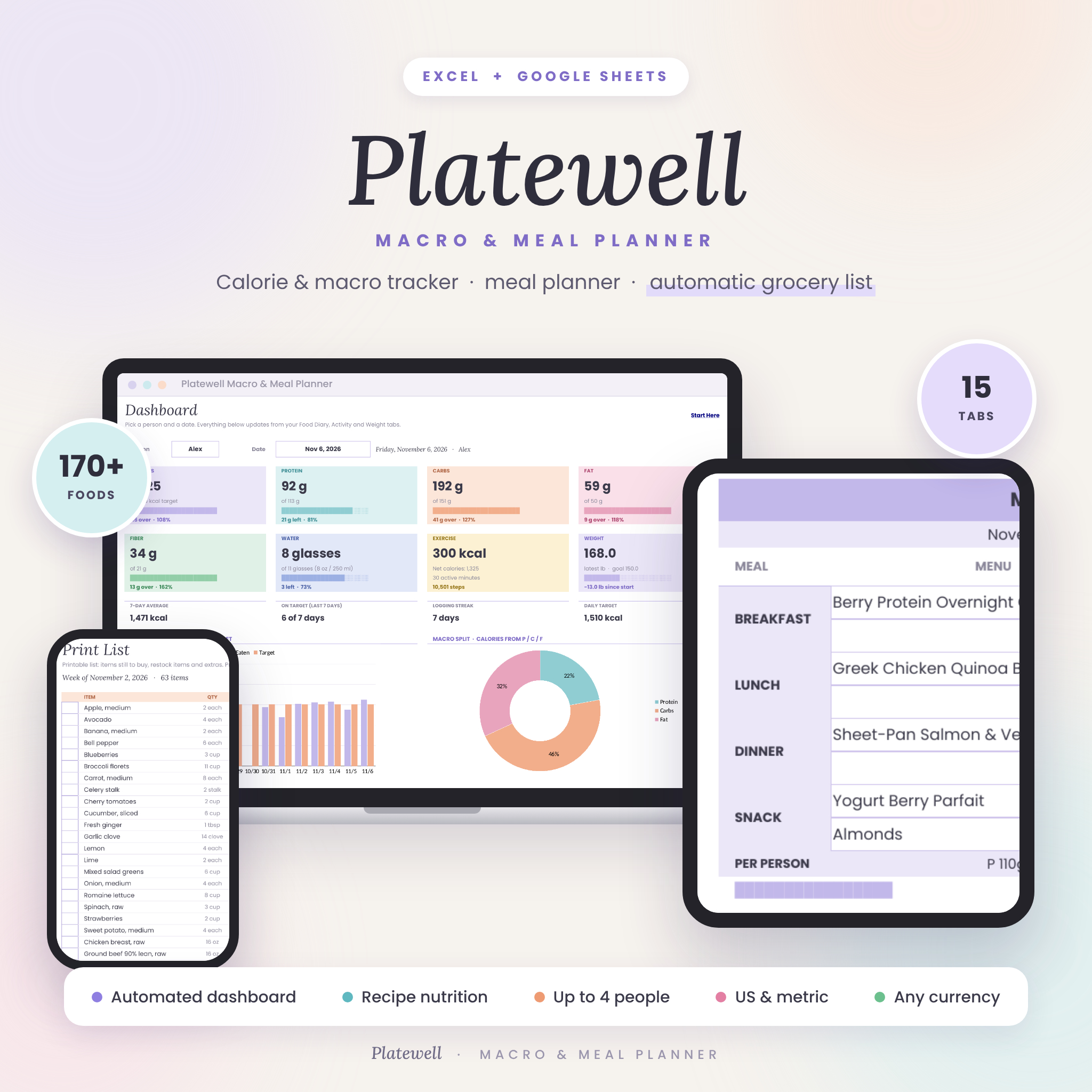



The Platewell calorie and macro tracker spreadsheet brings everything you need to eat well into one calm, colorful workbook for Excel and Google Sheets. Plan your week, log meals in seconds, see calories and macros against your own targets, and let your grocery list build itself. With 170+ foods already loaded, recipe nutrition calculated from ingredients and room for up to 4 people, it does the math so you can focus on the food.
What the Platewell Calorie & Macro Tracker Does
Platewell is a calorie counter, macro tracker, meal planner, recipe book, pantry inventory and weight tracker that all talk to each other. Choose a food or recipe from a dropdown and the calories, protein, carbs, fat and fiber fill in automatically. Plan your meals for the week and the shopping list appears, sorted by store aisle, minus anything already in your pantry, with a cost estimate in your own currency.
Who It Is For
- Anyone counting calories or macros who wants a clear picture without a paid app or subscription
- Busy households planning meals for up to 4 people and shopping once a week
- High protein, low carb, keto, Mediterranean or balanced eaters who want targets that match their style
- Meal preppers who want nutrition and cost per serving worked out for every recipe
- Beginners: you only type in the white boxes and everything else is automatic
Main Benefits
- Personal targets in minutes: the built-in goals calculator works out BMR, maintenance calories, a daily calorie target, macros, fiber and water for each person.
- Faster logging: 170+ common foods are pre-loaded with nutrition, and your own recipes appear in the same searchable dropdown.
- Less food waste and spending: pantry stock is deducted from your shopping list, leftovers are skipped and use-by dates are flagged.
- Real progress: the dashboard shows today, the last 14 days, your logging streak and your weight change since you started.
Features
Calorie and macro tracking
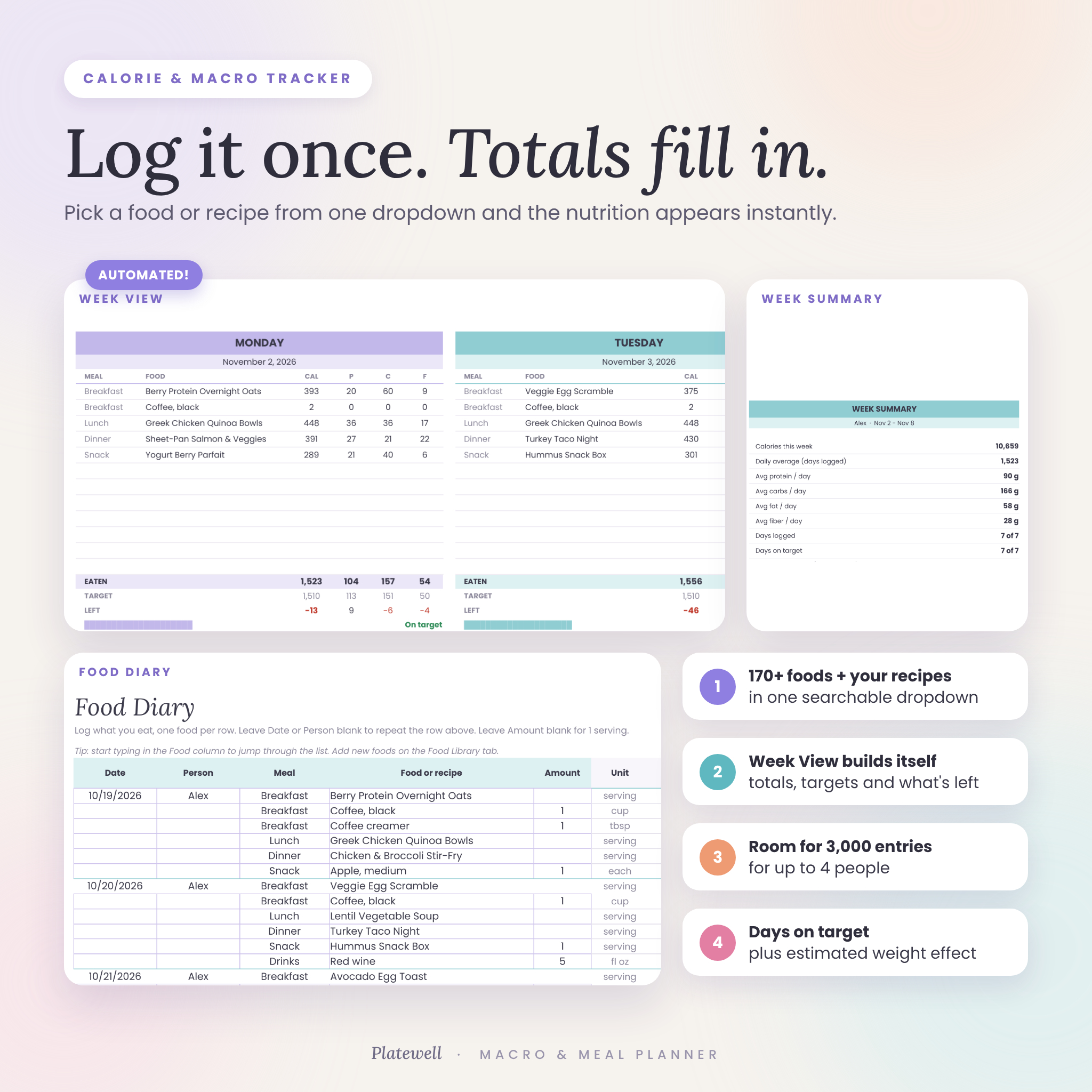
- Food Diary with room for 3,000 entries and automatic nutrition for every row
- Week View that builds a 7-day calorie and macro tracker from your diary, with totals, targets and what is left each day
- Week summary with daily averages, days on target and an estimated weight effect
- Automated dashboard: calories, protein, carbs, fat, fiber, water, exercise and weight tiles with progress bars, plus charts
Meal planning and groceries
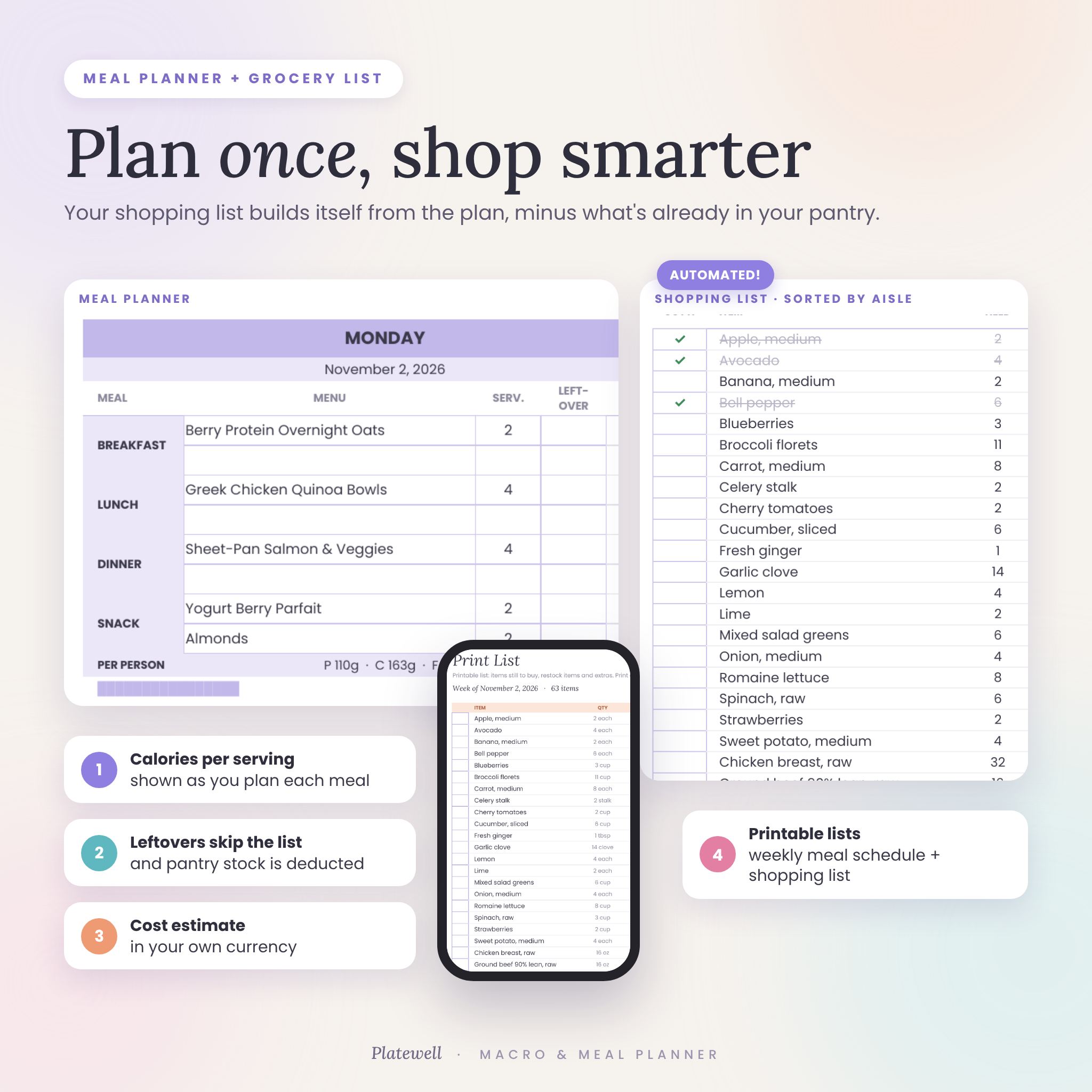
- Weekly Meal Planner with two slots each for breakfast, lunch, dinner and snacks, calories per serving and a leftovers tick box
- Printable Meal Schedule that fills in from your plan
- Automatic Shopping List sorted by aisle, with pantry stock, packs to buy and estimated cost
- Restock items from your pantry and add extra items, then print everything on one page
- Kitchen inventory for the fridge, freezer and pantry with “use soon” and “expired” alerts
Recipes and foods
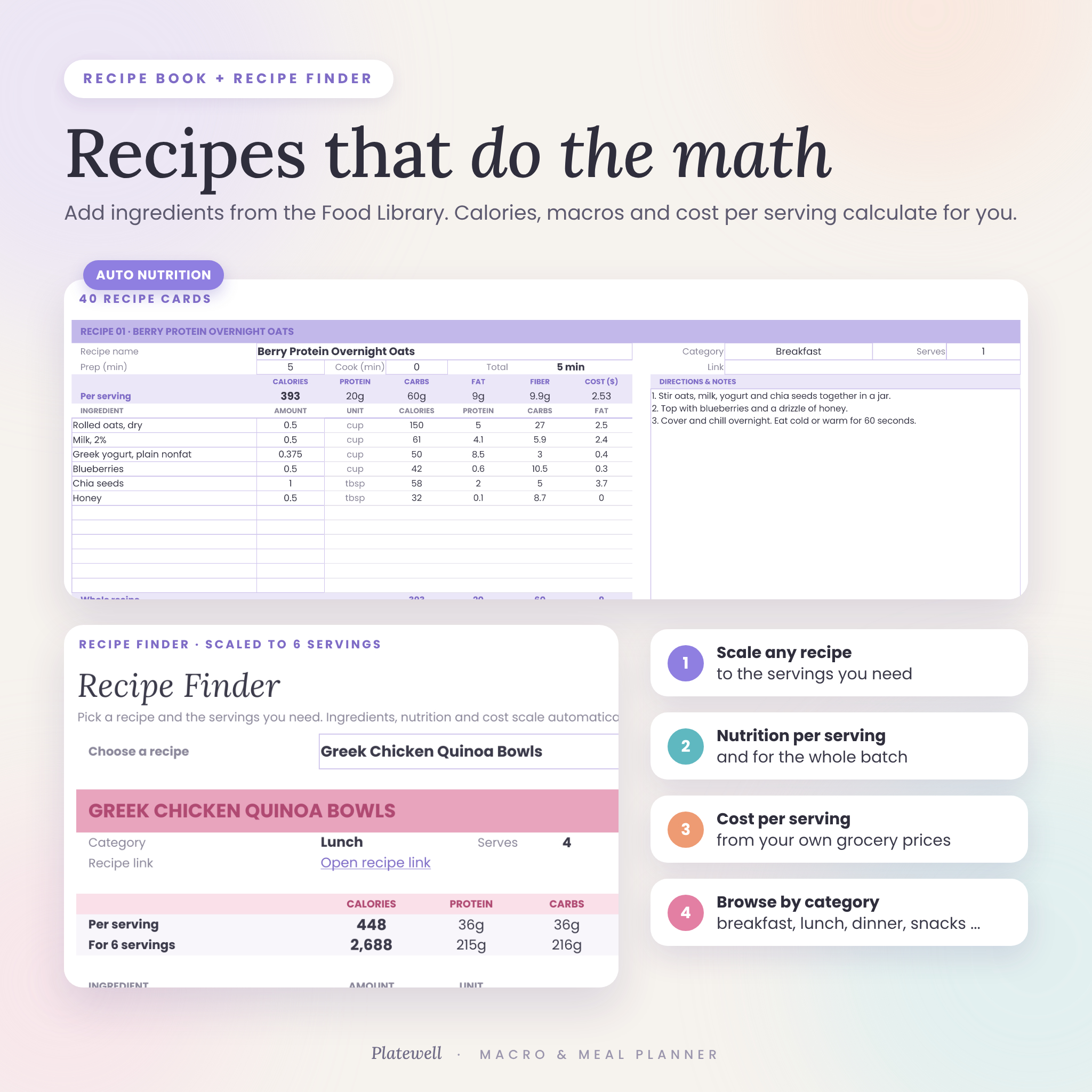
- 40 recipe cards: pick ingredients and amounts, and calories, macros, fiber and cost per serving calculate themselves
- Recipe Finder that scales any recipe to the servings you need and lets you browse by category
- Food Library with 170+ foods and space for 400
Goals and progress
- Goals and macro calculator for up to 4 people with 6 diet styles or your own custom split
- BMI, weeks to goal and an estimated goal date
- Weight tracker for up to 4 people with a progress chart, plus optional body measurements
- Water, steps, exercise, calories burned, sleep and mood log, with an option to add exercise calories to your target
What Is Included
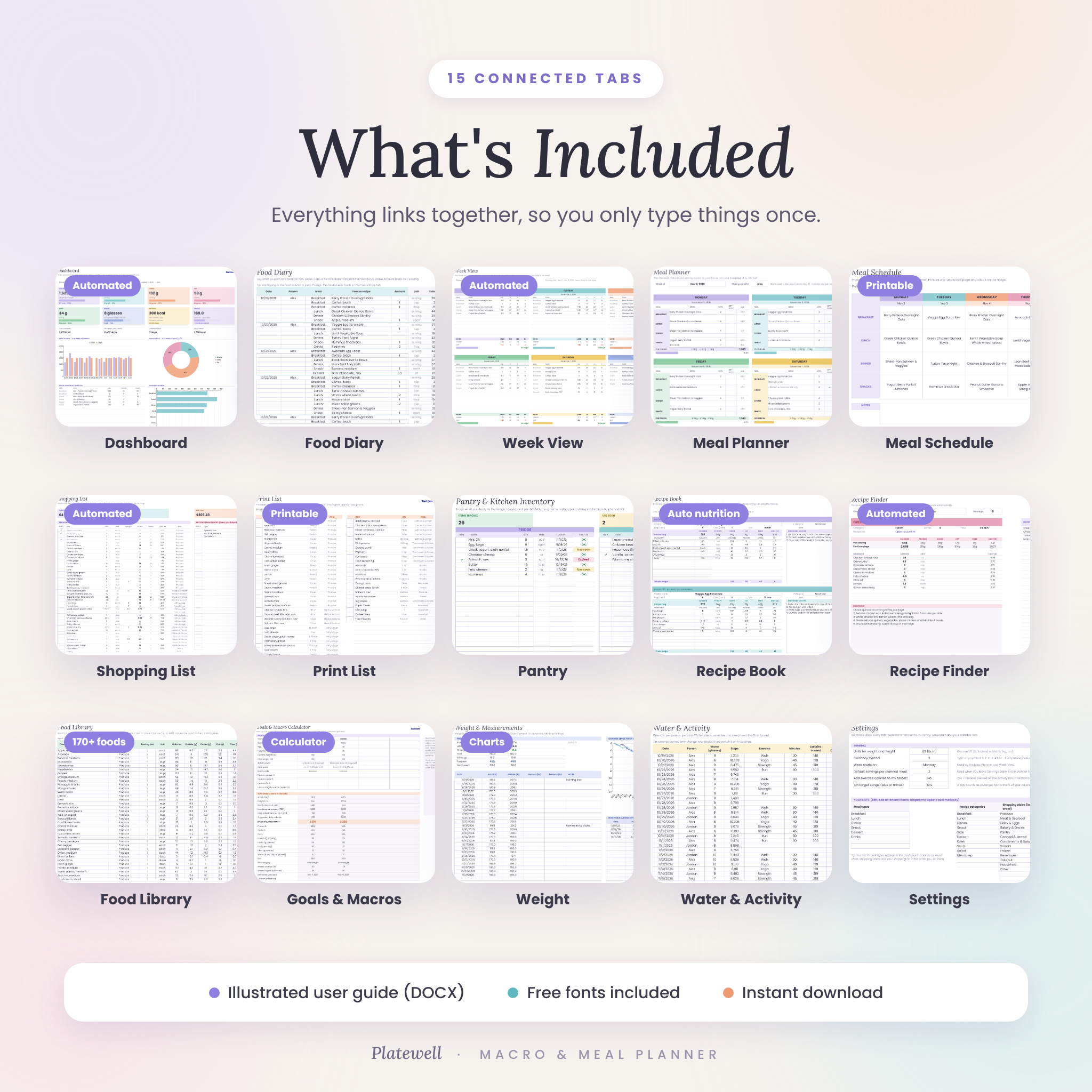
- Platewell Macro & Meal Planner spreadsheet (.xlsx) with 15 connected tabs
- Illustrated step-by-step user guide (.docx)
- Poppins and Lora font files (free, optional, for the exact look in desktop Excel)
How It Works
- Set up: choose US or metric units, your currency symbol and the day your week starts.
- Set your goals: enter a short profile for each person and your targets appear instantly.
- Add recipes: pick ingredients from the Food Library and the nutrition is done for you.
- Plan the week: fill the Meal Planner and your grocery list and printable menu build themselves.
- Log and track: add what you eat, plus water and weigh-ins, and the Dashboard and Week View do the rest.
File Formats and Software Requirements
- One Excel workbook (.xlsx) that works in Microsoft Excel (2016 or later, Microsoft 365 and Excel for the web) and in Google Sheets
- Google Sheets is free: upload the file to Google Drive and save it as a Google Sheet
- Best set up on a computer; you can view and update it in the Excel or Google Sheets mobile apps
- No macros, add-ons or scripts
Customization
Switch between US (lb, inches) and metric (kg, cm) units and type any currency symbol: every cost in the planner follows it. Rename people, meal types, recipe categories, shopping aisles and units, put aisles in your store’s order, and edit or add foods to match the brands you buy. Formula cells are protected in Excel without a password, so beginners cannot break anything and experienced users can still unlock them.
Digital Download
This is an instant digital download. No physical item will be shipped. Your files are available on your account page and in your order email as soon as payment is confirmed.
Use Cases
- A couple losing weight together, each with their own calorie and macro targets
- A family planning dinners for the week and shopping once with a list sorted by aisle
- A gym-goer hitting a high protein target and tracking weight change
- A meal prepper costing out batch recipes per serving
- Anyone trying to waste less food by using what is already in the fridge first
FAQ
Does it work in Google Sheets and Excel?
Yes. It was tested in Microsoft Excel for the web and in Google Sheets. Upload it to Google Drive and save it as a Google Sheet, or open it directly in Excel.
Can more than one person use it?
Yes. Set up to 4 people, each with their own targets, diary entries, weigh-ins and activity.
Can I use metric units or a different currency?
Yes. Choose US or metric units and type any currency symbol on the Settings tab.
Do I have to type the nutrition for every food?
No. 170+ common foods are pre-loaded, and recipe nutrition is calculated from the ingredients you choose. You can add your own foods from any label.
Does it work for keto, low carb or high protein diets?
Yes. Pick from six macro styles or enter your own custom percentages.
Will the shopping list update automatically?
Yes. It builds itself from your Meal Planner, sorts by aisle and subtracts what you already have in your pantry.
Is this medical advice?
No. Targets are general wellness estimates. Please speak with a doctor or registered dietitian before major changes to your diet.
License: for personal use by the purchaser only. Please do not resell, share or distribute the files. Microsoft Excel and Google Sheets are trademarks of their respective owners; Platewell is not affiliated with either.
Reviews
There are no reviews yet.