Tailoring every CV sounds right until you are on application fourteen at 10pm, rewriting the same bullet for the third time. The fix is not to stop tailoring. It is to stop starting from scratch. A master CV holds everything you have ever done in one long file, and each application becomes a quick job of choosing, not writing.
This guide is for anyone running a serious job search: people sending ten or more applications, career changers aiming at two kinds of role, and contractors who pitch for new work every few months. You will learn what goes in a master CV, how to tag a bullet bank so the right lines are easy to find, a twenty-minute routine for building each tailored copy, and how to keep the whole thing current without it becoming a chore.
The payoff is real. Once the master exists, a tailored CV takes a fraction of the time, and every version you send is sharper than the generic one you would have sent otherwise.
Quick picks: templates for your tailored copies
| Product | Best for | Price | Link |
|---|---|---|---|
| Hollis Resume Kit | Several lengths plus a job search planner | $8.99 | View |
| Alder Resume Kit | Tracking which version went where | $4.79 | View |
| Sloane Resume Kit | Matching cover letter and references page | $4.49 | View |
What a master CV is, and what it is not
A master CV is a private working document. It holds every job, every bullet, every course, every tool and every result you can remember. It can run to five or six pages, and that is fine, because nobody but you will ever read it.
It is not the CV you send. Think of it as a pantry. Each application is a meal, and you take only what that recipe needs. A two-page CV for a project coordinator role might use a third of what is in the master. A one-page CV for a weekend retail role might use a tenth.
Keep the master in plain formatting: simple headings, plain bullets, no columns. Its job is to be easy to search and copy from, not to look pretty. The design happens later, in the template you send.
What goes into the master file
Be generous here. It is much easier to cut than to remember something at short notice.
- Every role with exact dates, employer, town and your exact job title, plus any title changes within the same employer.
- Every bullet you have ever written, including weaker versions. You may improve them later.
- The numbers behind your results, with a note on where they came from: “cut overtime 18%, from Q3 payroll report”. You will be asked in interviews.
- Three or four profiles, each aimed at a different kind of role you might apply for.
- Projects, at work or outside it, with a line on your part and the outcome.
- Training, certificates and licences with dates and issuing bodies.
- Tools and systems you have used, with a rough level: daily, occasional, trained.
- Awards, volunteering and speaking, even small ones.
- Referee details, kept here and only shared when asked.
A warehouse team leader with eight years in the job might end up with 60 bullets across four roles. That is not too many. That is a well-stocked pantry.
Building a tagged bullet bank
The trick that makes a master CV fast to use is tagging. After each bullet, add a few short tags in brackets that describe the skill it shows. Then, when an advert asks for budget control, you search the file for “[budget]” and every relevant line appears.
Here is how three bullets might look in the master file of an office manager:
- Moved 40 staff to a new office over one weekend with no lost working days. [projects] [planning] [suppliers]
- Renegotiated the cleaning and stationery contracts and saved around 12,000 a year. [budget] [suppliers] [negotiation]
- Wrote the onboarding checklist now used for every new starter across three sites. [process] [training] [admin]
Keep your tags to a short, fixed list, maybe twelve to fifteen words, so you use the same ones every time. Good starting tags: leadership, budget, customers, data, process, projects, sales, training, suppliers, systems, reporting, compliance. Remove the tags from the tailored copy, of course. They live only in the master.
Choosing a template for your tailored copies
Your tailored CVs need a proper design, and you will need a few shapes of it. A one-page version for short applications. A two-page version for most professional roles. A single-column version for online portals that run applications through screening software. If all three come from the same template family, every CV you send looks consistent, which matters when a recruiter has seen you twice.
Save a clean, empty copy of each version in a Templates folder. Never type over the originals. When you start a new application, copy the version you need and work in the copy.
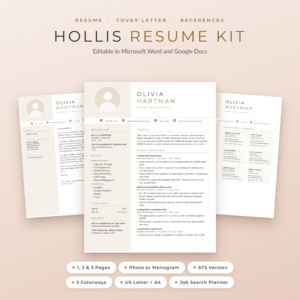
Hollis Resume Kit
Price: $8.99 | Best for: people sending many tailored versions
Hollis gives you resumes with a photo or a monogram in 1, 2 and 3 pages, plus an ATS resume in 1 and 2 pages, so every shape of tailored CV comes from one design. Matching cover letters, a references page and a thank-you letter are included, in Champagne, Rosewood and Graphite and both US Letter and A4, with the fonts built into each file. A Job Search Planner for Excel and Google Sheets comes too. Save blank copies of the 2 page and ATS files first, since you will use those most.
The twenty-minute tailoring routine
Once your master and templates are ready, each application follows the same steps.
- Read the advert (3 minutes). Highlight the five or six phrases that repeat or appear first. Turn each into one of your tags.
- Pick a profile (2 minutes). Choose the closest of your stored profiles and adjust one sentence to echo the advert.
- Search your tags (5 minutes). For each highlighted need, search the master and copy the two best bullets into a scratch list.
- Fill the template (6 minutes). Paste roles and chosen bullets into your copied template, strongest bullet first in each role.
- Trim and check (3 minutes). Cut to length, check dates and spelling, and remove anything that does not serve this advert.
- Save and log (1 minute). Save as a PDF with the company name in the file name and record it in your tracker.
The first few times take longer. By the fifth application, twenty minutes is realistic, and it feels good to send something tailored without that heavy late-night dread.
One master, two jobs: a worked example
Meet Daniel. He has six years in a mid-sized software company, first in customer support and then as a team lead. His master CV has 52 bullets. He is applying for two different jobs this week.
Job A: Customer Success Manager
The advert stresses retention, onboarding new clients and working with sales. Daniel searches for [customers], [training] and [sales]. His profile leads with “customer support lead with six years helping software clients get value fast”. His top bullet is about cutting new client onboarding time from six weeks to three. Bullets about internal reporting are left out.
Job B: Support Operations Analyst
This advert wants data, process improvement and reporting. Daniel searches for [data], [process] and [reporting]. His profile switches to “support team lead who turns ticket data into process changes”. His top bullet is now about building a weekly dashboard that showed 30% of tickets came from one billing screen. The onboarding bullet drops to third.
Same person, same history, two very different first impressions. Each recruiter sees someone who looks made for their role, and neither CV says anything untrue.
Naming files and tracking versions
Version chaos is the hidden cost of tailoring. Three weeks in, a recruiter calls about “the analyst role”, and you need to know exactly which CV they have in front of them.
Use one folder structure: Master, Templates, Sent and Adverts. Name every sent CV the same way: your name, the company, the role and the date, such as “Daniel-Reed-CV-Brightline-CSM-2026-04-02.pdf”. Save a copy of the advert next to it, because adverts often vanish once a role closes. And log every application, the version sent and the follow-up date in one tracker. Our guide to running a job search from one spreadsheet shows a simple column layout.
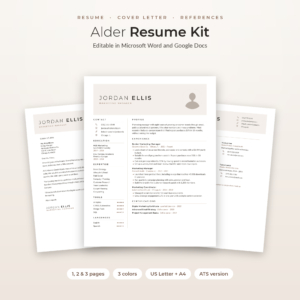
Alder Resume Kit
Price: $4.79 | Best for: job seekers juggling many versions
Alder includes 1, 2 and 3 page CVs with a photo, a no-photo version and an ATS resume, plus a cover letter, references page and thank-you letter, in Mocha, Sage and Slate and both paper sizes. The Job Application Tracker for Excel has a dashboard, dropdowns and follow-up alerts, so each tailored version you send gets its own row. A six-page Job Search Toolkit is included too. Set up the tracker before you send your first tailored copy.
Keeping the master current
A master CV only works if you feed it. The best habit is a ten-minute “wins log” once a month, say on the first working day. Open the master and add anything new from the last four weeks: a project finished, a number improved, a course completed, a compliment from a client.
It sounds small. But by the time you next need a CV, perhaps two years from now, you will have 24 months of fresh, specific bullets waiting, with the numbers still accurate. Compare that with trying to remember what you did in spring of last year. That relief is worth ten minutes a month.
When you change jobs, add the new role straight away with its start date, even before you have bullets for it. Then the structure is ready for the wins log to fill.
A master cover letter as well
The same idea works for cover letters. Keep a master letter file with your best opening lines, a few strong middle paragraphs, each built around one result, and two or three closing paragraphs. For each application, pick one opening, two middle paragraphs that match the advert, and one close, then smooth the joins.
Make sure the letter, CV and references page share a design so the application reads as one piece. If you are comparing template families before committing, our roundup of the best resume templates for Word and Google Docs lays fifteen side by side.
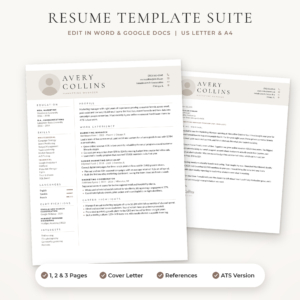
Sloane Resume Kit
Price: $4.49 | Best for: matching CV and letter sets
Sloane gives you a 1 page resume with and without a photo, a 2 page resume, a 3 page CV and an ATS resume, plus a four-paragraph cover letter and a references page with six reference cards, all in three colours and both paper sizes. It is built on real Word styles, so adding or deleting bullets never breaks the layout. The bonus Resume Writing Toolkit has 96 action verbs and a bullet formula. Use the cover letter’s four-paragraph shape as the frame for your master letter file.
Mistakes that undo the master CV approach
- Sending the master. A six-page CV for a junior role is a sure way to the no pile. Always cut to fit.
- Editing only the tailored copy. If you improve a bullet while tailoring, paste the better version back into the master too.
- Too many tags. Forty different tags make searching useless. Keep the list short and fixed.
- Inconsistent facts. Dates and job titles must be identical across every version, and match your LinkedIn profile.
- Tailoring into fiction. Choosing which true things to emphasise is fine. Inventing skills to match an advert is not, and interviews tend to expose it.
Frequently asked questions
What is a master CV?
A master CV is a long private document holding your full work history, every bullet and result, training, tools and several profiles. You never send it. You copy from it to build a tailored CV for each job.
How long should a master CV be?
As long as it needs to be. Four to six pages is common for someone with ten years of experience. Length does not matter because only you read it.
How do I tailor my CV quickly for each job?
Tag every bullet in your master CV by skill, highlight the key needs in each advert, search your tags, and paste the best matching bullets into a ready template. With practice it takes about twenty minutes.
Should my master CV use a fancy template?
No. Keep the master plain and easy to search. Use a designed template only for the tailored copies you actually send.
How often should I update my master CV?
Once a month is ideal. Ten minutes on the first working day to add new results, projects and training keeps it fresh and accurate.
Is tailoring a CV the same as lying?
No. Tailoring means choosing which true experience to put first for each job. Adding skills or results you do not have is a different thing, and it usually comes out at interview.
Your next step
Open a blank document tonight, call it “Master CV”, and paste in every version of your CV you can find, old ones included. Merge them into one list of roles and bullets, then add tags. When it is ready, set up your tailored copies in the Hollis Resume Kit.