If you have been using an online CV maker such as CreatCV and want something you can keep, the simplest alternative is a set of downloadable Word templates. You open them on your own computer, edit them with no login and save as many versions as you like. Nothing sits on anyone else’s server.
This article is for job seekers who like the speed of an online CV maker but want to own their files. It covers who an online tool still suits, how to pick between a single template and a big bundle, how to move your content across in one sitting, and the extras that make a downloadable kit more than a CV: an ATS version, a LinkedIn and interview workbook, and a tracker for every application.
Quick picks: downloadable CV tools you own
| Product | Best for | Price | Link |
|---|---|---|---|
| 50 Resume Templates Bundle for Word | Choice of 50 designs with sample content | $14.99 | View |
| Slatewell ATS Resume Template | Clean single-column CV for online portals | $7.49 | View |
| Wellspoken LinkedIn and Interview Workbook | Matching LinkedIn profile and interview prep | $6.99 | View |
| Job Application Tracker Spreadsheet for Excel | Follow-ups, interviews and offers | $5.99 | View |
Why people look for a CreatCV alternative
Online CV makers are quick. You type into boxes, the design takes care of itself and a CV appears. That convenience is real, and for a one-off application it can be all you need.
The reasons people look elsewhere tend to be practical rather than dramatic. They want to edit offline on a train. They want ten tailored versions without juggling one online profile. They want a cover letter, references page and thank-you letter that match. Or they simply prefer having a file on their own drive that will still open in five years. Terms and features differ between online CV services and change over time, so if you are weighing one up, read its current pricing and download options before you commit.
A downloadable kit answers those needs directly. You trade some hand-holding for full control.
Who should stay with an online CV maker
Fair is fair. A downloadable template is not right for everyone.
- You only need one CV, once. If you are applying for a single job and will not touch the CV again for years, a quick online tool may be enough.
- You have no access to Word or Google Docs. Downloadable templates need a word processor. Google Docs is free, but you need a device that runs it comfortably.
- You want every sentence suggested for you. Some online makers offer pre-written phrases. Templates give prompts and guides, but you write the words.
If none of those apply, owning your files will probably save you hassle across a long search.
One template or a bundle of 50?
This is the first real choice. A single template kit gives you one design in several lengths and colours. A large bundle gives you many designs to choose from, which helps if you apply across very different fields or simply cannot decide what suits you.
Think about a graphic designer who also applies for office manager roles. A bold sidebar design suits the creative jobs. A calm, minimal layout suits the admin roles. With a bundle, both come from the same purchase and each has its own matching cover letter.
A bundle with real sample content has another benefit. You see what good looks like in your field before you type a word, which is the closest thing to an online maker’s suggestions you will find in a downloadable file.
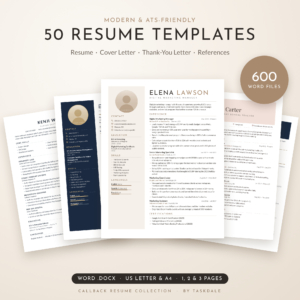
50 Resume Templates Bundle for Word
Price: $14.99 | Best for: people who want lots of design choice
The Callback Resume Collection holds 50 resume designs, each with a matching cover letter, thank-you letter and reference page, in 1, 2 and 3 page versions and both US Letter and A4. That comes to 600 editable Word files. Sixteen designs are single-column ATS layouts, and each template carries sample content for one of 12 career fields. Bonuses include a 23-page job search playbook, an Excel application tracker, 248 icons and the 16 fonts the designs use. Browse the sample for your field first, then pick two designs to shortlist.
What to check before you buy any downloadable template
Not every downloadable template is easy to live with. Some look lovely in the preview and fall apart the moment you type. Before you choose, run through this short list.
- How is the layout built? Tables and Word styles grow with your text. Floating text boxes do not, and a single extra line can push words out of sight.
- Which fonts does it use? If you have to download and install fonts, the file may look broken on another computer or in Google Docs. Common fonts or fonts bundled with the kit avoid that.
- Which paper sizes are included? A4 for the UK, Europe, Africa, Australia and most of Asia. US Letter for the US and Canada. A kit with both saves a fiddly resize.
- Are there matching letters? A cover letter, references page and thank-you note in the same style make the whole application look planned.
- Is there an ATS version? If you apply through company websites, you want a plain single-column file as well as the designed one.
- Is there any writing help? Prompt-style placeholders or a short guide stand in for the suggestions an online maker would give you.
Five minutes with that list can save you an evening of fighting a template that was never built to be edited.
A worked example: one switch, start to finish
Ama is a customer service team leader in Leeds who built her CV in an online maker last year. She now wants to apply for operations coordinator roles and needs a cover letter that matches, an ATS version for two big employers and a way to track replies.
On Saturday morning she copies her CV text into a document called “Ama CV master”. She picks a calm two-page design from a bundle, fills in her header, and pastes her experience across as plain text. While reading aloud she notices her best bullet says only “Managed a team”. She rewrites it: “Led a team of 11 advisers handling around 1,200 calls a week, raising the customer satisfaction score from 78% to 86% in nine months.”
Next she makes the ATS version from the same text, updates her LinkedIn headline to mention operations, and logs three open applications in a tracker. Total time: just under two and a half hours. On Monday she applies for a new role in twelve minutes, because everything is already on her drive. That is the real payoff of owning your files.
Moving your CV across in one sitting
You do not need to rewrite anything. Set aside about 90 minutes and follow these steps.
- Export what you can. If your online tool lets you download a PDF or text file, do that first.
- Copy the text section by section. Paste it into a plain document called “CV master text”. This is your safety net.
- Open your chosen template. Pick the length that fits your experience. One page for most early careers, two for most mid-careers.
- Paste as plain text. Ctrl+Shift+V in most programs, so the template keeps its fonts and spacing.
- Read every bullet aloud. Online makers sometimes encourage generic lines. Swap at least three for specific results.
- Make the matching letter. Copy your header into the cover letter template.
- Export both as PDFs and check on a phone.
Once the master is saved on your drive, tailoring for the next job takes ten minutes instead of a full rebuild. That feels like a weight off.
Do not skip the ATS version
Many large employers run applications through applicant tracking software before a person reads them. That software reads plain, single-column text best. Sidebars, icons, text boxes and headers can scramble the order or hide your contact details.
The fix is easy. Keep a designed CV for email and printed copies, and a plain single-column version for online portals. Our guide to the ATS-friendly resume template explains what the software struggles with and how to test your file. A kit built for this from the start saves guesswork, and it can still look good when a hiring manager opens it.
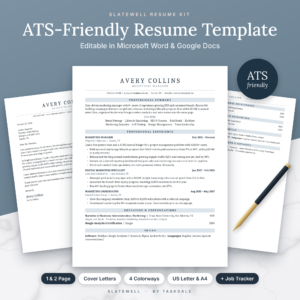
Slatewell ATS Resume Template
Price: $7.49 | Best for: online applications to big employers
Slatewell is a single-column kit for Word and Google Docs with four resume layouts, including Executive and Entry-Level versions, two cover letters, a references page and an interview thank-you letter. Everything comes in four calm colourways and both US Letter and A4, with no text boxes, tables, icons or images and contact details kept in the body of the page. A bonus Job Search Tracker for Excel and Google Sheets is included. Pick the layout for your career stage and upload that file to company portals.
Make your LinkedIn profile tell the same story
Recruiters often read your CV, then look you up on LinkedIn, then meet you. If your job titles, dates or achievements do not match between the two, it raises questions. When you move to a new CV, it is a good moment to bring your profile in line.
Start with the facts: titles, employers, dates. Then rewrite your headline so it says what you do and what you want, not just your current title. “Payroll administrator | Sage and Xero | Ready for a payroll team lead role” tells a recruiter far more than “Administrator at ABC Ltd”.
After that, prepare for the interview itself. Five or six real stories from your work, each with a situation, what you did and the result, will cover most questions you get asked.
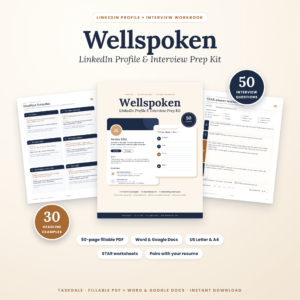
Wellspoken LinkedIn and Interview Workbook
Price: $6.99 | Best for: matching LinkedIn and interview prep
Wellspoken has two parts. Part 1 helps you write a LinkedIn profile that matches your CV, with headline formulas, 30 example headlines, About section templates, experience bullet formulas and networking messages. Part 2 is an interview workbook with 50 common questions, STAR answer worksheets, salary and company research pages, checklists and thank-you emails. It comes as a 50-page fillable PDF and editable Word and Google Docs files. Start with the fact-matching page, then write your headline.
Keep every application in one place
Online CV makers sometimes include a simple dashboard. When you move to downloadable files, you will want your own tracker. Without one, it is easy to lose track after the first 15 applications, and a missed follow-up can mean a missed interview.
A good tracker does three things. It lists every application with date, role and status. It tells you when to follow up. And over a few weeks, it shows you which job sites actually lead to replies, so you can spend your evenings where it counts. After an interview, send a short thank-you note within a day; our guide to the thank you email after an interview has templates for that.
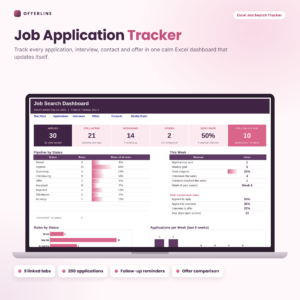
Job Application Tracker Spreadsheet for Excel
Price: $5.99 | Best for: organised, active job searches
Offerline is an Excel tracker with nine linked tabs: Start Here, a Dashboard, Applications, weekly goals, follow-up reminders that flag as Soon or Due now, an interview countdown, a source report, and an offer comparison covering year-one pay, real hourly rate and commute hours. Formula cells are locked and inputs use dropdowns. Set your follow-up gap, then enter your last five applications to see the dashboard come alive.
A one-week plan for switching over
If you would rather not do it all at once, spread the move across a week.
- Day 1: Copy your CV text out of your online tool into a master document.
- Day 2: Pick your design and fill in the header and profile.
- Day 3: Move your experience across, improving three bullets.
- Day 4: Build the ATS version from the same text.
- Day 5: Update your LinkedIn headline and job titles to match.
- Day 6: Set up your tracker and log any open applications.
- Day 7: Send one fresh application with your new files.
By the end of the week you have a full set of files on your own drive and your first application out. The second one will take a fraction of the time.
Frequently asked questions
What is a good alternative to an online CV maker?
Downloadable CV templates for Word and Google Docs. You keep the files, edit offline and make as many versions as you need without an account.
Can I move my CV from an online builder to Word?
Yes. Copy the text section by section into a plain document, then paste it into a Word template using paste as plain text so the new design stays intact.
Are downloadable CV templates ATS friendly?
Some are and some are not. Look for a single-column version with standard headings and no text boxes or images, and use it for online job portals.
Do I need Microsoft Word to use CV templates?
No. Most Word templates open in Google Docs, which is free. Upload the .docx file to Google Drive and open it there.
Should my LinkedIn profile match my CV?
Yes. Job titles, employers and dates should match exactly. Your LinkedIn headline and About section can be a little more personal.
Your next step
Before you do anything else, copy your current CV text into a plain document and save it on your own drive today. Then choose your design. If you want plenty of styles to pick from with sample wording for your field, start with the 50 Resume Templates Bundle for Word.