You send forty applications and hear back from two. The resume is not bad. It just never reached a person. Many employers run applications through tracking software first, and a pretty layout can confuse it. An ats friendly resume template solves that by keeping the structure plain enough for a machine to read, while still looking sharp to the human who opens it after.
Here is how it works, what to avoid, and which Taskdale kits give you a clean, readable file for a few dollars.
Quick picks
| Product | Best for | Price | Link |
|---|---|---|---|
| Northfield ATS Resume Kit | Full set with a thank-you letter and job tracker | $7.97 | View |
| Shortlist ATS Resume Template Kit | 1 and 2 page resumes plus a job search tracker | $7.49 | View |
| Meridian ATS Resume Template Kit | Resume, cover letter, references and tracker | $6.95 | View |
| ATS Resume Template | A simple 1 and 2 page set with a job tracker | $4.79 | View |
| Everett ATS Resume Template | The lowest price with a thank-you letter | $2.99 | View |
What an ats friendly resume template really is
ATS stands for applicant tracking system. It is the software many companies use to collect resumes, pull out the text and sort candidates. When you upload a file, the system tries to find your name, job titles, dates and skills. If it cannot find them, you can end up with a half empty profile on a recruiter’s screen.
An ats friendly resume template is built to avoid that. It uses one main column, standard headings like Experience and Education, normal fonts and no tricks that hide text from a reader. It still looks neat. It just does not rely on decoration to do its job.
Picture a recruiter with two hundred applicants and a coffee going cold. She does not zoom in on design. She scans for a title that matches the role and a few clear results. Your template should get out of her way.
What trips up resume software
Some design choices look great and read badly. Know the common ones before you pick a layout or edit one.
- Text boxes and floating shapes that sit outside the main text flow.
- Two or three column layouts that the software reads in the wrong order.
- Skill bars and star ratings, which carry no words for the software to read.
- Contact details tucked into the page header or footer.
- Icons used in place of words, like a tiny phone symbol with no label.
Pictures can also be a problem. If a job post is aimed at the US market, a photo adds nothing for the software and may even work against you with some employers. That is why a plain ATS version is worth having, even if you also keep a styled one.
How to write an ATS resume that still sounds human
Getting the template right is half the job. The words matter just as much. Here is the approach that tends to work.
Mirror the job post
Read the posting and note the exact terms it uses. If it says “customer onboarding” and your old resume says “client setup”, change yours, as long as it is true. Software often looks for matching phrases, and humans respond to them as well.
Use standard section names
Call it Work Experience, not “Where I’ve Been”. Call it Education, not “My Learning Path”. Clever headings look fun and confuse parsers.
Spell out and shorten
Write “Search Engine Optimization (SEO)” once, then use SEO. That way both versions are found.
Keep dates simple
Use one date style across the whole page, like “Mar 2021 to Jun 2024”. Switching styles halfway through can scramble how a system reads your timeline.
Lead with results
Each bullet should say what you did and what changed. “Trained 12 new staff and cut onboarding time from four weeks to three” is clear to a person and rich in plain words for a machine.
Five ATS friendly resume template kits compared
Each ats friendly resume template below is for Word and Google Docs. They differ in price, extras and how many pages they cover. Pick by what you will actually use.
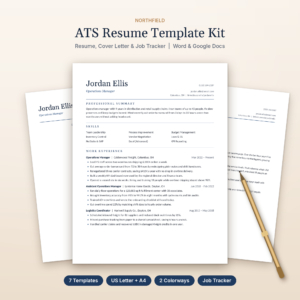
Northfield ATS Resume Kit
Price: $7.97 | Best for: a complete application set in one download
Northfield is a resume template for Word and Google Docs with a cover letter, references, a thank-you letter and a job tracker. It comes in US Letter and A4. If you want every piece of an application to match, this is the fullest kit of the five.
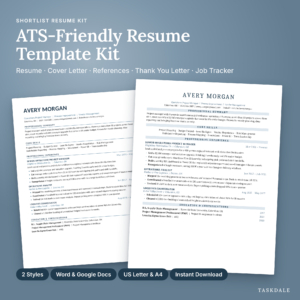
Shortlist ATS Resume Template Kit
Price: $7.49 | Best for: job seekers who want to track every application
Shortlist is built for Word and Google Docs, with 1 and 2 page resumes, a cover letter, references, a thank-you letter and a job search tracker. It comes in US Letter and A4. The tracker is useful once you pass ten or twenty applications and start losing count.
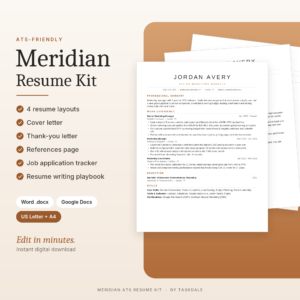
Meridian ATS Resume Template Kit
Price: $6.95 | Best for: a straightforward ATS kit in the middle of the price range
Meridian is a Word and Google Docs resume template kit that includes a cover letter, references and a job tracker. It is a tidy pick if you want the core pieces and nothing extra.
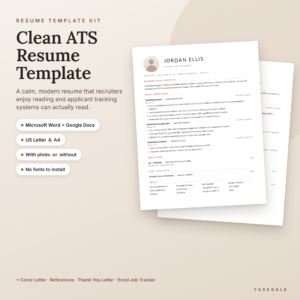
ATS Resume Template for Word & Google Docs
Price: $4.79 | Best for: a simple, lower cost ATS set
This template gives you a 1 and 2 page resume, a cover letter, references and a job tracker. It is made for Word and Google Docs. Good if you want the basics and a tracker without paying for extras.
Everett ATS Resume Template
Price: $2.99 | Best for: the lowest price that still includes a thank-you letter
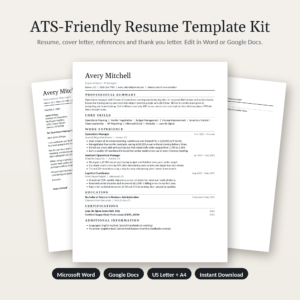
Everett is an ATS resume template for Word and Google Docs. It has a 1 and 2 page resume, a cover letter, references and a thank-you letter, in US Letter and A4. At $2.99 it is an easy first step.
Side by side
| Product | Format | Price | Best for | Link |
|---|---|---|---|---|
| Northfield | Word and Google Docs, US Letter and A4 | $7.97 | Full set with thank-you letter and tracker | View |
| Shortlist | Word and Google Docs, 1 and 2 page, US Letter and A4 | $7.49 | Tracking many applications | View |
| Meridian | Word and Google Docs | $6.95 | Core pieces plus tracker | View |
| ATS Resume Template | Word and Google Docs, 1 and 2 page | $4.79 | Basic set on a budget | View |
| Everett | Word and Google Docs, 1 and 2 page, US Letter and A4 | $2.99 | Lowest price, thank-you letter | View |
Making an ATS friendly resume template look good
Plain does not have to mean dull. A few small choices make a simple page feel designed.
Use white space. A page with room around the text looks calm and confident. Keep margins generous and put a clear gap between sections. Next, use bold only for job titles and company names. If everything is bold, nothing stands out.
Pick one accent, like a thin line under each heading or a single dark color for your name. Then stop. One touch looks chosen. Five look like clutter.
Keep your top lines strong. Your name, your target title and one sentence about what you do should sit at the top. A recruiter who reads only that much should know exactly who you are.
Choosing the right ats friendly resume template for your career stage
Your stage of work changes what you need. A student applying for a first role has little to list, so a one page layout with room for projects and education is plenty. Everett or the ATS Resume Template cover that at the lowest cost.
Someone mid career, with three or four jobs behind them, usually wants the two page option and the extras. Shortlist and Northfield both bring a thank-you letter and a job tracker, which helps once your search turns into a real project with deadlines and follow ups.
Career changers have a different problem. Their old titles do not match the new target. For them the summary at the top does the heavy lifting, so choose a layout with a clear summary block and keep the skills section in plain words. A tracker also helps, because a change of field often means more applications before the first answer.
And if you are not sure, start cheap. A $2.99 file that you actually fill in beats a fancier one you never open.
A short story about a rejected resume
Think of someone applying for an operations role. Her old resume had a sidebar with her skills in a colored column and a photo in the corner. It looked polished. She applied to thirty jobs and got silence.
She moved everything into a single column, put her contact info in the main body and renamed her sections. Nothing about her experience changed. A few weeks later the replies started. This is a common kind of fix, and it is usually that dull. The software could finally read her.
Checking your resume before you send it
You can test your file in two minutes. Save it as a PDF, open it, and try selecting all the text with your mouse. Copy it into a plain notepad window. If the text appears in a sensible order, a parser can probably read it. If the lines come out jumbled or whole sections go missing, something in the layout is getting in the way.
Also check the file name. “Resume Final v7 copy” tells a recruiter nothing. Try “Firstname-Lastname-Resume” instead. And follow the instructions on the job post about file type. When it asks for Word, send Word. When it does not say, a PDF is usually safe.
One last habit: keep a master copy with every job and skill you have, then trim a fresh copy for each application. It takes five extra minutes and keeps your resume pointed at the role in front of you, not at a generic reader who does not exist.
Give it a week of real use. If you keep getting replies, the setup is doing its job. If not, look at the wording before the layout. Often the fix is a clearer job title at the top, or bullets that name tools and results in plain terms.
Frequently asked questions
What is an ats friendly resume template?
It is a resume layout built so tracking software can read it. That usually means a single column, standard headings, normal fonts and no text boxes or skill bars. It still looks tidy to a person. Most Taskdale resume kits include an ATS version alongside the styled one.
Do all companies use ATS software?
Not all, but many mid sized and large employers do, especially when applications come through an online portal. Small businesses may read resumes by hand. Since you rarely know which, an ATS safe resume is the lower risk choice for online applications.
Should I put a photo on an ATS resume?
For US style applications, leave it off. A photo adds nothing for the software and some employers prefer not to see one. If a role in another country expects a photo, keep a separate photo version and use it only where that is the norm.
Are PDF or Word files better for ATS?
Follow the job post first. If it asks for Word, send Word. If it allows either, a text based PDF usually keeps your layout intact. Avoid PDFs made from scanned images, since the software cannot read the words in them.
How long should an ATS resume be?
One page suits early careers, and two pages suit most experienced workers. Shortlist, Everett and the ATS Resume Template all offer 1 and 2 page versions, so you can match the length to your real history.
Your next step
Pick one ats friendly resume template and get a clean file ready today. If you want the complete set, take Northfield. If you want the cheapest way to start, Everett is $2.99. Fill in your last two jobs, run the copy and paste test, and send your first application with a layout the software can finally read.