Every August the same question pops up in homeschool groups: spreadsheet, printable or app? People argue like it is politics. The truth is quieter. Each format works, for a different kind of parent. A homeschool planner spreadsheet does the math and keeps records. A printable gives you pen and paper. A digital planner travels with you. This guide compares the three honestly, tells you who each one suits, and points to the Taskdale options so you can pick one this week and get on with teaching.
Quick picks
| Product | Best for | Price | Link |
|---|---|---|---|
| Little Oak Homeschool Planner Spreadsheet | Excel fans who want a full command center | $8.99 | View |
| Brightpath Homeschool Planner Spreadsheet | A spreadsheet that also includes printable pages | $6.99 | View |
| Lesson Lane Digital Teacher Planner 2026-2027 | A digital planner for teachers and homeschoolers | $9.99 | View |
| Homeschool Planner App for Multiple Kids | A digital app for several kids on iPad, phone or computer | $4.49 | View |
The three formats at a glance
Before the details, a plain summary. A spreadsheet is a file full of tabs where you type, sort and add things up. A printable is a set of pages you print and write on, or fill in on screen as a PDF. A digital or app-style planner lives on a device and is built for tapping and typing instead of printing.
None of them is “the best”. The best is the one that survives November. That is the month when the shiny new planner gets buried under library books, and only the habits that fit your real life are still standing.
Why choose a homeschool planner spreadsheet
A homeschool planner spreadsheet shines when you have numbers to track. Grades, attendance days, hours, book lists, lesson counts. A spreadsheet adds them up, so you are not doing sums at the kitchen table after the kids are in bed.
It also stretches. Got a fourth child next year? Copy a tab. Want to move Thursday’s science to Friday? Drag it. Need to sort the reading list by author? Two clicks. A spreadsheet is the most forgiving format when your plans change, and homeschool plans change constantly.
The downsides are real, though. You need a computer or a tablet with a spreadsheet app. Some people feel tied to a screen, and a screen at the table can become a distraction. And if you are not used to Excel, the first hour feels like learning a small language.
Who should pick a spreadsheet
Parents who like order and totals. Parents of several kids. Parents who plan to build a transcript later and want grades and hours in one place. If you already live in Excel for work or the family budget, you will feel at home within minutes.
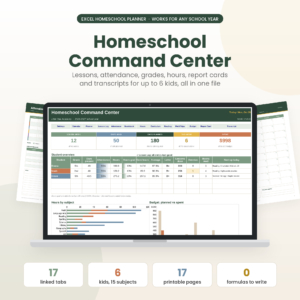
Little Oak Homeschool Planner Spreadsheet
Price: $8.99 | Best for: parents who want a full Excel command center for the school year
Little Oak is a homeschool planner spreadsheet for Excel, built as a command center. If you want one workbook that holds your planning in a single organized file, this is a clean place to start, and it suits anyone who prefers typing and sorting to writing by hand.
Why choose a printable homeschool planner
Paper has a pull that software does not. You see the week at once, you can scribble in the margin, and nothing pings. For many parents, writing the plan by hand is how it sticks in their head.
Printables are also kind to kids. A child can tick a box on a chart herself. A weekly sheet on the fridge shows what is left without anybody asking. And you can print only what you need, which keeps the binder light.
The cost is effort. You need a printer, ink and paper, and a place to keep the pages. Lost pages are lost data. If you have a habit of misplacing things, you might love paper and still struggle with it. That is where a fillable PDF helps, since you can type into the page and print it only when you want to.
Who should pick a printable
Parents who think better with a pen. Families with younger kids who like checklists. Anyone who needs a screen break from work all day. And anyone who wants a binder they can hand to a grandparent or a substitute teacher without explanation.
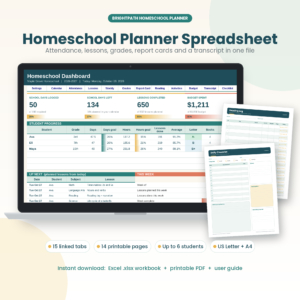
Brightpath Homeschool Planner Spreadsheet
Price: $6.99 | Best for: parents who want a spreadsheet and printable pages together
Brightpath is a homeschool planner spreadsheet with printable pages included. At $6.99, it lets you plan on screen and print the pages you want to hold in your hand, which makes it a handy bridge for people who cannot decide between formats.
Why choose a digital or app-style homeschool planner
A digital planner goes where you go. You can open it in the car outside piano lessons, check tomorrow’s plan while the soup simmers, or shift tomorrow’s lesson in a spare minute. There is no printing, no lost pages and no ink bill.
This format suits parents who are already glued to a tablet or laptop. It is also kind to anyone who homeschools while working, because a plan that fits in a pocket is a plan you will check. The tradeoff is the same screen problem as with a spreadsheet. Tools that live on a device can drift out of sight when the device is closed.
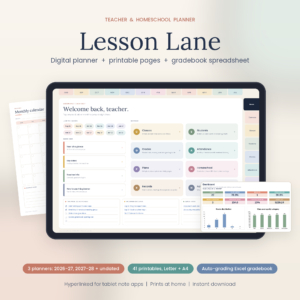
Lesson Lane Digital Teacher Planner 2026-2027
Price: $9.99 | Best for: teachers and homeschoolers who want a digital planner
Lesson Lane is a digital teacher planner for 2026-2027 that also works as a homeschool planner. It is a good match if you want a digital planner built with teachers in mind that also serves for planning the home school year.
Spreadsheet vs printable vs app: a real-life test
Here is a quick way to decide. Picture your planning moment. Is it Sunday night on the couch with a laptop? Choose a spreadsheet. Is it Saturday morning with coffee and a pen? Choose a printable. Is it ten minutes in the pickup line? Choose digital.
Next, think about your hardest task. If it is tracking grades and hours, lean spreadsheet. If it is getting kids to follow a daily list, lean printable. If it is staying flexible and mobile, lean digital. Match the tool to the pain and the choice gets easy.
And do not be afraid to mix. Plenty of families plan in a spreadsheet and print the weekly page for the fridge. That is not cheating. That is using each format where it is strongest.
Common mistakes when choosing a homeschool planner
The first is buying for the person you wish you were. The color-coded, ten-tab version of you who plans six weeks ahead. Buy for the person you are on a Tuesday in February. The second is choosing by looks alone. A pretty planner you dread opening is clutter. The third is switching every term. Give a format at least a full term before you judge it.
The fourth is forgetting backups. If your plan lives in one file, copy it to a cloud folder once a week. If it lives on paper, snap a quick photo of each filled page. Five seconds now saves a bad afternoon later.
What to check before you buy any homeschool planner
Read the listing slowly. Look at the file type: Excel, PDF, or something built for a tablet app. Check the paper sizes if you plan to print, since US Letter and A4 are not the same. Look at the school year the planner covers, because a 2026-2027 planner suits a fall start but may feel odd in the middle of a different year.
Then ask yourself three honest questions. Will I open this on a normal Wednesday? Does it track the things I actually need, like attendance or grades? Can I live without the features I will never touch? A planner with fewer tabs you use beats one with forty you ignore. Do this check once, and the buying part is over in ten minutes.
Setting up your first month in any format
Whichever format wins, start the same way. Week one, add only the fixed things: your school days, subjects and any outside classes. Week two, add lesson plans for the core subjects. Week three, start recording attendance and grades. Week four, review what you keep skipping and cut it.
That slow ramp beats the big weekend setup, where you fill in the whole year and then never look at it. The plan should grow with you. A half-empty planner that you use daily beats a full one you never touch.
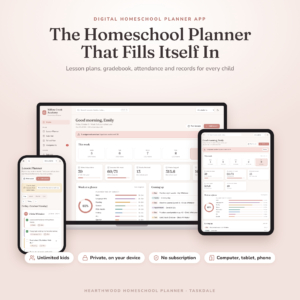
Homeschool Planner App for Multiple Kids
Price: $4.49 | Best for: parents who want planning, grades and records on iPad, phone and computer
Homeschool Planner App for Multiple Kids is a digital lesson planner with a gradebook, attendance tracker, report cards and transcripts. It works on iPad, phone and computer, and it is made for families with more than one child. If you like to update records from wherever you happen to be, this is the one to look at.
Which homeschool planner spreadsheet or format fits you?
If you love Excel and want a full command center, take Little Oak. If you cannot choose between screen and paper, Brightpath gives you a spreadsheet with printable pages for a lower price. If you want a planner you can carry on a device, look at Lesson Lane. And if you want a true app that works on iPad, phone and computer, with a gradebook and attendance, the Homeschool Planner App covers it.
A final word if you are torn. Cost is rarely the deciding factor here, since every option on this page is only a few dollars. The real cost is the time you spend setting up and the guilt you feel when you stop using it. So choose the format that makes the first week feel easy. Ease in week one is the best predictor of use in week twenty.
If you can, try the format on a small piece of your life first. Plan just next week in it. Log just the attendance for a month. A small trial tells you more than an hour of comparing features ever will.
| Product | Format | Price | Best for | Link |
|---|---|---|---|---|
| Little Oak Homeschool Planner Spreadsheet | Excel spreadsheet | $8.99 | Typing, sorting and a full command center | View |
| Brightpath Homeschool Planner Spreadsheet | Spreadsheet + printable pages | $6.99 | Mixing screen and paper on a budget | View |
| Lesson Lane Digital Teacher Planner 2026-2027 | Digital planner | $9.99 | Teachers and homeschoolers on the go | View |
| Homeschool Planner App for Multiple Kids | Digital app (iPad, phone, computer) | $4.49 | Several kids, records on any device | View |
Frequently asked questions
Is a homeschool planner spreadsheet better than a printable?
Neither is better for everyone. A spreadsheet does the adding for you and is easy to change, while a printable is quick to glance at and free of screens. Choose the one that matches how you actually plan, and test it for a full term.
Can I use a homeschool planner spreadsheet on a tablet or phone?
Often yes, if you have a spreadsheet app that opens Excel files. Check what the listing says about formats before you buy. Larger screens are easier for planning, while phones work well for quick checks and small updates.
Do I need a printer for a printable homeschool planner?
If you want paper, yes. If you pick a fillable PDF, you can type into the pages on screen and print only when you want to. Many families print the weekly pages and keep the rest on the computer.
How much should I spend on a homeschool planner?
Prices vary, and the products here run from about $4 to $10. Start with the format that fits your habits, not the one with the most pages. A simple planner you use daily is worth more than a fancy one you ignore.
Can I switch homeschool planner formats mid-year?
You can, though it is easier at a term break. Copy your lesson plans and records across, and keep the old file as a backup. If a format is not working after a full term, switching is a perfectly good idea.
Your next step
So, the short version: choose the format that fits the moment you plan, not the one that looks best in a photo. If you are unsure, Brightpath Homeschool Planner Spreadsheet is a low-risk way to try both a spreadsheet and printable pages in one purchase. Use it for a month, then decide.