Some CVs can be patched. Add the latest job, nudge the dates, save. Others have been patched so many times that every new line breaks something, the font changes halfway down page two, and the oldest bullet still mentions a fax machine. When you open yours and feel a small sinking feeling, that is usually the sign. It is new CV time.
This guide is for anyone starting over: people returning to work after a break, people who have not job hunted in five or more years, career movers, and anyone whose file has simply grown messy. It covers how to tell whether you need a rebuild, what to gather before you start, how to move content into a fresh template without dragging old formatting problems along, and a realistic weekend plan to get it finished.
Starting fresh sounds like more work. In practice it is often quicker than fighting an old file, and the result feels much better to send.
Quick picks: fresh templates to start from
| Product | Best for | Price | Link |
|---|---|---|---|
| Sloane Resume Kit | A calm, modern restart with a writing toolkit | $4.49 | View |
| Alder Resume Kit | Tip-led placeholders and a job tracker | $4.79 | View |
| Hollis Resume Kit | A complete matching set for a proper relaunch | $8.99 | View |
Signs your CV needs a fresh start, not a patch
A patch is fine when the bones are good. A fresh start is better when the bones are the problem. Here is how to tell the difference.
The layout breaks every time you edit. You add one bullet and the whole second page shifts, or a text box drifts over your dates. That usually means the file was built with floating boxes or manual spacing, and no amount of careful editing will fix it for good.
The style is from another era. Centred everything, a clip-art border, a font you have not seen since school. Readers do notice, even if they would not say so.
The content is mostly duties. If most bullets begin with “Responsible for”, you will be rewriting them anyway, so you may as well rewrite them in a clean file.
Your direction has changed. A CV built for a sales career will never quite fit an application for a training role, however much you edit it. The order, the profile and the emphasis all need to change.
And finally, the honest one: you dread opening it. That feeling slows down every application. A file you are proud of makes you apply more often, which matters more than any single wording choice.
Update or rebuild: a two-minute test
Open your current CV and ask four questions. Can you add a new role without the layout breaking? Is every heading formatted the same way? Does it fit on one or two pages at a readable size? Would you be happy for a hiring manager to see it today?
If you answer yes to all four, update it and move on. If you answer no to two or more, rebuild. The rebuild does not mean starting your wording from zero. It means taking your content and placing it in a clean structure, then improving it as you go.
Gather your material first
The slowest part of a new CV is usually hunting for facts halfway through. So collect them first, in one sitting, before you touch a template.
Pull out old contracts or payslips to confirm exact start and end dates. Find any appraisals or review notes, because they often contain the results you forgot about: “Reduced complaints by a third”, “Trained four new team members”. Look at your LinkedIn profile, old CVs, certificates and training records. Check your email for thank-you messages from managers or clients; they are a goldmine of specific wins.
Put everything into one plain document, grouped by job. It will be messy. That is fine. This is your raw material, and having it all in one place before you start makes the next steps much faster.
Choosing a fresh template
A good template does more than look nice. It keeps working after twenty edits. When you choose one, look for real Word styles for headings and body text, no floating text boxes, fonts that come with the file or are already on your computer, and your paper size, A4 or US Letter.
It also helps if the template comes in more than one length and with a single-column version for online portals. You may start with a one-page CV and later need two pages for a senior role, and rebuilding in a different design is exactly the kind of work you are trying to avoid. If you are weighing up whether to pay for a template at all, our look at free vs paid resume templates sets out the trade-offs honestly.
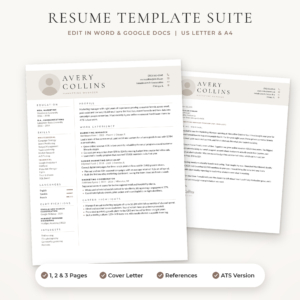
Sloane Resume Kit
Price: $4.49 | Best for: a clean restart after years away
Sloane is built from simple tables and real Word styles, so adding a job grows the column and deleting a section moves everything up neatly. You get a 1 page resume with and without a photo, a 2 page resume, a 3 page CV, an ATS resume, a cover letter and references page, in three colours and both US Letter and A4. The bonus Resume Writing Toolkit has 96 action verbs and before-and-after bullet examples. Open the 1 page file first and see whether your rewritten content fits before moving to two pages.
Moving content across without old problems
Here is the trap. You copy a section from your old CV, paste it into the shiny new template, and the old fonts, sizes and spacing come along with it. Now your new CV has the same problems as the old one.
Avoid it by pasting as plain text. In Word, use Paste Special and choose Keep Text Only, or press Ctrl+Shift+V in many versions. In Google Docs, use Ctrl+Shift+V or right-click and choose Paste without formatting. The text arrives bare and takes on the template’s own styles.
Move one section at a time, starting with experience, since it is the biggest. Click into the template’s placeholder bullet, paste as plain text, and the bullet style comes from the template. If something looks wrong, apply the template’s style to it rather than formatting it by hand. Our step-by-step guide to making a resume in Google Docs shows where the style controls live if you are working there.
Rewriting each section with fresh eyes
Profile
Write it last, not first. Once your experience is rewritten you will know what your strongest points are, and the profile can lead with them. Three sentences: who you are, one proof point with a number, what you want next.
Experience
Rewrite each bullet so it starts with a verb and, wherever honest, ends with a result. “Responsible for the reception desk” becomes “Ran a busy reception desk handling about 80 patients a day and cut waiting room complaints by moving reminder calls to the day before”. Keep three to five bullets for recent roles and one or two for older ones.
Skills
Clear out anything dated or generic. Remove software nobody uses anymore. Replace “Microsoft Office” with what you can actually do, such as Excel pivot tables or mail merge. Add tools you picked up recently, even outside work.
Education and training
Put the most recent or most relevant first. Older school results can shrink to one line. Short courses from the last few years are worth listing, because they show you have kept learning.
A worked example: Grace starts over
Grace has been a dental receptionist for nine years and wants to move into practice management. Her old CV is three pages, built in 2016, with a decorative border and eleven bullets per job, most of them duties.
She gathers her appraisals and finds three results she had forgotten: she set up a recall system that filled cancelled slots, trained two new receptionists, and switched the practice to online booking. She picks a clean two-page template, pastes her text across as plain text, and rewrites her bullets around those wins. Her old title line, “Receptionist”, becomes “Dental Practice Coordinator”, which matches what she now does day to day. Her profile goes last and leads with the online booking move.
The new CV is two pages, clearly ordered, and points at the job she wants rather than the one she has. She told a friend it was the first time in years she felt proud to send it. That is the real result of starting fresh.
A weekend plan to finish it
Two half-days is enough for most people. On Saturday morning, gather your material into one document and choose your template. On Saturday afternoon, move your experience across as plain text and rewrite the bullets for your two most recent roles.
On Sunday morning, finish older roles, education and skills, then write your profile. On Sunday afternoon, read the whole thing aloud, print it, fix what you find and save a PDF. Then stop. Fresh eyes on Monday evening will catch the last few slips.
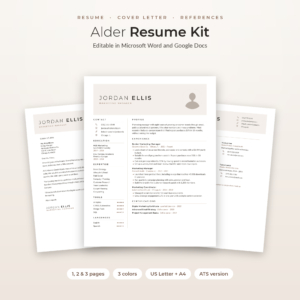
Alder Resume Kit
Price: $4.79 | Best for: people restarting with little time
Alder’s placeholder text is made of short tips that tell you what to write in each line, which helps when you are rebuilding over a single weekend. You get 1, 2 and 3 page resumes, a no-photo version, an ATS resume, a cover letter, references page and thank-you letter, in Mocha, Sage and Slate and both paper sizes. A Job Application Tracker for Excel, a Job Search Toolkit and a Round Photo Maker are included. Follow the tips in the experience section first on Saturday afternoon.
Giving your new CV a proper launch
A fresh CV deserves a fresh set around it. Update your LinkedIn profile so the job titles and dates match exactly. Make a cover letter in the same design, so your applications look like one piece rather than parts from different years. Prepare a references page in the same style, ready for when an employer asks.
Then name your files properly. “Grace-Mensah-CV.pdf” for the general version, and the company name added for tailored copies. Keep the Word file as your editable master and send PDFs.
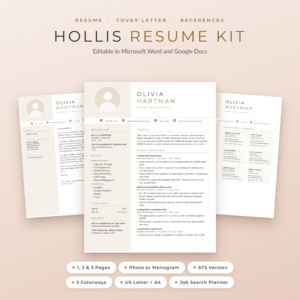
Hollis Resume Kit
Price: $8.99 | Best for: a full relaunch with matching documents
Hollis gives you the whole matching set for a relaunch: resumes with a photo or monogram in 1, 2 and 3 pages, an ATS resume, cover letters, a references page with six reference cards and an interview thank-you letter, in Champagne, Rosewood and Graphite and both US Letter and A4. The fonts are built into each file, and a Job Search Planner for Excel and Google Sheets comes with it. Finish the CV first, then copy your header into the cover letter so they match exactly.
Keeping it fresh from now on
The reason most CVs end up needing a rebuild is that nobody touches them between job searches. A fifteen-minute check every three months stops that. Add any new results, courses or responsibilities while you still remember the details and the numbers.
Put a reminder in your calendar for the first Sunday of January, April, July and October. It is a tiny habit, and the next time you need a CV in a hurry, you will open a file that is already up to date. No sinking feeling.
Mistakes when starting over
The most common one is copying formatting across along with the words. Always paste as plain text. The second is keeping every bullet from the old CV out of loyalty. A fresh start is the perfect moment to cut. The third is rushing the profile at the start, before you know what your best points are. And the fourth is forgetting the rest of the set: a lovely new CV paired with a 2017 cover letter in a different font undoes some of the good work.
Frequently asked questions
How do I know if I need a new CV or just an update?
If the layout breaks when you edit, the design looks dated, most bullets are duties, or your career direction has changed, start fresh. If the structure is sound, simply add your latest role and results.
How do I move my old CV into a new template?
Copy one section at a time and paste it as plain text, using Keep Text Only in Word or Paste without formatting in Google Docs. The text then takes on the new template’s styles.
How long does it take to write a new CV from scratch?
Most people can finish a solid CV in two half-days if they gather dates, results and certificates first. The rewriting goes much faster once all your material is in one place.
Should my new CV be one or two pages?
One page suits graduates and people with under about ten years of relevant experience. Two pages is normal for experienced applicants. Choose a template that offers both so you can switch easily.
What should I remove from an old CV?
Outdated software, duties without results, jobs from more than fifteen years ago, full street addresses, “References available on request” and any personal details you are not required to share.
How often should I update my CV?
A quick fifteen-minute check every three months keeps it current, even when you are not job hunting. Add new results and training while the details are fresh.
Your next step
Tonight, open a blank document and gather your dates, results and certificates into it, grouped by job. Tomorrow, pick a clean template and paste your experience across as plain text. If you want a calm, modern design with a writing toolkit to guide the rewrite, start with the Sloane Resume Kit.