A Word templates resume pack should get you from download to sent application in about an hour. Open the right file, type over the sample text, save it in the right format and attach it. That’s the promise. The packs that deliver it are built so you never touch a margin or wrestle a text box, and everything in the set already matches.
This guide is for anyone holding a freshly downloaded resume pack, or thinking about buying one, who wants to know what to do with all those files. You will see what a good pack includes, which file to start with, how to edit without breaking the layout, how to save and name your files, and what to send with them. We also compare four Taskdale Word packs.
Quick picks: Word resume template packs
| Product | Best for | Price | Link |
|---|---|---|---|
| Marlowe Resume Template Kit | Photo and monogram designs with every letter | $4.79 | View |
| Ellery Resume Template for Word | Fonts built in and a 21-page user guide | $4.79 | View |
| ATS Resume Template for Word and Google Docs | A clean ATS layout with a job search toolkit | $4.79 | View |
| Marlowe Resume Template | The larger set with three color choices | $4.79 | View |
What should be in a Word resume pack
A single resume template is useful. A pack is useful for the whole application. When you compare options, look for these pieces:
- Resume in more than one length. A one-page version for most roles, plus two and three-page versions for experienced or specialist applications.
- An ATS version. One column, no tables or images, for online job portals that read your file with software first.
- Photo and no-photo designs. Photos are normal in some countries and not in others. Having both saves rebuilding the header.
- Matching cover letter. Same header, same fonts. It makes the application look like a set.
- References page. Ready to send when an employer asks.
- Thank-you letter. For the day after an interview.
- US Letter and A4. The two paper sizes are different shapes, so a pack with both avoids overflow when you switch.
- Some guidance. Placeholder tips, an action verb list or a short guide save a lot of staring at a blank line.
That might sound like a lot of files. A good pack sorts them into folders by size and design, so you only open what you need. For a broad comparison of designs, see our roundup of the best resume templates for Word and Google Docs.
Step 1: Open the right file first
Unzip the download into a folder called Job Search, somewhere you will find it again. Then resist the urge to open every file. Start with one.
- Pick your paper size. US Letter for the US and Canada. A4 for almost everywhere else.
- Pick your length. One page if you have under about 10 years of experience. Two pages if you have more, or a lot of certifications.
- Pick photo or no photo. In the US, Canada and the UK, most employers don’t expect a photo. In parts of Europe, the Middle East, Africa and Asia, many do.
- Save a copy right away. Use File, Save As, and name it Master Resume. Keep the original untouched in case you want to start fresh.
Now you have one file open, on the right paper, in the right length. Everything else in the pack can wait until this is done.
If fonts look wrong
If the design opens in a plain font like Calibri or Times instead of the one in the preview, the template’s fonts aren’t installed on your computer. Some packs include the font files. Double-click each one and choose Install, then reopen the resume. Packs with fonts built into the file avoid this step entirely.
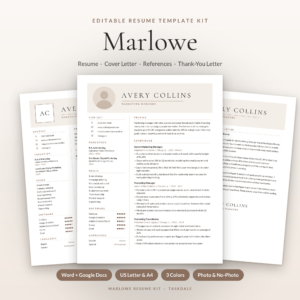
The Marlowe kit is a good all-rounder here, with photo, monogram and ATS designs in one matching set.
Marlowe Resume Template Kit
Price: $4.79 | Best for: applicants in any country
The Marlowe Resume Template Kit gives you a resume in 1, 2 and 3-page versions, a cover letter, a references page and a thank-you letter, each in a photo design and a no-photo monogram design, plus an ATS resume for online portals. It is built from simple tables and real Word styles, so the page grows as you type and heading changes apply everywhere at once. It opens in Word and Google Docs. Start with the 1-page monogram file if you are applying in the US.
Step 2: Edit in the right order
Editing top to bottom feels natural, but it isn’t the fastest route. Work in this order instead and you’ll avoid rewriting the summary three times.
- Experience first. Type over each sample job with your own: title, employer, city, dates, then three to five bullets. Duplicate a job block for extra roles by copying it whole and pasting below.
- Education and training. Degree, school, year, plus any licenses or certificates the job needs.
- Skills. Eight to twelve, using the job ad’s words where they are true for you.
- Summary last. Now that the rest is written, pick the two strongest things and put them in a three-line summary at the top.
- Header. Name, phone, email, city, LinkedIn. Check every character.
- Delete unused sections. If you have no publications, remove that heading rather than leaving it blank.
Habits that keep the layout clean
- Type over placeholder text rather than deleting it and typing fresh. The style stays.
- Paste as plain text when copying from an old resume. In Word, use Paste and choose Keep Text Only.
- Press Enter once. The spacing is already built into the style.
- Change colors through the style, not heading by heading.
That’s the whole trick. Most of the hour is spent thinking about your words, which is exactly where it should go. The first time a full page comes together without a single nudge to the margins is a quietly lovely moment.
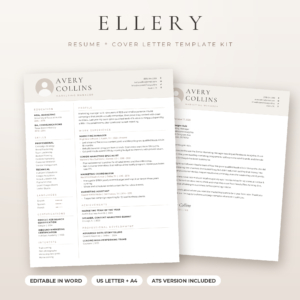
If you want fonts that travel with the file and a guide that walks you through the writing, Ellery is built for exactly that.
Ellery Resume Template for Word
Price: $4.79 | Best for: people who want it to just open right
Ellery is a Word resume pack with 1, 2 and 3-page layouts, a no-photo version, a separate ATS resume, a matching cover letter and a references page, in Stone and Slate and in US Letter and A4, 32 Word files in all. It is built from plain text, real styles and simple tables with fonts included. You also get an Excel job application tracker and a 21-page guide with writing tips, 96 action verbs and 12 interview questions. Read the guide’s quick start, then open the 1-page file.
Step 3: Match the cover letter and references
With the resume done, open the matching cover letter and save a copy with the company name. Your header is the same as the resume, so copy and paste it across. Then write four short paragraphs:
- Opening: the role you are applying for and one line on why you fit.
- Evidence: two achievements from your resume that match the job ad, with a little more detail.
- Why them: one specific thing about the company or team that drew you in.
- Close: a polite, confident line about speaking further.
Keep it under one page. Then fill in the references page with two or three people who have agreed to be contacted, and save it. Don’t send references unless the employer asks for them, but have the file ready so you can reply within the hour when they do.
Step 4: Save and name your files properly
How you save the file matters as much as what is in it.
PDF or Word?
Send a PDF unless the employer asks for a Word file. A PDF looks the same on every screen and phone. A .docx can shift if the reader has different fonts or an older version of Word. In Word, go to File, Save As, and choose PDF. Some job portals specifically ask for .docx so their software can read it. Follow what they say.
Name it so it is easy to find
Use your name, the document type and the company: Jordan_Lee_Resume_Brightwater.pdf and Jordan_Lee_CoverLetter_Brightwater.pdf. Recruiters download dozens of files called resume.pdf. Yours will stand out simply by having your name on it.
Check the PDF, not the Word file
Open the PDF you just saved and scroll through. Check links work, nothing has moved and no page has a single stray line. Open it on your phone too. Many hiring managers read on a phone first.
Step 5: Send it the right way
If you are applying by email, the email itself is the first thing they read. Keep it short and plain.
- Subject line: the job title and your name, like Office Manager Application, Jordan Lee.
- Body: three or four lines saying which role you are applying for, that your resume and cover letter are attached, and that you look forward to hearing from them.
- Attachments: resume and cover letter as PDFs, nothing else unless asked.
Through a job portal, upload the ATS version if you have one, then paste your cover letter text into the box if there is one. Keep a note of what you sent and when.
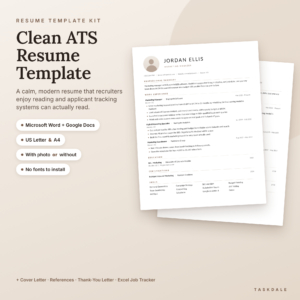
If you would like a pack with a job tracker and a step-by-step guide for the whole process, this ATS kit covers it.
ATS Resume Template for Word and Google Docs
Price: $4.79 | Best for: online portal applicants
This ATS resume template kit gives you one and two-page resumes, a matching cover letter, a references page and a thank-you letter in Word format that opens in Google Docs, each in US Letter and A4 with photo and no-photo versions. The layout is one column with standard headings and dates on proper tab stops. You also get an Excel job application tracker, a 12-page job search toolkit and a 17-page step-by-step guide. Open the guide first, then the one-page resume.
After you hit send
The pack keeps working after the application goes out. When you land an interview, open the thank-you letter template and personalize it within a few hours. Mention one thing you talked about and restate your interest in a sentence. Our guide to the thank-you email after an interview covers timing and wording.
For each new job, go back to your Master Resume, save a fresh copy with the new company name, and adjust the summary and bullets to fit. With the pack set up, each new application takes 15 to 20 minutes rather than an evening.
If you sometimes work in Google Docs, our walkthrough on making a resume in Google Docs shows how to keep a Word template looking right there too.
Your first hour, minute by minute
If you like a plan, here is how the first full application usually breaks down for someone with a few jobs behind them.
| Minutes | Task |
|---|---|
| 0 to 5 | Unzip the pack, pick paper size, length and design, save Master Resume |
| 5 to 30 | Type in experience, education and skills |
| 30 to 35 | Write the three-line summary and check the header |
| 35 to 50 | Fill in the matching cover letter for this job |
| 50 to 55 | Save both as PDFs with clear names and check them on your phone |
| 55 to 60 | Write the short email or upload to the portal, then note it in your tracker |
If your history is long or you are changing careers, give yourself two sessions instead of one. Tired editing leads to typos, and a fresh pair of eyes the next morning will catch them.
Common mistakes with resume packs
Editing the original file. Always work on a copy so you can start fresh if something goes wrong.
Mixing designs. A Marlowe resume with a different pack’s cover letter looks mismatched. Stick to one set.
Leaving placeholder text. A stray line of sample text is easy to miss and hard to explain. Read every line before saving the PDF.
Sending the wrong length. A three-page resume for an entry-level role looks padded. Match the length to the job.
Forgetting the ATS version. Upload the photo design to a portal and the software may scramble it.
Frequently asked questions
What is a Word templates resume pack?
It is a set of matching Word files for a job application: usually resumes in different lengths, a cover letter, a references page, a thank-you letter and an ATS version, in one consistent design.
Can I use a Word resume template in Google Docs?
Most of them, yes. Upload the .docx to Google Drive and open it with Google Docs. Check fonts and spacing before you download it as a PDF.
Should I send my resume as a PDF or a Word file?
Send a PDF unless the employer or portal asks for a Word file. A PDF keeps the layout exactly as you designed it.
Why does my resume template look different from the preview?
Usually the template’s fonts aren’t installed on your computer. Install the included font files, or choose a pack with fonts built in, then reopen the file.
How long does it take to fill in a resume template?
About an hour for your first complete application. After that, tailoring a copy for each new job takes 15 to 20 minutes.
Your next step
Make a folder called Job Search, choose your paper size and length, and open just one resume file tonight. Fill in your experience first and save your Master Resume. If you don’t have a pack yet, the Marlowe Resume Template Kit gives you every matching document in one download.