Online invoicing services such as Envoice suit plenty of businesses. You log in, pick a client, add lines and send. But some owners reach a point where they want something simpler: no account, no plan to keep paying for, and invoices saved as files on their own computer. If that sounds like you, an Envoice alternative can be as plain as a good set of invoice templates.
This guide is for sole traders, makers, home service providers and small shops who send a modest number of invoices and want the process to stay simple. We will look fairly at what online invoicing tools offer, what “simple” should really mean in a template, the three main template formats and who each suits, a worked example from a custom order business, and how to move your records across without losing anything.
Quick picks
| Product | Best for | Price | Link |
|---|---|---|---|
| Ledgerline Business Forms Kit | Simple invoice, quote, estimate, receipt and purchase order set | $2.99 | View |
| Maker’s Business Forms Kit | Crafters taking custom orders with deposits | $3.00 | View |
| PaidPath Client and Invoice Hub | Tracking payments and balances after you send | $9.49 | View |
| Ledgerline Invoice, Quote and Receipt Kit | Auto-calculating Excel invoice with a client list and log | Original price was: $3.00.$1.50Current price is: $1.50. | View |
What online invoicing services do well
Let’s give credit where it is due. Online invoicing tools tend to offer a few genuinely useful things:
- Send from anywhere. Log in on a phone or laptop and invoice from the job.
- Online payment. Many let clients pay from a link in the email.
- Automatic reminders. Some send overdue nudges for you.
- Shared access. A business partner or bookkeeper can log in too.
For a business sending dozens of invoices a week, or one where several people bill clients, those features save real time. If that is you, staying put may be the right call.
Why some owners look for an alternative
The reasons people switch tend to be practical rather than dramatic:
- Ongoing fees. A monthly or yearly plan for a business that sends eight invoices a month can feel out of proportion.
- Features they never use. Dashboards, team seats and integrations sit idle.
- Wanting files they keep. A folder of PDFs and one spreadsheet on your own drive is easy to back up and easy to hand to an accountant.
- Working offline. A market stall, a rural job or a flight with no wifi.
- Plan changes. Any online service can change its pricing, limits or features over time. A template you own stays the same.
If two or three of those ring true, a simple template set will likely cover what you need.
What “simple” should mean in an invoice template
Simple does not mean bare. A good simple invoice template still has everything a client and an accountant expect. It just does not ask you to learn a system. Look for:
- Clear places for your details, the client’s details, an invoice number, the date and a due date
- Enough line rows for a typical job, with quantity, price and amount
- Subtotal, discount, tax, deposit and balance due
- A payment details box and a short terms line
- A logo spot you can replace in a few clicks
- Matching quote and receipt forms, so all your paperwork looks the same
- Both US Letter and A4 if you ever print
And one more: it should open straight away in software you already have. If a template needs a manual to fill in, it is not simple.
The three template formats, and who each suits
Word templates: type and go
Open the file, click the placeholder text, type over it, save as PDF and send. Word templates suit people who invoice a few times a month and are comfortable typing totals themselves. The look is polished and the learning curve is close to zero. The catch: Word will not check your arithmetic.
Excel templates: the math is done for you
An Excel invoice remembers your clients and prices, multiplies quantities, applies discounts and tax, and works out the balance due. It suits anyone with more than a handful of lines per invoice, or anyone who has ever sent a total that did not add up. Many also keep an invoice log that marks paid and overdue invoices.
Printable and fillable PDFs: pen or screen
Print them blank and write by hand, or type into the fields on screen. These suit market sellers, mobile workers and anyone who hands an invoice over in person. Keep a copy of each one for your records.
Most small businesses end up using two of the three. Excel at the desk, a pad of printed forms in the bag. For a deeper side-by-side, our comparison of invoice templates in Word, Excel and PDF walks through each format with examples.
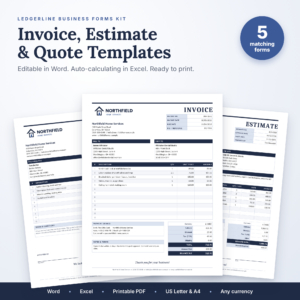
Ledgerline Business Forms Kit
Price: $2.99 | Best for: Sole traders wanting a simple matching set
Five matching forms in navy and soft blue: quote, job estimate, invoice, sales receipt and purchase order. You get them as Word templates in US Letter and A4, ten blank printable PDFs with writing lines, and an Excel Invoice Maker that fills client details and item prices and works out tax, total and balance due. Invoices mark themselves paid or overdue, and a tracker logs up to 300. Open the Word invoice first and drop your logo into the dashed box.
Worked example: a custom tumbler order
Jess makes personalized tumblers from her spare room. A customer orders six for a bridal party, each with a name, plus gift boxes, shipped to one address. Jess takes a deposit on every custom order before she starts. In this example she does not collect sales tax; if you do, add it as its own line.
| Item | Qty | Price each | Amount |
|---|---|---|---|
| 20 oz glitter tumbler, rose gold | 6 | 28.00 | 168.00 |
| Name personalization | 6 | 4.00 | 24.00 |
| Gift box with tissue | 6 | 3.50 | 21.00 |
| Shipping, one address | 1 | 12.00 | 12.00 |
The total is 225.00. The customer paid a 100.00 deposit when she placed the order, so the invoice shows a balance due of 125.00, payable before shipping.
What makes this invoice work is what sits around it. The order form listed all six names, spelled exactly. The deposit agreement said the deposit is not refundable once the tumblers are made. The invoice references the order number. When the customer asks “was it Kaitlyn with a K?”, Jess checks the order form in ten seconds. That is a small, lovely kind of calm on a busy Saturday of orders.
Custom order businesses need more than an invoice. They need an order form with room for every detail, a deposit agreement, and a receipt. Keeping all of those in one matching set is where a maker-specific kit pays off.
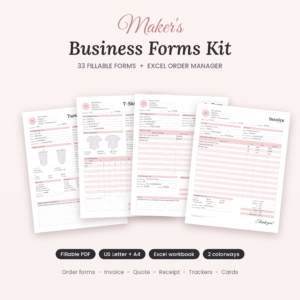
Maker's Business Forms Kit
Price: $3.00 | Best for: Crafters and custom order sellers
33 printable and fillable PDF forms in US Letter and A4, including nine order forms for apparel, tumblers, mugs, signs, ornaments, tote bags and decals, plus an invoice, price quote, sales receipt and a custom order and deposit agreement with tick-box terms. An Excel Order Manager turns orders into invoices and receipts and shows a sales dashboard. Print the tumbler or general order form first and use it on your next custom order.
How to switch without losing records
Moving off an online invoicing service takes an afternoon if you do it in order. Do not cancel your account until the last step.
- Download every past invoice as a PDF. Save them in folders by year. These are your records for tax and disputes.
- Export your client list, usually as a CSV file, if the service allows it. If not, copy names, addresses and emails into a sheet.
- Export or copy your items and prices. These become your template’s price list.
- Note your last invoice number. Your first invoice from the new template carries on from it. Never restart at 1.
- List any unpaid invoices. Enter them in your new tracker with their due dates so nothing slips during the move.
- Send one test invoice to yourself from the new template. Check the PDF, the totals and the payment details.
- Update your payment links if you were using the service’s payment page. Your payment provider may offer a link you can paste into your invoice instead.
- Then cancel, once you are sure you have everything saved.
Keep old invoice PDFs for as long as your local tax rules require. Several years is common. A backed-up folder costs nothing and saves a lot of stress if a question comes up later.
Sending invoices without invoicing software
Without a service sending emails for you, a few habits keep things professional:
- Name files clearly. “INV-1048 Rivera Bridal.pdf” is easy to find for you and your client.
- Use a short email template. “Hi Ana, please find invoice 1048 for 125.00 attached, due by 12 May. Payment details are on the invoice. Thank you for your order.”
- Send from a business email address rather than a personal one.
- Add a payment link from your payment provider if clients like paying by card.
- Keep a sent folder just for invoices so you can find them quickly.
If you are unsure whether a job needs a quote, an estimate or straight to an invoice, our guide to the difference between a quote, an estimate and an invoice sorts that out.
Tracking payments once you leave the app
The one thing you will miss from an online service is the list of who has paid. Rebuild it on day one. A tracker with each invoice, its due date, payments received and a status that changes on its own replaces that screen completely.
Spend ten minutes a week on it. Log payments from your bank, sort by days overdue, send reminders. That habit matters more than any tool, online or not.

PaidPath Client and Invoice Hub
Price: $9.49 | Best for: Owners replacing an invoicing app
An Excel workbook that links clients, services, invoices, quotes, payments and expenses. Statuses update on their own, partial and installment payments are handled, and the dashboard shows overdue invoices first, money owed by age and net profit for any period. Print a clean invoice, quote or client statement on US Letter or A4 in one click. Import your client list first, then enter any unpaid invoices from your old service.
Who should stay with an online service
A template set is not for everyone. Stay with an online invoicing service if several people in your business create invoices, if most clients pay by clicking a link in the invoice email, if you rely on automatic reminders, or if you send more than about 40 invoices a month. Those are the jobs software does best. If you send fewer, and you would rather own your files, simple templates are a comfortable fit.
Mistakes to avoid when switching
- Cancelling before downloading your history. You may lose access to old invoices.
- Restarting numbering. Duplicate invoice numbers confuse clients and accountants.
- Forgetting unpaid invoices during the move. List them first.
- Sending editable files. Always send invoices as PDFs.
- No backup. Save your invoice folder to a second drive or cloud storage.
- Too many templates. Pick one set and use it for everything, so your paperwork matches.
Frequently asked questions
What is a simple alternative to an online invoicing app?
A set of invoice templates in Word, Excel or PDF, plus a spreadsheet to track payments. You fill in each invoice, save it as a PDF and email it yourself.
Can I still accept card payments without invoicing software?
Yes. Many payment providers let you create a payment link you can add to your invoice or email. Check what your provider offers.
How do I keep my old invoices when I leave an invoicing service?
Download every invoice as a PDF and export your client list before cancelling. Store them in folders by year and back them up.
Do invoice templates work on a Mac?
Word and Excel templates open in Microsoft Office for Mac. Printable PDFs open in any PDF reader. Check each listing for exact software versions.
Is a Word invoice template enough for a small business?
For a few simple invoices a month, often yes. If your invoices have many lines, discounts or tax, an Excel template that calculates totals is safer.
How many invoices a month is too many for templates?
There is no fixed number, but many owners find templates comfortable up to around 30 or 40 a month. Beyond that, the time spent on emails and reminders adds up.
Your next step
Download your invoice history and client list from your current service this week, then make one test invoice from a template you own. If it looks right and adds up, send your next real invoice from it. The Ledgerline Business Forms Kit gives you a simple invoice, quote, estimate, receipt and purchase order in one matching set.