A teacher planner earns its place when it holds three things at once: what you are teaching, how each pupil is doing, and what was agreed in the last meeting. Most teachers keep those in three separate places. A lesson notebook, a markbook, and a pile of sticky notes from parents’ evening. Then a parent rings on a Thursday and the note you need is in a different bag.
This guide is for classroom teachers, tutors and home educators who want one system for lessons, marks and meetings. You will see what each part needs to do, how to set it up in an evening, a short weekly routine that keeps it current, and four Taskdale planners that cover the job in different formats.
Quick picks: four teacher planners compared
| Product | Best for | Price | Link |
|---|---|---|---|
| Classroom Compass Teacher Planner | One browser file for lessons, marks and parent contact | Original price was: $6.49.$4.99Current price is: $4.99. | View |
| Classroom Compass Teacher Planner Workbook | Spreadsheet fans who want weighted marks and a parent log | Original price was: $11.99.$5.99Current price is: $5.99. | View |
| Chalk & Bloom Digital Teacher Planner | Tablet planners who want a page for every date | $3.49 | View |
| Lesson Lane Digital Teacher Planner | Tablet pages plus a gradebook spreadsheet | $9.99 | View |
What the planner has to hold in a normal week
Picture a Year 5 teacher with 29 pupils and a Tuesday that looks like this. Five lessons. A spelling test to mark. A phonics group that needs moving on. A meeting with the SENCo at 3.30, and a parent who emailed at 7am asking why her son’s reading book has not changed.
Every one of those items lands in one of three buckets. Lessons are the plan. Marks are the evidence. Meetings are the promises you make to other people. A planner that only does one of them leaves you juggling the other two in your head, and your head is already busy.
So before you choose a layout, write down the three things you lose most often. For most teachers the list is short and blunt: “where I got to with Set 3”, “who still owes the science homework”, “what I told Mrs Patel I would do”. If your planner can answer those three questions in under a minute, it is doing its job.
Lessons: build the week around your timetable
Start with the timetable, not the lessons. Your periods, breaks, assemblies and the PPA slot on Wednesday afternoon are fixed. Lessons fill the gaps. A planner that knows your timetable can lay the week out for you, and you only type what changes.
Set it up once
- Enter your bell times and each class or subject, with its own colour.
- Add the term dates, INSET days and half-term so you never plan a lesson for a day the school is shut.
- Copy last week forward, then edit. Most weeks change by about a third, not all of it.
Keep a lesson bank
The second time you teach fractions of amounts, you should not be starting from a blank page. Save each lesson with its objective, resources and a one-line note on how it went (“too long, cut the starter”). Next year that note is gold.
If you like everything in one window on a laptop, a browser-based planner keeps the timetable, lesson bank and records side by side without any account or subscription.
Classroom Compass Teacher Planner
Price: Original price was: $6.49.$4.99Current price is: $4.99. | Best for: teachers who plan on a laptop
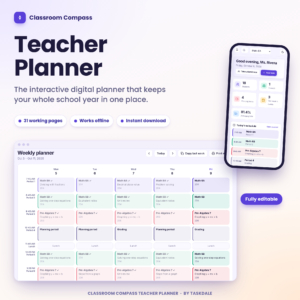
A single HTML file that opens in your web browser and works offline, with 31 pages covering a weekly planner built from your own bell schedule, a lesson bank, unit plans, a gradebook, attendance and a parent contact log. There is no account and nothing to install. Start by entering your bell schedule and one class, then copy your first week forward; setup takes about fifteen minutes with the illustrated Word guide.
Marks: a markbook that does the sums for you
Marking is where planners usually fall apart. You mark a stack of 29 books, write the scores on a sticky note, and promise yourself you will type them in later. Later is report season.
The fix is a markbook that is quick enough to fill in straight after marking. Two minutes with the books still on the desk. A spreadsheet works best here, because it can weight the categories and update each pupil’s average while you type.
Decide your categories before the first test
Say homework counts for 20 per cent, classwork 30 and end-of-unit tests 50. Set those weights on day one. A pupil who scores 14 out of 20 on homework, 22 out of 30 in class and 38 out of 50 on the test lands on 74 per cent overall, and the sheet shows it without a calculator.
Mark missing work honestly
Use a separate code for missing work and another for excused work. A blank cell hides the difference between “not handed in” and “was off with flu”, and that difference matters at parents’ evening.
Classroom Compass Teacher Planner Workbook
Price: Original price was: $11.99.$5.99Current price is: $5.99. | Best for: one teacher with one class group
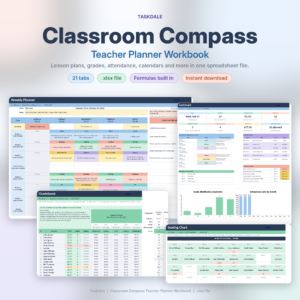
An .xlsx workbook with 21 tabs: weekly planner, gradebook with weighted categories (type M for missing or E for excused), a full-year attendance sheet, a 40-pupil roster, seating chart, behaviour log and a parent log with follow-up dates. It comes with a 25-page Word guide and was tested in LibreOffice Calc. Set your category weights on the Setup tab first, then add your roster; it is licensed for one teacher.
For a closer look at running marks and attendance in a spreadsheet, the guide to a teacher planner spreadsheet for lessons, grades and attendance walks through the tabs one by one.
Meetings: parents, colleagues and the follow-up
Meetings are the part teachers most often skip in a planner. Then the same conversation happens twice, because nobody wrote down what was agreed the first time.
Keep a meeting page with five lines and nothing more. Date. Who was there. What was raised. What you agreed to do. When you will check back. That last line is the one that saves you. “Move Leo to the front table and update Mum on Friday” is a promise with a date on it, and a planner can remind you.
The same page works for a line manager catch-up, a phase meeting or a quick chat with a teaching assistant in the corridor. Parent contacts deserve their own log, though. When a parent rings in March asking what happened in November, you want the date, the reason and the outcome in one row.
If you like to write meeting notes by hand with a stylus, a tablet planner with a daily page per date keeps the note on the day it happened.
Chalk and Bloom Digital Teacher Planner
Price: $3.49 | Best for: iPad and Android tablet planners
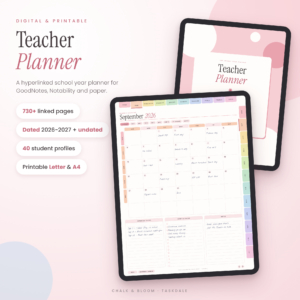
A hyperlinked PDF for GoodNotes, Notability, Xodo and similar apps, with dated 2026-2027 versions (Sunday or Monday start, 717 pages) and two undated versions (732 pages). Every date has a daily page with periods, priorities, copies to make and parent contacts, and the Parents section holds communication logs, conference schedules and meeting notes. Printable US Letter and A4 files are included; import one planner and tap through the Parents tab first.
Paper, tablet or browser: which format suits you
There is no best format. There is the one you will open on a wet Monday at 8.10am. So be honest about where you already work.
- Browser file: good if your laptop is open all day. Everything is searchable, and reports print in a click.
- Spreadsheet: good if you trust numbers more than pages. Strongest for marks and attendance, weaker for jotted notes.
- Tablet PDF: good if you think with a pen. Handwriting suits meeting notes and quick lesson tweaks.
- Printed pages: good for a desk planner that stays in the classroom and never needs charging.
Plenty of teachers mix two. A tablet for the daily page and meetings, a spreadsheet for marks. That split works well because each tool does the job it is built for.
Lesson Lane Digital Teacher Planner
Price: $9.99 | Best for: teachers who want tablet plus spreadsheet
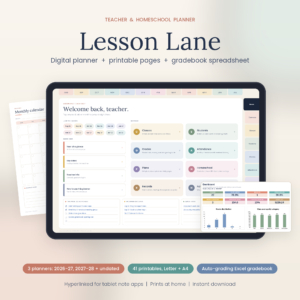
Three hyperlinked planners (August 2026 to July 2027, the following year, and an undated one), 41 printable undated templates in US Letter and A4, and a gradebook spreadsheet for 40 pupils with five weighted categories. It includes a parent contact log, meeting notes and an IEP and 504 tracker. Fill in the Start Here tab of the spreadsheet first, then import your year’s planner into your note app.
A 20-minute Sunday routine that keeps it all current
A planner only helps if it is up to date. This short routine does that without eating your weekend.
- Five minutes on lessons. Copy last week forward. Change what moved. Add any trips, mocks or assemblies.
- Five minutes on marks. Enter anything still on a sticky note. Check who has two or more missing pieces.
- Five minutes on meetings. Read last week’s follow-up lines. Anything due this week goes on Monday’s list.
- Five minutes on the week ahead. Pick the three things that must happen. Write them at the top of Monday.
That is it. Twenty minutes, and Monday morning starts with a plan rather than a panic. The small win is real: walking into the staffroom already knowing who you need to speak to.
Mistakes that make a planner go quiet by half-term
Planning too far ahead in detail
Full lesson plans for six weeks look impressive in September and are wrong by week three. Plan units roughly for the term and lessons in detail one week out.
Recording marks you never use
If a score will never feed a report, an intervention group or a parent conversation, ask whether it needs typing at all. A tick in the book may be enough.
Keeping meeting notes nowhere near the pupil record
A note about Ava’s reading in your diary and her marks in a spreadsheet means two places to check. Link them, or at least note the date of the meeting beside her name in the markbook.
Starting the planner after the term has begun
You can, of course. Just start small. Timetable and this week’s lessons first, the roster next weekend, the rest after that. Trying to back-fill five weeks in one sitting is how planners get abandoned.
If you want a quick view of how the Classroom Compass versions differ from each other, this guide on which Classroom Compass teacher planner fits your classroom compares them side by side.
Report season: where lessons, marks and meetings meet
Reports are the real test of a teacher planner. Twice or three times a year you need to say, for each pupil, what was taught, how they did and what has been discussed with home. If those three things live in one system, writing 29 reports is tiring. If they live in five places, it is miserable.
Try this order when report deadlines arrive. First, print or export the mark summary for the class, so you can see who has moved up and who has slipped since the last report. Second, open each pupil’s meeting and parent notes, because a comment that ignores a conversation from October will land badly. Third, glance at the lesson record for the term to remind yourself of the units covered. Fractions, persuasive writing, the Romans. Names of units make comments concrete.
A pupil comment built this way might read: “Sami has grown in confidence with fractions, moving from 52 per cent on the first check to 71 per cent on the end-of-unit test. As agreed at our meeting in November, he now reads aloud twice a week, and it shows.” Every part of that sentence came from the planner. None of it came from memory at 11pm.
Some planners include a comment builder or a progress report page that pulls marks and attendance together. Even without one, a planner with all three parts in it cuts report writing from a weekend down to a few evenings.
Plan for the day you are not there
A good planner pays off most on the morning you wake up with a temperature. If your timetable, seating plan, class list and this week’s lessons already sit in one place, a cover plan takes ten minutes, not an hour of typing from bed.
Keep one page ready with routines, allergy notes, who can help next door and where the spare pencils live. Update it each half-term. For a full list of what to include, see what to put in a substitute teacher plan template.
Frequently asked questions
What should a teacher planner include?
At minimum: your timetable, weekly lesson plans, a markbook, attendance, a class list with contact details, and a page for meeting and parent notes. Anything beyond that is a bonus.
Is a digital or paper teacher planner better?
Digital wins for marks, searching and printing reports. Paper wins for quick notes and for teachers who think better with a pen. Many teachers use a tablet for notes and a spreadsheet for marks.
How do I record parent meetings in a planner?
Write the date, who attended, what was raised, what you agreed and the date you will follow up. Keep it to five lines so you actually do it every time.
Can I share my teacher planner file with my department?
Check the licence first. The Classroom Compass Workbook, for example, is licensed for one teacher, so each colleague would need their own copy.
How long does it take to set up a teacher planner?
Plan for one evening. Timetable and term dates take about 15 minutes, a class list another 15, and your first week of lessons around half an hour.
Your next step
Tonight, write down the three things you lost track of last week: a lesson, a mark or a meeting promise. Then pick the format that would have caught them and set up just your timetable and this week. If a laptop is where you live, start with the Classroom Compass Teacher Planner and have your first week planned before Monday.