Planner agenda pages for daily appointments do one job better than any calendar app: they show the whole day in order, with everything you need for each stop written right beside it. The address. What to bring. The question you meant to ask last time and forgot. When you have five, six or eight appointments in a day, that extra detail is the difference between gliding through and scrambling in the car.
This guide is for people whose days are built from appointments. Mobile hairdressers and dog groomers. Home care workers. Tutors, therapists and sales reps. Parents with a week full of pediatrician visits, school meetings and swim lessons. You will learn the five columns that make an agenda page work, see a worked example, and find four Taskdale planners that suit different ways of working.
Quick picks: agenda pages and appointment planners
| Product | Best for | Price | Link |
|---|---|---|---|
| Petalpath Undated Daily Planner | Shift workers who need their own times | $2.39 | View |
| Clear Day Daily Planner Printable | A printed agenda on a desk or clipboard | Original price was: $2.99.$2.49Current price is: $2.49. | View |
| Rosewren Undated Digital Life Planner | Appointments on an iPad or Android tablet | $32.99 | View |
| HuddleKeep Meeting Planner App | Work meetings with agendas and action items | $12.99 | View |
What makes an agenda page different from a schedule
A schedule tells you when. An agenda tells you when, where, with whom and what for. That extra layer is what you need when appointments come thick and fast.
Picture a mobile hairdresser with six clients on a Thursday. Her phone calendar says “10:00 Mrs Lopez”. Her agenda page says “10:00 Mrs Lopez, 42 Birch Lane, gate code 1847, color touch-up, bring the ash blonde toner, ask about her daughter’s wedding”. One of those is a reminder. The other is a plan.
An agenda page also works as a record. At 5 p.m. you can look down the page and see what happened at every stop, what was paid and what needs following up. For anyone self-employed, that record is gold at tax time.
Who needs one most
- People who travel between appointments and need addresses and timings
- Anyone who prepares something for each appointment, such as files, tools or questions
- Carers juggling a family member’s medical visits
- Freelancers who bill by the visit or session
- Parents with several kids and overlapping activities
The five columns of a working agenda page
You can rule these into any notebook or print a page that already has the space. The columns are what matter.
- Time. Start time, and the time you need to leave to get there. “Leave 9:35, arrive 10:00.”
- Who and where. Name, address, phone number, gate code or room number. Anything you would otherwise dig out of an email.
- Purpose. One short line on what the appointment is for. “Annual review”, “first session”, “fix kitchen tap”.
- Bring or prep. Documents, tools, questions, payment. If you need to print a form, this is where the reminder lives.
- Outcome. Filled in after. What happened, what was paid, the next step.
The outcome column is the one most people skip, and the one they miss most later. Even three words, such as “paid cash, rebook 6 wks”, turns the page into a log.
Worked example: a home care worker’s Tuesday
- 7:30 to 8:30 | Mr Hanley, 12 Oak St, key in lockbox 3392 | morning routine and breakfast | bring gloves, check pill box | outcome: ate well, low on milk, tell daughter
- 9:00 to 10:00 | Mrs Osei, Apt 4B Riverside | shower help | bring towel set from van | outcome: knee sore, note for nurse visit
- 10:45 to 11:15 | Pharmacy, Main St | collect Mr Hanley’s prescription | bring signed form | outcome: collected, next due 28th
- 12:00 to 1:00 | Lunch break | (protected, no bookings)
- 1:30 to 2:30 | Mr Patel, 88 Hill Rd | lunch and social visit | bring crossword book | outcome: in good spirits, asked about Friday
- 3:00 | Office, team meeting | weekly review | bring timesheet | outcome: shift swap for Saturday agreed
Every line holds what she needs to walk in prepared. And the outcomes give her an end-of-day report she can text to the office in two minutes.
Prep before, notes after
The best agenda pages work in two passes. The evening before, you fill in time, who, where, purpose and prep. After each appointment, you fill in the outcome. That rhythm takes the stress out of both ends.
Questions for medical and official appointments
Doctor’s visits deserve special care. Most of us leave and remember the question we meant to ask. So write the questions in the prep column the night before, numbered, most important first. Then tick each as it gets answered. A parent taking a child to a specialist might list four questions: dosage, side effects, when to come back, and whether swimming is okay. All four get answered because they are right there on the page.
The same trick works for the bank, a lawyer, a school meeting or a landlord. You walk in with a list. You walk out with answers.
Follow-ups that do not get lost
Any outcome that needs action gets an arrow. During your evening review, copy arrowed items onto the right future page. “Rebook 6 weeks” becomes a note on the page six weeks from now. Nothing floats.
If you want a page that mixes appointments with longer diary-style notes, our guide to the diary planner for notes, plans and appointments covers a three-zone layout that pairs well with this.
When your day does not start at 8 a.m.
Many printed agenda pages assume a 9-to-5 day. If you are a nurse on nights, a baker starting at 4, or a tutor whose sessions run from 3 to 9 p.m., an hourly grid that starts at 8 a.m. is half wasted and half missing.
The fix is a flexible time column, where you write your own times in. Your 4 a.m. start becomes the first line. A gap between a 6 a.m. delivery and a 2 p.m. meeting gets two lines, not eight empty ones. The page bends to your day, rather than the other way around.
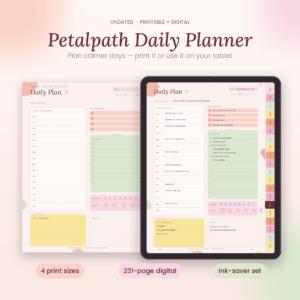
Petalpath Undated Daily Planner
Price: $2.39 | Best for: shift workers and irregular hours
An undated printable and digital kit with 14 layouts. The Flex Day page has a blank time column in 30-minute blocks so you set your own hours, and the Daily Plan page has a 6 a.m. to 9 p.m. hourly schedule with half-hour guides, four Top Priorities and a For Tomorrow box. It also includes weekly, monthly, habit, goal, meal and budget pages. Print it in four sizes or open the hyperlinked version on a tablet.
Write in your own times once on a blank Flex Day copy, save it, and print a stack. Your personal agenda template, ready every morning.
A printed agenda on a clipboard or desk
Paper still wins for some appointment-heavy jobs. A receptionist at a busy clinic, a dental hygienist between patients, a property manager doing viewings. A printed sheet on a clipboard is quick to glance at, needs no unlocking and never runs out of battery halfway through the afternoon.
For a desk or clipboard, US Letter or A4 gives you the most room per appointment. Print a week of pages on Sunday, clip them in order and tear off each day as it ends. There is a small, real satisfaction in that tear.
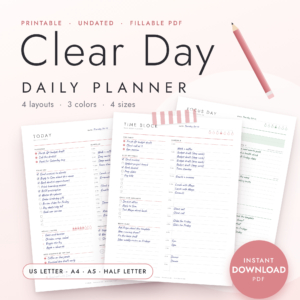
Clear Day Daily Planner Printable
Price: Original price was: $2.99.$2.49Current price is: $2.49. | Best for: desk workers and clipboard planners
Four undated layouts in three colors and four sizes (US Letter, A4, A5, Half Letter), printable or fillable. The Daily Planner page has an hourly schedule from 6 a.m. to 11 p.m. with a 13-line to-do list, and the Time Block page has a half-hour grid from 6 a.m. to 10 p.m. with calls and messages and a brain dump. Use the Time Block page for days packed with short appointments.
Type addresses for regular clients into the fillable version once, then print. You only hand-write what changes. Keep the finished pages in a folder by month, too. If a client calls in October asking when their last visit was, you can find it in under a minute.
A digital agenda on your tablet
If you already carry a tablet between appointments, a digital agenda saves you a clipboard. You can paste a screenshot of a map, a photo of a form or a client’s notes right beside the time slot. Search your handwriting later for a name. And a hyperlinked planner lets you tap from the month view to any day in one move, which makes rebooking quick when a client asks for “same time in three weeks”.
An undated planner works well here, because appointment-heavy jobs rarely follow a neat January to December year. Start the week you buy it.
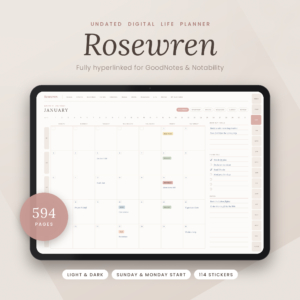
Rosewren Undated Digital Life Planner
Price: $32.99 | Best for: tablet users with busy appointment days
An undated hyperlinked planner with 594 pages and more than 23,000 links, for iPad and Android tablets. It has 60 weekly pages with top three tasks per day and time blocks, plus daily pages, monthly calendars with week links and a top menu on every page. Date finder calendars for 2027 to 2031 make filling in dates quick. Set up the current month first, then add your regular clients to a notes page.
One tip for tablet agendas: make a single notes page called “Regulars” with every repeat client’s address, access details and preferences. Bookmark it. When you plan tomorrow, you copy from that page instead of searching old emails.
Meetings as appointments: agendas at work
For office workers, many appointments are meetings, and a meeting needs its own agenda: the topics, the time for each, the decisions and who does what afterward. Squeezing all that into one line of a daily planner rarely works.
A better split: the daily agenda page holds the meeting time, room and one-line purpose. A separate meeting tool holds the detailed agenda and notes. Then your day stays readable and your meeting notes stay findable.
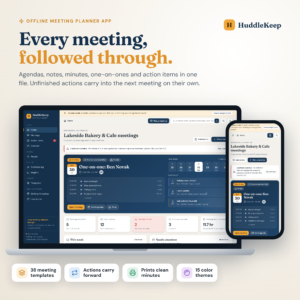
HuddleKeep Meeting Planner App
Price: $12.99 | Best for: team leads with recurring meetings
A meeting planner that opens in your browser from a single file, with no sign-up and notes kept on your own computer. Choose from 38 templates such as one-on-ones, team meetings, client calls and parent-teacher conferences, each with a timed agenda, notes, decisions and action items. Unfinished actions carry into the next meeting automatically. Set up your weekly team meeting as a repeating meeting first.
Mistakes that make agenda pages fail
- Writing only the start time. Without a leave-by time, travel eats into every appointment.
- Leaving out addresses. Looking up an address at a red light is stressful and unsafe.
- No lunch slot. Block it like an appointment. Otherwise it gets booked over.
- Skipping outcomes. A week later you will not remember who paid and who owes.
- Too many appointments, no buffer. Six back-to-back appointments with zero gaps means the 3 p.m. client waits 40 minutes.
- Prepping in the morning. Do it the night before. Mornings are for driving, not hunting for forms.
A five-minute end-of-day wrap
Before you put the planner away, run down the outcome column. Circle anyone who still owes payment. Copy every arrow onto its future page. Then fill in tomorrow’s first two appointments, so the morning starts with a plan. Five minutes, and the day is properly closed. That feeling of a finished page, every line filled, is quietly satisfying.
For more ways to shape a daily page around your kind of day, our comparison of daily planner layouts for different routines sets out the options side by side.
Frequently asked questions
What should an agenda page include?
Time and leave-by time, who and where, the purpose of each appointment, what to bring or prepare, and an outcome line to fill in afterward.
How many appointments fit on one daily page?
On a US Letter or A4 page, six to eight with full details is comfortable. If you regularly have more, use a half-hour time block layout or two pages per day.
Is a paper or digital agenda better for appointments?
Paper is faster to glance at and never needs charging. Digital lets you add photos, maps and searchable notes. Pick whichever you will open between every appointment.
How do I keep track of client appointments as a freelancer?
Use one agenda line per appointment with an outcome column for payment and next booking. At the end of each week, copy totals into your bookkeeping.
Can I use a daily planner as an appointment book?
Yes. Any daily page with a time column and room for notes works. Add addresses and an outcome note to turn it into a full appointment book.
How far ahead should I fill in agenda pages?
Write appointments onto future pages as soon as they are booked, but add the full prep details only the evening before, when you know what is actually needed.
Your next step
Tonight, rule five columns on a page and fill in tomorrow’s appointments: time, who and where, purpose, prep and a blank outcome. Use it for one day and see how much calmer it feels. If your hours do not fit a standard grid, start with the Petalpath Undated Daily Planner.