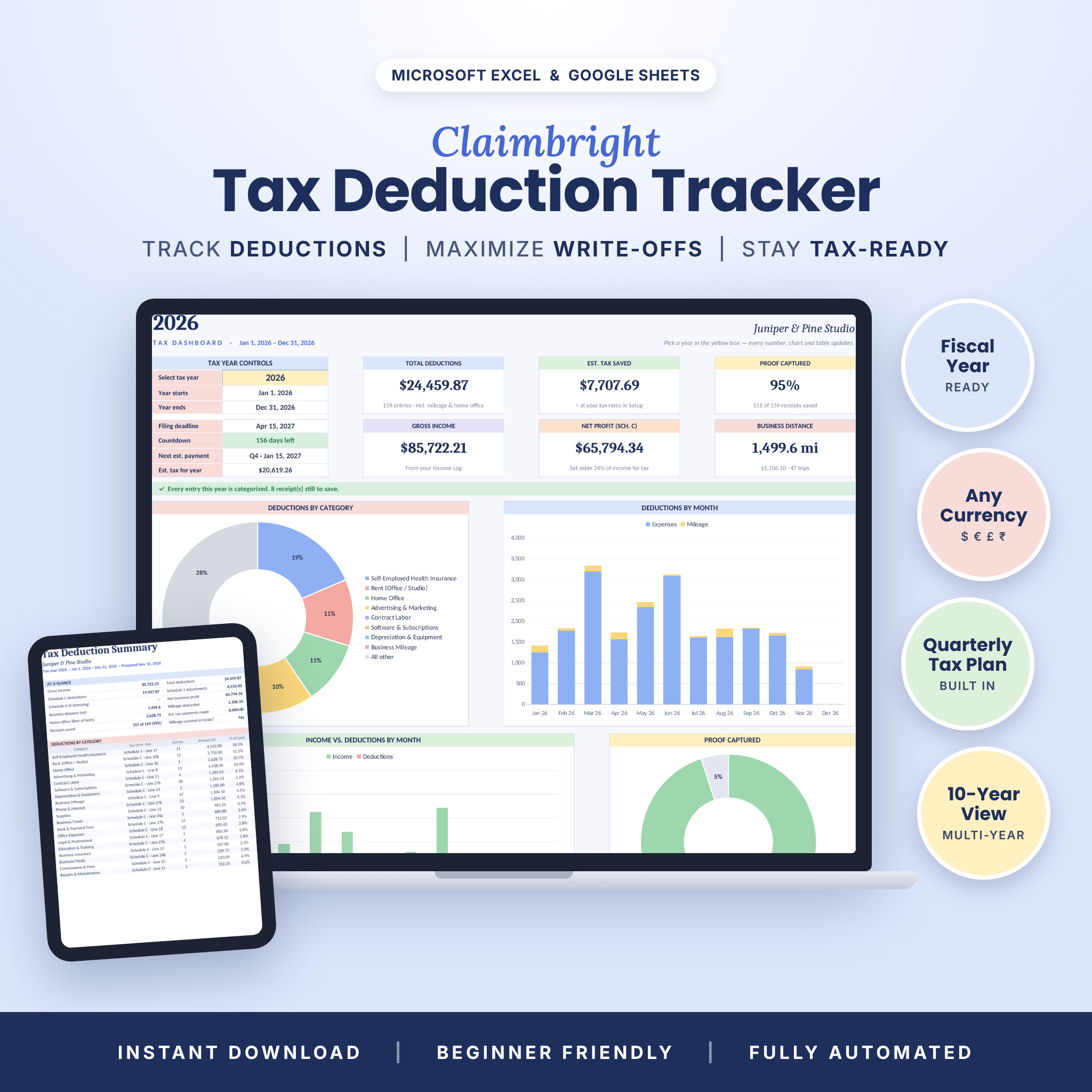


The Claimbright Tax Deduction Tracker is a tax deduction tracker spreadsheet for Excel and Google Sheets that turns a year of receipts, miles and invoices into a clear, accountant-ready picture of every write-off. Log an expense in seconds and Claimbright applies your business-use percentage, the 50% meal rule and the right Schedule C line automatically — then shows it all on a beautiful dashboard that updates the moment you pick a tax year.
It is built for freelancers, 1099 contractors, sole proprietors, creators, Etsy and online sellers, gig workers and small business owners who want to keep more of what they earn without paying for accounting software.
Why this tax deduction tracker is different
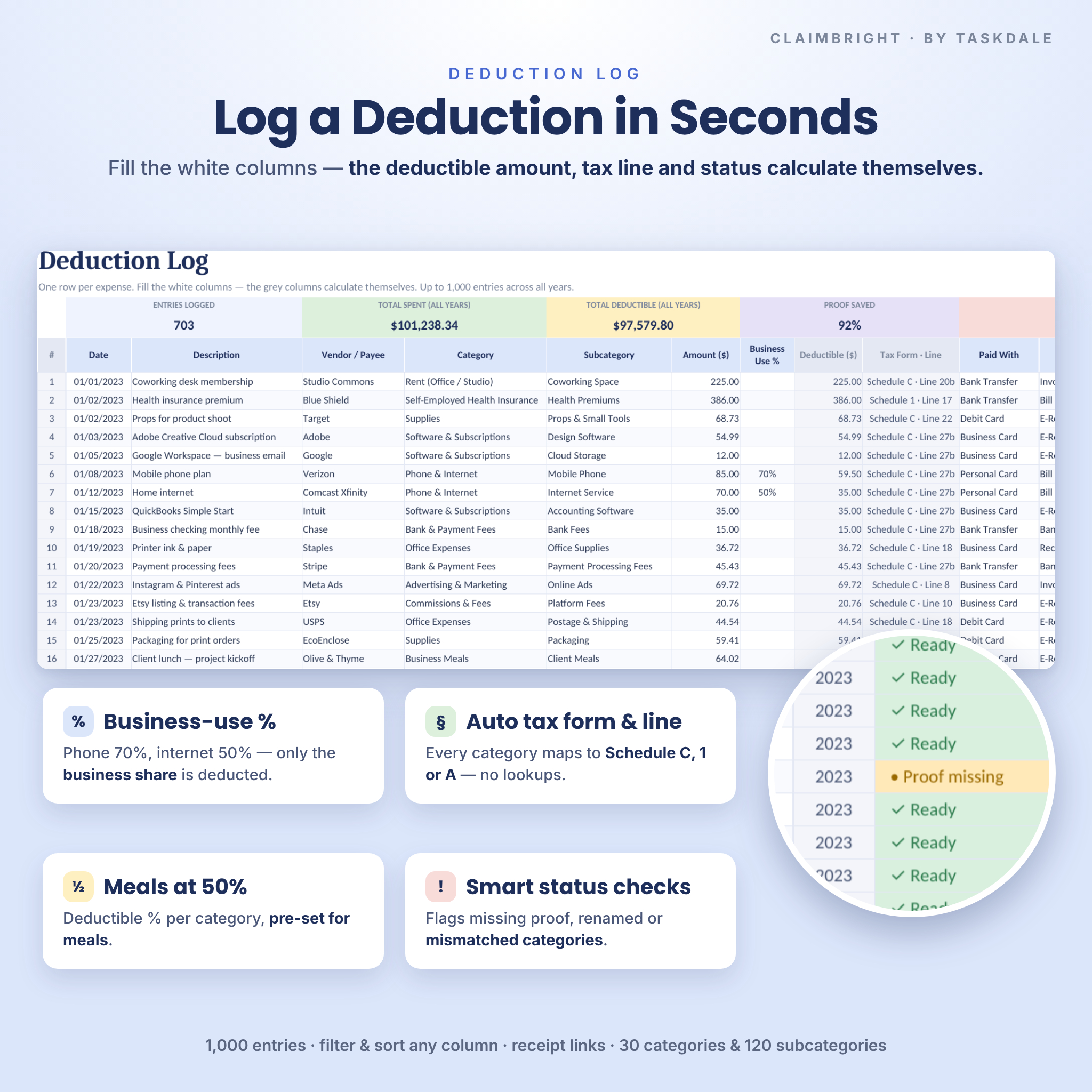
- Smart status checks on every row — flags a missing date, a missing receipt, a renamed category or a subcategory that doesn’t belong, so nothing silently drops out of your totals.
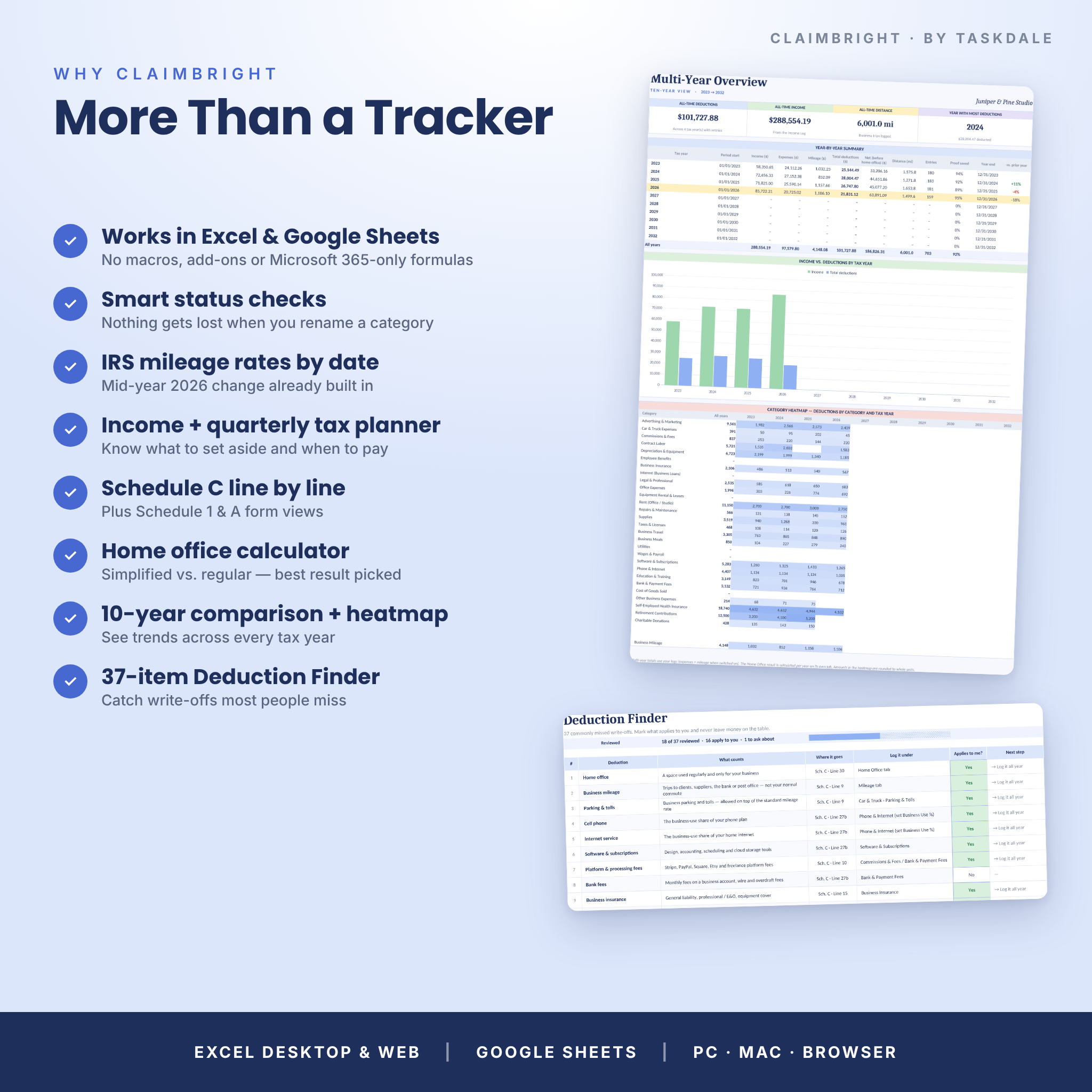
- Mileage at the right IRS rate by date — 2023–2026 standard rates are built in, including the 2026 mid-year change (72.5¢ to June 30, 76¢ from July 1). Add new rates any time.
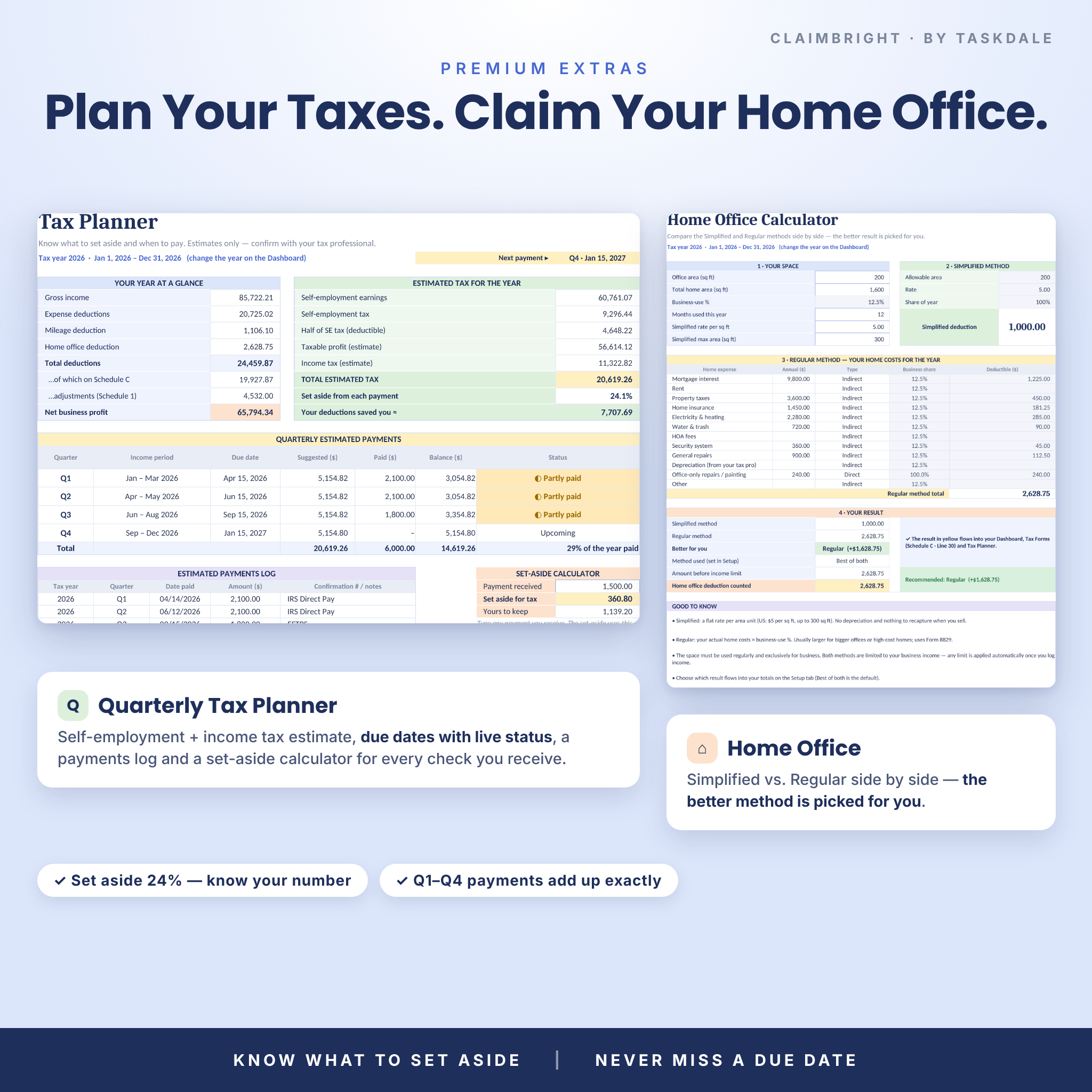
- Income + quarterly tax planner — see net profit, an estimate of self-employment and income tax, what percentage to set aside, and each quarterly due date with live status.
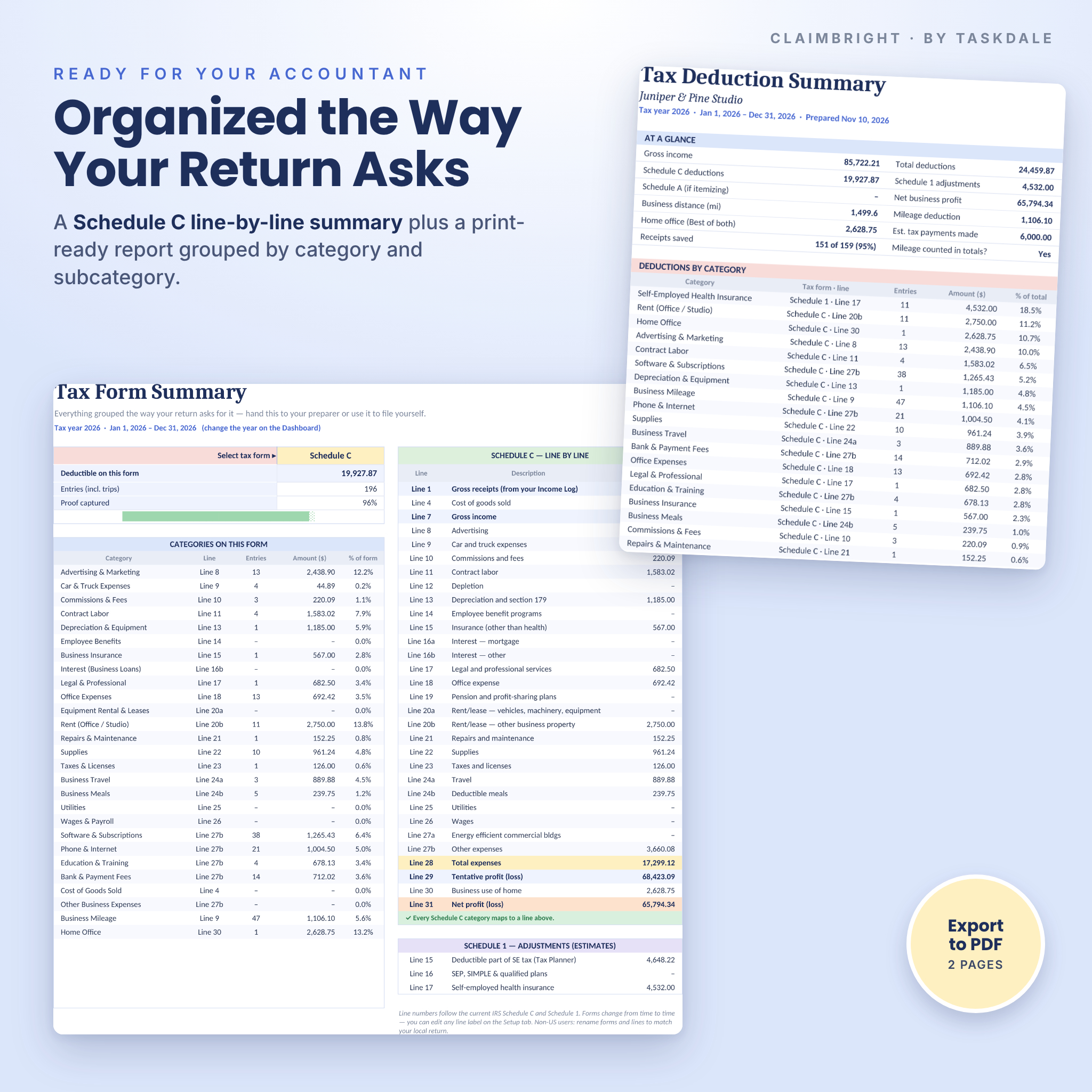
- Schedule C line by line — plus Schedule 1 and Schedule A views, so your numbers are already organized the way your return asks for them.
- Works in Excel and Google Sheets — standard formulas only. No macros, no add-ons and no Microsoft 365-only functions.
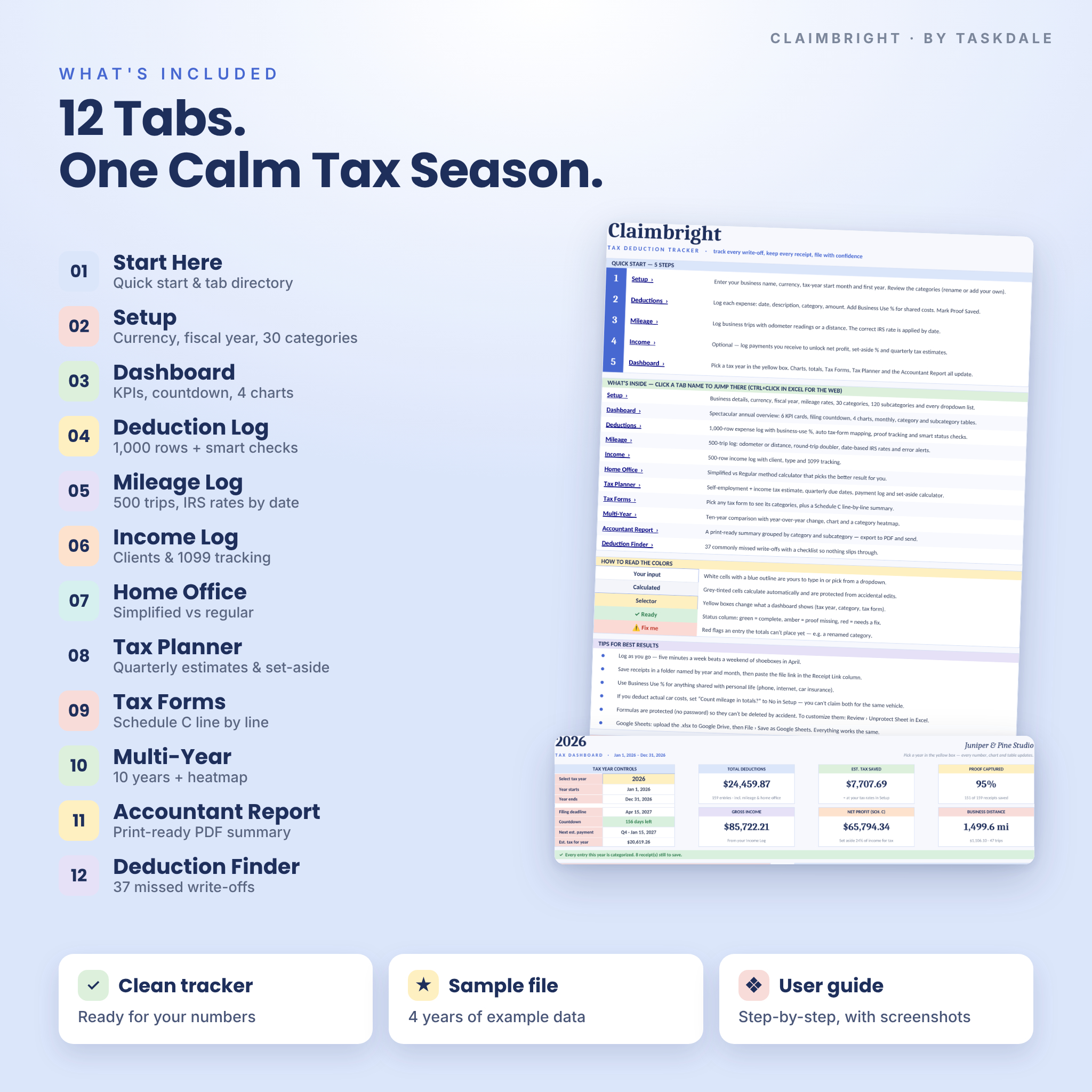
What’s included
- Claimbright Tax Deduction Tracker (.xlsx) — the clean, ready-to-use tracker with categories and IRS mileage rates pre-filled.
- Sample workbook (.xlsx) — a fully filled example business with four years of data, so you can see every feature in action.
- User guide (.docx) — a 17-page, step-by-step guide with screenshots, troubleshooting and FAQs.
The 12 tabs
- Start Here — quick-start steps, a clickable tab directory and a color legend.
- Setup — business name, one currency setting, tax-year start month, mileage rates, 30 categories and 120 subcategories.
- Dashboard — year selector, filing countdown, 6 KPI cards, 4 charts and tables by month, category and subcategory.
- Deduction Log — 1,000 rows with business-use %, deductible amount, tax form and line, receipt link, proof tracking and status.
- Mileage Log — 500 trips with odometer readings or a typed distance, round-trip doubler and automatic rates.
- Income Log — 500 rows with client, income type and 1099 form tracking.
- Home Office — Simplified vs. Regular method side by side, with the better result picked for you.
- Tax Planner — estimated tax, quarterly payments, a payments log and a set-aside calculator.
- Tax Forms — pick any form to see its categories, plus a Schedule C line-by-line summary.
- Multi-Year — ten tax years side by side with year-over-year change, a chart and a category heatmap.
- Accountant Report — a print-ready two-page summary you can save as PDF and email to your preparer.
- Deduction Finder — 37 commonly missed write-offs with a Yes / No / Not sure checklist.
Main benefits
- Claim more of the deductions you’re entitled to, with a checklist of the ones people forget.
- See your estimated tax saved, net profit and set-aside percentage at a glance.
- Never miss a quarterly payment or the filing deadline — the countdown turns red within 30 days.
- Hand your tax professional a clean, grouped report instead of a shoebox of receipts.
- Compare years to spot rising costs and plan ahead.
How it works
- Set up in two minutes. Enter your business name, currency and the month your tax year starts. Review the categories — rename or add your own.
- Log as you go. Add expenses, business trips and (optionally) income. White cells are for you; grey cells calculate themselves.
- Check the dashboard. Pick a tax year in the yellow box and every card, chart, table, tax form summary and report updates.
- Plan and file. Use the Tax Planner for quarterly payments, then print the Accountant Report at tax time.
Customization
Change the currency symbol once and every money value follows ($ is the default; €, £, ₹, C$, A$ and more are in the list, or type your own). Choose any fiscal-year start month, switch miles or kilometers and square feet or square meters, and edit every dropdown list. Formula cells are protected without a password, so beginners can’t break anything — and advanced users can unprotect a sheet to customize further. Non-US users can rename the tax-form labels and turn off self-employment tax.
File formats and software requirements
- Two .xlsx workbooks (clean and sample) and a .docx user guide.
- Microsoft Excel 2016 or later, Microsoft 365 or Excel for the web.
- Google Sheets (free Google account) — upload the file to Google Drive and choose File › Save as Google Sheets.
- Setup is easiest on a computer; you can add entries and view the dashboard from the Excel or Google Sheets mobile apps.
Digital download
This is an instant digital download. No physical item will be shipped. Your files are available from the order confirmation page and email as soon as payment is complete.
Use cases
- A freelance designer tracking software, coworking rent and client meals for Schedule C.
- A rideshare or delivery driver logging every business mile at the correct IRS rate.
- An Etsy or online seller separating platform fees, packaging, shipping and inventory costs.
- A consultant setting aside the right amount from each client payment and paying quarterly taxes on time.
- A photographer comparing equipment and travel costs across several tax years.
- A small business owner with a July–June fiscal year who needs reports that follow that year.
Frequently asked questions
Does this tax deduction tracker work in Google Sheets?
Yes. Upload the .xlsx to Google Drive and save it as a Google Sheet. Formulas, dropdowns, charts and colors convert automatically.
Do I need Microsoft 365?
No. It uses standard functions that work in Excel 2016 and later, Excel for the web and Google Sheets.
Can I track more than one tax year?
Yes. Keep logging in the same file; each entry is assigned to its tax year automatically and the Multi-Year tab compares ten years.
Does it include the 2026 IRS mileage rates?
Yes — 72.5¢ per mile from January 1 to June 30, 2026 and 76¢ from July 1, 2026, plus 2023–2025 rates. You can add future rates on the Setup tab.
Can I use it with a fiscal year or outside the US?
Yes. Choose any start month, any currency symbol, and rename categories and tax-form labels to match your local return.
Is this tax advice?
No. Claimbright is an organizing and estimating tool. Please confirm deductions and estimates with a qualified tax professional.
Can I share or resell it?
No. The license is for personal use by the purchaser for one business. Sharing, reselling or redistributing the files is not permitted.


Reviews
There are no reviews yet.