
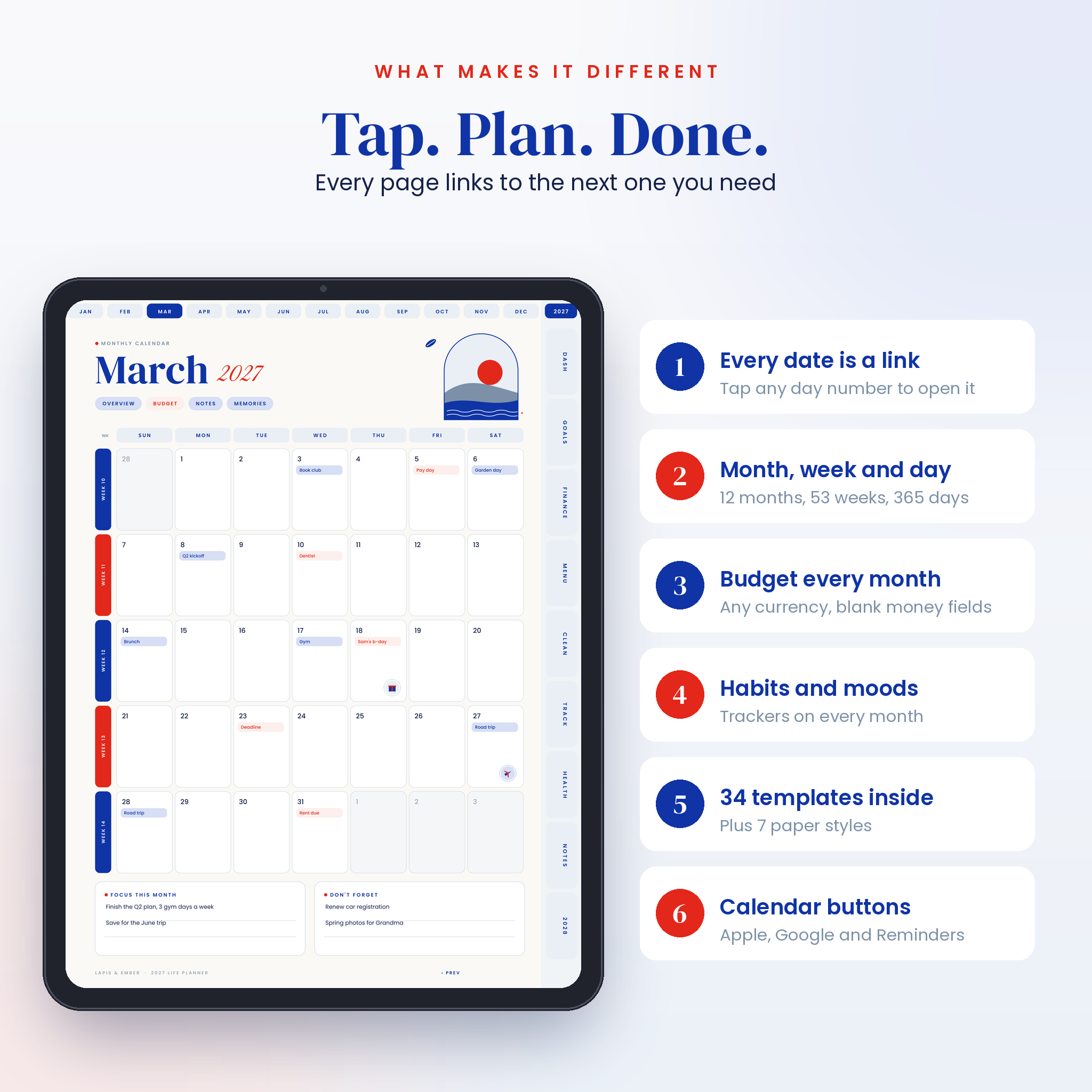

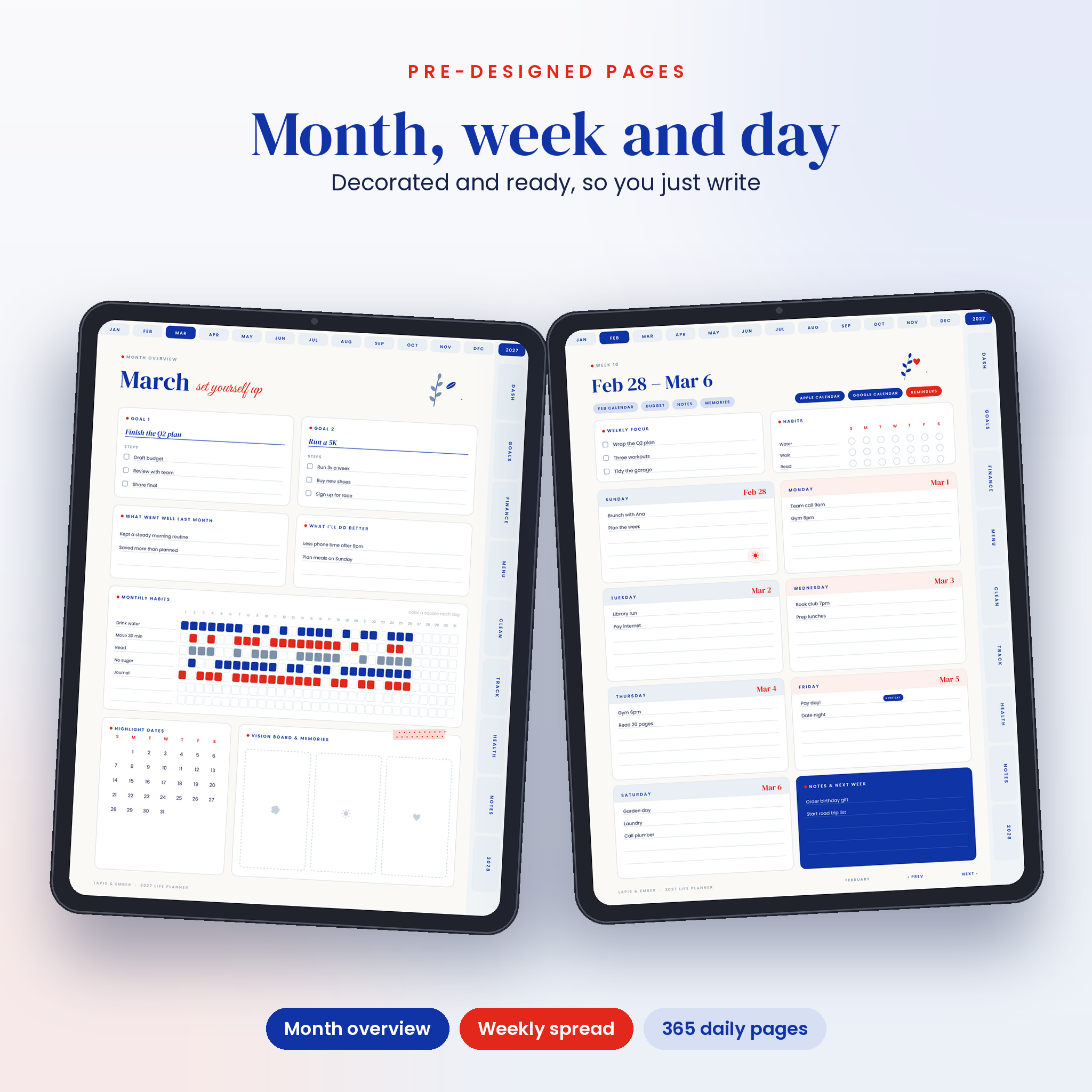


The Lapis & Ember 2027 digital planner is a dated, fully hyperlinked life planner for GoodNotes, Notability and other PDF note apps. It arrives finished. Every monthly, weekly and daily page is already designed in Egyptian blue, stone blue and scarlet, so you skip the setup and go straight to planning. Tap a month along the top, tap a section on the side, tap any date. You are there.
It suits people who want a pretty planner but don’t have hours to decorate one. Busy parents use it to run the house. Professionals use it to protect their focus time. If you are new to digital planning, the user guide walks you through your first ten minutes.
What you get with this 2027 digital planner
- Complete edition, Sunday start (545 pages)
- Complete edition, Monday start (545 pages)
- Lite edition, Sunday start (180 pages, no daily pages)
- Lite edition, Monday start (180 pages, no daily pages)
- Sticker book PDF with 150 stickers to copy with your lasso tool
- Sticker pack ZIP with the same 150 stickers as transparent PNG files in 10 folders
- User guide in Word format covering setup, every feature, tips and troubleshooting
Inside the planner
Dashboard
Your home screen. It has a month picker, nine section tiles, twelve quick link lines you fill in yourself, a brain dump area and three buttons that open Apple Calendar, Google Calendar and Apple Reminders.
Year pages
A 2027 overview with every date linked, an important dates page for birthdays and events, a year in pixels mood tracker and a 2028 look-ahead calendar.
Five pages for every month
- Month overview: two goals with steps, a review of last month, a 7-habit tracker for every day, a mini calendar and three vision board frames.
- Monthly calendar: big date boxes, week links down the side, a focus box and a “don’t forget” box.
- Monthly budget: income, spending by category, bills, savings and money left over. A blank currency field means it works in dollars, pounds, euros, rand or anything else.
- Monthly notes and a memories page with a daily mood row and room for photos and stickers.
53 weekly spreads
Each week has a focus list, a small habit grid, a box for every day and a notes box for next week. Tap a date on any day box to open that day.
365 daily pages with a time-first method
Most daily planners hand you a to-do list and wish you luck. This one asks you to plan around the time you actually have. Put appointments on the hourly schedule (6 AM to 10 PM). Sort tasks into 5, 15 and 30+ minute groups. Pick your top 3. Add one fun thing and one self care item, then block them into the gaps. Each day also has meals, water, mood and a gratitude box. A small calendar in the corner lets you hop to any date that month.
Templates and extras
There are 34 templates in total, sorted into tabbed sections so you never hunt for them.
- Goals: yearly goals across eight life areas, goal planner, goal progress bars, a 50-spot bucket list and a project planner.
- Finance: annual budget, savings tracker with a 100-cell grid, debt payoff (snowball or avalanche), bill tracker and a subscription tracker.
- Menu: weekly meal plan, grocery list by aisle, recipe card and a favorite meals list.
- Clean: a pre-filled cleaning schedule, a weekly room-by-room checklist and a declutter tracker.
- Track and Health: 10-habit tracker, reading log, exercise log, workout planner, self-care menu and a sleep and water log.
- Notes and more: brain dump, inbox, follow-up list, meeting notes, journal, password hints, travel plans, packing list, contacts, gift planner, gratitude and 10 numbered note pages.
- Paper: blank, lined, dot grid, graph, Cornell, dark lined and dark dot pages.
How the hyperlinked digital planner works
- Download your files after checkout.
- Import the PDF you want into GoodNotes, Notability, Noteshelf, Xodo or a similar app.
- Tap “Open dashboard” on the cover.
- Use the month tabs on top and section tabs on the side to move around. Some apps follow links only in read mode, and the guide shows you how.
- Write, type or add stickers. Duplicate any template page when you want more of it.
File formats and requirements
- Planner: PDF, portrait, 3:4 ratio (fits iPad screens and most Android tablets). Each complete file is under 3 MB, so it opens fast.
- Stickers: PDF sticker book plus PNG files with transparent backgrounds.
- Guide: DOCX (opens in Word, Google Docs, Pages or LibreOffice).
- You need a tablet and a PDF note app that keeps hyperlinks. A stylus helps but is not required.
- Fonts are embedded, so the planner looks the same on every device.
Customize it your way
Pick Sunday or Monday weeks. Pick the Complete or Lite edition, and switch any time. Color-code with the five sticker colors, type into pages with the text tool, and add quick links to the places you open most. Need two meal plans a week? Duplicate the page.
Real ways people use it
- A parent tracking school runs, meal plans and the grocery list in one file.
- A freelancer blocking client calls on the daily schedule and logging bills and subscriptions.
- Someone paying off a credit card, checking off each payment on the debt tracker.
- A weekly planner who uses the Lite edition and never sees a daily page.
- A family planning a summer road trip with the travel plan and packing list.
Digital download
This is a digital product. Nothing ships. Your files are ready to download right after payment, from your confirmation email and your account page. No physical item and no app are included. The planner is for personal use only, so please do not share or resell the files.
FAQ
Does this digital planner work with GoodNotes?
Yes. It is built for GoodNotes 5 and 6 on iPad, and the guide covers how to import it and use the links.
Can I use it on Android?
Yes, in apps that keep PDF links, such as Xodo or Noteshelf.
Is the planner dated?
Yes. It runs from January 1 to December 31, 2027. The first and last weeks include the few days from 2026 and 2028 so they stay whole.
Which start day should I choose?
You get both. Use the Sunday start file if your week starts on Sunday, or the Monday start file if it starts on Monday.
What is the Lite edition?
It is the same planner without the 365 daily pages. Tapping a date takes you to that week instead. It is great if you plan weekly.
Can I print the pages?
Yes. Use “fit to page” for US Letter or A4. The planner is designed first for tablets, so dark pages use a lot of ink.
Do I need to buy inserts or stickers?
No. The templates, paper styles and 150 stickers are all included.
Can I get a refund?
Because the files download instantly, we cannot take returns. If something does not work, contact us and we will help you fix it.
Reviews
There are no reviews yet.