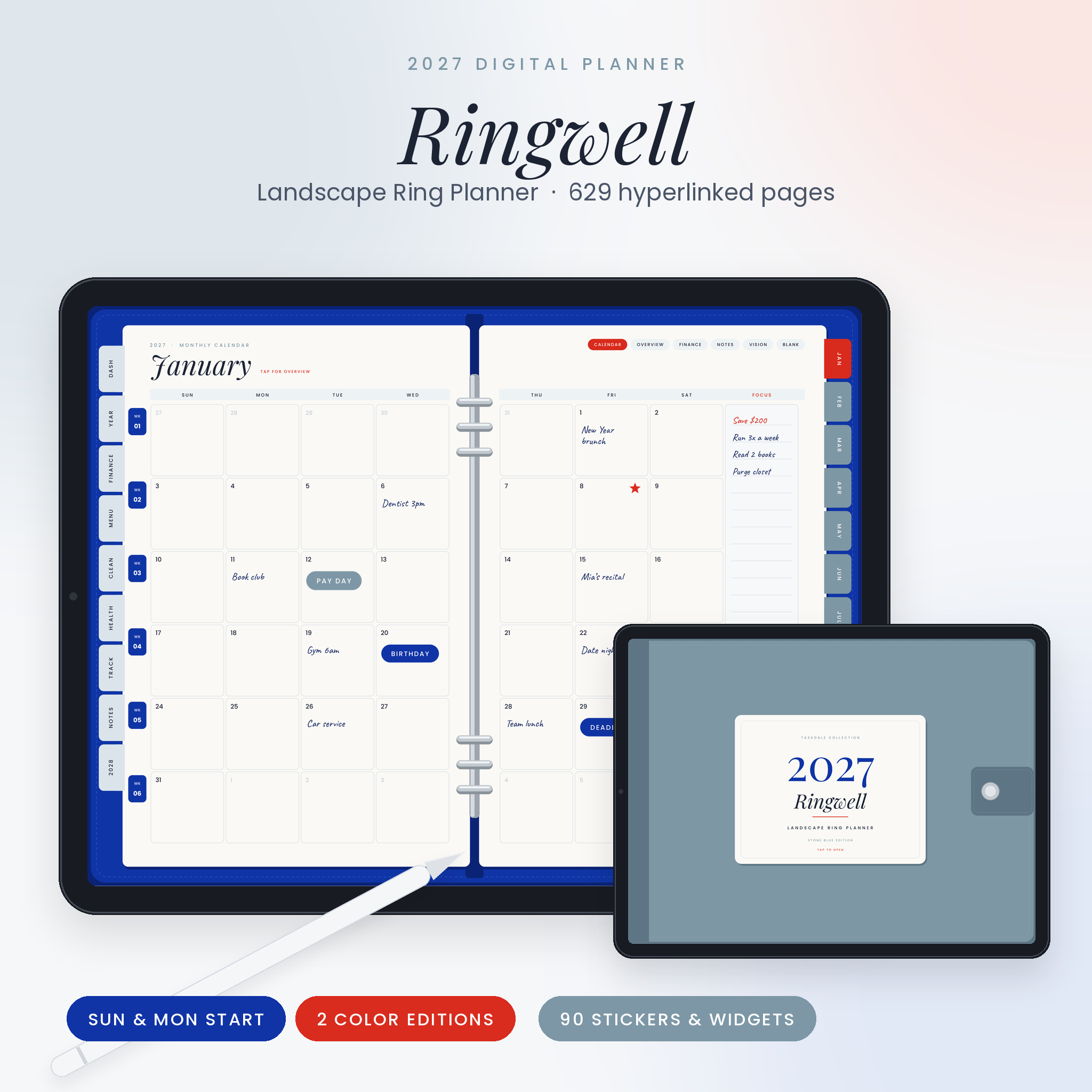
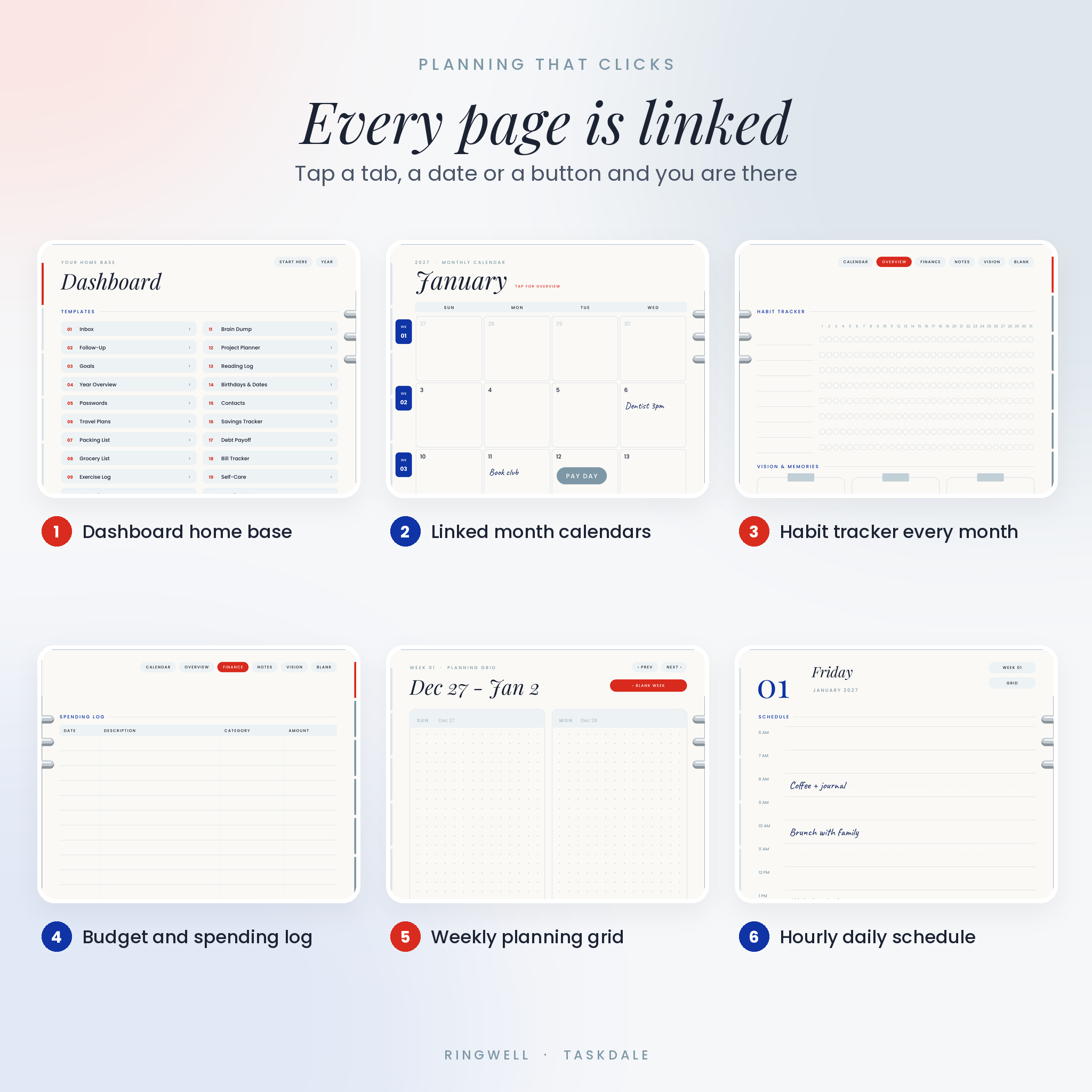



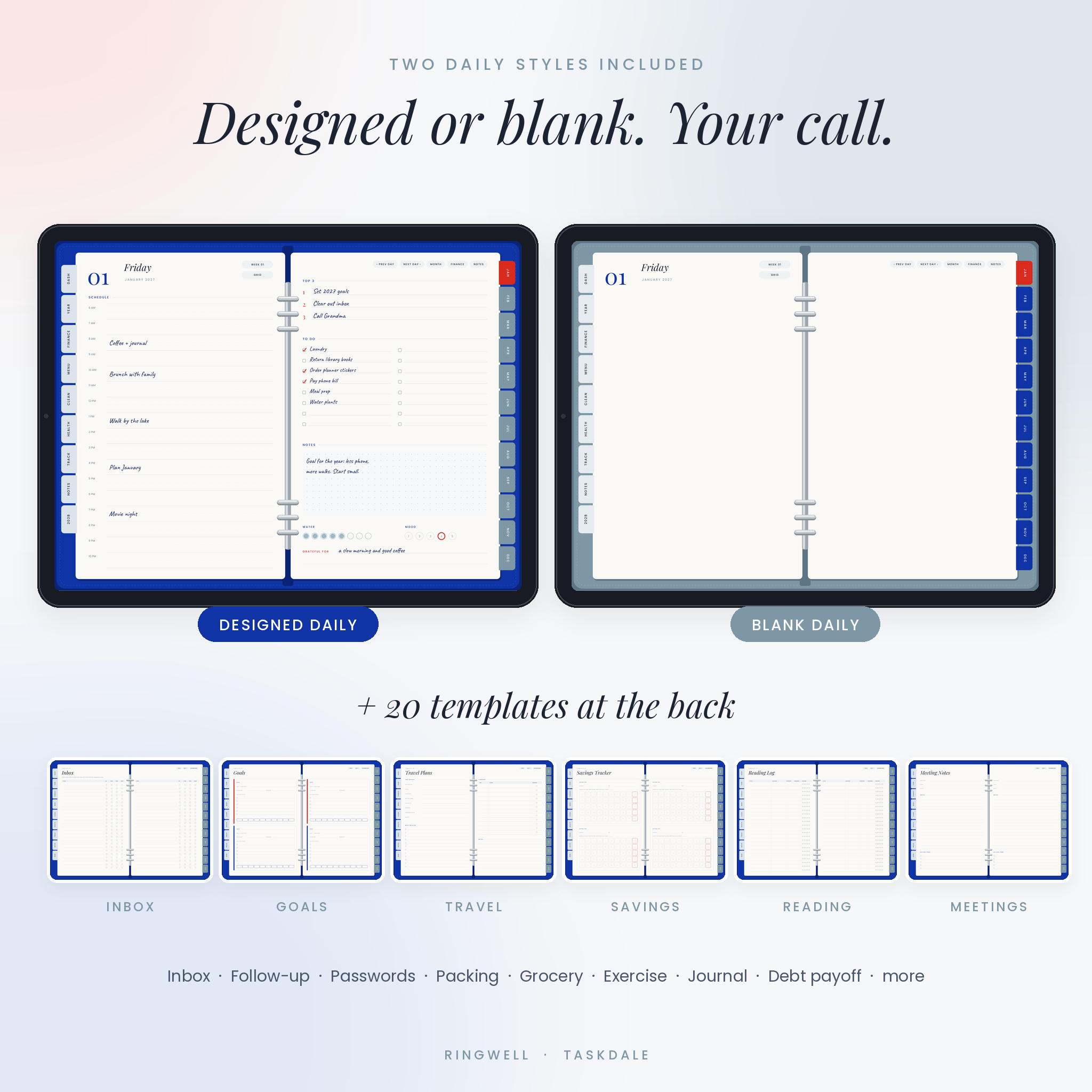
Ringwell is a 2027 digital planner laid out like an open ring binder: two pages side by side, silver rings down the middle and colored tabs on both edges. It runs as one hyperlinked PDF, so a single tap takes you from the dashboard to March, from March to week 11 and from week 11 to Thursday. No scrolling through 629 pages to find next Tuesday.
You get eight planner files (two cover colors, Sunday or Monday start, designed or blank daily pages), a 90-piece sticker and widget pack and a 15-page user guide. Buy once, plan the whole year.
What this 2027 digital planner does
It keeps every part of your life in one notebook. Your month calendar sits next to your budget. Your meal plan sits next to your cleaning list. Your weekly spread is one tap away from each day. The tabs on the left follow the month you are in, so the Finance tab on a March page opens March finances, not January.
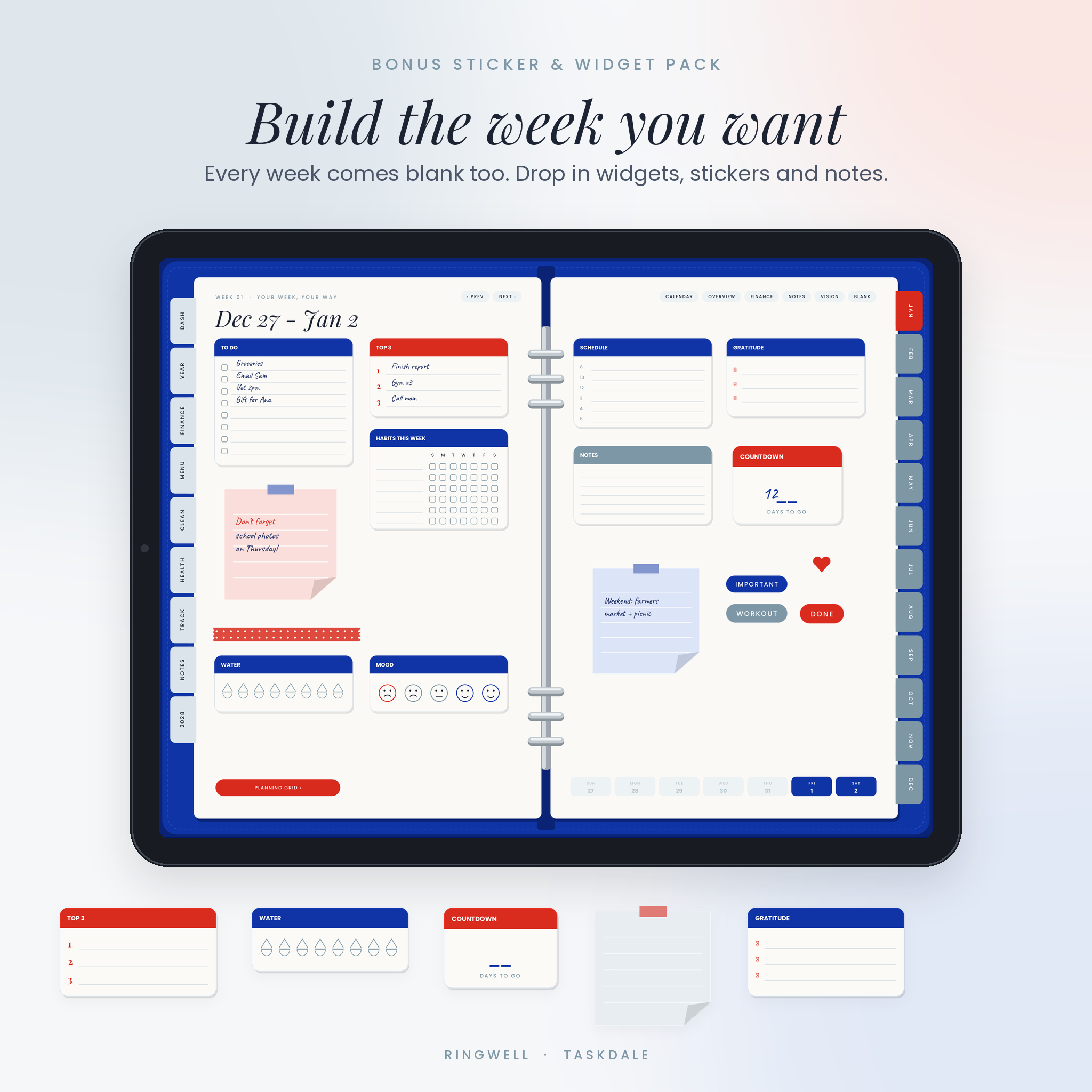
Weekly pages come two ways. The first spread is blank, made for stickers, widgets and your own layout. Swipe once and you get a planning grid with a box for every day and a Top Priorities panel. Use whichever fits the week.
Who it is for
- iPad and Android tablet users who love the look of a ring planner
- Parents juggling school runs, meals, bills and appointments
- Students and professionals who need an hourly daily schedule
- Sticker and widget fans who want open space to decorate
- Anyone moving from a paper planner to a digital one
Main benefits
- Find anything fast. More than 20,000 links connect tabs, dates, weeks, months, templates and sections.
- Plan your way. Pick designed daily pages for structure or blank daily pages for freedom. Both versions are included.
- Run the house from one place. Finances, menu, cleaning, health and trackers repeat every month.
- Calm, readable design. Egyptian blue, stone blue and a touch of scarlet on warm white paper. Easy on the eyes for a full year.
Features
Dashboard home base
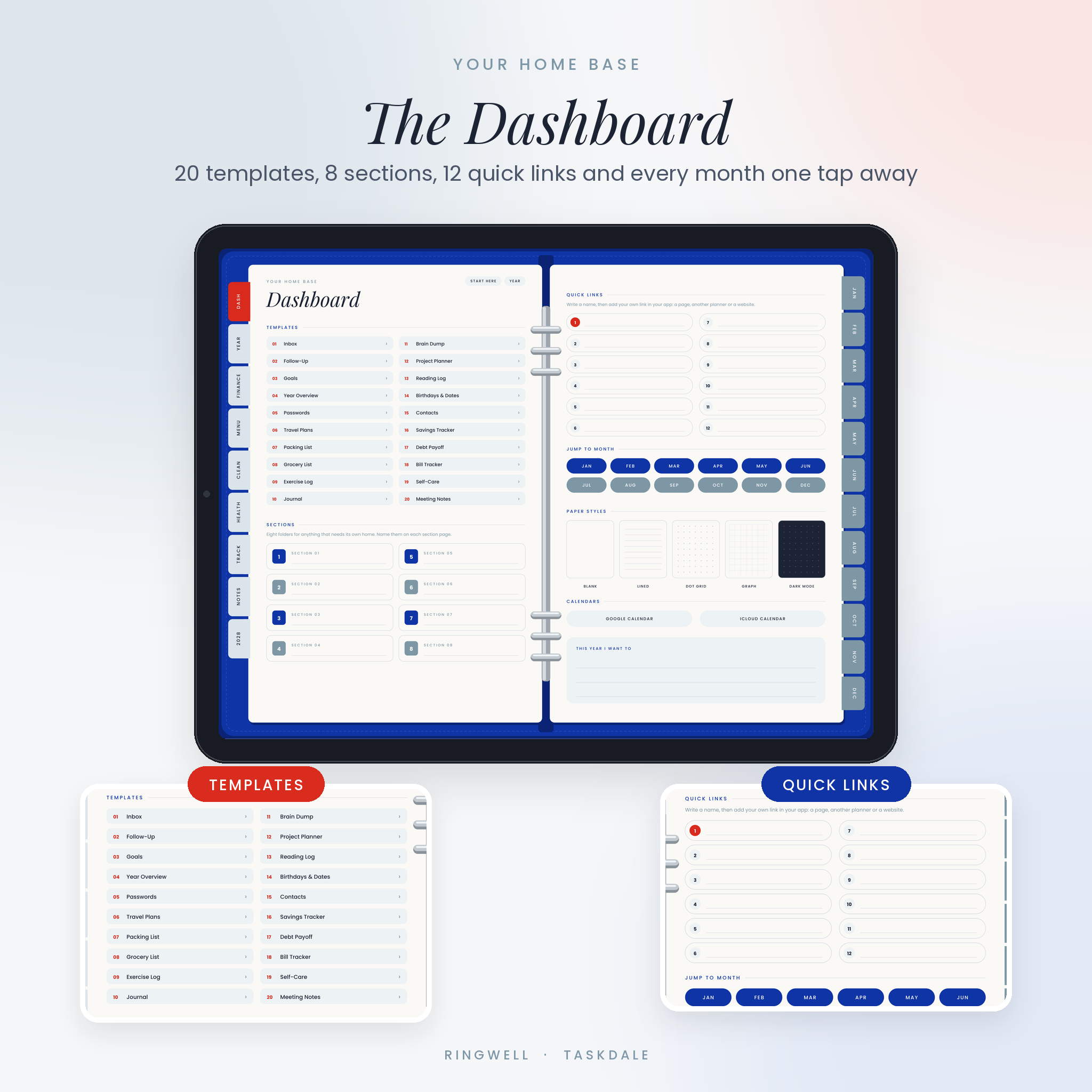
Links to 20 templates, 8 custom sections, a month picker, 5 paper styles and Google Calendar and iCloud Calendar buttons. It also has 12 Quick Links slots you can point at any page, another notebook or a website.
Monthly pages (10 per month)
- Month calendar with week buttons on every row and a Focus column
- Monthly overview: two goals with steps, a look back at last month, important dates and a mini calendar
- Habit tracker for 8 habits across every day of the month, plus a word for the month
- Finances: income, bills with paid checkboxes, 15-line spending log, summary boxes and a savings goal bar
- Menu: five-week dinner plan, meal ideas and an eight-section grocery list
- Cleaning: daily resets, weekly jobs, monthly deep clean and six home zones
- Health: daily water, sleep, movement and mood check-in, plus appointments
- Trackers: three goal progress bars, a mood map and eight custom trackers
- Lined notes, a vision board and a blank spread
Weekly and daily pages
- 53 weeks, each with a blank spread and a planning grid
- 365 daily pages from January 1 to December 31, 2027
- Designed daily pages: 6 AM to 10 PM schedule, top 3, 16-line to-do list, notes, water, mood and gratitude
- Previous and next day buttons, plus shortcuts to the month, finances and notes
20 undated templates
Inbox, Follow-Up, Goals, Year Overview, Passwords (hint style), Travel Plans, Packing List, Grocery List, Exercise Log, Journal, Brain Dump, Project Planner, Reading Log, Birthdays & Dates, Contacts, Savings Tracker, Debt Payoff, Bill Tracker, Self-Care and Meeting Notes.
Extras
- 2027 at a Glance and 2028 at a Glance
- Blank, lined, dot grid, graph and dark mode paper
- 8 custom sections with 6 named subfolders each
- Start Here page that shows how the planner works
What is included
- Egyptian Blue Edition ZIP: 4 planner PDFs (Sunday or Monday start, designed or blank daily)
- Stone Blue Edition ZIP: the same 4 planners with a stone blue cover
- Sticker & Widget Pack ZIP: 90 transparent PNG files and a 5-page sticker book PDF. 24 labels, 31 date circles, weekday headers, 4 sticky notes, 6 washi strips, 11 widgets and 8 icons
- User Guide (DOCX): setup steps, how each page works, tips, troubleshooting and FAQ
How it works
- Download and unzip your files after checkout.
- Pick one planner: cover color, start day and daily style.
- Import the PDF into a note app that supports PDF links, such as GoodNotes, Notability, Noteshelf, ZoomNotes or Xodo.
- Tap tabs, dates and buttons to move around. Write with your stylus.
File formats and software requirements
- Hyperlinked PDF, landscape 4:3 pages (1366 x 1024 points), fonts embedded
- About 6 MB per planner file
- Needs a PDF annotation app that follows internal links. The app is sold separately or free, depending on which you choose
- Works on iPad, Android tablets and other tablets that run one of those apps
- Sticker files are PNG with transparent backgrounds
- User guide opens in Microsoft Word, Google Docs, Pages or LibreOffice
Customization
The blank weekly spreads, blank daily pages, blank monthly spreads and vision boards are made for stickers, widgets and photos. Add your own links to the 12 Quick Links slots and the 48 section subfolders. Duplicate any template or paper page as often as you like. Money fields say Amount with no symbol, so you can plan in dollars, pounds, euros or any currency.
Digital download information
This is an instant digital download. Nothing ships. Your files appear on the order confirmation page and in your Taskdale account as soon as payment goes through. Colors can look slightly different from screen to screen.
Real ways people use this 2027 planner
- A mom of three plans dinners and grocery runs on Sunday night, then checks the cleaning list each morning.
- A college student blocks classes and shifts on the hourly schedule and keeps assignments in the Inbox template.
- A freelancer tracks invoices on the Follow-Up page and watches spending in the monthly log.
- A sticker lover builds every week from scratch on the blank spread with the widget pack.
FAQ
Does this digital planner work with GoodNotes?
It is a standard hyperlinked PDF built for apps like GoodNotes that let you write on PDFs and tap links. Links work when the pen tool is off or in read only mode.
Can I use it on an Android tablet?
Yes, in an Android PDF app that supports links and handwriting, such as Xodo.
Is it Sunday or Monday start?
Both. You get Sunday start and Monday start versions of every file.
What is the difference between designed and blank daily pages?
Designed pages have a schedule, top 3, to-do list and trackers. Blank pages keep the date and navigation but leave the spread open for your own layout.
Is this a physical planner?
No. It is a digital file you download and use on a tablet.
Can I print pages?
Yes, for personal use, from your PDF app. It is designed for screens first.
Can I share it with a friend?
No. The license is for personal use only. Please do not share, resell or redistribute the files.
Reviews
There are no reviews yet.