


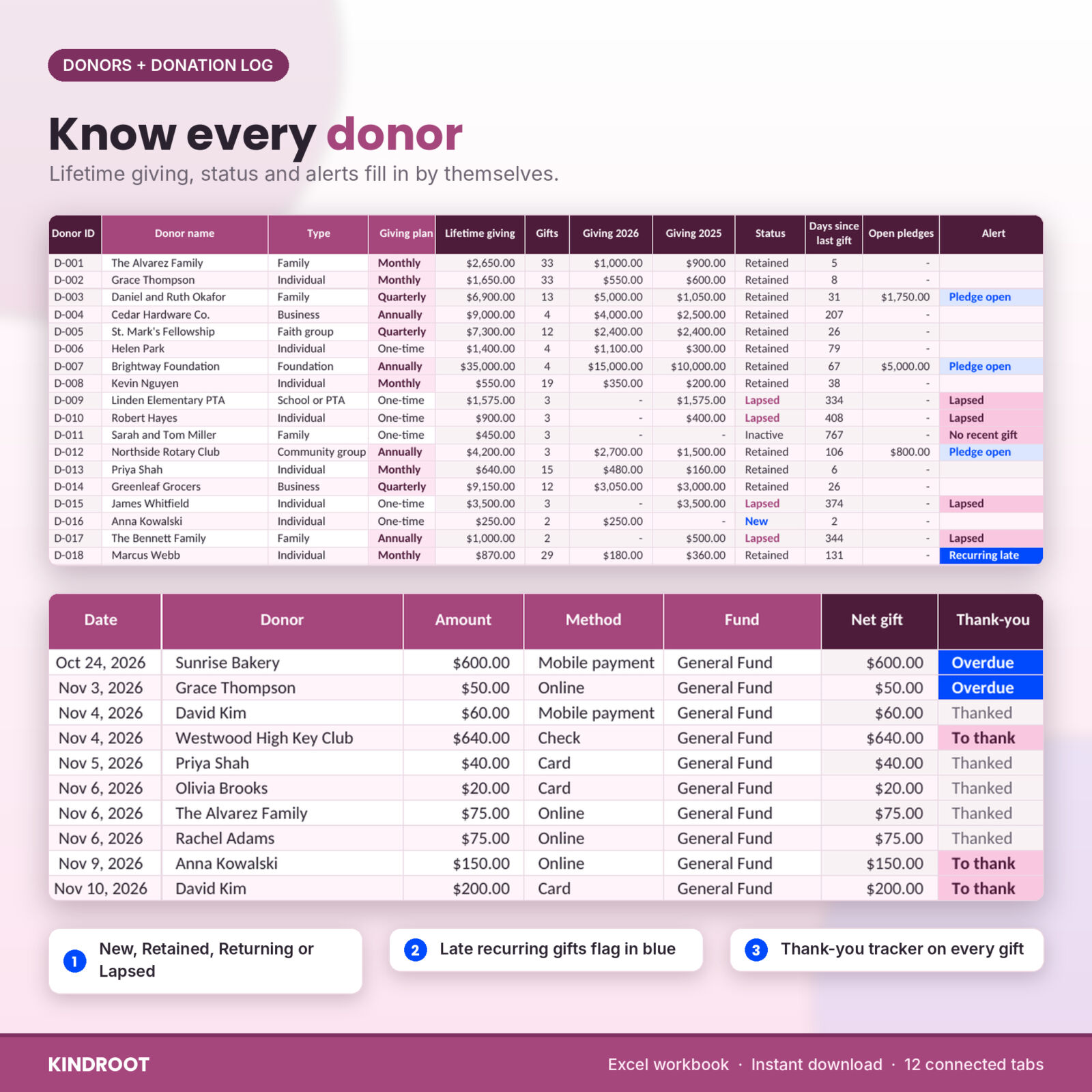


Kindroot is a donation tracker spreadsheet and donor database for Microsoft Excel. It is made for small nonprofits, churches, schools, PTAs and volunteer-run fundraisers that need clear numbers without paying for donor software every month. You log each gift once. Twelve connected tabs do the math, flag what needs attention and turn your records into year-end giving statements.
Most donation logs stop at a list of amounts. Kindroot also tracks donor status and retention, recurring givers, pledges, campaign goals, event income and costs, and volunteer hours. Then it rolls everything into a giving dashboard you can filter by year and month.
What this donation tracker spreadsheet does
- Keeps one donor database. Up to 400 donors with type, salutation, contact details, address and giving plan. First gift, last gift, lifetime giving, this year, last year and open pledges fill in on every row.
- Logs every gift. Up to 2,000 gifts with date, donor, amount, method, fund, campaign and event. Record the value of anything the donor received back, such as a gala dinner, and in-kind items by description.
- Makes sure everyone is thanked. Add the date you sent a thank-you. Gifts without one show “To thank”, then turn blue as “Overdue” after the number of days you choose.
- Spots donors drifting away. Every donor gets a status for the year: New, Retained, Returning, Lapsed or Inactive. Monthly, quarterly and annual givers are flagged “Recurring late” when a gift is overdue.
- Tracks pledges. Payments are matched from the donation log by donor and campaign, so paid so far, balance, % paid and Open, Due soon, Overdue or Paid all update by themselves.
- Shows campaign progress. Up to 30 campaigns with goal, dates, raised, donors, open pledges and a progress bar.
- Counts event results. Tickets, sponsorships, auction and sales, gifts logged at the event, costs, net raised and the cost to raise each dollar.
- Logs volunteer hours. A roster of up to 150 volunteers and a shift log with hours and the value of their time.
Giving statements for any donor and year
Pick a donor and a year from two drop-downs. A one-page letter fills in with your letterhead, the donor’s address and greeting, your thank-you paragraph, total gifts, goods or services received, net contribution and the list of gifts. Switch the list to monthly totals for weekly givers. The wording lives on the Settings tab, so you edit it once for every donor. Print it or save it as a PDF to email. The statement is a thank-you and a record of gifts, not tax advice, so you can adjust the wording to suit your local rules.
The giving dashboard
Six cards show total raised (with the change against the previous period), gifts received and the average gift, donors giving and new donors, donor retention, pledges outstanding and volunteer hours. An alert strip counts gifts to thank, overdue thank-yous, lapsed donors, late recurring gifts, overdue pledges and running campaigns. A goal bar tracks the year against your target.
Eight charts update on their own: raised by month against last year, raised by fund, campaign progress, top donors, donor status, payment methods, volunteer hours by month and gross raised by event. Underneath, three short lists show lapsed donors to call, gifts to thank and pledges coming due.
What is included
- Kindroot-Donation-Donor-Tracker.xlsx: the Excel workbook with 12 tabs (Start Here, Dashboard, Donations, Donors, Pledges, Campaigns, Events, Volunteers, Volunteer Hours, Giving Statement, Reports and Settings).
- Kindroot-User-Guide.docx: a 22-page guide covering setup, every tab, customizing, tips, troubleshooting and FAQs.
How it works
- Set your basics. Organization name and address, currency, annual goal, funds, payment methods, donor types and the statement wording on one Settings tab.
- Add your donors, campaigns and events. One row each.
- Log gifts as they arrive. Pick from drop-downs. Totals, statuses and checks fill in.
- Watch it add up. The dashboard, reports and giving statements update on their own.
Reports for the board and grant applications
The Reports tab shows money raised by month and fund for the year, with last year’s totals and the change, plus giving by donor type and by payment method. It prints on one landscape page.
File format and software
One Excel workbook (.xlsx). Built for Microsoft Excel 2010 or newer on Windows or Mac, and tested in LibreOffice Calc. There are no macros, add-ins or internet links. It is not built for Google Sheets or Apple Numbers. Formula cells are protected without a password so they cannot be broken by accident, and the white input cells stay open.
Make it yours
Pick your currency symbol once and every money cell follows it: dollars, euros, pounds, rand, naira and 15 more. Rename funds, payment methods, donor types and volunteer roles, and the drop-downs update straight away. Old rows that use a renamed item turn pink, so nothing breaks silently.
Real ways people use it
- A food pantry treasurer logs weekly gifts, thanks new donors within the week and prints year-end statements in January.
- A church office tracks tithes by fund, follows building fund pledges and sends monthly-total statements to weekly givers.
- A PTA runs a fun run and a bake sale and sees net raised and cost per dollar for each event.
- A small charity reports volunteer hours and their value in a grant application.
Digital download
This is an instant digital download. Nothing is shipped. After payment you can download the Excel workbook and the user guide straight away. Personal license for one organization: please do not resell, share or upload the files.
FAQ
Can I use this donation tracker for a church?
Yes. Set up funds such as Tithes, Offerings and Building Fund, then send year-end statements from the Giving Statement tab. Weekly givers can get a monthly-totals statement.
Does it work in Google Sheets?
It is built for Excel 2010 or newer and tested in LibreOffice Calc. It was not built or tested for Google Sheets or Numbers.
How many donors and gifts does it hold?
400 donors, 2,000 gifts, 200 pledges, 30 campaigns, 25 events, 150 volunteers and 1,200 volunteer shifts.
Is the giving statement an official tax receipt?
It is a thank-you letter and a record of gifts, not tax advice. You can edit the wording on the Settings tab to match what your organization needs.
Can I use my own currency?
Yes. Pick from 20 currency symbols on the Settings tab and every money cell switches.
Do I need to know formulas?
No. You only type in the white cells and pick from drop-downs. The user guide walks through every tab.
Are there macros?
No macros, scripts or add-ins, so there is nothing to enable.
Reviews
There are no reviews yet.