
Grant Tracker Spreadsheet for Nonprofits and Grant Writers
Grantspire is a complete grant tracker spreadsheet for small nonprofits, grant writers and community organizations. It replaces scattered lists and calendar reminders with one connected workbook that follows each grant from the first funder you research, through the LOI and proposal, to the award, the spending and the final report. You type the facts once, and the tracker calculates your weighted forecast, next deadlines, document progress, spending pace and win rates for you.
What the Grantspire grant tracker does
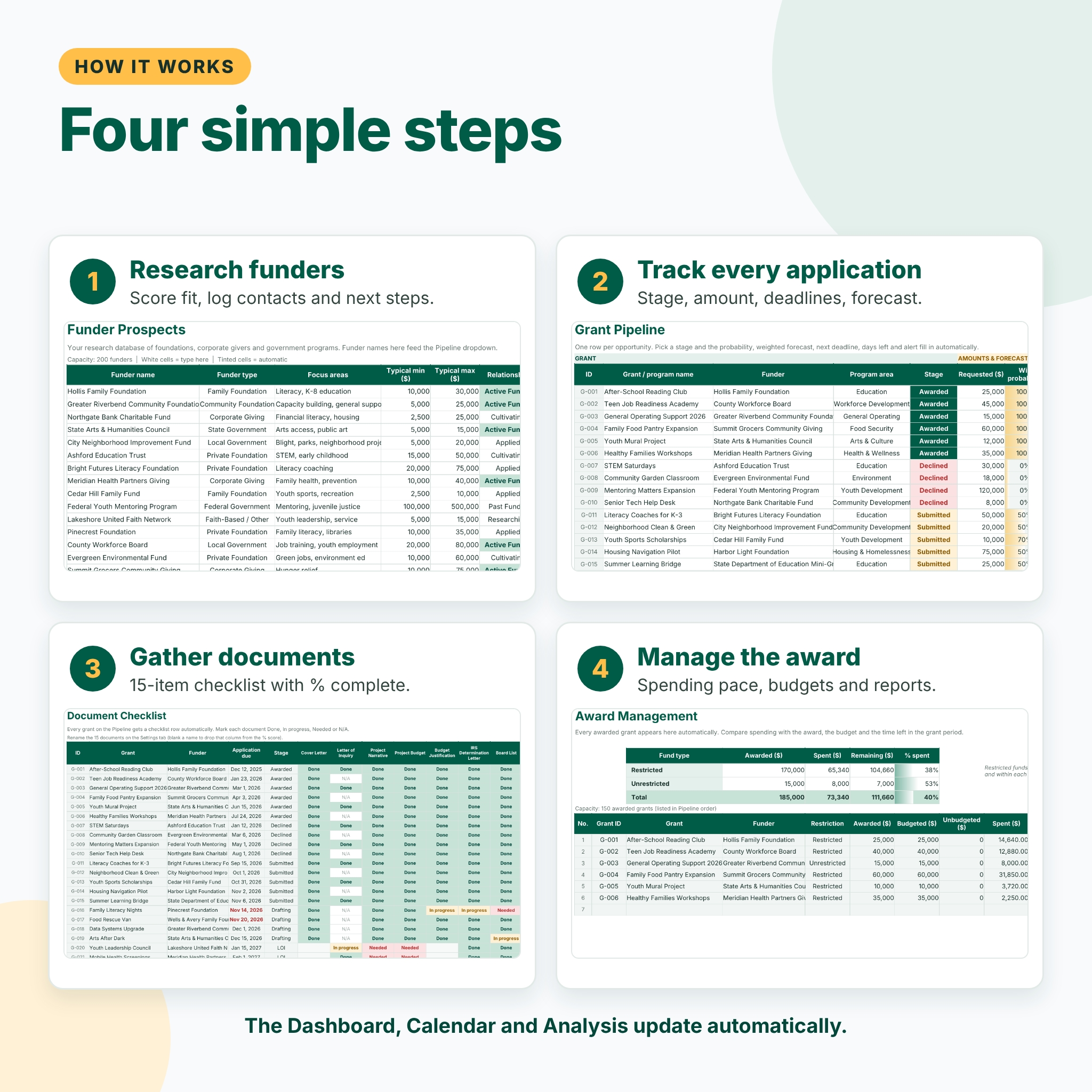
- Funder prospect database. Keep up to 200 funders with type, focus areas, geographic focus, typical award range, deadline cycle, relationship status, a 1-5 fit score, contact details and next steps. Each funder shows its applications, dollars requested, dollars awarded and win rate automatically.
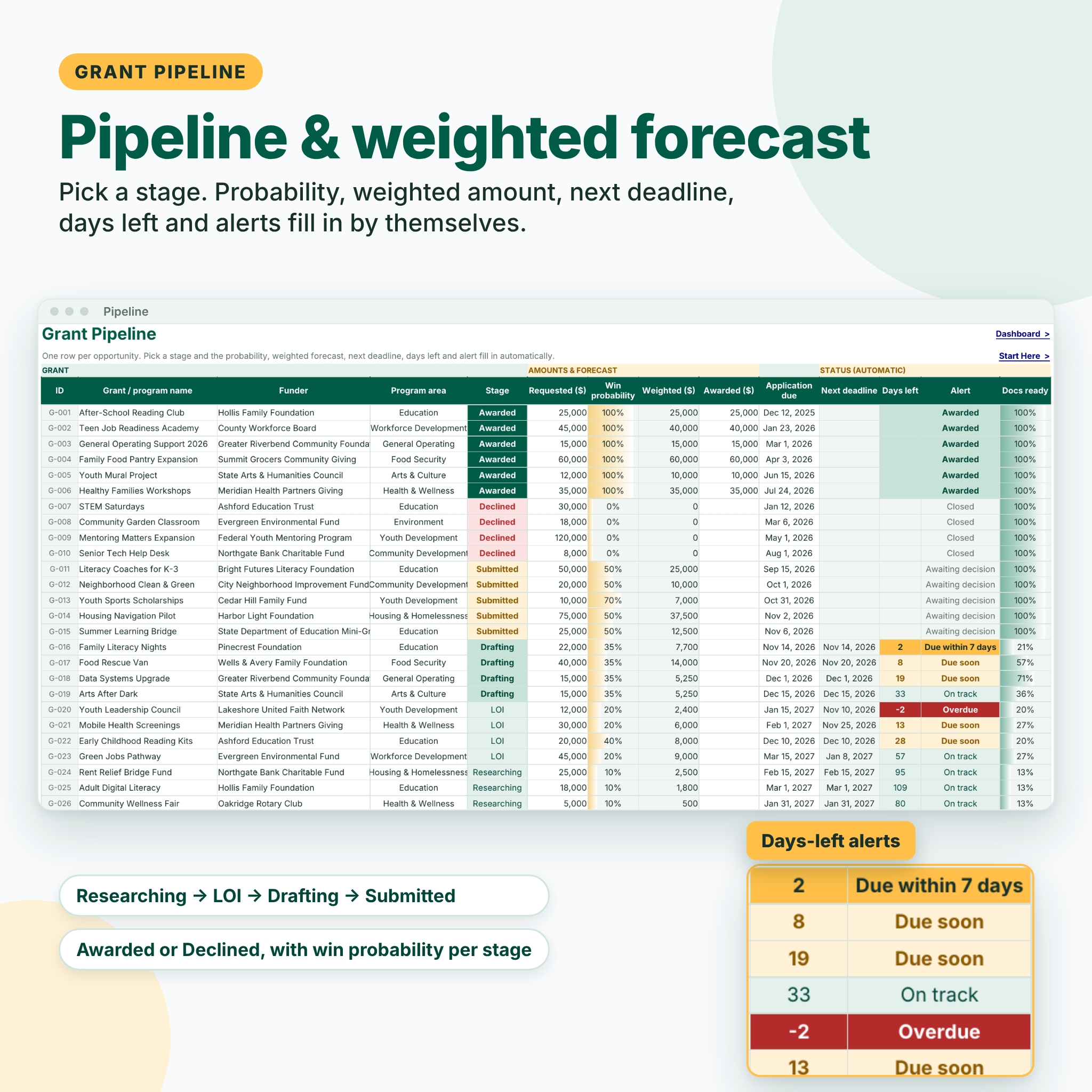
- Grant pipeline with weighted forecast. Track 300 grants through six stages: Researching, LOI, Drafting, Submitted, Awarded and Declined. Each stage has a default win probability you can change, and you can override it for any single grant. The weighted amount and total forecast update instantly.
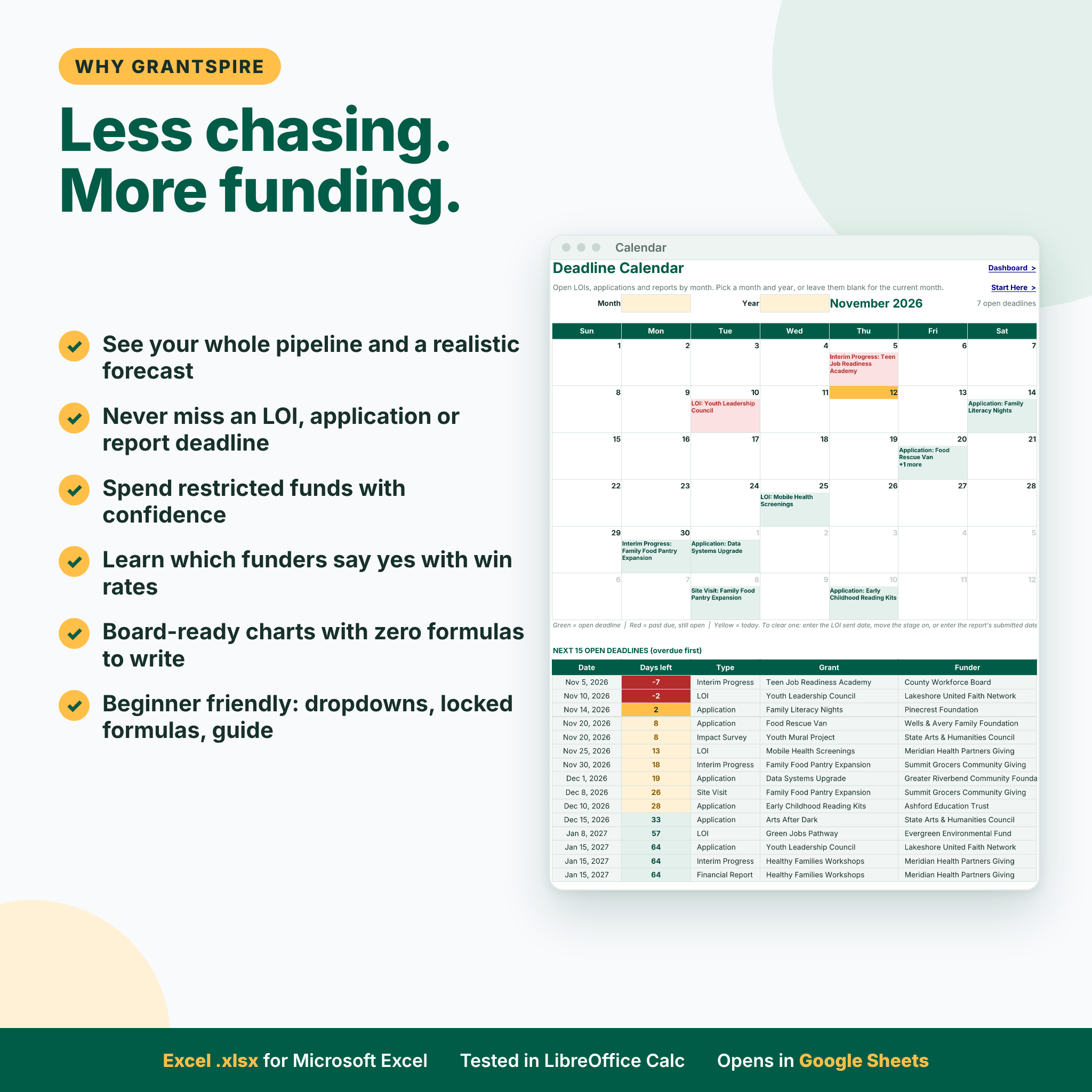
- Deadline calendar with days-left alerts. Every open LOI, application and report deadline appears on a month-view calendar and in a list of the next 15 deadlines. Overdue items turn red and anything due within seven days turns yellow.
- Document checklist per application. Fifteen common attachments (cover letter, narrative, budget, IRS determination letter, Form 990, audited financials, logic model and more) with Done, In progress, Needed or N/A status and a % complete bar for every grant.
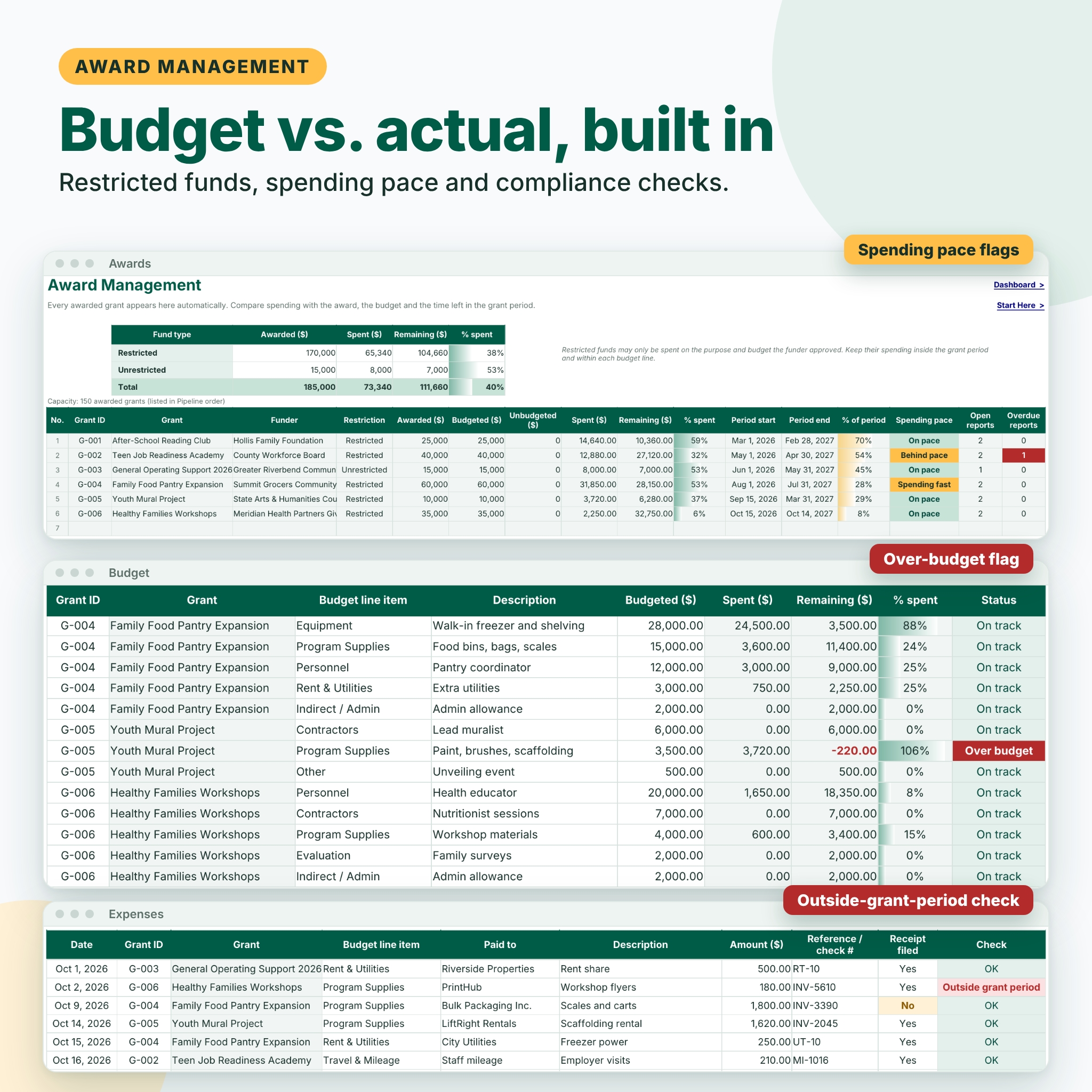
- Award management. Each awarded grant appears automatically with awarded, budgeted, spent and remaining amounts, % spent compared with % of the grant period elapsed, and a spending pace flag: On pace, Behind pace, Spending fast, Period ended or Over award.
- Budget vs. actual by line item. Enter the approved budget for each award, log expenses, and see spent, remaining and status for every line. Over-budget lines are flagged in red.
- Restricted funds. Restricted and unrestricted awards are totaled separately so you always know how much restricted money is left to spend.
- Expense log with compliance checks. 1,500 expense rows. A Check column flags a missing grant, an unknown grant, a missing budget line or a date outside the grant period.
- Reporting deadlines. Interim, final and financial reports with status and overdue alerts, linked to the calendar and the awards tab.
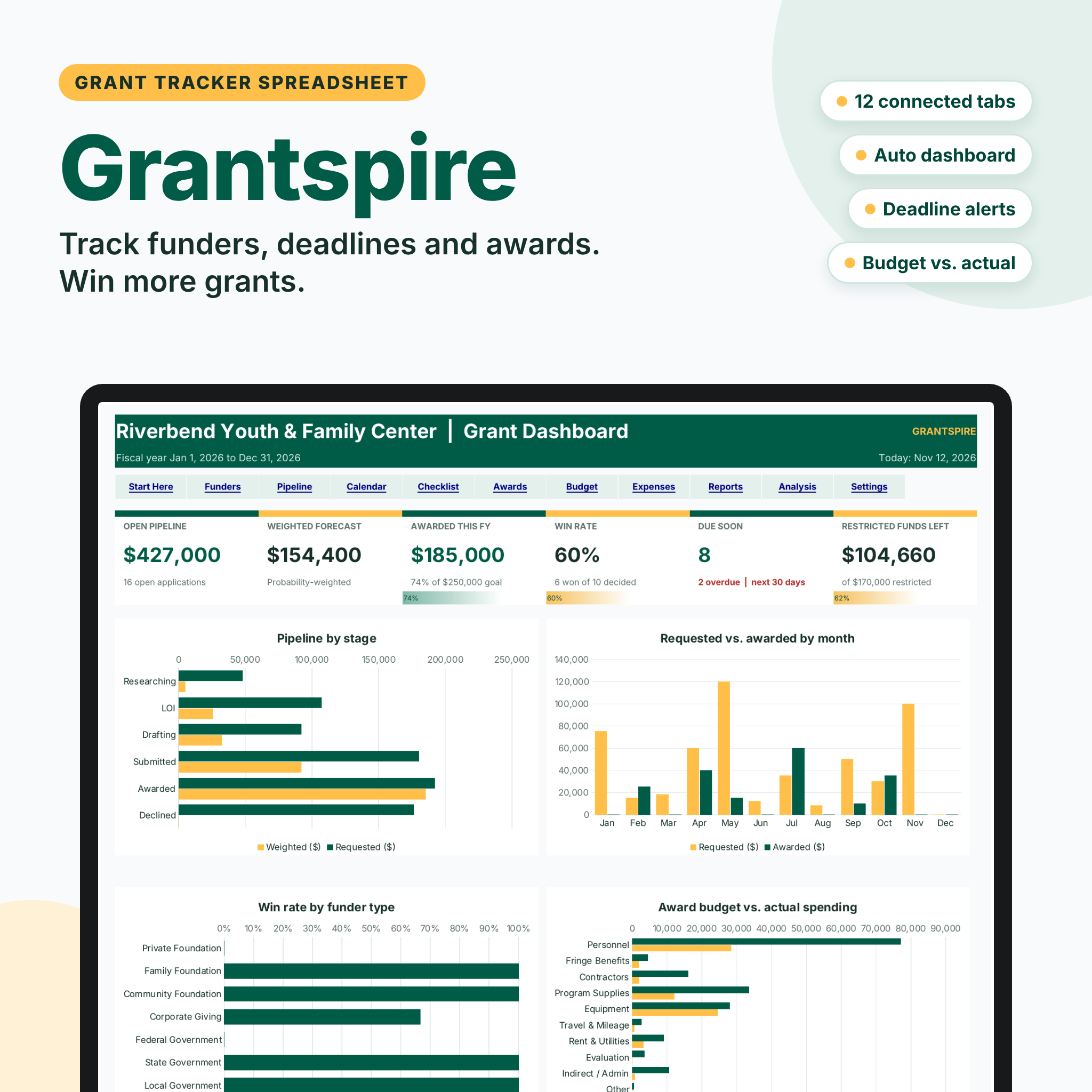
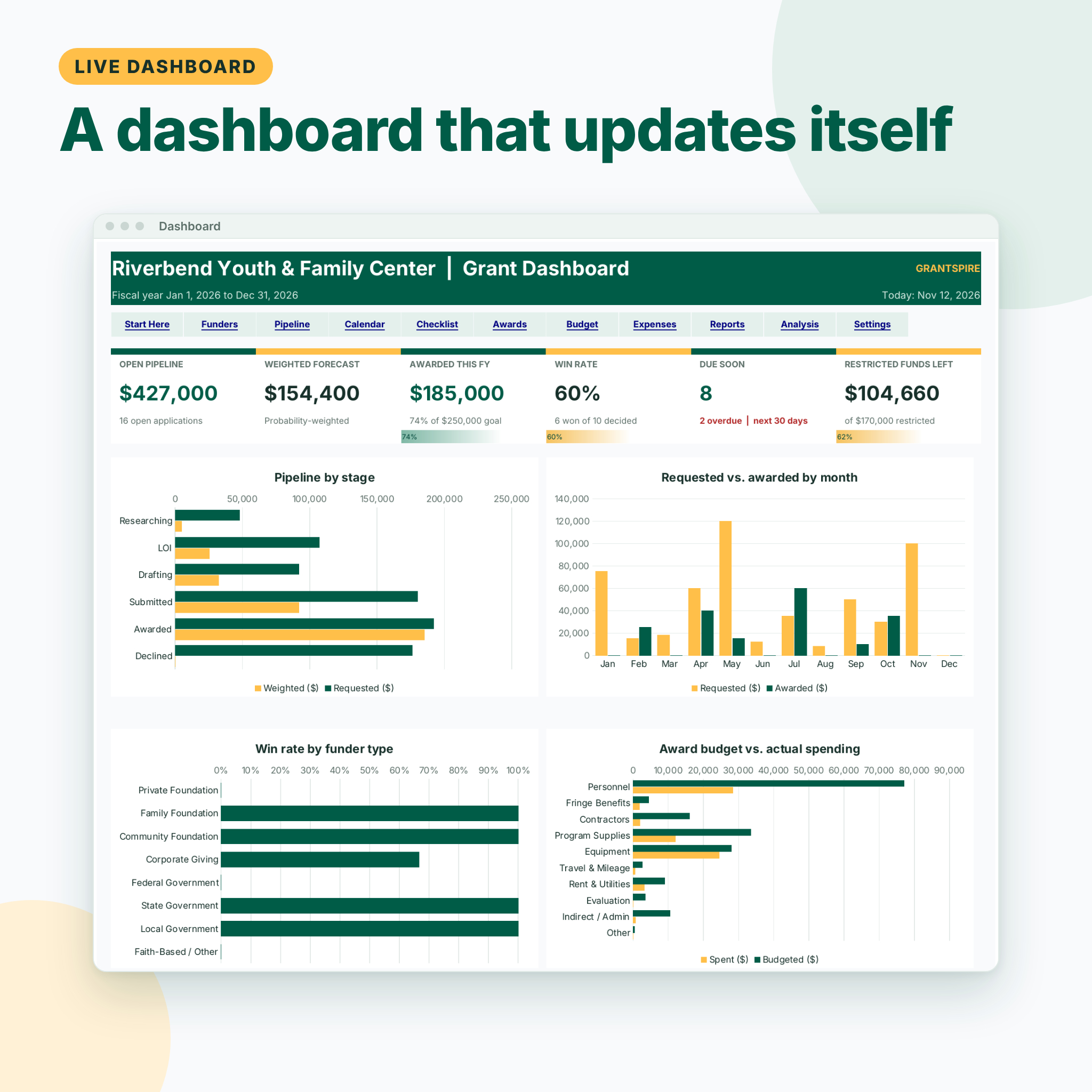
- Win-rate analysis. Win rate by count and by dollars, average award, average days to a decision, pipeline by stage, requested vs. awarded by month, and win rates by funder type and program area.
- Spectacular dashboard. Six KPI tiles (open pipeline, weighted forecast, awarded this fiscal year with goal progress, win rate, deadlines due soon and restricted funds left), four charts, the next 10 deadlines and the spending pace of your awards.
Who it is for
Grantspire is built for executive directors, development staff and freelance grant writers who apply to foundations, corporate giving programs and government agencies. It suits youth programs, food pantries, arts groups, schools, churches, health and housing nonprofits, and any organization that receives restricted grant funds. It is focused on grants; if you also need to track individual donors, pair it with a separate donation tracker.
Main benefits
- See a realistic income forecast instead of a hopeful total.
- Stop missing LOI, application and reporting deadlines.
- Spend restricted money on time and within budget, with flags before small problems become audit findings.
- Walk into board meetings with charts that are already up to date.
- Learn which kinds of funders say yes, so you can plan next year’s grant calendar.
What is included
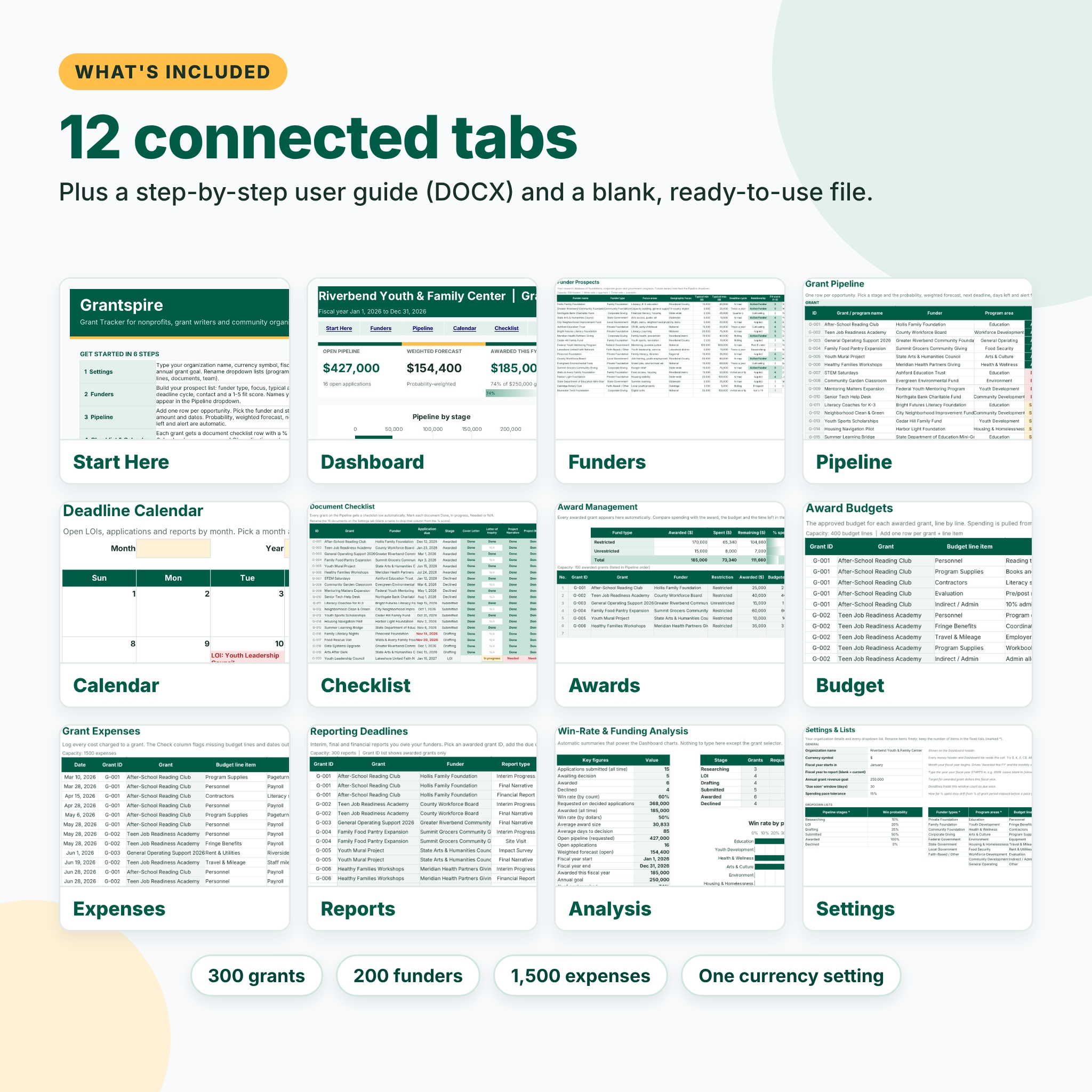
- Grantspire-Grant-Tracker.xlsx with 12 tabs: Start Here, Dashboard, Funders, Pipeline, Calendar, Checklist, Awards, Budget, Expenses, Reports, Analysis and Settings
- Grantspire User Guide (DOCX) covering setup, every tab, customization, tips, troubleshooting and FAQs
The workbook arrives blank and ready for your data. Listing images show fictional sample data.
How it works
- On Settings, enter your organization name, currency symbol, fiscal year start and annual grant goal, and rename the dropdown lists.
- Add funders on the Funders tab.
- Add each opportunity on the Pipeline and move its stage forward as it progresses.
- Track documents on the Checklist and deadlines on the Calendar.
- When a grant is awarded, enter its budget, log expenses and schedule its reports. The Dashboard updates on its own.
File formats and software requirements
Excel-format .xlsx for Microsoft Excel; tested in LibreOffice Calc; built with standard functions that also work when you open it in Google Sheets. There are no macros, scripts or add-ons. To use Google Sheets, upload the file to Google Drive and open it with Google Sheets.
Customization
One currency setting drives every money header and dashboard tile, with $ as the default. Rename program areas, funder types, budget line items, report types, documents and team members on the Settings tab, and adjust the win probability for each stage, the due-soon window and the spending pace tolerance. Formula cells are locked so they can’t be overwritten by accident, and the sheets are protected with no password, so you can unprotect them to change colors or layout. Every tab has a print area that fits the page width.
Digital download
This is a digital product. No physical item is shipped. After purchase you can download the .xlsx workbook and the DOCX user guide from your Taskdale account.
Use cases
- A youth nonprofit tracking 20 foundation applications and three restricted awards.
- A freelance grant writer keeping deadlines and documents organized for a client.
- A food pantry managing an equipment grant budget and its interim report.
- An executive director preparing a grant income forecast for the annual budget.
Frequently asked questions
Does this grant tracker work in Google Sheets?
Yes. Upload the .xlsx to Google Drive and open it with Google Sheets. It uses standard functions only.
Can I change the currency?
Yes. Type your symbol once on the Settings tab and every money label follows it.
How many grants can I track?
300 grants, 200 funders, 150 awards, 400 budget lines, 1,500 expenses and 300 reports.
How is the weighted forecast calculated?
Each open grant’s requested amount is multiplied by its win probability, which comes from its stage or your own override.
Does it track restricted funds?
Yes. Awards are marked restricted or unrestricted, totaled separately, and compared with their line-item budgets and grant periods.
Is there a free version?
Yes. Grantspire Lite includes the dashboard and a 25-grant pipeline so you can try the core features first.
License
Personal use license from Taskdale. Use Grantspire for your own organization or for the clients you personally manage. You may not resell, share, give away or redistribute the file, the guide or any modified version of them.
Reviews
There are no reviews yet.