


Keyfinch Home Buying Planner Spreadsheet: your whole first-home journey in one file
The Keyfinch home buying planner spreadsheet is built for first-time home buyers in the US who want a clear plan and fewer surprises. Instead of juggling listing tabs, lender emails and a dozen calculators, you keep your budget, the homes you love, your offers and every contract deadline in one connected Excel-format workbook. Type your numbers in the light coral cells and everything else calculates for you, right up to a dashboard that shows where you stand.
Estimates only, not financial advice: the planner helps you plan and compare, and your lender, agent and attorney confirm the final numbers and dates.
What it does
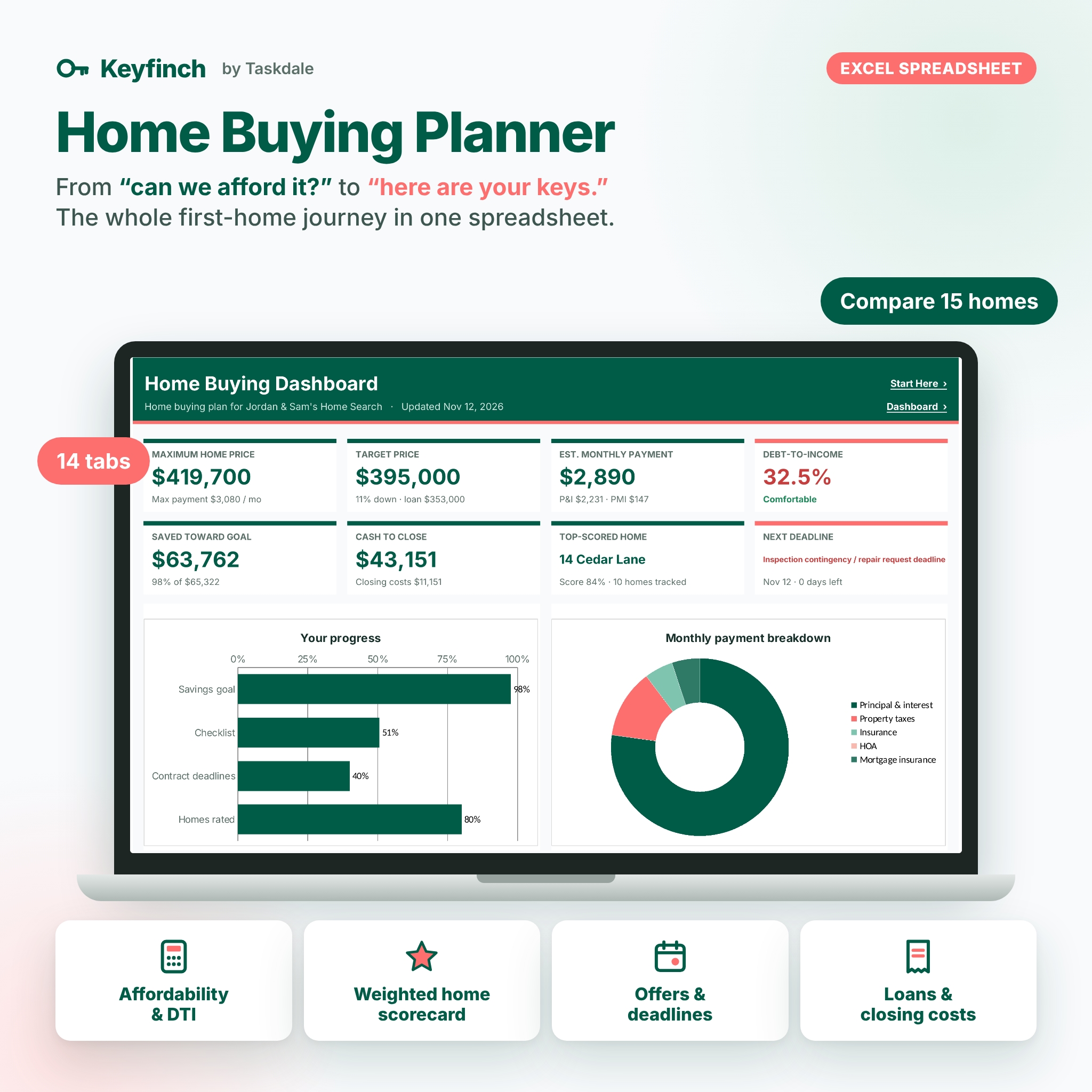
- Affordability calculator: enter gross income and monthly debts to see your front-end and back-end debt-to-income ratio, your maximum monthly housing payment and the maximum home price it buys, including property taxes, insurance, HOA dues and mortgage insurance (PMI) when your down payment is under 20%.
- Target home check: a full PITI breakdown at any price with a clear verdict: Comfortable, Stretch or Over limit.
- Price ladder: 12 prices around your maximum with the monthly cost, DTI and verdict for each, plus a chart.
- Cash you need: down payment, closing costs, cash reserve and moving budget compared with what you have saved.
- Down payment savings tracker: a savings goal, up to 6 accounts, a 300-entry savings log, average saved per month, projected goal date and a month-by-month chart.
- House hunting comparison: up to 15 homes with price per square foot, estimated monthly payment, budget fit, score, must-have check, rank and number of showings.
- Weighted must-have scorecard: 12 editable criteria with weights from 0 to 5 and must-have flags. Rate each home 1 to 5 and the planner calculates a fair weighted score and rank. A home that fails a must-have ranks below every home that passes.
- Showing notes log: 200 rows for open houses and tours: first impression, likes, dislikes, repairs and red flags, questions and next steps.
- Offer tracker: 15 offers with % of list price, earnest money, seller credits, escalation cap, contingencies, status, counter and final price.
- Offer and contingency deadline timeline: enter your acceptance and closing dates and 20 milestones get due dates, days left and alerts (Overdue, Due soon, This week, Upcoming, Complete).
- Loan offer comparison: 5 Loan Estimates side by side with monthly payment, upfront lender cost, interest over the years you plan to stay, true cost, points break-even and a ranked best value.
- Closing cost worksheet: 30 lines with estimate, Loan Estimate and Closing Disclosure columns, who pays, and your cash to close after credits and earnest money. Lines that rise more than 10% are flagged.
- Moving and closing checklist: 77 ready-made tasks in 8 phases, from checking your credit to settling in, with status, owner, due dates and progress by phase.
- Dashboard: 8 KPI tiles, a progress chart, payment breakdown, savings vs goal, home scores, your top 5 homes and your next 5 deadlines.
Who it is for
- First-time home buyers who want to know their real budget before touring.
- Couples and families who need one fair way to compare homes together.
- Buyers under contract who want every contingency deadline and closing cost in one place.
Main benefits
- One file for the whole journey, from pre-approval to move-in.
- Decisions based on weighted must-haves instead of gut feel.
- Loans compared by true cost over your stay, not just the rate.
- Formula cells locked (no password) so nothing breaks by accident.
- One currency setting that every money label reads from ($ by default).
What is included
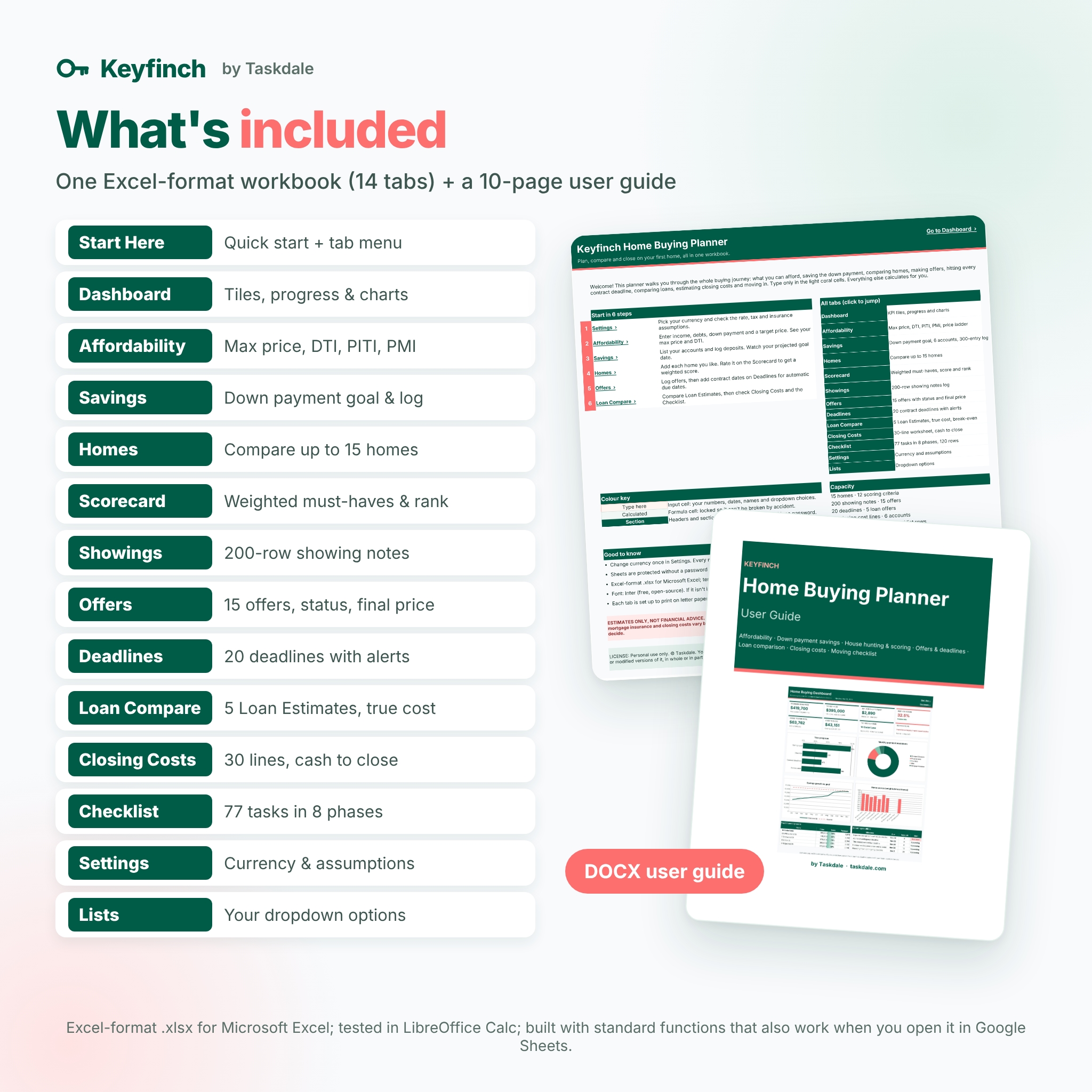
- Keyfinch-Home-Buying-Planner.xlsx: a clean, empty workbook with 14 tabs (Start Here, Dashboard, Affordability, Savings, Homes, Scorecard, Showings, Offers, Deadlines, Loan Compare, Closing Costs, Checklist, Settings, Lists).
- Keyfinch-User-Guide.docx: a 10-page illustrated user guide with setup steps, tab-by-tab instructions, tips, troubleshooting and FAQ.
How it works
- Open Settings, choose your currency and replace the starting assumptions (rate, tax rate, insurance, PMI rate) with your quotes.
- Enter income, debts, down payment and a target price on Affordability.
- Log savings, add homes and rate them on the Scorecard after each tour.
- When you make an offer, log it, add your contract dates, compare Loan Estimates and fill in closing costs.
- Check the Dashboard any time for the big picture.
File formats and software requirements
Excel-format .xlsx for Microsoft Excel; tested in LibreOffice Calc; built with standard functions that also work when you open it in Google Sheets. No macros or add-ins. Every tab is set up to print on letter paper, fitted to the page width. Font: Inter (free and open source); if it is not installed, your app shows a similar font automatically.
Customization
Rename the scorecard criteria and weights, edit milestone names and day counts to match your contract, add your own checklist tasks, and extend the dropdown lists marked with coral headers. Sheets are protected with no password, so you can unprotect any tab to change colors or formulas.
Digital download
This is a digital product. No physical item will be shipped. Your files are available to download right after purchase from your Taskdale account.
Real situations where buyers use it
- Deciding on a realistic price range before talking to an agent.
- Choosing between three favorite homes after a busy weekend of open houses.
- Comparing a credit union, an online lender and a local bank on true cost.
- Keeping inspection, appraisal and financing deadlines straight while under contract.
- Checking the Closing Disclosure against the Loan Estimate before closing day.
FAQ
Does this home buying spreadsheet work in Google Sheets?
It is an Excel-format .xlsx for Microsoft Excel, tested in LibreOffice Calc, and built with standard functions that also work when you open it in Google Sheets.
Does it include a mortgage amortization schedule?
No. Keyfinch focuses on the buying journey. For a full amortization schedule with extra payments, see our Amortiva mortgage calculator.
How many homes can I compare?
Up to 15 homes on up to 12 weighted criteria.
Can I change the DTI limits?
Yes. The front-end, back-end and stretch limits are all in Settings.
Can I use my own currency?
Yes. Change the currency symbol once in Settings and every money label follows it.
Is this financial advice?
No. All results are estimates for planning only. Confirm numbers with your lender, agent, attorney or another licensed professional.
Is there a free version?
Yes. Keyfinch Home Buying Planner Lite includes the affordability calculator and a 5-home scorecard.
License
Personal use only. You may use this template for your own home purchase and household. You may not resell, share, redistribute or upload the files or modified versions of them. © Taskdale.

Reviews
There are no reviews yet.