

Student Loan Payoff Planner Spreadsheet for Federal and Private Loans
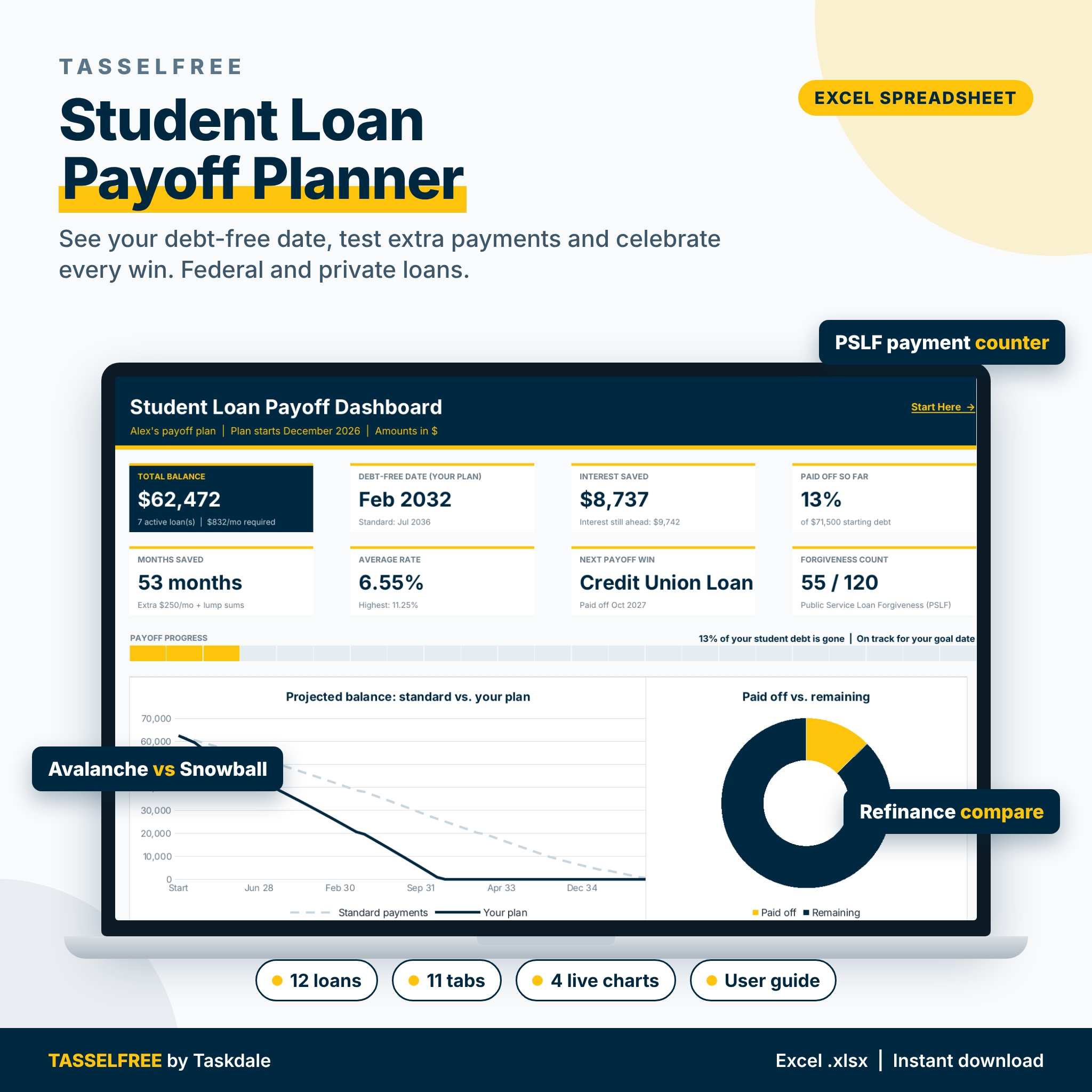
Tasselfree is a student loan payoff planner spreadsheet that turns a confusing stack of loans into one clear plan. Enter up to 12 federal or private loans and the planner shows your debt-free date at standard payments, then shows how many months and how much interest you save with extra payments, lump sums and a smarter payoff order. Everything recalculates the moment you change a number.
Federal repayment rules change often, so Tasselfree never guesses plan formulas. You enter the required payment your servicer bills you, and the planner does the rest. It is an estimating and organizing tool: verify details with your servicer / studentaid.gov. Not financial advice.
What the student loan payoff planner does
- Loan inventory: 12 loans with nickname, federal or private, loan type, servicer, repayment plan, status, original amount, balance, rate, required payment, due day and notes.
- Payoff timeline: per-loan months left, payoff date and interest left at standard payments, plus your plan’s payoff date and months saved.
- Extra payment scenarios: a monthly extra amount plus up to 24 one-time lump sums, with a side-by-side “your plan vs. standard” table and a callout of months and interest saved.
- What-if ladder: quick estimates for eight extra-payment amounts you choose.
- Single-loan calculator: exact months and interest for one loan with an extra amount and a lump sum in any month.
- Avalanche vs. Snowball vs. Custom order: all three strategies run on the same budget, with payoff order, loan-by-loan payoff dates and a balance chart.
- Refinance comparison: choose which loans to include and compare up to three offers on payment, total interest, total cost with fees, lifetime savings and fee break-even. A warning appears automatically if you include a federal loan, because refinancing federal loans to private gives up federal protections.
- Forgiveness payment counter: a personal qualifying-payment tracker for PSLF or another program, with confirmed count, months you log, estimated total, earliest possible date and an employment certification log. It is a tracker only and makes no eligibility claims.
- Payment history log: 600 rows with loan dropdowns, payment type, optional principal/interest split and confirmation numbers.
- 360-month payoff schedule: payment, interest, principal, lump sum, plan balance and standard balance every month, with paid-off loans highlighted.
- Milestone celebrations: percent-paid milestones from 10% to 100%, a celebration row for every loan and 10 custom milestones, each with a projected date and your reward.
- Dashboard: 8 KPI tiles, a payoff progress bar and 4 charts: projected balance (standard vs. your plan), paid off vs. remaining, balance by loan and payments logged over the last 12 months.
Who it is for
Tasselfree is built for US borrowers with more than one student loan: recent graduates, grad and professional students, borrowers with both federal and private loans, parents repaying Parent PLUS loans, and public service workers who want their own record of qualifying months. It is simple enough for a spreadsheet beginner and detailed enough for a numbers person.
Main benefits
- See one debt-free date for all of your loans instead of juggling servicer websites.
- Know exactly what an extra $100 a month or a tax refund is worth before you send it.
- Pick a strategy with real numbers instead of guessing between Avalanche and Snowball.
- Avoid costly refinance mistakes with a total-cost comparison and a federal-protection warning.
- Stay motivated with a progress bar, payoff celebrations and rewards you plan in advance.
How it works
- On Settings, set your currency symbol, plan start month, extra monthly payment, strategy and roll-forward choice.
- On My Loans, enter each loan from your latest statement. A check column flags missing data or a payment that does not cover interest.
- Add lump sums on Extra Payments and compare strategies on the Avalanche vs. Snowball tab.
- Log payments as you make them, track forgiveness months if they apply, and watch the dashboard and milestones update.
What is included
- Tasselfree-Student-Loan-Payoff-Planner.xlsx: a blank, ready-to-use workbook with 11 tabs (Start Here, Dashboard, Settings, My Loans, Extra Payments, Avalanche vs Snowball, Payoff Schedule, Refinance, Forgiveness Tracker, Payment Log, Milestones).
- Tasselfree-User-Guide.docx: a step-by-step guide covering setup, every tab, customizing, tips, troubleshooting and FAQ.
File formats and software requirements
Excel-format .xlsx for Microsoft Excel; tested in LibreOffice Calc; built with standard functions that also work when you open it in Google Sheets. No macros and no add-ins. The user guide is a .docx file. The font is Inter (SIL Open Font License); if it is not installed, your app substitutes a similar font.
Customization
Change the currency symbol once and every money heading and dashboard tile follows it. Rename or add dropdown options for loan types, repayment plans, statuses and programs on the Settings tab. Formula cells are locked and input cells are gold; sheets are protected with no password, so you can unprotect them to change colors or layout. Every tab has a print area set to fit the page width.
Digital download
This is an instant digital download. No physical item ships. After purchase, download the files from your Taskdale account and open them on your computer.
Use cases
- Deciding whether a tax refund should go to your highest-rate private loan or your smallest federal loan.
- Checking whether a 7-year refinance offer actually saves money after fees.
- Keeping a monthly record of public service employment and qualifying payments next to your official count.
- Setting a debt-free goal date and seeing whether your plan beats it.
FAQ
Does it work in Google Sheets?
It is an Excel-format .xlsx for Microsoft Excel, tested in LibreOffice Calc, and built with standard functions that also work when you open it in Google Sheets.
Does it calculate my income-driven payment or PSLF eligibility?
No. Rules change often, so you enter your servicer’s required payment and use the forgiveness tab as a personal counter. Verify with your servicer / studentaid.gov.
How many loans can I track?
Up to 12 loans, 600 logged payments, 24 lump sums and 240 forgiveness months.
Can I use it outside the US?
The layout is built for US student loans, but you can set any currency symbol on the Settings tab.
Is there a free version?
Yes. Try the free Tasselfree Lite with 5 loans, a dashboard and a payment log.
Is this financial advice?
No. It is an estimating and organizing tool. Confirm decisions with your servicer, lender or a qualified professional.
License
Personal use only. You may use the planner for your own loans and household. You may not resell, share, upload, give away or redistribute the files or modified versions. Author: Taskdale.


Reviews
There are no reviews yet.