

College Application Tracker & Scholarship Tracker Spreadsheet for Excel
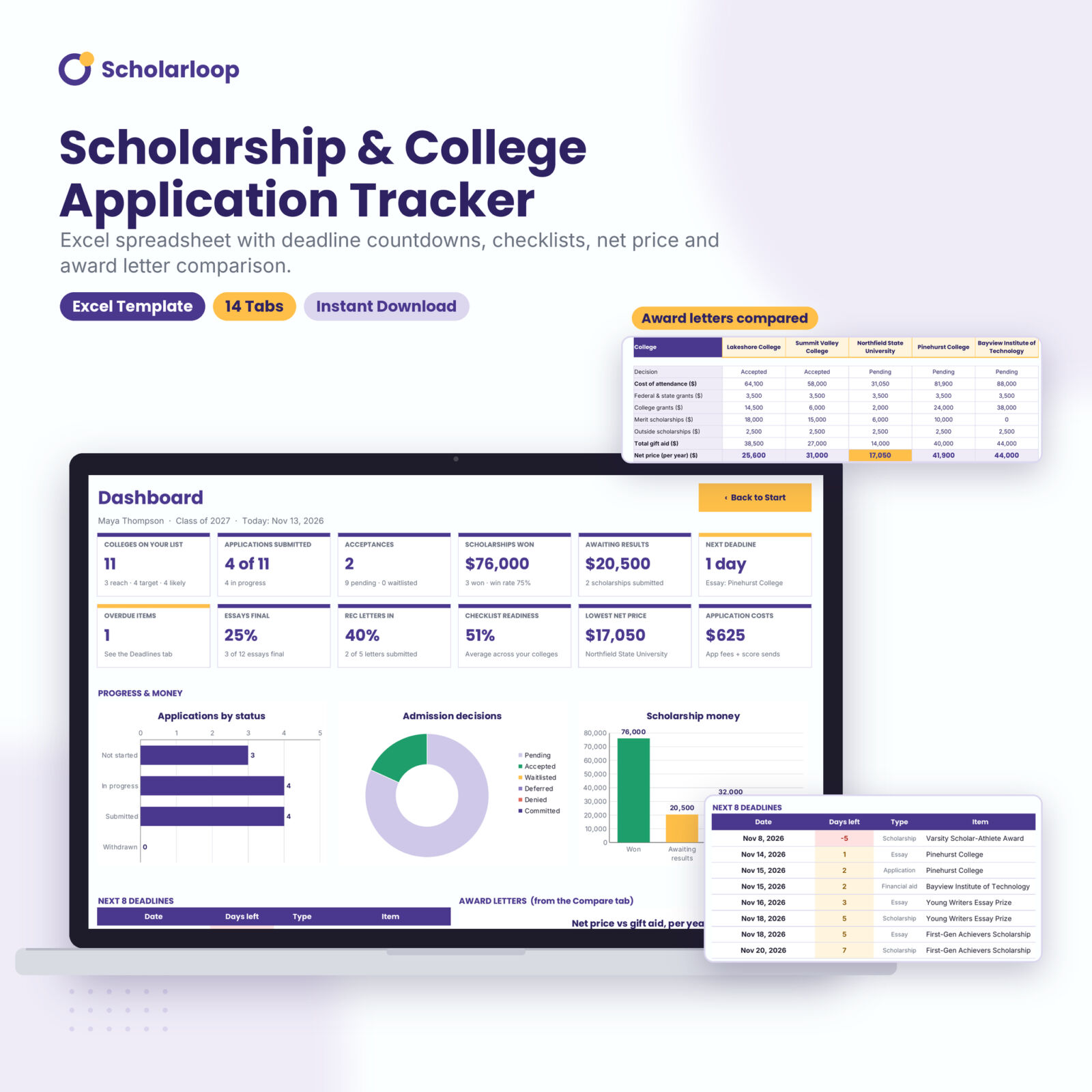
Scholarloop is a college application tracker spreadsheet and scholarship tracker built into one Excel workbook. You type each college, scholarship, essay, recommender and test score once. The workbook counts down every deadline, merges them into one sorted list, totals the scholarship money you have won and works out what each college will really cost after aid.
Most college trackers stop at a list of schools and dates. Senior year has more moving parts than that. Scholarloop connects them, so the checklist, the cost sheet and the dashboard all update the moment you change a status.
Who it is for
- High school juniors and seniors applying to a handful of colleges or to 60
- Parents who want to see deadlines, costs and aid without asking twice
- Students applying to many scholarships with different essays and documents
- School counselors, tutors and college coaches working with one student at a time
- Transfer and gap-year applicants who need the same tracking on a different timeline
What the scholarship and college tracker does
A dashboard that does the math
Twelve KPI cards show colleges on your list, applications submitted, acceptances, scholarship money won, money awaiting results, your next deadline, overdue items, essay and recommendation progress, checklist readiness, the lowest net price and your total application costs. Six live charts cover application status, admission decisions, scholarship money, award letters and open deadlines by month.
Every deadline in one list
The Deadlines tab pulls open dates from five places: application deadlines, financial aid priority dates, scholarship deadlines, essay due dates and recommendation letters. It sorts them, flags each one Overdue, Due soon or On track, and drops items off once you mark them done. You choose how many days count as due soon.
Requirements checklist for each college
Each college appears on the Checklist tab automatically. Mark 12 items Done, To do or N/A (application form, essay, supplements, transcript, test scores, teacher and counselor letters, fee, FAFSA, CSS Profile, interview) and a readiness percentage tells you how close you are. You can rename the items to fit your schools.
Scholarship tracker with money totals
Log up to 200 scholarships with provider, type, eligibility, amount, deadline and a document mini-checklist. Renewable awards multiply by the number of years, so a $5,000 four-year award counts as $20,000. Mark a result Won and the amount flows straight to the dashboard with your win rate.
Net price calculator and award letter comparison
Enter cost of attendance, grants, scholarships, work-study and loans for each college. Scholarloop calculates net price, the out-of-pocket gap, gift aid as a share of cost, a 4-year net price with a yearly cost increase you set, total borrowing and an estimated monthly loan payment. Then pick five colleges on the Compare tab to see their award letters side by side, with the lowest net price highlighted.
Essays, recommenders and test scores
The Essays tab checks word counts against limits and flags anything over. The Recommenders tab tracks who you asked, when the letter is due and whether you have sent a thank-you note. The Tests tab logs every sitting and calculates your best SAT, SAT superscore, best ACT composite and ACT superscore, plus score sends and fees.
Fit score and senior-year roadmap
Rate each college from 1 to 5 on six criteria with weights you control and get a fit score out of 100 with a ranking. A 38-task roadmap walks you from June before senior year to June after, with a progress bar.
What’s included
- Scholarloop Excel workbook (.xlsx) with 14 tabs: Start, Dashboard, Deadlines, Colleges, Checklist, Scholarships, Essays, Recommenders, Tests, Cost & Aid, Compare, Fit Score, Roadmap and Settings
- Illustrated user guide (.docx, 26 pages) covering setup, every tab, customizing, troubleshooting and FAQs
The workbook arrives empty and ready for your own information. The screenshots show a made-up sample student.
How it works
- Open Settings and add your name, class year and currency symbol.
- List your colleges and scholarships with deadlines and amounts.
- Mark requirements, essays and letters as you finish them.
- Enter award letters when they arrive and compare offers on one screen.
- Check the Dashboard and Deadlines tabs once a week.
File format and software
Built for Microsoft Excel 2010 or newer on Windows and Mac, including Microsoft 365. It also opens in Google Sheets and LibreOffice Calc because it uses standard formulas and no macros. Apple Numbers is not supported. The design uses the free Google Fonts Poppins and Inter; without them Excel shows a standard font and everything still works.
Easy to customize
Every dropdown reads from lists on the Settings tab, so you can add application plans, scholarship types or test types, or rename statuses, without breaking a formula. Type any currency symbol once and every money header and dashboard figure follows it. Formula cells are locked with no password so they stay safe, and white input cells are always open. Rename checklist items and fit criteria in seconds.
Real situations where it helps
- October of senior year, with Early Action, Early Decision and scholarship deadlines landing in the same two weeks
- A parent trying to see which accepted college is the most affordable after grants
- A student applying to 25 local scholarships who needs to know which essays and letters are still missing
- A counselor checking a student’s readiness before a meeting
Instant digital download
This is a digital product. You receive the Excel workbook and the Word user guide as instant downloads after checkout. Nothing is shipped. Your license covers personal and family use, and a counselor or small business may use it in its own work. Reselling or sharing the files is not allowed.
FAQ
Does this college application spreadsheet work in Google Sheets?
Yes. Upload it to Google Drive and open it with Google Sheets. Sheet protection does not carry over, so avoid typing in the lavender formula cells.
Will the deadline countdowns update by themselves?
Yes. Days left uses today’s date every time you open the file.
How many colleges and scholarships can I track?
60 colleges, 200 scholarships, 80 essays, 25 recommenders and 30 test sittings.
Can I use my own currency?
Yes. Change the symbol once on the Settings tab.
Does it calculate net price from my award letters?
Yes. Enter the cost of attendance and aid from each letter and it calculates net price, 4-year cost and an estimated loan payment.
Is it beginner friendly?
Yes. Type only in white cells. Everything else is automatic, and the user guide explains each tab with screenshots.
Does it work on a Mac?
Yes, in Microsoft Excel for Mac.

Reviews
There are no reviews yet.