



Notecraft is a Cornell notes template set that gives you every page you need to take better notes and actually remember them. You get printable Cornell pages for handwriting, a fillable PDF you can type into, and a hyperlinked digital notebook with tabs for eight subjects. Every file comes in US Letter and A4, and every page shares the same clean violet and lime design, so your binder looks consistent from the first week of class to the final exam.
Most Cornell templates stop at three boxes on a page. Notecraft adds the part that makes the method work: a built-in review system. Each page has Reviewed boxes for 1 day, 1 week and 1 month, and a Spaced Review Tracker lets you log every set of notes and rate your confidence. You always know what to study next.
What’s included in this Cornell notes template set
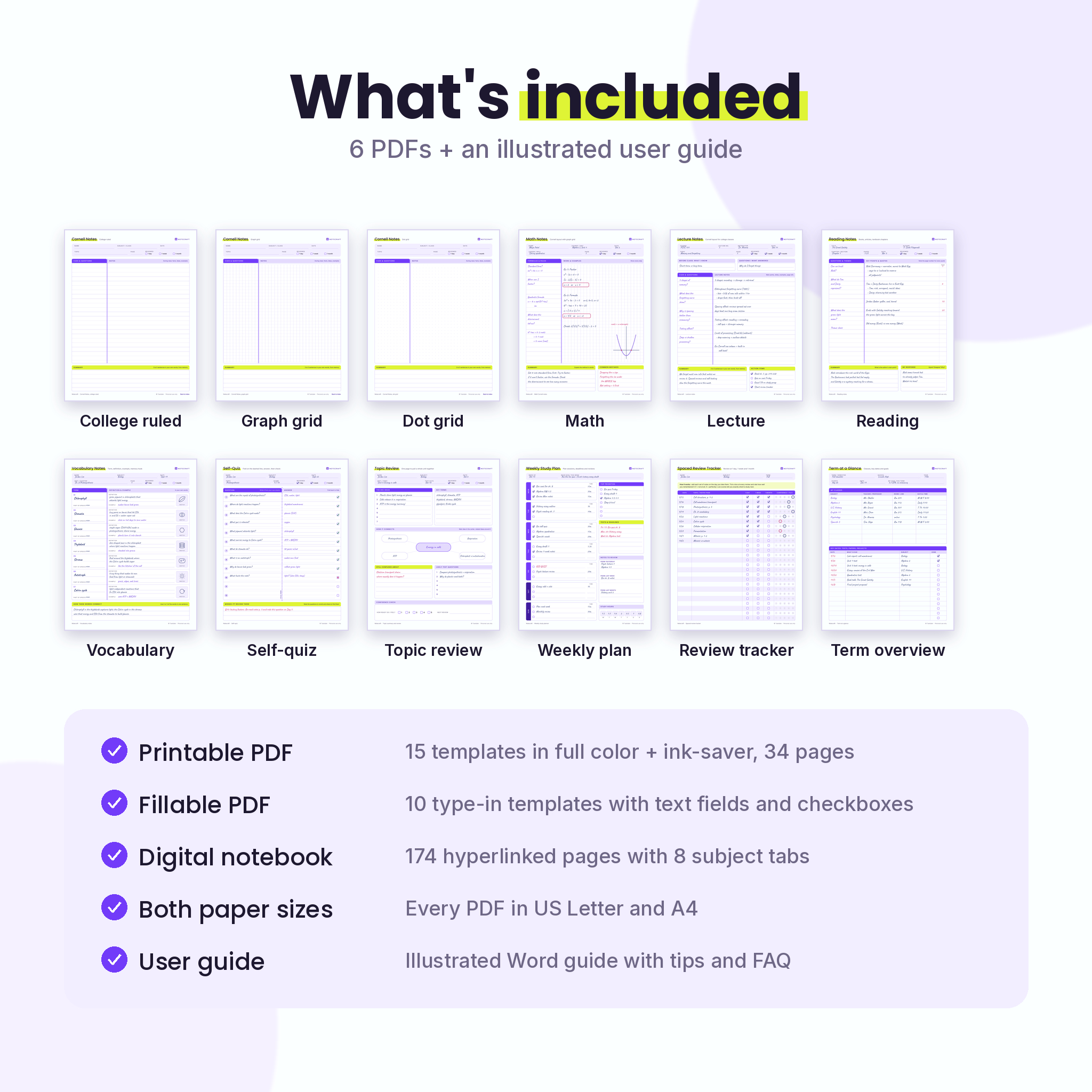
- Printable PDF (US Letter and A4): 15 templates in full color, the same 15 in an ink-saver black and white version, a one-page guide to the method, a worked example and printing tips. 34 pages per file.
- Fillable PDF (US Letter and A4): 10 type-in templates with text fields and check boxes, so you can type notes on a laptop, save them and print. 13 pages per file.
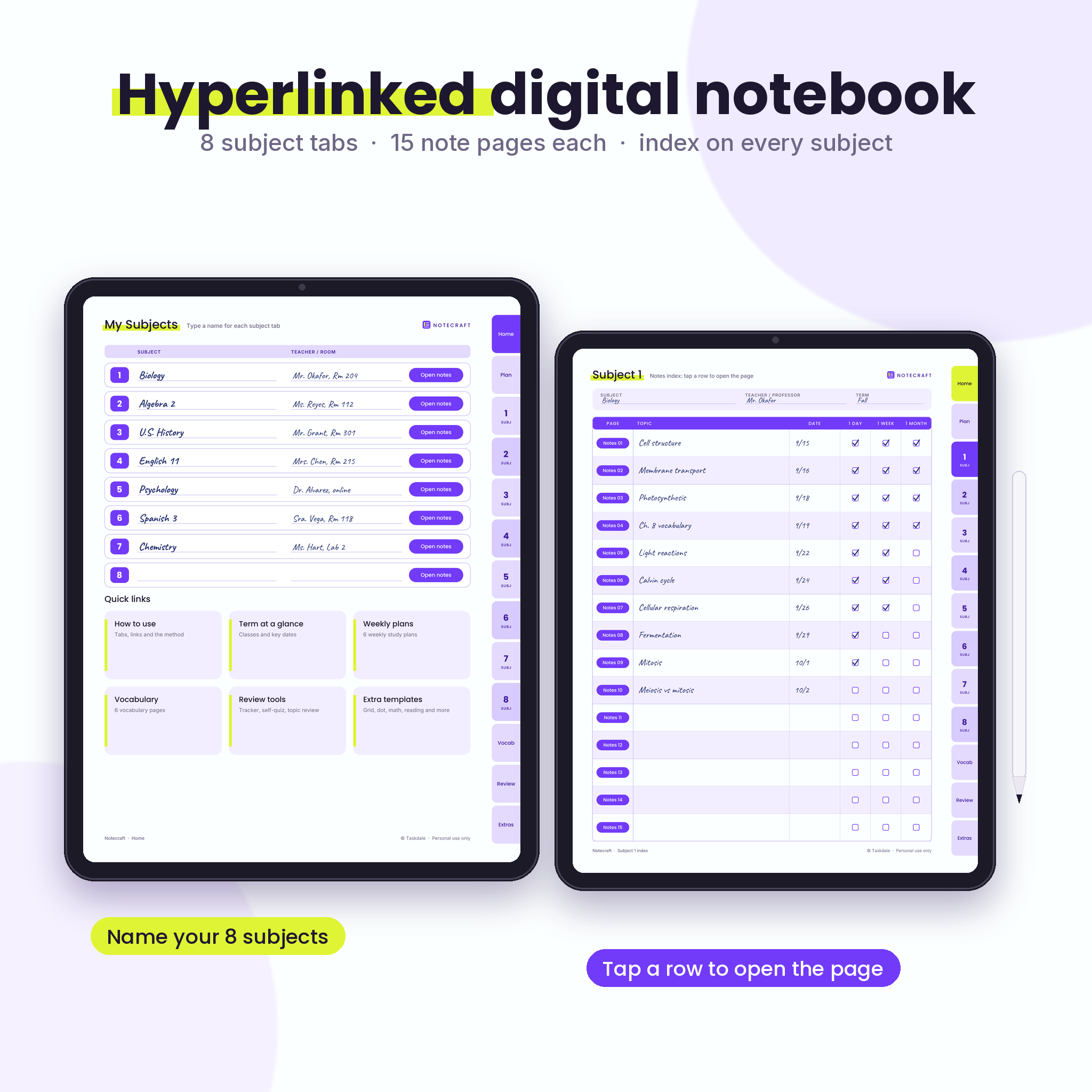
- Digital Cornell notebook (US Letter and A4): 174 hyperlinked pages with tabs on every page for Home, Plan, 8 subjects, Vocab, Review and Extras. Each subject has a linked index and 15 Cornell note pages.
- User guide (Word .docx): an illustrated guide to every page, plus tips, troubleshooting and FAQ.
The 15 templates
- Cornell Notes in college ruled (9/32 in), wide ruled (11/32 in), graph grid, dot grid and blank
- Notes, continued (for long lectures)
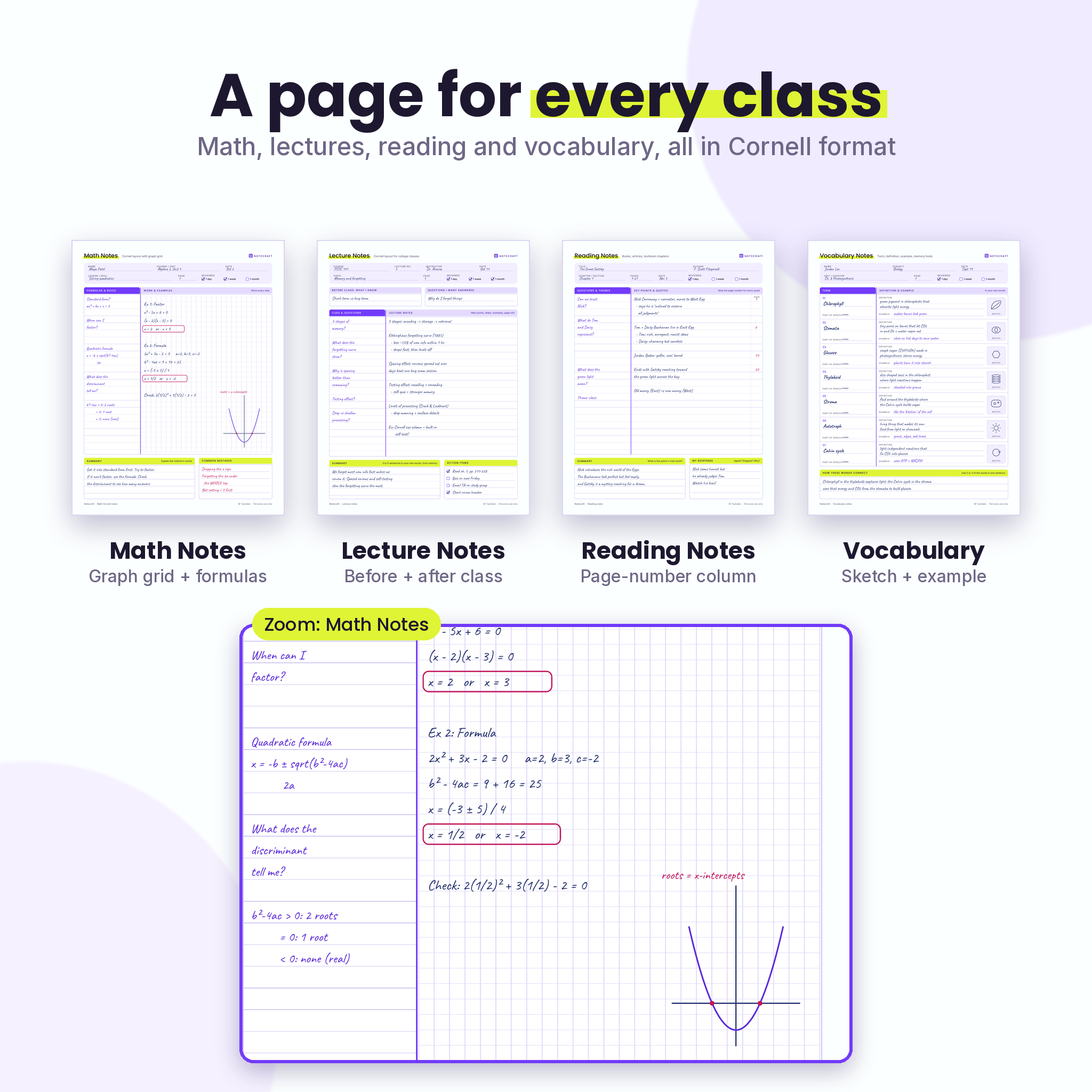
- Math Notes with a formulas column, graph grid work area and a Common Mistakes box
- Lecture Notes with before-class questions and an action items checklist
- Reading Notes with a page-number column for quotes and a My Response box
- Vocabulary Notes with term, part of speech, definition, example and a sketch box
- Self-Quiz (fold and test), Topic Review, Weekly Study Plan, Spaced Review Tracker and Term at a Glance
Why these Cornell notes printables work better
The layout follows the classic Cornell proportions: a cue column about 30% of the page, a wide notes column and a summary box at the bottom. The cue column is labeled Cues & Questions, because questions turn your notes into a self-test. That small detail matters if your teacher grades Cornell notes with a rubric, as many AVID classrooms do.
- Complete header on every page: name, subject or class, date, topic and page number.
- Spaced review built in: tick 1 day, 1 week and 1 month as you review.
- Guidance where you need it: short prompts such as “3 to 5 sentences in your own words, from memory” sit right in the summary bar.
- Print friendly: 0.5 in margins, exact line spacing, embedded fonts and ink-saver versions of every template.
- Easy to find pages: the printable and fillable files open on a linked index, and every page links back to it.
How it works
- Pick your format. Print the pages, type in the fillable PDF, or open the digital notebook.
- Take notes in class. Fill the wide Notes column with key facts, examples and diagrams.
- Add cues and a summary. Within 24 hours, write questions in the cue column, then summarize the page from memory.
- Review and remember. Tick the review boxes, log the topic on the tracker, and quiz yourself before tests.
Who it is for
This Cornell notes template is made for high school and college students, AVID students, homeschoolers, adult learners studying for a certification, and teachers or tutors who want a consistent page to hand out to their own students. If you have ever ended a semester with a pile of notes you never looked at again, the review pages are for you.
Real ways buyers use it
- A biology student prints 20 copies of the college ruled page and keeps a Vocabulary page for each chapter.
- A college freshman types lecture notes in the fillable PDF during class and prints them for the binder.
- An algebra student works problems on the Math Notes grid and lists common mistakes before the test.
- A teacher hands out the Reading Notes page for a novel unit and the Self-Quiz page before a quiz.
- A student with a tablet keeps every class in the tabbed digital notebook.
File formats and software
- PDF files. The printable and digital notebook files open in any PDF reader.
- The fillable pages need a PDF reader that supports forms, such as the free Adobe Acrobat Reader.
- The digital notebook links work in standard PDF readers. To write with a stylus, use a note-taking or annotation app that supports PDF hyperlinks.
- The user guide is a Word .docx file. It also opens in Google Docs, Pages and LibreOffice.
Customizing your Cornell notes pages
Print only the pages you need, as many times as you like. Choose full color or ink-saver. Type your subject names on the digital notebook Home page and topics in each subject index. Mix typed and handwritten notes in one binder, since the designs match across all three files. Note that the page designs are PDFs, not editable Word or Canva files.
Instant digital download
This is a digital product. No physical item is shipped. After checkout you can download all seven files right away: two printable PDFs, two fillable PDFs, two digital notebook PDFs and the user guide. The license covers personal use and use in your own classroom, tutoring practice or small business. Please do not share or resell the files.
FAQ
What is a Cornell notes template?
It is a page split into a cue column, a notes column and a summary box. You take notes during class, add questions afterward and summarize from memory, which makes reviewing much faster.
Can I type in these Cornell notes?
Yes. The fillable PDF has text fields for the header, cue column, notes and summary, plus check boxes. Use Adobe Acrobat Reader or another reader that supports forms.
Which paper sizes are included?
Every PDF comes in US Letter (8.5 x 11 in) and A4 (210 x 297 mm).
Is it good for AVID Cornell notes?
Each page has the full header, a cue column labeled for questions and a summary area, which match common AVID rubrics. Check your teacher’s own requirements too.
Can I use the digital notebook on a tablet?
Yes, the PDF opens on any tablet. The tabs and links work in standard PDF readers and in annotation apps that support PDF hyperlinks.
Can I print as many copies as I want?
Yes, for your own use or for your own students or clients. Sharing or reselling the files is not allowed.
Can I edit the page design?
No. The templates are PDFs, so you can print, type and write on them, but the layouts themselves are fixed.
Reviews
There are no reviews yet.